
Introduction: Why You Need to Understand These Terms
Have you ever plugged in a USB-C charger, only to find it charges your phone painfully slow? Or bought a fancy 100W charger, but your phone only draws 20W?
Your charger isn’t broken, and your phone isn’t faulty — you just don’t speak the “language” of USB-C charging yet.
USB-C is just a connector shape. What really determines charging speed is the power delivery protocol hidden behind it. In this article, we’ll explain USB PD, PPS, and EPR in the simplest way possible. By the time you finish reading, you’ll never get confused buying chargers and cables again.
Chapter 1: USB PD Basics
What is USB Power Delivery (USB PD)?
USB PD stands for USB Power Delivery — think of it as the “official USB fast charging protocol.” It’s a power supply standard developed by USB-IF, the USB standardization organization.
Before USB PD, USB ports could only deliver 7.5W or 15W at most — enough for phones, but not nearly enough for laptops. USB PD was created to safely deliver higher power through USB ports, up to 240W.
Simply put, USB PD is the “common language” that lets USB-C ports both transfer data and deliver high-power charging.
The Evolution of USB PD Versions
USB PD has gone through four major versions:
PD 1.0 (2012): Established the basic framework for fast charging negotiation, max power 100W.
PD 2.0 (2014): Launched alongside the USB-C connector, expanded fixed voltages to 5V, 9V, 15V, and 20V, pushing power to 100W.
PD 3.0 (2017): Still 100W max, but the big addition was PPS (Programmable Power Supply). Also added device software version identification and digital certificates.
PD 3.1 (2021): Max power jumped from 100W to 240W, adding 28V, 36V, and 48V voltage levels.
What is USB-IF?
USB-IF stands for USB Implementers Forum, a non-profit organization founded by tech companies including Intel and Microsoft. Its job is to develop and maintain USB standards, including the USB PD protocol.
Think of USB-IF as the “legislature” of the USB world — if you want your USB devices to work with each other, you follow their rules.
Chapter 2: USB PD Power Terminology
Voltage
Voltage is the “pressure” of electricity, measured in volts (V). USB PD supports multiple voltage levels:
- 5V, 9V, 15V, 20V (standard PD 2.0/3.0 levels)
- 28V, 36V, 48V (new EPR levels in PD 3.1)
Current
Current is the “flow rate” of electricity, measured in amperes (A). Common USB PD currents are 2A, 3A, and 5A.
Wattage
Wattage is the total charging “speed,” measured in watts (W). The formula is simple:
Power = Voltage × Current
For example:
- 20V × 5A = 100W
- 28V × 5A = 140W
- 48V × 5A = 240W
Power Contract
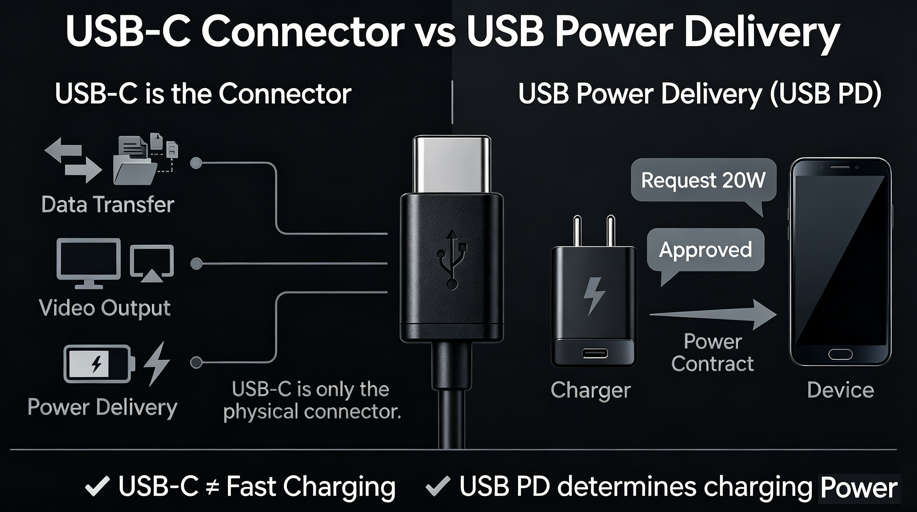
This is the cleverest part of USB PD — the charger and device “negotiate” before any power flows.
When you plug in your device, the charger doesn’t just blast power into it. Instead, the device tells the charger “I need X volts and Y amps,” and the charger replies “OK, I can do that” — then power starts flowing.
That’s why a 100W charger only gives your phone 20W — because the phone only “asked” for 20W, and the charger won’t force-feed more.
Chapter 3: PDO and APDO
What is PDO?
PDO stands for Power Data Object — think of it as the charger’s “menu” .
A PD charger stores multiple PDOs internally, like “I can do 5V/3A, 9V/3A, 15V/3A, 20V/5A.” When you plug in a device, the charger sends this “menu” to the device, and the device picks the option it needs.
Fixed PDO
Fixed PDOs are fixed voltage output levels — like 5V, 9V, 15V, 20V, 28V, 36V, 48V. This is the traditional way: either 5V or 9V, nothing in between.
APDO (Adjustable PDO)
APDO stands for Adjustable Power Data Object — it’s the PPS-specific power mode.
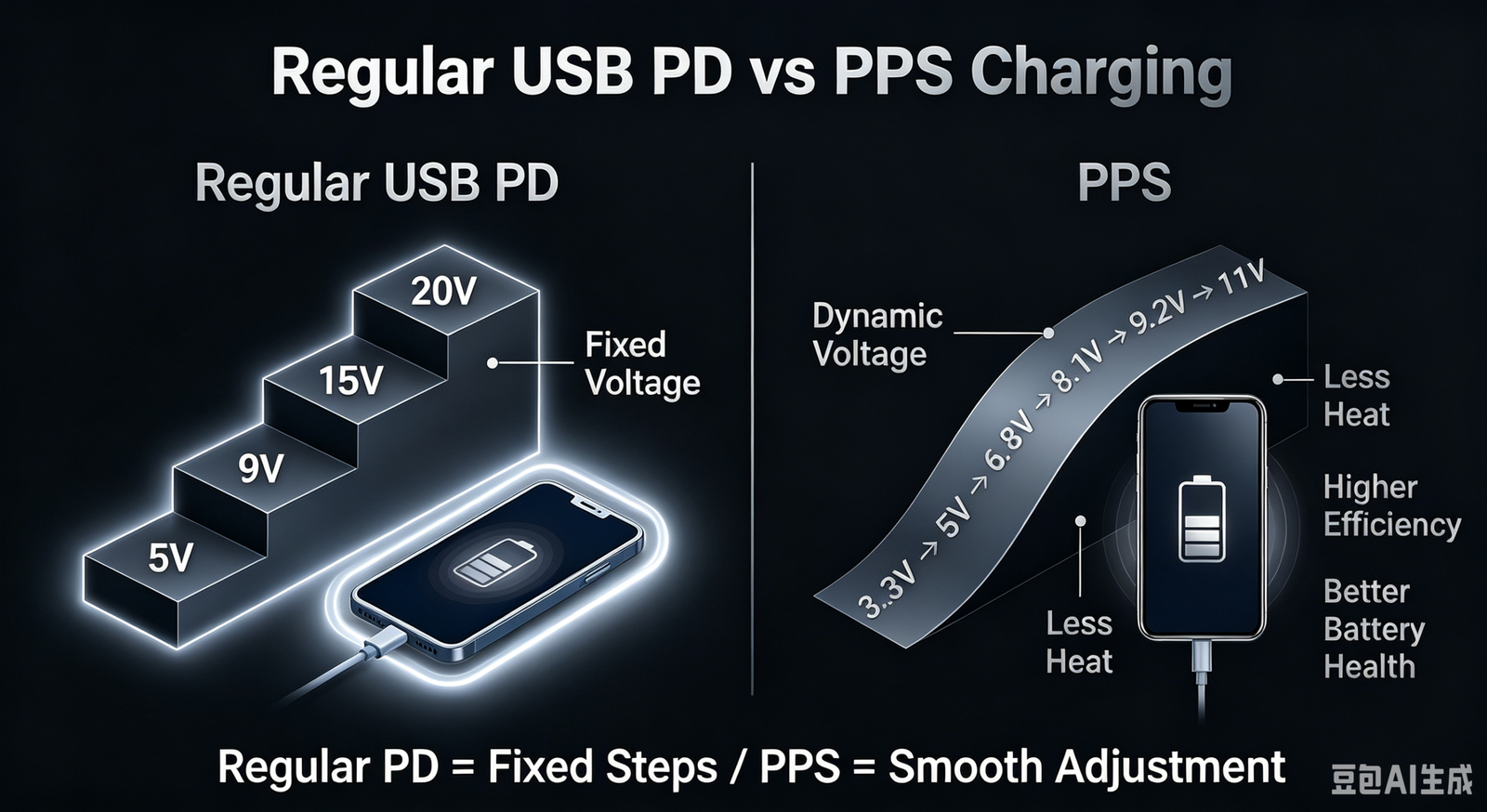
Unlike Fixed PDO, APDO allows continuous adjustment within a voltage range — for example, anywhere between 3.3V and 11V, in steps as small as 20mV. Think of Fixed PDO as a bicycle with a few gears, and APDO as a car with continuously variable transmission.
Chapter 4: PPS (Programmable Power Supply)
What is PPS?
PPS stands for Programmable Power Supply, a technology introduced by USB-IF alongside PD 3.0 in 2017.
How Does PPS Work?
Traditional fixed-voltage charging is like ordering from a set menu — you only have a few fixed options. PPS is like a buffet — you can tell the chef exactly how much you want at any moment.
Specifically: during charging, your phone constantly tells the charger “I need 8.1V now,” “now I need 8.3V,” “now 8.5V” — and the charger adjusts the voltage accordingly in real-time. This adjustment happens every 10 seconds.
What Are the Benefits of PPS?
- Less heat: Voltage stays at the optimal level — not too high, not too low
- Higher efficiency: Less energy wasted
- Better battery health: Stable charging helps extend battery life
- More stable charging speed: No sudden slowdowns
What’s the Difference Between PPS and Regular PD?
Regular PD is fixed-step — either 5V, or 9V, or 15V — just a few options. PPS is dynamically adjustable — it can continuously fine-tune within a range, accurate to 20mV per step.
Think of regular PD as stairs with fixed steps, and PPS as a ramp where you can stop anywhere.
Which Brands Support PPS?
Many phones from Samsung, Google Pixel, Nothing, some Xiaomi models, and some Honor models support PPS fast charging. And the list keeps growing.
Chapter 5: SPR and EPR
SPR (Standard Power Range)
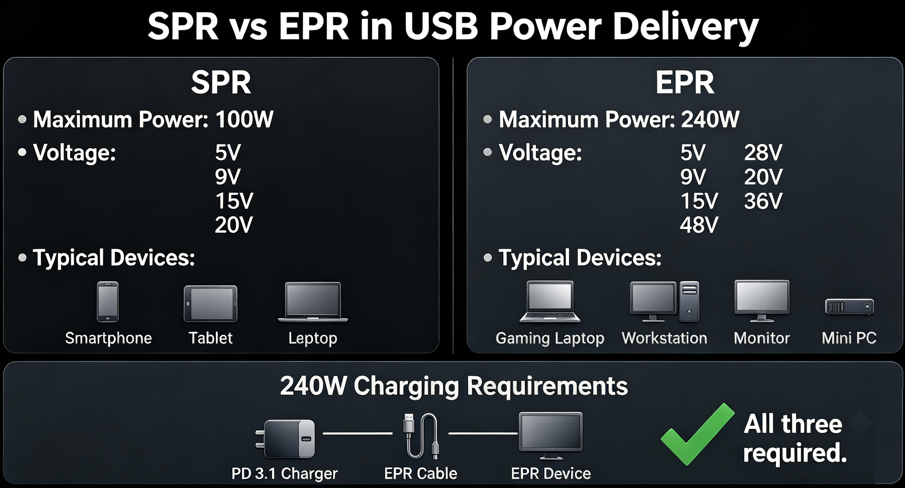
SPR stands for Standard Power Range — the original USB PD power range: max 100W at 20V/5A.
Everyday devices like phones, tablets, and most laptops fall within SPR’s range.
EPR (Extended Power Range)
EPR stands for Extended Power Range — a new standard introduced in PD 3.1: max 240W at 48V/5A.
Why do we need EPR? Because some devices need more than 100W:
With EPR, these devices can also charge via USB-C, eliminating the need for bulky proprietary power bricks.
SPR vs EPR: What’s the Difference?
| Feature | SPR | EPR |
|---|---|---|
| Max Power | 100W | 240W |
| Voltages | 5V, 9V, 15V, 20V | 5V, 9V, 15V, 20V, 28V, 36V, 48V |
| Devices | Phones, tablets, regular laptops | Gaming laptops, workstations, monitors |
| Cable required | Regular 5A cable | EPR-certified cable |
Chapter 6: EPR Cables
Why Do You Need a Special Cable for 240W?
Higher power means higher demands on the cable. Regular USB-C cables have thinner wires and can’t handle 48V safely.
So to get 240W charging, the charger, the device, AND the cable must all support EPR. No exceptions.
What is a 5A Cable?
A 5A cable is one that can handle 5A of current. Not all USB-C cables support 5A — many cheap ones only support 3A or less.
What is an E-Marker Chip?
E-Marker stands for Electronic Marker — a tiny chip soldered inside the USB-C plug.
It acts like an “electronic ID card” that stores:
- The cable’s maximum current rating
- The cable’s maximum power rating
- Certification information
When you plug in the cable, the charger reads this chip first to check if the cable is up to the task before delivering high power. This is why a cheap cable can kill your fast charging — the cable itself “tells” the charger: I can’t handle it.
How to Read Cable Power Ratings
Common USB-C cable power ratings include: 60W, 100W, 140W, 180W, 240W. Always check the product specifications.
Chapter 7: The USB PD Charging Process
Source and Sink
- Source: The device that provides power — like a charger or power bank
- Sink: The device that receives power — like a phone, laptop, or tablet
DRP (Dual Role Power)
DRP stands for Dual Role Power — a device that can both provide and receive power.
The classic example is reverse wireless charging on phones — your phone can receive power from a charger (as a Sink) and also power your earbuds or smartwatch (as a Source).
The Complete Charging Negotiation Process
A full USB PD charging session goes like this:
Connect → Identify → Read PDOs (charger sends its “menu”) → Request Power (device picks an option) → Confirm (charger says OK) → Start Charging
This all happens in an instant — faster than you can blink.
Chapter 8: The Relationship Between USB-C and PD
USB-C is Just a Connector, Not Fast Charging
Many people assume “if it’s USB-C, it must support fast charging.” That’s a huge misconception.
USB-C is just a physical connector shape — it might only support USB 2.0’s 15W power delivery. Just because a wall outlet has three prongs doesn’t mean it’s wired for 380V — the shape doesn’t tell you the capability.
USB PD is the Power Protocol
USB PD is the “language” and “rulebook” that runs over the USB-C connector. With USB PD, chargers and devices can “talk” to each other and negotiate power.
Why Doesn’t Every USB-C Port Support PD?
Because many cheap devices use the USB-C connector shape but don’t implement the PD protocol chip inside. The port looks like USB-C, but inside it’s still old-school USB.
Why Doesn’t Every PD Charger Support 240W?
To get 240W, you need ALL of these:
- PD 3.1 support
- EPR support
- An EPR-certified 240W cable
- Both charger and device support EPR
If any piece is missing, you won’t get 240W.
Chapter 9: Common Misconceptions
Myth 1: USB-C Always Means Fast Charging
No. USB-C is just a connector shape — it doesn’t guarantee any fast charging protocol.
Myth 2: PD Equals PPS
No. PPS is a feature introduced in PD 3.0 — it’s part of PD, but PD isn’t PPS. A PD charger without PPS will still charge your phone just fine — it just can’t dynamically adjust voltage.
Myth 3: A 100W Charger Always Delivers 100W
No. How much power a charger delivers is decided by the device. The device asks for what it needs, and the charger provides it.
Myth 4: EPR Is Always Faster Than SPR
Not necessarily. EPR just means the charger is “capable” of higher power. If your device only needs 20W, an EPR charger and an SPR charger will charge at the exact same speed.
Myth 5: PPS Damages Batteries
No. Quite the opposite — PPS precisely controls voltage and current, reducing heat during charging, which is actually better for your battery.
Myth 6: All Cables Are the Same
Completely different. Different cables can handle vastly different power levels — some are data-only, some support 60W, some 100W, some 240W.
Chapter 10: Quick Glossary
| Abbreviation | Full Name | Chinese | One-Sentence Explanation |
|---|---|---|---|
| USB PD | USB Power Delivery | USB供电协议 | The official USB fast charging protocol |
| PPS | Programmable Power Supply | 可编程电源 | Dynamically adjusts voltage during charging |
| SPR | Standard Power Range | 标准功率范围 | Max 100W |
| EPR | Extended Power Range | 扩展功率范围 | Max 240W |
| PDO | Power Data Object | 功率数据对象 | The charger’s “power menu” |
| APDO | Adjustable Power Data Object | 可调PDO | PPS-specific power mode |
| Source | — | 电源端 | The device that provides power |
| Sink | — | 用电端 | The device that receives power |
| DRP | Dual Role Power | 双角色供电 | Can both provide and receive power |
| E-Marker | Electronic Marker | 电子标识芯片 | The cable’s “ID card” that stores its capabilities |
| 5A Cable | — | 5A数据线 | A cable that supports high-current power delivery |
| Power Contract | — | 功率协商 | The negotiation between device and charger |
Conclusion
You now know the core terminology of the USB PD world. Let’s quickly recap:
USB-C is a connector, not fast charging. Don’t assume every C port supports fast charging.
USB PD is the official USB fast charging protocol that safely delivers higher power through negotiation between charger and device.
PPS is the dynamic voltage adjustment technology introduced in PD 3.0 that reduces heat, improves efficiency, and extends battery life.
EPR is PD 3.1’s extended power standard that raises the ceiling from 100W to 240W.
Charging speed depends on the charger, the device, AND the cable working together — all three are essential.
With these terms under your belt, you’ll see through marketing hype, accurately judge compatibility, and never waste money on the wrong charger or cable again.