
Have you ever plugged your laptop into a charger using a brand-new “100W USB-C cable,” only to watch it charge painfully slow? Or wondered if that bargain charger you bought online is actually delivering its advertised wattage?
You’re not alone. USB-C’s “one shape, thousands of capabilities” design is great for universality, but it also makes it nearly impossible to troubleshoot charging problems just by looking at the plug.
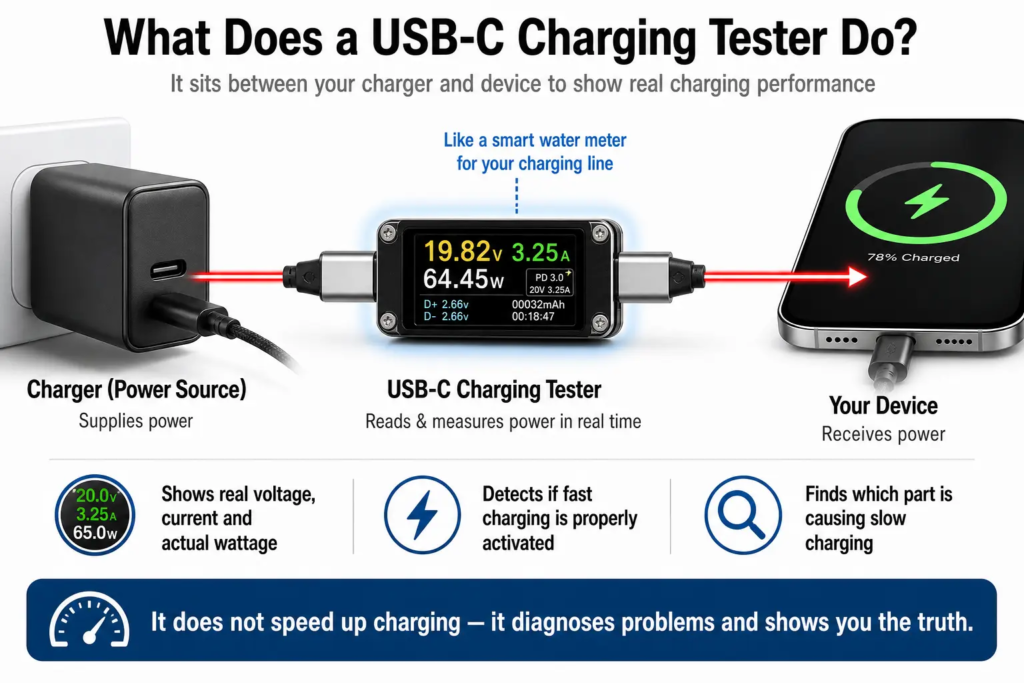
Think of your USB-C charging setup like a home water supply system:
- The charger is the water pump that supplies water pressure.
- The cable is the pipe that carries power to your device.
- Your phone/laptop is the tank being filled.
If water flows slowly, it could be a weak pump, a narrow pipe, or a tank that simply doesn’t accept more flow. A USB-C charging tester is like a smart water meter you install right in the middle: it shows you exactly how much power is flowing, what’s limiting the speed, and which part of the chain is causing the problem.
1. Why You Need One: Common USB-C Charging Headaches
These are the exact problems a tester can help you solve:
- Charging speed feels random: sometimes fast, sometimes painfully slow, with no obvious reason.
- A new charger or cable won’t trigger fast charging, even though it says it should.
- Charging cuts in and out, and you can’t tell if the issue is the device, charger, or cable.
- You can’t tell if a cable only does charging, or also supports high-speed data and video output.
- You suspect a charger is lying about its advertised wattage, but you have no way to prove it.
- You don’t know if a cheap cable is bottlenecking your fast charger.
Without a tester, fixing these issues means buying replacement parts one by one and guessing — a huge waste of time and money.
2. What a USB-C Charging Tester Actually Does
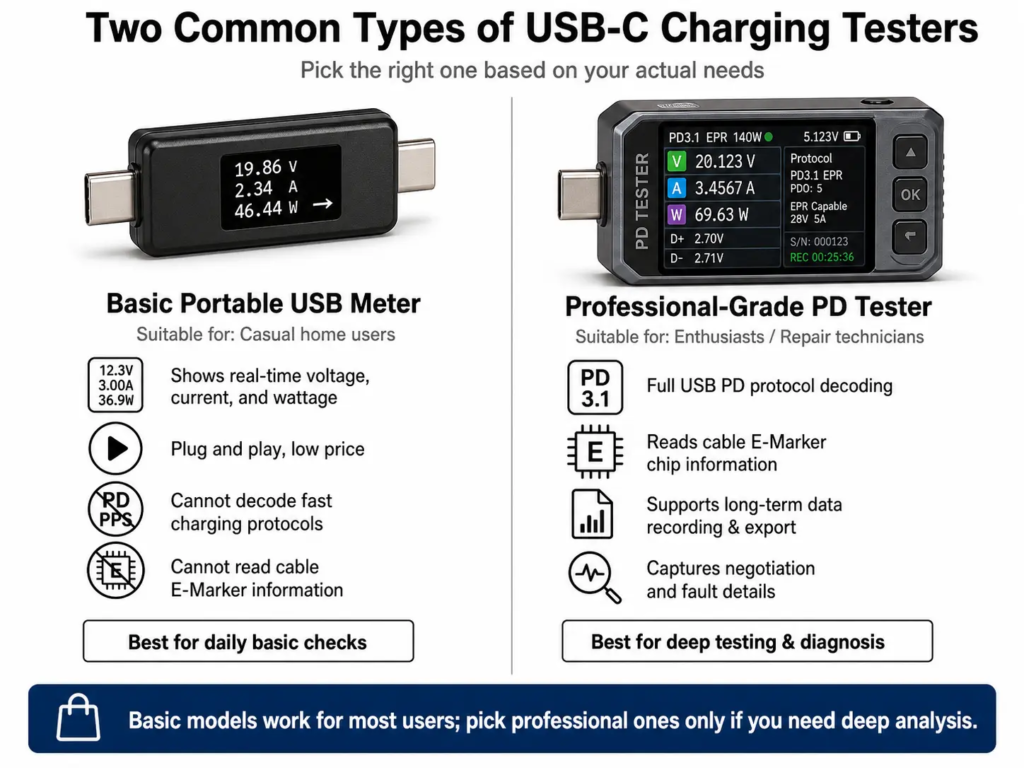
Keep in mind that not every tester has every feature. Basic USB power meters can only measure voltage, current and power, while professional USB-C analyzers can decode charging protocols and read cable information.
2.1 Detect Fast Charging Protocols & Real-World Power
- Identifies which fast charging protocols the charger and device support, such as USB PD, QC, AFC and more.
- Shows real-time voltage (V), current (A), and actual wattage (W) as charging happens.
- Compares the charger’s advertised wattage against its real output, so you can confirm if fast charging mode is actually active.
- Tracks whether power stays steady or drops / fluctuates abnormally during charging.
2.2 Verify If Your Cable Is Up To Spec
- Tells you whether a cable supports fast charging, and what maximum power level it can handle.
- Detects if a high-power USB-C cable has a built-in E-Marker identification chip.
- Higher-end professional models can also read a cable’s supported data speed (USB 2.0, USB 3.x, USB4, etc.).
- This prevents you from accidentally bottlenecking your charger with a low-spec cable.
Quick fact per USB-IF rules: Any USB-C cable designed to carry more than 3A (such as 5A cables supporting up to 100W or 240W USB PD) is required to include an E-Marker. Basic 3A charging cables do not need one, so it is normal for not every USB-C cable to have an E-Marker.
2.3 Pinpoint Mismatches Between Charger, Cable & Device
- Quickly locates the cause of slow charging: is the charger too weak, the cable too low-spec, or does your device simply not support faster charging?
- Confirms that all three parts (charger, cable, device) support compatible fast charging protocols and power profiles.
- Detects cases where protocol incompatibility is preventing fast charging from activating at all.
2.4 Troubleshoot Charging Faults & Instability
- Identifies common issues like random disconnections, power drops, and failed fast-charge handshakes.
- Helps you narrow down which component is broken, instead of blindly replacing parts.
- Professional models support long-term monitoring, to catch intermittent drops or repeated protocol renegotiations that happen over time.
3. How It Works (In Simple Terms)
A USB-C charging tester plugs in between your charger and your device, in series with the charging path. It reads and records charging information without interfering with normal charging.
Think of it as a translator and traffic inspector sitting in the middle of the charging line:
- It listens to the negotiation conversation between the charger and your device.
- It measures exactly how much voltage and current is actually flowing through the cable.
- It does not make charging faster by itself — it only reads, measures and analyzes what is already happening.
What it can read:
- Real-time voltage, current and power numbers
- E-Marker cable information (max current rating, data speed capability on premium models)
- Underlying USB PD protocol messages (only on professional-grade testers)
For most everyday users, you only need to look at the final numbers on the screen — you don’t need to understand the low-level protocol details.
Important distinction: Basic USB power meters only measure voltage, current and wattage. Only professional testers with PD protocol decoding and E-Marker reading can show you detailed protocol and cable information.
4. Who Should Buy a USB-C Charging Tester?
4.1 Regular Consumers
- Verify that a new charger or cable actually performs as advertised.
- Diagnose everyday issues like slow charging or failed fast charge.
- Decide whether you need to replace your charger, cable, or both.
4.2 Tech Enthusiasts
- Compare real-world performance between different chargers and cables.
- Confirm if a device is properly entering fast charging mode.
- Test cross-brand compatibility between chargers, cables and devices.
4.3 Repair & Support Technicians
- Quickly locate the fault point: broken charger, damaged cable, or faulty device port.
- Use test results to explain compatibility differences to customers.
- Speed up troubleshooting and reduce repeated trial-and-error testing.
5. Common Types of USB-C Charging Testers
5.1 Professional-Grade Testers
- Built for repair technicians, engineers and power users, with the fullest feature set.
- Support full USB PD protocol analysis, E-Marker cable info reading, data logging and export.
- Some can capture and display the complete protocol negotiation process.
- Popular examples: ChargerLAB Power-Z series, FNIRSI, AVHzY, widely used by reviewers and engineers.
5.2 Portable Basic USB Meters
- Best for everyday home users.
- Plug-and-play, with a small screen that shows voltage, current and wattage in real time.
- Simple to use, low price, great for basic charging checks.
- Usually does not include full protocol decoding or advanced analysis.
5.3 Software-Enhanced Testers
- Pair with a phone or PC app to view history logs and save test reports.
- Some support wireless connection and firmware updates.
- Much more convenient for data analysis, but still require the physical tester hardware to work.
- Note: Phone/PC software alone cannot detect USB-C charging status. It only works when paired with a compatible tester device.
Different models cover different features and use cases, at very different price points. Pick the one that matches what you actually need.
6. Buying Tips
- Casual home users: A basic portable USB meter with real-time voltage / current / wattage display is enough.
- Users who buy lots of chargers/cables: Choose a model that supports USB PD protocol detection and E-Marker cable reading.
- Repair or deep testing needs: Go for a professional-grade tester with full PD protocol analysis, data recording and export support.
What a Tester Cannot Do
A USB-C charging tester can measure and analyze charging behavior, but it cannot:
- Increase charging speed on its own
- Upgrade a cable to support higher power
- Add fast charging support to a charger
- Enable features your device does not natively support
7. Practical Tips & The Golden Rule
- A charging tester only analyzes and diagnoses problems. It cannot make charging faster on its own.
- Final charging performance always follows the weakest-link rule: no matter how powerful your charger is, if any part in the chain is a bottleneck, the whole system slows down to match it.
- Even if your charger supports 100W, if your device maxes out at 45W, you will never charge faster than 45W.
- Even if your cable supports 240W, if your charger or device doesn’t, 240W charging will never happen.
- Best charging performance is only achieved when the charger, cable and device are all compatible and support compatible fast charging protocols and power profiles.
One-Sentence Summary
A USB-C charging tester is like a health checkup machine for your USB-C setup. It quickly verifies whether your charger, cable and device are working properly, and finds the real reason behind slow charging or compatibility issues.