
USB 3.1 is one of the most important but also most confusing versions in the USB 3.x family. The version most people associate with USB 3.1 is USB 3.1 Gen 2, which supports a theoretical signaling rate of 10Gbps. Today, this speed is more clearly referred to as USB 10Gbps or, under the later USB 3.2 naming system, USB 3.2 Gen 2.
The confusion comes from USB naming changes, connector differences, cable requirements, and power delivery features that are often mixed together in product descriptions. A USB Type-C port does not automatically mean USB 10Gbps, and a cable that supports fast charging may not necessarily support high-speed data transfer. To understand USB 3.1 correctly, it is necessary to separate the data standard, the connector type, the cable capability, and the power delivery function.
1. Basic Concept and Naming
Official Name and Speed
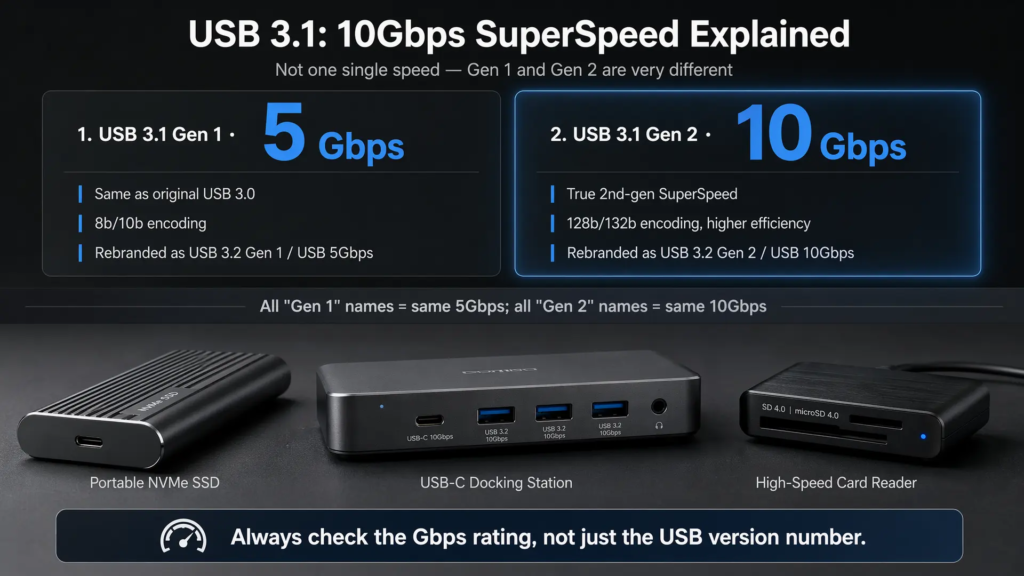
The core USB 10Gbps specification is USB 3.1 Gen 2. It was defined by USB-IF as part of the USB 3.x evolution and increased the maximum theoretical signaling rate from 5Gbps to 10Gbps.
One of the most important technical changes is the encoding method. USB 3.0 uses 8b/10b encoding, where 8 bits of data are transmitted as 10 bits on the wire. This creates about 20% encoding overhead. USB 3.1 Gen 2 moved to 128b/132b encoding, where 128 bits of data are carried in a 132-bit block. This improves encoding efficiency to about 97%.
| Standard | Maximum Signaling Rate | Encoding | Approximate Encoding Efficiency |
|---|---|---|---|
| USB 3.0 / USB 3.1 Gen 1 | 5Gbps | 8b/10b | About 80% |
| USB 3.1 Gen 2 | 10Gbps | 128b/132b | About 97% |
USB 3.1 Gen 2 also uses full-duplex SuperSpeed communication. More precisely, it uses separate transmit and receive differential pairs, so data can be sent and received at the same time at the SuperSpeed layer. This is different from USB 2.0, which uses a shared D+ / D− pair for half-duplex communication.
Relationship with Earlier USB Standards
USB naming changed several times. The original USB 3.0 standard was later renamed USB 3.1 Gen 1, while the newer 10Gbps mode became USB 3.1 Gen 2. Later, the USB 3.2 naming system absorbed both names again: 5Gbps became USB 3.2 Gen 1, and 10Gbps became USB 3.2 Gen 2.
USB 3.1 Gen 2 is backward compatible with older USB standards. A USB 10Gbps device can usually work with USB 5Gbps, USB 2.0, or even USB 1.x hosts if the device supports those fallback modes. However, the connection will only run at the highest speed supported by the host, device, and cable together.
2. Physical Connectors and Cables
Connector Types
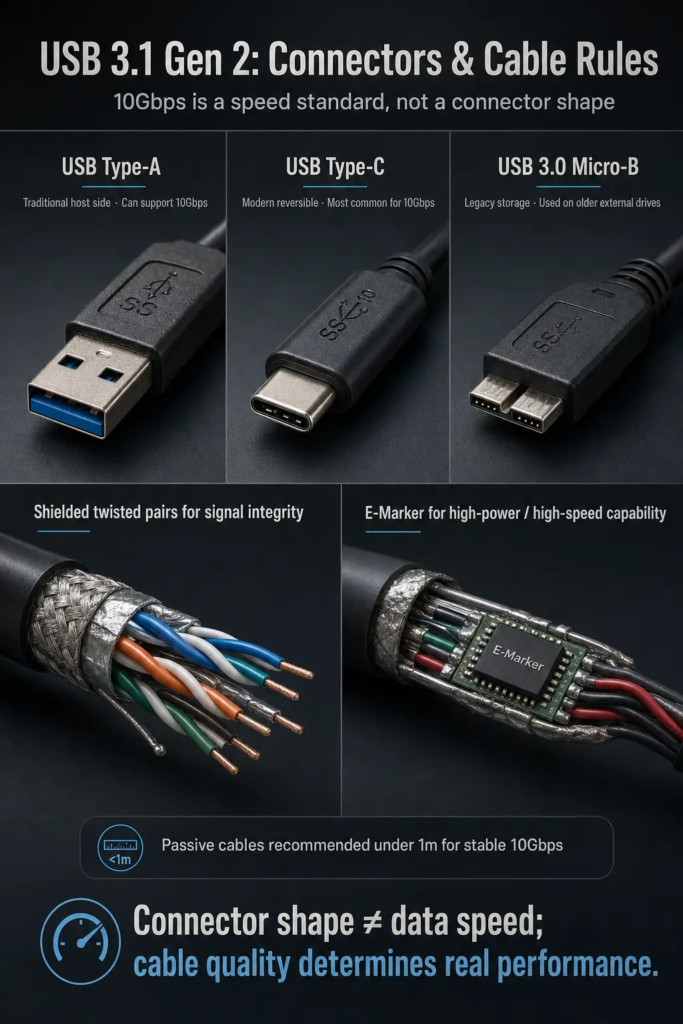
USB 3.1 Gen 2 is a data standard, not a connector shape. It can be implemented through different connector types if the hardware is designed for 10Gbps operation.
USB Type-A is the traditional rectangular USB connector. Some Type-A ports can support USB 10Gbps, but only when the host controller, port wiring, device, and cable are all built for that speed. A Type-A shape alone does not guarantee USB 10Gbps.
USB Type-C became strongly associated with USB 3.1 because it is reversible, compact, and designed for modern devices. Type-C can carry USB data, power delivery, display alternate modes, and other protocols depending on implementation. However, Type-C is only a connector form factor. A Type-C port may support USB 2.0 only, USB 5Gbps, USB 10Gbps, USB 20Gbps, USB4, DisplayPort Alt Mode, or other combinations.
USB 3.x Micro-B was widely used on portable hard drives, some cameras, and storage devices. It added extra contacts beside the older Micro-USB shape to support SuperSpeed transmission. In newer products, it has gradually been replaced by USB Type-C.
Cable Requirements
At 10Gbps, cable quality has a direct effect on connection stability. A cable designed only for charging or USB 2.0 data may not provide reliable USB 10Gbps transmission.
A proper USB 10Gbps cable usually needs well-designed differential pairs, shielding, controlled impedance, and good connector construction. These design elements help preserve signal integrity and reduce electromagnetic interference. For passive copper cables, shorter length is generally preferred. Around 1 meter is a common practical recommendation for stable USB 10Gbps use, but the actual result depends on cable quality, shielding, host/device tolerance, and the operating environment.
For longer distances, active cables, repeaters, or docking solutions are usually a better choice than long passive cables. If the cable cannot support the required signal quality, the device may fall back to 5Gbps, disconnect intermittently, or fail to enumerate correctly.
Some USB Type-C cables include an electronically marked cable assembly, often called an E-Marker. The E-Marker can identify cable capabilities such as current rating and supported high-speed features. It is safer to say that E-Markers are important for many full-featured or higher-power Type-C cables, rather than assuming every USB 10Gbps cable always has one. For users, the practical rule is simple: choose a cable that explicitly states USB 10Gbps support, and check the power rating separately if high-power charging is required.
3. Technical Features
Power Capability
Standard USB 3.x bus power is based on 5V operation. After configuration, a USB 3.x device can draw up to 900mA, equal to 4.5W. This is the same basic bus-power level commonly associated with USB 3.0.
USB Power Delivery is separate from USB 3.1 data speed. With USB Type-C, USB PD can negotiate much higher power levels. Classic USB PD 3.0 implementations are commonly associated with up to 20V at 5A, or 100W, when suitable cables and devices are used. Newer USB PD 3.1 Extended Power Range later increased the defined maximum to 240W, but that is not required for USB 3.1 Gen 2 data transfer.
For USB Type-C, power role and current negotiation use the CC pins. Traditional USB Type-A ports do not use Type-C CC-based negotiation. This is why it is important not to mix USB 10Gbps speed, Type-C connector shape, and USB PD power into one single assumption.
Data Transfer Optimization
USB 3.x uses a dual-bus architecture. The older USB 2.0 signal pair remains available for backward compatibility, while the SuperSpeed lanes carry high-speed USB 3.x data. This allows one connector system to support both legacy USB 2.0 signaling and modern SuperSpeed communication.
USB 3.x also introduced improvements in data handling compared with USB 2.0, including more efficient transfer mechanisms and better support for high-throughput devices. Features such as streams, asynchronous transfer behavior, improved flow control, and better endpoint buffer management can help reduce overhead and improve performance in storage and other high-speed applications.
The actual benefit depends on device design. A high-quality external SSD enclosure, for example, needs not only a USB 10Gbps link but also a capable bridge controller, fast storage media, good firmware, and proper thermal design.
4. Compatibility and Real-World Applications
System Support
Modern versions of Windows, macOS, and Linux generally support USB 3.x through xHCI host controllers. However, exact support depends on the operating system version, chipset, firmware, and drivers. Some older systems may require vendor chipset drivers or system updates to work reliably with USB 10Gbps devices.
For this reason, it is better to check the computer manufacturer’s specification instead of relying only on the operating system name. A system may have a Type-C port but still only support USB 5Gbps or USB 2.0 data, depending on how the port is wired.
External High-Speed Storage
USB 10Gbps is widely used for external SSDs. In ideal conditions, many USB 10Gbps SSDs can reach the approximate 900MB/s to 1,000MB/s class in sequential transfer tests. Real-world performance may be lower depending on the SSD, bridge chip, file size, thermal throttling, cable, and host controller.
USB-C Docking Stations
USB-C docks often use USB 10Gbps as the upstream data link. A single dock may provide USB ports, Ethernet, audio, card readers, and sometimes video output through alternate modes. However, all connected devices share the available upstream bandwidth, so heavy simultaneous use can reduce performance.
Network Adapters
USB 10Gbps provides enough headroom for Gigabit Ethernet and 2.5GbE adapters. Some faster adapters may also use USB 10Gbps, but network performance depends on the adapter chipset, driver quality, thermal design, and host system support.
Video Capture Devices
USB 10Gbps can support many HD video capture workflows, but whether it can carry uncompressed video depends on resolution, frame rate, bit depth, chroma subsampling, and overhead. It is better to check the capture device’s specification instead of assuming that every 10Gbps connection can handle every uncompressed video format.
5. Important Notes for Users
- Type-C does not automatically mean USB 10Gbps. Some Type-C ports and cables only support USB 2.0 or USB 5Gbps.
- USB 3.1 does not always mean 10Gbps. USB 3.1 Gen 1 is 5Gbps, while USB 3.1 Gen 2 is 10Gbps.
- Cable quality matters. A poor cable may force the link down to 5Gbps, cause unstable behavior, or prevent the device from being recognized.
- USB PD and USB 10Gbps are separate features. A product may support high-speed data without high-power charging, or high-power charging without high-speed data.
- Certification reduces compatibility risk. USB-IF certified products and clear speed labels can help users avoid misleading cables and ports.
Summary
USB 3.1 Gen 2, commonly known today as USB 10Gbps or USB 3.2 Gen 2, is a major improvement over USB 5Gbps. It doubles the theoretical signaling rate, improves encoding efficiency through 128b/132b encoding, and uses full-duplex SuperSpeed differential signaling for faster data communication.
Its biggest benefits appear in external SSDs, docking stations, network adapters, and video capture devices. But to actually get USB 10Gbps performance, the host, device, cable, and connector implementation must all support it. The safest buying rule is to check the actual speed label, cable rating, and product specification instead of judging only by the USB version name or the Type-C connector shape.