
1. Introduction: Why Connector Mating Cycle Durability Matters
1.1 Common Wear and Failure Issues in Daily Use
We interact with connectors every day — charging phones, plugging USB drives into laptops, connecting HDMI cables to TVs, plugging Ethernet cables into routers. Many people run into problems: charging cuts out when the cable is bumped, headphones produce no sound, or the internet drops repeatedly. Most people blame the cable, but in reality, wear and aging of the device’s built-in connector is the most common cause.
1.2 Impact on User Experience and Device Lifespan
Connectors are the “connection gateway” of electronics, and also one of the most easily worn components. Many phones and laptops still perform well functionally, but become unusable due to loose or faulty connectors. This forces costly repairs or early replacement, shortening the device’s usable life and ruining day-to-day usability.
1.3 Value for Everyday Users and Industry Engineers
For everyday users, understanding connector durability helps avoid damaging habits, reduces repair costs, and extends device life. For engineers, mating cycle durability is a core reliability metric that directly affects product quality, warranty costs, and customer satisfaction — it is a key focus in design and manufacturing.
2. Core Basics of Connector Mating Cycle Durability
2.1 Simple Definition and What Counts as One Mating Cycle
Put simply, connector mating cycle durability is the total number of times a connector can be plugged and unplugged while working properly. The industry defines one full mating cycle as one complete insertion plus one complete withdrawal. This unit measures how tough a connector is — the higher the number, the more durable the connector.
2.2 Mechanical Life vs. Electrical Life
Many people confuse the two: Mechanical life refers to how long the physical structure lasts — whether the housing, springs, and latches stay intact and the connector still plugs in normally. Electrical life refers to functional reliability — whether charging stays steady and data transmits correctly. A connector can look fine but fail to charge or transfer data, which means its electrical life has ended first.
2.3 What Rated Mating Cycles Actually Mean
The mating cycle number listed in product specs is an official value measured by manufacturers under standard lab conditions. It indicates the durability grade of the connector and is a useful reference when shopping for phones, laptops, or cables. All else equal, a higher rated cycle count means better baseline durability.
2.4 Lab Rating vs. Real-World Lifespan
Lab testing uses ideal conditions: smooth straight insertion, steady speed, controlled temperature and humidity, and no dust. In real life, angled insertion, wiggling, dust, and moisture all speed up wear. So a connector rated for 10,000 cycles often won’t reach that number in daily use — real lifespan depends heavily on how you use it and the environment.
2.5 Common Criteria for End-of-Life
The industry judges a connector at end-of-life by three main criteria: physical damage making insertion impossible or latching failure; contact resistance exceeding limits, causing overheating and unstable performance; or functional failure, such as frequent disconnection, loss of charging, or data failure. Any one of these means the connector has reached the end of its useful life.
3. How Connectors Work and Why They Wear Out
3.1 What Happens Inside During One Mating Cycle
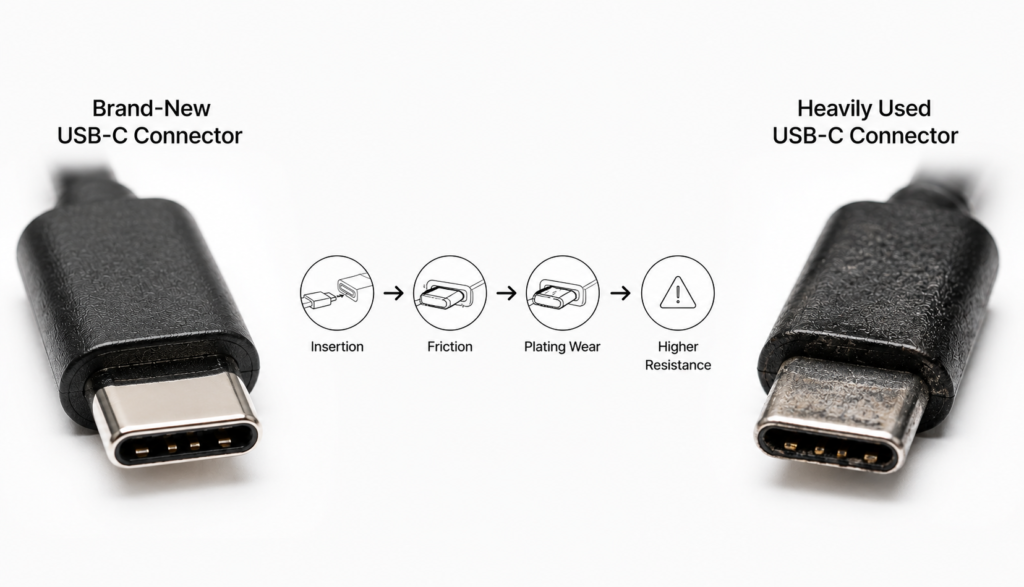
Every time you plug in a connector, the internal metal springs are pushed apart and flex, and the metal contact surfaces slide against each other. When fully seated, the springs press firmly against the plug’s contacts with spring force, ensuring reliable flow of electricity and signals.
3.2 How Contact Plating Wears Away Over Time
Metal contacts are coated with a thin layer of plating — usually gold or tin — to prevent oxidation and reduce friction. Each plug cycle wears away a tiny amount of plating. Over thousands of cycles, the plating thins, develops scratches, and eventually wears through in spots, exposing the base metal underneath.
3.3 How Rising Contact Resistance Degrades Performance
With intact plating, metal contacts conduct electricity smoothly with very little resistance. Once plating wears through, the exposed base metal oxidizes and rusts, increasing electrical resistance. Higher resistance causes slower charging, connector overheating, and data transmission errors.
3.4 Main Causes of Failure: Metal Fatigue, Lost Spring Force, Corrosion, and Dust
Connectors fail for four main reasons: metal fatigue — springs weaken from repeated bending, like a paperclip breaking after being bent back and forth; oxidation and corrosion after plating wears away; dust and lint building up between contacts, breaking electrical connection; and broken housings or latches from long-term wear.
3.5 Hidden Wear: Fretting Corrosion from Vibration
One often-overlooked form of wear is fretting corrosion. For example, a charging phone jostling in your pocket, or a laptop on a bumpy car ride, causes tiny, invisible movements between plug and socket. Over time, this micro-movement wears away plating and creates debris, leading to intermittent connection issues. This hidden wear is extremely common in daily use.
4. Key Factors That Determine Connector Lifespan
4.1 Materials: Contact Base Metal, Plating, and Insulation
Materials are the foundation of durability. Contacts made of phosphor bronze or beryllium copper have better elasticity and fatigue resistance than plain brass. Thick hard gold plating lasts much longer than thin flash gold or tin plating. High-strength engineering plastic housings resist cracking far better than cheap plastic.
4.2 Structural Design: Spring Geometry, Contact Force, Latch, and Housing
Design sets the upper limit for lifespan. Well-shaped springs distribute stress evenly and resist fatigue. Optimal contact force ensures a reliable connection without causing excessive wear. Good latching and guide structures prevent uneven wear from angled insertion. A strong housing protects internal springs from physical damage.
4.3 Manufacturing: Precision, Assembly, and Contact Lubrication
Build quality affects real-world performance. High-precision connectors plug smoothly, align contacts perfectly, and avoid one-sided wear. Proper assembly ensures even spring force. Some high-end connectors use specialized contact lubricants that dramatically reduce friction and extend life.
4.4 Environment: Temperature, Humidity, Dust, Corrosion, and Vibration
The environment is a silent killer. High heat and humidity speed up oxidation. Dust and sand inside the connector act like sandpaper, accelerating plating wear. Corrosive air in coastal or industrial areas rusts contacts faster. Constant vibration and shock worsen spring fatigue and fretting wear.
4.5 Human Factors: Plugging Technique, Habits, Cable Quality, and Hot-Plugging
User habits have the biggest impact on lifespan. Rough plugging, angled insertion, and yanking the cable multiply wear. Poor-quality cables with mis-sized plugs, rough edges, and thin plating scratch connector plating and over-stress springs. Frequent hot-plugging can cause tiny electrical arcs that erode contacts over time.
5. Mating Cycle Ratings of Common Connectors
5.1 Digital Device Connectors: USB-A, USB-C, Micro-USB, Lightning
The most common phone and computer connectors vary widely in durability. USB-A, the older large connector, is typically rated for around 1,500 cycles. Micro-USB, used on older Android phones, has a 10,000-cycle rating but often fails early due to its fragile latch hooks. Apple’s Lightning connector is rated for about 10,000 cycles. USB-C, today’s standard, is rated for at least 10,000 cycles and offers the best overall durability.
5.2 Audio/Video Connectors: HDMI, DisplayPort, 3.5mm Audio Jack
HDMI and DisplayPort, used for TVs and monitors, typically have 5,000–10,000 cycle ratings. With many precise pins, wear often causes screen flickering or no signal. The 3.5mm headphone jack is rated for 5,000+ cycles; twisting the plug while inserted adds extra wear beyond simple insertion.
5.3 Network and Power Connectors: RJ45, DC Barrel Jack
RJ45 Ethernet ports are rated for roughly 750–1,000 cycles, with failure usually coming from broken plastic latches or worn gold plating on pins. DC barrel power jacks are rated for 5,000–10,000 cycles; their simple design makes them fairly durable, but wear still leads to loose connections and intermittent charging.
5.4 Industrial and Automotive Connector Standards
Industrial and automotive connectors — such as M12 circular connectors and automotive-grade USB ports — have far higher durability standards than consumer products, typically 10,000+ cycles, with some high-reliability models reaching 50,000 cycles. They must also withstand extreme temperatures, vibration, and corrosion.
5.5 Why USB-C Connectors Last Longer
USB-C’s durability comes from four key design advantages: it is reversible, so no fumbling or scraping while trying to plug it in the right way; its symmetrical structure distributes force evenly, avoiding one-sided wear; side-spring latching is much tougher than Micro-USB’s hook latches; and the universal industry standard enforces stricter material and build quality requirements.
Rated Mating Cycles of Common Consumer Connectors
| Connector Type | Typical Rated Cycles | Common Applications |
|---|---|---|
| USB-A | ~1,500 | Laptops, chargers, USB drives |
| Micro-USB | ~10,000 | Older Android phones, small gadgets |
| Lightning | ~10,000 | Apple iPhone, iPad |
| USB-C | ≥10,000 | Modern phones, laptops, tablets |
| HDMI / DisplayPort | 5,000–10,000 | TVs, monitors, graphics cards |
| 3.5mm Audio Jack | 5,000+ | Phones, headphones, audio equipment |
| RJ45 Ethernet | 750–1,000 | Routers, computers, switches |
| DC Barrel Power Jack | 5,000–10,000 | Laptops, security cameras, small appliances |
6. Standardized Testing for Connector Durability
6.1 Industry Standards: National, International, and Consortium Specs
Connector cycle ratings are not made up — they follow standardized tests. The IEC 60512 series is the global baseline, with China’s corresponding GB/T 5095 series. Industry groups like USB-IF and HDMI LA also set their own durability requirements; certified products must meet these specs.
6.2 Test Equipment, Environment, and Key Parameters
Testing uses automated mating cycle machines that precisely control speed, force, and alignment. Standard tests run at room temperature and humidity, with a fixed insertion speed and cycle rate, repeating until the connector fails.
6.3 Basic Durability Testing vs. Combined Environmental Testing
Basic testing is pure mechanical cycling at room temperature. More demanding tests add environmental stress: extreme heat/cold, humidity, salt spray, or dust, to simulate harsh real-world conditions. Automotive and industrial connectors must pass these combined tests.
6.4 Key Checks: Appearance, Feel, Contact Resistance, and Performance
During and after testing, inspectors check four main things: physical appearance for cracks or deformation; insertion/extraction force and plug feel; contact resistance to ensure it stays within limits; and functional performance like charging and data transfer. Failure in any one area marks end-of-life.
7. Common Signs of a Worn-Out Connector
7.1 Physical Feel: Looseness, Rough Insertion, Latch Failure
The most obvious sign is changed feel: the plug feels loose, wiggles easily, or falls out; insertion feels gritty or stiff instead of smooth; latches or locking mechanisms stop holding the plug securely.
7.2 Functional Issues: Intermittent Charging, Overheating, Poor Contact
Common functional problems include charging that cuts in and out when the cable is touched; the connector getting noticeably hot during use; and needing to wiggle or re-plug the connector to make it work.
7.3 Transmission Problems: Unstable Data, Signal Drops, Slow High-Speed Transfer
For data and signals, you may see file transfers failing or dropping out; internet disconnections; flickering or blank video screens; or high-speed transfer speeds dropping far below rated performance.
8. Habits That Drastically Shorten Connector Life
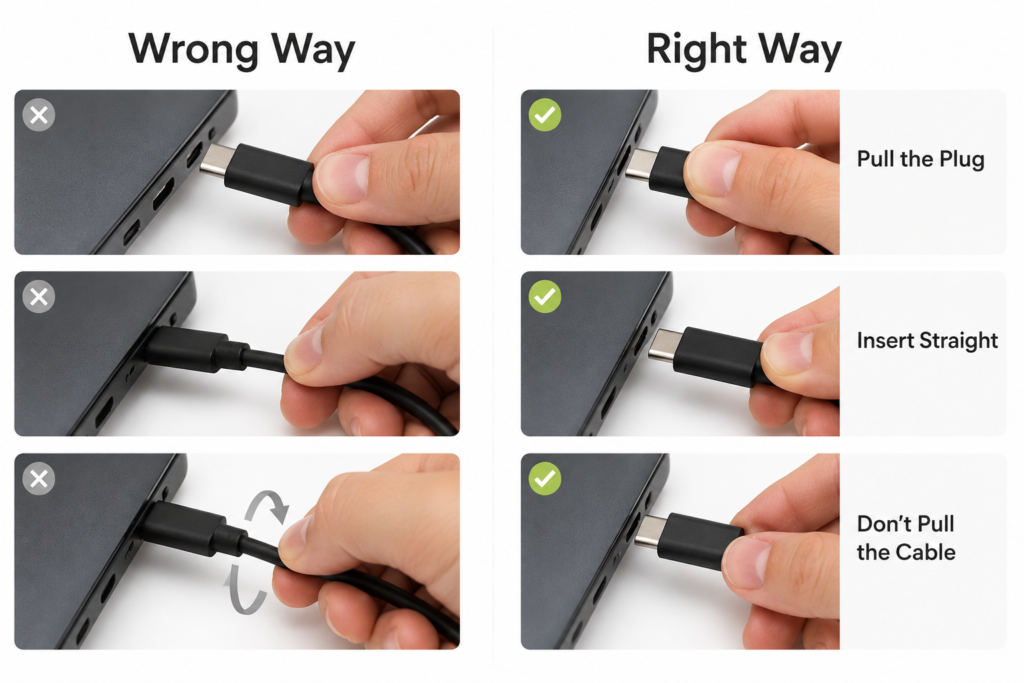
8.1 Rough Plugging, Angled Insertion, and Yanking Cables
This is the most damaging behavior. Angled insertion wears one side of the springs and plating unevenly. Wiggling the plug or pulling by the cable bends springs out of shape. Slamming plugs in and out can crack housings and damage internal parts.
8.2 Using Low-Quality, Poor-Fitting Cables and Adapters
Cheap cables often have mis-sized plugs, sharp edges, and thin plating. They scratch connector plating, over-stress springs, and over time can stretch out and wear out the device’s port permanently.
8.3 Dust Buildup, Moisture, and Harsh Environments
Lint from pockets and dust from desks build up inside ports, accelerating wear and causing connection issues. Sweat, spilled drinks, and high humidity corrode contacts and speed up oxidation. Long-term use in dusty or damp environments ages connectors much faster.
8.4 Frequent Hot-Plugging and Stressing the Connector While In Use
While many connectors support hot-plugging, the tiny electrical arcs from plugging in under power still erode contacts over time — and frequent use speeds this up. Moving or lifting a device while a cable is plugged in puts extra mechanical stress on the connector, hastening spring fatigue and structural damage.
9. Practical Ways to Extend Connector Life
9.1 Plug Straight and Grip the Plug, Not the Cable
Align the connector carefully and insert it straight in, without forcing it at an angle. Always pull by the plug body itself, never yank the cable. Avoid wiggling or bending the cable sharply while plugged in.
9.2 Clean Gently and Keep Dust and Moisture Out
If you see dust or lint, gently brush it out with a soft dry brush or clean with a lint-free swab. Never poke with metal pins or toothpicks, and never spray liquid directly into the port. Use dust caps when the port is not in use.
9.3 Use Extension Cables and Adapters Strategically
For frequently plugged/unplugged setups, use an extension cable or dock. This shifts wear to the cheaper cable, protecting the device’s built-in port. Dust caps on rarely used ports keep out dirt and moisture.
9.4 Choose Quality Cables and Certified Accessories
When buying cables and accessories, pick certified, standards-compliant products instead of cheap no-name options. Good cables have properly sized plugs and thick, durable plating — they last longer and protect your device’s ports.
10. Design Technologies for Better Durability
10.1 High-Elasticity, Fatigue-Resistant Contact Materials
Premium connectors use beryllium copper or high-grade phosphor bronze for springs. These materials stay springy and resist fatigue much better than plain brass, staying tight after thousands of cycles.
10.2 Wear-Resistant Plating and Multi-Point Contact Designs
Hard gold alloys, gold-palladium-nickel, and thicker plating greatly increase wear resistance. Multi-point contact designs keep working even if one contact wears down, boosting overall reliability.
10.3 Optimized Springs, Strong Housings, and Better Alignment
Improved spring shapes distribute stress evenly, reducing fatigue and breakage. Longer guide structures make alignment easier and cut down on angled-insertion wear. Strong housing materials resist drops and crushing, protecting internal parts.
10.4 Precision Assembly and Advanced Contact Lubrication
Tighter manufacturing and assembly tolerances ensure even contact force and avoid localized over-wear. Some high-end connectors use specialized contact lubricants that reduce friction, repel moisture, prevent oxidation, and significantly extend service life.
11. How Wear Affects Electrical Performance
11.1 Contact Resistance and Overheating
The more a connector wears, the higher its contact resistance rises. Higher resistance generates more heat when current flows through, making the port hot. This reduces charging efficiency and can create safety risks in severe cases.
11.2 Charging Stability and Signal Integrity
Unstable contact causes intermittent charging and short charge cycles, hurting battery life and charging speed. For signals, fluctuating resistance causes interference — audio static, video flicker, and network packet loss.
11.3 Risks for High-Speed Data Transmission
High-speed data is very sensitive to contact quality. Aged, oxidized contacts cause signal errors and attenuation, leading to failed large file transfers. High-speed interfaces like USB 3.x, Thunderbolt, and fast Ethernet suffer more from aging than low-speed connectors.
12. Common Myths About Connector Durability
12.1 “Gold-plated connectors never wear out” and “Tighter = better quality”
Gold plating is more wear-resistant and anti-corrosive, but it is not indestructible — even thick gold will wear through with enough cycles. And tighter is not always better: excessive insertion force accelerates plating and spring wear. A smooth, moderate fit is ideal.
12.2 “All USB-C connectors last the same” and “Expensive = more durable”
Two USB-C connectors can have wildly different lifespans depending on brand, materials, and build quality. Expensive products are not always more durable, but ultra-cheap no-name connectors almost always cut corners on materials and plating, resulting in much shorter life.
12.3 “It dies instantly at the rated cycle count” and “Loose = broken”
The rated cycle count is a minimum pass/fail threshold from the lab, not an exact death sentence. Most connectors keep working past their rating, just with reduced performance. And looseness does not always mean it is broken — sometimes it is just dust buildup or slight spring deformation that can be fixed with cleaning.
13. Choosing the Right Connector for Your Use Case
13.1 Everyday Home and Consumer Use
For casual home use with infrequent plugging, standard certified consumer connectors work fine. Prioritize universal, durable types like USB-C and stick with certified cables — no need for overkill industrial specs.
13.2 High-Cycle Office and Test Equipment
For daily heavy use — test stations, shared office devices — choose high-rated, well-built connectors and cables. Using docks or extension cables to protect the device’s native port will lower long-term maintenance costs.
13.3 Outdoor, Automotive, and Industrial Reliability
For harsh environments — outdoor, vehicle, or factory use with vibration and temperature swings — use industrial or automotive-grade connectors, preferably sealed against dust and water. Consumer-grade connectors are not sufficient here.
14. Future Trends in Connector Durability
14.1 New Wear-Resistant Materials and Advanced Plating
Materials and plating keep improving. Nanocrystalline and amorphous coatings, for example, offer better wear resistance than traditional gold plating while being thinner — perfect for shrinking connector sizes.
14.2 Magnetic and Contactless Connectors
Magnetic connectors align via magnet force, with almost no friction or hard impact during mating — theoretically lasting far longer than traditional physical connectors. Wireless charging and data transfer eliminate mating wear entirely, solving the durability problem at the source.
14.3 Smart Monitoring and Self-Healing Technology
Future smart connectors may include built-in health monitoring, alerting users to wear levels and predicting failures before they happen. Self-healing materials could also repair minor plating wear automatically, further extending service life.
14.4 Durability Breakthroughs for Smaller, High-Density Connectors
As connectors shrink and gain more functions, designers must balance high-speed performance and durability in less space. Future advances will come from more precise structural design and better materials, giving tiny connectors impressive mating cycle life.
15. Summary
15.1 Durability Is a Combination of Materials, Design, Build, and Use
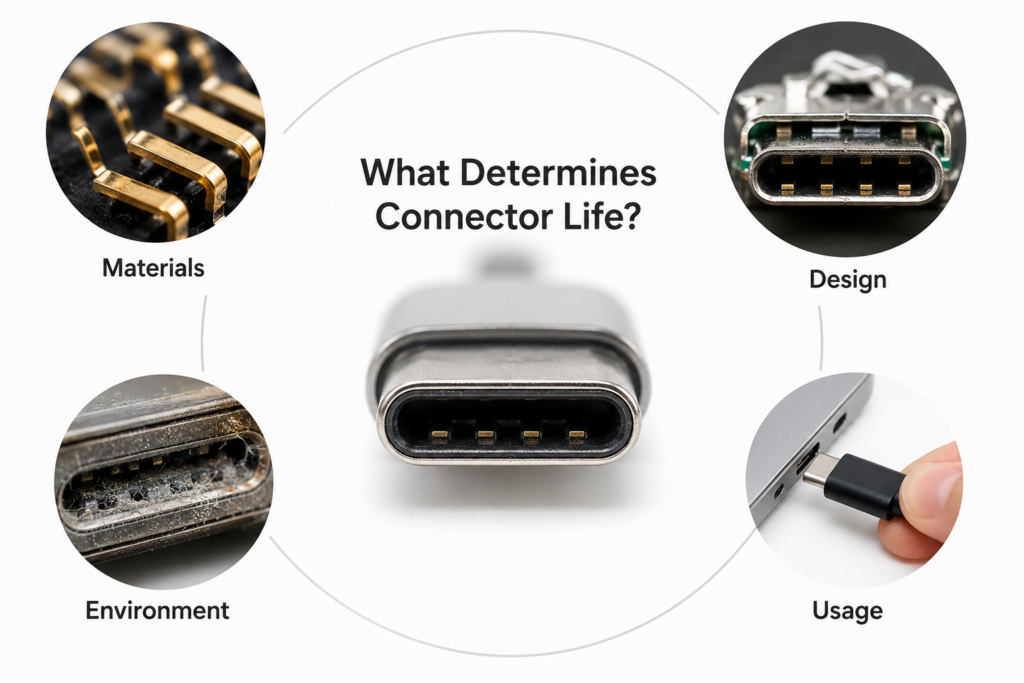
Connector lifespan is not determined by one single factor. Good materials, smart design, and solid manufacturing lay the foundation — but real-world life ultimately depends heavily on how you use and care for the connector.
15.2 Good Habits and Basic Care Dramatically Extend Life
Most connector damage is caused by poor usage habits. By plugging correctly, keeping ports clean, and using quality cables, you can greatly slow down wear and keep your devices working properly for years longer.
15.3 Knowing the Basics Helps You Choose Better and Maintain Smarter
Understanding connector durability helps you judge product quality when shopping and avoid damaging habits in daily use. It is practical tech knowledge that saves money and improves your overall experience with electronics.