
Ever come home after a thunderstorm to find your router completely dead? Or had a phone charger and TV power board fry the second power kicks back on after an outage? Most people write this off as cheap device build quality, but one of the most common culprits is a power surge — the short, sharp electrical spike that hits the grid. Other factors like component aging, sustained overvoltage, faulty grounding, or wiring issues can also cause damage, but surges are far more common (and preventable) than most people realize.
A surge sounds technical, but it’s essentially a split-second voltage shockwave in your electrical system — think of the sudden water hammer you get when a tap slams shut in your plumbing. It lasts barely a blink, but the force is intense enough to fry chips, capacitors, and ports inside your electronics. A Surge Protective Device (SPD), also called a surge suppressor, is the device designed to absorb and redirect that shock before it reaches your gear.
Most people’s understanding of surge protection stops at “surge protector power strips”, or they mix it up with UPS units, voltage regulators, or GFCI outlets. It’s easy to get fooled by inflated marketing specs, and even a good SPD won’t work if installed wrong. This guide is built for real-world home and small office use: we’ll break down what surges are, how to pick the right SPD, how to install it safely, and what pitfalls to avoid. Whether you’re a renter, a homeowner with a NAS and home theater, or running a small home office, you’ll walk away knowing exactly what you need.
Assess Your Risk: Where Surges Come From & Whether You Need Protection
2.1 4 Common Surge Sources for Homes & Small Offices
Surges don’t just happen during thunderstorms — they show up all the time in regular daily use:
- Nearby lightning induction: This is the most common external source. It’s not a direct strike to your power lines; instead, lightning striking nearby induces high voltage on all conductive lines (power cables, Ethernet, coaxial TV, security camera wiring) that travels straight into your building.
- Grid switching surges: Utility transformer switching, power line fault recovery, service restoration after an outage, and routine distribution system operations all create “switching surges”. If you’ve ever had a charger or small device fry right after power comes back on after an outage, this is a likely culprit.
- Internal appliance cycling: Large appliances like air conditioners, refrigerators, well pumps, elevators, compressors, and power tools create local voltage disturbances when they turn on or off. That brief flicker of your lights when the AC kicks on? That’s a small voltage disturbance. Repeated over time, these small surges wear down sensitive electronics.
- Signal line surges: This is the most overlooked entry point. Outdoor-run Ethernet cables, cable TV lines, satellite dishes, and PoE security camera wiring sit exposed to the elements 24/7, so they easily pick up induced surges. Those surges then travel straight into your router, TV, or NVR (network video recorder) and fry your gear — even if your power lines are fully protected.
2.2 3 Ways Surges Travel Into Your Devices
Surges don’t only come through your power outlets. They have three common propagation paths:
- Power lines: Surges can appear between the Line (L, or “hot”), Neutral (N), and Protective Earth (PE, or “ground”) wires. They fall into two categories: differential mode (between L and N) and common mode (between L-PE and N-PE), which we’ll explain in more detail in the next section on how surge protection works.
- Signal and data lines: RJ45 Ethernet, phone lines, coaxial cable, security system wiring, access control lines, and PoE cables can all carry surges into routers, switches, NVRs, and cameras. This is why so many people see device failures even after installing power surge protectors — they left this entire path unprotected.
- Metal conductors and inductive coupling: Metal water pipes, heating pipes, building steel rebar, and the shielding on long cable runs can also pick up induced voltage, create potential differences, and indirectly pass surges into your electrical system.
2.3 2 Types of Damage Surges Cause
Surge damage isn’t always immediate and obvious. It falls into two categories:
- Catastrophic immediate failure: When a surge has enough energy, it instantly fries components like power supplies, rectifier bridges, switching power supply ICs, capacitors, motherboards, and Ethernet PHY chips. The device stops working entirely, right away.
- Chronic, cumulative damage: Smaller surges won’t break your device on the spot, but they slowly erode the insulation on internal components, cause electrical parameters to drift, and shorten the device’s usable life. Symptoms show up as random crashes, unexpected reboots, intermittent network drops, or ports that work sometimes and not others. Most people blame “cheap build quality” for these issues, but they’re often the result of years of small, repeated surge damage.
2.4 How to Quickly Gauge Your Surge Risk Level
You can estimate your risk level by checking these five factors:
- Geographic location: Areas with high annual thunderstorm days have higher risk — think the southeastern U.S., tropical and subtropical regions, mountainous areas of Europe and Asia, and coastal high-humidity zones like coastal Australia.
- Service entry method: Properties with overhead power lines, long outdoor cable runs, or standalone yard wiring have higher risk than dense urban apartments with underground utility lines. Overhead lines are fully exposed to the elements, so they pick up far more induced lightning surges.
- Building type: Detached single-family homes, top-floor apartments, buildings near large metal structures (like cell towers or industrial facilities), and properties with lots of outdoor cameras or antennas have elevated risk.
- Past damage history: If you’ve ever had a router, TV power supply, charger, or Ethernet port fail after a thunderstorm or power outage restoration, that’s a very clear, strong signal that your location has high surge risk.
- Device value: If you own a NAS, home server, work computer, security camera system, or high-end home theater, the cost of data loss or repair is far higher than the cost of the device itself — so protection is a much higher priority.
2.5 Priority Order for Protecting Your Devices
If you’re on a budget, you don’t need to protect every device at once. Start with the highest-priority gear first:
- First priority: Desktop/laptop computers, NAS units, home servers, workstations, and gaming consoles. The biggest risk here is data loss and downtime cost — a NAS holding years of family photos and work files is worth far more in data than the hardware itself.
- Second priority: Routers, optical network terminals (ONTs)/cable modems, network switches, smart home hubs, and security NVRs. These are the backbone of your entire network and security system. If they fail, every connected device goes down with them.
- Third priority: TVs, projectors, home theater systems, and high-end major appliances. These have high repair costs, and most are connected to multiple line types (power, Ethernet, coaxial) — meaning more surge entry points.
- Fourth priority: Basic small appliances like hair dryers, rice cookers, and desk lamps. These have low replacement cost and minimal impact if they fail, so you can add protection for them later if your budget allows.
How Surge Protection Works (No Jargon)
3.1 Core Logic: Divert, Shunt, Clamp
You don’t need to memorize circuit equations to understand how SPDs work. Think of it like flood control:
An SPD doesn’t “destroy” the surge (the flood). Instead, it opens a dedicated spillway to divert most of the surge current away, while keeping the voltage (water level) that reaches your devices (your home) within a safe, manageable range.
Here’s how it works in practice:
- During normal power use: The SPD’s internal protection components have very high resistance, with only a tiny leakage current that doesn’t affect regular power delivery. For signal-line SPDs, there may be a very small amount of signal loss, which is why you need to match the SPD to your line’s speed and frequency band.
- When a surge hits: As soon as voltage rises past the SPD’s threshold, the protection components switch almost instantly to very low resistance. Depending on the protection mode and your building’s grounding system, the SPD will conduct between L-N, L-PE, and/or N-PE paths, shunting the surge current onto the lowest-impedance path available.
How well this works depends heavily on the quality of your grounding, equipotential bonding, and the length of the SPD’s connecting wires. The final voltage left at the device end (after clamping) is called the voltage protection level (Up) in IEC standards, or voltage protection rating (VPR) in UL standards — you’ll also hear it called clamping voltage.
3.2 Differential vs. Common Mode Surges: Why Grounding Matters (But No Ground Isn’t Totally Useless)
You’ve probably heard someone say, “If you don’t have grounded outlets, surge protectors don’t work at all.” That’s not entirely true — it depends on what type of surge you’re dealing with:
- Differential mode surges: These happen between the Line (hot) and Neutral wires, when voltage spikes across the two power lines. Most plug-in surge protector power strips have protection components wired directly between L and N, so even if you don’t have a working Protective Earth (PE/ground) wire, they can still provide some clamping for differential mode surges.
- Common mode surges: These happen between Line and Ground (L-PE) and Neutral and Ground (N-PE) — basically, a spike in voltage between your power lines and the earth itself. This type of surge relies entirely on a reliable ground connection and proper equipotential bonding, because the only way to divert the surge current is to send it into the earth.
If you don’t have effective grounding, your SPD’s ability to divert common mode surges drops sharply. Whole-house protection and signal line protection will be far less effective, and the residual voltage left at your devices will be higher, reducing overall protection.
A critical warning here: A three-prong outlet does not mean you have a working ground. Many older homes have three-prong outlets that aren’t actually connected to a ground wire, or are wired incorrectly. Those cheap “cheater plugs” that adapt a two-prong outlet to three prongs? Almost none of them provide a real, safe ground connection. If you live in an older home, had wiring work done by an unlicensed handyman, or aren’t sure about your grounding, hire a licensed electrician to test it — it’s worth the cost.
3.3 3 Common Protection Components (And Why Good SPDs Use a Mix)
The core of every SPD is its protection components. There are three common types, each with pros and cons — high-quality SPDs almost always combine them for better performance:
- Metal-Oxide Varistor (MOV): The most common protection component, low cost and with strong current capacity. It conducts electricity as soon as voltage rises past its threshold. The downside: it degrades a little bit every time it absorbs a surge. Cheap, low-quality MOVs without built-in thermal protection can overheat and cause a fire if they fail.
- Gas Discharge Tube (GDT): Can handle extremely high surge currents, so it’s often used for service entrance SPDs or as the first line of “coarse” protection on signal lines. The downsides: it has a higher trigger voltage than MOVs, and if a sustained power-frequency current (called “follow current”) keeps flowing after the surge, it may not turn off on its own — so it needs to be paired with other components for safety.
- Transient Voltage Suppressor (TVS): Has an extremely fast response time and very precise clamping voltage, so it’s used for protecting sensitive electronics and signal interfaces. The downside: its current capacity is relatively low, so it’s rarely used alone for high-current surge scenarios.
The takeaway: don’t buy an SPD just because the marketing says it uses a certain component. A high-quality SPD will combine MOVs, GDTs, TVSs, thermal cutoffs, and fuse protection to balance current capacity, response speed, and overall safety.
3.4 Why You Need Multi-Stage Surge Protection
A lot of people wonder: why not just install a whole-house SPD at the panel, or just use a good surge protector power strip? Why do you need multiple layers?
The answer is that no single SPD can do all four of these things at once: handle extremely high surge energy, clamp voltage to a very low level, sit right next to your devices, and last for decades.
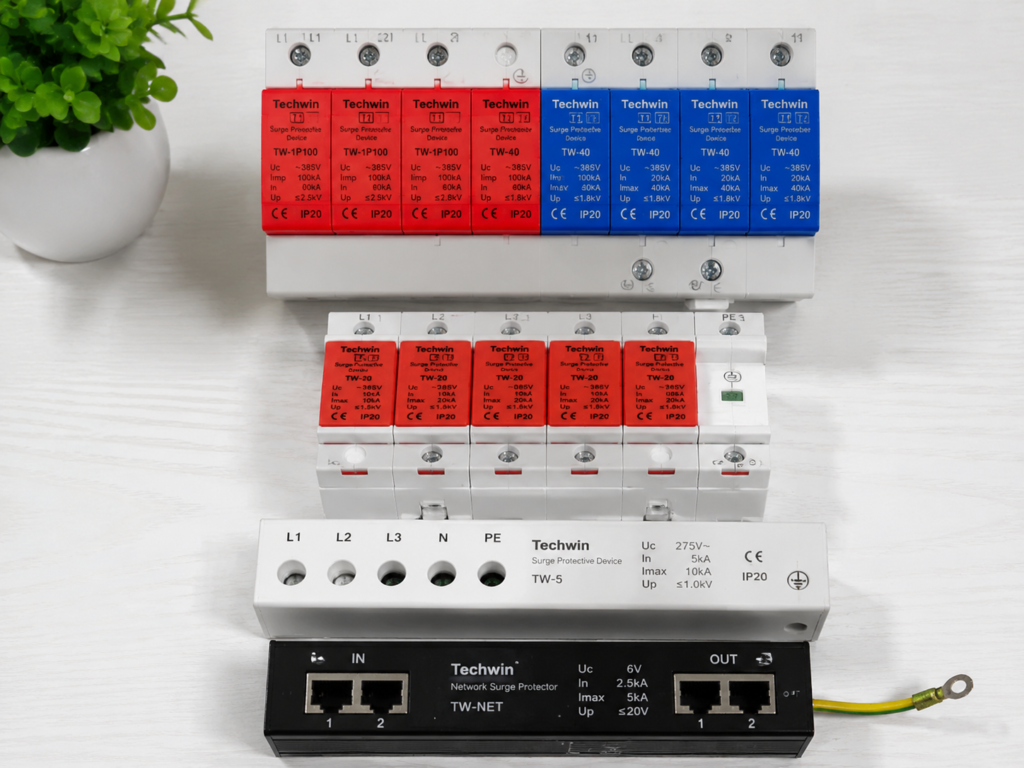
- SPDs with very high current capacity usually have higher residual (clamped) voltage.
- SPDs with very low clamping voltage usually can’t handle as much surge energy.
- SPDs installed at the main service entrance are far from your devices, and the inductance of the wiring between the SPD and your gear will raise the residual voltage at the device end.
- SPDs installed right next to your devices can’t handle the full force of a large incoming surge.
That’s why proper surge protection is layered, like a defense line:
- A main service entrance SPD (first stage) absorbs the bulk of the high-energy incoming surge, bringing the voltage down to a manageable level.
- A sub-panel or circuit-level SPD (second stage, optional for most homes) further reduces any remaining surge energy on critical circuits.
- A terminal/device-level SPD (third stage) sits right next to your sensitive electronics, clamping the final residual voltage down to a level the devices can safely handle.
There’s no one-size-fits-all number for “safe” residual voltage — it depends on the SPD’s Up/VPR rating, the surge waveform, wiring length, grounding quality, and the specific tolerance of your device. You can’t just guess based on experience.
For high-risk setups (like a detached home in a high-lightning area), a combination of main entrance, terminal, and signal line protection is recommended. For low-risk rental scenarios, starting with a certified terminal surge protector power strip is perfectly fine.
3.5 SPD Classes: What Do Type 1, Type 2, and Type 3 Mean?
You’ll often see SPDs labeled Type 1, Type 2, or Type 3 — but it’s critical to know that the IEC (International Electrotechnical Commission) and UL (Underwriters Laboratories, the North American standard body) use these same labels for different definitions. They are not directly interchangeable.
In the IEC system (used in most of Europe, Asia, Africa, Australia, and many other regions):
- Type 1: Installed at the building’s main service entrance, designed to handle a portion of direct lightning current. Tested with the 10/350µs current waveform.
- Type 2: Installed in distribution panels, designed to protect against induced lightning surges and switching surges. Tested with the 8/20µs current waveform.
- Type 3: Installed close to terminal devices, for fine, low-voltage clamping protection.
The UL system (used in North America) also uses Type 1, Type 2, and Type 3 classifications, but with different test methods and use cases — you cannot directly map them to IEC types.
For most regular users, you don’t need to memorize these classifications. Just match the SPD to its installation location: if it’s going in your main electrical panel, look for a panel/entrance-rated SPD; if it’s going next to your desk or TV, look for a terminal/device-rated SPD. Always prioritize products certified to your local electrical standards, and follow the manufacturer’s installation location guidelines.
Choosing the Right SPD Type: Form Factors & Use Cases
4.1 5 Common Form Factors of Power SPDs
Power-focused SPDs come in five main types, each built for a different installation location and use case. Pick the one that fits your setup:
- Main service entrance SPD: Installed in your home’s main electrical panel or at the utility service entry point, it protects your entire home’s power system and has a high surge current capacity. This must be installed by a licensed electrician — never open or modify your electrical panel yourself.
- Sub-panel / circuit-level SPD: Used in small offices, home server closets, or on critical dedicated circuits (like security system or network cabinet circuits) as a middle layer of protection to further reduce residual surge energy. Also requires professional electrician installation.
- Plug-in surge protector power strip: The most familiar form factor, it protects one or more devices and works right out of the box. Perfect for desks, TV stands, and router setups, and ideal for renters who can’t modify their electrical panel.
- Wall-mounted / outlet-replacement SPD: These either replace your existing wall outlet directly or plug into a wall outlet for a clean, low-profile look. Great for fixed locations like behind a TV or desk, but you still need to verify certification, specs, and grounding quality — “wall-mounted” doesn’t automatically mean better protection.
- Rack-mount surge-protected PDU: Designed for network cabinets and server racks, this is a rack-mounted power distribution unit (PDU) with built-in surge protection, used to power switches, NAS units, small servers, and other rack-mounted gear from a single source.
4.2 Signal Line SPDs: The Most Overlooked Protection Gap
So many people install power surge protectors, only to have their router or TV fry anyway — because the surge came in through an Ethernet or coaxial cable, not the power line. Signal line SPDs are designed to protect against exactly this.
They’re needed for any line that runs outdoors or over long distances: outdoor Ethernet cables, PoE security cameras, cable TV lines, satellite dishes, phone lines, access control wiring, and long low-voltage cable runs can all act as surge entry points.
When shopping for a signal line SPD, keep these key points in mind:
- Ethernet protectors: Confirm speed compatibility first — 100Mbps, Gigabit, 2.5G, or 10G. A speed mismatch will cause reduced speeds or total disconnection. For PoE (Power over Ethernet) setups, also confirm the SPD supports your PoE standard (PoE, PoE+, PoE++), and that voltage, current, and pinout are compatible — a mismatch can fry your devices.
- Coaxial protectors: Match the connector type, impedance, and frequency band. For example, cable TV and cable broadband use 75Ω impedance, satellite systems use different frequency bands, and industrial communications systems often use 50Ω impedance. Buying the wrong one will either not work or degrade your signal.
- All signal SPDs add a small amount of insertion loss (a tiny drop in signal strength), which can reduce your link’s safety margin. Don’t just buy one because the plug fits — confirm it won’t interfere with your normal signal speed or quality.
For best results, install signal SPDs as close to the point where the cable enters your building as possible, to minimize the length of unprotected cable running indoors. Their ground connection should also be tied to the same grounding/equipotential bonding system as your power SPDs, otherwise surge diversion will be less effective.
4.3 UPS vs. Surge Protection: Do You Need Both?
A very common question: “I already have a UPS, do I still need a separate surge protector?”
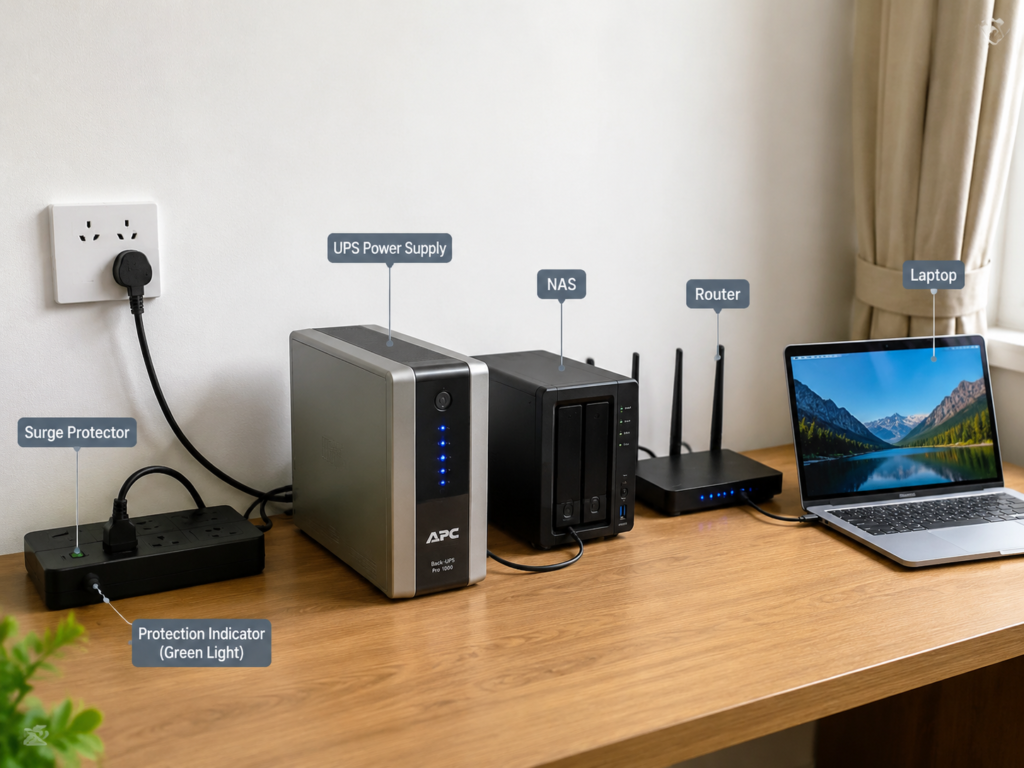
The short answer: it depends on your UPS’s surge protection rating, but in almost all cases, adding a certified SPD is a good idea.
A UPS (uninterruptible power supply)’s core job is to provide battery backup for safe device shutdown, and some models also offer voltage regulation. It is not designed first and foremost as a surge protection device. Entry-level UPS units may have only very basic surge absorption capability — some have no surge protection at all. They cannot replace a dedicated, certified SPD.
For critical devices like NAS units, work computers, and home servers, the recommended setup is:
Wall/panel SPD → UPS → device-level / signal-line protection
This gives you protection against both surges and power outages.
Always follow the order recommended in your UPS’s manual, though — some models have specific requirements for what can be connected upstream of the UPS.
4.4 SPD Recommendations by Scenario
Don’t overthink your setup — just match the SPD type to your use case:
- Renters or single-device protection: Choose a certified plug-in surge protector power strip with clear status indicators and built-in ground detection. No panel modifications needed, and you can take it with you when you move.
- Homeowners / whole-house protection: Install a main entrance or Type 2 SPD in your electrical panel, plus terminal SPDs near high-value devices for layered, reliable protection.
- High-lightning areas / detached homes / overhead power lines: Prioritize a full three-stage setup (main entrance + circuit-level + terminal), and hire an electrician to inspect your grounding and equipotential bonding first — good grounding is the foundation of effective protection.
- Sensitive electronics: For computers, NAS units, home theaters, and workstations, look for SPDs with a low Up/VPR rating, complete protection modes, and certification from a reputable brand for the most precise clamping.
- Outdoor devices: Security cameras, access control systems, and yard equipment need both power and signal line protection. Use outdoor-rated SPDs that are waterproof, corrosion-resistant, and rated for your local temperature range — never use indoor SPDs outdoors.
- Small offices: Protect the main panel, desk outlets, network cabinet, Ethernet entry points, and security camera lines. This reduces the chance of a single surge taking out every device in the office.
4.5 Why Different SPD Types Can’t Replace Each Other
It’s common to think, “I have a whole-house SPD, so I don’t need plug-in strips” or “I have a surge protector power strip, so I don’t need to protect my Ethernet line.” These are all mistakes — each SPD type has its own specific role and limits:
- Plug-in surge strips can’t replace main entrance SPDs: Power strips have limited current capacity, and they’re installed at the end of your wiring. A large incoming surge will already have spread through your entire home’s wiring before it reaches the strip, and the strip won’t be able to handle the full energy.
- Main entrance SPDs can’t replace terminal SPDs: The main panel is far from most of your devices, and the inductance of the wiring between the panel and your gear will raise the residual voltage at the device end. For sensitive electronics, that residual voltage may still be high enough to cause damage.
- Power SPDs can’t replace signal line SPDs: Surges can enter through Ethernet, coaxial, or security camera wiring, completely bypassing your power protection. Protecting only the power line leaves a massive gap in your defenses.
- UPS units can’t replace SPDs: Unless your UPS explicitly lists surge protection specifications and has passed relevant certification, never assume it has enough surge protection capability to replace a dedicated SPD.
Understanding SPD Specs: Avoid Marketing Hype
5.1 5 Must-Check Specs for Beginners
It’s easy to get overwhelmed by marketing buzzwords like “100kA maximum current” “nanosecond response time” or “100,000 joules of energy”. Most of these are hype. Start with these five core specs to avoid 90% of scams:
- Voltage compatibility: SPDs rated for 120V/125V systems cannot be used with 230V/240V systems, and vice versa. Don’t assume a plug adapter makes it safe — mismatched voltage ratings will either result in no protection at all, or cause the SPD to fail dangerously.
- Voltage protection level (Up / VPR): Also called clamping voltage, this is the maximum voltage the SPD will allow through to your devices under standard lab test conditions. Within the same standard system, a lower number means better, more precise protection. Important caveat: the actual voltage your devices see in real life depends on wiring length, surge waveform, and grounding quality — it’s not a fixed number. Only compare Up/VPR numbers between products tested to the exact same standard.
- Nominal discharge current (In): This is the surge current the SPD can withstand repeatedly, according to standard test cycles. It’s far more useful than the “maximum” current rating, since surges happen more than once. That said, actual lifespan depends on many factors (surge energy, waveform, temperature, component quality, product design), so you can’t directly convert an In rating to a specific number of surges the SPD will handle.
- Maximum discharge current (Imax): This is the absolute maximum surge current the SPD can survive — once, or maybe a handful of times. It is not a repeatable rating. Many cheap brands advertise a huge Imax number as a marketing trick, even if their In rating is tiny.
- Status indicators: Look for clear indicator lights for “protection active”, “ground fault”, and “end of life / failure”. The easier these are to read, the better — otherwise you’ll have no way to know if your SPD has stopped working.
5.2 Reasonable Spec Ranges for Home & Small Office Use
You don’t need the highest possible specs — you need specs that match your risk level and use case. Here’s a general reference:
- Main entrance / panel-level SPDs: For average homes, look for products in the 20–60kA nominal discharge current range. For high-lightning areas or detached homes, you can go higher, but always have a licensed electrician confirm the right rating for your specific electrical system. Bigger is not always better.
- Terminal plug-in surge strips: Prioritize rated current/power capacity, Up/VPR, In/Imax, protection modes, and certification. Don’t fixate on the “joule” rating — test methods for joule ratings vary wildly between brands, so they’re not a reliable standalone measure of protection.
- 120V regions (North America, etc.): UL-certified products list a VPR rating, with common tiers at 330V, 400V, and 500V. For products tested to the same UL standard, a lower VPR means more precise protection.
- 230V regions (Europe, Australia, most of Asia, etc.): IEC-certified products list an Up rating, with common tiers at 1.0kV, 1.2kV, and 1.5kV. Always evaluate Up alongside Uc (maximum continuous operating voltage), In, and installation class — don’t judge by Up alone.
One overhyped spec to ignore: response time. A lot of brands brag about “nanosecond” or even “picosecond” response times, but this is not a top priority for home use. Every certified SPD on the market has a fast enough response time for residential surges. Real-world protection depends far more on Up/VPR, current capacity, wiring length, grounding quality, and proper certification.
5.3 Advanced Specs (For Panel-Level or Detailed Selections)
If you’re shopping for a panel-level SPD, or just want to dig deeper, these advanced specs will help you make a more informed choice:
- Uc / MCOV (Maximum Continuous Operating Voltage): The highest steady voltage the SPD can handle long-term without failing or degrading prematurely. For 230V systems, common ratings are 275V or 320V; for 120V systems, 150V is standard. It must be matched to your local grid’s normal fluctuation range — if it’s too low, even regular voltage swings will trigger the SPD repeatedly, speeding up wear and tear.
- Protection modes: Check whether the SPD covers L-N, L-PE, and N-PE protection paths. Different countries use different grounding systems (like TT, TN-S, or TN-C-S), which require different protection mode configurations. Always confirm the SPD is compatible with your local grounding system.
- Test waveform: The 8/20µs waveform is used to test performance against induced lightning and switching surges. The 10/350µs waveform is used to test lightning current handling capacity. Current ratings from different waveforms cannot be compared directly — a 10kA 10/350µs surge carries far more energy than a 10kA 8/20µs surge. Any product that lists a current rating without specifying the waveform is intentionally misleading.
- SCCR (Short Circuit Current Rating): The maximum short-circuit current the SPD can safely withstand if it fails. For panel-mounted SPDs, a licensed electrician must confirm the SCCR is higher than the maximum possible short-circuit current at the installation point. If it’s too low, a short circuit could cause the SPD to rupture or catch fire.
- Backup overcurrent protection: Panel SPDs almost always require a dedicated circuit breaker or fuse (called backup protection) installed upstream. If the SPD fails short-circuit, the backup protection will trip to isolate the fault. Whether the trip only affects the SPD branch or the entire upstream circuit depends on the breaker/fuse selection and protection coordination — this must be designed by an electrician per local electrical codes, never improvised.
- Thermal cutoff and failure mode: Prioritize SPDs with built-in thermal protection, clear failure indicators, and a design that safely disconnects from the power line when they reach end of life. This prevents failed protection components from overheating and causing a fire.
5.4 Common Spec Exaggeration Traps to Avoid
Watch out for these classic marketing tricks when shopping:
- Only listing Imax, no Up/VPR: It doesn’t matter how much current an SPD can handle if the clamped residual voltage is still high enough to fry your devices. It’s like building a tall flood wall but setting the spillway so high that your house still floods.
- Passing off peak current as nominal current: Imax is a one-time extreme limit, while In is the repeatable rating. Many brands advertise a “100kA” surge rating that’s actually the Imax, when their In rating is less than 10kA.
- Only advertising a joule rating: Joule ratings are measured with wildly different test methods across brands, so results can vary by multiples. They can’t be used alone to judge protection quality. Cheap, low-quality products love to use “100,000+ joules” as a gimmick to trick buyers.
- Fixating on response time: A fast response time doesn’t mean low residual voltage, long lifespan, or high current capacity. It’s just one of many specs, and every certified SPD on the market has a fast enough response time for home use.
- Ultra-high specs with no certification: A $5 power strip claiming 100kA surge capacity is almost always a fake rating. Worse, cheap, uncertified SPDs can overheat and catch fire when they fail, making them more dangerous than no protection at all.
- Ignoring rated power/current: If you plug a 20A load into a 10A-rated surge strip, it will overheat and potentially catch fire from overload — even if the surge protection itself is perfect. This has nothing to do with surge protection, but it’s just as deadly.
5.5 Certification & Regional Compatibility
Electrical standards vary by country, so always choose products certified to your local standards. This ensures both protection performance and basic safety.
- North America: Prioritize products certified to UL 1449 (the standard for SPDs) or ETL-listed. Also check for VPR, SCCR, and UL Type classification to make sure they fit your use case.
- Europe, Australia, and other IEC-system regions: Look for compliance with IEC/EN 61643 series standards, plus regional marks like CE, VDE, or TÜV.
- China market: Look for compliance with GB/T 18802 series standards, and confirm whether CCC or other mandatory/voluntary certifications apply based on the product type and local regulations. Don’t treat vague, unlabeled marks as a universal guarantee of quality.
Also, keep in mind that plug types, grounding systems, and rated voltages differ by country. We don’t recommend using an SPD designed for one region long-term with only a travel plug adapter — not only will protection performance be reduced, but it can also create safety hazards.
Installation & Usage: Make Your SPD Actually Work
6.1 Basic Installation Safety Rules
Safety always comes first. Different SPD types have different installation requirements:
- Main service entrance and panel-mounted SPDs must be installed by a local licensed electrician. Never open or modify your electrical panel yourself — electric shock, wrong wiring, or improper installation can cause fatal accidents.
- When installing panel SPDs, the electrician must verify your grounding/neutral system, wire gauge, backup overcurrent protection (breaker or fuse), SCCR compatibility, wiring length, installation location, and compliance with all local electrical codes. They cannot be installed arbitrarily.
- Plug-in surge protector power strips can be installed by users directly into a wall outlet, but only if the outlet’s rated current, grounding status, and total load power all meet the strip’s requirements.
- Signal line SPDs should be wired in series between the incoming outdoor cable and your device. Their ground wire should be as short, straight, and securely connected as possible — never coil the ground wire or use extra-long leads.
6.2 Correct Use of Plug-In Surge Protector Strips
A lot of people buy a good surge strip, then use it wrong and drastically reduce its protection effectiveness. Follow these rules:
- Always plug directly into a fixed wall outlet when possible. Avoid plugging your surge strip into old, worn-out power strips or cheap extension cords — old wiring and poor contact will reduce the SPD’s ability to divert surge current.
- Do not daisy-chain multiple surge protector strips. Daisy-chaining does not give you “double protection” — it adds extra line impedance and more contact points, which actually raises the residual voltage at your devices. You’re better off buying one high-quality strip than chaining cheap ones.
- Never plug high-power loads like air conditioners, space heaters, electric water heaters, or microwaves into the same surge strip as sensitive electronics like computers, NAS units, or routers. Not only do you risk overloading the strip, but the voltage disturbances from large appliances cycling on and off can also damage your sensitive gear.
- Don’t cover the strip’s ventilation holes, and don’t place it in damp, hot, or dusty areas. These conditions speed up component aging and can create safety hazards.
- Check the protection and ground indicator lights regularly. If the protection light goes out, turns red, or a fault light illuminates, stop using the strip immediately and replace it according to the manufacturer’s instructions.
6.3 Signal Line SPD Installation Tips
Installed wrong, a signal SPD won’t protect you well — and might even interfere with your normal service. Follow these tips:
- Install the SPD as close to the point where the cable enters your building as possible, to minimize the length of unprotected cable running indoors. If you install it right next to the device, the surge has already traveled through all your indoor wiring, so protection will be far less effective.
- For Ethernet protectors: confirm compatibility with your network speed, PoE standard, and shielded/unshielded cable type. A wrong purchase can cause reduced speeds or even damage your devices.
- For coaxial protectors: confirm the connector type, frequency band, impedance, and that it won’t interfere with your cable broadband or satellite signal. For example, some older coaxial SPDs don’t support gigabit cable internet, and will slow your connection to a crawl.
- Keep the ground wire as short and straight as possible. Avoid coiling it or using extra-long leads — the longer the ground wire, the more inductance it has, and the worse the surge diversion effect will be.
- For outdoor security camera systems: we recommend installing SPDs at both the camera end and the indoor switch/NVR end. This is especially important for long PoE cable runs, where dual-end protection is far more reliable.
6.4 Basic Grounding Checks You Can Do Yourself
Grounding is the foundation of effective surge protection. You don’t need professional tools to do these basic checks:
- Check your SPD’s ground indicator light. That said, this is only a preliminary check — it cannot replace professional testing. Some fake ground setups can still trigger the “ground good” light.
- Inspect your wall outlets for looseness, heat, discoloration, or a burning smell. These are all signs of poor contact or underlying wiring problems.
- If you’re using a two-prong outlet with a cheater plug adapter, you almost certainly do not have a real protective ground. Don’t expect an SPD to provide good common mode surge protection in this setup.
- If you live in an older home, had wiring modified during a renovation, experience frequent breaker trips, or have had multiple devices fail after thunderstorms, hire a licensed electrician to test your grounding and entire electrical system. Never attempt to fix wiring yourself if you’re not qualified.
6.5 When to Replace Your SPD
A lot of people install an SPD and never think about it again — but SPDs are consumable devices with a limited lifespan. Here’s how to know when it’s time for a new one:
- For products with status indicators: If the protection light goes out, turns red, or a fault light illuminates, the protection module has failed. Stop using the SPD immediately and replace it according to the manufacturer’s instructions.
- For terminal products with no status indicators: Plan to replace them every 3–5 years. If you’ve experienced a severe thunderstorm, a nearby lightning strike, or a major grid fault, replace them earlier (or have them inspected if possible).
- For any SPD with visible damage: If you see burn marks, casing deformation, smell burning plastic, feel the casing is hot, notice loose outlets, or have frequent breaker trips on the circuit, stop using it immediately and replace it.
Keep in mind: all MOV-based SPDs are consumable. They degrade a little bit every time they absorb a surge, so they won’t last forever.
Common Myths & Troubleshooting
7.1 8 Most Common Surge Protection Myths
Most misconceptions about surge protection come down to these 8 myths:
- Myth: If I have an SPD, I’m fully protected from lightning.
Fact: SPDs only reduce the risk of conducted, line-borne surges. They cannot withstand the full energy of a direct lightning strike. Complete lightning protection is a full system engineering project. - Myth: Surge protector strips can handle any high-power appliance.
Fact: Always check the strip’s rated current and maximum power load. Overloading a strip will cause overheating and fire risk — this has nothing to do with surge protection, but it’s just as dangerous. - Myth: If I have a UPS, I don’t need a separate SPD.
Fact: UPS surge protection capacity varies wildly by model. Entry-level UPS units have very limited surge handling, and cannot replace a certified dedicated SPD. - Myth: A whole-house SPD means I don’t need terminal device protection.
Fact: Residual voltage drops over wiring distance, and device sensitivity varies. Sensitive electronics far from the main panel can still be damaged by surges, even with a whole-house SPD. - Myth: If the strip still powers my devices, it’s still protecting them.
Fact: Many SPDs continue to pass power normally even after their protection modules have completely failed. The only way to know if it’s still working is to check the status indicators. - Myth: Higher specs always mean better protection.
Fact: Specs should match your use case and risk level. Focus on certification, Up/VPR, In, Uc/MCOV, and protection modes. Chasing unnecessarily high specs is just a waste of money. - Myth: Daisy-chaining multiple surge strips gives stronger protection.
Fact: Daisy-chaining is not the same as multi-stage protection. It adds extra contact points and line impedance, which actually raises residual voltage and increases risk. You’re better off buying one high-quality strip. - Myth: Protecting the power line is enough.
Fact: Outdoor Ethernet, coaxial cable, and security camera wiring are all common surge entry points. A huge number of device failures are caused by surges coming in through signal lines, not power lines.
7.2 Why Your Devices Still Fail Even With SPDs Installed
If you have SPDs but still experience device damage, check these common causes:
- Unprotected entry paths: The surge came in through an unprotected line like Ethernet, coaxial cable, or security camera wiring. For example, if you only protect your power lines, a surge coming in through an outdoor Ethernet cable can fry your router, then spread to every device connected to it.
- Poor grounding: Missing ground wire, high ground resistance, overly long ground leads, or poor equipotential bonding means the surge current can’t be diverted properly, leaving residual voltage high enough to damage devices.
- Insufficient protection tier: If you only have a plug-in surge strip and no panel/entrance-level SPD, a large incoming surge may exceed the terminal SPD’s capacity entirely.
- Failed SPD: The protection module has aged or failed completely, but you didn’t notice the indicator light warning and replace it. It’s the same as having no protection at all.
- Improper installation: Panel SPDs with overly long connecting wires, incorrectly configured backup protection, or signal SPDs with bad ground connections will all have reduced effectiveness.
- Event beyond SPD capability: Direct lightning strikes, sustained overvoltage, short circuits, broken neutral lines, or internal device faults are not things standard residential SPDs can protect against.
7.3 Why Your SPD Keeps Failing Prematurely
If your SPDs keep dying, don’t just blame product quality — check these factors first:
- Extremely high surge risk: If you live in a high-lightning area, have overhead power lines, live in a detached home, or have nearby industrial equipment that cycles frequently, you’ll see far more surges than average, so SPDs will degrade faster.
- Faulty power or grounding system: Poor grounding, aging wiring, neutral line faults, or frequent grid voltage fluctuations mean your SPD is being hit by surges constantly — or even operating in sustained overvoltage conditions — so it will fail much faster than normal.
- Undersized SPD selection: If you’re using a terminal-level plug-in SPD to handle surge energy that should be absorbed by a panel/entrance-level SPD, it will fail quickly, every time.
- Low-quality product: Uncertified products with fake specs, insufficient thermal protection, and cheap components are inherently prone to early failure.
- Overloaded circuit: If a surge strip is running near or over its maximum power load long-term, the extra heat will accelerate SPD aging, or even cause direct failure.
7.4 The Clear Limitations of Surge Protection
Don’t treat surge protection as a magic bullet. It has well-defined limits:
- It cannot replace circuit breakers, RCD/GFCI protection, voltage regulators, over/under-voltage protectors, or UPS units — each of these serves a completely different purpose.
- It cannot guarantee protection against direct lightning strikes or surges that exceed its design capacity. It only reduces risk.
- It provides no direct protection against sustained overvoltage, undervoltage, short circuits, broken neutral lines, or internal device faults.
- Without effective grounding, common mode surge protection and signal line protection will be drastically less effective.
- Overall protection performance depends on installation distance, wiring length, grounding quality, protection mode, and your device’s own surge tolerance. Buying the most expensive SPD on the market won’t help if it’s installed wrong or your grounding is bad.
7.5 Basic Troubleshooting Steps After a Device Failure
If you experience device damage or suspect your SPD has failed, follow these basic steps as a regular user:
- First, check the SPD itself: Look at the protection and ground indicator lights, inspect the casing for damage, smell for burning plastic, and feel for unusual heat. Note any dead lights, burn marks, or overheating.
- Second, check where the device failed: If the power input port is damaged, the surge likely came through the power path. If the Ethernet, HDMI, or coaxial port is damaged, it’s likely a signal path surge or ground potential difference issue.
- Third, check how many devices failed: If every device on the same circuit failed at once, the surge likely came through that power circuit. If only devices connected to the same outdoor cable (like a satellite dish or outdoor Ethernet) failed, the surge almost certainly came through that line.
- Fourth, look for unprotected entry points: Check for unprotected outdoor cables, long Ethernet runs, antennas, or security camera wiring — these are the most commonly missed surge entry points.
- Fifth, stop using suspect SPDs and call a pro if needed: If you’re unsure about the state of your protection, or if you suspect panel-level issues, hire a licensed electrician to test your grounding, outlets, and panel SPDs. Never disassemble electrical panel equipment yourself.
Decision Checklist: Avoid Mistakes With This Quick Guide
8.1 Home & Small Office Decision Checklist
Use this checklist before you buy, and after you install, to avoid common mistakes:
- Risk assessment: Are you in a high-lightning area? Do you have overhead power lines? Do you live in a detached home or top-floor apartment? Do you have outdoor cables or antennas? Is your local grid frequently unstable?
- Device inventory: List out your high-value devices (computers, NAS, routers, security cameras, TVs, AV gear) and note their data value and repair cost.
- Plan selection: Renters should start with plug-in terminal surge strips. Homeowners in high-risk areas should use a main panel SPD + terminal SPD setup. If you have outdoor signal lines, add signal SPDs for those lines.
- Product verification: Confirm voltage compatibility, plug type match, reliable third-party certification, reasonable Up/VPR rating, clearly labeled In/Imax, correct Uc/MCOV for your region, and complete protection modes.
- Installation verification: Confirm effective grounding, no overloaded circuits, no daisy-chained surge strips, signal SPDs installed near the cable entry point, and panel SPDs installed by a licensed electrician.
- Maintenance verification: Check status lights regularly, inspect SPDs after severe thunderstorms or major grid events, and replace old, unmonitored SPDs on schedule.
8.2 Budget-Friendly SPD Solutions
If you’re not sure how to allocate your budget, use these tiered recommendations:
- Low budget: Start with certified surge protector strips for your highest-priority critical devices (computer, router, NAS). This covers your biggest risk for a very small cost.
- Medium budget: Add surge strips to all key rooms, plus signal line protection for Ethernet and/or coaxial lines. This is ideal for users with security cameras, home theater setups, or home offices, for more comprehensive coverage.
- High risk / high-value gear: Go for a full setup: panel SPD + terminal SPDs + signal line SPDs + UPS for critical devices. Hire an electrician to inspect your grounding and equipotential bonding at the same time. This is for scenarios with expensive equipment, irreplaceable data, or high surge risk.
8.3 What You’ll Know After Reading This Guide
By now, you should be able to:
- Clearly distinguish surge protection from full lightning protection, voltage regulation, UPS units, circuit breakers, and RCD/GFCI protection — no more mixing them up.
- Judge whether you need surge protection, and which devices to prioritize, based on your living environment, utility entry type, and device value.
- Understand core specs like Up/VPR, In, Imax, Uc/MCOV, protection modes, and certification — so you won’t get fooled by marketing hype.
- Explain why main panel, terminal, power, and signal line SPDs can’t replace each other — so you won’t think buying one product solves everything.
- Tell if an SPD has