
If you use a Samsung Galaxy phone, you’ve most likely encountered these confusions when buying a charger: you clearly bought a 65W GaN charger, but when you plug it in, it only shows “Fast Charging” instead of the “Super Fast Charging” advertised? Some say Samsung’s fast charging is a proprietary protocol that ordinary PD chargers can’t use, while others say any USB-C PD charger can reach full speed—who is right?
First, here’s the core conclusion to help you get out of the misunderstanding right away: The current mainstream Samsung 25W and 45W Super Fast Charging are not independent proprietary protocols opposed to USB PD at all. Instead, they are exclusive fast charging labels and charging strategies that Samsung Galaxy devices provide when USB PD PPS conditions are met. For ordinary users to judge whether full speed can be achieved, just remember three things: the maximum fast charging level supported by the phone itself, whether the charger has a matching PPS output, and whether the cable can withstand the corresponding current.
You can pick up your phone and check right now: when the charger is plugged in, the text displayed on the lock screen or notification bar directly corresponds to the current charging mode:
- Displays “Super Fast Charging”: It has basically entered the 25W-level Samsung SFC mode, meeting the basic full-speed requirements of the current model;
- Displays “Super Fast Charging 2.0”: It has entered the higher-level 45W SFC 2.0 mode (provided your phone itself supports 45W);
- Displays “Fast Charging”: Mostly ordinary PD, old AFC, or lower-level fast charging, which does not meet the full-speed standard of Samsung SFC;
- Displays normal charging: Either the accessory does not support fast charging, or conditions such as temperature, battery level, or interface contact are not met.
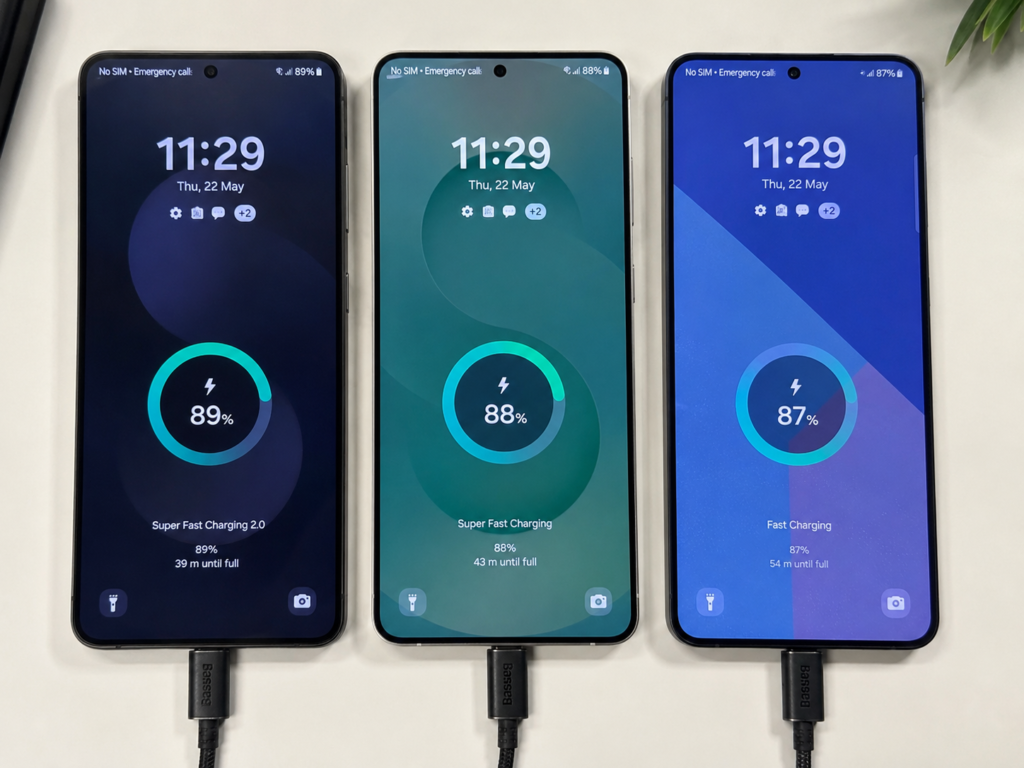
It should be noted that the text may vary slightly across different One UI versions and regional languages, and these labels only indicate that the corresponding mode has been entered, not that the peak power of 25W or 45W is maintained throughout the process—fast charging power changes dynamically, which will be explained in detail later.
Let’s first clarify the scope and premises of this article to avoid misunderstandings: we only talk about wired charging, focusing on the 25W Super Fast Charging and 45W Super Fast Charging 2.0 common in recent Samsung Galaxy phones and tablets. We do not cover wireless fast charging, in-car proprietary fast charging, old Micro-USB interface devices, nor industrial-grade USB power supply devices. The default premise for all conclusions below is that formal and compliant chargers, qualified cables are used, in a normal temperature environment, and the fast charging switch in the system is turned on. In cases of low temperature, high temperature, charging while playing games, current sharing from multi-port chargers, nearly full battery, or poor interface contact, the charging speed will definitely be affected.
There are also two most easily confused basic concepts that must be clarified first, otherwise the more you read later, the more confused you will be:
First, USB-C is the interface form (the oval interface that can be plugged in either way), and USB PD is the power supply protocol. The two are completely not the same thing—not all chargers with a USB-C port support PD, and not all USB-C devices can fast charge. The USB-C port of some old or low-power devices can only charge slowly.
Second, PPS is a programmable power supply extension function added to USB PD version 3.0. Not all PD chargers support PPS, and PPS is precisely the core prerequisite for Samsung Super Fast Charging to reach full speed.
Third, a high total power of the charger does not mean that it will charge Samsung phones faster—even a 240W PD 3.1 charger, if the PPS level does not match, Samsung phones still cannot reach full speed, because the phone itself has a maximum input power limit.
The Real Logic of Fast Charging: Wattage Does Not Represent Full-Process Speed
The biggest misunderstanding many people have about fast charging is that “whatever wattage is labeled, it will always charge at that power”. In fact, the power of mobile phone fast charging changes dynamically. The labeled 25W and 45W are only peak powers, just like the maximum speed of a car, which cannot be maintained from start to finish.
How is Power Calculated?
The formula for charging power is very simple: Voltage × Current = Power.
- Common reference parameters for Samsung 25W SFC: 9V × 2.77A ≈ 25W, which will be dynamically adjusted under the PPS level in practice;
- Common reference parameters for Samsung 45W SFC 2.0: 11V × 4.05A ≈ 45W, which is also the peak dynamically adjusted by PPS.
Charging is a Continuous Negotiation Process
Charging is not the charger forcefully pouring power into the phone, but a continuous “negotiation” process led by the phone:
- After plugging in the charger, the charger first reports to the phone the fixed voltage levels and PPS adjustable levels it supports;
- The phone requests the most suitable voltage and current combination from the charger based on the current battery level, temperature, maximum current the cable can withstand, and system load (such as whether you are playing a game);
- During charging, the phone will continuously adjust the request: it requires higher power when the battery is low, and gradually slows down as the battery level increases;
- In cases of excessive temperature, unqualified cables, current sharing from multi-port chargers, or nearly full battery, the phone will actively reduce power to ensure battery safety.
What Exactly Are the Advantages of PPS?
The voltage of a mobile phone battery will slowly rise as the battery level increases. If a PD charger with a fixed voltage level is used, the phone needs to convert the output voltage of the charger once internally to match the real-time demand of the battery. This conversion process will cause loss and heat generation.
PPS allows the charger to directly output a voltage close to the battery’s demand, reducing internal conversion loss in the phone, lowering heat generation, and improving charging efficiency in the medium and low battery range. However, it should be noted that PPS is not a magic that “if you have it, it will definitely be faster”. The final charging speed is still determined by the phone’s charging strategy, PPS level matching, cables, and temperature control.
The Real Speed Difference Between 25W and 45W
Many people think that 45W is 1.8 times that of 25W, and the charging speed will also be 80% faster, which is completely wrong. 45W is only the peak power, which usually only lasts for a short period of time when the battery is low (generally below 20%), at normal temperature, with the screen off or under low load.
From actual experience:
- 0-50% charging stage: 45W is about 15%-30% faster than 25W. For example, 25W takes 25 minutes to charge to 50%, while 45W may take about 20 minutes, which is suitable for emergency charging before going out;
- Total time from 0-100%: The difference between the two is usually less than 30%, because both will gradually slow down after medium to high battery levels, and the trickle charging speed of the last 10% is almost the same;
- The specific difference will also be affected by the model, battery capacity, ambient temperature, and background load, and cannot be directly converted by power multiples.
Why Do Chargers Labeled 45W Have Different Charging Speeds?
You may have encountered this: you bought a PD charger labeled 45W, but when charging a Samsung phone, it only shows “Super Fast Charging” instead of “Super Fast Charging 2.0”, and the speed is not much faster than 25W. There are several common reasons:
- Only fixed PD levels, no high-current PPS: For example, some 45W chargers only have fixed PD levels of 15V⎓3A and 20V⎓2.25A, and do not have the 4A-level PPS output required by Samsung, so naturally they cannot trigger SFC 2.0;
- Insufficient PPS current: 45W SFC 2.0 usually requires PPS to support an output capability of about 3.3-11V⎓4A. If the maximum PPS current is only 2.25A, it can only run up to 25W at most;
- Unqualified cable: 45W-level fast charging requires a cable that can withstand 5A current. Ordinary 3A cables will limit the current, and even if the charger is strong enough, it cannot reach full speed;
- Current sharing from multi-port chargers: Many multi-port chargers can output 45W PPS from a single port, but after plugging in a second device, the power of the port where the phone is connected will be shared, possibly dropping to 25W or even lower;
- Phone temperature control limit: When playing games, navigating, shooting videos, or when the ambient temperature is too high, the phone will prioritize temperature control and actively reduce charging power. Even if all accessories are qualified, it cannot reach the peak.
Full-Speed Trigger Conditions: How to Judge Whether Accessories Can Reach Full Speed?
Now that you know the principle, the next part is the most practical: how to confirm whether your phone, charger, and cable can trigger Samsung SFC full speed?
Necessary Conditions for 25W SFC
To trigger 25W-level Super Fast Charging, four conditions are indispensable:
- Device side: Your Samsung phone or tablet itself supports 25W SFC;
- Charger side: Supports USB PD PPS and can provide 25W-level PPS output capability;
- Cable side: Use a qualified USB-C to USB-C cable. USB-A to USB-C cables cannot complete full PD PPS negotiation and basically cannot trigger full speed;
- System environment side: The system fast charging switch is turned on, and temperature, battery level, and load status allow fast charging.
After meeting the conditions, the phone will usually display “Super Fast Charging”, but the real-time power will still change dynamically, not always maintaining 25W.
Necessary Conditions for 45W SFC 2.0
The requirements for 45W are higher, and all four conditions need to be upgraded:
- Device side: Your Samsung device explicitly supports 45W Super Fast Charging 2.0—do not judge by series names such as “flagship”, “Ultra”, or “Note”. Some basic flagships and old flagships only have 25W, so be sure to check the official parameters;
- Charger side: Supports PD PPS adjustable output with sufficiently high current. A common reference is 3.3-11V⎓4A-level capability;
- Cable side: Must use a 5A USB-C to USB-C cable with e-marker electronic marking. The e-marker is a small chip in the cable that can tell the charger and device the maximum current and voltage it supports to avoid overload. Formal C to C cables labeled 100W or 240W generally come with a 5A e-marker, but parameters should still be taken as the standard;
- Environment side: It is easier to reach the 45W peak power when the battery is low (20%-40%), at normal temperature, with the screen off or under low load.
Samsung models of different years, different chip platforms, and different battery capacities may have slightly different charging strategies, and the final standard shall be based on official parameters and the actual output levels of the charger.
How to Read Charger Parameters?
When buying a charger, don’t just look at promotional terms like “65W”, “100W”, “GaN”, “PD fast charging”. Focus on finding the PPS label in the output parameters, which is the key to whether Samsung SFC can be triggered:
- 25W-level reference: If you see “PPS 3.3-11V⎓2.25A” (about 24.75W), or other PPS levels that can cover the voltage and current required by Samsung, it is basically sufficient;
- 45W-level reference: Only when you see parameters around “PPS 3.3-11V⎓4.05A” (about 44.55W) is it possible to trigger SFC 2.0;
- If the detail page only says “supports PD fast charging” and does not mention PPS at all, there is a high probability that it cannot trigger Samsung SFC full speed;
- If the charger is labeled 45W but only lists fixed PD levels such as 15V⎓3A and 20V⎓2.25A, without high-current PPS, then its 45W is not the same thing as Samsung’s 45W SFC.
How to Read Cable Parameters?
- 25W scenario: A qualified USB-C to USB-C cable is sufficient. Focus on workmanship, contact reliability, and whether it supports PD communication. There is no need to specially buy a high-specification cable;
- 45W scenario: Prioritize choosing a 5A e-marker C to C cable from a formal brand. Common labels are “100W 5A” or “240W 5A”;
- Limit of 3A cables: Many ordinary C to C cables only support a maximum current of 3A, which is sufficient for 25W, but cannot withstand the 4A current required for 45W. Therefore, even with a 45W PPS charger, a 3A cable can only run up to about 25W at most;
- Limit of A to C cables: The USB-A port itself does not support full PD PPS negotiation, so USB-A to USB-C cables are not suitable as a Samsung SFC full-speed solution, and can only trigger ordinary fast charging at most.
Power Differences Between Samsung Models
Different series of Samsung devices have very different fast charging powers. Here is a general reference for you, but never judge directly by the series name. Be sure to check the official parameters of the corresponding model:
- Flagship Ultra/Note series: Some models support 45W SFC 2.0, and some old or non-Ultra models only support 25W;
- Regular S/FE series: Most support 25W SFC, and individual models may have different strategies;
- Z Fold/Flip foldable series: Most support 25W or lower power SFC;
- Tab tablet series: Mid-to-high-end models may support 25W/45W SFC, and entry-level models mostly have ordinary fast charging or lower power.
How to Verify That You Have Really Entered Fast Charging Mode?
- Basic judgment: Just look at the charging indicator on the phone’s lock screen or notification bar. Displaying “Super Fast Charging” means entering 25W-level SFC mode; displaying “Super Fast Charging 2.0” means entering 45W-level SFC 2.0 mode; displaying “Fast Charging” is generally ordinary PD or AFC, which does not reach SFC full speed; displaying normal charging means that fast charging conditions are not met.
- Advanced judgment: If you are interested, you can use a reliable USB-C power meter to observe voltage, current, and charging curves, but understand that instantaneous power will fluctuate. Don’t draw conclusions just by looking at the value of a certain second.
- Correct test conditions: It is recommended to observe when the battery is 20%-40%, at normal temperature, with the screen off, low background load, and only one device plugged in, so that the results are referenceable.
- Not recommended judgment methods: Testing when the battery is above 80%, testing while playing games, only looking at the peak of a certain second, testing with public charging piles—the speed in these scenarios cannot represent the real capability of the accessories.
For ordinary users, as long as the corresponding fast charging indicator can be displayed stably and the charging time meets expectations, it is completely sufficient. There is no need to pursue reaching the labeled peak every second.
How to Choose for Different Scenarios? Practical Purchasing Decision Framework
Single Samsung Device Charging Scenario
- Worry-free choice: Buy Samsung original chargers and cables directly, or third-party sets clearly marked “compatible with Samsung SFC/SFC 2.0”, no need to check parameters yourself;
- Cost-effective choice: Choose a USB PD PPS charger from a formal brand with matching parameters. The price is lower than the original, and the quality is also guaranteed;
- Key point for 25W users: Confirm that the charger supports 25W-level PD PPS, and use it with a qualified C to C cable;
- Key point for 45W users: First confirm that your phone supports 45W SFC 2.0, then choose a charger with 4A-level PPS, paired with a 5A e-marker C to C cable;
- Pitfall reminder: Chargers that only label “PD fast charging” but do not mention PPS parameters at all have a high probability of not being able to trigger SFC full speed. Buy with caution.
Multi-Device Mixed Use Scenario (Samsung + Tablet + Laptop/Other Brands)
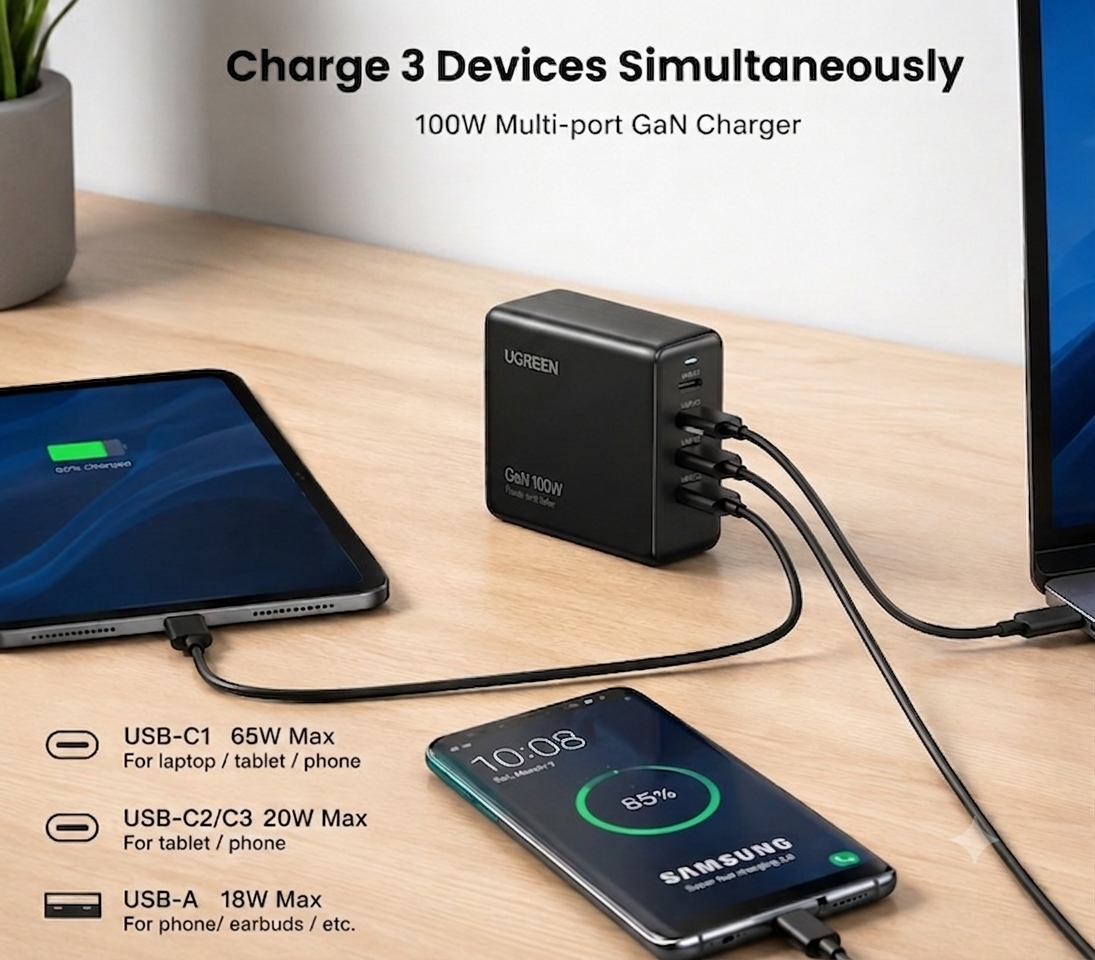
Prioritize choosing a multi-port USB PD PPS charger from a formal brand. One charger can handle all devices, so you don’t have to carry a bunch of chargers when going out.
Pay attention to three points when purchasing:
- The total power is sufficient for multiple devices to use at the same time;
- Single-port output supports the PPS level required by Samsung;
- When multiple ports are plugged in at the same time, the port where the phone is connected still retains sufficient PPS power—many multi-port chargers can reach 45W PPS on a single port, but when two or three ports are used at the same time, the phone port may drop to 25W, 18W or even lower. Be sure to read the multi-port distribution description on the parameter page clearly in advance.
In addition, when plugging in a second device, the multi-port charger may briefly stop charging to renegotiate power distribution. This is a normal phenomenon, not a malfunction.
Outing/Travel/Public Charging Scenario
- Try to bring your own PD PPS charger, which can charge your phone, as well as tablets, laptops, and power banks. It is much more reliable than public charging;
- Before purchasing for travel, confirm: whether the charger supports 100-240V wide voltage, whether the plug specification matches the destination, and whether you need to buy an additional conversion plug;
- The protocol, power, and cable quality of public charging piles are unstable, and there may also be shared load problems. There is no way to guarantee SFC full speed at all. Don’t use public charging to judge whether your accessories are good or not;
- Safety reminder: Public USB ports not only have no guaranteed charging speed, but may also have data security risks. Prioritize using your own charger plugged into an AC power outlet.
Power Bank Scenario
When Samsung users choose a power bank, they should prioritize models that support USB-C PD PPS output, and check these points:
- Whether the USB-C port supports PPS, and whether the PPS level is sufficient for 25W/45W;
- Whether the maximum output power of a single port meets the demand, and whether the power will drop when multiple ports output at the same time;
- Whether the included cable meets the current requirements. Many power banks come with 3A cables, which are not sufficient for 45W, so you need to replace them with 5A cables yourself;
- Don’t confuse capacity with power: capacity (mAh/Wh) determines how many times you can charge approximately, and power (W) determines how fast you charge. There is no necessary connection between the two.
Special reminder for 45W users: Many power banks are labeled 65W or even 100W, but the PPS current may not meet the requirements of Samsung SFC 2.0. Be sure to look at the specific adjustable level parameters, not just the total power.
Simplest Purchasing Decision Checklist
It doesn’t matter if you can’t remember the details above. Just check step by step according to this checklist:
- Only use Samsung devices and don’t want to study parameters: choose Samsung original/officially certified SFC sets;
- Multi-device mixed use, pursuing cost-effectiveness: choose a formal brand PD PPS charger, check PPS levels and cables;
- 25W models: PD PPS 25W-level capability + qualified C to C cable;
- 45W models: device supports 45W + 4A-level PPS charger + 5A e-marker C to C cable;
- Multi-port charger: additionally check the single-port power distribution when multiple ports output at the same time, not just the total power;
- For those who also need to charge laptops: meet both the PD power required by the laptop and Samsung’s PPS levels, both must meet the standard.
Common Misconceptions and Troubleshooting
9 Most Common Cognitive Misconceptions
- Misconception: SFC and USB PD are two completely unrelated protocols → Correct answer: Mainstream 25W/45W SFC is mainly implemented based on PD PPS, and is a fast charging label and strategy on the Samsung device side, not an independent protocol.
- Misconception: All PD chargers can charge Samsung at full speed → Correct answer: There must be a matching PPS level. Ordinary PD can usually only trigger lower-power fast charging.
- Misconception: The higher the wattage of the charger, the faster the phone charges → Correct answer: The phone has a maximum input power limit. A 100W charger can only run at 25W for a 25W model, and will not be faster.
- Misconception: 45W must be much faster than 25W → Correct answer: 45W has a higher peak, but the total time difference from 0-100% is usually less than 30%, and the difference is more obvious only when charging at low battery levels.
- Misconception: Non-original chargers will definitely damage the battery → Correct answer: Formal, compliant PD PPS chargers with matching parameters can be used safely. Inferior, falsely labeled accessories are the source of risk. Long-term use while charging at high temperatures has a greater impact on the battery.
- Misconception: Displaying Super Fast Charging means full power throughout the process → Correct answer: The label only indicates that the corresponding mode has been entered, and the power will be dynamically adjusted with battery level, temperature, and load.
- Misconception: Buying a 5A cable will trigger 45W → Correct answer: A 5A cable is only one of the necessary conditions. It also requires the device to support 45W and the charger to have corresponding PPS capability.
- Misconception: 65W/100W GaN chargers must support Samsung 45W → Correct answer: GaN is just a selling point of the charger’s component material, and has nothing to do with whether it supports PPS. The key still depends on PPS parameters.
- Misconception: A multi-port charger with sufficient total power will definitely reach full speed → Correct answer: It depends on how much power the port where the phone is connected can still get and whether it retains the PPS level when multiple ports are used at the same time.
Fast Troubleshooting Steps for Slow Charging (By Priority)
If your Samsung phone’s charging speed is wrong, check step by step in this order, and most problems can be found:
- Confirm the phone’s own power: First check the official parameters to confirm whether your model supports 25W or 45W. Don’t guess by the series name;
- Check system settings: Confirm that the fast charging switch is turned on. The name and location of settings may change after system upgrades, so look carefully;
- Check charger parameters: Does it support PD? Is there PPS? Is the PPS level sufficient? If it is a multi-port charger, is there another device plugged in causing current sharing and power reduction?
- Check the cable: Is it a C to C cable? Is it a 5A e-marker cable used in 45W scenarios? Is the cable damaged, loose, or has poor contact?
- Eliminate environmental and status factors: Is the temperature too high or too low? Are you using high-load applications while charging? Is the battery level already over 80%? Is the phone case too thick causing poor heat dissipation?
- Cross-verify: Try a different cable, a different charger, a different socket, and then clean the dust from the phone’s USB-C port. Many times it’s just poor contact;
- Power meter assistance: If you have a power meter, it can help with judgment, but don’t deny the capability of the entire set of accessories with a single instantaneous power. Look at the overall charging curve.
Corresponding Causes of Typical Fault Scenarios
- Scenario 1: 65W PD charger only displays “Fast Charging” → There is a high probability that the charger only supports fixed PD levels, has no PPS, or has insufficient PPS levels.
- Scenario 2: 45W phone only displays “Super Fast Charging”, not “Super Fast Charging 2.0” → Possible causes: insufficient charger PPS current, cable is not 5A e-marker, the model actually does not support 45W, too high temperature or system strategy limit.
- Scenario 3: Very fast just after plugging in, slows down after a few minutes → Normal phenomenon. As the battery level and temperature rise, the phone actively reduces power to protect the battery. It is not a problem with the accessories.
- Scenario 4: Samsung phone slows down after plugging in a second device → The multi-port charger redistributes power, and the power of the phone port is shared.
- Scenario 5: The same set of accessories is obviously slower in summer than in winter → The ambient temperature is high, and the phone’s temperature control limits the input power, which is a normal protection mechanism.
Final Summary: You Can Now Judge by Yourself
After reading this article, you should already understand that Samsung Super Fast Charging and USB PD have never been opposed—mainstream 25W/45W SFC is essentially a Samsung-exclusive fast charging experience implemented based on USB PD PPS.
Let’s go through the core conclusions again for you:
- Whether a Samsung phone can reach full speed depends on “device-supported levels + charger PPS matching + cable current meeting standards”, and has nothing to do with the advertised total wattage of the charger;
- Original SFC accessories are the most worry-free, no need to study parameters; formal third-party PD PPS accessories have stronger versatility and higher cost-effectiveness, but you need to check the PPS levels yourself;
- The peak of 45W is indeed higher, but the actual speed is affected by battery level, temperature, load, and model strategy, far from 1.8 times that of 25W, and the total time difference from 0-100% is usually less than 30%.
If you encounter fast charging-related problems in the future, just check according to this verbal checklist:
- First look at the phone: Does this Samsung support 25W or 45W?
- Then look at the charger: Is there PPS in the output parameters? Is the voltage and current sufficient?
- Then look at the cable: Use a qualified C to C for 25W, and a 5A e-marker C to C for 45W;
- Finally look at the environment: Is it high temperature, high load with the screen on, multi-port current sharing, or the battery level is already very high?
Whether you are choosing a charger, choosing a cable, or troubleshooting slow charging, going through this checklist will basically give you an accurate answer. You don’t have to ask people everywhere, and you won’t be easily fooled by promotional terms.