
We’ve all been there: packing for a trip and staring at a pile of chargers for your phone, tablet, laptop, and wireless earbuds, wondering if you can just grab your 65W or 100W laptop charger and use it for everything. But then the doubts creep in: Will that much power fry my phone? Will it make the battery bloat? Could it burn out the motherboard? If you own multiple consumer electronics, you’ve almost certainly had these worries. Today we’re breaking down everything you need to know about mixing high-wattage chargers—from how charging works, to common use cases, to mistakes you need to avoid. By the end, you’ll be able to tell for sure if your charger is safe to use across devices.
Short Answer: Compliant High-Wattage Chargers Are Usually Safe to Mix
Let’s cut straight to the point: As long as you have a genuine, certified charger, compatible fast charging protocols, a quality cable, a fully functional device, and a well-ventilated charging space, using a higher-wattage charger for phones, tablets, laptops, earbuds, and other devices is almost always safe.
A lot of people misunderstand what “wattage” means on a charger: the number printed on the brick is its maximum power delivery capacity, not the fixed amount it will always output. Think of it like the water line coming into your home: it can supply enough water for every tap in the house at once, but when you fill a coffee mug, you only get as much water as you let flow through the faucet. It won’t blast the mug to pieces. The real risks never come from high wattage itself—they come from uncertified cheap chargers, low-quality cables, damaged devices, hot enclosed spaces, and hacks that bypass charging safety protocols.
Your 3 Biggest Concerns, Answered
- Will it fry my motherboard? Genuine USB-C PD or other compliant fast charging systems negotiate voltage and current before any power flows. The device only draws the amount of power it can safely handle, so there’s no risk of “forced” power damaging internal components.
- Will it make my battery bloat or catch fire? The risk is extremely low when using a working device with compliant accessories. Battery swelling, fires, and overheating are almost always caused by damaged batteries, water exposure, extreme heat, or cheap, uncertified parts—not high-wattage chargers.
- Will it speed up battery degradation? Compliant fast charging does not automatically cause severe battery damage. Far bigger factors for battery lifespan are high temperatures, using the device under heavy load while charging, and leaving devices plugged in at 100% for long periods.
What This Guide Covers (and What It Doesn’t)
The safety rules in this guide apply to common consumer electronics: phones, tablets, laptops, wireless earbuds, smartwatches, fitness bands, and power banks, with a focus on universal USB-C PD fast charging scenarios.
One critical caveat: Old barrel-jack chargers or chargers with proprietary, non-standard connectors cannot be mixed based on wattage alone. You must verify that the output voltage matches the original charger exactly, that the connector polarity and size are correct, and that the replacement meets the manufacturer’s requirements. Using the wrong proprietary charger can absolutely damage your device.
Why Don’t High-Wattage Chargers “Force” Power Into Devices?
The fear of high-wattage chargers mostly comes from the idea that they’ll push all their power into a small device, like pouring a bucket of water into a shot glass. But charging is a two-way negotiation—your device is the one in control. Let’s break it down.
Rated Wattage = Maximum Capacity, Not Fixed Output
You might remember this basic formula from science class: Power (W) = Voltage (V) × Current (A). You don’t need to memorize it—just know that a 100W charger can deliver up to 100W of power, not that it will always output 100W. Think of it like a professional mover who can lift 100 pounds: if you hand them a 20-pound box, they’ll only use enough effort to carry 20 pounds. They won’t shove an extra 80 pounds of stuff into your box.
Fast Charging Protocols Negotiate Power Before Any Electricity Flows
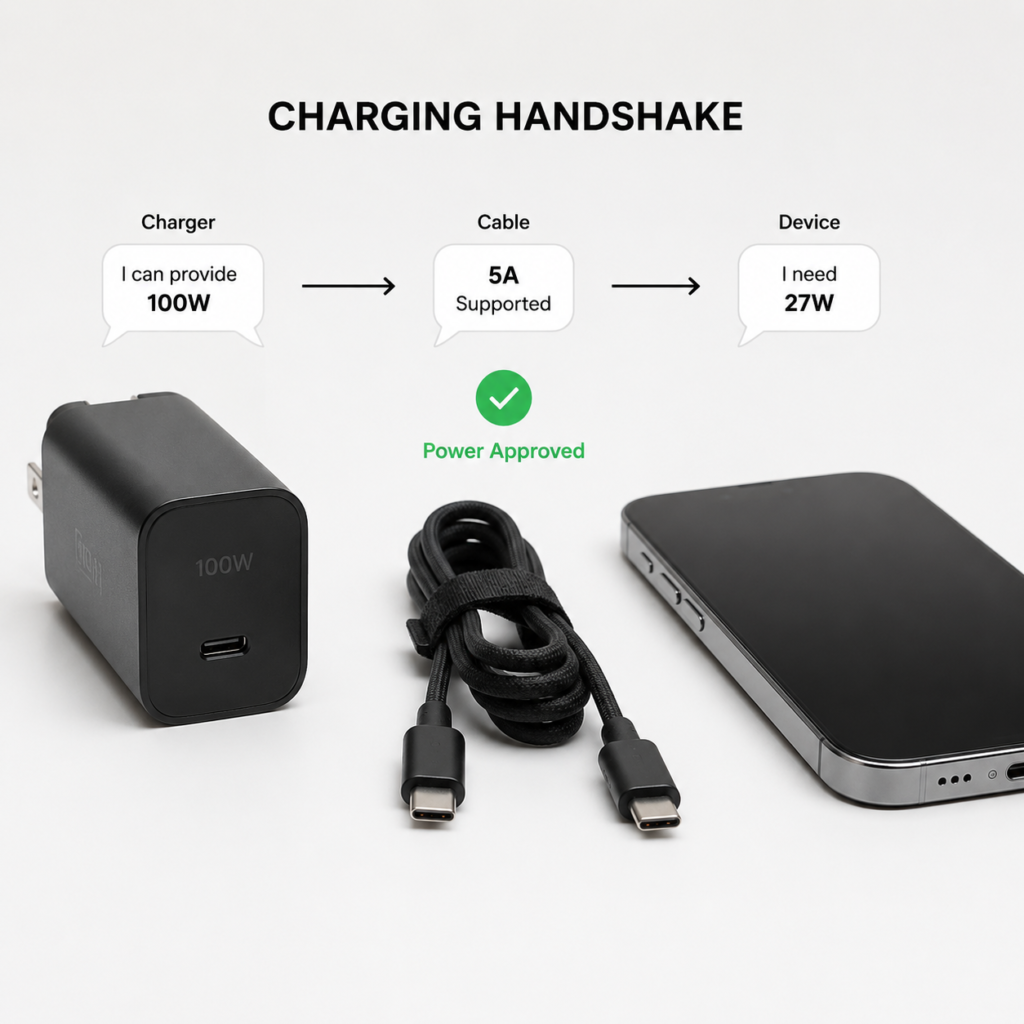
Charging doesn’t start the second you plug in the cable. First, the charger, device, and cable communicate using a set of rules called a fast charging protocol—think of it as a shared language. USB PD, PPS, QC, and brand-specific proprietary fast charge protocols all serve this same purpose.
As soon as you plug in, all three parts “shake hands” and agree on power levels:
- The charger says: “I can output 5V, 9V, 12V, and 20V, up to 100W total.”
- The device says: “I only need up to 9V/3A, which is 27W.”
- The cable says: “I can handle up to 5A of current, so that’s fine.”
Only after this negotiation succeeds does the charger deliver power at the requested level. If the protocols don’t match—for example, if your device only supports an older QC protocol and the charger uses PD—the system will usually fall back to basic 5V slow charging instead of forcing high voltage.
Three Layers of Protection Keep You Safe
In a legitimate charging setup, three separate lines of defense prevent accidents:
- Charger side: All compliant chargers include over-voltage, over-current, over-temperature, and short-circuit protection. If something goes wrong, they automatically cut power.
- Device side: Phones, laptops, and other devices have dedicated charging management chips, battery protection boards, and temperature sensors that control charging speed and current at all times. If the device gets too hot, it slows down charging; when the battery is full, it stops entirely.
- Cable side: High-power USB-C cables include a tiny chip called an E-Marker, which acts as the cable’s ID card. It tells the charger how much current it can safely handle, so the charger won’t activate high-power mode if the cable can’t keep up. 100W and higher PD charging almost always requires a 5A E-Marker cable. For even higher 140W/240W PD 3.1 setups, you’ll also need a cable that supports EPR (Extended Power Range).
Common Mix-and-Match Scenarios: What’s Safe, What’s Risky?
Now that you understand how charging works, let’s walk through the most common mix-and-match scenarios to clear up any confusion.
Can I Use a 65W/100W Charger for My Phone?
Almost always yes. For example, if your iPhone supports ~27W PD fast charging, plugging it into a 100W PD charger will only draw around 27W—no damage, and it won’t charge any faster than the phone’s maximum speed.
If your phone uses a brand-specific proprietary fast charge protocol (like 120W or 210W super fast charging on some Android models), a third-party universal high-wattage charger may only trigger standard PD charging or even slow charging. It will still be safe, just not as fast as the original charger.
Can I Use a Laptop 65W/100W Charger for My Tablet?
If you have a USB-C PD tablet (like an iPad Pro or Samsung Tab S series), it’s completely safe to use a laptop PD charger. The tablet will negotiate to its maximum supported power level automatically. If the protocols don’t match, the most common outcome is slower charging or no fast charge—no safety risk.
Can I Use a Higher-Wattage Charger for My Laptop?
For USB-C PD laptops (like MacBooks, Dell XPS, or Lenovo Yoga models), using a higher-wattage PD charger is usually safe. The laptop will only draw as much power as it needs—for example, a laptop that came with a 65W charger will still charge at around 65W when plugged into a 100W PD brick.
Critical warning: Laptops with old barrel-jack or proprietary square connectors cannot be charged with random higher-wattage chargers. You must confirm the output voltage matches the original charger exactly, the connector polarity is correct, and the connector size fits. Stick to OEM or officially certified replacements, or you risk frying the motherboard.
Will a High-Wattage Charger Break My Earbuds, Smartwatch, or Fitness Band?
Genuine high-wattage chargers are perfectly safe for small wearables and audio devices. These small gadgets have charging circuits that only request 5V low-power charging, so the charger will deliver exactly that, no high voltage.
Risks come from other sources: cheap no-name earbuds with cut-rate charging circuits, water-damaged devices, dirty or tarnished magnetic charging pins, or charging while the device is covered by fabric or a thick case. These issues cause problems, not the charger’s wattage.
Is It Safe to Charge a Power Bank With a High-Wattage Charger?
Yes—genuine power banks have built-in input protection circuits that limit power draw to their maximum supported input level. For example, if your power bank only supports 18W input, plugging it into a 65W charger will still charge it at 18W, with no risk of damage.
If you want fast charging for your power bank, you’ll need the power bank’s input protocol, the charger’s protocol, and the cable’s specs to all match. If any one is missing, it will just charge slower—still safe, just not as fast.
6 Real Risks That Actually Make Charging Unsafe
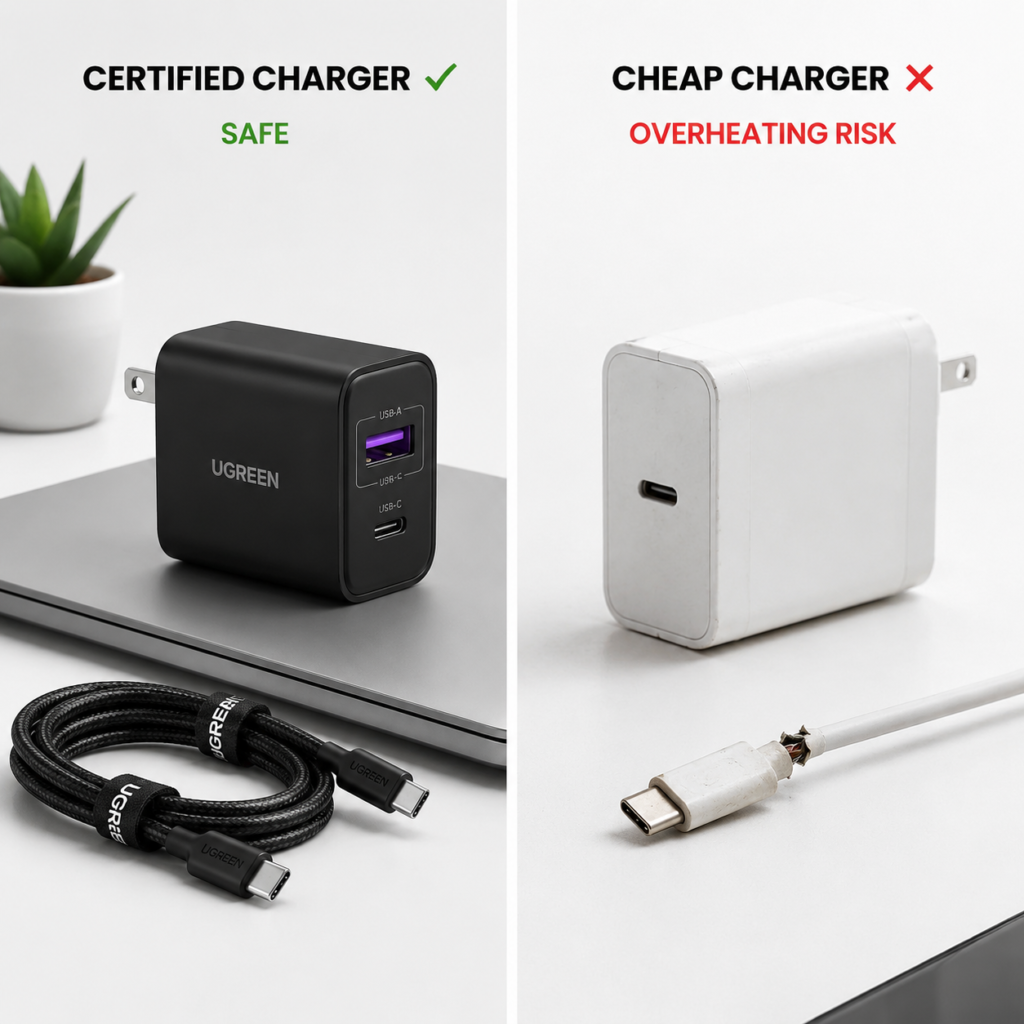
We’ve talked a lot about what’s safe, but high-wattage chargers aren’t risk-free if you use them wrong. The real dangers come from these common mistakes—avoid them at all costs.
1. Uncertified, Fake-Rated No-Name Chargers
This is the single biggest risk. Many ultra-cheap no-name chargers cut every corner to save cost: they skip protection circuits, have insufficient insulation, and deliver unstable voltage and current. At best, they’ll damage your device; at worst, they can short out and cause a fire.
Avoiding them is simple: check for regional safety certifications that match where you live:
- North America: Look for UL or ETL safety certification, plus FCC compliance for electromagnetic compatibility
- EU/EEA: Choose reputable brands with valid CE marking
- UK: Look for UKCA certification
- Japan: Look for PSE certification
- China: Look for mandatory 3C certification
Never buy white-label chargers with no brand, manufacturer info, or contact details. Saving a few dollars isn’t worth the fire risk.
2. Under-Spec or Damaged Cables
Cables aren’t just “plug and play”—they have a maximum current rating:
- For USB-C PD setups under 60W, a standard 3A cable is usually sufficient
- For 100W and higher PD charging, you’ll need a 5A cable with an E-Marker chip
- For 140W/240W PD 3.1 setups, confirm the cable supports EPR (Extended Power Range)
If your cable has a cracked outer jacket, loose connectors, tarnished or blackened metal pins, or is stiff and cracked at the bend points, replace it immediately. Damaged cables can overheat, short out, or cause fires.
3. Charging a Damaged Device
If your device has a swollen battery, water damage, a loose charging port, gets so hot you can’t hold it while charging, or smells like burnt plastic, stop charging immediately. Don’t test it with different chargers to “see if it works”—take it to official customer support or a reputable repair shop right away. Damaged devices already have safety hazards, and charging will only make those risks worse.
4. Charging in Hot, Enclosed, or Covered Spaces
Lithium-ion batteries hate heat. Never charge devices in a hot car in direct sunlight, under blankets, under pillows, under piles of clothes, or with super thick, non-breathable phone cases. High heat doesn’t just speed up battery degradation—it can also cause internal short circuits in the battery, increasing fire risk.
5. Charging While Running High-Load Apps
Charging while playing graphics-heavy 3D games, using turn-by-turn navigation on a long drive, editing 4K video, or running a mobile hotspot for hours makes your device generate a lot of heat on its own. Add charging heat on top of that, and temperatures can spike quickly. At best, your device will throttle performance or pause charging to cool down; at worst, it will speed up battery aging or create safety risks.
6. Trigger Cables, Cheap Adapters, and Multi-Port Charger Fine Print
Avoid so-called “PD trigger cables” or cheap power adapters, especially generic ones designed for old barrel-jack laptops. These often have mismatched voltage or reversed polarity, which can fry your motherboard instantly. If you absolutely need an adapter, buy one from a reputable brand that explicitly lists compatibility with your exact device model.
Also, when buying a multi-port charger, don’t just look at the total advertised wattage. A 100W dual-port charger might deliver 100W when only one port is in use, but drop to 65W + 30W when both ports are active. Always check the per-port maximum power and power distribution rules before you buy.
Safe Charger & Cable Buying + Usage Guide
Now that you know what risks to avoid, here’s how to pick safe accessories and use them correctly.
How to Pick a Safe Charger: 4 Key Tips
- Check certifications first: Prioritize chargers with your region’s required safety certifications—this is the absolute baseline for safety. Genuine products will almost always print certification marks on the charger casing or packaging.
- Check supported protocols: If you have multiple devices, choose a universal charger that supports USB PD and PPS—these work with almost all phones, tablets, and laptops. If you rely on a brand’s proprietary fast charge, buy the OEM charger or a third-party model explicitly listed as compatible.
- Check output specs: Look for a charger with output levels that cover common voltages: 5V, 9V, 12V, 15V, and 20V. This ensures better compatibility across devices. If you travel internationally, pick a 100-240V wide-voltage model, which works in most countries without a separate voltage converter.
- Buy from reputable channels: Stick to official brand stores, authorized retailers, and well-known online sellers. Avoid ultra-cheap no-name chargers from street stalls or random small shops—they’re almost always fake-rated and low quality.
How to Pick the Right Cable for Your Needs
- For USB-C devices under 60W: A standard 3A USB-C cable is sufficient
- For USB-C devices 100W and up: Choose a cable explicitly rated for 5A with an E-Marker chip
- For Apple Lightning devices: Use Apple official or MFi-certified cables to avoid pop-up errors, unstable charging, and quality issues
- For proprietary fast charge devices: Some brands require OEM or certified cables to hit maximum fast charge speeds—check product details before buying
5 Daily Habits for Safe Charging
- Charge devices in well-ventilated, dry areas away from flammable materials, like a desk or nightstand. Never charge on beds, in couch cushions, or near piles of paper.
- If you notice unusual overheating, a burnt smell, smoke, or sparks while charging, unplug the charger immediately and stop using the device.
- Avoid charging while running high-load apps like graphics-heavy games or long video editing sessions. If you have to use the device while charging, take off the protective case and set it somewhere with good airflow.
- For devices that stay plugged in long-term (like work laptops or backup phones), turn on battery protection/optimized charging mode—the feature that pauses charging at around 80%. Most major brands (Apple, Samsung, Google, Lenovo, etc.) include this feature, and it drastically extends battery lifespan.
- During thunderstorms or when the power grid is unstable, unplug chargers or use a reputable surge protector to avoid voltage spikes damaging your devices.
Quick Pre-Charge Checklist
When you’re not sure if a charger is safe to use, run through this quick list:
- [ ] The charger is from a reputable brand and bought from a legitimate channel
- [ ] It has the required safety/regulatory certifications for your region
- [ ] The device, charger, and cable have compatible fast charging protocols
- [ ] The cable is rated for enough power, with no damage, loose connectors, or tarnished pins
- [ ] The device has no swollen battery, water damage, strange smells, or unusual overheating
- [ ] The charging area is well-ventilated, cool, and nothing is covering the device
Common Charging Myths, Debunked
There’s a lot of misinformation about charging floating around. Let’s bust the 6 most common myths.
Myth 1: Higher Wattage = Faster Charging for Any Device
Fact: Charging speed is determined by the device’s maximum charging power, protocol compatibility, cable specs, and temperature control. If your phone only supports 25W, a 200W charger will still charge it at 25W. It won’t be any faster—you’re just paying for extra capacity you’ll never use.
Myth 2: High-Wattage Chargers Force Power Into Devices
Fact: All genuine fast charging systems negotiate power levels before charging starts. The charger only delivers exactly what the device requests, just like you wouldn’t pour an entire fire hose worth of water into a small coffee mug.
Myth 3: All Third-Party Chargers Are Unsafe
Fact: Third-party chargers from reputable brands with proper safety certifications and matching specs are perfectly safe to use. Many third-party brands build higher-quality chargers than generic “OEM” knockoffs. The unsafe products are uncertified, no-name cheap chargers—not third-party ones in general.
Myth 4: Fast Charging Always Severely Damages Batteries
Fact: The biggest factors affecting lithium-ion battery lifespan are high temperatures, charge cycle depth, and long-term storage at 100% charge. Compliant fast charging has a much smaller impact than most people think. Modern devices have robust temperature control and charging management systems, so normal use is nothing to worry about. High heat from charging while running heavy apps is far worse for battery health.
Myth 5: All USB-C Cables Handle 100W+ Charging
Fact: USB-C is just the shape of the connector—it doesn’t tell you anything about the cable’s power capacity. Many cheap USB-C cables only support 3A current, which maxes out at 60W. For 100W+ charging, you need a dedicated 5A E-Marker cable. Always check the specs before buying.
Myth 6: A Certification Mark Guarantees a Product Is Safe
Fact: Some dishonest sellers print fake certification marks on cheap, low-quality products. That’s why buying from reputable channels is just as important as checking the mark. If you’re unsure, you can look up the product’s certification number on the certifying body’s official website to verify it’s legitimate.
10-Second Quick Check: Can You Use That Higher-Wattage Charger?
If you’re ever in doubt, just ask yourself these 6 simple questions:
- Is the charger from a reputable brand and a legitimate seller?
- Does it have the required safety certifications for my region?
- Are the fast charging protocols on my device and the charger compatible?
- Is the cable rated for enough power?
- Are the device, cable, and charger all undamaged, with no unusual overheating?
- Is the charging spot well-ventilated, cool, and free of items covering the device?
If you can answer “yes” to all six, you can use the charger with confidence. If you’re unsure about any one, stick to a lower-wattage genuine charger first, or contact the device manufacturer’s support team to confirm before using.
At the end of the day, high-wattage chargers aren’t a hazard—they’re a convenient way to consolidate all your charging needs into one brick, so you can carry fewer accessories when you travel. As long as you choose genuine, certified products, double-check protocol and cable compatibility, and avoid risky usage habits, mixing high-wattage chargers is both convenient and safe. The real thing to watch out for isn’t high wattage—it’s cheap uncertified accessories, bad charging habits, and using damaged devices.