
1. Basic Knowledge: Core Facts About iPhone Battery and Charging
Many people assume iPhone batteries degrade quickly, but with a basic understanding of how they work, you can significantly slow down the aging process.
iPhones use lithium-ion batteries. Unlike older battery types, they have no “memory effect”, so you never need to fully drain them before recharging. Battery aging is a natural process, but bad charging habits can speed it up, while good habits can extend your battery’s lifespan.
“Battery Health” shows your battery’s current maximum capacity compared to when it was new. A “charge cycle” happens when you use 100% of the battery’s capacity — for example, going from 100% to 20% and then charging back to 100% counts as 0.8 of a cycle. According to Apple, a normal iPhone battery retains about 80% of its original capacity after 500 full charge cycles.
The goal of proper charging is to slow this decline as much as possible, so your phone stays reliable for longer.
2. Charging Accessories: Buying Guide and Pitfalls
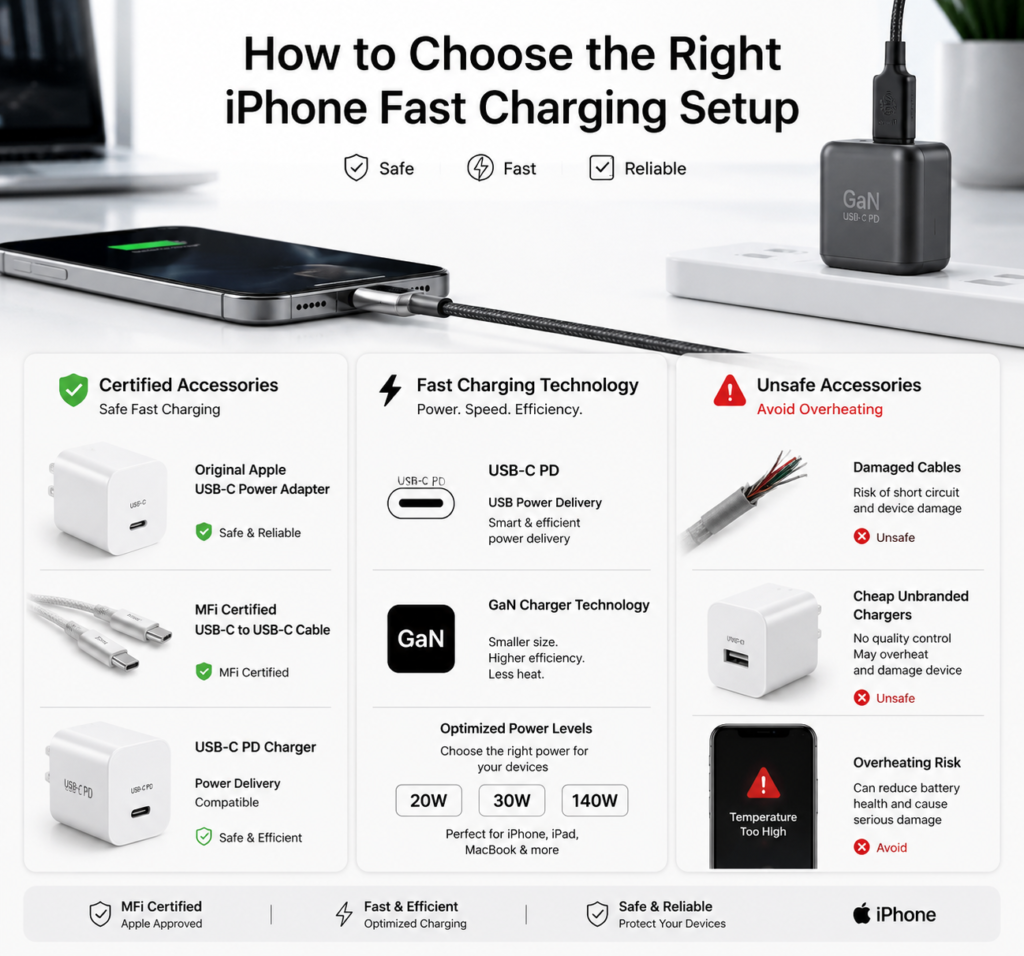
The right accessories are the first step to safe charging and battery protection. The wrong ones not only charge slowly, but can also damage your device.
(1) Charging Cables
- Original vs. MFi-certified cables: Original Apple cables are reliable but expensive. MFi (Made for iPhone) certified cables are made by third-party brands with Apple’s official chip, offering the same safety and compatibility at a better price.
- Lightning vs. USB-C cables: iPhone 14 and older models use a Lightning port and require a USB-C to Lightning cable for fast charging. iPhone 15 and newer models use a USB-C port and work with standard USB-C to USB-C cables.
- Risks of damaged or cheap cables: Frayed, uncertified cables can cause unstable charging, overheating at the port, and in severe cases, damage your phone’s charging chip or create a fire risk.
(2) Chargers
A higher wattage charger is not always better — matching your phone is what matters. Different iPhone models support different fast charging speeds. See the table below for reference:
| iPhone Series | Charging Port | Max Fast Charging Power | Recommended Charger Wattage |
|---|---|---|---|
| iPhone 8 ~ iPhone 11 | Lightning | ~18W | 20W |
| iPhone 12 ~ iPhone 14 | Lightning | ~20W–27W | 20W / 30W |
| iPhone 15 Series | USB-C | ~27W | 20W / 30W |
- Are third-party PD/GaN chargers safe? Yes — as long as they are from reputable brands and support the USB Power Delivery (PD) protocol, they are completely safe. GaN (Gallium Nitride) chargers are smaller, run cooler, and many have multiple ports, making them perfect for travel.
- Original vs. certified third-party chargers: Go official if budget is no issue. For most people, a reputable PD charger plus an MFi cable delivers the same performance and safety at a lower cost.
(3) Wireless Charging Accessories
- Qi vs. MagSafe charging: Qi is a universal wireless charging standard that works with all wireless-charging iPhones, with a maximum power of 7.5W. MagSafe is Apple’s magnetic wireless charging system for iPhone 12 and newer, delivering up to 15W with perfect alignment every time.
- How to choose a safe wireless charger: Look for products with Made for iPhone, Qi-certified, or MagSafe-certified labeling. Avoid no-name, unbranded cheap chargers with no listed specifications.
3. Wired Charging: Best Practices and Fast Charging Facts
Wired charging is the fastest and most efficient way to charge your iPhone. Done right, it balances speed and battery care.
- Best daily charging habits: Charge little and often. Try to keep your battery between 20% and 80%. Don’t let your phone die completely, and you don’t need to charge it to 100% every time.
- How to enable fast charging and what to expect: Fast charging requires both a PD fast charger and a certified cable. At room temperature, you can get around 50% battery in 30 minutes. Above 80%, charging automatically slows down — this is a normal battery protection feature, not a problem.
- Charging while using your phone: Light use like messaging or watching videos is fine. But high-load tasks like gaming or long video calls make the phone hot, and combined with charging heat this can speed up battery aging. It’s best to avoid charging during heavy use.
4. Wireless Charging and MagSafe Explained
Wireless charging is convenient, but many people worry it damages batteries. The real factor to watch is heat.
- Qi wireless charging: Tips and speed: Standard Qi charging is slower than wired. Make sure the phone is centered on the charger — misalignment causes slower charging and more heat.
- MagSafe charging: Benefits, requirements and tips: MagSafe snaps into place automatically, so you never have to fumble with alignment, and it charges faster than regular Qi. Use a MagSafe-compatible case; thick metal cases or magnetic accessories can reduce efficiency and cause extra heat.
- Does wireless charging damage your battery? No. Wireless charging itself does not harm batteries. The heat generated during charging is what matters. With a quality charger and normal room temperature, wireless charging is just as safe as wired.
5. iOS Battery Protection Features You Should Use
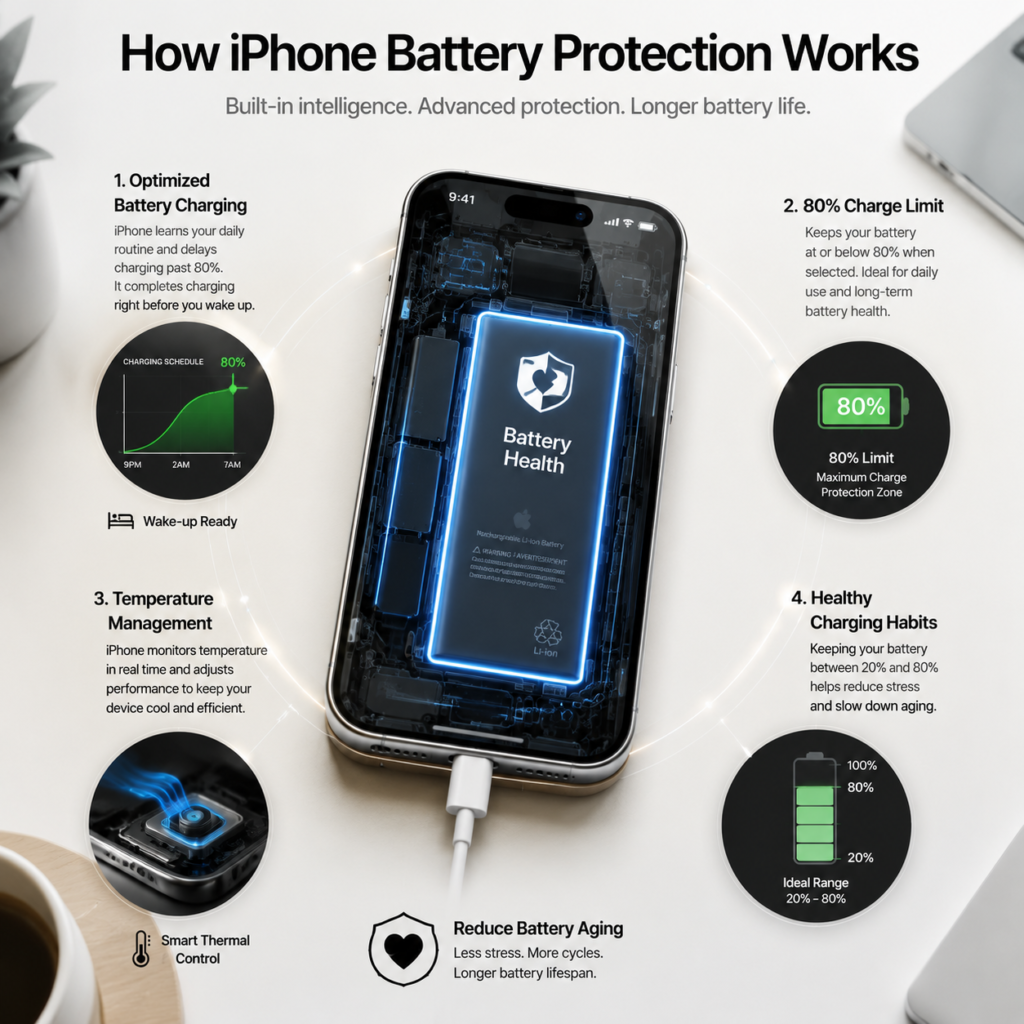
iOS has built-in battery protection tools that slow down aging without getting in the way of daily use.
- Optimized Battery Charging: How it works: This feature learns your daily routine (for example, charging overnight while you sleep). It pauses charging at 80% and finishes the last 20% right before you usually wake up, reducing the time your battery spends at 100%. Keep this turned on for daily use; you can turn it off temporarily if your schedule changes.
- 80% Charge Limit (iPhone 15 and newer): This is a more direct protection option. When enabled, your phone stops charging at 80%. It’s ideal if you keep your phone plugged in most of the day and don’t need maximum battery life.
- Temperature protection and other management: If your phone gets too hot, iOS will automatically pause charging and may show a temperature warning. This is normal protection — just let your phone cool down and charging will resume.
6. Common Charging Myths Debunked
There are many myths about iPhone charging. Here are the facts behind the most common ones:
| Common Myth | The Truth |
|---|---|
| New phones need a full discharge then full charge to “activate” | False. Lithium-ion batteries have no memory effect. Just use and charge your new iPhone normally. |
| Charging overnight will damage or explode your battery | False. Phones have full overcharge protection and stop charging when full. Long-term overnight charging can slightly speed up aging, but Optimized Battery Charging fixes this. |
| Fast charging definitely ruins your battery faster | False. Proper fast charging has very little impact. Heat and cheap accessories cause far more battery damage than fast charging itself. |
| Wireless charging is worse for your battery than wired | False. It’s not wireless charging itself — it’s excess heat from cheap chargers. With a good product, there’s no extra damage. |
| Non-original accessories will always harm your phone | False. Certified third-party accessories (MFi, PD, Qi) are just as safe as official ones. |
| You can’t use your phone while charging | False. Light use like browsing or texting is fine. Just avoid heavy gaming or video recording while charging. |
7. Charging Tips for Every Scenario
Different situations call for different charging habits to balance convenience and battery health.
- Daily commute and office use: Keep a charger at your desk and top up your battery throughout the day. Staying in the middle charge range is better than waiting until it’s almost dead.
- Travel and power banks: Choose a PD fast-charging power bank and a compact multi-port GaN charger. They can charge your phone, earbuds and tablet all at once.
- Extreme hot or cold weather: Don’t charge your phone in direct sunlight or inside a hot car in summer. In cold winter weather, charging may slow down naturally — charge indoors at room temperature if possible.
- Long-term storage: If you won’t use your phone for two weeks or more, charge it to about 50%, turn it off, and store it in a cool, dry place. Top it up every 1–2 months.
- Gaming and heavy use: Charge your phone before you start playing. If you must charge while gaming, use a wired charger and take off the case to help with cooling.
8. Battery Care and Troubleshooting
Core Rules to Slow Battery Aging
Use certified charging accessories, avoid high temperatures, and don’t leave your battery fully charged or fully drained for long periods.
Common Charging Problems and Fixes
- Not charging at all: Try a different cable and charger first. Check the charging port for dust or debris, and make sure your phone is not too hot or too cold.
- Charging too slowly: It’s normal for charging to slow down above 80%. If it’s slow the whole time, check that your charger and cable support fast charging, and that your phone isn’t overheating.
- Overheating while charging: Unplug immediately, remove the case, close heavy apps, and let the phone cool in a shady spot. If this happens often, get your battery checked.
- When to replace your battery: Consider a replacement when Battery Health drops below 80%, or when you notice much shorter battery life or performance drops. Apple official service is the most reliable option, but reputable third-party repair shops also work.
9. Conclusion: Build a Smart iPhone Charging Routine
The simple formula for good iPhone charging is: quality accessories + good habits + avoid heat.
You don’t need to chase “perfect charging” or stress about your battery. Batteries are consumable parts — with normal use, they last 2–3 years easily. When the health does drop, a battery replacement will make your phone feel like new again.
Follow these tips, enjoy the convenience of fast charging, and your iPhone battery will stay healthy for longer.