
If you’ve been shopping for a charger lately, you’ve definitely seen the term “gallium nitride” (GaN). It feels like you’re behind the times if you don’t buy a GaN charger these days — but is that really the case? What exactly makes GaN better than traditional silicon-based chargers? Does it charge faster? Is it worth paying extra? In this article, we’ll break everything down thoroughly, from basic common knowledge to buying tips. After reading, you’ll be able to make your own judgment without being swayed by marketing buzzwords.
Conclusion First: Quick Version for Regular Users
If you’re short on time, read these core conclusions first, which will answer about 80% of your questions.
One-Sentence Conclusion
The core advantage of GaN chargers is not that they charge phones faster, but that they are easier to make smaller, lighter, and with higher multi-port integration at the same power level. Silicon-based chargers are not outdated or obsolete — they are still very practical in low-power, fixed-location, budget-sensitive scenarios. Under the premise of the same power, same protocol, same device, and same cable, the charging speed of GaN and silicon chargers is usually almost identical. The priority when buying should be: device power requirement and protocol matching > safety and compliance > cable specification > multi-port power distribution > whether it is GaN.
Quick Comparison Table
For a more intuitive view, we’ve organized the core differences between the two into a table. The comparison premise is consumer-grade products with the same power, same positioning, and formal compliance certification:
| Comparison Dimension | Gallium Nitride Charger (GaN) | Silicon-Based Charger (Si) |
|---|---|---|
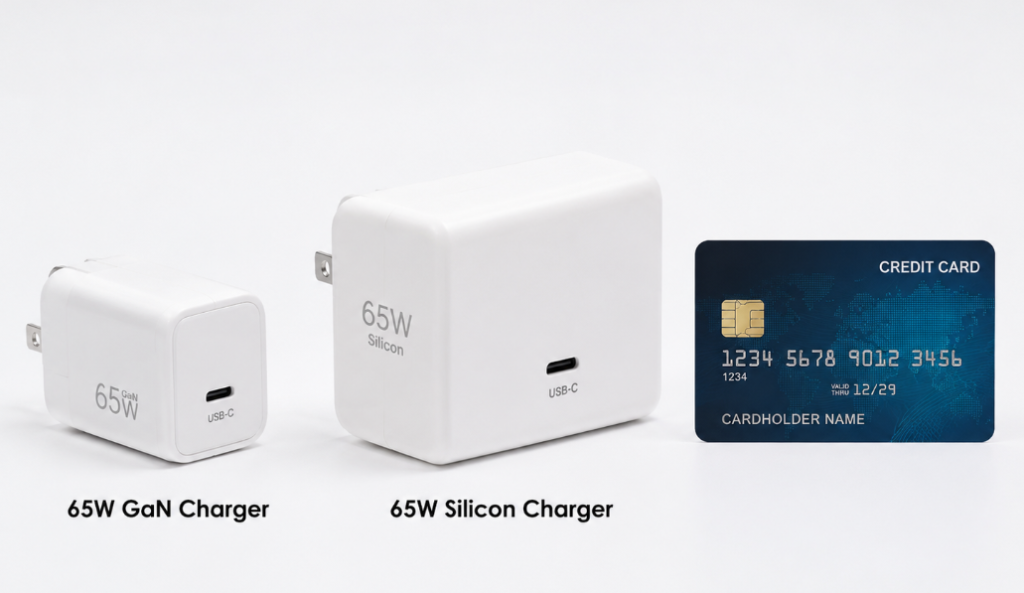
| Size and Weight | Usually smaller and lighter at the same power; advantage is obvious above 65W | Usually larger and heavier at the same power |
| Charging Speed | Basically no difference at the same power and same protocol; speed depends on power, protocol, cable, and device upper limit | Basically no difference at the same power and same protocol |
| Heat Performance | Usually higher conversion efficiency, but small size leads to concentrated heat, so it may not feel cooler to the touch | Slightly lower efficiency, but larger size means larger heat dissipation area, so surface temperature may be lower |
| Multi-Port Capability | Common 65W, 100W, 140W multi-port compact products with high integration | Multi-port products are usually larger in size at the same power |
| Price | Usually more expensive; price gap has gradually narrowed in recent years | Extremely cost-effective for low-power products |
| Safety | Qualified products are safe; low-quality products carry high risks | Qualified products are safe; mature solutions have strong stability |
| Suitable For | Users who travel frequently, have multiple devices, or charge laptops via USB-C | Users with a single phone, fixed home use, or budget priority |
This Article Will Help You Answer These Questions
- What exactly is the difference between GaN chargers and regular silicon-based chargers
- Whether GaN chargers are faster, safer, and more durable
- Which scenarios are worth paying extra for GaN, and which scenarios have no need to upgrade at all
- How to understand key parameters like power, protocol, multi-port distribution, safety certification, and cable specifications
Prerequisites: Clarify Comparison Objects and Basic Rules First
Before we formally talk about principles and comparisons, let’s clarify “what exactly we are comparing”, “what makes a fair comparison”, and “which common misconceptions to avoid first”, so you don’t get confused as we go on.
What Is a Silicon-Based Charger
The silicon-based chargers we often talk about refer to consumer-grade charging heads whose core power switching devices mainly use traditional silicon (Si) semiconductor materials. They are the most widely used and most technologically mature charging solution in the past decade, and are by no means “outdated”, “unsafe”, or “unable to fast charge”.
The common old 5W/18W original phone chargers, the bulky power adapters that come with traditional laptops, ordinary 20W USB-C fast chargers, and even some 65W adapters, many of them use silicon-based solutions. Of course, appearance is only a reference — you can’t judge whether a charger is silicon-based just by its size; ultimately, it depends on the internal core components.
What Is a Gallium Nitride (GaN) Charger
The core power switching devices of gallium nitride (GaN) chargers use wide-bandgap semiconductor materials like gallium nitride. It is a solution that has become popular in the consumer fast charging field in recent years, focusing on small size, high power density, and multi-port integration.
Common 30W mini fast chargers, 65W USB-C chargers that can replace the original adapters of thin and light laptops, and 100W/140W multi-port desktop chargers mostly use GaN solutions. Similarly, compact products are very likely to use GaN, but you can’t just look at the appearance — some marketing will package small-sized silicon-based chargers as GaN, so pay attention to distinguishing them.
Comparison Rules of This Article: What Makes a Fair Comparison
To avoid the unfair situation of “comparing apples to oranges”, all comparisons in this article default to the following unified standards:
- Comparison premise: Consumer-grade products with the same rated power, same number of ports or same usage positioning, sold through formal channels and meeting the compliance requirements of the corresponding region.
- Comparison scope: Focus on wall chargers, desktop chargers, and USB-C adapters commonly used for phones, tablets, and laptops, centered around the 100-240V wide voltage and USB-C PD fast charging ecosystem.
- Exclusion scope: Special categories such as industrial power supplies, server power supplies, car chargers, wireless charging bases, power bank 2-in-1 products, laboratory power supplies, and brand-specific magnetic power supplies are not included in this comparison.
We will remind you of the premise again for each dimension of comparison later, but this general rule is the basis for all conclusions.
5 Most Commonly Confused Things
Many people’s misunderstandings about chargers essentially come from mixing several different concepts together. Let’s clarify them all here first, so it will be much easier to read later:
- Fast charging ≠ GaN: Silicon-based chargers can also do fast charging. Whether fast charging is possible mainly depends on output power, fast charging protocol, cable, and device-side support — there is no inevitable relationship with the material used.
- GaN ≠ necessarily faster: Under the premise of the same power, same protocol, same device, and same cable, the charging speed of GaN and silicon is usually almost the same.
- Silicon-based ≠ unusable: In low-power, fixed-location, budget-sensitive scenarios, silicon-based chargers have higher cost-effectiveness and are completely sufficient.
- Small size ≠ no heat: All chargers generate heat under high load. GaN just makes it easier to reduce loss and shrink component size — it doesn’t mean it won’t get hot. Even, because of its small size and small heat dissipation area, it may feel hotter to the touch.
- High power ≠ device can use it all: The power of a charger is only its output capability. The final charging power is determined by the device’s own upper limit. For example, if a device only supports 20W, using a 100W charger won’t give you 100W charging speed.
Plain-Language Principles: Where Do the Experience Differences Between the Two Chargers Come From
You don’t need to understand circuits or memorize semiconductor parameters. We’ll explain in the most plain terms why different materials lead to differences in experience.
Core Function of a Charger (No Circuit Knowledge Required)
The job of a charger is simple: convert high-voltage alternating current (AC) from the wall into low-voltage direct current (DC) that phones, tablets, and laptops can use. Inside it, there is a component like a “high-speed switch” called a power switching device, responsible for quickly turning the current on and off. Together with components like transformers, capacitors, and control chips, it finally outputs stable low-voltage electricity.
The material and performance of this “high-speed switch” will directly affect the energy waste (i.e., loss) during switching, heat generation, switching speed, and the size of magnetic components like transformers and inductors — ultimately affecting the size and weight of the entire charger. Regular users just need to remember: The material properties of GaN provide a higher upper limit for the miniaturization and high power density of chargers, but it is not the only determining factor.
Core Characteristic Differences Between the Two Materials
For analogy, if we compare power switching devices to “switches” that control current on/off, in designs pursuing high operating frequency and high power density, traditional silicon devices usually face limitations such as high switching loss, high heat dissipation pressure, and difficulty in shrinking supporting magnetic components. GaN devices are more suitable for high-speed switching actions. Under reasonable circuit design, they can reduce some switching losses, increase operating frequency, and leave more room for overall miniaturization.
Specifically:
- GaN devices can usually switch faster and withstand higher voltages, with less energy waste during the switching process. Less energy waste theoretically reduces heat generation, and at the same time, components like transformers, inductors, and heat dissipation structures have the opportunity to be made smaller
- The advantages of silicon-based devices are that the industrial chain is extremely mature, costs are low, supply is stable, and design experience is rich, making them especially suitable for low-power and cost-sensitive products
- Of course, the cost of GaN devices themselves, drive design, and overall debugging thresholds are also higher, so the price of finished products is often more expensive than silicon-based products with the same positioning
The Logical Chain From Material Differences to User Experience
Material differences don’t directly turn into the small charger in your hand; they are transmitted step by step:
Material properties → affect switching loss and operating frequency → affect heat generation, magnetic component size, heat dissipation requirements, and circuit board layout → ultimately determine the overall size, weight, temperature rise, stability, and price
So you will find that even for GaN chargers, different brands may have very different sizes, heat levels, and prices — because the material only sets the upper limit, and the actual experience depends on the manufacturer’s design level and component quality. If a GaN charger has poor heat dissipation, poor insulation, and cheap components, its experience may be worse than a well-designed silicon-based charger.
Debunking the Biggest Misconception: GaN Does Not Directly Make Charging Faster
This is the point that most people get confused, so we’ll talk about it separately: Charging speed has no direct relationship with whether it is GaN.
Charging speed is determined by several factors together: the maximum power the device can accept, the power the charger can output, the fast charging protocols supported by both, the current capacity of the cable, and the device’s temperature control strategy. GaN just makes it easier for chargers to achieve higher power in a small size — it will never break through the charging upper limit of the phone or laptop itself.
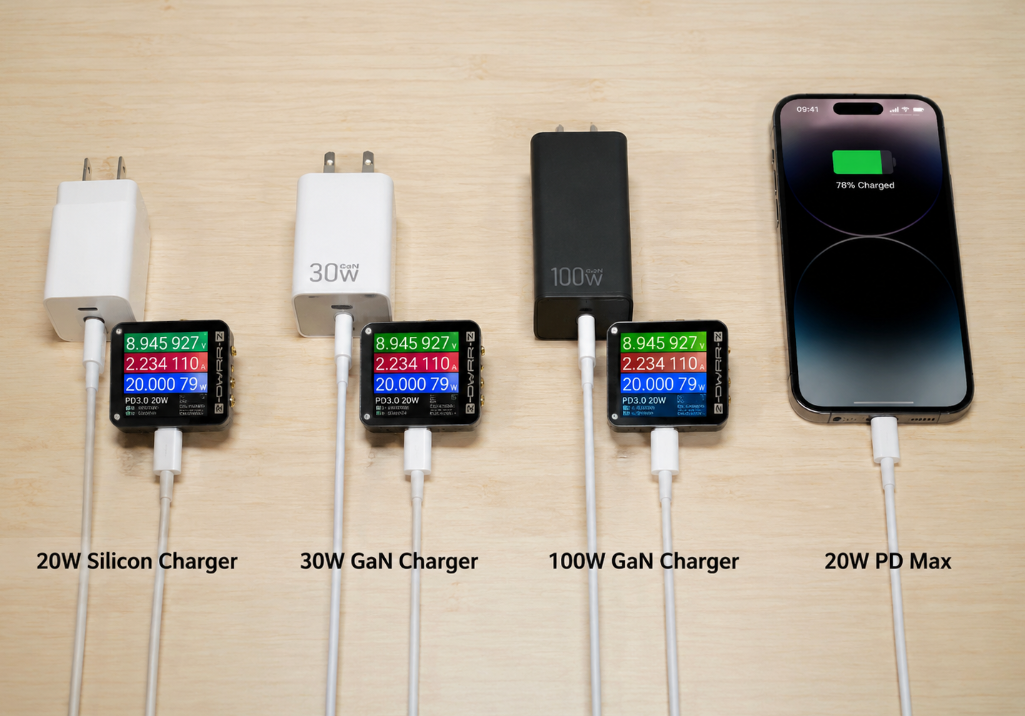
For a simple example: a phone that only supports 20W PD fast charging, if you charge it with a 20W silicon charger, a 30W GaN charger, or a 100W GaN charger, the peak power usually won’t exceed 20W, and the full charge time is almost the same.
Of course, there are exceptions: if you previously used an old 18W silicon charger whose protocol didn’t match your new phone, and you feel it’s faster after switching to a 65W GaN charger — the real reason is that the new charger’s power and protocol are matched, not because it uses GaN material. Even if you switch to a 65W silicon charger, the speed will be just as fast.
Item-by-Item Comparison of Core Dimensions (Under the Premise of Same Power and Qualified Products)
After covering the basic concepts, we will make a comprehensive comparison of the two chargers from several dimensions that users care about most. All conclusions are based on the premise of “same power, qualified products”; if the premise changes, the conclusions may not hold.
Size, Weight, and Power Density
This is the most intuitive advantage of GaN, and also its biggest selling point.
- Comparison standard: Under the same rated power, same number of ports, and same plug specification, compare the overall size, weight, and power density (that is, the volume/weight per watt of power; the smaller the value, the higher the density)
- General conclusion: In the power range of 65W and above, GaN is usually smaller and lighter than silicon. The common size advantage is about 30%-50%, and the weight advantage is 20%-40%. Of course, the specific values will vary due to brand and design differences
- Higher power = more obvious advantage: In 65W, 100W, 140W multi-port products, the miniaturization advantage of GaN is particularly easy to perceive — for example, under the premise of the same 65W single port, similar plug specifications and number of ports, well-designed GaN products can often significantly reduce thickness or length; but the specific size is also affected by plug structure, safety insulation distance, shell design, and whether there are extra functions. You can’t judge whether it’s GaN or its quality just based on a advertised size.
- Small gap at low power: In the 20W-30W range, silicon-based chargers can also be made very small, and the advantage of GaN is not necessarily obvious. Even some well-designed silicon chargers are smaller than low-quality GaN chargers
- Exceptions: If a GaN charger has many extra functions, such as digital display, colorful lights, replaceable plugs, desktop extension cords, it will also increase the size, offsetting part of the advantage brought by the material
- Semi-expert judgment method: Don’t just look at the absolute size of the charger; look at “volume per watt” and “weight per watt”, and also judge in combination with the available power per single port and the simultaneous output power of multiple ports. For example, two 100W chargers, one with a maximum single-port power of 65W, and the other with a maximum single-port power of 100W — the latter obviously has higher power density
Heat Generation and Conversion Efficiency
Many people think GaN doesn’t generate heat at all, which is completely wrong.
- Comparison standard: Under the same power, same load, same ambient temperature, and same placement method, compare the overall conversion efficiency and shell temperature rise
- General conclusion: The conversion efficiency of GaN chargers is usually higher, with a common gap of about 2%-5%. The specific value is affected by circuit design, load range, input voltage, and manufacturer’s design level
- Important correction: High efficiency does not mean it must feel cooler to the touch. Because GaN chargers are small in size and have a small heat dissipation area, heat is more concentrated, so the local surface temperature may be higher than that of larger silicon chargers — that is, it will feel hotter to the touch, but in fact, it wastes less energy
- More obvious advantage under high load: Under conditions of above 65W, continuous full load for 30-60 minutes, and relatively high ambient temperature, well-designed GaN chargers are more likely to show efficiency advantages, and overall heat control will be better
- Exceptions: If it is a low-quality GaN charger with poor heat dissipation design, non-flame-retardant shell material, and a cramped internal layout, the surface temperature may be much higher than that of a high-quality silicon charger
- How to judge if heat generation is normal: Warmth, slight heat, and obvious shell temperature rise during full load are all normal; if it is so hot that you can’t touch it for a short time, it frequently stops charging, has a strange smell, the shell is deformed, or the plugs are blackened, that is abnormal heat generation, and you should stop using it immediately
Charging Speed
We emphasize again: under the same power and same protocol, there is almost no difference in charging speed between the two.
- Comparison standard: Scenarios with same power, same fast charging protocol, same device, same specification cable, and single-port output
- General conclusion: The charging speed of the two is usually almost the same, and you can barely perceive the difference
- Factors that actually affect speed: The maximum input power of the device, the single-port output power of the charger, the matching degree of PD/PPS/private protocols, the current capacity of the cable, the temperature of the device, and the battery level range
- Here’s a common phenomenon: phones have higher power in the low battery stage, and will actively slow down after approaching 80%. This is a normal strategy of the device to protect the battery, not a broken charger
- Differences in multi-device scenarios: Multi-port GaN models often have higher total power and more flexible power distribution, so when charging multiple devices at the same time, you may feel it’s more stable and faster — but this is because the overall power planning is better, not because the GaN material itself can accelerate charging
- When the conclusion fails: If you compare an old 18W silicon charger with a 65W GaN charger, the GaN one is definitely faster, but this is a difference in power and protocol, not a difference in material
Number of Ports and Multi-Port Power Distribution
This is another very practical advantage of GaN: it’s easier to make multiple ports in a small size.
- Comparison standard: Under the same size or same total power, compare the number of ports, maximum single-port power, and rules for simultaneous multi-port output
- General conclusion: GaN is more common in multi-port compact designs like 2C1A, 3C1A, 4C, especially suitable for users with multiple devices
- Must-check parameters: When buying a multi-port charger, you can’t just look at the total power. You must check these parameters: total power, maximum single-port power of each USB-C port, power distribution when two devices are plugged in at the same time, and distribution when three or more devices are plugged in at the same time
- For example: a multi-port charger labeled 100W may have a maximum single-port power of 100W, 65W+30W when charging two ports at the same time, and 45W+30W+20W when charging three ports at the same time — it is absolutely not that every port can output 100W
- Fixed distribution vs dynamic distribution: Some multi-port chargers have fixed distribution rules, for example, 65W+30W is fixed when two devices are plugged in, which is easier to predict; some are dynamic distribution, which automatically adjusts according to the needs of the devices, more flexible, but “renegotiation” may occur when a new device is plugged in
- What is renegotiation: When plugging in or unplugging a new device, existing devices may briefly stop charging and then resume. This is a normal phenomenon of protocol reallocating power; but if it frequently stops and resumes charging repeatedly, you need to check if it’s a problem with compatibility, cable, or overheating
- Exceptions: High-end silicon-based multi-port chargers can also achieve very complete power distribution, but they are usually much larger in size at the same power
Price and Cost-Effectiveness
GaN is usually more expensive, but whether it’s worth it depends on your needs.
- Comparison standard: Products from the same brand, same positioning, same power, same number of ports, and formal channels
- General conclusion: GaN is usually more expensive than silicon. The common price gap for 65W single-port or multi-port products is about 30%-100%, but this is not a fixed rule. In recent years, with the popularization of technology, the price gap has been slowly narrowing
- Many factors affect price: In addition to the cost of GaN devices themselves, there are also control solutions, number of ports, whether PD 3.1 is supported, certification costs, brand premium, whether cables are included, after-sales policies, etc.
- Silicon is more cost-effective in low-power scenarios: In the 20W-30W range, the price advantage of silicon is very obvious, and the experience gap is very small, so the cost-effectiveness is extremely high
- GaN has higher comprehensive value in medium and high power scenarios: For products above 65W, the small size and multi-port capability of GaN can bring a very obvious experience improvement, with higher comprehensive value
- Calculate cost-effectiveness from another angle: If you have several devices, a high-quality multi-port GaN charger can replace several single-port charging heads, and also save socket space and luggage space. Calculated this way, the total cost of ownership may be lower instead
- Risk reminder: If the price of a GaN charger is far below the market average, you must be vigilant. It is very likely to have falsely labeled power, missing protection circuits, shrunken materials, or incomplete certification
Service Life and Reliability
Many people think GaN is more durable, but that’s not necessarily the case.
- Comparison standard: Service life under normal room temperature, formal brands, qualified design, and daily plugging/unplugging frequency
- General conclusion: Both qualified GaN and qualified silicon chargers can meet years of daily use. The material itself is not the only factor determining lifespan
- Factors that actually affect lifespan: The quality of internal electrolytic capacitors or solid-state capacitors, heat dissipation design, welding quality, plug structure, port durability, whether the protection circuit is complete, and long-term load level
- Correcting a common saying: GaN devices themselves do have the potential to work at high frequency, high voltage, and high temperature, but you can’t directly deduce that “GaN chargers must be more durable” — the overall lifespan is determined by the shortest board. For example, if the capacitor quality is poor, even if the best GaN devices are used, the lifespan won’t be long
- Precautions for high-temperature use: Long-term use in environments above 40°C will accelerate the aging of internal components of all chargers, especially capacitors. No matter what material it is, prioritize products with better temperature control and component quality
- Semi-expert judgment method: Looking at brand reputation, third-party teardown reviews, compliance certification, warranty policies, and long-term user feedback is much more reliable than just looking at the word “GaN”
Safety Performance and Compliance Certification
This is the most important point, which we save for last: No material is absolutely safer. Qualified products are all safe, and low-quality products are all dangerous.
- Comparison standard: Qualified products that meet the regulations and safety requirements of the corresponding region
- General conclusion: Both qualified GaN and qualified silicon chargers can meet daily safety needs. There is no absolute winner in safety at the material level
- What is the key to safety: Whether the insulation distance is sufficient, whether the shell is made of flame-retardant material, whether there is overvoltage/overcurrent/short circuit/overtemperature protection, how well leakage is controlled, whether electromagnetic interference (EMI) meets standards, and whether the plug structure is firm — these are the core factors that determine safety
- Important correction: Many marketing claims say “GaN responds faster so protection is more timely”. In fact, whether protection is timely mainly depends on the control chip, protection circuit, and overall design, and cannot be simply attributed to the material
- Common compliance marks in different regions (especially for overseas users):
- US market: UL or ETL are third-party certifications focused on safety, FCC mainly focuses on electromagnetic compatibility or radio frequency compliance
- EU market: CE is the conformity mark for entering the EU market, involving requirements such as Low Voltage Directive, EMC, RoHS, etc. It is a framework for manufacturer self-declaration, and cannot be simply equated with third-party safety certification
- UK market: UKCA is the conformity mark for the UK market
- Japanese market: PSE is a mandatory requirement of Japan’s Electrical Appliance and Material Safety Law
- Pitfall reminder: Certification marks themselves may be forged or misused. You can’t just look at the logo printed on the shell; you need to judge in combination with formal channels, brand official website, product model, manual, and after-sales information
- Core conclusion: The risk of low-quality GaN is much higher than that of qualified silicon. Material labels can never replace safety design
Real Scenario Adaptation: Which Is Better for Different Situations
After talking about parameter comparisons, let’s go back to actual usage scenarios and see which one to choose for different needs.
Low-Power Scenarios Like Single Phone, Earbuds, Watch (20W and Below)
For this scenario, silicon-based chargers are more recommended.
- The reason is simple: low price, small size gap, fully meets the demand, highest cost-effectiveness
- If you already have an original silicon charging head, the speed is sufficient, and there is no abnormal heat, strange smell, or damage, there is no need to upgrade just for the word “GaN”
- Of course, it’s not that you can’t choose GaN: if you want to unify your home’s USB-C charging system, want a smaller size, or need a small head that can charge both your phone and tablet at the same time, you can also choose a low-power GaN charger
- Note: The high-power private fast charging of some Android phones may not run at full speed on third-party GaN chargers. Confirm protocol matching before buying
Commute/Business Trip Scenarios With Tablet + Thin and Light Laptop (45W-100W)
For this scenario, GaN chargers are more recommended.
- It is small in size and light in weight. One head can charge phones, tablets, and thin and light laptops at the same time, saving a lot of luggage space for business trips and commutes
- Two conditions must be checked before buying: whether your laptop supports USB-C PD charging, and what the officially recommended charging power is
- Key buying points: Single-port power must cover the needs of the laptop. For example, if your thin and light laptop needs 65W PD, you should at least choose a GaN charger that can output 65W per single port; if you often need to charge your phone and laptop at the same time, it’s best to choose one above 100W
- If you travel frequently, prioritize models with foldable plugs and support for 100-240V wide voltage
Multi-Device Simultaneous Charging Scenario (Phone + Earbuds + Tablet + Laptop)
For this scenario, multi-port GaN chargers are more recommended.
- One head can charge several devices, saving sockets and space, and you don’t need to bring multiple charging heads when going out
- The key is not how high the total wattage is, but the power distribution table for simultaneous multi-port output — you must check how much power each port can get when 2, 3, or 4 devices are plugged in, and whether it can meet your device needs
- Common reference for selection: 65W is suitable for phone + tablet, or fast charging a thin and light laptop alone; 100W is suitable for charging a thin and light laptop + phone at the same time; 140W is suitable for higher-power laptops, or charging more devices at the same time
- Note: Plugging and unplugging devices may trigger power redistribution. A brief pause in charging is a normal phenomenon, not a malfunction
- Exception: If you use it in a fixed location, have plenty of sockets, and already have several qualified silicon charging heads, the benefit of upgrading may be limited
Fixed Home/Desktop Long-Term Plugged-In Scenarios
In this scenario, the perception of size advantage is much weaker.
- If you only charge a single low-power device, such as charging a phone by the bed, a silicon charger is completely sufficient and more cost-effective
- If you pursue a tidy desktop and want to reduce the number of charging heads and cables, a multi-port GaN desktop charger or a GaN desktop power supply with an extension cord will be a good choice
- If you are powering low-power devices like desk lamps, routers, and speakers for a long time, qualified silicon chargers are usually more cost-effective and more stable
- Small reminder for long-term plugged-in use: Do not cover the heat dissipation holes of the charger, stay away from high-temperature and airtight spaces, and regularly check the condition of the plugs and cables
International Travel Scenarios
No matter which one you choose, first confirm whether the input voltage supports 100-240V wide voltage, otherwise cross-region use may damage the charger and even pose safety risks.
- The advantages of GaN are particularly obvious in travel scenarios: small size, light weight, multi-port, foldable plugs, which can save a lot of luggage space, and one head can handle all devices
- Pay attention to plugs: US, EU, UK, and AU plugs have different shapes. Prepare high-quality conversion plugs when necessary
- A common misconception: conversion plugs only change the shape of the plug, do not change the voltage, do not increase power, and cannot solve the problem of protocol mismatch
- Risk reminder: Poor contact of low-quality conversion plugs will generate heat, especially not suitable for long-term high-power use. Be sure to buy reliable ones
Extreme Environment Usage Scenarios (High-Temperature Car / Low-Temperature Outdoor)
Whether it’s GaN or silicon, you need to pay attention when using it in extreme environments.
- High-temperature environment: Long-term high temperature will accelerate the aging of internal components. Do not leave the charger in a sun-exposed car for a long time working at full load. Although GaN devices themselves have the potential to work at high temperatures, the stability of consumer-grade overall products still mainly depends on heat dissipation design, protection strategy, and capacitor materials
- Low-temperature environment: The difference between the two is usually not large, and is more affected by capacitor performance, cable flexibility, and device battery temperature control
- General reminder: In extreme environments, prioritize products with reliable brands, complete protection, and sufficient power margin. Don’t buy cheap products
High-Power Laptop / Gaming Laptop Scenarios (Above 100W)
The portability advantage of GaN is obvious, but it cannot blindly replace the original adapter.
- For high-performance laptops or gaming laptops, GaN chargers can be used as an alternative solution for light-load office work and business trip charging, which is convenient to carry
- Important boundary: Some gaming laptops or workstations require the original dedicated adapter to meet power needs under high load. USB-C PD charging may only support light-load use, or only slow charging
- For charging above 100W, you must check whether it supports USB PD 3.1 EPR, not just look at the 140W or higher number written on the shell
- Key buying points: Confirm the PD levels supported by your laptop, the single-port output power of the charger, and whether the cable supports 5A and the corresponding power level
Semi-Expert Advanced: Understanding Key Charger Parameters
If you want to choose a product that is more suitable for you, you don’t need to understand circuits; just understanding these key parameters is enough.
Power Parameters: Distinguish Total Power, Single-Port Power, and Multi-Port Distribution
Many people only look at “total power” when buying chargers, which is one of the easiest pitfalls to fall into.
- Rated total power: The maximum output power of all ports combined, does not mean that each port can output such high power at the same time
- Maximum single-port power: The highest power that a single port can output to one device. This is the key parameter that determines whether a laptop can be fast charged
- Simultaneous multi-port output rules: How power is distributed when 2, 3, or 4 devices are plugged in. You must check the output parameter table on the product detail page, you can’t guess
- Power calculation is very simple: voltage × current = power. For example, 20V/5A is 100W
- Semi-expert reading method: When you see a 100W charger, don’t directly think “that’s enough”. Keep reading: Is only the C1 port capable of 100W, or both C1/C2? Will it drop to 65W+30W when charging two ports at the same time? These details determine the actual experience
USB PD, PPS, and Private Fast Charging Protocols
Even if the power is enough, it’s useless if the protocol doesn’t match.
- USB-C PD: This is the universal fast charging protocol with the best cross-brand compatibility. It has high compatibility with tablets and thin and light laptops, and is also very common on phones. However, the maximum fast charging power of many phones still depends on PPS or brand private protocols, and third-party PD chargers may not reach the peak power advertised by the brand.
- PPS: Full name is Programmable Power Supply. It can adjust voltage and current more precisely. Some Android phones require chargers that support PPS to achieve relatively high fast charging power
- Private protocols: High-power fast charging from some brands, such as 120W and 210W fast charging on some Android phones, relies on their own chargers and cables, and belongs to private protocols. Third-party PD chargers may only trigger relatively low power, such as 30W or 45W
- Judgment method: First check the official specifications of your device to see which fast charging protocols it supports, then check the protocols supported by the charger accordingly. Don’t just look at the maximum wattage
- For a practical example: a certain phone advertises 120W fast charging, but its private protocol is not open to the public. Third-party PD/PPS chargers may only charge it to 30W. The exact power it can reach depends entirely on which protocols the device manufacturer has opened up
USB PD 3.1 EPR: Must Pay Attention for Above 100W
If your device requires USB-C charging above 100W, you must pay attention to this parameter.
- Traditional USB PD (SPR) covers up to 100W, which is the 20V/5A specification
- USB-C charging above 100W usually involves USB PD 3.1 EPR (Extended Power Range), with common levels such as 28V, 36V, 48V, etc. For example, 140W charging is usually the 28V/5A specification
- To achieve EPR high-power charging, the charger, device, and cable must all support the corresponding EPR level at the same time — none can be missing
- Cable requirements: High-power charging usually requires a 5A cable with an E-Marker chip. When buying, check clearly whether it is labeled 100W, 140W, or 240W, or whether there is a 5A mark
- Boundary reminder: Even if the charger supports PD 3.1, if your device does not support the corresponding EPR level, it will not run at full high power, and can only reach up to 100W
Input Voltage and Plugs: Must Check for Overseas Users
This is the point that overseas users are most likely to overlook, so be sure to confirm in advance.
- Input voltage range: Only chargers that support 100-240V wide voltage can be used across countries. If the product only supports 110V or only 220V, cross-region use may cause damage or even safety risks
- Plug type: US, EU, UK, and AU plugs have different shapes. Choose a model that matches the local socket
- Foldable plugs: Very portable, but if it is a relatively heavy charger, it may fall or have poor contact when plugged into a loose wall socket, so pay attention
- Replaceable plugs: Suitable for users who often travel to different countries, but confirm whether the plug module is firm and whether it supports the target power. Don’t buy the flimsy ones
Cable Specifications: The Often Overlooked Power Bottleneck
Many people spend a lot of money on high-power GaN chargers, but the charging is still slow, and finally find out it’s a problem with the cable.
- Many ordinary USB-C cables only support 3A current, with a maximum power of about 60W
- 100W charging usually requires a 20V/5A cable. For 140W or 240W charging, you also need to check whether the cable supports the corresponding PD 3.1 EPR capability
- What is an E-Marker chip? It is a small chip in the cable, used to tell the device and charger how much current this cable can withstand and which functions it supports
- If the cable does not match, the system will automatically reduce to a lower power, which manifests as slow charging or inability to trigger high-power levels
- Purchase advice: When buying a high-power charger, prioritize matching it with an original cable, or a cable clearly marked 100W/240W/5A. Don’t just use old cables from home
Safety, EMC, and Compliance Marks: More Important Than Material Labels
Emphasize again: The priority of compliance certification is much higher than material labels.
- Safety: Focuses on direct safety risks such as electric shock, fire, insulation, and overtemperature
- EMC: Electromagnetic Compatibility, which focuses on whether the charger will interfere with other devices or be interfered with by other devices
- Compliance requirements vary by region, a brief summary:
- US market: UL and ETL are third-party certifications focused on safety, FCC mainly focuses on electromagnetic compatibility or radio frequency compliance
- EU market: CE is the conformity mark for entering the EU market, involving requirements such as Low Voltage Directive, EMC, RoHS, etc. It is not a third-party safety certification, but a framework for manufacturer self-declaration
- UK market: UKCA is the conformity mark for the UK market
- Japanese market: PSE is a mandatory requirement of Japan’s Electrical Appliance and Material Safety Law
- How to judge if it is truly compliant: Prioritize buying products from formal channels, check whether the product model, manual, and official website information are complete, and whether the after-sales service is clear. Don’t just look at a logo printed on the shell
Pitfall Avoidance and Fault Diagnosis: Don’t Be Misled by Material Labels
There are many marketing buzzwords about GaN on the market now. We have compiled the most common pitfalls and common fault diagnosis methods to help you avoid detours.
8 Common Pitfalls to Avoid Before Buying
- Pitfall 1: Thinking GaN equals fast charging: Whether fast charging is possible depends on power, protocol, cable, and device upper limit. There is no inevitable relationship with material
- Pitfall 2: Thinking GaN doesn’t generate heat at all: When running at full high power, all chargers generate heat, and GaN is no exception
- Pitfall 3: Thinking multi-port 100W means each port is 100W: When charging multiple devices at the same time, power is distributed, and it is impossible for each port to run at full total power
- Pitfall 4: Thinking GaN is better for battery health: Battery health is mainly determined by device-side power management, temperature, and usage habits, and has nothing to do with charger material
- Pitfall 5: Thinking the higher the power, the better: Power that the device can’t use is redundant, there’s no need to pay extra
- Pitfall 6: Thinking small size means unsafe: Safety depends on design, materials, and compliance certification, not solely determined by size
- Pitfall 7: Thinking having the word “GaN” means it’s real GaN: Some products only write vague marketing terms like “GaN technology” or “GaN solution”, and may not actually use GaN power devices
- Pitfall 8: Thinking the included cable can definitely run at full power: For high-power chargers, you must confirm the specification of the included cable. In many cases, the included cable may not reach the maximum power
How to Judge If a Product Is a Trustworthy GaN Charger
- Check if the product detail page clearly states “uses GaN power devices”, instead of just writing vague marketing terms like “GaN technology” or “GaN solution”
- Check whether the brand official website, product model, manual, output parameter table, and certification/compliance information are complete
- Check the reputation of third-party reviews or teardowns, especially focusing on temperature rise, protection, internal materials, and insulation design
- Check if the price is significantly lower than similar products. Too low a price most likely means falsely labeled power, shrunken materials, or lack of after-sales service
- For a simple estimate: products with significantly smaller size at the same power are very likely GaN, but this cannot be used as the only judgment basis
Cause Diagnosis of Common Charging Problems (Are They Related to Material?)
When encountering charging problems, don’t rush to blame “GaN is no good” or “silicon is too old”. Most problems have nothing to do with the material:
- Slow charging: Prioritize checking the device’s power upper limit, protocol mismatch, cable not supporting high power, and multi-port distribution power reduction. Usually unrelated to material
- Not charging: May be due to damaged cable, dirty port, device-side protection, protocol negotiation failure, or charger malfunction
- Severe heat: First check if it is working at full load, if the ambient temperature is too high, if it is covered, and if the socket is loose
- Frequent charging interruption: May be due to overheat protection, multi-port power renegotiation, poor cable contact, poor adapter contact, or protocol compatibility issues
- Performance degradation after long-term use: Common causes are port wear, cable aging, capacitor aging, internal solder joint or plug problems. Material is not the main cause
General Steps for Troubleshooting
When encountering problems, you can troubleshoot step by step in this order, and most problems can find the cause:
- Step 1: Replace with a qualified high-power cable to first rule out cable problems
- Step 2: Plug in only one device, charge with a single port, to rule out multi-port power distribution and renegotiation issues
- Step 3: Test with other devices to determine whether it is a device problem or a charger problem
- Step 4: Replace with a wall socket, or replace with a high-quality conversion plug, to rule out external power supply poor contact issues
- Step 5: Check the ambient temperature and heat dissipation status. Do not cover the charger, and do not use it at full load in sun-exposed or airtight spaces
If after troubleshooting, there is still frequent charging interruption, strange smell, shell deformation, abnormal plug heat, or burn marks, be sure to stop using it immediately and replace it in time.
Key Conditions for Comparison Conclusions to Fail
All the comparison conclusions we mentioned earlier have premises. If these situations occur, the conclusions may not hold:
- Different power ranges: For low-power products below 30W, the experience gap between the two is usually very small
- Product quality differences: The experience of low-quality GaN may be far worse than that of high-quality silicon
- Different scenarios: When used at fixed low power, the size advantage of GaN is barely perceptible
- Insufficient device upper limit: If your device only supports low power, even a high-power GaN charger can’t发挥 its full potential
- Protocol mismatch: If the phone or laptop does not support the corresponding PD/PPS/EPR levels, even if the power is sufficient, it won’t run at full speed
- Substandard cable: High-power charging above 100W is particularly easily limited by the cable
- Design differences: Chargers with digital displays, light effects, multi-ports, and replaceable plugs will increase size and cost, offsetting part of the material advantage
Buying Decision Framework: Four Steps to Choose the Right Charger for You
After talking so much, finally here is a simple four-step buying framework. Follow it and you can choose the right product for you, no need to struggle.
Step 1: First Calculate Real Power and Protocol Requirements
First figure out how much power your devices to charge need and what protocols they support. This is the most basic step.
- Phone/earbuds/watch: 20W-30W is usually sufficient. Some Android high-power models require dedicated protocols or PPS to run at full speed
- Tablet: 30W-45W is more common, some models can support higher power
- Thin and light laptop: 45W-65W is more common, some models require 100W
- High-performance laptop/gaming laptop: Even above 100W may not completely replace the original adapter. The charging capability under high load depends on the official description
- Core principle: Follow the power and protocols officially supported by the device. Don’t blindly pursue the maximum wattage; enough is good
Step 2: Determine the Core Usage Scenario
Different scenarios have completely different demand priorities.
- Frequent business trips, carrying multiple devices: Prioritize small size, multi-port, foldable plugs, usually more suitable to choose GaN
- Fixed home use, single device, low power: Prioritize cost-effectiveness, silicon is completely sufficient
- Pursue tidy desktop: Focus on number of ports, cable length, desktop placement method, multi-port distribution rules
- International travel: Prioritize products with 100-240V wide voltage and suitable plugs, paired with reliable adapters
- Replace original laptop charger: Must confirm PD levels, single-port power, and cable specifications
Step 3: Core Standards for Screening Qualified Products
Whether you choose GaN or silicon, these standards must be met:
- Protocol matching: Supports PD, PPS, PD 3.1 EPR, or private protocols required by your devices
- Power matching: Single-port power can meet the most power-hungry device, and multi-port distribution can meet the demand for simultaneous charging
- Cable matching: The power level of the cable should correspond to the target power. Don’t mix up 60W, 100W, 140W, 240W
- Compliant and reliable: Clear safety/EMC/regulatory marks for the corresponding region, purchased from formal channels
- Brand and after-sales: Prioritize brands with long-term reputation, clear warranty, and stable models
- Heat dissipation and size: Don’t blindly pursue extreme small size. High-power products should leave margin for heat dissipation
Step 4: Judge Whether the Premium for GaN Is Worth It
The last step is to judge whether the extra money for GaN’s small size and multi-port capability is worth it to you.
- Situations where GaN is worth buying: Frequently carry it out, need power above 65W, need multi-port all-in-one, want to replace laptop adapter, want to reduce the number of desktop charging heads
- Situations where silicon is more suitable: Only charge phones or low-power devices, use in fixed location, budget priority, old silicon charger at home is still sufficient
- Price gap judgment: If the price gap is within your acceptable range, and the value of portability/multi-port is clear to you, then GaN is usually worth it; if the price gap is too large and your needs are very simple, then choosing silicon is more rational
- Beware of low-price traps: High-power multi-port GaN chargers far below the market average price should first be suspected of falsely labeled power, shrunken materials, or compliance risks. Don’t be greedy for cheap
Upgrade Judgment for Those Who Already Have Silicon Chargers
If you already have a silicon charger, should you upgrade? You can check against these points:
- Situations worth upgrading: Old charger is too big and heavy, not enough ports, new device requires higher power, need one charger for multiple devices, frequent travel and commute
- Situations not worth upgrading: Old charger is safe and normal, single device low-power use, charging speed is sufficient, fixed location use, limited budget
- Upgrade order: First upgrade mismatched cables and protocols, then consider higher power or GaN material. Don’t replace the charger right away
Typical Purchase Combination Suggestions
If you still don’t know how to choose, you can refer to these common combination solutions and adjust according to your own situation.
Only Charging a Phone
It is recommended to choose a qualified 20W-30W silicon or small-sized GaN charger. Prioritize budget, choose silicon; pursue portability, choose GaN. It is not recommended to blindly buy a charger above 100W for a single phone, it’s completely unnecessary.
Phone + Tablet
It is recommended to choose a 45W-65W dual-port GaN charger. Focus on whether it can meet the common power of the phone and tablet when outputting from two ports at the same time. If it’s for fixed home use and you already have two silicon chargers, you don’t need to replace them.
Phone + Thin and Light Laptop
It is recommended to choose a 65W-100W GaN charger. If your thin and light laptop needs 65W and you often need to charge your phone at the same time, it is recommended to buy a 100W one, not a 65W one, otherwise the laptop will not have enough power when charging two ports at the same time. Be sure to confirm that the cable supports at least the target power.
Multiple Devices + Business Trip
It is recommended to choose a 100W-140W multi-port GaN charger, prioritizing 2C1A or 3C1A configuration. Focus on weight, plug type, input voltage, socket stability, and multi-port distribution table. If your laptop supports PD 3.1 140W, confirm that both the charger and cable support the corresponding level.
High-Performance Laptop / Gaming Laptop
GaN can be used as a portable charging solution, but it may not completely replace the original high-power adapter. For high-load scenarios like gaming, rendering, and training, the original adapter still prevails. Before buying, be sure to check the official USB-C charging upper limit and whether it supports PD 3.1 EPR.
Summary
By reading this, you should have a clear understanding of the difference between GaN and silicon chargers, and be able to make your own buying judgment. Let’s recap the core points one last time:
- The core difference between the two is the material of the power switching devices. GaN brings the potential for miniaturization and high power density, not a direct increase in charging speed
- Charging speed is mainly determined by power, protocol, cable, and device upper limit, and has no direct relationship with whether it is GaN
- GaN does not mean absolutely safer or more durable. The overall design, compliance certification, materials, and brand quality control are much more important than the material label
- When buying, you should understand key parameters such as total power, single-port power, multi-port distribution, PD/PPS/PD 3.1, and E-Marker cables. Don’t just look at marketing buzzwords
- Different scenarios are suitable for different products: for low-power, fixed-use scenarios, choosing qualified silicon is more cost-effective; for medium-high power, multi-device, portable scenarios, choosing high-quality GaN is more worth it
At the end of the day, there is no absolutely better charger, only a charger that is more suitable for your needs. There’s no need to blindly follow the trend to buy GaN, and there’s no need to think silicon is outdated. The one that suits you is the best.