
1. Introduction: Why USB-C Needs Fiber Optic Technology
The Real-World Pain Points of High-Speed USB-C
Today, USB-C is far more than just a charging port. It handles 4K/8K video output, high-speed solid-state drive transfers, and multi-device docking stations. However, traditional copper cables have a natural physical limit: the longer the cable, the more high-speed signal degrades. For distances over 2 meters, maintaining full speed becomes difficult, leaving a gap for long-distance device connections in conference rooms and large spaces.
The Emergence and Role of Fiber Optic USB-C Cables
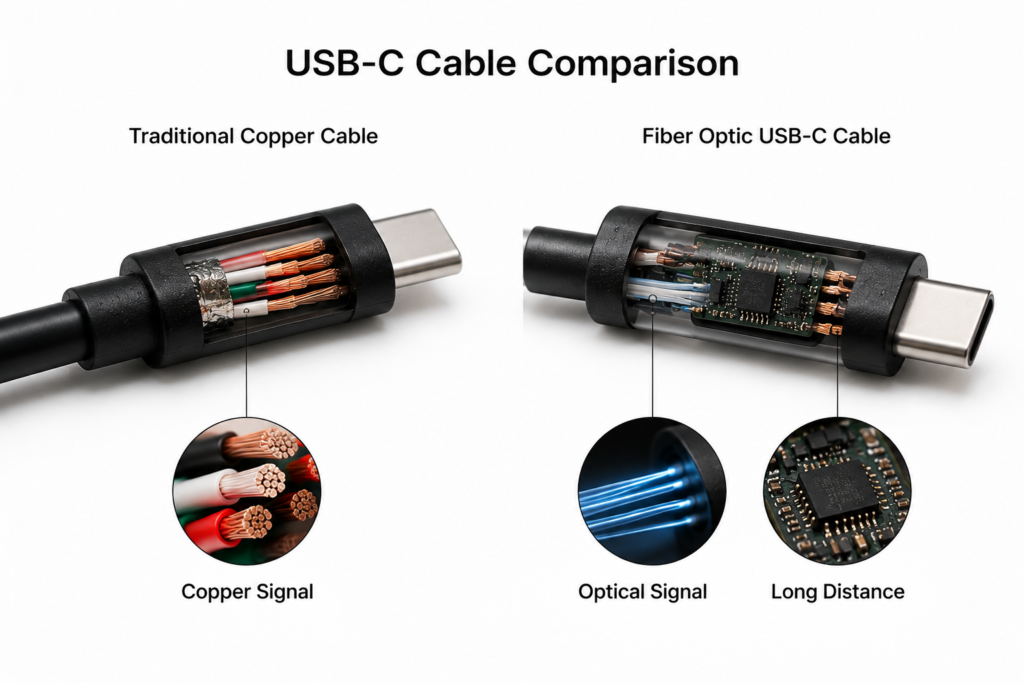
Fiber optic USB-C cables were built to solve this exact problem. They bring proven fiber-optic communication technology into the USB-C form factor. While they look nearly identical to standard USB-C cables on the outside, their internal transmission logic is completely different, designed specifically for long-distance, high-bandwidth, and high-interference USB-C connections.
2. What Is a Fiber Optic USB-C Cable?
Basic Definition and Core Nature
A fiber optic USB-C cable is essentially a USB-C Active Optical Cable (AOC). It uses optical fiber as the core medium for high-speed signal transmission, with dedicated chips at both ends to convert between electrical and optical signals, enabling high-speed connectivity between devices.
Key Differences From Standard Copper USB-C Cables
The core difference lies in the transmission medium and signal type. A side-by-side comparison is below:
| Feature | Standard Copper USB-C Cable | Fiber Optic USB-C Cable |
|---|---|---|
| Transmission Medium | Copper conductors | Optical fiber (with auxiliary copper wires) |
| Signal Type | Electrical signals | Optical signals (converted at both ends) |
| Long-Distance Performance | Severe signal loss beyond 2 meters | Maintains full speed up to tens of meters |
| Interference Resistance | Susceptible to electromagnetic interference | Virtually immune to electromagnetic interference |
| Price Range | Affordable, wide selection | Higher cost, mid-to-premium positioning |
3. How Fiber Optic USB-C Cables Work
The Bidirectional Electro-Optical Conversion Process
The working principle can be simplified as an “electrical-optical-electrical” relay:
- Electrical signals from the host reach the cable connector and are converted into optical signals by a chip.
- The optical signals travel rapidly through the fiber via total internal reflection, with almost no signal loss.
- At the opposite end, the optical signals are converted back into electrical signals and sent to the connected device. This process works bidirectionally, supporting simultaneous data upload and download.
Plug-and-Play Power and Communication
Fiber optic USB-C cables require no external power supply. The conversion chips at both ends draw power directly from the host’s USB-C port. Thin copper wires inside the cable handle device detection and low-speed control signals, so they work just like regular cables — plug in and use, with no extra setup required.
4. Internal Structure of Fiber Optic USB-C Cables
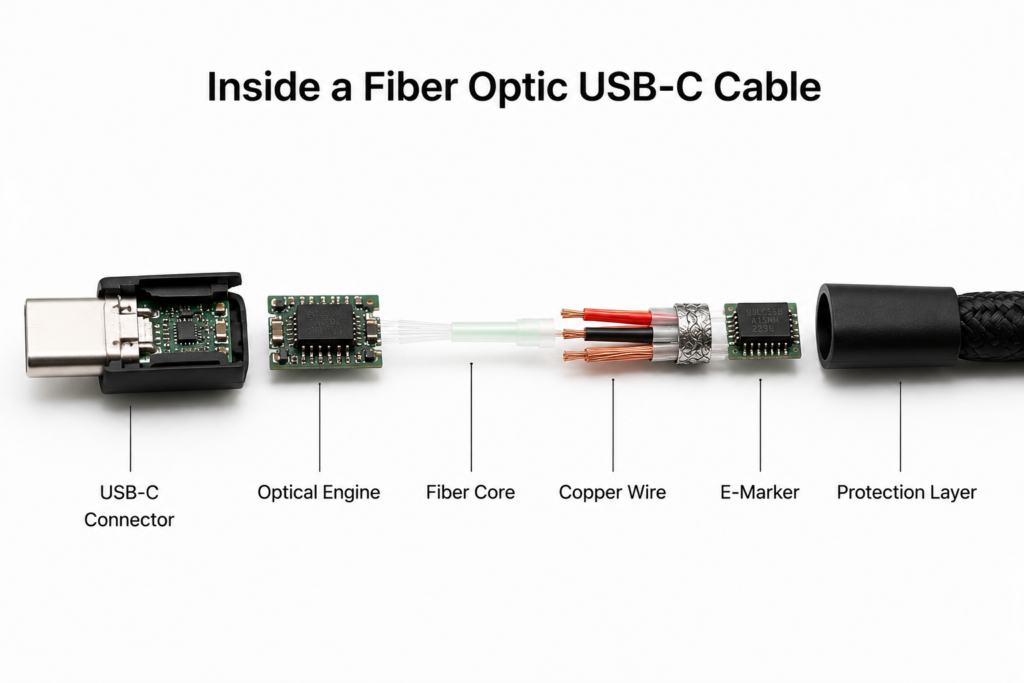
End Connectors: Optical Engine and Control Chips
The connectors are the “brain” of the cable, housing two key chip sets:
- Electro-optical conversion chips: The core component that converts between electrical and optical signals for high-speed transmission.
- E-Marker controller chip: Communicates the cable’s speed and power capabilities to connected devices, ensuring protocol compatibility.
Cable Body: Copper-Fiber Hybrid Design
Most consumer fiber optic USB-C cables are not “all-fiber”; they use a hybrid copper-fiber structure:
- Fiber core: Handles high-speed data and high-definition video transmission.
- Thin copper wires: Carry power, device identification, and low-speed control signals.
- Strength layer and jacket: Aramid fibers inside protect the fiber, while the outer jacket provides durability and flexibility.
Common Fiber Types: Multimode vs. Single-Mode
- Multimode fiber: The standard choice for consumer and mainstream professional products. It offers a good balance of cost and performance, covering distances from a few meters to tens of meters for most everyday and commercial use cases.
- Single-mode fiber: Offers longer transmission distances and lower loss, but at a higher cost and with stricter manufacturing requirements. It is typically used for industrial and data center deployments with extremely long cable runs.
5. Supported Standards and Performance Specifications
Data Protocols: USB 3.2, USB4, and Thunderbolt Compatibility
Fiber optic USB-C cables cover all major high-speed protocols:
- Entry-level: USB 3.2 Gen2 (10Gbps), ideal for flash drives and portable SSDs.
- Mainstream: USB4, Thunderbolt 3/4 (40Gbps), suitable for external GPUs and high-speed storage.
- High-end: USB4 v2.0, Thunderbolt 5 (80Gbps and above), built for professional-grade equipment.
Video Output: DisplayPort Alt Mode Support
Nearly all full-featured fiber optic USB-C cables support DisplayPort Alt Mode. They can connect directly to monitors, TVs, and projectors to deliver stable 4K high-refresh and 8K ultra-HD video, matching the video capability of full-featured copper cables.
Power Delivery: USB PD Specs and Real-World Limits
This is the most commonly misunderstood feature: fiber cables generally have weaker power delivery than full-featured copper cables.
- Most basic models only support low-power delivery for low-speed peripherals.
- A small number of premium hybrid cables support 60W–100W USB PD charging, but options are limited and expensive.
- Pure fiber solutions cannot deliver power at all, only data and video.
Transmission Distance by Bandwidth
The higher the bandwidth, the more limited copper cables become — and the more fiber optics shine. Typical distances are listed below:
| Bandwidth Specification | Typical Passive Copper Cable Distance | Typical Fiber Optic USB-C Distance |
|---|---|---|
| USB 3.2 Gen2 (10Gbps) | 1–2 meters | Up to 30 meters |
| USB4 / Thunderbolt 3/4 (40Gbps) | 0.8–2 meters (active copper) | Up to 15–30 meters |
| 8K Video Transmission | Stable under 1 meter | Stable at 10–20 meters |
6. Fiber Optic USB-C vs. Active Copper USB-C
How Active Copper USB-C Cables Work
An active copper USB-C cable adds signal amplification/regeneration chips (Retimer/Repeater) inside the copper cable. It extends range by boosting degraded electrical signals, but it still transmits data via electricity — essentially giving copper cable a performance boost.
Core Differences Between the Two
- Signal type: Active copper cables still use electrical signals and remain vulnerable to electromagnetic interference; fiber uses light signals and is inherently immune.
- Maximum distance: Active copper cables extend range to roughly 2–5 meters; fiber can easily reach tens of meters.
- Cost: At the same speed, active copper cables are much cheaper than fiber cables.
- Heat and power draw: Active copper cables run cooler; fiber cables generate slight heat at the connectors due to the electro-optical conversion.
7. Key Advantages
Stable Ultra-Long-Distance Transmission
This is the biggest benefit of fiber cables. They break through the physical limits of copper, maintaining full-speed, zero-loss transmission over tens of meters without intermediate repeaters, making large-space installation simple and clean.
Excellent Electromagnetic Interference Resistance
Light signals are unaffected by electromagnetic radiation. In factory floors, server rooms, and near medical equipment, they deliver stable video and data without screen flicker, speed drops, or disconnections.
Lighter, More Flexible Cable Body
Optical fibers themselves are only microns in diameter. For the same length, a fiber cable is thinner, lighter, and more flexible than an equivalent copper cable, making it easier to route through walls, store, and move.
Minimal High-Speed Signal Loss
High-speed signals in copper degrade steadily with length. In fiber, signal loss within the rated distance is negligible — performance at maximum length is nearly identical to performance at short range.
8. Limitations and Important Considerations
Higher Overall Cost
Thanks to the built-in electro-optical chips and more complex fiber manufacturing and alignment processes, fiber cables cost several times more than equivalent copper cables, with long-distance high-speed models carrying an even higher price tag.
Most Models Are Directional
Most fiber optic USB-C cables have a clearly marked Source (host) end and Sink (display/device) end. Plugging them in reverse will prevent device detection and normal operation. Always check the connector labels when buying and using.
Limited High-Power Delivery
Do not assume fiber cables support full “one-cable” docking like premium copper cables. Most have limited power capability, and options that combine 40Gbps speed with 100W PD charging are very rare and expensive.
Lower Bend Resistance
Fiber glass is brittle and sensitive to sharp bends, heavy crushing, and tight kinks. Excessively tight bends can break the fiber or drastically increase signal loss, so avoid sharp creases during installation and storage.
9. Common Use Cases
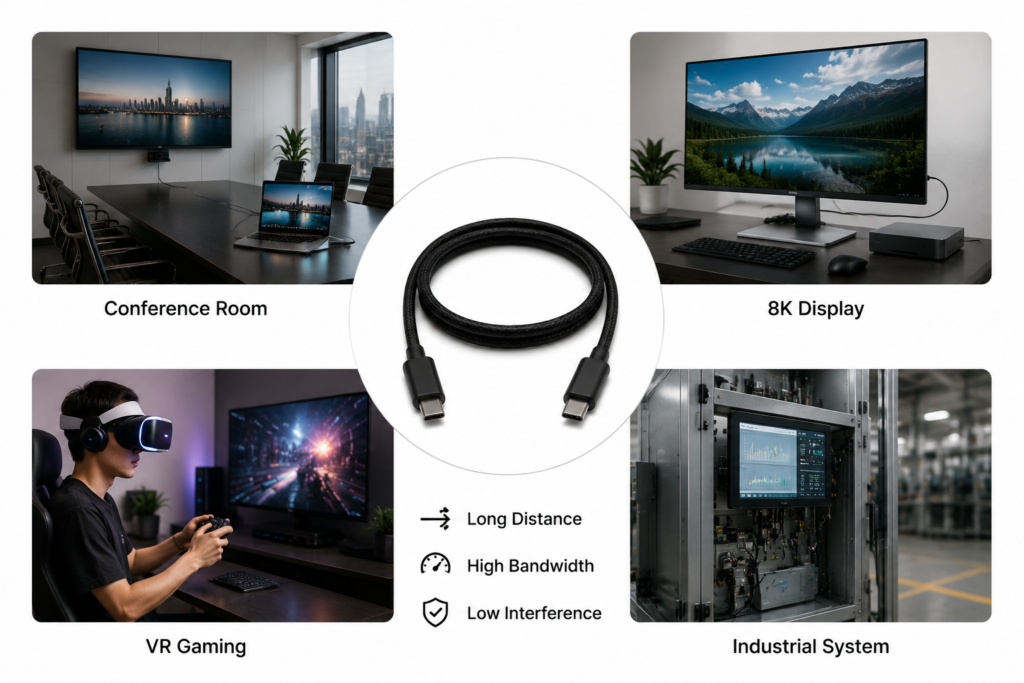
Professional AV and Conference Systems
In conference rooms, exhibition halls, and auditoriums, the host PC is often far from the display or projector. Fiber cables deliver stable 4K/8K video over long distances with zero latency, making them the standard for professional AV installations.
VR/AR and Gaming
VR headsets usually ship with short cables. A long fiber cable expands your play area while preserving image clarity and low latency, freeing you from the constraints of a short tether.
Industrial and Medical Equipment
Factories have motors and variable-frequency drives that create noisy electromagnetic environments; hospitals have sensitive imaging equipment. Fiber cables are immune to this interference, delivering reliable machine vision and medical imaging data.
Desktop Productivity and Multi-Monitor Setups
If your PC is under the desk or far from your monitors, fiber cables enable clean, tidy cabling while keeping your dock and multi-monitor setup running at full speed, with no performance drop from cable length.
10. Buying Guide and Pitfalls to Avoid
Match Your Needs: Speed, Length, and Features
There’s no need to buy the highest spec available:
- For file transfers and standard monitors: A 10Gbps entry model is enough.
- For Thunderbolt docks and high-speed SSDs: Choose a 40Gbps model.
- Always confirm your required cable length and whether you need PD charging.
How to Check Key Specifications
Look for explicit specs on the product page: rated speed in Gbps, supported protocols, exact power rating, and whether the cable is directional. Don’t buy based only on the word “fiber.”
Common Buying Mistakes
- Beware of marketing gimmicks: Some sellers label braided copper cables as “fiber-style” — they have nothing to do with actual fiber optics.
- Don’t assume fast charging: Always confirm the power rating before purchase, so you don’t end up with a cable that can’t fast-charge your laptop.
- Watch for fake specs: Cheap, extra-long high-speed cables often fail to deliver their advertised performance.
11. Usage, Maintenance, and FAQs
Daily Use and Storage Tips
When storing, coil the cable in large loops — do not bend it sharply. Avoid crushing the cable under heavy objects or yanking on the connectors. When not in use, put dust caps on the connectors to prevent contamination of the optical components.
Basic Troubleshooting
- No connection when plugged in: First check if the cable direction is reversed, then try a different host port to make sure it supplies enough power.
- Slow speed or poor image quality: Confirm that your device port matches the cable’s protocol, and that you haven’t plugged it into a slower USB-C port.
- Intermittent connection: Check for sharply bent sections along the cable and ensure the connectors are fully seated.
Frequently Asked Questions
- Can a fiber optic USB-C cable charge my phone? Basic models support low-power charging; high-speed fast charging is not supported.
- Is it worth buying for short distances? For everyday 1–2 meter use, standard copper cables work perfectly — the benefits of fiber won’t be noticeable.
- Can I mix it with regular USB-C cables? The connectors are universally compatible, but performance will be limited by the slower component in the chain.
12. Future Trends and Final Summary
Technology Evolution Roadmap
Fiber optic USB-C cables will evolve in three main directions: higher bandwidth, with 80Gbps+ specs becoming mainstream; improved power delivery to close the gap with full-featured copper; and lower chip costs to bring the technology to more consumer products.
Summary: Who Should Buy One?
Fiber optic USB-C cables are not a must-have for everyone — they are a targeted solution:
- Recommended for: Users needing high-speed connections over 5 meters, working in high-interference environments, or deploying professional AV/industrial/medical systems.
- Not necessary for: Everyday 1–2 meter desktop use, users wanting full one-cable charging, and budget-conscious casual users — standard copper cables will serve you perfectly well.