
Why You Should Understand the Charging Curve
If you’ve ever used fast charging on your phone, you’ve probably noticed this pattern: the battery charges rapidly in the first 20 to 30 minutes, jumping to 70% or 80% in no time. But as it gets closer to full, the speed slows down dramatically, and the last 10% can feel like it takes forever. Why can’t charging stay fast the whole time?
The answer lies in the core rule of lithium-ion battery charging, shown in what’s called a “charging curve.” Understanding this curve will help you make sense of common charging questions: why fast charging slows down at 80%, why your phone charges slower in winter, whether overnight charging damages your battery, and how to spot common charging myths.
This guide skips complicated formulas and technical jargon, so anyone can follow along.
What Exactly Is a Charging Curve?
Put simply, a charging curve is a graph that tracks how a battery’s voltage and current change over time, or as its charge level rises. The horizontal axis shows either charging time or remaining battery level, while the vertical axis measures two key values: charging current and charging voltage.
All consumer lithium-ion batteries follow the same core charging principle: constant current (CC) charging followed by constant voltage (CV) charging, known as the CC/CV model.
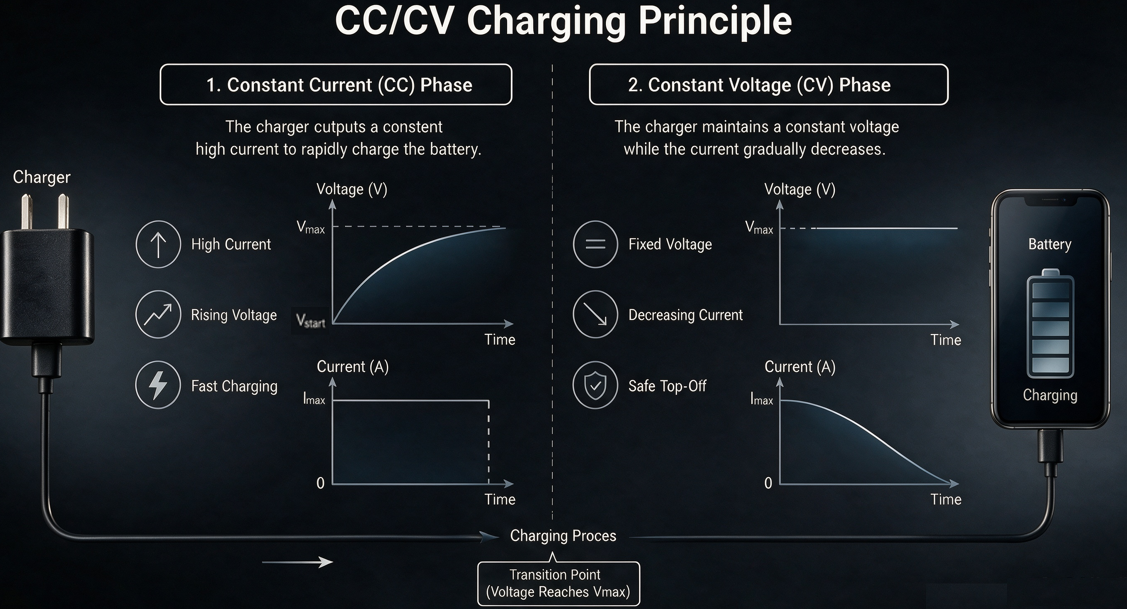
Think of charging a battery like filling a glass of water. When the glass is empty, you can turn the faucet on full blast to fill it quickly—that’s the constant current phase. When the glass is almost full, you turn the faucet down low to top it off without spilling—that’s the constant voltage phase.
You might wonder: why not just keep the current high all the way to 100%? The answer comes down to safety and battery lifespan. Due to their chemical properties, lithium-ion batteries can’t handle high current when nearly full. Sustained high current at high charge levels would speed up wear on the battery cells, and even cause overheating or swelling. The “fast first, slow later” pattern is a careful balance between charging speed, safety, and long-term battery health.
The Four Stages of a Standard Lithium-Ion Charging Curve
A complete charging curve has four distinct stages, each with its own current/voltage behavior and purpose.
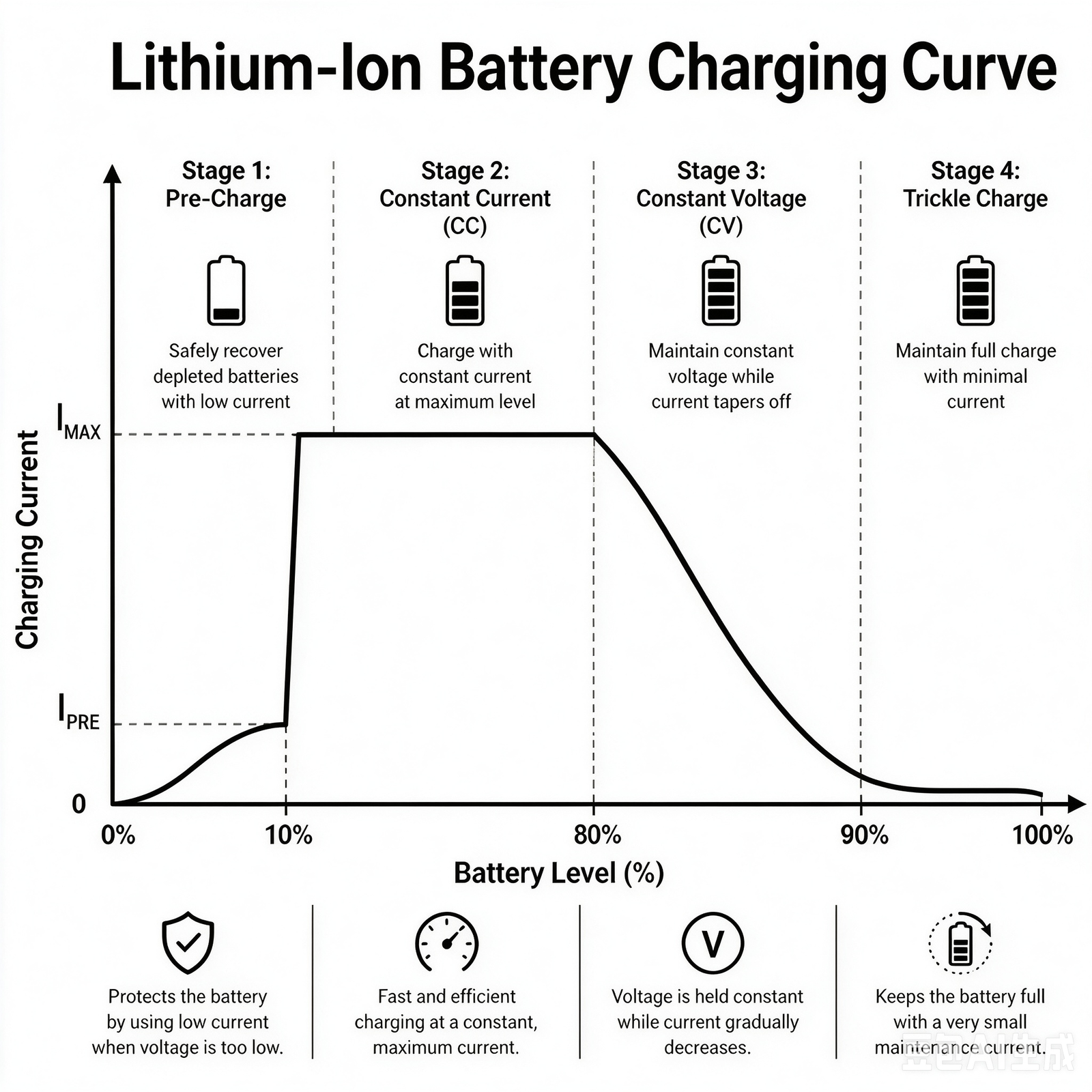
Stage 1: Pre-Charging – Gentle Wake-Up for the Battery
This stage, also called trickle activation, only kicks in when the battery is extremely drained or deeply discharged.
- Current & voltage behavior: The charger delivers a very low current, and the battery’s voltage rises slowly.
- Key purpose: Think of it as warming up a sleeping battery. A deeply drained battery has high internal resistance. Hitting it with high current right away would stress the cells and shorten their lifespan. The small pre-charge current brings the voltage up to a safe level before normal fast charging begins.
For most daily use, you won’t even notice this stage, since you rarely let your phone die completely.
Stage 2: Constant Current Charging – The Fast Charging Workhorse
This is the fastest part of the entire charging process, and the reason “fast charging” feels so quick.
- Current & voltage behavior: The charging current stays at its maximum constant level, while the battery’s voltage rises steadily.
- Typical charge range: Roughly 10% to 80% battery.
Why is this stage so fast? Because power equals voltage multiplied by current. During constant current charging, the current stays at its peak, and voltage keeps rising, so overall charging power stays high. This is how phones can reach 80% charge in just 30 minutes.
Stage 3: Constant Voltage Charging – Slowing Down to Top Off
When the battery reaches around 80%, the curve shifts to the constant voltage stage. This is the point where everyone notices charging getting slower.
- Current & voltage behavior: The charging voltage stays constant, while the charging current gradually decreases.
- Typical charge range: Roughly 80% to 90% battery.
The logic is straightforward: when a battery is nearly full, it can’t accept more lithium ions at the same rate. High current at this stage would cause excess heat and lithium plating inside the battery, seriously damaging its lifespan. So the charger holds the voltage steady and slowly reduces the current, letting the battery fill up gently.
Stage 4: Trickle Charging / Float Charging – Maintaining a Full Battery
When your phone says 100%, charging hasn’t fully stopped—it’s just switched to trickle charging.
- Current & voltage behavior: Voltage stays steady, and the charger supplies a tiny amount of current.
- Key purpose: To make up for the battery’s natural self-discharge. Even when not in use, lithium-ion batteries lose a tiny bit of charge every day. Trickle charging replaces that small loss with a very low current, keeping the battery at full capacity.
Many people worry that charging overnight will damage their battery. In reality, all reputable phones and chargers switch to this low-current trickle stage once full. There’s no risk of overcharging, and it’s completely safe.
How Fast Charging Changed the Charging Curve
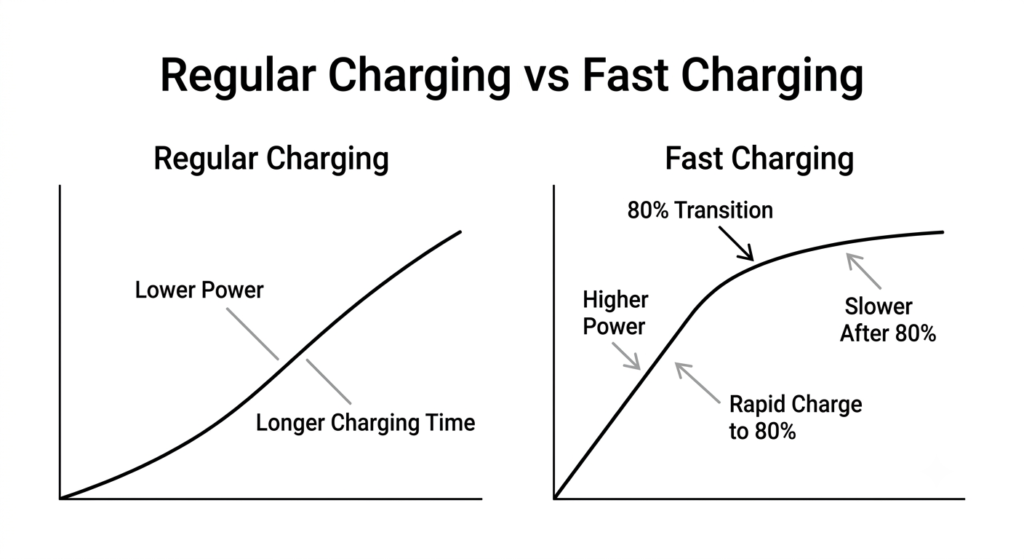
Back in the days of 5W slow chargers, charging curves were flat and gentle, and a full charge took two to three hours. Today, with 100W+ fast chargers that can fill a phone in 15 minutes, the curve has been dramatically optimized.
Regular Charging vs. Fast Charging: What’s the Difference?
With a basic 5W charger, the constant current stage has very low current, so overall power is low. The whole curve is gradual, and charging takes a long time.
Fast charging works by cranking up the power during the constant current stage. This makes the 10% to 80% range much faster, cutting total charging time significantly. The higher the peak power, the higher the current in this stage, and the faster the battery charges.
Two Fast Charging Technologies: Different Curve Shapes
There are two main fast charging approaches, and they produce very different looking curves:
- High voltage, low current: Used in early QC and PD charging standards. This approach raises the charging voltage significantly while keeping current steady. On a graph, the voltage climbs sharply, and power is increased by pushing voltage higher.
- Low voltage, high current: Used in many proprietary fast charging systems from phone brands. This approach uses very high current with minimal voltage change. The current peak on the graph is much higher, charging produces less heat, and fast charging works better while the screen is on.
But no matter which technology is used, or how high the power rating is, all fast charging slows down around 80%. This is a physical limit of the constant voltage stage, shared by all lithium-ion batteries, regardless of brand or charging standard.
Why Charging Curves Vary Between Phone Brands
Two phones with the same 100W fast charging rating can have different real-world speeds—one might charge fully in 20 minutes, the other in 25. Some slow down at 80%, others start slowing at 70%. What causes these differences? There are four main factors.
1. Different Charging Protocols and Technology Paths
Universal standards like USB PD have different power management logic than brand-specific proprietary protocols. Proprietary protocols can be deeply optimized for a brand’s own batteries, sustaining peak power longer. Universal standards work with more devices, but use more conservative tuning.
Also, high-voltage and high-current designs naturally produce different curve shapes, which translates to different perceived charging speeds.
2. Different Battery Specs and Tuning Priorities
Battery cells differ in capacity, material, and internal resistance, which sets the maximum safe current. For the same power rating, a larger capacity battery will have relatively lower charging current, and the constant current stage will last a different amount of time.
Brands also have different tuning priorities: some push for maximum charging speed with more aggressive current levels, while others prioritize battery lifespan with more conservative settings that shift to constant voltage earlier.
3. Different Temperature Control and Safety Thresholds
Charging always produces heat, and temperature is a huge factor in charging speed. Every brand sets its own temperature limits: some won’t reduce current until the battery hits 40°C, while others take a more cautious approach and start slowing down at 35°C.
Differences in battery protection circuit design also affect when the switch from constant current to constant voltage happens, which changes the shape of the whole curve.
4. System-Level Software Optimization
Modern smartphones include smart charging features, like overnight charging optimization and usage pattern learning. The system learns your schedule, charging to 80% overnight and then topping off right before you wake up. This changes the shape of the charging curve in daily use.
Additionally, different systems have slightly different definitions of “full charge” and different trickle charging strategies, which affects how fast the final percentage feels to users.
Everyday Factors That Change Your Charging Curve
The charging curve isn’t fixed. Temperature, battery age, and how you use your phone can all alter it, which is why charging sometimes feels faster or slower for no obvious reason.
1. Ambient Temperature: Slow in Winter, Slow in Hot Summer Too
Lithium-ion batteries are very sensitive to temperature. Both extreme cold and extreme heat slow down charging:
- Cold weather (like winter outdoors): The lithium inside the battery becomes less active, and internal resistance rises. The pre-charge stage takes longer, and the constant current stage can’t reach full current, so overall charging is noticeably slower.
- Hot weather (like after sitting in the sun): If the battery gets too hot, thermal protection kicks in. The system reduces charging current early, or even pauses charging temporarily, to protect the battery from damage.
2. Battery Aging: How Charging Changes After Two Years of Use
Batteries are consumable parts. As they go through more charge cycles, they age, and their charging curve changes too:
- The constant current stage gets shorter, and the battery shifts to constant voltage earlier. The “golden period” of fast charging becomes shorter.
- The actual usable capacity of the battery decreases. The whole curve is effectively “compressed”—it may say 100% full, but it holds less charge than a new battery.
This is why older phones not only have worse battery life, but also feel like they charge slower than when they were new.
3. Usage: Why Charging Feels Slower When Gaming With the Screen On
If you charge your phone while gaming or streaming video, you’ll notice the battery percentage climbs much slower. This isn’t your imagination.
When running demanding apps, the processor and screen use a lot of power. Some of the charging power goes toward powering the phone instead of charging the battery, so the effective current going into the battery drops. At the same time, the phone runs hotter, which triggers thermal throttling of the charging speed. Together, these two effects make charging feel much slower.
4. Charging Accessories: Cheap Chargers or Cables Kill Fast Charging
To get the full fast charging curve, your charger, cable, and phone all need to support the same charging protocol.
If you use a charger that doesn’t support your phone’s fast charging protocol, or a low-quality cable that can’t handle high current, charging drops down to basic slow speeds. The constant current stage never reaches its full current level, the whole curve is “scaled down,” and charging speed drops significantly.
Common Charging Myths Debunked
There are a lot of persistent myths about phone charging. Once you understand the charging curve, they’re easy to debunk.
Myth 1: You should leave your phone plugged in for an extra hour after it hits 100% to “calibrate” the battery
Fact: This is completely unnecessary.
When your phone shows 100%, it’s already in the trickle charging stage, and the battery is fully charged. Leaving it plugged in longer only maintains that tiny trickle current—it doesn’t add any extra charge to the battery. There’s no such thing as extra “activation” or “calibration” from overcharging. It provides no benefit, and reputable devices are designed to prevent overcharging anyway.
Myth 2: Fast charging damages batteries because of the high current
Fact: Heat is the number one enemy of battery lifespan, not high current.
The high current in the constant current stage is always kept within the battery’s safe limits by reputable manufacturers. What really speeds up battery aging is the heat generated during charging. High heat causes the electrolyte inside the battery to degrade faster, reducing cell capacity quickly. Charging while gaming or in hot weather is far worse for your battery than fast charging itself.
Myth 3: If charging slows down at 80%, your battery is broken
Fact: This is standard design for all lithium-ion batteries, every phone does it.
Shifting from constant current to constant voltage and dropping the current at around 80% is a fundamental part of how lithium-ion batteries charge. It has nothing to do with the battery being worn out. Even a brand new phone with a brand new battery will slow down at this stage. If your phone slows down at 80%, that means its charging system is working normally. If it never slowed down, that would be a safety concern.
Myth 4: Higher wattage always means faster charging from 0 to 100%
Fact: Peak wattage is just a short-term maximum, it doesn’t tell you the whole story.
When brands advertise 120W or 200W fast charging, that peak power usually only lasts for a few minutes. After that, power gradually drops due to temperature and voltage limits. To judge how fast a phone really charges, you need to look at the full charging curve—especially the average power between 10% and 80%—not just the peak number.
Final Takeaways: Practical Charging Tips
Now that you understand how the charging curve works, here are simple, practical charging habits that balance speed and battery health.
- For fastest results: Unplug at 80% for the best time efficiency Up to 80% is the constant current fast charging stage, where speed is highest. After 80%, charging enters the slower constant voltage stage, and gets progressively slower. For quick top-ups, stopping at 80% gives you the most charge for your time.
- To protect your battery: Avoid full discharge, and avoid charging in high heat Try not to let your phone die completely. Deep discharge triggers the pre-charge stage, and frequent deep draining is hard on the battery. Also, avoid charging while gaming or charging a hot phone right after it’s been in the sun—heat is the biggest cause of battery aging.
- Overnight charging is safe with genuine accessories Once full, your phone automatically switches to trickle charging, and won’t keep pushing high current into the battery. As long as you use an original or reputable third-party charger and cable, charging overnight is completely safe. You don’t need to wake up in the middle of the night to unplug your phone.
- When buying charging accessories: Protocol support matters more than wattage When shopping for chargers and cables, don’t just look at the wattage. First make sure they support your phone’s specific fast charging protocol. If the protocol doesn’t match, even a very high wattage charger won’t deliver fast charging—it will just charge at basic slow speeds.