
Have you ever had this experience: when you’re rushing to catch a flight at the airport and your phone is about to die, you see a USB port next to your seat and want to plug in, but suddenly you worry — will your photos, contacts, and chat records be stolen once you plug it in? There are five or six USB cables piled up in your drawer at home: some come with your phone, some come with your power bank, some are labeled “fast charging cable”, and some are labeled “charge only”. You can’t tell at all which one can transfer data and which one is safer.
Many people’s understanding of the security of charging cables and data cables falls into two extremes: either the panic that “plugging in a data cable will leak data immediately”, or the carelessness that “they can all charge anyway, just use any one”. In fact, the core difference in security risks between the two is not “whether they can charge”, but a detail that is easily overlooked: whether there is a path for user data.
In this article, we will start from the most basic definitions, clarify the security differences between charging cables and data cables, common pitfalls, and solutions for different scenarios. From beginner level to independent judgment, after reading this, you will no longer struggle with a pile of cables.
1. First, Understand the Comparison Objects: What Exactly Are Charging Cables and Data Cables?
Before talking about risks, we must first clarify two core concepts, otherwise it is easy to guess randomly with marketing terms such as “fast charging cable” and “full-featured cable”, and the more you look, the more confused you will be.
Plain Language Definition: Core Functional Differences Between the Two Types of Cables
For the USB cables we talk about daily, there is first a most basic consensus: almost all ordinary USB cables can supply power, that is to say, as long as it is a normally usable USB cable, it can basically charge devices. There is no daily civilian USB cable that “can only transfer data and cannot charge at all”.
On this basis, there is actually only one core difference between the two types of cables:
- Pure charging cable: Mainly responsible for power supply, physically not connected to the path for ordinary USB user data transmission, and usually cannot transmit user data such as photos, files, and contacts.
- Data cable: Has both charging and USB data transmission capabilities. In addition to charging, it can also be used to transfer files, sync devices, connect to car infotainment systems, connect to printers, and even flash and debug mobile phones.
In other words, the biggest security difference between the two types of cables is never “whether they can charge”, but whether there is an open physical path for user data transmission — this is the starting point for judging the security of all USB cables.
Plain Language Principle: Wire Cores and Signal Types Determine What They Can Do
How many wire cores are inside a USB cable and what each core is responsible for directly determine what it can do. We don’t need to memorize complex terms, just distinguish between two types of functional wires:
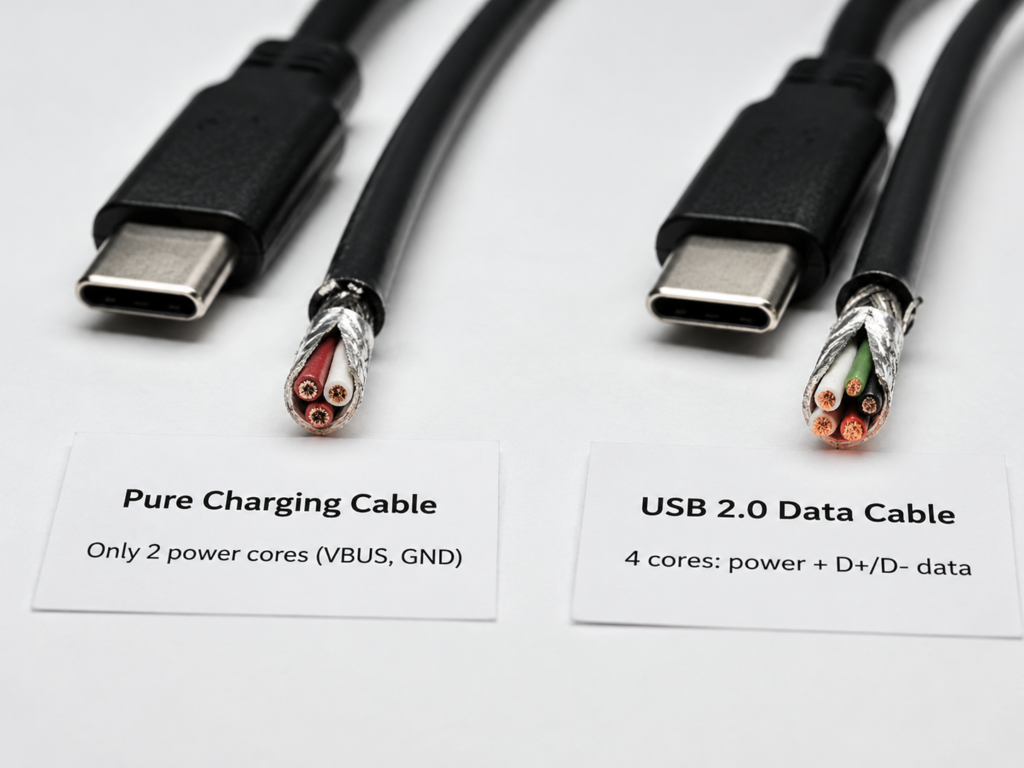
One type is responsible for power transmission: all USB cables that can charge have two core power supply wire cores (called VBUS and GND in the industry, equivalent to the live wire and neutral wire of daily wires), which are specially used to deliver electricity.
The other type is responsible for transmitting user data: if it is a USB 2.0 specification data cable, there will be two more D+/D- wire cores. Most of our photo transfer, file transfer, and computer device recognition go through these two paths; if it is a high-speed cable such as USB 3.x, USB4, or Thunderbolt, there will be more high-speed differential wire cores for transmitting high-speed data such as large files and videos.
Here, we must particularly distinguish two easily confusing things. They are both related to “signal transmission”, but they are not user data transmission channels:
The first is the CC line of the USB-C interface: it is only responsible for identifying the front and back of the plug, judging whether the device is supplying power or receiving power, and negotiating fast charging power. It is equivalent to a “charging administrator” and will not be used to transmit your photos and files.
The second is the E-marker chip: commonly found in high-power or high-speed USB-C cables, just like the “ID card” of the cable. When plugged in, it will tell the device “how much power I can handle and how fast I support”. But having this chip does not mean that it can definitely transmit user data — some high-power pure charging cables also have E-marker, just to negotiate high-current fast charging, and are not connected to the wire cores for data transmission at all.
Remember a key principle: charging negotiation signals are not the same as user data transmission. Even if some fast charging protocols use data pins for electrical identification, it does not mean that your phone files are already open for access.
3 Actual Types of Charging Cables: Don’t Be Fooled by the Packaging
Many people think that “charge only” written on the package means a pure charging cable. In fact, the “charging cables” on the actual market are divided into at least three types, with vastly different security levels:
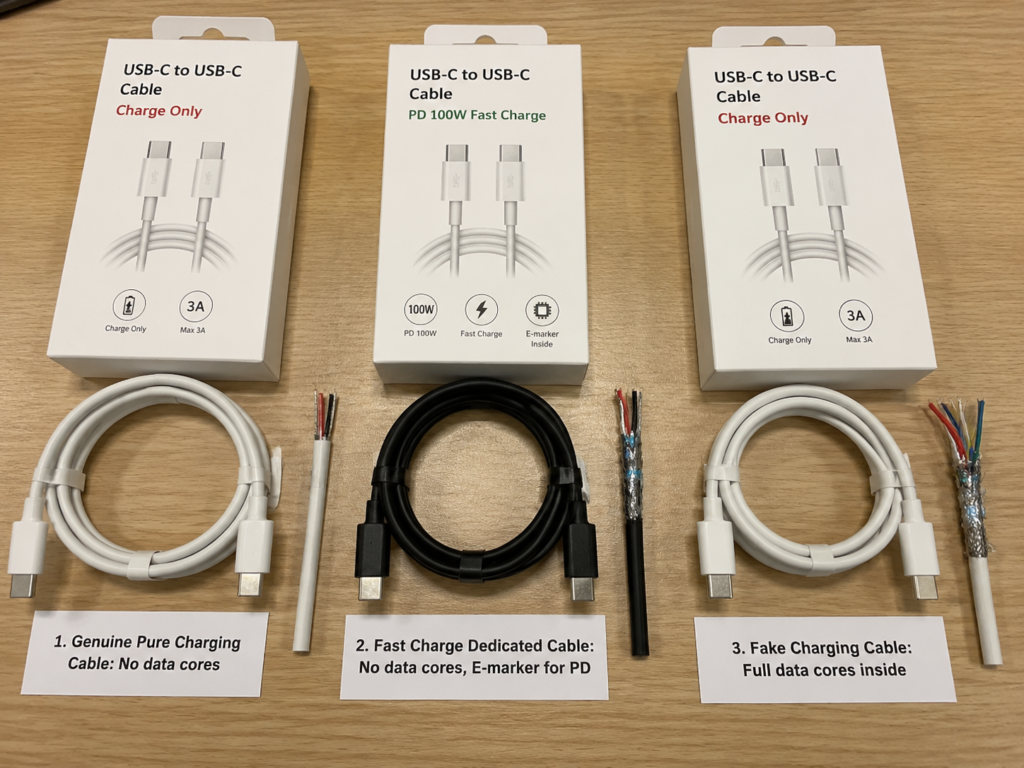
The first type is genuine pure charging cable: there are indeed no user data wire cores connected inside, which physically directly blocks data transmission, and its security is the clearest.
The second type is fast charging dedicated charging cable: supports fast charging recognition or PD fast charging negotiation, can meet fast charging needs, but also has no user data wire cores connected, and cannot transfer files. This type of cable balances the convenience of fast charging and data isolation, and is very suitable for public charging.
The third type is fake charging cable: the package is printed with “charge only”, but actually the internal data wire cores are fully connected. When plugged into a computer, the device can be recognized, and the risk is almost the same as that of ordinary data cables.
Therefore, to judge the risk of a cable, always look at its actual function, not just the text on the package.
Special Note on USB-C: Same Appearance, But Functions May Vastly Differ
Many people think that USB-C is a new interface, so it must be able to transfer data and support fast charging, but that’s not the case at all. USB-C is just the physical shape of the interface, and has no direct relationship with its functions — a cable with the same USB-C interface may be a pure charging cable, a USB 2.0 data cable, a USB 3.x high-speed cable, a Thunderbolt/USB4 full-featured cable, or even a dedicated cable that supports video output.
Also, don’t judge data capability by appearance details: the interface can be plugged in both ways, the cable is relatively thick, the interface is blue, or it supports high-power fast charging — none of these can prove that it can definitely transfer data, and vice versa. The more “versatile” the USB-C function is, the more carefully you should look at its actual parameters, and you can’t take it for granted.
Unified Comparison Criteria in This Article: Avoid Comparing Apples to Oranges
To prevent everyone from taking special cases as general conclusions, let’s first clarify the conventional boundaries of the following discussion:
The conventional risk comparison mentioned in this article defaults to qualified civilian cables produced by regular manufacturers, with the same interface type, and daily usage scenarios of mobile phones/computers/power banks. If it is a falsely labeled cable, a low-quality cable with no brand/no parameters/no certification, a maliciously modified cable, or usage scenarios for highly sensitive groups such as journalists and government staff, the risk level will be significantly higher and requires separate judgment.
Also, let’s give everyone a reassurance first: modern mobile phone systems usually have security mechanisms such as lock screen protection, trust pop-ups, and default charge-only mode. Data cables don’t “steal all your data as soon as you plug them in”, so there’s no need to panic excessively.
2. Core Logic: Why the Security Risks of the Two Types of Cables Are Different
Now that we understand the basic definitions, let’s talk about why the security risks of the two types of cables are different — essentially, it’s a question of “whether the data path is connected”.
Essential Difference in Risks: Whether There Is a Physical Path for User Data Transmission
The core of the security difference between the two types of cables lies in the connection or disconnection of the data path:
- A pure charging cable has no ordinary user data path, which is equivalent to directly digging up the data transmission road. Even if the opposite end is a malicious device, it cannot read the files in your phone through the standard USB data channel.
- A data cable has a complete data path, which is equivalent to the road between the two ends of the device being connected. But whether it can get into your phone to take things depends on whether you open the door — that is, system permissions, user authorization, and whether the opposite device is trustworthy.
Here, we must correct a most common misunderstanding: data security risks do not come from “the cable stealing data”, but from “the cable giving untrusted devices the opportunity to communicate with your device”. Ordinary cables themselves have no storage function and will not actively steal things; they are just a channel.
The Truth About Risk Sources: Cables Are Usually Channels, Not Active Hazards
Ordinary cables themselves do not store user data, nor will they steal your photos, contacts, or chat records out of thin air. What actually initiates the risk is generally the devices at both ends: for example, modified public charging ports, virus-infected unfamiliar computers, unknown car infotainment systems, and USB malicious devices disguised as chargers.
Because pure charging cables cut off the data path, even if the opposite device is untrusted, it is difficult to access your user data through the standard USB data protocol. Of course, there are exceptions: if it is a maliciously modified cable with a built-in attack chip, then it is not a “channel” but an “attack device”. We will talk about this situation separately later.
Differences in Prerequisites for Risk Triggering
The two types of cables face different types of risks and have different triggering conditions:
- Pure charging cables mainly face power supply safety issues: such as power mismatch, cable heating, loose interfaces, and damage caused by low-quality charging modules, which have nothing to do with data.
- In addition to power supply risks, data cables also have data interaction risks, but this risk does not exist as soon as you plug in. It will only be triggered if several conditions are met: the opposite device is untrusted, your device is unlocked, you click “Trust This Computer”, you select file transfer mode, or you enable USB debugging, etc.
Mobile phone systems usually have authorization pop-up protection, but computers, mobile phones with developer mode enabled, jailbroken/rooted devices, and old systems that have not been updated for a long time have higher risks. Also note: selecting “charge only” mode on your phone can significantly reduce risk, but it is not the same as physically disconnecting the data pins, and there is still a difference from the physical isolation of a pure charging cable.
Beginner-Level Overall Risk Ranking (From High to Low)
To make it easy for everyone to understand at a glance, we rank the risks of common scenarios from high to low:
- Highest risk: Unfamiliar USB port or unfamiliar computer + data cable + user clicks trust/allows file transfer/enables USB debugging.
- High risk: Cables of unknown origin, especially those given by strangers, found, second-hand with unknown source, abnormal appearance, or with suspicious chips.
- Medium to low risk: Unfamiliar USB port + genuine pure charging cable or reliable USB data blocker, mainly remaining risk of power supply quality.
- Lowest risk: Own trusted cable + own trusted charger/computer + normal system permission settings.
Of course, if the so-called “pure charging cable” is falsely labeled or maliciously modified, the risk will directly rise to the high-risk level.
3. Item-by-Item Comparison of Core Risks
We talked about the overall logic earlier. Now we will break down the differences between the two types of cables in more detail from the four most common risk dimensions. Each comparison will first clarify the prerequisites to avoid misinterpretation.
Data Privacy Leakage Risk: The Most Concerned Core Difference
Let’s first clarify the comparison criteria: qualified products of the same specification, connected to the same device, relatively new mobile phone system, and default security settings maintained.
Under this premise, the user data leakage risk of a genuine pure charging cable is close to 0 — because it has no standard USB user data transmission path at all, and the opposite device doesn’t even have a channel to “talk” to your phone, so naturally it can’t read files.
While the risk of data cables is significantly higher, because the opposite device can initiate identification, synchronization, file access, or peripheral communication requests, but this does not mean that data will leak as soon as you plug in. For data leakage to actually occur, multiple conditions usually need to be met: the device is unlocked, the user clicks “Trust This Computer”, selects “File Transfer/MTP” mode, allows photo access, or the device has USB debugging enabled, or the old system has unfixed vulnerabilities.
A special reminder here: a trust prompt popping up after plugging in a data cable does not mean that data has been leaked — this is just the normal process of the device recognizing the opposite end. As long as you refuse authorization and maintain charge-only mode, file access is usually not opened.
Of course, this conclusion can also change: if it is a falsely labeled charging cable, the risk should be calculated as a data cable; conversely, if a data cable is used with a USB data blocker, or the cable has a real physical charge-only switch, the risk will be close to that of a pure charging cable.
Malicious Control and Injection Risks: More Hidden But Conditional
The comparison criteria for this dimension are: connected to a maliciously modified opposite device, a malicious computer, or a malicious device disguised as an ordinary peripheral.
Because pure charging cables cannot establish data communication, the risk on the standard USB data attack path is very low, and malicious devices cannot send commands to your phone through conventional methods.
The risk of data cables is higher. The most common is HID keyboard injection attack: a malicious device disguises itself as an ordinary USB keyboard. Once the device recognizes it, it can automatically and quickly input a series of commands, such as downloading software, modifying settings, and even stealing files. This type of attack is more common on computers, because computers usually trust keyboard peripherals by default; on mobile phones, it usually requires the user to first authorize OTG connection, enable USB debugging, or the system has vulnerabilities for the attack to succeed easily. In addition, there may be risks such as malicious peripheral disguise, abuse of debugging interfaces, and induced software installation.
Ordinary users don’t have to worry too much about “being remotely controlled as soon as you plug in”, but pay attention to several high-risk settings: the USB debugging switch on Android, jailbroken/rooted mobile phones, randomly enabling developer permissions, and not updating the system for a long time — these will greatly increase the risk.
There is also an exception: if it is a maliciously modified cable with a built-in attack chip, no matter whether the package says charging cable or data cable, it should be directly treated as a high-risk device.
Power Supply and Hardware Security Risks: Risks Common to Both Types of Cables
The comparison criteria for this dimension are: same power specification, same workmanship level, regular and qualified products, normal use.
Many people think that charging cables are “safer” than data cables, but they actually mean data security. In terms of power supply safety, there is no natural difference between the two. The risk of fire and overheating depends corely on the current that the cable can carry, the workmanship of the interface, the quality of the charger, and the power demand of the device, and has no direct causal relationship with whether data transmission is supported — a low-quality pure charging cable may also overheat and catch fire, and a regular data cable, as long as the power matches, also has guaranteed power supply safety.
In addition, both types of cables may face the risk of interface damage: low-quality cables may damage the device interface due to short circuits, poor contact, or terminal deformation; if the data pins of a data cable are short-circuited, problems such as abnormal identification and interface failure may also occur.
The risk of high-power fast charging also has no direct relationship with whether it is a data cable: fast charging requires the cable, charger, and device to all support the corresponding protocol. If a cheap cable has falsely labeled power, whether it is a charging cable or a data cable, problems such as heating, speed reduction, and charging interruption may occur.
In terms of aging performance, there are also differences between the two: after a pure charging cable ages, it usually manifests as slow charging, charging interruption, and heating; after a data cable ages, in addition to charging problems, there may also be transmission interruptions, repeated device recognition by the computer, and repeated permission pop-ups.
Compatibility Misuse Risk: An Easily Overlooked Indirect Risk
This type of risk is not that the cable itself is broken, but that it is used in the wrong scenario, which indirectly brings security or experience problems.
Misuse of pure charging cables is mostly an experience problem: for example, you find that you can’t transfer files when you want to, you can’t connect to a computer when you want to flash your phone, there’s no response when you want to connect to CarPlay/Android Auto, and the printer can’t be recognized. It usually doesn’t cause security incidents, but it may delay things.
Misuse of data cables can bring security problems: for example, leaving a data cable plugged into a public USB port, an unfamiliar computer, or a shared power strip for a long time is equivalent to exposing your device to unknown opposite devices for a long time, which invisibly increases the risk.
There is also a common misuse misunderstanding: equating fast charging capability with data capability — a cable that can fast charge may not be able to transfer data, and a cable that can transfer data may not support high-power fast charging. When buying, you should check the power label and data rate label separately.
Also, pay attention in work scenarios: company computers, government terminals, and laboratory equipment may have special USB control requirements, such as prohibiting USB storage, prohibiting mobile phone synchronization, and closing debugging interfaces. You can’t plug in casually according to personal daily habits.
4. Key Variables That Reverse Conventional Conclusions
What we said earlier are all conventional situations, but there are several variables that can directly reverse the conclusion, which belong to advanced judgment ability, and everyone must understand them.
Authenticity of Cables: Nominal Functions May Not Match Actual Ones
Security judgment always depends on “actual capability”, not the promotional language on the package. In addition to the fake pure charging cables we mentioned earlier, there are also fake data cables — they are nominally capable of data transmission, but actually can only charge. Although the data risk is low, there may be problems of falsely labeled power and poor workmanship.
Especially low-price gifts, short cables included with shared power banks, unbranded bulk cables, and second-hand cables of unknown origin have the most unreliable function labels and a high probability of false labeling. If you are not sure what type a cable is, don’t guess. We will teach you how to test it later.
System Settings: Software Charge-Only ≠ Physical Blocking
Many people think that selecting “charge only” on the phone is absolutely safe, but it’s not. The software-level charge-only mode can indeed significantly reduce the risk of data leakage, as it turns off functions such as file transfer and MTP, but it is not equivalent to physically cutting off the data pins — there may still be basic device enumeration, charging negotiation, or identification processes.
The protection logic of different systems is also different: iOS usually uses the “Trust This Computer” pop-up and lock screen status as important lines of defense. If it is not unlocked or trusted is not clicked, data permissions are basically not opened; Android can set the default USB mode, but the interfaces and logic vary by brand and version.
A special reminder here: USB debugging is a high-risk switch. Ordinary users don’t need to turn it on at all, let alone authorize debugging keys on unfamiliar devices. Developers should also revoke debugging authorization in time after use.
Intermediate Devices: Adapters, Docks, and Charging Stations Add Up Risks
Don’t think that only the cable and the devices at both ends are related; the devices connected in the middle will also add up risks. For example, if you connect a data cable to an unfamiliar HUB, docking station, desktop charging station, car infotainment system, or public printer, it is equivalent to having an additional untrusted intermediate device, and the risk will be higher.
Pure charging cables or data blockers can reduce the data interaction risk brought by such intermediate devices, but note: pure charging cables cannot solve power supply-level risks such as abnormal voltage, low-quality charging modules, and interface short circuits.
This type of scenario is actually very common: USB ports on hotel bedside tables, USB ports on airport seats, USB ports on shared office desks, car infotainment systems of rental cars, and public printers all belong to the situation of “uncontrollable intermediate devices”.
Dual-Use Cables with Physical Switches: Switch Status Determines Risk Level
Now there is a type of cable on the market with a “charging/data” toggle switch on the cable body, which looks very convenient. Its security depends entirely on whether the switch actually disconnects the data wire cores:
When switched to charge-only mode, if the switch actually disconnects the data pins, the data risk is close to that of a pure charging cable; when switched to data mode, it is treated as an ordinary data cable.
If you buy this type of cable, it’s best to test it with your own trusted computer when you first get it: switch to charge-only mode and see if the computer can still recognize the phone. If the switch is loose, the mode is abnormal, or the computer can still recognize the phone when switched to charge-only, don’t rely on it in public scenarios.
Smart/Digital Display Special Cables: Extra Chips Increase Uncertainty
There are also cables with special functions, such as those with digital power display, timed power-off, magnetic attraction, and light effects. These cables may have additional control chips inside. Having a chip does not mean it is malicious, but for smart cables of unknown origin, it is difficult for you to judge what the chip inside is doing, and the uncertainty is higher.
Smart cables with credible sources, transparent brands, and clear parameters have controllable risks; if they are bought from street stalls, of unknown brands, and with flashy functions, you should be more careful. In addition, for magnetic cables, note that the metal contacts are easy to absorb dust and debris, which may cause short circuits and poor contact, posing power supply safety hazards.
The core logic of choosing cables is always: credible source, clear parameters, and reliable workmanship are far more important than fancy functions.
Maliciously Modified Cables: Normal Appearance But Built-In Attack Chips
This is the most special category: maliciously modified cables may have built-in microchips and wireless modules, which can simulate keyboards, network cards, and even storage devices. They are almost indistinguishable from ordinary cables in appearance, and ordinary people can’t tell at all.
However, the probability of ordinary users encountering such cables is very low. Its high-risk sources mainly include: gifts from strangers, unknown gifts from conferences and events, found in public places, and second-hand cables from informal channels. If you are a highly sensitive group such as journalists, government staff, corporate executives, crypto asset holders, or developers, you must focus on prevention.
Practical advice for highly sensitive people: only use trusted cables purchased from formal channels for your main devices, do not use cables of unknown origin, and do not casually connect your main phone to unfamiliar computers.
Fast Charging Demand: Will Change the Security Trade-off Logic
Many people think that you must use a data cable for fast charging, but that’s not necessarily the case. It depends on the fast charging protocol:
USB-C PD fast charging mainly relies on the CC line for negotiation and does not require a user data path, so there are pure charging cables that support PD fast charging but cannot transfer files.
USB-A QC fast charging and some manufacturers’ proprietary fast charging protocols may use D+/D- pins for voltage identification or handshake, but this is only negotiating charging voltage, not equal to allowing reading of phone files, which is a different thing from opening MTP file transfer.
Pure charging cables may only support 5V slow charging, or may support limited fast charging, depending on the cable design and supported protocols. Now there are many dedicated charging cables on the market that support fast charging but not file transfer, which are very suitable for public charging and commuting backup.
The trade-off logic is also very simple: prioritize data isolation in public scenarios, and balance fast charging, data speed, and convenience in trusted home scenarios.
5. Risk Judgment for High-Frequency Real Scenarios
After talking about so many principles, let’s directly apply them to the scenarios that everyone encounters most often. You can use them directly after reading.
Public Charging Scenarios: Airports, Hotels, Malls, Shared Power Banks
The risk of public USB ports has a special name in the security community: Juice Jacking, also known as “charging hijacking”, which refers to someone modifying public USB ports into devices that can read data and inject malicious content.
Let’s first draw a realistic boundary here: there are not many public large-scale real cases, but public USB ports are unmanaged public devices. You don’t know what is connected behind them, so cautious use is still a reasonable security habit.
In this scenario, the user data leakage risk of pure charging cables is very low, and mainly need to pay attention to problems such as power supply quality, loose interfaces, and slow charging; if using a data cable, once you click trust, allow file transfer, or the device has unfixed vulnerabilities, the risk will rise significantly — even if you select charge-only mode, it is only a software-level restriction, not as thorough as physical isolation.
The security priority of public charging is: the best solution is to bring your own charger and plug it into a wall socket; the second best solution is to bring your own reliable pure charging cable, or use a USB data blocker; if you can only use a data cable, be sure to keep your phone locked, reject trust prompts, only select charge-only mode, and do not transfer any files.
As for the built-in cables of shared power banks, many short cables of shared power banks are mainly for charging, but different brands, batches, and interface designs are different. You can’t judge that they must have no data capability just because they are from shared power banks. They should still be treated as public uncontrollable environments. For main devices storing sensitive data, priority should be given to using your own charger or data blocker.
Scenarios of Borrowing Unfamiliar Cables/Using Second-Hand Cables
Many people worry that second-hand cables will retain the previous user’s data, but there is actually no need at all: ordinary data cables have no built-in storage chips, and will not save private data such as photos, contacts, and chat records. There is no such thing as “leaking the previous user’s data with a second-hand cable” or “leaving your own data in the cable”.
If it is a genuine pure charging cable, there is no data leakage path, and it mainly depends on whether its power and workmanship are qualified; if it is an ordinary data cable, the risk mainly comes from the opposite device it is connected to, not who used it before.
The biggest uncertainty in this type of scenario is whether the cable has been maliciously modified — the more unknown the source, the higher the risk. The safety advice is very simple: do not plug cables of unknown origin into your main phone, work phone, or devices storing sensitive data; if it’s just for temporary charging, prioritize using a USB data blocker, or find a wall socket to plug in your own charger.
Connecting to Unfamiliar Peripherals: Public Printers, Rental Car Infotainment Systems, Unfamiliar Computers
If you use a pure charging cable to connect to this type of peripheral, usually the device can’t even be recognized, so naturally there is no risk of standard data interaction.
If you use a data cable, once you click trust, the peripheral may read some media, files, contacts, or sync related information. How much it can get depends on the system permission settings and the peripheral’s capabilities. For example, when connecting to a rental car’s infotainment system, if you use CarPlay or Android Auto, your contacts, call records, navigation destinations, and even text message records may be left in the car system; when connecting to a public printer, it may read the files you choose to print, and even the storage permissions of some devices.
The safe operation for this type of scenario is: only give necessary permissions, unplug the cable immediately after use, and delete pairing records, sync records, and authorized device lists on the car system or device, and do not leave personal information.
Scenarios Where Devices Are Infected with Malware
If a computer is infected with a virus and you connect your phone with a pure charging cable, it is difficult for malware to transfer files to or read data from the phone through the standard USB data path, and the risk is very low; but if you use a data cable, malware may try to read phone backups, induce you to click authorization, exploit system vulnerabilities, abuse debugging interfaces, or use the permissions of sync software.
Conversely, if the phone is already infected with malware, when connected with a data cable, the malware may more easily spread files through the USB path, and even attack the connected computer; using a pure charging cable can reduce the spread risk through the USB path.
High-risk conditions for this type of scenario include: the device uses an old system that has stopped updating, the phone is jailbroken/rooted, USB debugging is enabled, the phone has previously trusted an unfamiliar computer, and the permissions of auto-sync software are set too high. If these conditions exist, try not to use a data cable to connect to untrusted devices.
Trusted Home/Office Scenarios: Your Own Charger, Your Own Computer
In a trusted environment of your own, such as using your own charger and your own personal computer at home, the data security risks of both types of cables are very low, and the focus of choosing cables can shift to speed, power, durability, and compatibility.
If you need to back up files, transfer photos, flash your phone, or connect to your own car infotainment system, use a regular data cable and unplug it in time after use; if it’s just for bedside charging, workstation charging, or connecting to a portable power bank, a pure charging cable is also fine, and it can also reduce the trouble of accidentally triggering data connection.
If it’s an office scenario, you must abide by the company’s IT security regulations — many enterprises restrict USB storage, mobile phone synchronization, debugging interfaces, and even prohibit private devices from connecting to office computers. You can’t plug in casually according to personal daily habits.
6. Practical Operational Methods: Identify Cable Types + Use Cables Safely
After talking about so many risks, here are some directly operable methods to teach you how to judge the type of cable and how to use cables safely.
3 Methods to Judge Cable Type (Ranked by Reliability)
The most reliable method is the computer test method: test with your own trusted computer and mobile phone. Plug in the cable. If the computer can recognize the phone and the phone pops up a “Trust This Computer” or file transfer prompt, it can basically be confirmed that the cable has data transmission capability. But note: if the computer can’t recognize it, it’s not necessarily 100% a pure charging cable. It may also be that the cable is broken, the interface is dirty, the driver has a problem, the phone is locked, not authorized, or restricted by system settings. You need to rule out several factors.
The second is the label checking method: look at the labels on the package or the cable body. If it is marked with words such as data transfer, sync, USB 2.0, USB 3.x, 10Gbps, Thunderbolt, most are data cables. If it is marked with “charge only”, it can only be used as a reference and cannot be fully trusted, because there are too many false labels.
The least reliable is the scenario inference method: for example, short cables of shared power banks, low-price gift cables of a few yuan, and ultra-cheap no-name cables are many charging cables, but these cables also have higher risks of false labeling and poor quality. It can only be used as a rough judgment and cannot be taken as true.
Finally, a reminder of several completely useless judgment methods: looking at the thickness of the cable, the color of the interface, the shape of the interface, whether it can fast charge, and the price — none of these can accurately judge whether there is a data function. Don’t guess blindly.
Decision Logic for Choosing Cables by Scenario
Public charging, bedside charging, workstation charging: prioritize choosing pure charging cables from regular brands, or equip with a USB data blocker to reduce unnecessary data exposure.
Connecting to your own computer, backing up files, transferring photos, flashing your phone, connecting to your own car infotainment system: use a regular data cable and unplug it in time after use.
Unsure of the cable type and in a public scenario: always treat it as having data risk, do not click trust, do not allow file transfer, and try to replace it with your own charger.
Highly sensitive devices: only use cables from trusted sources, avoid public USB ports and unfamiliar cables, and add a data blocker if necessary.
4 Operations for Safe Use of Data Cables
When a permission prompt pops up from a public USB port, select charge only or reject trust, and never click “Trust This Computer” or “Allow File Transfer”.
When connecting to unfamiliar devices, only give necessary permissions, unplug immediately after use, and clear pairing records, trusted device lists, and sync records.
Ordinary users should turn off USB debugging; developers should revoke debugging authorization in time after use, and do not authorize debugging on unfamiliar computers.
Do not leave data cables plugged into public ports, unfamiliar computers, shared power strips, or docking stations of unknown origin for a long time.
Common Charging Safety Rules for Both Types of Cables
Whether it’s a charging cable or a data cable, these charging safety rules apply:
Do not buy “three-no” products with no brand, no parameters, no certification, and falsely labeled power.
The power of the cable should match the charger and the device. For example, for high-power USB-C PD fast charging, you should choose a cable with the corresponding current/power label.
If the cable body is damaged, the interface is loose, it heats abnormally during charging, has a peculiar smell, or the metal contacts are deformed, stop using it immediately.
Do not excessively bend or pull the interface, do not use the cable to tie heavy objects, to avoid internal wire core breakage or short circuit.
If there is a problem with charging, first check the cable, charger, socket, and device interface. Don’t immediately think “I’m being attacked”. The vast majority of cases are hardware or contact problems.
Correct Usage of USB Data Blockers
A USB data blocker is a small adapter that is plugged between a public USB port and your cable, physically cutting off the data path, so that ordinary data cables can also be close to a charge-only state.
It is suitable for public charging, hotel USB ports, airport seat USB ports, or when you only have a data cable and don’t want to transfer data.
But it also has limitations: with it, you can’t transfer files, connect to car infotainment systems, or flash your phone; it also can’t solve power supply-level risks such as abnormal voltage, low-quality charging modules, and insufficient power.
When buying, choose a reliable brand, check clearly the supported current and interface type, and don’t buy too cheap low-quality products, otherwise it may cause poor contact or even power supply risks.
7. High-Frequency Misconceptions and Pitfall Avoidance List
Many rumors about USB cables actually take special cases as general conclusions. We have sorted out the most common types of misconceptions to help you avoid pitfalls.
Data Security Misconceptions
Many people think that charging cables will never leak data, but that’s not true. Only regular genuine pure charging cables can physically block the standard USB data path; if it is a falsely labeled charging cable or a maliciously modified cable, there is still a data risk, and it cannot be generalized.
Some people also think that all data will be stolen as soon as you plug in a data cable, which is also excessive panic. Modern mobile phones usually require unlocking, authorization, trust, or enabling file transfer before opening user data; as long as you refuse authorization and keep charge-only mode, there is generally no risk of file leakage.
There is also a common misunderstanding: used data cables will retain the previous person’s data. Ordinary data cables have no storage chips and can’t store things like photos and contacts at all, so there’s no need to worry about “second-hand cables stealing privacy”.
Many people think that the risk of public charging comes from the cable, but that’s not true. In the vast majority of cases, the risk comes from untrusted USB ports or opposite devices, and the cable is just a channel; only maliciously modified cables themselves become hazards.
Finally, a reminder of several normal phenomena, don’t misjudge them as attacks: a trust prompt popping up when plugged into a computer is a normal device identification process; slow charging from public USB ports is mostly due to power limits; repeated disconnection and reconnection is usually due to loose interfaces or cable aging. Don’t think “I’m being targeted by hackers” as soon as there’s a problem.
Power Supply Safety Misconceptions
Some people think that charging cables are definitely less likely to catch fire than data cables, but that’s wrong. The risk of fire mainly depends on power specifications, workmanship, certification, and usage status. Low-quality pure charging cables may also overheat and catch fire, and regular data cables are also safe as long as the power matches.
Some people also equate fast charging cables with data cables, thinking that if a cable can fast charge, it can transfer data. Fast charging negotiation and file transfer are two completely independent sets of mechanisms. Many fast charging cables can only charge and cannot transfer data at all.
Also don’t think that fast charging is definitely safe. High-power fast charging has higher requirements for cables. Low-quality fast charging cables are more likely to heat up, slow down, and damage interfaces, and the risk is higher than ordinary qualified cables.
Finally, don’t think that data blockers can solve all USB risks. It can only block the data path, and cannot solve problems such as power supply quality, abnormal voltage, and short circuits. Don’t treat it as a “universal safety shield”.
Identification and Judgment Misconceptions
“All USB-C cables are the same” is the most common misconception. USB-C is just the interface shape, and the internal power, data, video, and Thunderbolt capabilities vary vastly. From a few yuan pure charging cable to a few hundred yuan Thunderbolt 4 cable, the appearance may be almost the same.
Also don’t think that selecting charge-only on your phone is absolutely safe. Software-level restrictions are indeed useful, but physical blocking is the most thorough. For highly sensitive scenarios, prioritize using pure charging cables or data blockers.
Many people judge whether a cable is a data cable by its thickness. In fact, a thick cable may just have thick power supply cores, or be more durable, and has nothing to do with whether it has data capability.
Finally, expensive cables are not necessarily safer. Brand, certification, source, and specification matching are far more important than just price. Some expensive cables just have more functions and may not be more suitable for your usage scenario.
Beginner-Level Pitfall Avoidance Checklist
If you don’t want to remember too many details, just remember these few points, and you can avoid most pitfalls:
In public places, prioritize using your own charger plugged into a wall socket.
Do not plug cables of unknown origin into main phones or work phones that store sensitive data.
When you don’t need to transfer data, do not click trust or allow file transfer.
Ordinary users should turn off USB debugging, and developers should revoke authorization in time after use.
If the cable is hot, has a peculiar smell, the outer sheath is damaged, or the interface is loose, stop using it immediately.
Highly sensitive people should carry a trusted pure charging cable or a USB data blocker with them.
8. Frequently Asked Questions
Which is safer, a charging cable or a data cable?
From the perspective of data privacy, regular pure charging cables are safer because they physically block the user data path. From the perspective of power supply safety, there is no natural difference between the two, mainly depending on brand, specification, workmanship, and usage status.
Will charge-only cables leak data?
Regular genuine charge-only cables usually do not leak user data through the standard USB data channel. But falsely labeled, maliciously modified, or unknown-origin cables cannot be fully trusted.
Is it safe to plug a data cable into a public USB port?
It is not recommended to directly trust public USB ports. A safer approach is to use your own charger, pure charging cable, or USB data blocker; if you can only use a data cable, reject the trust prompt and select charge-only mode.
Can fast charging cables transfer data?
Not necessarily. Fast charging capability and data transmission capability are two independent things. When buying, you should check the power label and data rate label separately.
Is it necessary to buy a USB data blocker?
For people who travel frequently, often use public USB ports, or have sensitive data on their devices, it’s worth preparing one. If you only use your own charger at home, it’s enough to prioritize buying regular cables and chargers.
Are the cables included with shared power banks charging cables or data cables? Will they leak data?
Many built-in short cables of shared power banks may be mainly for charging, but different brands, batches, and interface designs are different. You can’t judge that they must have no data capability just because they are from shared power banks; public devices are still recommended to be treated as uncontrollable environments. For main sensitive devices, prioritize using your own charger or data blocker.
Can all USB-C interface cables transfer data?
Not necessarily. USB-C is just the physical shape of the interface, and has no direct relationship with data transmission capability. USB-C cables with the same appearance may be pure charging cables, USB 2.0 data cables, USB 3.x high-speed cables, or Thunderbolt/USB4 full-featured cables. You can’t judge data capability by whether the interface can be plugged in both ways, the thickness of the cable, the color of the interface, or whether it supports fast charging. The most reliable method is to test with your own trusted computer and mobile phone.
If the phone is in charge-only mode, will data still leak when plugged into a public USB port?
The charge-only mode of regular brand mobile phones usually does not open user data permissions such as MTP file transfer and photo access, and the risk of data leakage in daily scenarios is extremely low. But software-level charge-only is not equal to physically cutting off the data pins, and there may still be basic device enumeration and charging negotiation processes. If the device has unfixed underlying USB vulnerabilities, there is theoretically a very low possibility of attack. Highly sensitive people are recommended to prioritize using pure charging cables or data blockers that physically block data. In addition, whether USB debugging is available also depends on the system, developer options, and existing authorization status. Ordinary users should turn off USB debugging and revoke authorization for unfamiliar computers.
How to identify maliciously modified USB cables? Can ordinary people tell?
Ordinary maliciously modified cables have built-in microchips, and their appearance is almost no different from regular cables. It is difficult for ordinary people to directly identify them with the naked eye. The most effective way to judge is to look at the source: cables given by strangers, unknown event gifts, found in public places, and second-hand cables from informal channels are all high-risk sources. Do not plug them into main devices that store sensitive data. Highly sensitive people are recommended to only use trusted cables with complete packaging purchased from official formal channels.
Is it more dangerous to use public charging with old phones/old systems?
Yes. Old systems that have stopped updating may have unfixed USB-related security vulnerabilities. Some early systems even do not have modern protection mechanisms such as default charge-only and trust pop-ups, and the risk when connecting to unfamiliar devices is much higher than that of new systems. If the old phone still stores sensitive data, try not to use public USB ports and unfamiliar cables, and prioritize using your own regular charger and cable for charging.
What cable is safer for charging when connected to a car infotainment system? Does CarPlay have to use a data cable?
If you just want to charge your phone, a pure charging cable is the safest, and will not trigger any data interaction and synchronization. If you need to use functions such as CarPlay, Android Auto, or car screen mirroring, you must use a cable with data transmission capability. It is recommended to only use your own regular data cable, unplug it in time after use, and when leaving the vehicle (especially rental cars or borrowed cars), delete pairing records, contact sync records, and navigation history in the car system.
Will used second-hand data cables retain the previous user’s data?
Ordinary data cables have no built-in storage chips and will not save users’ private data such as photos, contacts, and chat records. Therefore, there is no such thing as “leaking the previous user’s data with a second-hand cable” or “leaving your own data in the cable”. The main risks of second-hand cables are whether they have been maliciously modified, whether the workmanship is qualified, and whether the power is falsely labeled, which have nothing to do with previous users.
Will magnetic charging cables have safety hazards?
The main risks of magnetic cables are concentrated in the power supply level: the metal contacts of the magnetic connector are easy to absorb dust, iron filings and other debris, which may cause poor contact, abnormal heating or even short circuit; if the magnetic attraction is insufficient, it may also fall off accidentally during charging. The data security level is the same as ordinary cables, depending on whether there is a data path. Regular magnetic cables from credible sources have controllable risks, and low-cost magnetic cables from no-name brands or without certification should be used with caution.
Is slow charging from public USB ports because of an attack?
The vast majority of cases are not. Public USB ports usually limit the output power of a single port to avoid overload when multiple devices are charging at the same time, so slow charging speed is a normal phenomenon; it may also be that the cable power is not up to standard, the interface is in poor contact, or the device itself is too hot to trigger speed reduction. Only when there are abnormal authorization pop-ups, repeated disconnection and reconnection, the device turns on the screen for no reason, abnormal background traffic consumption, etc., do you need to be alert to risks and unplug the cable in time for investigation.
Is it safe to charge a mobile phone with the USB port of a laptop?
It depends on the trustworthiness of the computer. If it is your own private computer with regular security software installed, there is no problem at all, and you can also back up and transfer files by the way. If it is an unfamiliar, public, or other person’s computer, the risk is the same as that of a public USB port. It is recommended to select charge-only mode, reject trust authorization, or use a pure charging cable or USB data blocker.
9. Summary: 5 Things You Can Independently Judge After Learning
The whole article covers many details from basic definitions to scenario responses. You don’t have to memorize them one by one. As long as you fully understand these 5 things, you can make reliable judgments by yourself when encountering any USB cable security problems in the future, and you don’t have to search for answers everywhere or struggle with a pile of cables in your drawer.
First, you can grasp the core judgment standard of the two types of cables. You will no longer be confused by various names such as “fast charging cable”, “full-featured USB-C cable”, and “Thunderbolt cable”, and can directly pierce the appearance to grasp the essence: the core security difference between charging cables and data cables is never whether they can charge, but whether there is a physical path for user data transmission — this is the starting point of all judgments. When you are not sure, first rely on this.
Second, you can distinguish the boundary between fast charging and data transmission. You can clearly distinguish that fast charging negotiation, CC line communication, E-marker identification, and user file transmission are completely different things, and you will no longer take it for granted that “a cable that can fast charge can transfer data” or “a cable that supports PD is a data cable”. When choosing cables in the future, you will check the power specifications and data rate labels separately, and will not be tricked by merchants’ vague promotions.
Third, you can systematically assess the risk level from multiple dimensions. You will no longer just say “this cable is safe/unsafe” in a simple and crude way, but can comprehensively assess risks from four dimensions: data privacy, malicious control, power supply safety, and compatibility misuse. More importantly, you can understand the real source of risk: most of the time, the risk comes from untrusted devices at both ends (such as modified public USB ports, virus-infected unfamiliar computers), and the cable is just a channel. You don’t have to think that data will be stolen as soon as you plug in public charging, nor can you casually plug cables of unknown origin into your main device.
Fourth, you can identify the key variables that reverse conclusions. You already have advanced judgment ability and know which factors will directly overturn conventional conclusions: falsely labeled pure charging cables, maliciously modified cables, always-on USB debugging, unfamiliar intermediate expansion devices, public USB ports, and special fast charging protocols. When encountering these situations, you will automatically adjust your judgment logic, and will not apply the rigid thinking of “charging cables are safe, data cables are dangerous” to all scenarios.
Fifth, you can make reasonable choices in common scenarios. Whether it’s public charging at airports and hotels, borrowing a stranger’s cable for emergency, connecting to a rental car’s infotainment system, connecting to an unfamiliar computer, or bedside charging at home, workstation charging, connecting to your own computer for backup, you can choose the right cable and take correct operations according to the trustworthiness of the scenario and your own needs, avoiding most daily USB security pitfalls at the lowest cost, without compromising your user experience, nor taking privacy security lightly.
In fact, USB security has never been a profound technical problem. In essence, it is “figuring out the path, distinguishing scenarios, and knowing how to weigh pros and cons”. Mastering these 5 things, you don’t have to bookmark a bunch of “USB safety instructions”. When you encounter a problem, just sort it out a little, and you can get the answer by yourself. After all, charging is originally a daily trivial matter, and using it with peace of mind is more important than anything else.