
1. Introduction: The Big Performance Gap in Identical-Looking Cables
USB-C has become the universal port for smartphones, laptops, monitors, power banks, and nearly all modern digital devices. But while USB-C cables may look identical on the outside, their real-world capabilities can be worlds apart. Some only handle slow charging, some transfer data at blistering 40Gbps speeds, and others can drive an 8K high-refresh display.
The core bottleneck behind this gap is high-speed signal attenuation. Think of electrical signals like water flowing through a pipe. The longer the cable and the faster the transmission speed, the more the signal “fades” along the way. By the time it reaches the other end, it can become too distorted for the device to read.
To solve this problem, USB-C cables fall into two main categories: passive cables and active cables. They may look similar, but their internal design and ideal use cases are completely different.
2. Basic Definitions & Core Components
Passive USB-C Cables: Basic Wires for Physical Signal Transfer
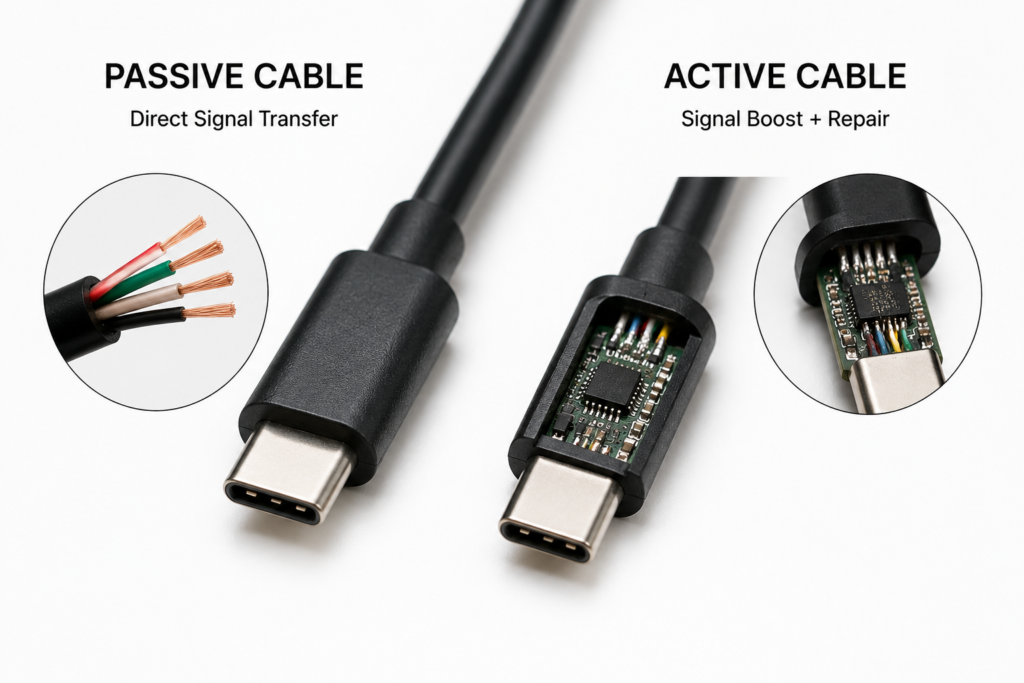
Passive cables are the most common type of USB-C cable. They are essentially shielded copper wires with no built-in chips to actively process signals. Their only job is to carry electrical signals from one end to the other.
Active USB-C Cables: Enhanced Wires With Built-In Signal Processing Chips
Active cables include dedicated signal processing chips inside the connectors or along the cable, acting as “signal relay stations” along the transmission path. These chips repair and boost weakened signals, enabling reliable high-speed transmission over much longer distances.
Key Chips Explained: Redriver, Retimer, and E-Marker
- Redriver: Acts as a signal “amplifier”. It boosts weakened signals to make up for cable loss, and is relatively low-cost.
- Retimer: Acts as a signal “rebuilding station”. It not only amplifies the signal but also cleans up interference and jitter, regenerating a clean, intact signal. It delivers better performance but costs more.
- E-Marker chip: This is the cable’s “digital ID tag”. It tells connected devices what the cable can handle — its maximum current, data speed, and other capabilities. It only reports specifications and does not process signals.
Quick Ways to Tell Them Apart: Labels and Length
- Check the labeling: If the packaging or cable body says “Active Cable”, “Retimer”, “Redriver”, or supports long-reach Thunderbolt 3/4 or USB4, it is almost always an active cable.
- Check the length: For 40Gbps high-speed cables, models longer than 1 meter are usually active. Most high-speed cables under 0.8 meters are passive. This rule does not apply to basic charging cables.
3. How They Work: Core Technical Differences
Passive Cables: Pure Conduction, Loss Depends on Material and Length
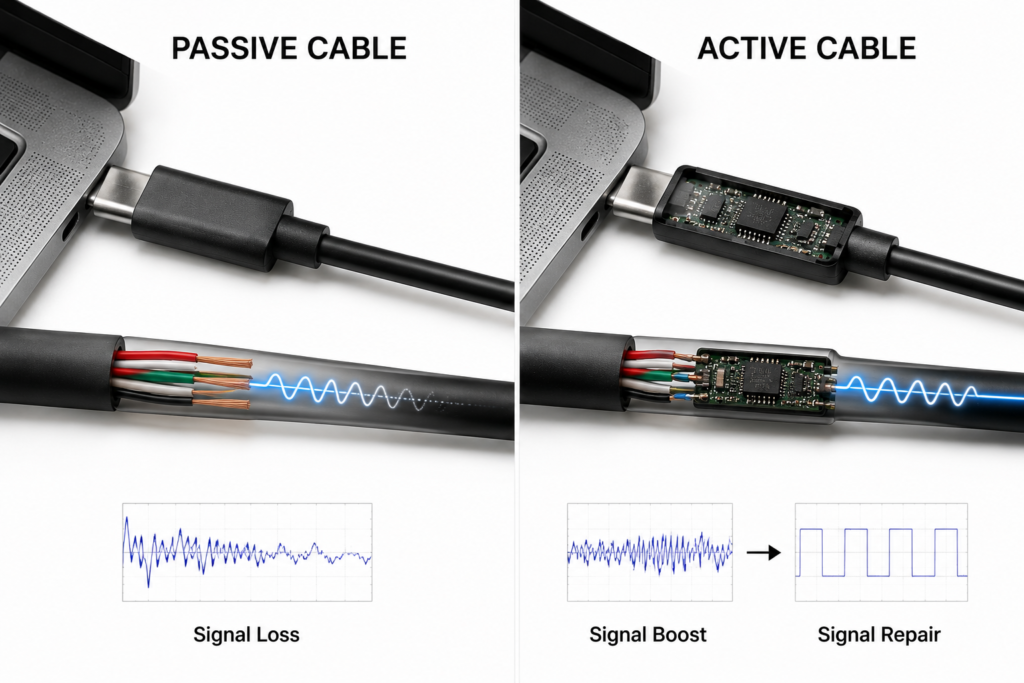
Passive cables work on a very simple principle: signals leave the source device, travel directly through the copper wire, and arrive at the other end with no modification along the way.
Signal loss depends entirely on the quality, thickness, and length of the copper wire. The longer the cable and the higher the speed, the more loss occurs. Beyond a certain length, you’ll get unstable connections, slower speeds, or even no connection at all.
Active Cables: Chips Actively Boost and Repair Signal Loss and Jitter
Active cables process the signal as it travels through the wire. Built-in chips amplify fading signals and reshape distorted ones, so the signal arrives clean and usable at the other end. It’s like adding rest stops along a long run to keep the signal going strong.
Copper Active Cables vs. Active Optical Cables (AOC)
- Copper active cables: Still use copper wires for transmission, with chips to boost electrical signals. They are moderately priced and work well for medium lengths of around 2 to 3 meters.
- Active Optical Cables (AOC): Convert electrical signals to light for transmission. They have almost no signal loss, can reach lengths of tens of meters, and are highly immune to interference. They are much more expensive and used mostly in professional settings.
4. Full Performance Comparison
Below is a straightforward comparison of the two cable types across the factors that matter most for everyday use:
| Category | Passive USB-C Cables | Active USB-C Cables |
|---|---|---|
| Data transfer capability | Supports USB4 40Gbps over very short distances; speed drops sharply with length | Maintains full 40Gbps+ speeds reliably over much longer distances |
| Max reliable high-speed length | Usually under 0.8m for 40Gbps; around 1–2m for 10Gbps | 2–3m for copper active; tens of meters for active optical cables |
| Video output capability | Supports 4K/8K over short distances; prone to black screen or frame drops with longer cables | Delivers stable high-resolution, high-refresh video over long distances |
| Charging power | Supports up to 240W PD fast charging with no extra loss | Also supports high-power PD; chips draw negligible power |
| Self power consumption | Zero | Very minimal, barely noticeable in daily use |
| Price | Low cost, wide range of options | Significantly more expensive, especially for higher specs |
| Portability | Generally flexible and easy to carry | Usually thicker and stiffer; some are directional |
Data Transfer: Speed Limits and Maximum Effective Length
Passive cables can hit maximum speeds over very short distances, but high-speed signals degrade quickly as length increases. Active cables use chip compensation to maintain full speed over much longer runs.
Power Delivery: PD Fast Charging Support and Cable Loss
Both cable types support USB PD fast charging. Charging capability depends mainly on wire gauge and E-Marker rating — not on whether the cable is active or passive. The chips in active cables draw so little power that they have no meaningful impact on charging speed.
Video Output: Resolution, Refresh Rate, and Connection Stability
For monitors or VR headsets, short passive cables work fine. But over longer distances, passive cables often cause screen flicker or blackouts when running high-resolution video. Active cables keep the video signal stable even at length.
User Experience: Cable Feel, Heat, Power Draw, and Price
Passive cables have a simple design, feel more flexible, and cost less. Active cables are usually thicker due to the built-in chips, some only work in one direction, and they cost more. Under normal use, their heat output and power draw are so low that most people won’t notice.
5. Which Cable Should You Use For Different Scenarios?
Best Uses for Passive USB-C Cables (Great Value)
- Everyday charging and data transfer for phones and tablets
- Short-distance connections between laptops and USB drives or portable SSDs
- Desktop setups with monitors or docks placed close to the computer
- All general, short-range daily use cases
Best Uses for Active USB-C Cables (Where They’re Truly Needed)
- Long-distance connections to monitors or docks (2 meters or more)
- Connecting VR headsets, high-speed external SSDs, or eGPUs
- Permanent installations in conference rooms or studios
- Medium-to-long range Thunderbolt / USB4 connections
Quick Scenario Reference
- Charging your phone and transferring photos: Passive cable is all you need
- 0.5m desktop connection to a dock: A high-quality passive cable is enough
- 2m+ connection to a 4K/8K monitor: Choose an active cable
- VR headset use where you need room to move: Choose an active cable
6. Practical Buying Guide
Pick Based on Your Real-World Needs
Start with two simple questions: How long does the cable need to be? And how fast does your data or video need to be? For everyday charging and short file transfers, passive cables offer the best value. Only step up to an active cable when you need long-distance high-speed performance.
Look for Official Certifications
Prioritize products with USB-IF certification or official Thunderbolt certification. These products have verified specs and performance, no false advertising, and are safer to use.
Common Pitfalls to Avoid
- Don’t buy a cable just because it has a USB-C connector. Always check the rated speed, power, and length.
- Be wary of cheap “long high-speed cables”. If the price seems too good to be true for the specs, it probably is.
- When buying an active cable, check if it is directional. Some models have a dedicated host end and device end, and plugging them in reverse will prevent full-speed operation.
7. Common Myths & FAQs
Myth 1: Any cable with an E-Marker chip is active
The E-Marker is just a specification label. Almost all cables that support 5A high current include an E-Marker, but most are still passive. The presence of signal processing chips is what makes a cable active.
Myth 2: Active cables are better in every way
Active cables only have an advantage for long-distance, high-speed use. Over short distances, passive cables have lower latency, better compatibility, and a lower price — making them the better choice.
Myth 3: Short cables are always passive and long cables are always active
Length is a general rule, not an absolute one. Some premium short cables include chips for optimized signal quality. Conversely, even very long basic charging cables remain passive.
Myth 4: Active cables need separate external power
Nearly all active cables do not require a separate power adapter. They draw a tiny amount of power from the USB port’s power pin to run their chips — just plug them in and they work.
Frequently Asked Questions
Q: Do I need an active cable for everyday charging?
A: No, not at all. Passive cables are perfect for charging. Active cables offer no benefit for charging alone.
Q: At what length do I need an active cable for high-speed use?
A: For 40Gbps USB4 / Thunderbolt cables, we recommend active models for lengths over 1 meter for the most reliable performance.
8. Summary & What’s Next
Core Differences Recap
Passive cables are basic, pure-physics workhorses. They’re cheap, universal, and highly compatible — ideal for short-range daily use. Active cables use built-in chips to boost signals, enabling long-distance, high-speed, reliable connections for specific high-performance scenarios.
Future Trends
As faster standards like USB4 Version 2.0 (80Gbps) become more common, the demands on signal transmission will keep growing. Active cables will become more widely used, and the cost of active optical cables will gradually come down.
Final Buying Advice
You don’t need to chase “active” as a status symbol. The best cable is the one that matches how you actually use it. For everyday short-range use, a good-quality passive cable is the smart choice. Only upgrade to an active cable when you have a real need for long-distance, high-speed transmission.