
Everything you need to know about Qualcomm’s fast charging technology — explained with simple analogies, clear tables, and zero confusing jargon.
Introduction: Why Should You Care About Fast Charging?
Let‘s be honest — nobody enjoys watching their phone battery crawl from 10% to 100% at a snail‘s pace. You have places to go, messages to reply to, and videos to watch. Waiting around for a phone to charge is just… annoying.
Back in the early smartphone days, most phones charged at 5V/1A — that‘s only 5 watts of power. A full charge could take 2 to 3 hours. Imagine plugging in your phone before dinner and it‘s still not fully charged by the time you‘re ready to leave. Painful, right?
This is where Qualcomm Quick Charge comes in.
Think of it like this: standard charging is like filling a bucket with a garden hose. Quick Charge is like using a fire hose — same basic idea, but way more water (power) gets delivered in the same amount of time.
Since 2013, Qualcomm has released several generations of Quick Charge technology. This guide will walk you through QC 1.0, 2.0, and 3.0 — what they are, how they work, and why they matter — using simple analogies that anyone can understand.
Quick Charge 1.0 (2013): The First Step Forward
When and Where?
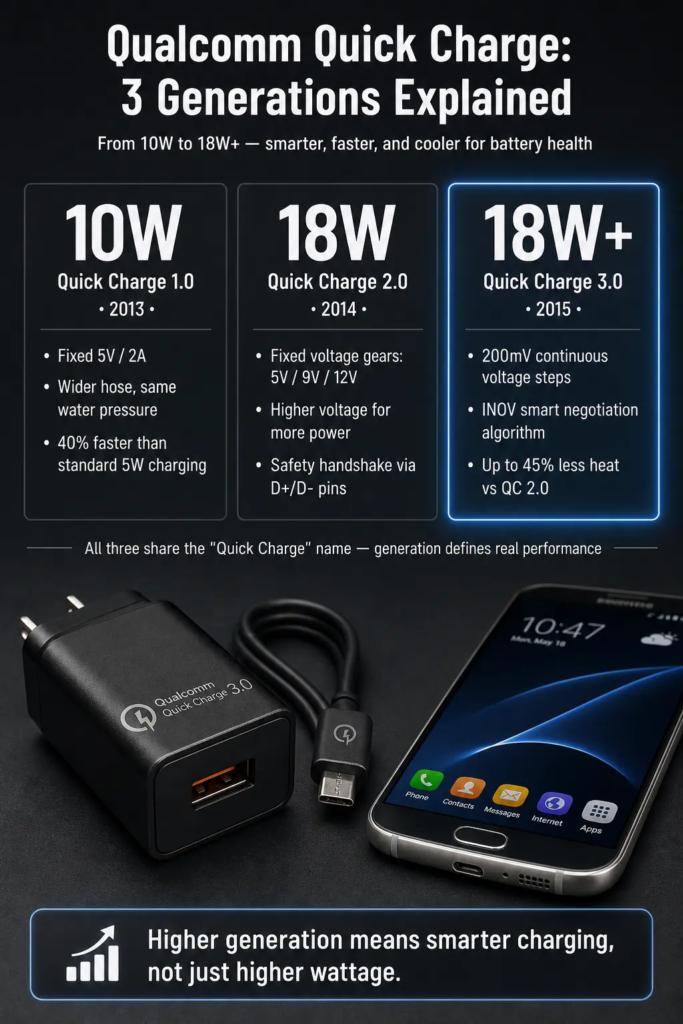
Quick Charge 1.0 launched in 2013 alongside the Snapdragon 800 chipset. This was the very first mainstream fast charging solution from Qualcomm.
The Specs
| Specification | Detail |
|---|---|
| Voltage | Fixed at 5V |
| Current | Up to 2A |
| Max Power | 10W |
| Compatible Chips | Snapdragon 600 series |
How It Works — The “Wider Pipe” Analogy
Imagine you‘re filling a swimming pool with a hose. Standard 5V/1A charging is like using a standard garden hose — the water flows at a certain rate. QC 1.0 keeps the same water pressure (5V) but uses a wider hose (2A instead of 1A). More water flows through, so the pool fills faster.
In technical terms: QC 1.0 keeps voltage constant at 5V and increases current to 2A, delivering 10W of power. This made charging about 40% faster than traditional 5V/1A charging.
Compatibility
The beauty of QC 1.0 was its simplicity. Any standard 5V USB charger could work with a QC 1.0 phone — you just wouldn‘t get the full 2A speed unless both the phone and the charger supported it.
⚠️ Quick Tip for Beginners: Not all USB cables are created equal! A cheap, thin cable might not handle 2A of current well — it can cause voltage drop and heat buildup. For the best QC 1.0 experience, use a thicker, better-quality cable.
Quick Charge 2.0 (2014): The Game-Changer
When and Where?
QC 2.0 arrived in 2014 with the Snapdragon 801 chipset. This was the version that really put Qualcomm on the map for fast charging.
The Specs
How It Works — The “Gear Shift” Analogy
Remember the garden hose analogy? QC 2.0 does something totally different. Instead of just making the hose wider, it increases the water pressure (voltage) too.
Think of it like driving a car. QC 1.0 is like driving in first gear — you press the gas pedal (current) harder, but you‘re still in the same gear. QC 2.0 lets you shift into higher gears (9V, 12V, etc.) — you get more power and speed.
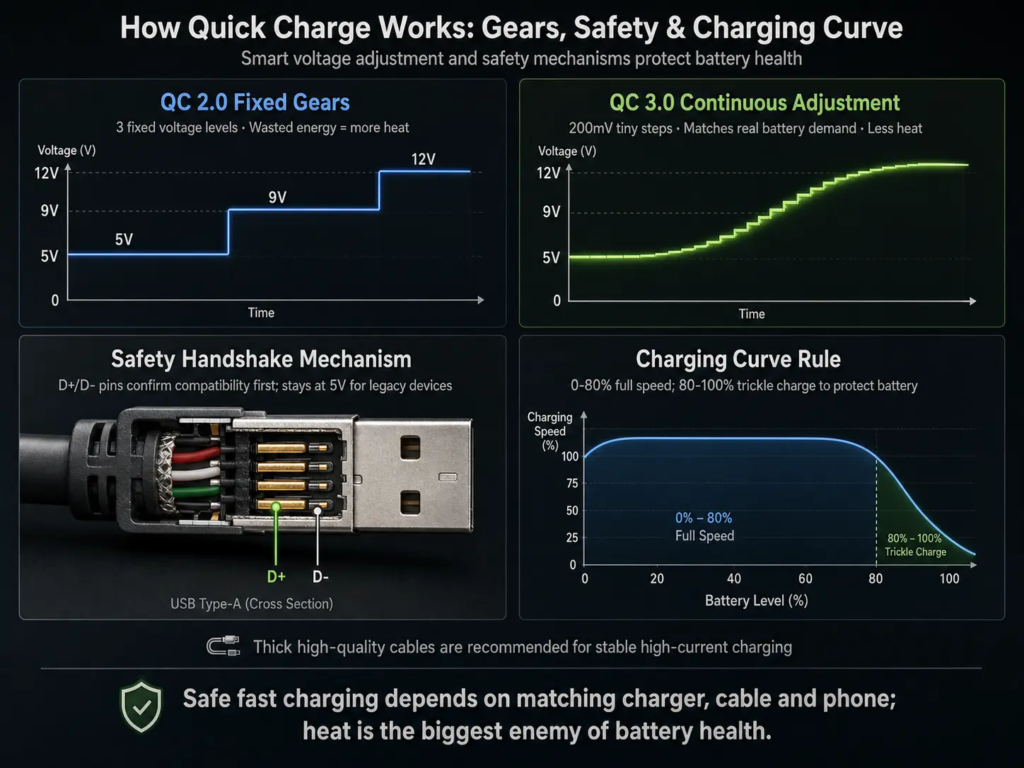
But here‘s the catch: QC 2.0 only has a few fixed gears — 5V, 9V, and 12V. It can‘t choose an in-between voltage like 7V or 8V. This is like having a car with only 1st, 3rd, and 5th gear — you get a big jump in power each time, but nothing in between.
The “Handshake” — How It Knows It‘s Safe
Here‘s something really important (and many beginners don‘t know this):
Your phone and charger don‘t just blast 9V immediately. That would be dangerous!
Instead, they do a “handshake” — like two secret agents confirming each other‘s identity with a codeword. The phone and charger communicate through the USB cable‘s D+ and D- pins (think of them as “telephone lines” for data). Only after they confirm that both support QC 2.0 does the charger safely increase the voltage to 9V or 12V.
If you plug a QC 2.0 charger into an old phone that doesn‘t support it, the charger stays at safe 5V — nothing gets fried.
🔑 Key Point: Both the phone AND the charger need to support QC 2.0 for fast charging to work.
Compatibility
QC 2.0 works with Micro-USB, USB Type-A, and USB Type-C connectors. It‘s also backward compatible with QC 1.0 — if you plug a QC 1.0 phone into a QC 2.0 charger, it‘ll charge at 5V/2A (10W).
The Downsides
The “fixed gear” approach has a problem. When your battery is at 50%, maybe it only needs 7V for optimal charging. But QC 2.0 can only offer 5V (too slow) or 9V (wastes energy as heat). This inefficiency creates more heat — and heat is the enemy of battery health.
Quick Charge 3.0 (2015): The Smart One
When and Where?
QC 3.0 launched in 2015 with the Snapdragon 820 chipset. This is where things got really smart.
The Specs
How It Works — The “Continuous Variable Transmission” Analogy
Remember how QC 2.0 was like a car with only 1st, 3rd, and 5th gear? QC 3.0 is like a continuously variable transmission (CVT) — it can pick any gear between 1st and 5th.
Instead of just 4 fixed voltage options (5V, 9V, 12V, 20V), QC 3.0 can choose any voltage from 3.6V to 20V in tiny 200mV steps. That‘s over 80 different voltage levels to choose from!
The INOV Algorithm — The “Smart Brain”
QC 3.0 introduces something called INOV — Intelligent Negotiation for Optimum Voltage.
Think of INOV as a smart assistant that constantly asks your phone: “How much power do you actually need right now?”
- Battery almost empty? → Give it higher voltage for maximum speed.
- Battery at 60%? → Dial it down slightly to reduce heat.
- Battery almost full? → Give it just enough voltage to top up safely.
This continuous adjustment means less wasted energy, less heat, and better battery health.
Real-World Speed
According to Qualcomm, QC 3.0 can charge a typical phone from 0 to 80% in about 35 minutes. Compare that to conventional charging which might take almost 1.5 hours for the same charge.
The Efficiency Gains
| Metric | Improvement vs QC 2.0 |
|---|---|
| Charging Efficiency | Up to 38% higher |
| Charging Speed | Up to 27% faster |
| Heat (Power Dissipation) | Reduced by up to 45% |
| Speed vs QC 1.0 | 2x faster |
The Charging Curve — “Fast Then Slow”
Here‘s something every beginner should know about how fast charging actually works:
QC 3.0 doesn‘t charge at full speed the entire time. It uses a “fast then slow” approach:
- Phase 1 (0% – 80%): Full-speed fast charging. This is where you get that 35-minute 0-to-80% magic.
- Phase 2 (80% – 100%): Slower “trickle charging.” The voltage drops down to protect the battery and extend its lifespan.
Think of it like filling a glass of water:
- You turn the tap on full blast when the glass is empty (fast!).
- But as it gets close to the top, you slow down so you don‘t spill (protect the battery).
This is completely normal and actually good for your battery — it helps it last longer.
Side-by-Side Comparison: QC 1.0 vs QC 2.0 vs QC 3.0
The One-Sentence Summary (For the Busy Reader)
- QC 1.0: “Just add more current” — wider hose, same pressure (5V/2A, 10W).
- QC 2.0: “Fixed high-voltage gears” — jump between 5V, 9V, and 12V (18W max).
- QC 3.0: “Smart continuous adjustment” — choose any voltage from 3.6V to 12V in tiny steps (faster, cooler, smarter).
Which Phones Support These?
QC 1.0
- Snapdragon 600 series
QC 2.0
- Snapdragon 200, 400, 410, 615, 800, 801, 805, 808, 810
QC 3.0
💡 Note: These were the flagship and mid-range chips of their time. Most Android flagships from 2013–2017 used one of these.
What About QC 4, 4+, and QC 5?
This guide focuses on QC 1.0–3.0, but for context:
- QC 4 (2017): Added compatibility with USB-PD (USB Power Delivery) — the universal fast charging standard.
- QC 4+: Enhanced version with better thermal management.
- QC 5 (2020): Uses dual-charging architecture to deliver over 100W of power — that‘s enough to charge some phones from 0 to 50% in just 5 minutes!
Final Thoughts: Why This Matters to You
Understanding Quick Charge helps you make better decisions:
- Buying a charger? Make sure it matches your phone‘s QC version.
- Buying a phone? Check which QC version it supports — newer is generally better (and cooler).
- Experiencing slow charging? It might be your cable, your charger, or your phone‘s compatibility.
The evolution from QC 1.0 to QC 3.0 tells a clear story: from simple “more current” to smart “just the right voltage.” And that‘s good news for your battery‘s health — and your patience.