
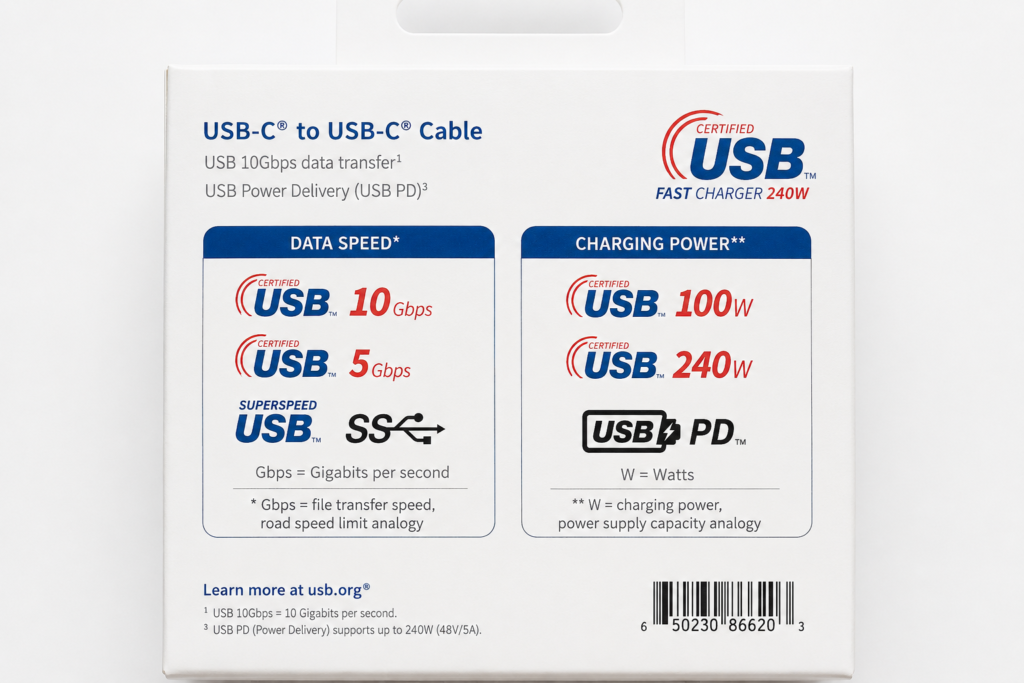
The two most confusing numbers printed on all USB product packaging are Gbps and W.
One measures how fast files transfer; the other measures charging power. Both matter, but they are completely independent and cannot replace each other.
Simple analogy for beginners
Gbps = highway speed limit (how fast data can move between devices)
W = restaurant meal portion (how much charging power a charger/cable can supply)
A wide, fast highway does not automatically serve huge meals. A restaurant that sells large portions does not guarantee a fast highway.
Real-world shopping example (verified by mass market products):
- A USB-C cable marked 240W fast charging may only support slow USB 2.0 (480Mbps) file transfer, and cannot run high-speed external solid-state drives.
- A cable marked 10Gbps fast data may only support low 60W charging, unable to charge high-power gaming laptops. If you only check one of the two values, you will almost certainly buy the wrong cable for your needs.
Separate the Two Core Units
| Marking | Full Official Name | Simple Meaning for Beginners | Where you will see this mark |
|---|---|---|---|
| Mbps / Gbps | megabits / gigabits per second | Maximum theoretical file transfer speed | USB flash drives, external SSD enclosures (hard drive boxes), laptop docking stations, laptop USB ports |
| W | watt | Maximum charging power the accessory can safely deliver | Wall chargers, USB-C cables, laptop charging ports |
Basic buying rule for all users:
- If you need to copy photos, videos, large files: only focus on the Gbps rating
- If you need fast charging for phones/laptops: only focus on the W wattage rating
- If you buy a single USB-C cable for both file transfer and charging: you must check both numbers
How to Read Data Speed Markings (Gbps Beginner Guide)
USB-IF (official USB standard organization) now recommends plain speed labels for ordinary users, instead of confusing old technical names like USB 3.2 Gen 2. Standard simplified labels include USB 5Gbps, USB 10Gbps, USB 20Gbps, USB 40Gbps, USB 80Gbps.
| Speed Mark | Beginner Translation | Daily Common Usage Scenarios | Critical Limitation Note |
|---|---|---|---|
| 480Mbps (USB 2.0) | Slow basic transfer | Mice, keyboards, printers, small photo files | Cannot run external SSDs, large file copying will be extremely slow |
| USB 5Gbps | Entry-level high speed | Regular flash drives, portable small storage | Sufficient for daily documents, not recommended for large video editing |
| USB 10Gbps | Mid-range fast data transfer | External solid-state SSDs, video capture cards | The most universal choice for most users’ storage needs |
| USB 20Gbps (USB 3.2 Gen 2×2) | High-performance storage speed | Professional high-speed external SSDs | Requires dual twisted differential wire pairs inside the cable; ordinary single-lane 10Gbps cables cannot reach this speed, the entire cable-port-device chain must fully support 20Gbps |
| USB 40Gbps / 80Gbps (USB4) | Top-tier ultra-high bandwidth | Laptop docking stations, 4K/8K display output, professional storage | Compatible with Thunderbolt devices, needs full-function certified cables |
Important reminder: All listed values are theoretical maximum limits. Real copy speed will also be limited by the SSD hardware, cable quality, port specification, single large file size, and device heat generation during transfer.
How to Read Power Markings (Wattage & USB PD Official Rules)
Power markings on charging products use W (watts) to represent maximum charging capacity.
USB Power Delivery (shortened to USB PD) is the official universal fast charging protocol, which allows a charger and electronic device to automatically negotiate matching voltage, current, and safe power levels. The latest standard USB PD 3.1 extends USB-C charging up to 240W, adding three high voltage levels: 28V, 36V, and 48V.
Key critical rule (official USB-IF standard)
Marking a product as 240W does NOT mean every USB-C device can automatically draw 240W power. Four conditions must all be satisfied simultaneously to activate high-power charging:
- The wall charger must support the corresponding EPR 240W power range
- The phone/laptop device must be designed to request 240W power
- The USB-C cable must carry official 240W EPR certification (built-in E-Marker recognition chip)
- Successful USB PD communication negotiation between charger and device
Simple restaurant analogy: A restaurant may offer a giant steak set (240W), but not every customer (device) can order it, and not every table (cable) is equipped to serve it automatically.
SPR and EPR: Two Official USB PD Power Ranges (USB PD 3.1)
| Range Full Name | Maximum Supported Power | Standard Voltage Levels | Best Real-World Use Cases |
|---|---|---|---|
| SPR (Standard Power Range) | 100W maximum (20V/5A) | 5V, 9V, 15V, 20V | Smartphones, tablets, thin lightweight laptops, all mainstream daily devices |
| EPR (Extended Power Range) | 240W maximum (48V/5A) | All SPR voltages + 28V, 36V, 48V | High-performance gaming laptops, portable monitors, industrial high-power equipment |
Household outlet analogy: SPR is a standard wall socket for daily small appliances; EPR is a heavy-duty industrial socket. Even if you own an industrial socket, your wire (cable) and appliance (laptop) must also support high power to use full capacity.
PPS: Fine-Tuned Programmable Power (PD 3.0 Exclusive Feature)
USB PD 3.0 introduced PPS (Programmable Power Supply), an optional optimized fast charging feature only available within the 3.3V–21V SPR 100W power range.
PPS allows the charger to adjust output voltage in tiny 20mV incremental steps, instead of switching between only several fixed voltage gears like basic PD.
Why this matters for ordinary users:
Flagship Samsung Galaxy and Google Pixel phones rely on PPS to reduce charging heat and boost efficiency. PPS dynamically adjusts voltage based on the battery’s real-time charging state.
Easy comparison analogy: Fixed basic PD voltage gears = set menu meals (you can only pick Meal A/B/C with fixed portions); PPS = a buffet, you can take exactly the power your battery needs without excess waste.
Critical correction note: PPS only works under SPR 100W power limits. 240W EPR high-power mode does not support PPS; EPR uses AVS adjustable voltage with 100mV larger steps instead. Not all PD chargers carry PPS support, it is an extra optional feature.
Core Key Rule: Data Speed and Charging Power Do Not Verify Each Other
This is the most common misunderstanding consumers face when buying USB accessories.
| Marking printed on packaging | What it guarantees | What it CANNOT prove |
|---|---|---|
| USB 10Gbps | The cable/port supports data transfer up to 10Gbps | It does not guarantee 60W/100W/240W fast charging capability |
| 240W certified | The cable/charger can deliver up to 240W charging power | It does not guarantee any high-speed data transfer (most 240W stock cables only use slow USB 2.0) |
| USB-C printed alone | Only describes the reversible connector shape | It provides zero promises of data speed, fast charging, or video output ability |
| USB4 logo | Supports ultra-high bandwidth protocol | The actual performance still depends on matching cable, port, and device hardware |
| Certified USB official logo | Passed basic USB-IF compliance testing | It cannot replace complete speed/wattage specifications printed on packaging |
Real product example: A cable can excel at 240W laptop charging but only copy files at slow 480Mbps. Another cable can transfer video files at 10Gbps speed yet only support low 60W phone charging.
Real Buying Scenario Decision Guide (5 Common Use Cases)
Scenario 1: Cable for External SSD Storage
Priority check: Data speed Gbps rating
If your hard drive box supports 10Gbps, you must purchase a cable clearly labeled USB 10Gbps or higher data speed. If a cable only prints 240W power and hides its data speed specification, never assume it works for fast solid-state drives (most are USB 2.0 slow models).
Scenario 2: Cable for Laptop High-Power Charging
Priority check: Charging wattage W rating
If your laptop requires 100W or higher power, three parts must all match the power standard: wall charger, USB-C cable, and laptop hardware. Data speed is irrelevant if you only use the cable for charging, but if you also plan to connect storage docks, you need to check both Gbps and W ratings together.
Scenario 3: Multi-Function USB-C Docking Station
Must check three categories: data transfer speed, maximum pass-through charging wattage, and video output support.
Labels reading simply “USB-C Dock” give no usable information. You need to confirm supported USB bandwidth, DP Alt Mode video output, charging power, Ethernet, and card reader specs separately.
Scenario 4: Daily Phone Charging Cable
First confirm the maximum charging wattage and PD/PPS protocol your phone supports. A high-power 240W cable cannot force your phone to charge beyond its hardware limit — it only reserves extra power headroom for future devices.
Scenario 5: Multi-Port GaN Wall Charger
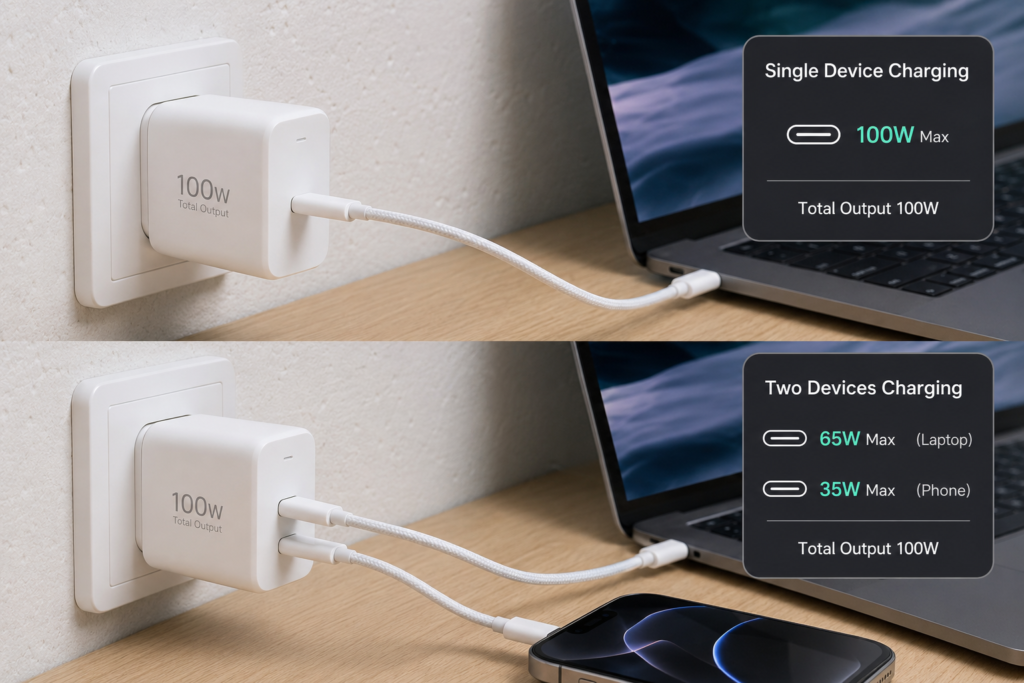
Critical misunderstanding correction: The large “100W” printed on multi-port chargers refers to total combined power across all ports, not the maximum power every single port can deliver at the same time.
Real 100W dual-port charger power split example (compliant with USB-IF shared power rules):
- Only one device connected: The single port can output full 100W maximum power
- Two devices connected simultaneously: Dynamic power split, e.g., 65W for laptop + 35W for smartphone
- Two low-power devices (earbuds + watch): Each receives only the small power it requests, within the total 100W budget
Household circuit breaker analogy: A 100A main home breaker does not supply 100A to every wall outlet. When high-power appliances like air conditioners run, less power remains for other sockets.
When purchasing multi-port chargers, always check two parameters instead of only the large printed watt number:
- Maximum independent power each single port can output
- Official power allocation rules when multiple ports are occupied at once
Quick Reference Cheat Sheet for Shopping
| Your Usage Goal | First specification to check | Secondary specification to verify |
|---|---|---|
| Transfer large video/RAW photo files | USB 10Gbps / 20Gbps / 40Gbps data label | Cable and device port must match the same speed grade |
| Charge gaming/thin laptops | Cable + charger wattage rating (60W/100W/240W) | Confirm full USB PD SPR/EPR protocol support |
| Connect external monitor via USB-C | DP Alt Mode video output marking | USB4 cable, resolution, and refresh rate limits |
| One cable for all daily tasks (charge + transfer files + dock) | Both Gbps data speed AND W power rating | Official USB-IF full-function certification mark |
| Avoid buying mismatched, useless cables | Exact numerical speed/watt specs printed on box | Never rely solely on the “USB-C” connector label alone |
Final Summary
USB data speed markings (Gbps) and charging power markings (W) are two fully independent specifications defined by USB-IF official standards.
- Gbps measures how fast files transfer between devices
- W measures the maximum safe charging power a cable/charger can supply
- The phrase “USB-C” only describes the reversible plug shape; it contains no built-in guarantee of fast data, high-power charging, or video display output.
When purchasing any USB cable, wall charger, or docking station, split your judgment into three separate questions:
- How fast data transfer speed do I need?
- How much charging wattage does my device require?
- Do I need video output functionality?
Confirm all hardware (cable, charger, laptop/phone, dock) support matching specifications, and this habit will prevent you from being misled by large marketing numbers printed on product packaging.