
Nowadays, more and more of our devices — smartphones, tablets, and laptops — charge via USB-C ports, and the term “PD fast charging” comes up all the time. USB PD 3.0 is one of the most mainstream universal fast charging standards today, but most people only know it as “something that charges faster”.
In this guide, we will break down everything about USB PD 3.0 in plain language: what it is, how it works, and why it matters. By the end, you will be able to confidently choose the right chargers and cables for your devices.
1. What Is USB PD 3.0?
1.1 Definition of USB PD 3.0
USB Power Delivery is a universal power delivery standard set by the USB Implementers Forum. Simply put, it is a shared set of rules for how chargers and devices communicate and deliver power.
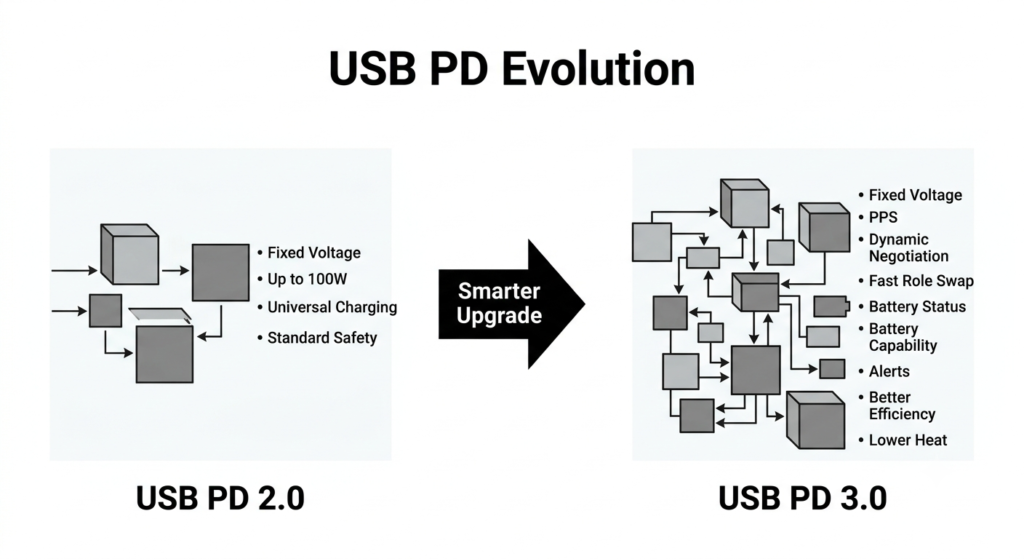
USB PD 3.0 is the third major version of this standard. It is not a completely new protocol built from scratch — it is an upgraded and optimized version of PD 2.0. Its core goal is to make charging smarter, more efficient, and safer, to keep up with the growing variety of digital devices.
1.2 How PD 3.0 Relates to PD 2.0
A common misconception is that PD 3.0 replaces PD 2.0 entirely. In reality, the two are fully backward compatible.
PD 3.0 keeps all the power rules and voltage levels of PD 2.0, and simply adds new smart features and safety mechanisms on top. Think of it like a software update on your phone: all your basic functions still work, but you get new features and better overall performance.
1.3 USB PD 3.0 in One Sentence
It does not just charge your devices quickly — it constantly adjusts voltage and current in real time based on the device’s battery level and temperature, delivering a fast yet gentle charging experience.
2. Why Was USB PD 3.0 Created?
2.1 What PD 2.0 Already Solved
Before PD 2.0, every brand had its own fast charging system, and chargers almost never worked across different brands. PD 2.0 created the first universal USB fast charging standard, with multiple fixed voltage levels and up to 100W of power.
For the first time, one charger could power everything from phones to laptops, cutting down on clutter and wasted accessories.
2.2 The Limitations of PD 2.0
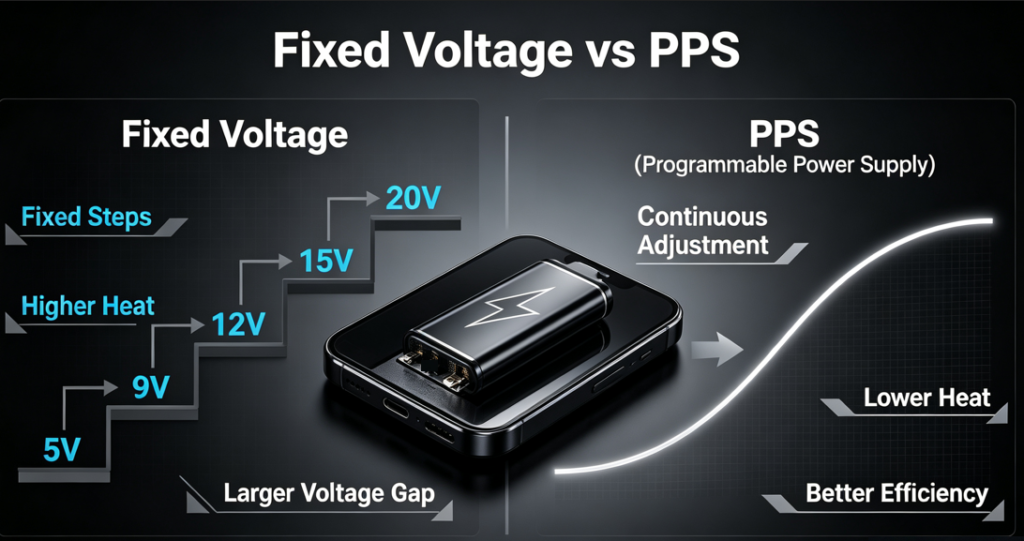
The main drawback of PD 2.0 is that voltage can only switch between fixed steps — for example, jumping directly from 5V to 9V, with nothing in between.
This causes several problems: large voltage jumps force the device’s internal circuit to work harder to step down the voltage, wasting energy as heat. Also, batteries need different voltages at different charge stages, and fixed steps cannot match them precisely, which lowers overall charging efficiency.
2.3 The Goals of PD 3.0
To fix these shortcomings, PD 3.0 was designed with four core upgrade goals:
- Smarter: real-time power adjustment based on device status
- More efficient: lower conversion loss and less heat
- Safer: multiple layers of fault monitoring and protection
- More compatible: works for more device types and use cases
3. How USB PD 3.0 Works
3.1 The Handshake Process When You Plug In
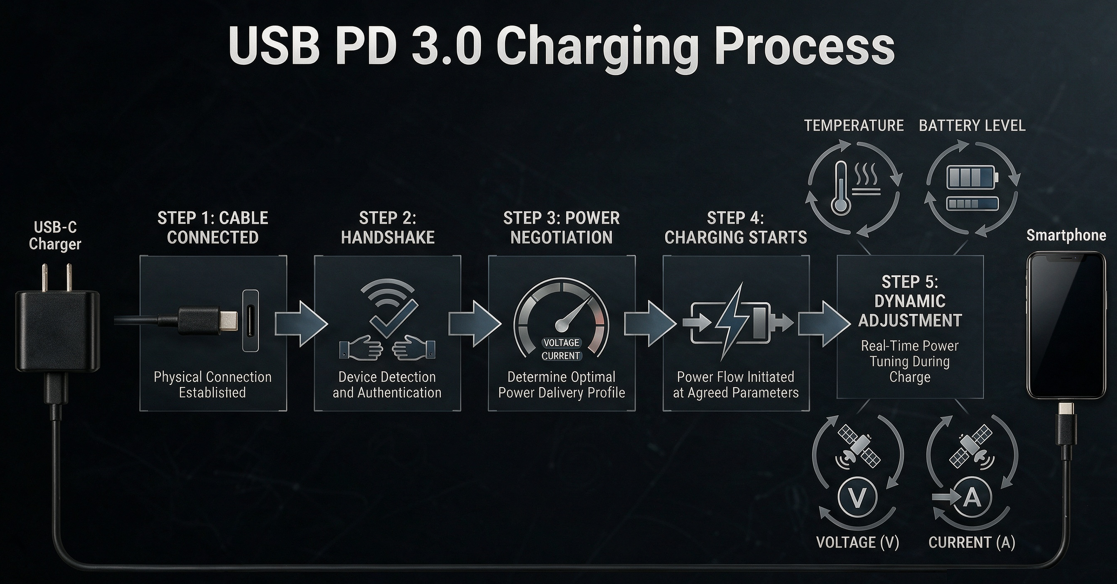
Many people worry that a high-power charger might damage their phone. In reality, this is impossible, because PD charging follows a strict handshake process — high voltage is never sent by default.
The process is a lot like ordering food at a restaurant:
- When you plug in the USB-C cable, the charger and device connect through a dedicated communication channel inside the port.
- The charger shares its “menu”: it tells the device which voltage levels it supports and how much power it can deliver.
- The device “places an order”: it requests a specific voltage and current based on what it needs.
- The charger confirms the request and starts delivering power at exactly that level. If no agreement is reached, the charger always defaults to a safe 5V output, so devices never get damaged.
3.2 Dynamic Negotiation During Charging
What makes PD 3.0 special is that the power agreement is not permanent. As the device charges, its battery level rises and its temperature changes.
When the battery is almost full, or if the device gets too warm, it can renegotiate with the charger at any time — lowering the voltage or current to keep charging safe and efficient. This process is controlled automatically by the device’s internal battery management chip.
3.3 Why Your Devices Will Not Get Damaged
The golden rule of PD charging: the charger never forces high voltage on its own. All high-voltage output must be requested by the device and confirmed by both sides.
Even if you use a 100W PD charger with an old 5V phone, it will only ever deliver 5V after negotiation — exactly like a basic charger. Safety is fully guaranteed.
4. What Fixed Voltage Levels Does USB PD 3.0 Support?
4.1 Standard Fixed Voltage Levels
Just like PD 2.0, PD 3.0 includes five standard fixed voltage levels:
- 5V: The basic universal voltage for all USB devices, used for standard charging and powering small accessories.
- 9V: The most common level for smartphone fast charging, used by most Android phones.
- 12V: Used for tablets, small electronics, and some lightweight laptops.
- 15V: Used for mid-power laptops and monitors.
- 20V: The highest voltage in PD 3.0, used for high-power laptops and docking stations.
4.2 Why Some Chargers Don’t Have 12V
Many people notice their PD charger only lists 5V, 9V, and 20V, with no 12V option. This is completely normal.
12V is an allowed standard level, but it is not required. Manufacturers choose which levels to include based on the charger’s intended use: a charger made mainly for phones will often skip 12V, while a premium all-purpose charger will usually include every voltage level. Missing 12V is a design choice, not a sign of a non-compliant charger.
5. The Biggest Upgrade: PPS (Programmable Power Supply)
5.1 What Is PPS?
PPS, short for Programmable Power Supply, is the most important and iconic new feature in PD 3.0 — it is essentially the core improvement of the entire standard.
In simple terms, PPS removes the limit of fixed voltage steps. It lets the charger adjust its output voltage smoothly and continuously within a certain range, for much finer power control.
5.2 How PPS Works
Without PPS, changing voltage is like climbing stairs — you can only move one full step at a time, with big gaps in between. With PPS, it is like walking up a smooth ramp — you can go up or down gradually, with no sudden jumps.
PPS typically adjusts in tiny 20mV steps, and can control current at the same time. The device can ask for exactly the voltage it needs at any moment, instead of being stuck with preset levels.
5.3 Why PPS Is More Efficient
A phone battery’s voltage rises slowly as it charges, for example from 3.7V to 4.4V. If you charge with a fixed 9V, the phone has to step 9V down to the battery’s voltage. The bigger the voltage gap, the more energy is lost as heat.
With PPS, the charger can output a voltage very close to what the battery actually needs. The smaller gap means far less energy is wasted, and the phone stays cooler during charging. The result is faster, more efficient charging with less heat buildup.
5.4 PPS vs. Fixed Voltage Charging
- Fixed voltage levels: Simple and low-cost, but with large voltage gaps and higher conversion loss, best for light charging scenarios.
- PPS continuous voltage adjustment: Precise and smooth, with much lower loss and less heat. It delivers a far better fast-charging experience, especially for heat-sensitive devices like phones. For everyday slow charging, you will not notice much difference. For high-power fast charging, PPS makes a huge improvement.
6. New Safety Features in USB PD 3.0
6.1 Fast Role Swap (FRS)
FRS stands for Fast Role Swap. In USB charging, the device supplying power is called the “source”, and the device receiving power is the “sink”. For example, a charger is the source and your laptop is the sink.
Sometimes roles reverse. Imagine your laptop is plugged into a dock, and the dock is plugged into wall power. If you unplug the dock’s power cord, your laptop suddenly has to start powering the dock instead.
FRS makes this switch happen almost instantly — so fast that your monitor will not flicker and your external drives will not disconnect. It is extremely useful for docks, monitors, and other accessories.
6.2 Battery Status
Battery Status lets the device share its current battery level and charging state with the charger.
With this information, the charger can adjust its strategy automatically: full speed when the battery is low, and gentle trickle charging when it is nearly full, for a smarter overall charging process.
6.3 Battery Capability
Battery Capability lets the device share its total battery capacity and maximum power limits with the charger.
This helps the charger deliver exactly the right amount of power, avoiding both underpowered operation and wasted energy. It makes the whole charging process better matched to the device.
6.4 Alert Messages
Alert messages are a real-time safety warning system. If something goes wrong during charging — if the temperature gets too high, the voltage is unstable, or the connection is loose — either side can send an alert.
When an alert is received, the charger or device will immediately lower power or even pause charging to prevent damage. Think of it as a built-in safety monitor for your charging.
7. The Relationship Between USB PD 3.0 and PPS
7.1 Not All PD 3.0 Supports PPS
A very common myth is that all PD 3.0 chargers have PPS. This is not true. PPS is an optional feature in the PD 3.0 specification, not a requirement.
A charger can be fully compliant with PD 3.0 even without PPS. Whether to include it is up to the manufacturer, based on cost and product positioning.
7.2 How to Tell If a Charger Has PPS
The easiest way is to read the output specs printed on the charger:
- If you see a voltage range, like “3.3-11V 3A” or “3.3-16V 2A”, that means it supports PPS.
- If you only see fixed levels like “5V/9V/12V/20V” with no range, it does not have PPS. You can also check the product description for “PPS” or “Programmable Power Supply” labeling.
7.3 Why Samsung Phones Rely on PPS
Many people know that Samsung’s Super Fast Charging only works with PPS-enabled chargers. That is because Samsung built its fast charging technology directly on top of the USB PD PPS standard.
Thanks to PPS’s precise voltage control, Samsung phones can charge cooler and sustain fast speeds for longer. If you use a regular PD charger without PPS, the phone will fall back to standard PD charging, which is noticeably slower.
8. How USB PD 3.0 Differs From Other Charging Standards
8.1 Compared to USB PD 2.0
PD 2.0 is the basic version, with only fixed voltage levels and limited features.
PD 3.0 is the enhanced version. It is fully backward compatible with PD 2.0, and adds PPS, FRS, safety alerts, battery status, and many more smart and safety features for an all-around better experience.
8.2 Compared to QC Fast Charging
Quick Charge (QC) is Qualcomm’s proprietary fast charging protocol, which was very popular on early Android phones.
The key differences:
- PD is an open, universal standard usable by everyone. QC is a proprietary standard owned by Qualcomm, mainly for Qualcomm-based devices.
- PD requires USB-C. Early QC versions also worked with Micro USB.
- PD works across phones, laptops, monitors, and more. QC is mostly limited to phones. Today the industry is moving heavily toward universal PD, and QC is much less common than it used to be.
8.3 Compared to Proprietary Fast Charging Standards
Many phone brands have their own fast charging systems, such as VOOC/SuperVOOC, SCP/FCP, and the unified UFCS standard.
These proprietary standards are very fast when used with matching first-party chargers — many exceed 100W. The downside is poor compatibility: across brands, you usually only get basic charging speeds, at best basic PD levels.
PD is a global universal standard supported by almost every USB-C device. One PD charger works with almost everything, which makes it far more convenient for everyday use.
8.4 Why More Brands Are Choosing PD
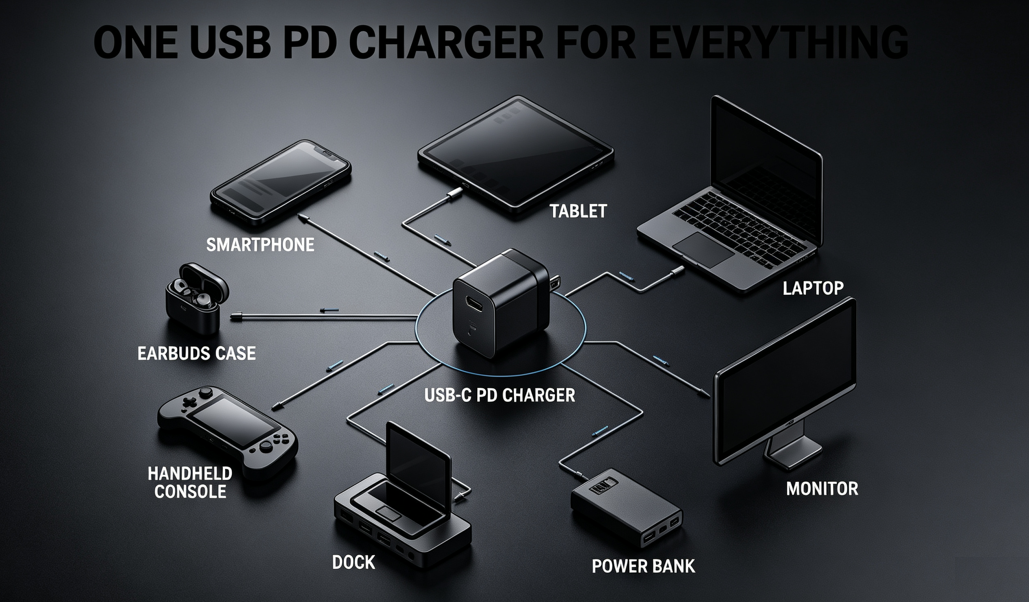
The biggest reason is universality. PD is the industry-accepted standard, working with phones, laptops, tablets, earbuds, handheld consoles, and more.
Brands do not have to build their own charging system from scratch, and consumers do not need a separate charger for every device. It is better for convenience and better for the environment. Even brands famous for their own proprietary fast charging now include PD support.
9. USB PD 3.0 Compatibility
9.1 Is PD 3.0 Compatible With PD 2.0?
Yes, fully compatible. Since PD 3.0 is built on top of PD 2.0, any PD 2.0 device or charger will work perfectly with PD 3.0 equipment. You just will not get access to new features like PPS.
9.2 Can PD 3.0 Charge Older Phones?
Absolutely. Whether it is an old 5V phone or an older PD 2.0 device, a PD 3.0 charger will automatically negotiate the highest speed the device supports. It will “downgrade” itself to match, and work flawlessly.
9.3 Is It Safe to Mix Old and New Chargers?
Yes, completely safe. All PD charging follows the rule: the device requests, the charger confirms. The charger never forces high voltage.
Even if you use a brand new 100W PD 3.0 charger with a very old 5V phone, it will only ever output 5V. There is no risk of damage.
9.4 What If PPS Isn’t Supported?
If your phone supports PPS but your charger does not, nothing bad happens. The system will automatically fall back to regular fixed-voltage PD fast charging. It will still charge normally — you just will not get the extra efficiency and lower heat of PPS.
10. Common Uses for USB PD 3.0
10.1 Smartphones
This is the most common use case. PPS-enabled PD chargers deliver efficient fast charging for Android phones, and every iPhone starting from the iPhone 8 supports PD fast charging.
10.2 Tablets
iPads and most Android tablets support PD fast charging, charging much faster than with a basic 5W charger.
10.3 Laptops
Nearly all modern thin-and-light laptops charge via USB-C PD. A single 65W PD charger can replace the bulky brick for most ultrabooks.
10.4 Monitor Power Delivery
Many USB-C monitors use PD to send video and power to your laptop over a single cable.
10.5 Power Banks
Most large-capacity power banks now support PD two-way fast charging — they charge themselves quickly, and charge your devices quickly too.
10.6 Docking Stations
A dock connects to your laptop and a wall charger, using PD to power your laptop while adding extra ports. It is a staple of modern desk setups.
10.7 Handheld Gaming Consoles
Devices like the Nintendo Switch and Steam Deck all support PD fast charging, making it easy to travel with just one charger.
11. Limitations of USB PD 3.0
11.1 Max Power Is Still 100W
Standard PD 3.0 tops out at 100W (20V/5A). That is not enough for gaming laptops and other high-performance devices. The newer PD 3.1 (EPR) extends this to 240W, but that is a separate extended standard, not part of base PD 3.0.
11.2 PPS Is Not Mandatory
Because PPS is optional, many budget PD 3.0 chargers leave it out. This gives you a worse experience, and it can be hard for average buyers to tell the difference at a glance.
11.3 High Power Requires a 5A E-Marker Cable
To get the full 100W from PD 3.0, you need a 5A cable with an E-Marker chip. Regular 3A cables top out at 60W. Many people buy a high-power charger but use a basic cable, and never get the full speed.
11.4 It Can’t Replace All Proprietary Fast Charging
PD is universal, but it can’t trigger the full speed of every brand’s proprietary charger. For example, a phone with 120W proprietary fast charging might only charge at 20–30W over standard PD.
12. Final Summary
USB PD 3.0 is not a brand new charging protocol — it is a full upgrade to PD 2.0.
It keeps all of PD 2.0’s power rules and five fixed voltage levels, with a maximum power of 100W. On top of that, it adds a full set of smart and safety features, including PPS programmable power supply, Fast Role Swap, battery status feedback, and safety alerts.
PPS is the most important upgrade. It enables precise, continuous voltage adjustment, drastically reducing charging waste and heat while improving overall efficiency.
PD 3.0 is fully backward compatible with PD 2.0 and basic 5V devices, automatically negotiating the best and safest power level for every device.
As the world’s most universal fast charging standard, PD 3.0 works with nearly every USB-C device from phones to laptops. It is the most important standard to look for when buying chargers and cables today.