
What Is USB PD 2.0?
Background
Before fast charging became widespread, traditional USB ports had very limited power delivery, stuck at a low 5V output with only a few to a dozen watts of power. Charging a smartphone fully often took three to four hours, let alone powering higher-wattage devices like laptops. To make things worse, every major brand rolled out its own proprietary fast charging standard, and chargers from different brands were incompatible with each other. People had to carry multiple chargers when going out, which was both inconvenient and wasteful.
To fix this fragmented situation, the USB Implementers Forum (USB-IF) officially released the USB Power Delivery 2.0 (USB PD 2.0) specification in 2014. It was the industry’s first cross-device, cross-brand universal USB fast charging standard, marking the official start of standardized USB fast charging and ending the era of proprietary protocols working in isolation.
Core Value
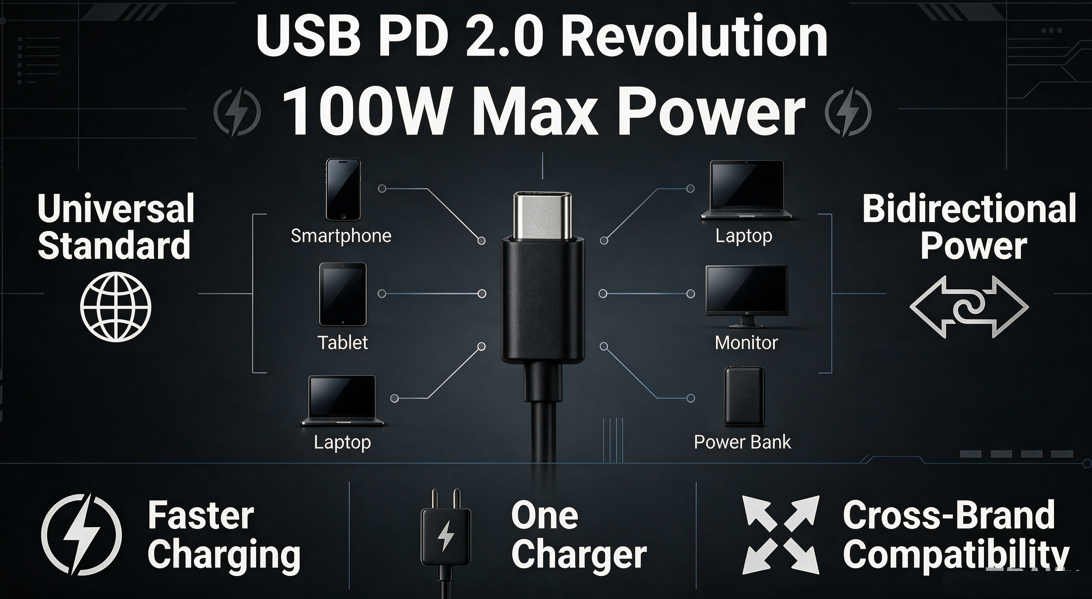
The arrival of PD 2.0 brought three revolutionary changes to USB power delivery:
First, a massive leap in power capacity. It raised the maximum power output of USB ports from barely over a dozen watts all the way up to 100W, making it possible to fast charge not just smartphones and earbuds, but also lightweight laptops.
Second, a unified charging standard. Whether it’s a smartphone, tablet, laptop or monitor, any device that supports the PD protocol can charge with the same charger — truly letting you “travel with just one charger.”
Third, flexible two-way power delivery. Paired with the USB Type-C connector, it supports reversible plugging and allows the power role to swap. A charger can power a device, and a device can also reverse-charge other small gadgets, opening up more flexible use cases.
Core Specifications: Power and Voltage Levels of PD 2.0
Five Fixed Voltage Levels
The defining feature of PD 2.0 is its five fixed output voltage levels, covering everything from small digital devices to laptops:
- 5V (basic compatibility level): This is the universal voltage for all USB devices. It ensures compatibility with older devices and guarantees basic power delivery as soon as you plug in.
- 9V and 12V (portable fast charging levels): These are the most common fast charging levels for smartphones, tablets, wireless earbuds and other small digital devices — the levels most people interact with daily.
- 15V and 20V (high-power levels): Designed specifically for higher-wattage devices like laptops, portable monitors and external hard drives, to meet medium to high power demands.
Power Limits and Matching Rules
The 100W maximum power of PD 2.0 is not achievable with any random cable. It is directly tied to the cable’s specification:
- A standard 3A PD cable supports up to 60W output (20V/3A), which is fully sufficient for fast charging smartphones, tablets and other small devices.
- To reach the full 100W power (20V/5A), you must use a 5A PD cable with a built-in E-Marker chip. This chip tells the charger and device “I can handle high current,” enabling full power output. At the same time, the PD protocol follows a backward compatibility rule: a higher-wattage charger will never force high voltage or high current onto a device. Instead, it automatically detects the device’s maximum acceptable power and matches the most appropriate level.
Key Boundary of This Version
Many people mix up PD 2.0 with the later PD 3.0. Here is the core difference: PD 2.0 only has the five fixed voltage levels above and does not support continuous voltage adjustment. PD 3.0 added Programmable Power Supply (PPS) for finer voltage control. Simply put, PD 2.0 works like “fixed gear shifting,” while PD 3.0 adds “stepless speed change” on top of that.
How It Works: How Fast Charging Is “Negotiated”
Core Mechanism: Power Negotiation (Handshake Protocol)
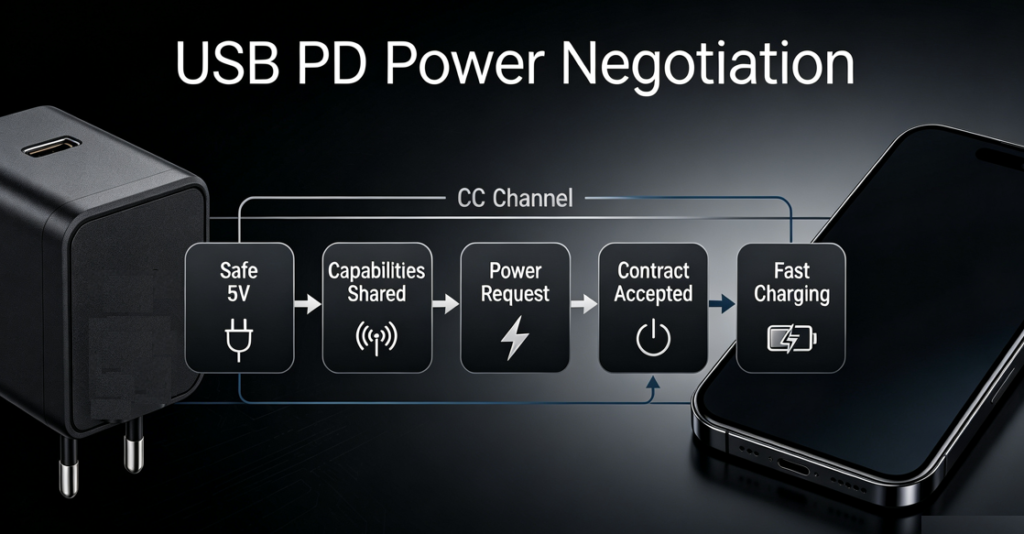
Many people worry that high-voltage fast charging will damage their devices, but there is no need to fear. The core logic of PD fast charging is “communicate first, deliver power later” — known in the industry as the handshake protocol. It’s like two people discussing a partnership: they agree on terms first, then start working.
The charger and device first confirm each other’s capabilities through communication. Only after confirming the device can handle the corresponding voltage and current will the charger raise its output voltage, preventing device damage from mismatched voltage at the source.
Full Negotiation Steps
The whole negotiation process happens so fast that we barely notice it. It roughly follows five steps:
- Initial connection: When you first plug in the cable, the charger only outputs a safe 5V low voltage to ensure basic power and device safety — no high voltage right away.
- Capability announcement: The charger sends information about all its supported voltage and current levels to the device through the communication channel.
- Device request: Based on its current battery level and charging needs, the device picks the most suitable level from the charger’s options and sends a request.
- Contract established: After confirming the request is valid, the charger switches to the requested voltage and delivers stable power.
- Dynamic adjustment: As the device’s battery level changes during charging, the device can re-initiate negotiation to raise or lower power. For example, it will lower power when nearly full to protect the battery.
Key Component: The CC Pin
PD negotiation works thanks to dedicated CC pins inside the Type-C connector. They act like an exclusive “communication line” built specifically for negotiation signals.
This is also why traditional Type-A ports cannot support full PD 2.0 fast charging: Type-A ports have no dedicated CC communication pins, so they cannot complete the full negotiation process — and thus cannot trigger high-voltage fast charging.
Hardware Requirements: What You Need to Trigger PD 2.0 Fast Charging
To trigger full PD fast charging, you need more than just one compatible part. The charger, cable and device port all have to meet the requirements.
Port Requirements
Full PD 2.0 fast charging can only be implemented with a USB Type-C connector.
Here is a common misconception to clear up: not every Type-C port supports PD fast charging. Some devices have Type-C ports that only support data transfer or basic power delivery. Without a built-in PD protocol chip, even a PD charger will only charge at 5V slow speed.
Charger Requirements
A charger must have a built-in PD 2.0 protocol chip to support fast charging negotiation.
It’s easy to tell: look at the parameter label on the charger. If it lists multiple voltage levels like 5V/9V/12V/15V/20V, it almost certainly supports PD. If it only lists 5V, it’s a basic slow charger.
Cable Requirements
Cables are where many people run into problems. PD fast charging has clear cable requirements:
- 3A PD cables: Support up to 60W power. They are fully sufficient for daily charging of smartphones, tablets and wireless earbuds, and are the most common type of PD cable.
- 5A PD cables (with E-Marker chip): Support up to 100W power, and are required for powering laptops and high-wattage monitors. Regular cables lack the internal communication wiring and high-current capacity needed. Even if they have a Type-C plug, they cannot trigger PD fast charging and will only charge at 5V slow speed.
Side-by-Side Comparison: PD 2.0 vs Other Common Fast Charging Standards
There are many fast charging standards on the market. How does PD 2.0 compare? Let’s look at the most common ones.
vs Traditional USB BC1.2
BC1.2 is a very old USB charging standard, with a maximum of 5V/1.5A — only 7.5W total power. It only provides basic slow charging, and can take three to four hours to charge a smartphone.
PD 2.0, by contrast, delivers over 10 times more power, supports multi-level voltage adjustment, and works with both small and high-wattage devices. The charging experience is in a completely different league.
vs Qualcomm QC 2.0/3.0
Qualcomm Quick Charge (QC) was once a very popular fast charging protocol. It has several key differences from PD:
- Compatibility: PD 2.0 is an open, industry-wide universal standard. It works across brands and chip platforms. Early QC protocols only worked on devices with Qualcomm chips, with much narrower compatibility.
- Power limit: PD 2.0 goes up to 100W, enough to power laptops. QC 3.0 tops out at only 36W, basically limited to smartphones and other small devices.
- Connector: PD 2.0 is designed around the Type-C connector. Early QC protocols could also work on traditional Type-A ports.
Core Advantages of PD 2.0
To sum up, PD 2.0 has three irreplaceable strengths:
First, broad compatibility. It is a unified, open industry standard, not a brand’s proprietary protocol, so it works with the widest range of devices.
Second, wide coverage of use cases. It works with everything from wireless earbuds and smartwatches to lightweight laptops and portable monitors — covering devices from a few watts up to 100W.
Third, multi-functionality. A PD-enabled Type-C port does more than just charge. It can also transfer data and output video at the same time, truly letting one cable do everything.
Real-World Uses: Where Can You Use PD 2.0?
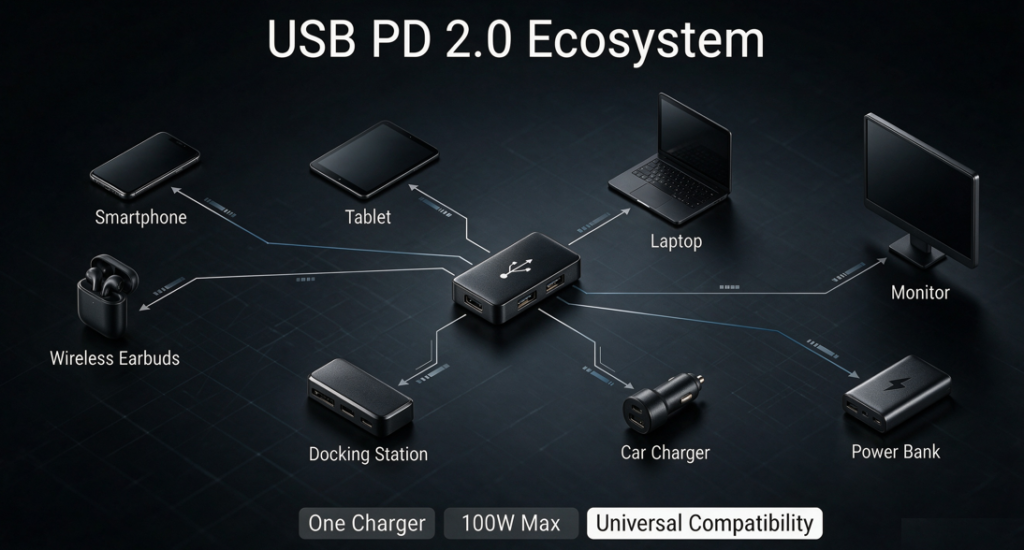
PD 2.0 has far more use cases than most people realize, covering almost every part of our daily digital life.
Consumer Electronics Charging
This is the scenario we are most familiar with: smartphones, tablets, wireless earbuds, smartwatches and other small digital devices can all fast charge with a PD charger. Lightweight laptops, portable monitors and other medium-to-high power devices can also operate normally through PD 2.0’s 20V level.
Power Expansion Scenarios
- Power banks: PD two-way fast charging power banks charge your phone quickly, and also recharge themselves much faster than regular power banks — perfect for topping up on the go.
- Car chargers: PD car chargers can fast charge your phone or even your laptop while driving, solving charging needs during travel.
- Desktop docks: A dock with PD power delivery only needs one Type-C cable to your computer to handle data transfer, video output and laptop charging all at once — what we commonly call “single-cable docking.”
Reverse Charging Scenarios
PD’s two-way power delivery also enables many practical use cases. For example, a laptop can reverse-charge your phone, earbuds or other small devices, so you don’t need to carry an extra power bank when going out. A monitor with PD power delivery can power your laptop and transmit video over a single cable, for a cleaner desk setup.
Common Myths: What Regular Users Get Wrong
There are many myths about PD fast charging online. Let’s clear them up one by one.
Myth 1: PD fast charging damages phones or harms battery health
This is the most common rumor. Genuine PD chargers and devices always match the appropriate voltage and current through the negotiation mechanism. The output stays well within the device’s safe limits and will not damage the device.
As for the impact of fast charging on battery life, it is mainly related to heat during charging — not the PD protocol itself. As long as you use certified, compliant products, there is no need to worry excessively.
Myth 2: A higher-wattage charger always charges faster
Many people think using a 100W charger to charge a phone will be much faster than a 20W charger, but that is not true.
The maximum charging speed is determined by the phone’s own internal charging management circuit. If a phone only supports 20W PD fast charging, even a 100W charger will only deliver 20W. The speed will not increase. A higher-wattage charger just has extra capacity — it never forces more power into the device.
Myth 3: Any Type-C cable can trigger PD fast charging
Wrong. Type-C is just the shape of the connector. Whether it supports PD fast charging depends on whether the cable has the required internal communication wiring and current capacity.
Cheap, low-quality Type-C cables often only have basic power and data pins, with no CC communication line. They cannot complete fast charging negotiation and will only charge at 5V slow speed. For power levels above 60W, you also must use a 5A cable with an E-Marker chip.
Myth 4: PD 2.0 only charges smartphones
Many people assume PD fast charging is only for phones. In reality, PD 2.0’s 100W maximum power easily covers lightweight laptops, portable monitors, small desktop appliances and many other devices. Its range of use is much broader than just phone charging.
Summary and Looking Ahead
Historical Significance of PD 2.0
PD 2.0 is a milestone standard in the history of USB fast charging. It was the first to truly universalize USB fast charging, laid the standardized foundation for the entire USB fast charging ecosystem, and greatly accelerated the adoption of Type-C connectors across the industry. It built the foundation for the later trend of “unified charging ports.”
Evolution: From PD 2.0 to PD 3.0 / 3.1
After PD 2.0, USB-IF released PD 3.0 and PD 3.1 specifications.
PD 3.0 added Programmable Power Supply (PPS) on top of 2.0, enabling finer voltage control, higher charging efficiency and better heat management. PD 3.1 further raised the maximum power to 240W to meet the needs of even higher-wattage devices.
Even so, the vast majority of PD fast charging devices on the market today still support PD 2.0 through backward compatibility. It remains the most universally compatible base standard for fast charging.
Buying Advice for Regular Users
For everyday consumers, here are a few practical buying tips:
- Prioritize chargers that support the PD protocol. They have the best device compatibility, so you won’t need to replace your charger when you switch to a different brand of device.
- Choose power based on your needs: 20–30W is enough for charging phones and earbuds. For powering lightweight laptops, we recommend 65W or higher.
- Always buy from reputable brands. Poor-quality chargers and cables with substandard protocol chips not only fail to fast charge properly, but can also be a safety hazard.