
Introduction
Walk into any electronics store, and you’ll see shelves filled with all kinds of chargers. Some have just one port, others have three or four. Some are labeled 65W, others 140W. Some say “GaN,” others say “PD fast charging.” Prices range from a few dollars to over a hundred.
Faced with so many choices, it’s easy for ordinary people to feel confused: Why do two USB-C chargers charge at such different speeds? Why doesn’t a 100W charger necessarily charge my phone quickly? Are more ports always better? What exactly is GaN, and why is everyone talking about it?
If you have these questions, this article is for you.
We won’t overwhelm you with complex formulas or technical jargon. Instead, we’ll explain the most common charger terms and concepts in plain, everyday language. By the time you finish reading, you’ll be able to understand the specs on charger boxes and know how to pick the right charger for yourself and your family.
Chapter 1: Basic Charger Terms
Charger
A charger converts the alternating current (AC) from your wall outlet into direct current (DC) that phones, tablets, and laptops can use. Simply put, it’s the device that “feeds” electricity to your electronics.
Some people ask: Is a charger the same as a power adapter? Basically, yes. But strictly speaking, an adapter emphasizes the function of “converting one type of power to another,” while a charger emphasizes the purpose of “charging a battery.” In everyday use, the two terms are often used interchangeably, so you don’t need to worry too much about the difference.
USB Charger
A USB charger is a charger that outputs power through a USB port. This is the most common type of charger today. Whether you’re charging a phone, tablet, Bluetooth earbuds, or a power bank, you’re almost certainly using a USB charger.
AC Charger and Wall Charger
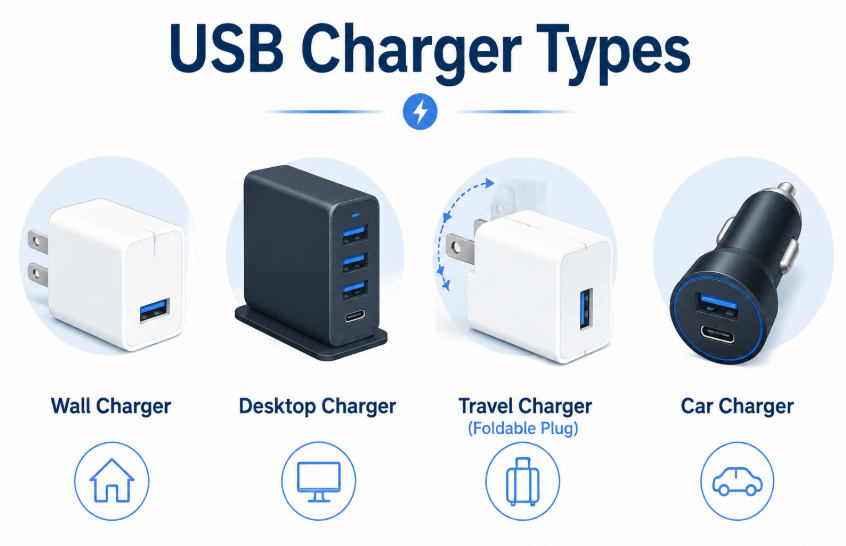
An AC charger is the kind you plug directly into a wall socket—the most common type in homes. People often call it a “wall charger” for obvious reasons. In contrast, a desktop charger is usually larger, has more ports, and is designed to sit on a desk to charge multiple devices at once.
Travel Charger
Travel chargers have foldable prongs that tuck away for easy packing. More importantly, they support worldwide voltage (100V to 240V), so you can use them in any country without needing an additional transformer.
Car Charger
A car charger plugs into your vehicle’s cigarette lighter socket, converting the car’s 12V or 24V power into USB output, so you can charge your phone while driving.
Chapter 2: Charger Port Terms
USB-A Port
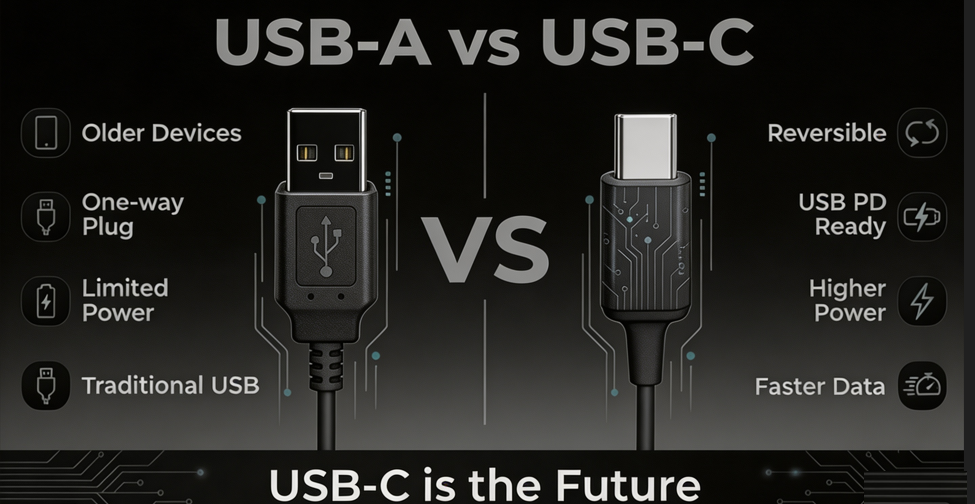
This is the classic USB port—rectangular and directional (you can only plug it in one way). Most older devices and budget devices use this port. It can support fast charging, but it’s much slower than USB-C.
USB-C Port
This is the new-generation USB port—oval-shaped and, best of all, reversible (you can plug it in either way). More importantly, USB-C is the foundation for USB PD fast charging. Most new phones, tablets, and laptops now use USB-C ports.
Single-Port and Multi-Port Chargers
A single-port charger has one output port and can charge only one device at a time. A multi-port charger has two, three, or even four ports and can charge multiple devices simultaneously.
But here’s a crucial concept called shared power: A multi-port charger has a fixed total power capacity. For example, a 100W three-port charger can deliver 100W when only one device is plugged in, but when all three ports are in use, the total is still 100W—each port gets less power. Some high-end chargers support independent output, where each port has its own power circuit and doesn’t affect the others, but these chargers are usually more expensive.
Chapter 3: Power Parameter Terms
Watt (W) – Power
Watt is the unit of power. Think of it as the charger’s “power delivery capacity.” The higher the wattage, the more power the charger can provide. A 65W charger can deliver more power than a 20W charger.
Voltage (V) and Current (A)
Power = Voltage × Current. 100W = 20V × 5A. Voltage is like “pressure,” and current is like “flow rate.” Together, they determine the total power a charger can output.
Input and Output
Chargers usually list two sets of parameters. Input refers to the power the charger draws from the wall outlet, typically labeled “100-240V ~ 50/60Hz,” meaning it works with wall sockets anywhere in the world. Output refers to the power the charger can deliver to your device, listing different voltages and corresponding currents, such as “5V/3A, 9V/3A, 20V/5A.”
Rated Power and Peak Power
Rated power is the power a charger can deliver stably and continuously. Peak power is the maximum power a charger can briefly hit, but it can’t sustain that level. For ordinary users, rated power is what matters—peak power is just nice to know.
Chapter 4: USB Charging Protocol Terms
USB BC 1.2
This is the most basic USB charging standard, with a maximum power of only 7.5W. Before BC 1.2, USB ports were mainly for data transfer, with charging as an afterthought. BC 1.2 was the first standard dedicated to USB charging. It’s painfully slow by today’s standards, but it was the starting point for all fast charging.
USB Power Delivery (USB PD)
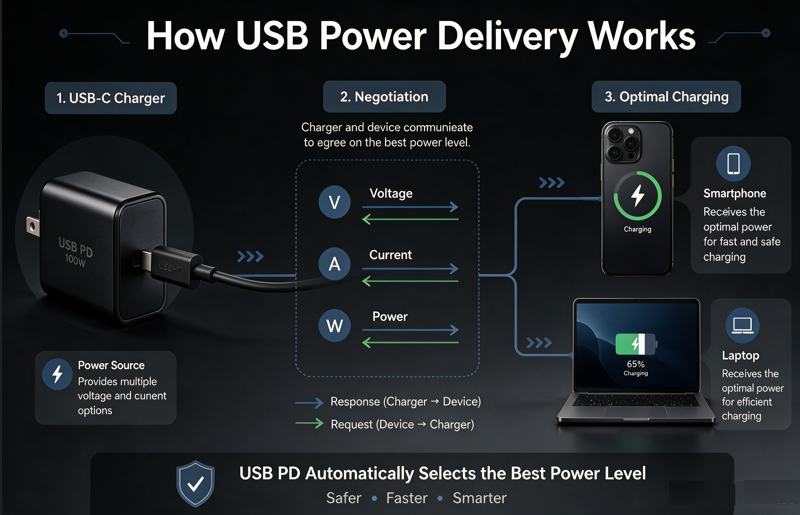
USB PD is the fast-charging protocol developed by the USB standards organization. Think of it as the “universal language” between chargers and devices. Its biggest advantage is this: regardless of brand—phone, tablet, or laptop—as long as a device supports PD, it will fast-charge with any PD-compatible charger.
The PD protocol originally supported up to 100W, then upgraded to PD 3.0, and later PD 3.1 which supports 240W. PD 3.0 is currently the most common version, used by the vast majority of devices that support fast charging.
PPS (Programmable Power Supply)
PPS is a feature introduced in PD 3.0 that allows a charger to dynamically adjust voltage based on the device’s needs. Samsung phones make extensive use of PPS fast charging. Simply put, PPS makes charging more precise, more efficient, and generates less heat.
SPR and EPR
SPR (Standard Power Range) refers to the original 100W maximum supported by PD 3.0 and earlier versions. EPR (Extended Power Range) was introduced with PD 3.1, raising the上限 to 240W.
Chapter 5: Third-Party Fast Charging Protocol Terms
In addition to USB’s official PD protocol, major phone manufacturers have also developed their own fast-charging protocols:
- Qualcomm Quick Charge (QC) : Commonly used in phones with Qualcomm chips.
- Samsung SFC: Samsung’s fast-charging protocol.
- Huawei SCP and FCP: Huawei’s fast-charging protocols, with SCP being the newer version.
- OPPO VOOC and SuperVOOC: OPPO’s flash charging technology—”charge for five minutes, talk for two hours.”
- OnePlus Dash Charge and Warp Charge: OnePlus’s fast charging.
- Xiaomi HyperCharge: Xiaomi’s fast-charging technology.
- UFCS (Universal Fast Charging Specification) : This is China’s unified fast-charging standard, designed to enable cross-brand, cross-device fast charging compatibility. As of October 2025, over 200 products from nearly 50 companies have passed UFCS certification.
The biggest problem with these proprietary protocols is lack of compatibility—using a Huawei charger with an OPPO phone probably won’t give you fast charging. That’s why PD is becoming increasingly important—it’s the “common language” everyone can use.
Chapter 6: Charger Technology Terms
Gallium Nitride (GaN)
GaN is the most important technological breakthrough in the charger world in recent years. It’s a new semiconductor material that, compared to traditional silicon, can handle higher voltages, conducts electricity better, and generates less heat.
In plain terms: at the same power output, GaN chargers can be much smaller; at the same size, GaN chargers can deliver more power. That’s why a 65W GaN charger today can be less than half the size of a traditional 65W charger.
But please note: GaN makes chargers smaller, cooler, and more efficient, but it does not directly make charging faster. Charging speed depends on the charging protocol and the device’s own power acceptance capability.
Traditional Silicon Chargers
Traditional chargers use silicon as the core semiconductor material. Silicon technology is mature and low-cost, but it’s less efficient than GaN—at the same power output, silicon chargers are larger and generate more heat.
Conversion Efficiency
When a charger draws power from the wall and delivers it to your device, some energy is lost as heat. Conversion efficiency is the ratio of “output power ÷ input power.” Higher efficiency means less wasted energy and less heat generated by the charger.
Safety Protection Features
A good charger should have multiple protection features:
- Over Voltage Protection (OVP) : Automatically shuts off if voltage gets too high, preventing damage to your device.
- Over Current Protection (OCP) : Automatically shuts off if current gets too high, preventing short-circuit damage.
- Over Power Protection (OPP) : Automatically shuts off if power exceeds the rated limit.
- Short Circuit Protection (SCP) : Automatically cuts power in case of a short circuit.
- Over Temperature Protection (OTP) : Automatically reduces power or shuts off if the charger gets too hot.
When buying a charger, check the packaging for these protection features.
Chapter 7: Power Distribution Terms
When a multi-port charger is charging multiple devices at once, how is the power divided? That’s where power distribution comes in.
Dynamic Power Allocation and Intelligent Distribution
A good multi-port charger dynamically adjusts power分配 to each port based on each device’s needs. For example, if you plug in a laptop and a phone, the charger might give 90W to the laptop and 10W to the phone. If the laptop is fully charged, it shifts more power to the phone.
Power Budget
The power budget is the charger’s total power limit. A 100W charger, no matter how many devices are plugged in, cannot deliver more than 100W total across all ports.
Dual-Port, Triple-Port, and Four-Port Chargers
The more ports a charger has, the less average power each port can receive. When buying a multi-port charger, check the power distribution table for different usage scenarios—for example, “100W max with single port, 65W+30W with two ports, 45W+30W+15W with three ports.”
Chapter 8: Certification and Safety Terms
The various certification marks on a charger indicate which safety standards it has passed:
- USB-IF Certified: Certification from the USB standards organization, indicating the charger complies with official standards like USB PD.
- CE: EU safety certification.
- FCC: US electromagnetic compatibility certification.
- UKCA: UK safety certification.
- PSE: Japan safety certification.
- CCC: China’s compulsory 3C certification—required for sale in China.
- UL: North American safety certification.
Chargers with these certifications are at least safe to use. Chargers with no certification marks at all are best avoided.
Chapter 9: Common Misconceptions
Misconception 1: A 100W charger = all devices charge at 100W
Not true. The 100W rating is the charger’s “maximum output capability,” but how fast a device actually charges depends on how much power the device itself can accept. Plug a 100W charger into a phone that only supports 20W fast charging, and it will charge at only 20W.
Misconception 2: Charger power = device charging power
Not true. Charger power is “how much it can provide,” while device charging power is “how much is actually used.” The final charging power is negotiated between the charger and the device—like connecting a big pipe to a small faucet; the flow rate depends on the faucet, not the pipe.
Misconception 3: USB-C = USB PD
Not true. USB-C is the shape of the port, while USB PD is the charging protocol. Just because a device has a USB-C port doesn’t mean it supports PD fast charging. Before buying a charger, check what fast-charging protocol your device actually supports.
Misconception 4: More ports = more total power
Not true. The number of ports and the total power when charging multiple devices simultaneously are two different things. A four-port charger might have only 65W total, while a two-port charger might have 140W total. Look at total power, not just the number of ports.
Misconception 5: Bigger charger = faster charging
Not true. Charging speed depends on power and protocol, not size. GaN technology has made it possible to pack high power into very small chargers.
Misconception 6: GaN = faster charging
Not true. GaN makes chargers smaller, cooler, and more efficient, but it does not directly increase charging speed. Charging speed is still determined by power and protocol.
Chapter 10: How to Read a Charger Spec Sheet
How to Read Input Parameters
Look at the “Input” section on the charger. If you see “100-240V ~ 50/60Hz,” the charger supports worldwide voltage and can be used internationally.
How to Read Output Parameters
Look at the “Output” section, which lists different voltages and corresponding currents, such as “5V/3A, 9V/3A, 12V/2.5A, 20V/5A.” This shows the different power levels the charger can deliver at different voltages. What you need to know is which voltage level your device supports—usually listed in the device manual.
How to Read Multi-Port Output
Multi-port chargers typically list the power distribution for single-port, dual-port, and triple-port usage separately. For example:
- Single port: up to 100W
- Two ports (C1+C2): 65W + 30W
- Three ports (C1+C2+A): 45W + 30W + 15W
With this table, you’ll know roughly how much power each device will get when charging multiple devices simultaneously.
How to Quickly Determine What’s Right for Your Device
- Phone: First check what fast-charging protocol your phone supports, then buy a charger that supports that protocol. If you’re unsure, a PD-compatible charger is usually a safe bet.
- Tablet: Most tablets support PD. A 30W+ PD charger should be sufficient.
- Laptop: Laptops typically need 45W to 100W. Check your original charger’s wattage and buy a PD charger with the same or higher wattage.
- Gaming handheld: Devices like Steam Deck and ROG Ally generally support PD and need 45W to 65W.
- Power bank: Check the power bank’s input power and buy a matching charger.
Conclusion
After reading this article, you now understand most of the important concepts in the charger world.
Let’s do a quick recap:
Knowing the port doesn’t mean knowing the charger. USB-C is just a port shape—it doesn’t guarantee fast charging support.
Power, protocols, and certifications all matter. Looking only at “100W” isn’t enough—you also need to know what protocols it supports and what certifications it has.
Learning to read specs is more valuable than just looking at “100W.” The spec sheet on the charger box holds all the answers. Learn to read it, and you won’t be fooled by marketing.
Choosing the right charger for your device is more important than blindly chasing high wattage. A 100W charger plugged into a phone that only supports 20W is no different from using a 20W charger—except you paid more.
We hope this dictionary helps you make smarter choices the next time you buy a charger.