
Non-certified USB products are not automatically bad.
That needs to be said first. Many products that do not show USB-IF certification information may still work. The real problem is that when a product has unclear specs, an unknown source, and no checkable certification information, the buyer has one less layer of protection.
A better rule is:
Non-certified does not automatically mean dangerous. “Unclear specs + unknown source + no way to verify” increases risk.
A USB accessory may be cheap, but it may connect to your phone, laptop, SSD, monitor, and charger. A small accessory can affect a much more expensive device.
Risk 1: Unclear Speed Claims
The most common risk is not a dramatic accident. It is buying something that does not perform as expected.
Examples:
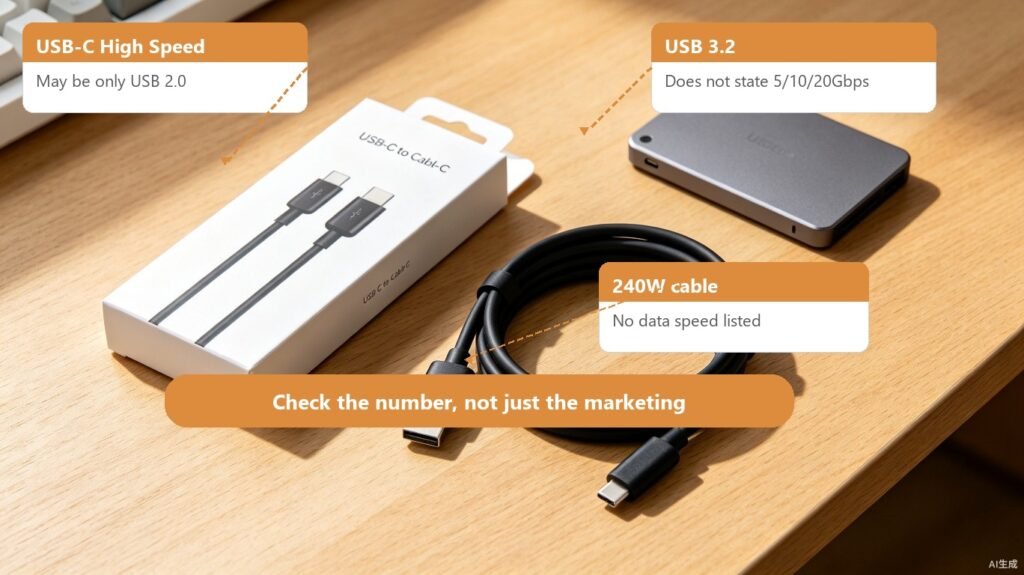
- A product says “USB-C high speed,” but only supports USB 2.0 data.
- A cable says 240W, but does not state data speed.
- An enclosure says USB 3.2, but does not say 5Gbps, 10Gbps, or 20Gbps.
- A dock says 4K, but does not state refresh rate, port limits, or host requirements.
It is like buying a “fast train” ticket and discovering it is the slow train. It still arrives, but not the way you expected.
Risk 2: Power Negotiation and Cable Capability May Be Unreliable
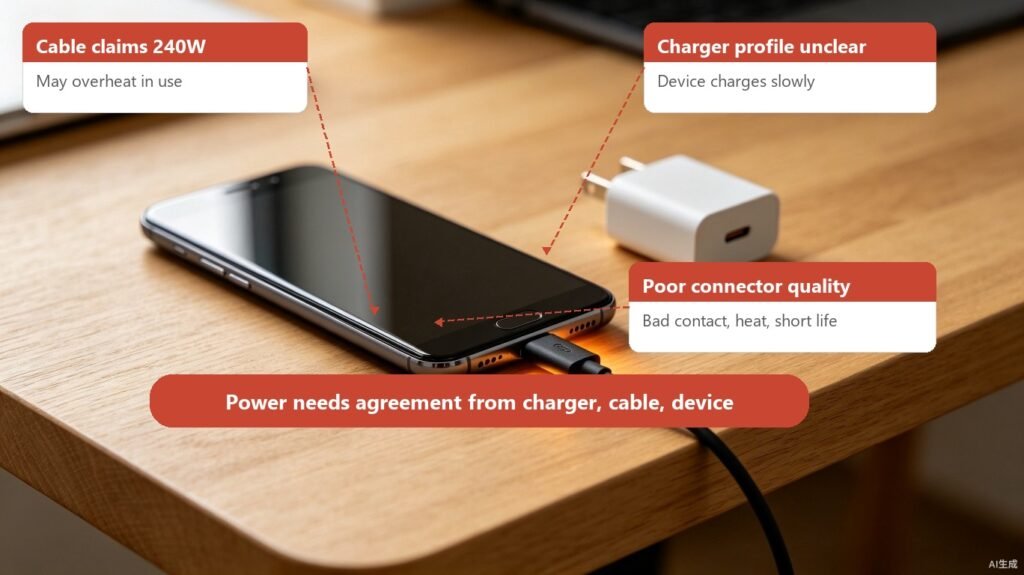
USB-C high-power charging depends on negotiation. The charger, device, and cable need to agree on what power level is safe.
If a product is poorly designed or badly labeled, you may see:
| Problem | Possible result |
|---|---|
| Cable power rating is exaggerated | Unstable high-power charging or heat |
| Charger power profiles are unclear | Device charges only at low power |
| Cable and charger do not match | Disconnects, reconnects, or power drops |
| Poor connector quality | Bad contact, heat, shorter lifespan |
Compliant USB PD is like a menu. The device chooses what it can accept. The risk with poor accessories is that the menu may be wrong, reported badly, or supported by weak hardware.
Risk 3: Connector and Cable Quality Affect Lifespan
USB accessories look simple, but plug quality, solder joints, wires, shielding, housing, and strain relief all matter.
Low-quality products may cause:
- Loose plugs that disconnect when touched.
- Cables that fail after bending.
- External drives dropping during transfer.
- Docks becoming unstable when warm.
- Connectors heating during long use.
These problems may not appear on day one. They are like thin shoe soles. Five minutes feels fine. A full day tells the truth.
Risk 4: Security Risk Comes From Data Too
USB carries both data and power. Risk is not only electrical.
NIST guidance on portable storage media treats devices from other sources as untrusted and recommends controls such as authorization, scanning, disabling unnecessary ports, restricting execution, and logging to reduce risk.
For normal users, the simpler rules are:
- Do not plug in random USB drives.
- Do not use unknown USB storage for work files.
- Do not plug in USB devices found in public places.
- In a company environment, follow IT policy and use authorized devices.
- When moving files, scan the media and confirm the source.
USB-IF certification is mainly about USB compliance and interoperability. It is not a security audit of every file on a flash drive. Do not treat certification and malware scanning as the same thing.
Risk 5: Support and Accountability Can Be Weak
Certification information, clear model numbers, official channels, and brand documentation all help answer one question: if something goes wrong, who is responsible?
Some very cheap no-name products may have:
- Unclear model numbers.
- Product pages that disappear later.
- Packaging specs that do not match online specs.
- No checkable certification information.
- Weak support.
- Big changes between batches under the same listing.
This does not prove the product will fail. It does make problems harder to trace.
When Should You Avoid Unclear Products?
Avoid unclear USB accessories when the use case is more sensitive.
| Situation | Why it matters more |
|---|---|
| Charging a laptop at high power | Higher power makes cable and charger quality more important |
| Connecting an external SSD | Disconnects or transfer errors can affect data |
| Using a dock or monitor | Data, power, and video are involved together |
| Long-term use with expensive devices | A small accessory can affect a costly device |
| Company or production environment | Security and accountability matter more |
If you are temporarily connecting a cheap mouse, the risk is different. Judge the product by what it connects to, how much power it carries, and what data it touches.
A Simple Buying Checklist
Before buying USB accessories, check:
- Are the specs clear: speed, power, connector, and use case?
- Can you find the brand, model, and official documentation?
- Is there Certified USB information, or can you check USB-IF Product Search?
- For high-power cables, does it state 60W, 100W, 240W, or another clear rating?
- For high-speed cables, does it state USB 10Gbps, 20Gbps, 40Gbps, or another clear speed?
- Is the price unrealistically low while the claims are huge?
- Are you avoiding unknown USB storage devices on important computers?
The most important habit is this: do not buy only for “it fits.” USB problems often happen after the plug fits: slow transfer, unstable connection, heat, no video, no fast charging, or data risk.
Summary
Non-certified USB products are not automatically dangerous, but they lack one layer of checkable compliance.
The products to worry about are the ones with vague specs, unknown sources, suspicious logos, untraceable models, and confused speed or power claims. USB accessories are small, but they can affect expensive devices and important data.
When buying USB products, do not rely only on price and appearance. Read the specs, confirm the source, check certification information, and avoid unknown USB storage devices. That is not fear. It is basic care for your devices.