
Thunderbolt has become a common feature on modern laptops, monitors, docking stations, external SSDs, and many professional devices. However, terms like Thunderbolt 3, Thunderbolt 4, Thunderbolt 5, USB4, PCIe, DisplayPort, and PAM-3 can easily confuse people.
The good news is that these concepts are much simpler than they appear. This glossary explains the most common Thunderbolt terms in plain English, helping you understand what they mean before buying a computer, cable, dock, or storage device.
What Is Thunderbolt?
Thunderbolt is a high-speed connectivity standard developed by Intel in collaboration with Apple. A single Thunderbolt cable can carry multiple types of signals at the same time, including data, video, audio, and power. This allows one cable to connect displays, external storage, docking stations, and many other devices.
Light Peak
Light Peak was the original codename for Thunderbolt. Intel initially planned to use optical fiber for transmission, but the first commercial version switched to copper cables because they were more affordable while still delivering excellent performance.
How Thunderbolt Has Evolved
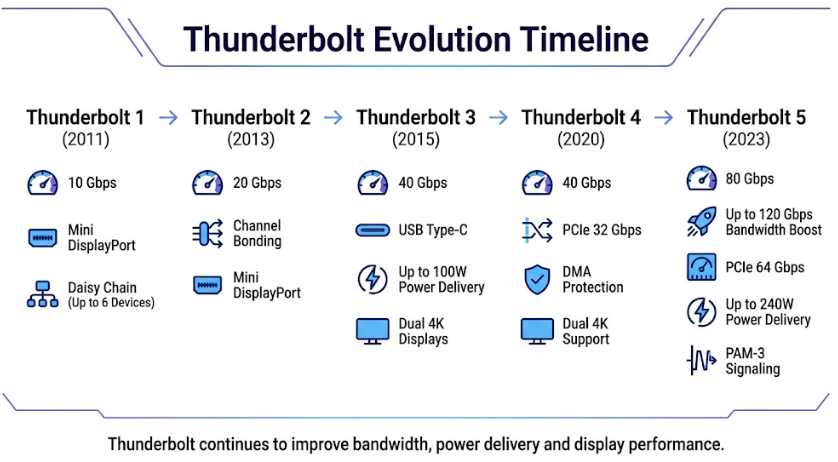
Thunderbolt 1 (2011) introduced transfer speeds of up to 10 Gbps through the Mini DisplayPort connector and supported daisy-chaining up to six devices.
Thunderbolt 2 (2013) combined two 10 Gbps channels to provide 20 Gbps of bandwidth, making it more suitable for professional video workflows.
Thunderbolt 3 (2015) was the biggest milestone. It adopted the USB Type-C connector, increased bandwidth to 40 Gbps, supported USB Power Delivery up to 100 W, and could drive multiple high-resolution displays.
Thunderbolt 4 (2020) kept the same 40 Gbps speed but introduced stricter certification requirements, guaranteed PCIe performance, mandatory support for dual 4K displays or one 8K display (where supported by the platform), and enhanced security with DMA protection.
Thunderbolt 5 (2023) significantly improved performance with 80 Gbps bidirectional bandwidth, Bandwidth Boost up to 120 Gbps in one direction, PCIe bandwidth up to 64 Gbps, support for USB Power Delivery up to 240 W, and the new PAM-3 signaling technology.
Core Technologies
PCI Express (PCIe)
PCIe is the high-speed communication standard used by components inside a computer. Thunderbolt extends PCIe connections outside the computer, allowing fast external SSDs and other high-performance devices to operate efficiently.
DisplayPort (DP)
DisplayPort is a digital video standard. Thunderbolt carries DisplayPort signals, allowing you to connect external monitors through the same cable used for data.
Tunneling
Tunneling is one of Thunderbolt’s key technologies. It packages different protocols such as PCIe, DisplayPort, and USB into a single connection, allowing them to work simultaneously without interfering with each other.
Daisy Chain
Daisy chaining allows multiple devices to be connected one after another through a single Thunderbolt port. Depending on the devices involved, up to six Thunderbolt devices can be connected in one chain.
Thunderbolt Controller
The Thunderbolt controller is the dedicated chip that manages data, video, and power traffic between the computer and connected devices.
Thunderbolt Networking
Two computers can be connected directly with a Thunderbolt cable to create a high-speed network, making large file transfers much faster than many traditional networking methods.
Thunderbolt Share
Thunderbolt Share is Intel software that allows two connected computers to share files, screens, keyboards, and mice through a Thunderbolt connection.
Performance Terms
Bandwidth refers to the maximum amount of data that can be transferred every second. Thunderbolt has evolved from 10 Gbps to 20 Gbps, then 40 Gbps, and now 80 Gbps, with Thunderbolt 5 supporting up to 120 Gbps in Bandwidth Boost mode.
Bidirectional bandwidth means sending and receiving data simultaneously at high speed.
Bandwidth Boost is a Thunderbolt 5 feature that dynamically reallocates bandwidth, allowing up to 120 Gbps in one direction while maintaining 40 Gbps in the opposite direction for demanding display workloads.
PAM-3 signaling improves data efficiency by using three signal levels instead of traditional binary signaling, enabling higher performance without requiring completely new cables.
Power Delivery allows Thunderbolt cables to charge devices. Thunderbolt 3 supports up to 100 W through USB Power Delivery, while Thunderbolt 5 supports up to 240 W when compatible hardware and certified cables are used.
Connectors and Cables
Thunderbolt 1 and Thunderbolt 2 use the Mini DisplayPort connector.
Thunderbolt 3, Thunderbolt 4, and Thunderbolt 5 all use the USB Type-C connector. However, not every USB-C port supports Thunderbolt, so it’s important to check the specifications or look for the Thunderbolt logo.
Passive copper cables contain no active electronics and typically work best at shorter lengths.
Active copper cables include signal-conditioning electronics to maintain full performance over longer distances.
Active optical cables use fiber optics and are designed for long-distance Thunderbolt connections, sometimes reaching dozens of meters.
Certification and Compatibility
Thunderbolt devices must pass Intel certification to carry the Thunderbolt name and logo, ensuring compatibility, reliability, and performance.
Thunderbolt 5 is backward compatible with Thunderbolt 4 and Thunderbolt 3. Older Thunderbolt 1 and Thunderbolt 2 devices can usually be connected through compatible adapters, although they will operate at the capabilities of the older standard.
USB4 incorporates technology contributed by Thunderbolt 3, and Thunderbolt 4 and Thunderbolt 5 are fully compatible with USB4 devices, although actual features depend on the capabilities of both devices.
Security and Ecosystem
Thunderbolt 4 introduced mandatory DMA protection, helping prevent unauthorized memory access through connected devices. This protection relies on technologies such as Intel VT-d and IOMMU, which isolate and manage device access to system memory.
Today, the Thunderbolt ecosystem includes laptops, desktop motherboards, docking stations, external SSDs, professional monitors, networking adapters, capture devices, and expansion cards. It has become one of the most powerful and flexible connection standards for creators, professionals, and everyday users alike.
Conclusion
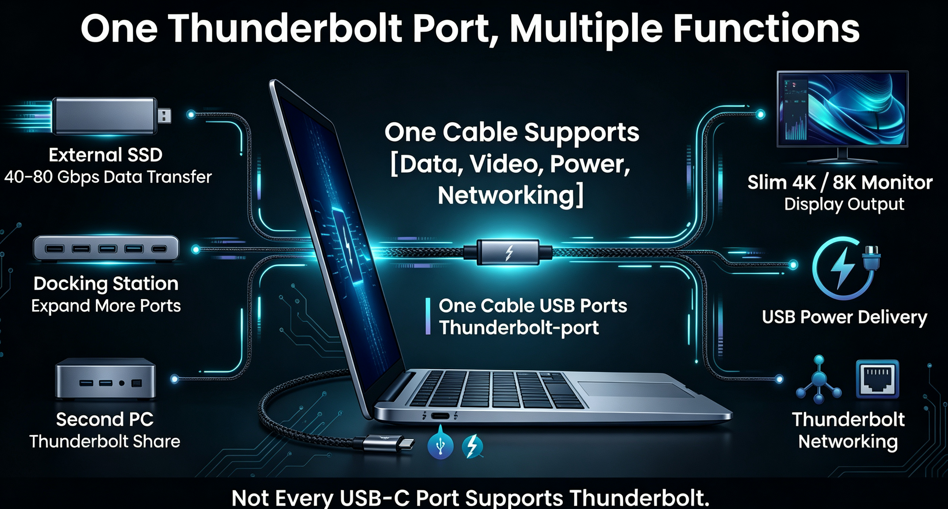
Thunderbolt is much more than a connector. It is a complete high-speed connectivity platform that combines data transfer, video output, power delivery, and multi-device expansion through a single cable.
For most users, the key points are simple:
- Thunderbolt 3 and later use the USB Type-C connector.
- Thunderbolt 4 focuses on stricter compatibility, security, and certification requirements.
- Thunderbolt 5 dramatically increases bandwidth and supports up to 240 W of power delivery.
- Not every USB-C port supports Thunderbolt, so always check your device specifications before purchasing accessories.
Understanding these terms will make it much easier to choose the right laptop, dock, monitor, cable, or external storage device for your needs.