
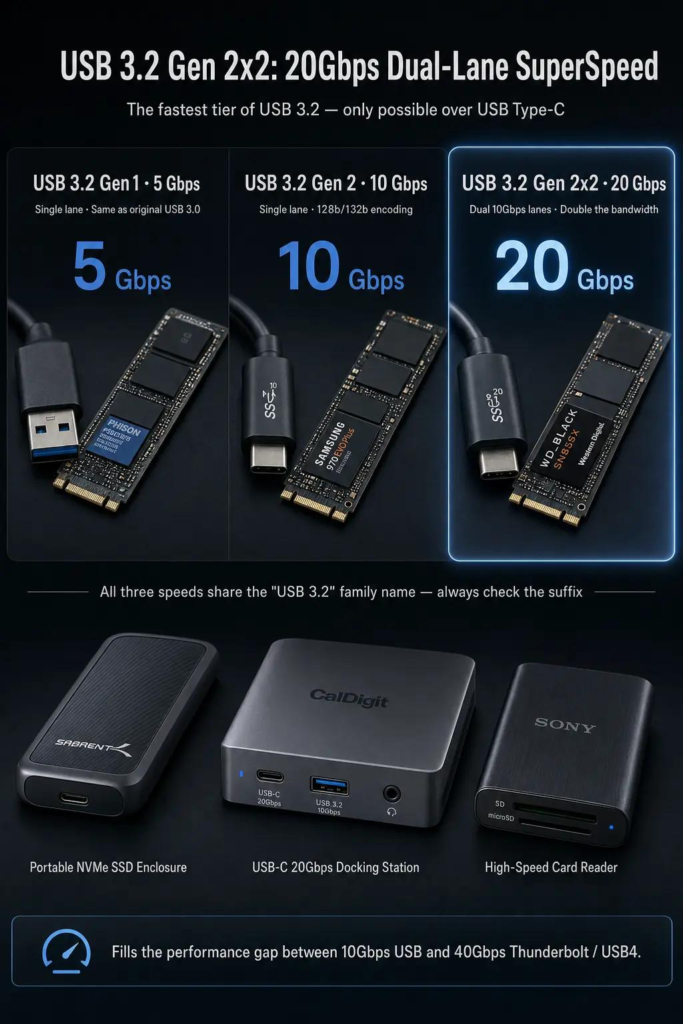
USB 3.2 Gen2x2 represents the highest performance tier within the USB 3.2 generation. While USB 3.0 introduced SuperSpeed USB at 5 Gbps and USB 3.1 Gen 2 pushed a single lane to 10 Gbps, USB 3.2 Gen2x2 combines two 10 Gbps lanes over a USB Type-C connection to deliver a nominal signaling rate of 20 Gbps.
Today, this 20 Gbps performance class may appear under several names: USB 3.2 Gen 2×2, SuperSpeed USB 20Gbps, or simply USB 20Gbps. For most practical buying and engineering discussions, these names refer to the same dual-lane 20 Gbps operation within the USB 3.2 family.
USB 3.2 Gen2x2 was designed for applications that demand more bandwidth than a single 10 Gbps lane can provide, such as high-performance external NVMe storage, multi-device docking, high-speed data acquisition, and large file workflows. Because it requires two high-speed lanes, it is only possible over USB Type-C connectors and cables, and it is not backward compatible with Type-A or other legacy connector shapes at full speed.
1. Naming and Historical Background
USB 3.2 Gen2x2 was introduced as part of the USB 3.2 specification, which expanded the SuperSpeed USB family to include multi-lane operation. Its defining feature is the ability to use two 10 Gbps lanes simultaneously, doubling the single-lane Gen2 rate of 10 Gbps to a combined 20 Gbps.
The naming situation has become layered. What began as USB 3.0 at 5 Gbps was later renamed USB 3.1 Gen 1, and then folded into USB 3.2 as USB 3.2 Gen 1. Similarly, USB 3.1 Gen 2 at 10 Gbps became USB 3.2 Gen 2. The dual-lane variant, however, was new to the USB 3.2 generation and was named USB 3.2 Gen 2×2 from the start. To reduce confusion, USB-IF has increasingly promoted performance-based names such as USB 5Gbps, USB 10Gbps, USB 20Gbps, USB 40Gbps, and USB 80Gbps.
| Common Name | Later Specification Name | Consumer-Friendly Name | Nominal Rate |
|---|---|---|---|
| USB 3.0 | USB 3.2 Gen 1 | USB 5Gbps | 5 Gbps |
| USB 3.1 Gen 2 | USB 3.2 Gen 2 | USB 10Gbps | 10 Gbps |
| USB 3.2 Gen 2×2 | USB 3.2 Gen 2×2 | USB 20Gbps | 20 Gbps |
| USB4 | USB4 | USB 40Gbps / USB 80Gbps depending on generation | 40 Gbps and above |
This naming history is important because many products still use older or partial labels. A device marked simply “USB 3.2” could mean 5 Gbps, 10 Gbps, or 20 Gbps depending on the suffix. The speed number or the “x2” designation is what matters for actual performance.
2. Why USB 3.2 Gen2x2 Was Needed
Single-lane 10 Gbps USB was already a major step up from 5 Gbps, but certain workloads still hit its limits. External NVMe SSDs, in particular, began to approach or exceed 10 Gbps of throughput, making the interface itself the bottleneck rather than the storage media.
USB 3.2 Gen2x2 addressed this by adding a second high-speed lane, effectively doubling the available bandwidth without changing the underlying per-lane signaling technology. This made it possible to build faster storage, higher-bandwidth docks, and more capable multi-device accessories while reusing much of the existing 10 Gbps physical-layer design.
This made 20 Gbps USB especially useful for:
- External NVMe SSD enclosures and portable SSDs
- High-speed backup and large file transfer
- USB-C docking stations with multiple high-speed peripherals
- High-resolution video capture and data acquisition
- Multi-drive storage adapters and hubs
- Pro-grade portable storage for content creators
3. Physical Layer and Cable Design
USB 3.2 Gen2x2 does not invent a new signaling technology. Instead, it uses the same 10 Gbps per-lane physical layer as USB 3.2 Gen 2, but activates both available high-speed lane pairs in a USB Type-C connection.
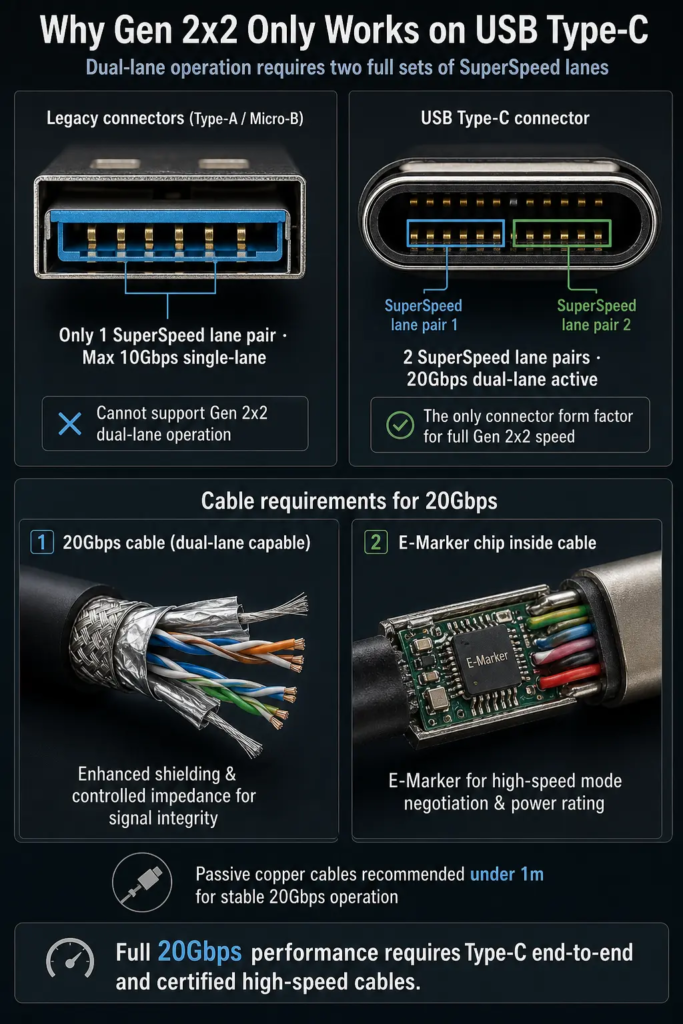
A USB Type-C cable contains multiple conductors, including power pins, configuration channel pins, USB 2.0 D+/D- pins, and two sets of SuperSpeed differential pairs (TX1/RX1 and TX2/RX2). In single-lane operation, only one pair of SuperSpeed lanes is used. In Gen2x2 operation, both pairs are active simultaneously, each carrying 10 Gbps in each direction.
3.1 Why Only USB Type-C Can Do 20 Gbps
USB 3.2 Gen2x2 requires a USB Type-C connector and cable. Older connectors such as USB Type-A, USB Type-B, Micro-B, or Mini-USB do not have two independent SuperSpeed lane pairs and therefore cannot support dual-lane operation.
| Connector Type | Maximum USB 3.x Speed | Supports Gen2x2 (20 Gbps)? |
|---|---|---|
| USB Type-A | 10 Gbps (single lane) | No |
| USB Type-B | 10 Gbps (single lane) | No |
| USB Micro-B | 10 Gbps (single lane) | No |
| USB Type-C | 20 Gbps (dual lane), 40 Gbps+ with USB4/Thunderbolt | Yes |
This means that even if a host has a 20 Gbps controller, connecting a Type-A device or cable will limit the link to single-lane speeds. Adapters from Type-C to Type-A may be convenient, but they cannot deliver Gen2x2 performance on the Type-A side.
3.2 Dual-Lane Operation and Full-Duplex Behavior
Each SuperSpeed lane pair is already full-duplex, meaning it can transmit and receive at the same time using separate TX and RX differential pairs. In Gen2x2 mode, there are two such lane pairs active, so the link has even more aggregate capacity for bidirectional traffic.
This dual-lane architecture improves performance for storage, multi-device hubs, and scenarios where both upstream and downstream data movement occurs simultaneously. It is conceptually similar to adding a second highway alongside the first, rather than making the first highway faster.
3.3 Cable Length, Shielding, and Signal Integrity
20 Gbps dual-lane operation places even more demands on cable quality than 10 Gbps single-lane operation. The cable must support both high-speed lane pairs with adequate shielding, controlled impedance, and low crosstalk.
Passive copper cables for 20 Gbps are commonly short, with around 1 meter often treated as a practical upper limit for reliable passive operation. Longer distances typically require active cables with built-in signal conditioning, repeaters, or re-drivers.
Poor shielding, low-quality connectors, excessive length, or strong electromagnetic interference can cause link instability, automatic fallback to 10 Gbps or lower speeds, reduced throughput, or device detection problems. For best reliability, use certified 20 Gbps cables from reputable manufacturers and keep cable runs short when possible.
4. Encoding and Effective Bandwidth
USB 3.2 Gen2x2 uses 128b/132b encoding, the same encoding scheme introduced with USB 3.1 Gen 2. This encoding maps every 128 bits of data into 132 transmitted bits, which provides much lower overhead than the older 8b/10b encoding used by USB 3.0 / USB 3.2 Gen 1.
With 128b/132b encoding, the encoding efficiency is approximately 97 percent. On a 20 Gbps dual-lane link, that corresponds to roughly 19.4 Gbps of encoded data before protocol-level overhead is considered. Additional protocol overhead — packet headers, framing, link management, and device-level protocols — reduces the real-world usable throughput further.
| Item | Value |
|---|---|
| Raw signaling rate (dual lane) | 20 Gbps (2 × 10 Gbps) |
| Encoding method | 128b/132b |
| Encoding efficiency | ~97% |
| Effective data rate after encoding | Roughly 19.4 Gbps before other overhead |
| Typical protocol-effective bandwidth | Approximately 18 Gbps class, depending on workload |
Actual file transfer speed is lower still because of storage media limits, bridge chip performance, USB host controller behavior, operating system overhead, file system characteristics, and the specific transfer protocol used by the device. In practice, real transfers are often measured in the 1.4 to 1.8 GB/s range for well-optimized external NVMe storage setups, though results vary.
5. Power and Power Delivery
USB 3.2 Gen2x2 is a data transport specification and is not the same thing as USB Power Delivery (USB PD). However, because Gen2x2 requires a USB Type-C connection, it is commonly found alongside USB PD-capable ports and cables.
The standard 5V current available from a USB 3.2 port is similar to other SuperSpeed generations — up to 900 mA for standard bus-powered operation at 5V. Higher power levels, laptop charging, and variable voltage require USB PD negotiation, proper E-Marker-equipped cables, and supporting hardware on both ends.
| USB Generation | Standard Bus-Powered Current at 5V | Power at 5V |
|---|---|---|
| USB 2.0 | 500 mA | 2.5 W |
| USB 3.2 Gen 1 / Gen 2 / Gen 2×2 | 900 mA | 4.5 W |
| USB PD (typical 5A E-Marker cable) | Up to 5 A at up to 20 V | Up to 100 W at 20 V / 5 A |
It is important to note that data speed and power capability are independent. A cable may support 20 Gbps data but only 60 W of power, or it may support 100 W charging but only USB 2.0 data. Buying decisions should verify both data rating and power rating separately.
5.1 E-Marker Cables and 20 Gbps
High-performance USB-C cables often include an E-Marker chip that identifies the cable’s capabilities to the host and device. E-Marker chips are associated with higher current capability (such as 5 A for 100 W PD) and are also common in 20 Gbps and USB4 cables because they help the system negotiate the correct operating mode.
Not every E-Marker cable supports 20 Gbps data, and not every 20 Gbps cable necessarily supports the maximum PD power level. The E-Marker is a capability discovery mechanism, not by itself a guarantee of any specific speed or power rating. Reading the cable’s actual ratings is still necessary.
6. Connector Types and Compatibility
Because USB 3.2 Gen2x2 requires two high-speed lanes, it is only available in USB Type-C form. However, USB Type-C hosts and devices are backward compatible with earlier USB generations, so a 20 Gbps port will still work with older equipment — just at the lower speed.
6.1 USB Type-C Host Ports
Many modern laptops, desktops, and motherboards include USB Type-C ports that can support 20 Gbps. Some ports are labeled with speed indications such as “20Gbps,” “USB 3.2 Gen2x2,” or simply a SuperSpeed logo with the number 20. Some vendors also use specific plastic insert colors, though color alone is not a formal guarantee.
A 20 Gbps USB-C port is backward compatible with 10 Gbps, 5 Gbps, USB 2.0, and USB 1.1 devices. The link negotiates down to the highest speed both sides support.
6.2 USB-C Cables and Their Capability Levels
USB-C cables vary widely in capability. A cable with a USB-C connector on each end might support charging only, USB 2.0 data, USB 5Gbps, USB 10Gbps, USB 20Gbps, USB4, or Thunderbolt. The shape of the connector tells you very little about what the cable can actually do.
For 20 Gbps Gen2x2 operation, the cable must be rated for at least USB 20Gbps or USB 3.2 Gen2x2. A 10 Gbps cable plugged into a 20 Gbps port and device will typically fall back to 10 Gbps single-lane operation.
6.3 Backward Compatibility with Older USB Devices
A 20 Gbps USB-C host port remains compatible with older USB equipment. USB 2.0 devices, USB 3.2 Gen 1 devices, and USB 3.2 Gen 2 devices all work at their own maximum speed. USB-C to USB-A adapters or cables are common for connecting legacy devices, but they will not deliver 20 Gbps on the Type-A side.
This backward compatibility is one of the strengths of the USB ecosystem: newer standards preserve support for older devices, while newer devices can fall back to older speeds when connected to older hosts.
7. Real-World Performance
The 20 Gbps number is a nominal signaling rate, not a guaranteed file copy speed. Real-world performance depends on the entire chain: host controller, cable quality, device controller, storage media, firmware, operating system, file system, and the type of data being transferred.
7.1 Storage Performance Examples
| Device Type | Typical Real-World Range | Notes |
|---|---|---|
| External NVMe SSD (USB 20Gbps) | Roughly 1,400 – 1,800 MB/s sequential | Depends on SSD performance, bridge chip, cooling, UASP support, and file size |
| SATA SSD in USB 20Gbps enclosure | About 500 – 550 MB/s | Limited by SATA speed, not by the 20 Gbps link |
| USB flash drive (20Gbps-capable) | Highly variable | Often limited by flash quality and controller design; many flash drives do not saturate 20 Gbps |
A high-quality 20 Gbps NVMe enclosure can approach 2 GB/s under ideal conditions, but sustained real-world transfers are often lower due to thermal throttling, SLC cache behavior, or host-side limitations. For many users, the difference between 10 Gbps and 20 Gbps is most noticeable with very large files or sustained workloads.
7.2 UASP and Protocol Efficiency
USB storage devices commonly use UASP (USB Attached SCSI Protocol), which can improve performance compared with older bulk-only transport methods. UASP supports command queuing and can reduce overhead, especially for mixed workloads.
The actual benefit depends on the operating system, host controller, device firmware, drive type, and access pattern. UASP can help in many storage scenarios, but it should not be treated as a fixed percentage gain for every device or workload.
8. Typical Applications
USB 3.2 Gen2x2 fills a sweet spot between the more common 10 Gbps USB and the higher-cost USB4 / Thunderbolt ecosystem. It is especially popular in scenarios where 10 Gbps is not enough, but 40 Gbps+ equipment is unnecessary or too expensive.
8.1 External NVMe Storage
External NVMe SSDs are one of the most important use cases for 20 Gbps USB. At 10 Gbps, many mid-range NVMe drives are already bottlenecked by the interface. At 20 Gbps, the link has enough headroom to let fast NVMe storage stretch its legs, making large video file transfers, photo libraries, and game libraries noticeably quicker.
8.2 Docking Stations and Multi-Device Hubs
USB-C docks and hubs benefit from 20 Gbps because the total bandwidth can be shared among multiple high-speed devices. With two 10 Gbps-equivalent lanes available, several 10 Gbps peripherals can operate more comfortably without competing as fiercely for a single 10 Gbps pipe.
8.3 Video Capture and High-Bandwidth Peripherals
Video capture devices, high-resolution cameras, and data acquisition equipment can also take advantage of 20 Gbps when their throughput requirements exceed 10 Gbps. Whether a specific device needs 20 Gbps depends on its resolution, frame rate, pixel format, compression, and internal protocol overhead.
8.4 Content Creation and Portable Workflows
For content creators working with 4K or 8K footage, raw photo libraries, or large project files, 20 Gbps portable storage can significantly reduce transfer and backup time. It offers a practical middle ground between the broad compatibility of 10 Gbps and the higher cost of Thunderbolt or USB4 storage.
9. Limitations and Practical Notes
9.1 Cable Quality Matters Even More at 20 Gbps
20 Gbps dual-lane operation is more demanding than 10 Gbps. A cable that works reliably at 10 Gbps may not pass 20 Gbps cleanly. Symptoms of insufficient cable quality can include automatic fallback to 10 Gbps, intermittent disconnects, slower-than-expected transfers, or failure to establish a Gen2x2 link at all.
For stable 20 Gbps operation, use certified USB 20Gbps cables from reputable manufacturers, keep cable length short for passive cables, and consider active cables or repeaters for longer runs.
9.2 “USB 3.2” on the Box May Not Mean 20 Gbps
Because USB 3.2 covers 5 Gbps, 10 Gbps, and 20 Gbps, products labeled “USB 3.2” without a suffix can be misleading. A budget SSD enclosure or cable might advertise “USB 3.2” while actually only supporting 5 Gbps or 10 Gbps.
When shopping, look for explicit speed numbers such as “20Gbps” or the full specification “USB 3.2 Gen2x2.” The Gen2x2 or “x2” part is what confirms dual-lane 20 Gbps capability.
9.3 USB 3.2 Gen2x2 Is Not Thunderbolt
USB 3.2 Gen2x2 and Thunderbolt are different protocols, even though both can use USB-C connectors. Thunderbolt supports PCIe tunneling, DisplayPort tunneling, and other advanced capabilities that USB 3.2 Gen2x2 does not provide.
A 20 Gbps USB device works on a Thunderbolt port (because Thunderbolt hosts support USB), but it will operate as a USB 20Gbps device, not as a Thunderbolt device. Conversely, a Thunderbolt-only device will not work at Thunderbolt speeds on a USB 3.2 Gen2x2-only host.
9.4 Platform Support Varies
Not every USB-C port supports 20 Gbps. Many laptops, phones, tablets, and budget motherboards have USB-C ports limited to 10 Gbps, 5 Gbps, or even USB 2.0 data only. Checking the platform’s technical specifications is the only reliable way to confirm whether a given port supports Gen2x2.
Intel Tiger Lake and newer platforms commonly include USB 3.2 Gen2x2 or USB4. AMD Ryzen 5000 series and newer platforms also commonly support 20 Gbps or higher USB-C speeds, but the exact port configuration depends on the motherboard or system designer.
10. USB 3.2 Gen2x2 Compared with Later Standards
| Standard / Marketing Name | Nominal Rate | Main Improvement |
|---|---|---|
| USB 2.0 High-Speed | 480 Mbps | Mainstream peripheral connectivity |
| USB 3.2 Gen 1 (USB 5Gbps) | 5 Gbps | First SuperSpeed generation, full-duplex SuperSpeed lanes |
| USB 3.2 Gen 2 (USB 10Gbps) | 10 Gbps | Higher single-lane SuperSpeed performance, 128b/132b encoding |
| USB 3.2 Gen 2×2 (USB 20Gbps) | 20 Gbps | Dual-lane operation over USB-C, doubling single-lane Gen2 bandwidth |
| USB4 | 40 Gbps and above | Protocol tunneling, dynamic bandwidth sharing, stronger USB-C ecosystem integration, Thunderbolt compatibility |
USB 3.2 Gen2x2 remains a strong mid-range option, but it is not the top of the USB performance ladder. Professional workstations, high-end storage arrays, external GPU enclosures, and Thunderbolt-native accessories are better served by USB4 or Thunderbolt-class connections. For consumers and many professional users who want fast storage without the Thunderbolt price premium, 20 Gbps USB remains a compelling choice.
Summary
USB 3.2 Gen2x2, also marketed as USB 20Gbps, is the highest-performance tier within the USB 3.2 generation. It achieves 20 Gbps of nominal signaling by using two 10 Gbps SuperSpeed lanes simultaneously over a USB Type-C connection, doubling the bandwidth of single-lane Gen 2 while using the same efficient 128b/132b encoding.
Its real-world value is most visible with external NVMe storage, high-speed docks, multi-device hubs, and content-creation workflows where 10 Gbps becomes a bottleneck. At the same time, Gen2x2 performance depends heavily on cable quality, host controller support, device firmware, and storage media — all of which must be rated for 20 Gbps operation to reach full speed.
The most important takeaway is this: USB 3.2 Gen2x2 is not just “faster USB 3.2.” It introduces dual-lane operation, requires USB Type-C end-to-end, and sits in a performance sweet spot between widespread 10 Gbps USB and the more advanced, more expensive USB4 and Thunderbolt ecosystems. That combination of speed, broad USB compatibility, and mid-range cost has kept 20 Gbps USB relevant even as USB4 becomes more common.