
Have you ever had this experience: you toss your phone onto the wireless charger before bed, only to find it didn’t charge in the morning because it was placed crookedly? Or when you use a wireless charger in the car, it stops charging after a few bumps, and your phone is about to die halfway through navigation? Recently, when picking a wireless charger, you always see similar terms like Qi, Qi2, MagSafe, thinking the newer the faster, but when you buy it home, either it can’t stick, or it charges slower than the old model.
In fact, both Qi and Qi2 are universal consumer-grade wireless charging standards launched by the Wireless Power Consortium (WPC) — in plain terms, they are charging rules recognized by the entire industry. Devices and chargers that comply with the rules can be used together regardless of brand. In this article, we will thoroughly explain the differences between the two from basic concepts to buying pitfalls. After reading it, you don’t have to guess from the product title anymore, you can judge which one to buy by yourself.
Core Conclusions First
If you are short on time, you can remember a few core conclusions first, and we will elaborate later:
First, the biggest pain point of traditional Qi is not “not being able to fast charge”, but the need to manually align the coil. If placed crookedly, it is easy to slow down, heat up, or even stop charging.
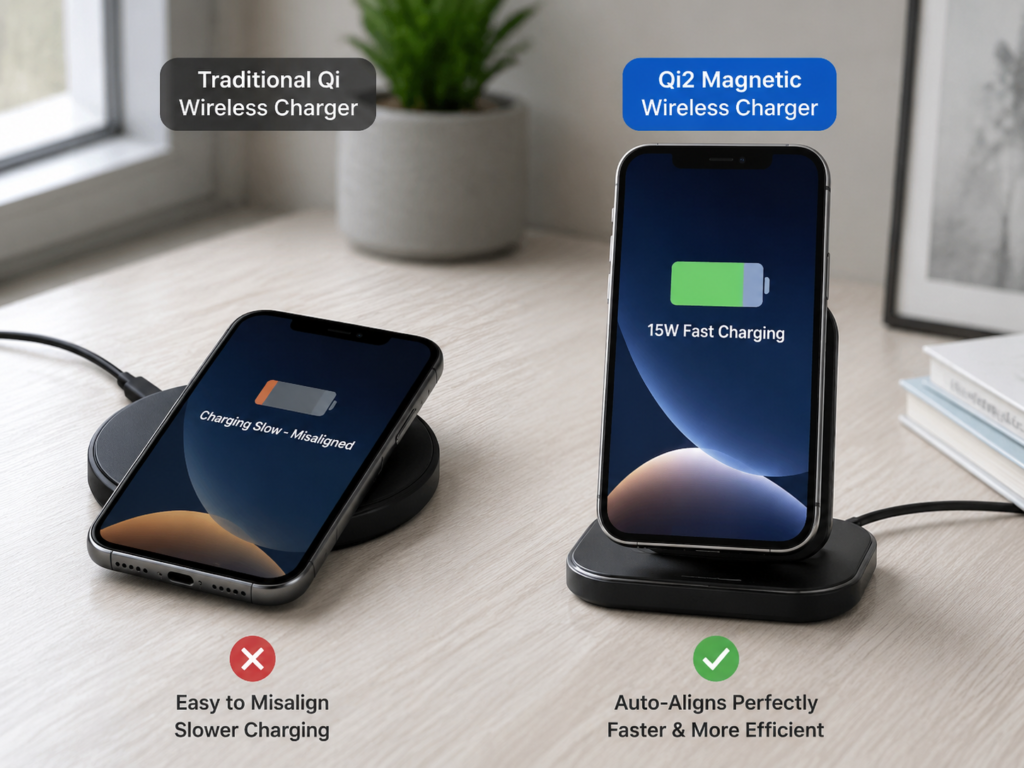
Second, the core upgrade of Qi2 is the addition of an industry-unified magnetic suction automatic alignment mechanism. When the phone is placed on it, the coil will automatically align, no need to repeatedly find the position.
Third, Qi2 does not necessarily have higher power than Qi: early mainstream Qi2 models are all 15W, the same as the nominal power of the highest fast charging level of old Qi (EPP 15W). Subsequent higher power versions (such as 25W level) require both the phone and the charger to support and pass certification before use.
Fourth, for ordinary users, the biggest value of Qi2 is “more stable and more worry-free”, not “much faster”, especially suitable for scenarios where it is easy to place crookedly, such as stands, car mounts, and bedside casual placement.
For your quick comparison, we have compiled a quick reference table of core differences:
| Comparison Dimension | Qi | Qi2 |
|---|---|---|
| Standard Ownership | WPC open universal standard | WPC open universal standard |
| Core Positioning | First-generation mainstream wireless charging standard | New-generation magnetic-alignment wireless charging standard |
| Alignment Method | Manual placement to find coil position | Magnetic structure automatic alignment |
| Common Power Levels | Basic Power Profile (BPP) up to 5W; Extended Power Profile (EPP) up to 15W | Early mainstream 15W; higher power versions require dual certification of device and charger |
| Experience Features | Prone to slow charging, overheating, and charging interruption when placed crookedly | Stable alignment, more consistent daily experience |
| Compatibility Logic | Only supports Qi protocol | Most are backward compatible with Qi mode, but magnetic suction and full power may not be available simultaneously |
| Most Suitable Scenarios | Flat slow charging, old devices, earbud cases | Phone stands, car mounts, charging while using, frequent picking and placing |
| Key Buying Considerations | Look for Qi certification, wireless output power, heat dissipation | Look for Qi2 certification, power version, magnetic structure, phone case compatibility |
Before we officially start, let’s clarify the boundaries of our discussion to avoid misunderstanding later:
What we are talking about today is wireless charging for low-power consumer electronics such as mobile phones and TWS earbud cases. Special wireless power supply for industrial equipment, medical devices, electric vehicles, and high-power kitchen appliances is not included. Also, special note: most smart watches use brand-specific private charging solutions (for example, Apple Watch and many Android watches cannot use ordinary wireless chargers), do not assume they support Qi or Qi2.
In addition, all our comparisons are based on products that have passed formal certification — uncertified no-name and white-label products have uneven performance, which cannot represent the level of the Qi or Qi2 standard itself. Finally, and most importantly, the judgment principle: we must separate three things: “can charge”, “can be magnetically adsorbed”, and “can reach the nominal power”. Many times, being able to stick does not mean it can charge, and being able to charge does not mean it can reach the advertised speed. We will mention this point repeatedly later.
Basic Cognition: First Understand a Few Easily Confused Concepts
Many people make mistakes when buying wireless chargers because they don’t understand those nouns and labels that look very similar. Let’s first explain a few core concepts in plain language.
Plain Language Explanation of Three Core Concepts
Qi is the traditional wireless charging standard we have used for many years. There are two common power levels: the basic level (BPP) has a maximum of 5W, which is the speed for charging earbud cases and old phones; the extended level (EPP) has a maximum of 15W, which is the mainstream level of wireless fast charging for old phones. Traditional Qi does not have a unified magnetic positioning structure, and users have to place the phone in a position where the coil is aligned by themselves.
Qi2 is a new generation of wireless charging standard launched by WPC. The core change is the addition of a unified rule called “Magnetic Power Profile (MPP)” — you can simply understand it as “industry-unified magnetic position + corresponding charging protocol”. Early Qi2 mostly has 15W power, and can be expanded to higher power in the future, but both the phone and the charger must support the corresponding version of certification, you can’t just buy a Qi2 charger to increase the speed.
MagSafe is Apple’s own private magnetic ecosystem, which includes not only magnetic wireless charging, but also a whole set of accessories and certification systems such as magnetic protective cases, stands, wallets, etc. It only serves Apple devices and is not a cross-brand universal standard.
Pitfalls of Version and Naming: Don’t Just Look at the Words “Qi2”
Many merchants use similar names to ride the popularity wave. Before buying, be sure to distinguish:
- Qi 1.x is the traditional Qi system we mentioned. Ordinary users are most exposed to the two levels of BPP 5W and EPP 15W.
- Qi2 15W is the most common Qi2 version at present. The core experience is magnetic automatic alignment + 15W wireless charging.
- Higher power Qi2 versions (such as 25W level) are the future evolution direction. Don’t just look at the charger’s nominal “25W Qi2”. You must confirm that your phone, charger, and power adapter all support the corresponding power certification, otherwise it can only run at a low level.
- Some products are marked “Qi2 Ready”, which means they support the Qi2 protocol themselves, but you may need to match them with a qualified magnetic protective case or an additional magnetic ring to get a complete magnetic experience. Read the manufacturer’s instructions carefully before buying.
- There are also terms like “Qi2 Compatible” and “magnetic wireless charger”, which are basically marketing words, not equal to passing the official Qi2 certification. They may just have magnets, can stick, or can charge in Qi mode.
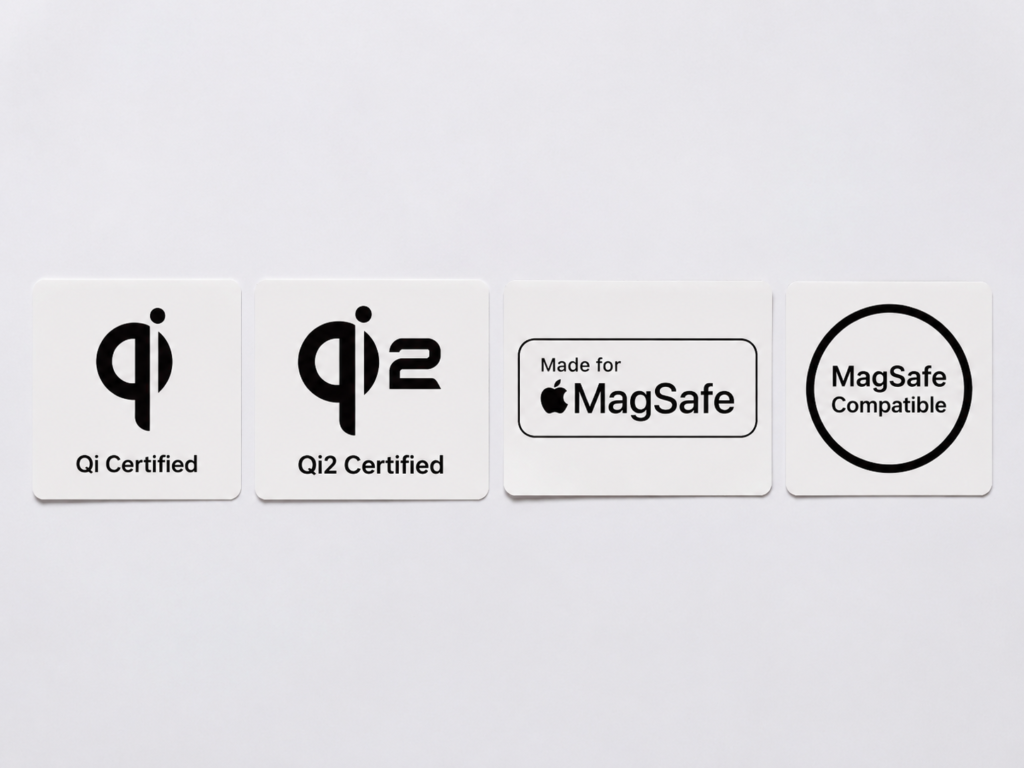
How to Distinguish Four Common Certification Marks
There are various certification marks on the market, just remember these four:
Qi Certified: It means the product has passed WPC’s Qi standard certification, supports the corresponding level of Qi protocol and power, but there is no unified magnetic structure requirement, and it does not necessarily have magnets.
Qi2 Certified: It means the product has passed WPC’s Qi2 standard certification, which not only supports Qi2’s magnetic alignment specification, but also has the charging capacity of corresponding power. This is the real Qi2 product.
Made for MagSafe: Apple’s official accessory certification, specially adapted to Apple’s MagSafe ecosystem, usually has a higher price, and better matching and recognition stability with Apple devices, but it is Apple’s private certification, not equal to Qi2 certification.
MagSafe Compatible / For MagSafe: It only means that the magnet position of the product is roughly matched with MagSafe, and can be physically adsorbed. It is neither equal to Apple’s official certification nor equal to passing Qi2 certification.
Key Connection Between Qi2 and MagSafe
Many people confuse Qi2 and MagSafe. In fact, the two are both related and different:
In terms of physical form, Qi2’s magnetic specification largely refers to Apple’s MagSafe technology, so most Apple phones that support MagSafe can be physically adsorbed on Qi2 chargers. But in essence, Qi2 is a cross-brand universal standard launched by WPC, which can be used by all brands; MagSafe is Apple’s private ecosystem, and only Apple devices can enjoy the complete MagSafe functions (such as accessory recognition, exclusive animations, customized power strategies, etc.).
For Apple users, whether your phone can reach the nominal power of Qi2 depends on the specific model, system version, certification type of the charger, as well as the temperature and power strategy at that time. It is not that if it can stick, it will definitely be at full speed. For Android users, whether the phone supports Qi2 must be checked against the clear description in the official parameters, or the WPC certification list. You can’t judge support just by “can stick to Qi2 charger” — many Android phones only have magnets on the back for easy adsorption, and do not support the Qi2 protocol themselves.
If you want to confirm whether the product is really certified, the most reliable way is to check the WPC official product database. When checking, pay attention to verifying the brand name, product model, SKU, certification type, power level, and even product pictures, which must be exactly the same as the product page you want to buy. Many brands have ordinary Qi version, Qi2 version, and MagSafe compatible version in the same series of products, with similar appearance and much different prices. Don’t place an order just by looking at the product title. Especially for low-priced products on crowdfunding platforms and white-label cross-border e-commerce, it is very common to use Qi2 keywords without certification, so be more careful.
Why Is Alignment So Important? The Underlying Logic of Wireless Charging
Many people think wireless charging is slow and generates a lot of heat, in fact, most of the problems are caused by “not aligned”. We don’t need to talk about complex physical principles, just remember: wireless charging relies on the transmitting coil in the charger and the receiving coil on the back of the phone to transmit energy through the magnetic field in the air. The more accurately the centers of the two coils are aligned, the higher the energy transmission efficiency, the less wasted electricity, naturally less heat and faster speed.
If the coil is crooked, three problems will occur: the actual charging power decreases, additional heat increases, and if it is too crooked, it may even stop charging directly, or trigger the charger’s protection mechanism. Here we also correct a common small misunderstanding: wireless charging is not completely without wires, just that there is no wire between the phone and the charger, the charger itself still needs to be plugged into the power supply.
Experience Logic of Traditional Qi
Why does traditional Qi always make people feel “not easy to use”? It is because it does not have a unified magnetic positioning structure, and users have to put the phone in the “sweet spot” of the coil by themselves. Especially for those flat-panel wireless chargers, the surface is flat without any positioning marks. When you put it casually with the lights off at night, it is easy to be off, and you find it didn’t charge when you wake up in the morning.
Some manufacturers will use multi-coil design to expand the range of the “sweet spot” and reduce the difficulty of alignment, but multi-coil will increase cost and volume, and heat dissipation is more difficult to do. Even with multi-coil, it is not as accurate and stable as magnetic alignment.
Experience Logic of Qi2
Qi2’s magnetic design is to solve this alignment problem. Note: the magnet itself is not responsible for transmitting electricity, its only function is to “pull” the phone to the correct position where the coil is aligned, and fix it so it does not shift. Because it can align with the center of the coil every time, the transmission efficiency is more stable, it is easier to maintain the design power, and it is more suitable for scenarios that are easy to shake, such as vertical stands and car mounts — after all, you can’t look down to find the coil position while driving.
Of course, the magnetic experience does not only depend on the charger: the thickness and material of the phone case, the accuracy of the magnetic ring position of the magnetic case, and whether the magnetic force is enough, will affect the firmness of adsorption and the accuracy of alignment. We will talk about this in detail when we talk about buying later.
Complete Judgment Chain of Charging Speed
Many people only look at the numbers “15W” and “25W” when buying wireless chargers, thinking the bigger the number, the faster, but that’s not the case. To judge the charging speed, we have three levels: the first level is the “nominal peak power” marked by the manufacturer, which is the highest power that can be achieved under ideal conditions; the second level is the “average power” in actual use, which is the charging speed most of the time; the third level is the “effective speed” that finally charges into the battery, which also deducts the loss of heat and system scheduling.
What really affects daily experience is the average power and effective speed, not the peak of a few seconds. There are at least six factors that affect charging speed: the highest wireless power supported by the phone itself, the certified output power of the charger, the power of the power adapter, the specification of the charging cable, the ambient temperature, and the charging strategy of the phone system.
For example, when the battery level is above 80%, it will slow down to protect the battery; when the screen is always on, navigating, playing games, or turning on the hotspot, it will slow down; if the ambient temperature is too high, it will also slow down. These are normal protection mechanisms, not a broken product. So when looking at the speed of a wireless charger, don’t just look at the peak number, look at the average speed in the 20%-80% battery range, and the performance of heat control, which is closer to your real daily experience.
Core Dimension Comparison: What Is the Difference Between Qi2 and Qi?
Before the comparison, let’s agree on a unified premise: the differences we are talking about are the characteristic differences of the standard itself, and the performance of specific products will also be affected by the manufacturer’s design — a bad Qi2 product may not be as good as a good Qi product. If you want to compare by yourself, try to use the same phone, the same power adapter, the same cable, the same ambient temperature, and similar battery range, preferably observe the charging segment of 20%-80%, so that the result is fair.
Charging Speed Comparison
Under normal circumstances, with the same 15W nominal power, Qi2’s actual average speed will be more stable because it can align the coil every time, and there will be no slowdown due to crooked placement. But if your old 15W EPP Qi charger is aligned very accurately and has good heat dissipation, the peak speed can actually be similar to 15W Qi2, and may even be faster in a short time.
There are also two common exceptions: first, some brands’ private wireless fast charging can achieve 30W, 50W or even higher power, which is much faster than the general Qi/Qi2, but the disadvantage is that it can only be used with their own devices, and can only run the basic level across brands, with poor universality; second, if your phone only supports ordinary Qi, even if you use a Qi2 charger, it can only charge at Qi’s power, and will not be faster.
Also, a reminder: if you see a Qi2 charger advertised as 25W or even higher power, be sure to confirm first whether your phone supports the Qi2 version of the corresponding power, otherwise even if the charger can output 25W, the phone can’t take it, and it can only run 15W or lower.
Alignment Difficulty and Stability Comparison
This is also the biggest difference between the two. Traditional Qi requires you to manually find the coil position, and a little crooked placement may cause slow charging, heat, or stop charging. Although multi-coil flat chargers can improve placement freedom, they are more expensive, have large differences in heat dissipation performance, and still can’t achieve “alignment no matter how you place it”.
Qi2’s magnetic automatic alignment is much more worry-free: just put the phone near the charger, the magnet will automatically pull it to the correct position, no need to adjust repeatedly. This advantage is particularly obvious in vertical stands, car mounts, when watching videos or having video meetings while charging — you pick up the phone and put it down, you don’t have to find the position every time, it aligns as soon as you put it on.
Heat Generation Performance Comparison
Normally, because Qi2 has more accurate coil alignment, the additional heat caused by offset will be less, and the overall temperature control will be more stable. But whether it is Qi or Qi2, the efficiency of wireless charging is inherently lower than that of wired charging, so both will be a little hotter than wired charging, which is normal. If the ambient temperature is high, the phone case is too thick, or you use high-load applications while charging, the heat generation will be more serious.
There are exceptions: if a high-quality Qi charger has active heat dissipation (such as fans, heat sinks), its heat generation performance may be better than that of a cheap Qi2 product without heat dissipation and with a closed structure. There is a simple standard to judge whether the heat is normal: it is normal if it feels slightly warm to the touch. If it is hot to the touch, frequently stops charging, or the charging speed is significantly slower, it means there is a problem, and you need to investigate the cause.
Compatibility Comparison: Separate Charging, Adsorption, and Full Power
Remember the principle we mentioned earlier, the experience of different combinations is completely different:
- Phones that only support Qi paired with Qi chargers: normal Qi charging, requires manual alignment.
- Phones that support Qi2 paired with certified Qi2 chargers: when the two match, they can both be magnetically aligned and run the corresponding level of power.
- Phones that support Qi2 paired with old Qi chargers: can charge normally, but can only work in Qi mode, no magnetic alignment experience, and power is also according to Qi levels.
- Old phones that only support Qi paired with Qi2 chargers: in most cases, they can be backward compatible and charge in Qi mode, but because old phones do not have a magnetic structure, they may not stick and fall off when placed on vertical or car Qi2 stands, and cannot run Qi2 power.
- Apple phones that support MagSafe paired with Qi2 chargers: usually physical adsorption is no problem, but the actual power depends on the model, system version, charger certification, as well as the temperature and power strategy at that time, not that if it can stick, it will definitely be at full speed.
- Small devices such as earbud cases: most only support Qi basic 5W level, using a Qi2 charger will not be faster, and the magnetic advantage cannot be exerted. Smart watches still need to be checked separately, do not assume support.
Safety Protection Comparison
As long as it is a formally certified Qi or Qi2 product, it basically has basic protection functions such as over-temperature, over-voltage, over-current, and Foreign Object Detection (FOD) — foreign object detection is the ability to recognize that there are metal sheets, bank cards and other things sandwiched between the phone and the charger, to avoid heat or danger.
Because the phone position is fixed in Qi2, it is theoretically more conducive to stable detection and efficiency control, but the actual safety performance still depends on the manufacturer’s product design and materials. For uncertified no-name products, common risks include false power marking, invalid foreign object detection, rough temperature control, inaccurate magnet position, poor shell heat dissipation, which have safety hazards in use. Also a reminder: do not sandwich bank cards, metal patches, ring holders, keys and other things between the phone and the wireless charger. In mild cases, it will trigger foreign object detection and stop charging, in severe cases, it may heat up and damage items.
How to Choose for Different Scenarios?
Choosing Qi or Qi2 actually depends largely on what scenario you mainly use it in. We give you references according to the most common scenarios.
Desktop Office Scenario
If you just put the wireless charger in a fixed position, usually you are used to placing the phone accurately on it, to slowly charge while working, and you already have a certified Qi charger that works fine, then you don’t need to change it, Qi is completely sufficient. If you frequently pick up and put down your phone, like to use a vertical stand, watch notifications or have video meetings while charging, then Qi2 will be much more worry-free, you don’t have to find the position every time you pick up and put down, it charges as soon as you put it on.
Buying advice: if you buy a stand model, prioritize Qi2; if you just put it flat on the desktop for slow charging and have a limited budget, choose a regular certified Qi product is enough.
Bedside Night Scenario
The biggest problem with traditional Qi at the bedside is that when you put it casually with the lights off before bed, it is easy to be crooked, and you find it didn’t charge in the morning, or only charged a little. Qi2’s magnetic alignment doesn’t have this problem, just put it nearby in the dark, the magnet automatically aligns, no need to turn on the light to find the position.
However, for wireless chargers used at the bedside, power is not the most important. Instead, you should first look at whether the temperature control performance is stable, whether the indicator light is too bright to dazzle the eyes, and whether there is fan noise — after all, when sleeping at night, stability and quietness are more important than speed.
Car Charging Scenario
This is also the scenario where Qi2 has the most obvious advantages. There are too many pain points of traditional car wireless chargers: vehicle bumps easily causes displacement, the phone is under high load during navigation, plus the sun exposure, it is easy to heat up and slow down, or even stop charging. Qi2’s magnetic design solves the big problem: you can put and take it with one hand, it sticks firmly, it is not easy to be crooked even when bumping, with stable alignment, the heat and speed performance will also be much better.
When buying a car wireless charger, in addition to looking at Qi2 certification, you also need to see whether the fixed structure is firm, how the heat dissipation design is, whether it is installed on the air outlet or the center console, whether it will block your line of sight and the airbag area, and it should also adapt to your car’s space. Also a reminder: do not frequently adjust the phone position while driving, safety first.
Charging with a Case Scenario
Whether it is Qi or Qi2, there are several common taboos: do not use a full metal phone case, do not sandwich bank cards, metal ring holders, metal patches and other things between the phone and the charger, which will affect charging in mild cases, and cause heat danger in severe cases.
For traditional Qi, too thick phone cases, cases with raised decorative parts on the back will increase the distance between the two coils, affect alignment and charging efficiency, and may even fail to charge. For Qi2, it is best to use a magnetic protective case with a standard magnetic ring. If the magnetic ring position of the case is crooked, or the case is too thick and the magnetic force is not enough, there will be unstable adsorption, inaccurate alignment, leading to heat, slow charging or even stop charging.
There is a simple judgment method: if you think the charging is slow and the heat is high, take off the phone case and try again. If the speed is significantly faster and the temperature drops, then it is the problem of the phone case.
Small Devices and Multi-Device Charging Scenarios
If you mainly charge low-power small devices such as TWS earbud cases and old phones, ordinary Qi is completely sufficient. Qi2’s magnetic suction and high power can’t play a role, there’s no need to spend more money. Smart watches still need to be checked separately, do not assume they support Qi or Qi2. Many three-in-one charging docks have private protocols for the watch position, which can only charge watches of specific brands.
When buying a three-in-one or multi-in-one charging dock, be sure to check the protocols and power of the phone position, earbud position, and watch position separately. Don’t just buy it because the title says “Qi2 three-in-one” — it is very likely that only the phone position is Qi2, the earbud position is ordinary Qi, the watch position is a private protocol, and even some phone positions are only compatible with Qi2, without certification. Also, when multiple devices are charging at the same time, if the total input power of the charger is not enough, the power of each position will decrease, and the speed will be slower, which should also be noted.
Travel and Public Charging Scenarios
If you often use public wireless chargers, such as those in coffee shops and airports, most of them are still ordinary Qi at present, and Qi2’s magnetic advantage cannot be exerted, because most public chargers are flat-panel, without magnetic suction. But if you bring a portable wireless charger with you when going out, Qi2 will be more worry-free, you don’t have to repeatedly find the position on the hotel bedside, it aligns as soon as you put it on.
But also a reminder: wireless charging is suitable for supplementary charging and night use. If you are in a hurry and pursue the fastest charging speed, it is more reliable to bring a wired fast charger.
Buying Pitfall Avoidance Checklist
When buying a wireless charger, check according to these steps, and you can basically avoid 90% of the pitfalls.
Step 1: First Confirm What Your Device Supports
First go to the official parameter page of the phone, see if it clearly marks support for Qi, Qi2, and what the corresponding wireless charging power is.
Apple users should note: your phone has MagSafe, which does not mean it can definitely reach the nominal power of Qi2. It depends on the specific model, system version, and the certification type of the charger.
Android users should pay more attention: only marked “magnetic compatible” or “magnetic wireless charging” does not mean support for Qi2. There must be an official clear Qi2 certification description, or the Qi2 certification of the corresponding model can be found in the WPC database, to be considered truly supported.
There is also the most basic pitfall: if your phone itself does not have wireless charging function, even if you stick a magnetic ring or buy a magnetic case, it can only be physically adsorbed on the charger, and cannot be wirelessly charged. Don’t waste money.
Step 2: Check the Certification and Parameters of the Charger
Prioritize products that clearly mark “Qi2 Certified” and can be found in the WPC official database with the corresponding model. When buying, check the specific model and SKU. Many brands have ordinary Qi version, Qi2 version, and MagSafe compatible version in the same series, with similar appearance and much different prices. Don’t just look at the title and buy the wrong one.
Be especially wary of these marketing words: “Qi2 compatible”, “For MagSafe”, “magnetic fast charging”, “MagSafe Compatible”, these are not equal to passing Qi2 certification. They may just have a magnet to stick, or can only charge in ordinary Qi mode.
There is also a common pitfall: don’t be misled by input power. Many merchants write “20W”, “30W”, “45W” in the title, but that is the input power of the charger, that is, the power from the power adapter to the charger, not the wireless output power to the phone. Be sure to find the “wireless output power” in the product details, that is the actual power for charging the phone.
If you see products advertised as “25W Qi2” or even higher power, be sure to confirm two things at the same time: first, your phone supports the Qi2 version of the corresponding power, and second, the charger has indeed passed the Qi2 certification of the corresponding power, otherwise it is mostly false marking.
Step 3: Check the Matching Power Supply Accessories
For a wireless charger to reach the nominal power, it must be matched with a PD/QC power adapter with sufficient power, as well as a compliant charging cable. For example, a 15W Qi2 charger generally requires at least 18W PD charging head to reach full speed; 25W Qi2 requires higher power of the charging head.
If it is a multi-device charging dock, also check whether the total input power is enough, and what the separate output power of each position is, don’t just look at the total power number. In addition, poor quality, too long, or poor contact USB-C cables can also cause the wireless charger to stop charging or slow down, don’t ignore the influence of the cable.
Step 4: Match Your Usage Scenario and Form
Different forms of wireless chargers are suitable for different scenarios, and the right choice will give a good experience: desktop flat Qi has higher cost performance, but you need to pay attention to whether you can get used to aligning the position every time; for vertical stand models, prioritize Qi2, also check whether the angle is appropriate, whether the base is stable, and whether there is enough heat dissipation space; for car mount models, prioritize Qi2, focus on whether the magnetic force is enough, whether the fixing method is firm, how the heat dissipation is, and whether the installation position will block the line of sight; for portable magnetic chargers, look at the magnetic force, thickness, heat generation performance, whether the built-in cable is long enough, and whether it will block your hand; for three-in-one docks, be sure to check the protocols and power of the phone position, earbud position, and watch position separately, don’t just look at the main title.
Step 5: Confirm the Compatibility of the Phone Case
If you usually use a phone case, you must consider the impact of the case. Ordinary thick cases will weaken the magnetic force, also increase the coil distance, reduce charging efficiency, and even cause heat.
If you use Qi2, it is best to use a magnetic protective case with a standard magnetic ring, and the position of the magnetic ring must be accurate — if the magnetic ring is crooked, even if it can stick, the coil is not aligned, it will still be slow, hot, or even unstable and fall off.
Try not to choose cases with metal decorations, ring holders, magnetic patches on the back, and do not sandwich bank cards or access control cards between the case and the phone, which not only affects charging, but may also damage the cards. If you are not sure whether your case is suitable, you can do a simple A/B test: charge once with the bare phone, charge once with the case, compare the charging speed and temperature. If the difference is large, it means the case has a problem.
Common Troubleshooting: What to Do If It Can’t Charge, Is Slow, Hot, or Stops Charging Repeatedly?
When you encounter problems with the wireless charger, don’t rush to return it first. Follow the steps below to troubleshoot, and most can find the cause.
Troubleshooting of Not Charging
First confirm that your phone itself supports wireless charging, this is the basis. If it is a traditional Qi charger, slowly move the phone position to find the coil position. Many times, the failure to charge is because it was placed crookedly. If it is a Qi2 charger, check whether the phone is firmly adsorbed and whether the direction is correct — for example, some chargers may not stick or charge if placed upside down.
Then take off the phone case and try, to eliminate the interference of thick cases, metal parts, or magnetic ring offset. Next, change to a qualified power adapter and charging cable. Many times, the failure to charge is because the power of the charging head is not enough, or the cable is broken.
If it still doesn’t work, see if it triggers foreign object detection or over-temperature protection — for example, if there is a metal object sandwiched, or the phone is too hot, the charger will automatically stop charging. If you have multiple devices, try all of them. If none of them can charge, it is probably the problem of the charger, power adapter or cable, not the phone.
Troubleshooting of Slow Charging
First look at the battery level. If it is already above 80%, the slowdown is a normal battery protection mechanism, almost all phones are like this, don’t be nervous.
Then see if you are using the phone under high load: for example, the screen is always on, navigating, playing games, turning on the hotspot, these will make the phone heat up, trigger the slowdown protection, and the phone itself consumes more power, so it seems to charge slowly. Too high ambient temperature will also slow down, for example, placed in a place where the sun shines in summer.
If it is traditional Qi, first check if the coil is not aligned, move the position and try. If it is Qi2, check if the magnetic ring of your magnetic case is crooked, or the case is too thick leading to inaccurate alignment.
Then check again: what is the highest wireless power supported by your phone? What is the wireless output power of the charger? Are the two matched? For example, if your phone only supports 10W wireless charging, even if you use a 25W Qi2 charger, it can only run at 10W speed.
If you bought a Qi2 advertised as high power (such as 25W), but the actual speed is very slow, be sure to confirm whether your phone supports the Qi2 version of the corresponding power. Many times it is not that the charger is slow, but that the phone does not support such high power.
Troubleshooting of Severe Heat Generation
First of all, it should be clear that slight warmth during wireless charging is normal, after all, the efficiency is lower than wired, and there will be a little loss. But if it feels hot to the touch, frequently stops charging, or the charging speed is significantly slower, it is abnormal, and you need to investigate the cause.
Prioritize checking these points: Is the coil not aligned? Is the phone case too thick? Is there a metal foreign object in between? Is the ambient temperature too high?
If the heat is severe during car navigation, you can try moving the stand to the position of the air conditioner outlet, or change to a stand with active heat dissipation. If it is still very hot, it is recommended to switch to wired charging, after all, long-term high temperature will accelerate battery aging. If your wireless charger is an uncertified no-name product with particularly poor temperature control, it is recommended to stop using it directly, don’t lose the big for the small.
Troubleshooting of Repeated Charging Interruption
The most common causes of repeated charging interruption are: position offset, triggered foreign object detection, overheat protection, insufficient power supply, poor cable contact.
If it is a traditional Qi charger, re-find the center of the coil, and it will not be interrupted after alignment. If it is Qi2, check if the phone case is too thick, the magnetic force is not enough, it will be crooked with a slight touch, or the magnetic ring position is wrong.
If multiple devices have charging interruption, it is probably the problem of the charger, power adapter or cable, change a set and try. If it only stops charging when used in the car, then focus on checking these points: Is the displacement caused by vehicle bumps? Is the output power of the car charger enough? Is the temperature too high due to sun exposure triggering protection? Is the phone’s navigation load too high causing heat and slowdown?
Clarification of Common Misconceptions
Regarding Qi and Qi2, there are several particularly easy-to-misunderstand misconceptions, we will clarify them all at once.
Misconception: Qi2 must be much faster than Qi
Correct explanation: The core advantage of Qi2 is stable alignment, not inherently higher power than Qi. With the same 15W nominal, the peak speed difference between the two may not be large, but Qi2’s average experience is more stable, and will not slow down due to crooked placement. Only in scenarios prone to offset, such as casual placement, car use, thick cases, and stands, Qi2’s speed advantage will be more obvious. If your Qi charger can be aligned every time and has good heat dissipation, the speed may not be slower than Qi2.
Misconception: Having magnetic suction means Qi2
Correct explanation: A magnet is just a physical structure. Qi2 is a complete set of standards including magnetic alignment specifications, charging protocols, and power requirements, and must pass WPC certification. Many cheap products just add a magnet to an ordinary Qi charger and call it “magnetic wireless charger”, but it is not Qi2 at all. The alignment accuracy, power, and safety protection may not meet the standards. When buying, be sure to look for the “Qi2 Certified” mark and verify the model in the WPC database.
Misconception: Qi2 is Apple’s MagSafe
Correct explanation: Qi2 is a cross-brand universal standard launched by WPC, which can be supported by all brands of mobile phones; MagSafe is Apple’s private ecosystem, and only Apple devices can enjoy complete functions. The physical magnetic forms of the two are similar, but the certification system, power strategy, and accessory ecosystem are different. Android phones can support Qi2, but it does not mean they support MagSafe’s private functions (such as official accessory recognition, exclusive animations, MagSafe exclusive power, etc.).
Misconception: Qi2 is completely incompatible with old Qi devices
Correct explanation: The vast majority of Qi2 chargers can be backward compatible with old Qi devices and charge in ordinary Qi mode. But most old Qi devices do not have a magnetic structure, so when placed on a vertical or car Qi2 stand, they may not stick and fall off, and cannot get Qi2’s magnetic alignment experience and higher power, they can only be used as ordinary Qi.
Misconception: Nominal 15W or 25W means this power throughout the process
Correct explanation: The power of wireless charging is affected by many factors: battery level, temperature, system charging strategy, device load, alignment state, all will cause power changes. For example, slowdown above 80%, high temperature slowdown, slow charging while using, are all normal protection mechanisms, not a product problem. When looking at the speed of a wireless charger, don’t just look at the peak number, pay attention to the average power, full charge time, and temperature curve, these are closer to the real experience.
Misconception: After buying Qi2, you don’t need to care about the phone case
Correct explanation: The phone case still affects the charging distance, magnetic force and coil alignment. If the case is too thick, it will weaken the magnetic force, leading to unstable adsorption, and also increase the coil distance, reducing efficiency. If the magnetic ring position of the magnetic case is inaccurate, even if it can stick, the coil is not aligned, it will still heat up and charge slowly. So when buying Qi2, it is best to match it with a regular magnetic protective case, and don’t use too thick or heavy cases with metal decorations.
Final Summary: Should You Choose Qi or Qi2?
Having said so much, finally give you a clear decision reference, you can match it according to your own situation.
Situations to Prioritize Qi2
- Your phone clearly supports Qi2, and you are planning to buy a new wireless charger.
- You often use scenarios such as vertical stands, car mounts, bedside casual placement, charging while using, and don’t want to repeatedly find the charging position.
- You are already using magnetic accessory ecosystems such as magnetic protective cases, magnetic stands, magnetic power banks, and want to unify the experience.
- The budget gap is not large, you want better future compatibility, and you can continue to use it when you change your phone later.
Situations Where Continuing to Use Qi Is Sufficient
- Your phone does not support Qi2, and you don’t plan to use magnetic accessories.
- You already have a stable certified Qi charger, which is mainly placed on the desktop or bedside for slow charging.
- Mainly charge low-power devices such as TWS earbud cases and old phones.
- Limited budget, only need basic wireless charging function.
- If you pursue extreme fast charging, neither Qi nor Qi2 is as fast as wired fast charging, or you can choose the brand’s own private wireless fast charging solution.
Products You Should Never Buy
- Only marked “magnetic fast charging”, “Qi2 compatible”, “For MagSafe”, but without Qi2 Certified certification, and no certification information can be found.
- Only advertise input power (such as 20W, 30W, 45W), do not clearly mark wireless output power.
- Advertise high-power Qi2 (such as above 25W), but do not explain device compatibility conditions, adapter requirements and certification information.
- Car mounts that do not explain the fixing method, heat dissipation design, compatible models and installation position restrictions.
- Three-in-one, multi-in-one charging docks that do not separately mark the protocols and power of the phone position, earbud position, and watch position.
- No-name products with abnormally low prices, no certification, no temperature control instructions, no foreign object detection instructions.
After reading this article, you should already be able to distinguish the core difference between Qi and Qi2 — not higher power, but the stable experience brought by magnetic automatic alignment; you can understand the differences between various certification marks, and will not be fooled by marketing words; you can independently judge whether “can charge, can be magnetically adsorbed, can reach full power” are established at the same time; you can judge whether to upgrade to Qi2 according to your own device, scenario, and budget; when encountering problems such as not charging, slow, hot, or repeated charging interruption, you can also troubleshoot the cause by yourself; you can also avoid common buying pitfalls such as fake Qi2 and false power marking.
The essence of wireless charging is for convenience. Choosing the one that suits you is much more important than choosing the one with the highest parameters.