
If you’ve bought a USB-C cable recently, you’ve definitely seen specs like 100W and 240W, and even confusing abbreviations like PD3.1 and EPR. Many people’s first reaction is: the higher the wattage, the better? Will it damage my phone? I only charge my laptop, is it necessary to buy a 240W one? In fact, the core difference between these two types of cables is not just the wattage number. Choosing the right one saves money and hassle, while choosing the wrong one either wastes money or limits the device’s charging speed. Even if you know nothing about technology, you’ll be able to judge which one to buy after reading this article.
Quick Conclusion: Decide If You Need a 240W Cable in 3 Seconds
If you’re in a hurry, read the quick selection rules in this section first, and you can basically make a decision; if you want to understand the reasons behind it, read on for detailed explanations.
First, a Reassurance for Everyone
First, clarify one core fact that is most easily misunderstood: A compliant 240W USB-C cable will not “force-feed” power to low-power devices; it is fully backward compatible with low-power devices such as phones and tablets, so there’s no need to worry about damaging things.
Put simply, the maximum safe power carrying capacity of a 100W cable is 5A at 20V (i.e., 100W), which falls within the Standard Power Range (SPR for short) of USB PD universal fast charging – the common PD fast charging range used in recent years. A 240W cable supports the PD3.1 Extended Power Range (EPR for short, the new high-power range added in PD3.1), and can withstand a maximum of 5A at 48V (i.e., 240W).
But you need to remember one core rule: actual charging power is never determined by the cable alone. It is the result of negotiation between the charger, cable, and device, and the final power is the highest level supported by all three. So if your device only supports up to 65W charging, even with a 240W cable, it will only run at 65W, no faster, no slower.
In other words: as long as your device’s USB-C input power does not exceed 100W, there is almost no difference in charging speed between a regular 100W cable and a 240W cable; only when both your device and charger support PD EPR fast charging over 100W can a 240W cable发挥作用.
Clarifying the Comparison Premise
To avoid ambiguity, all comparisons today are based on USB-C to USB-C cables from reputable brands, with accurate specs, and compliant with USB PD standards. We exclude USB-A to USB-C cables, magnetic cables, extension cables, adapters, unbranded cables with falsely marked specs, and damaged cables. The default conditions are 1-meter length, normal room temperature, and intact cables. In addition, we are discussing universal USB PD fast charging, not proprietary fast charging from phone manufacturers or proprietary round-port power supplies for gaming laptops – these have separate protocols and interfaces and are not within the scope of today’s discussion.
3-Second Quick Selection Guide
You can use the following points to judge quickly:
- If the maximum USB-C charging power of all your devices does not exceed 100W, a compliant 100W 5A C-C cable is sufficient; any extra money spent is a waste.
- If you have a device clearly marked as supporting over 100W USB-C PD input, prioritize a 240W PD3.1 EPR cable.
- If you only charge phones, tablets, earbuds, or power banks, 100W is already overkill, let alone 240W; a 60W cable is usually more than enough.
- If you need to charge PD devices of 140W, 180W, or even 240W class, don’t just look at the cable. You also need to confirm that both the charger’s single-port output and the device’s input support the corresponding EPR level; all three are indispensable.
- If you need to use this cable for data transfer, connecting a monitor, or connecting a docking station, power is only one of the requirements. You also need to separately check for markings such as USB 5Gbps/10Gbps/20Gbps/40Gbps, USB4, Thunderbolt, and DP Alt Mode; you can’t just look at the wattage.
Beginner’s Guide: What Determines the Power of a USB-C Cable
Many people only look at the wattage number, but don’t know where power comes from, or understand the meaning of those abbreviations. In this section, we explain all basic concepts in the plainest language, so you won’t be fooled by parameters after reading.
Plain-Language Explanation and Calculation of Power
Actually, understanding one simple formula is enough: Power (W) = Voltage (V) × Current (A), which represents how much electrical energy can be transmitted per unit time – the higher the power, the more electricity can be charged into the battery in the same time.
The rated power marked on a cable is its maximum safe carrying capacity, not that it will always run at full power when plugged into any device. It’s like a rope with a 100kg weight capacity: hanging a 10kg object is perfectly fine, and the rope won’t damage the object just because it can hold 100kg.
The common USB PD power levels basically conform to this formula:
- 60W = 20V × 3A (the most common standard fast charging level)
- 100W = 20V × 5A (the highest level of standard PD fast charging, belonging to the SPR standard power range)
- 140W = 28V × 5A (the entry level of PD3.1 EPR)
- 180W = 36V × 5A (the mid level of PD3.1 EPR)
- 240W = 48V × 5A (the highest typical level of PD3.1 EPR)
USB PD Protocol: Charging Isn’t “Forced Feeding” – It’s a Three-Way Negotiation
You might ask: since the cable can carry high power, why doesn’t it damage low-power devices? This is where the USB PD protocol comes in – it is the universal “charging communication rule” in the USB-C ecosystem, equivalent to a common language for the charger, cable, and device.
Before charging starts, the three parties first “communicate”: the charger first announces all the voltage and current levels it can output, the cable announces the maximum power and capabilities it can safely carry, and the device announces the levels it needs and can accept. Finally, the highest level supported by all three is selected for charging. If even one party does not support that level, it will not be used.
So high-power cables will not actively increase the device’s voltage, and low-power devices will only negotiate to the safe level they support, so there’s no need to worry about “being force-fed power”.
A note on proprietary fast charging: the 100W, 200W fast charging advertised by many phone manufacturers uses their own proprietary protocols, which may not reach peak power with universal PD cables and PD chargers. In such cases, original chargers and original cables are usually required.
E-Marker Chip: The Cable’s “Electronic ID Card”
You may have heard the term E-Marker. It is actually a small chip hidden in the plug of a USB-C cable, equivalent to the cable’s electronic ID card. It stores all the cable’s capability parameters: how much current it can carry, what power it supports, what data transfer speed it has, whether it can output video, and so on.
Why is this chip needed? In compliant USB-C/PD scenarios, ordinary C-C cables without an E-Marker are usually recognized as 3A cables, with a maximum use of about 60W. Cables that exceed 3A / support 5A usually require a correct E-Marker declaration to inform the charger and device of their carrying capacity.
It should be noted that the E-Marker itself does not make charging faster. It only truthfully reports the cable’s capabilities, allowing the charger and device to determine whether higher power can be used. A cable without a correct E-Marker declaration, no matter how thick its inner conductors are, is difficult to be recognized as a 5A or higher specification.
Why Is 240W Achieved by Increasing Voltage Instead of Current?
You may have noticed that in the power levels above, the maximum current is always 5A. Why not increase the current to 10A, so that 200W can be achieved without raising the voltage?
This is because the higher the current, the more problems there are:
- The higher the current, the more the cable heats up, and the higher the safety risk;
- The higher the current, the more power is lost in the cable (also known as voltage drop, where the voltage at the end is lower than at the start);
- The higher the current, the thicker the required inner conductors, making the cable stiff and heavy, and inconvenient to carry;
- The higher the current, the higher the contact pressure requirement for the plug terminals, which can easily cause poor contact and overheating.
That’s why PD3.1 EPR takes another approach: keeping the current at 5A, and raising the voltage to 28V, 36V, and 48V. This way, the power limit can be increased from 100W to 240W without increasing the current.
Precisely because the operating voltage is higher, 240W cables have stricter requirements for insulating materials, voltage withstand capability, flame retardant performance, and heat control than ordinary 100W cables. This is one of the reasons why compliant 240W cables are more expensive.
Core Dimension Comparison: 100W vs 240W USB-C Cables
Now that we understand the basic principles, let’s compare the two types of cables in detail from the dimensions everyone cares about most. For your quick reference, here is a simplified comparison table first, followed by detailed explanations.
| Comparison Dimension | 100W USB-C Cable (Compliant 5A) | 240W USB-C Cable (PD3.1 EPR) |
|---|---|---|
| Typical Power Limit | 20V×5A=100W | 48V×5A=240W |
| Applicable Standard | USB PD SPR (Standard Power Range) | USB PD3.1 EPR (Extended Power Range) |
| Backward Compatibility | 60W and below | 100W, 60W and below |
| Common Uses | Phones, tablets, 65W/100W thin and light laptops | 140W+ high-performance laptops, workstations |
| Data/Video Capability | Can range from USB 2.0 to Thunderbolt 4; markings need to be checked separately | Can range from USB 2.0 to Thunderbolt 5; markings need to be checked separately |
| Portability | Generally thinner and more flexible, with more options | Some products are slightly thicker and stiffer; high-end short cables can also be lightweight |
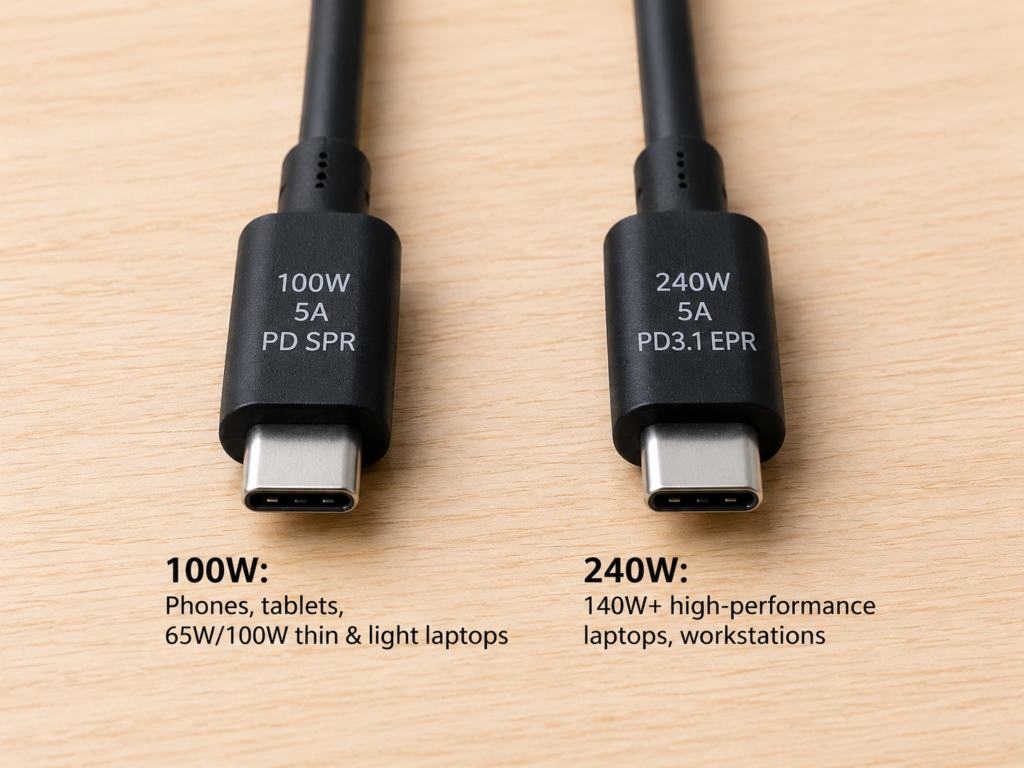
Power Carrying Capacity and Standard Boundaries
Looking at the core power carrying capacity, the boundary between the two is very clear:
- Ordinary USB-C cables without E-Marker: usually max out at 3A/60W, cannot reach 100W;
- Compliant 100W C-C cables usually support 5A and have a correct E-Marker, with a typical limit of 20V×5A=100W, belonging to the PD SPR standard power range;
- Compliant 240W cables usually need to support PD3.1 EPR and have EPR capability declared by the E-Marker, with a typical maximum of 48V×5A=240W, and are backward compatible with all SPR levels.
Here are two key reminders to help you avoid common misjudgments:
- If either the charger or the device only supports a maximum of 100W or less, even a 240W cable will not exceed 100W.
- Do not equate the power of a laptop’s original power supply with its USB-C input power: many high-performance gaming laptops have original power supplies of 180W, 230W, or even 280W, but their USB-C port may only support 100W PD input, or may not even support USB-C charging, requiring the original round-port power supply. Before buying a cable, be sure to check the device’s USB-C input limit; don’t just look at the wattage of the original adapter.
Actual Charging Speed Difference
What everyone cares about most is definitely how much the charging speed differs. In fact, there is no fixed answer to this question; it depends entirely on your device:
- Devices ≤100W: Almost no speed difference between the two cables: For example, phones, tablets, Switch, Steam Deck, 65W thin and light laptops, and office laptops under 100W – these devices have a charging limit below 100W, so the cable will never be a bottleneck. The charging speed is exactly the same with a 100W cable and a 240W cable.
- PD EPR devices >100W: Only 240W cables can reach full speed: For example, some 16-inch laptops that support 140W PD EPR input, and 180W-class mobile workstations – these devices support over 100W PD input. With a 100W cable, the power will be limited to within 100W, and charging speed will be slower; with a 240W cable, it can reach the maximum power supported by the device, for faster speed.
But even for devices that support high power, a 240W cable is not always faster than a 100W cable. When the battery level is above 80% (the device will actively reduce power to protect the battery), the ambient temperature is too high, the device is charging while running under high load, or a multi-port charger is charging multiple devices at the same time, the actual charging power will decrease. At these times, the speed difference between the two cables will be significantly reduced, or even almost non-existent.
Compatibility Performance
Many people worry whether 240W cables are incompatible with old devices, or whether 100W cables can be used for high-power devices. In fact, there are clear boundaries:
- 240W cables are backward compatible with all low-power USB-C devices: As long as the cables, devices, and chargers are compliant, old devices will only negotiate to the safe level they support, and there will be no overvoltage problems. Compatibility anomalies usually come from falsely marked cables, damaged cables, adapters, magnetic tips, or proprietary protocol restrictions, and have little to do with the 100W/240W power level itself.
- 100W cables can be used for 240W devices, but power is limited: For example, if you have an 180W workstation, you can charge it with a 100W cable, but the maximum will only be 100W. If it’s just light-load office work, the charging speed is still sufficient; but for high-load scenarios like gaming or rendering, power consumption may be more than 100W, and the battery will drain while charging.
Data and Video Transmission Capability
This is where most people make mistakes, so it must be emphasized: Charging power, data transfer rate, and video output capability are three completely independent specifications that cannot be inferred from each other. It’s not that a higher power cable means faster data transfer, nor that a cable that can charge 240W can connect to a monitor.
For example, many cheap 240W charging cables only retain USB 2.0 data capability, lacking the wire pairs required for high-speed data transfer, so they are not suitable for high-speed hard drives, monitors, or docking stations. On the contrary, some 100W cables are USB4 or Thunderbolt cables, supporting 40Gbps high-speed data transfer. When the host, monitor, and protocol version also support it, they can support high-spec video output, with much stronger data and video capabilities than ordinary 240W charging cables.
So if you need to use this cable to connect a high-speed hard drive, monitor, or docking station, be sure to check the corresponding markings separately:
- For high-speed data, look for parameters like USB 5Gbps, 10Gbps, 20Gbps, 40Gbps;
- For external monitors, look for markings for DP Alt Mode, USB4, or Thunderbolt;
- For single-cable docking station use, all three requirements of power delivery, data rate, and video output must be met; none can be missing.
In short: USB-C ports all look the same, but their internal functions can be vastly different. When buying, you absolutely can’t just look at the words “Type-C cable” or “240W cable”.
Appearance, Length, and Portability
In terms of appearance and portability, there are more options for 100W cables. Because the technology is mature and production volume is large, many products can be made very thin and flexible, easy to carry. As for 240W cables, because they need to meet high-voltage insulation and temperature rise (the amplitude of temperature increase during charging) requirements, some products are slightly thicker and stiffer, but this is not absolute – high-end brand short cables, using better materials, can also be made very lightweight.
A reminder here: You absolutely cannot judge power level just by the thickness of the cable. Some thin cables have falsely marked specs, and their inner conductors don’t meet the requirements at all; some thick cables may just have a thick outer sheath, with very thin inner conductors, and may not support 240W either. Thickness can only be a very rough reference; the key is to look at the specs, certification, and brand.
In terms of length, 1-meter cables are the most versatile, balancing power, price, flexibility, and stability, suitable for most scenarios. Cables of 1.5 to 2 meters are suitable for routing along desks, beside beds, or behind monitors, but the longer the cable, the more obvious the current loss (voltage drop) in the cable, and the more severe the heating, so it’s even more important to choose products from reputable brands. For long cables over 2 meters, be sure to choose ones with clearly marked power, certification, and a reliable brand. Don’t buy those cheap unbranded long cables, which are very likely to have falsely marked specs and overheat.
Safety and Durability
Many people think that 240W cables have higher power, so are they more dangerous? Actually, not necessarily. The key to safety is whether the cable has compliant certification, whether the E-Marker parameters are accurate, whether the terminal workmanship is good, whether the insulation design is adequate, whether flame-retardant materials are used, and how well the temperature rise is controlled.
The 240W EPR standard does have higher requirements for high voltage and temperature rise, but these are requirements for the standard, not a guarantee for all 240W cables – a poor-quality 240W cable is instead more dangerous than a high-quality 100W cable.
Durability is the same – it has no direct relationship with power level. It mainly depends on the outer sheath material (for example, braided cables are more durable than ordinary rubber cables), whether the connectors are reinforced, the number of bending cycles, plug-in lifespan, and cable flexibility. A high-quality 100W braided cable may be much more durable than a cheap 240W rubber cable.
However, in high-power scenarios, the requirements for cables are indeed higher, so try not to use falsely marked cables, damaged cables, or cables with loose connectors, and don’t randomly add poor-quality adapters or magnetic adapters to avoid danger.
Price and Cost-Effectiveness
In terms of price, compliant 1-meter 100W cables are cheaper and have more options, suitable for keeping multiple cables at home, in the office, and in your bag. Compliant 1-meter 240W cables are more expensive, and if you add features like USB4, Thunderbolt, 40Gbps data, and video output, the price will rise significantly.
The price difference mainly comes from several aspects: whether there is EPR support, E-Marker specifications, insulation material grade, terminal workmanship, certification costs, and whether there is high-speed data and video capability. Be wary of falsely marked “240W ultra-thin full-featured cables” or “240W 40Gbps ultra-cheap long cables” that are far below market price. Don’t buy them just because they’re cheap – otherwise, not only will they not work, but they may also pose safety hazards.
The logic for judging cost-effectiveness is simple: if it’s only for charging, buy according to the power you need, don’t spend extra money on high power you won’t use; if you also need to connect a docking station, monitor, or high-speed hard drive, consider the three requirements of power, data, and video together, and choose the most cost-effective one that meets all requirements.
Intermediate Level: Why You Can’t Reach Full Power Even With a 240W Cable
Many people buy a 240W cable, test it at home and find the power is only 65W or 90W, then think the cable is fake. In fact, most of the time it’s because other links are holding it back. In this section, we’ll explain the hidden limitations of high-power charging to help you troubleshoot.
The Three-Way Minimum Rule: Final Power Is Determined by the “Shortest Board of the Barrel”
The final charging power follows the “barrel effect”: it is determined by the highest level supported by all three parties – charger, cable, and device – and the shortest board is the power limit.
Let’s use the most common combinations as examples, you’ll understand at a glance:
- 240W charger + 240W cable + 65W laptop: The shortest board is the 65W laptop, final maximum 65W;
- 240W charger + 100W cable + 140W laptop: The shortest board is the 100W cable, final maximum no more than 100W;
- 100W charger + 240W cable + 140W laptop: The shortest board is the 100W charger, final maximum no more than 100W;
- 240W charger + 240W cable + 140W device: All three support EPR, the final power depends on the highest level supported by the device (a 140W device will be 28V×5A=140W, it will not reach 240W).
Charger Side: Don’t Mistake “Total Power” for “Single-Port Power”
Many people, when buying a charger, see the “240W” label and think it can output 240W to a single device, but that’s not necessarily the case, especially for multi-port chargers.
- Single-port charger: Directly check the PD levels supported by this USB-C port, whether it has 28V/36V/48V EPR levels, and what the maximum single-port output is;
- Multi-port charger: The marked total power is the maximum sum of all ports, not that a single port can reach that high. For example, many 240W multi-port chargers have a maximum single-port output of only 140W, or only the first C port supports 240W, while other ports max out at 100W. Moreover, when multiple devices are used at the same time, power is dynamically allocated – the more devices plugged in, the lower the power of a single port.
When choosing a charger, be sure to look at the “maximum single-port output” and “multi-port simultaneous use power allocation table” on the detail page, to confirm that the port you want to use can output the EPR level you need. Also note that a single cable only affects the carrying limit of the port it is plugged into, and does not change the charger’s internal power allocation strategy.
Device Side: The Most Easily Overlooked Power Ceiling
Many people overlook the device’s own input limit, thinking that as long as the charger and cable are good enough, they can run high power. In fact, the device’s USB-C input power limit is the final ceiling.
Original power supply power ≠ USB-C input power. Many high-performance laptops have high-power original power supplies, but their USB-C PD input may only be 100W or 140W, which cannot reach the original power supply’s power at all.
High-load scenarios may still require the original power supply. Some gaming laptops’ USB-C ports can only be used for charging. Under high load (such as playing AAA games or running rendering), even 140W PD may not be enough, and the battery will still drain. The original round-port power supply must be used for full performance operation.
Proprietary fast charging peak ≠ universal PD power. The proprietary fast charging peak advertised by phones (such as 120W, 200W) is not equal to the USB PD universal input power. If you use a universal PD cable and PD charger, it may only reach 27W or 45W, not reaching the peak in the advertisement.
How to check a device’s USB-C input limit? You can look at the technical specifications page on the official website, the product manual, the markings on the original adapter, the markings next to the USB-C port on the device body, or check the measured data from authoritative tech media.
Also note that the device’s real-time charging power is not fixed. It is affected by current battery level, battery temperature, system load, background tasks, and the manufacturer’s battery protection strategy. It will not stay at the peak for a long time, which is normal.
Cable Side: Hidden Limitations That Are Easy to Miss
In addition to the rated power, cables have some hidden limitations that also affect actual power:
5A carrying capacity is the basis for exceeding 60W. Only cables that support 5A can exceed 60W; cables without a correct E-Marker declaration usually run at a maximum of 3A/60W.
EPR support is the prerequisite for exceeding 100W. Only cables that support PD3.1 EPR can exceed 100W; the power limit of ordinary 5A cables is usually 100W.
Accurate E-Marker parameters are required for correct recognition. Some falsely marked cables have an E-Marker, but the parameters inside are randomly marked, so the device cannot recognize the correct carrying capacity, and can only run at low power.
Cable length and wire gauge affect actual voltage drop and heating. The thickness specification of the inner conductors (referred to as wire gauge) determines the cable’s resistance. The thinner and longer the cable, the greater the resistance, and the more obvious the voltage drop and heating. Compliant long cables use thicker inner conductors to ensure power meets standards, but cheap long cables often cut corners, and their actual power does not reach the rated value.
Adapter accessories add extra loss. Adapters, extension cables, and magnetic tips all increase contact resistance and power loss. Try not to use them in high-power scenarios, otherwise not only will the power not go up, but they may also overheat.
Aged cables cannot stably carry high power. If the cable’s outer sheath is damaged, the connector is loose, the plug is discolored, or it overheats abnormally during charging, it means it has aged. Do not use it for high-power charging anymore – not only will the power not go up, but there are also safety risks.
Why Does Measured Power Always Fluctuate?
Many people use a power meter to measure charging power, find that the value keeps jumping up and down, and think there’s a problem with the cable. In fact, this is normal, mainly for these reasons:
- When the battery is low, the device allows higher charging power, making it easier to reach the peak;
- When the battery level rises to a certain level (such as above 80%), the device will actively reduce power to protect battery life;
- When the battery or ambient temperature is too high, both the device and charger will actively reduce power to avoid overheating;
- After a second device is plugged into a multi-port charger, the power of the original port will be reallocated and may decrease;
- When the device’s load changes (such as suddenly opening large software), power consumption increases, and charging power may also be adjusted.
Also note that a USB power meter can only display the current real-time power and negotiation result. If the current combination only negotiates to within 100W at maximum, it only means that this charger/device/cable combination has not entered the EPR high-power mode, and cannot alone determine the authenticity of the cable. To verify 240W capability, you still need an EPR-supporting charger, device, and more professional test conditions; the power meter can only be a reference.
Scenario-Based Buying Guide: Apply Directly by Device
After talking about so many principles and pitfalls, some people may still find it troublesome. Don’t worry, we’ve organized buying suggestions for different scenarios, you can just match them to your situation.
Common Scenarios Where a 100W Cable Is Sufficient
If you fall into the following situations, a compliant 100W 5A cable is completely sufficient, no need to spend extra money on a 240W one:
- Mainly charging low-power devices like phones, tablets, earbuds, controllers, e-readers, and power banks;
- Using handheld consoles like Switch, Steam Deck, or thin and light laptops under 65W;
- Your laptop is a 13/14-inch office or business laptop with USB-C input power not exceeding 100W, such as MacBook Air, Dell XPS 13, ThinkPad X1 Carbon, etc.;
- All commonly used USB-C devices at home have a maximum charging power not exceeding 100W;
- Limited budget, need to keep multiple cables at home, in the office, and in your bag, mainly for charging;
- Frequently go out, need a lightweight and flexible cable, and have no PD devices over 100W.
Common Scenarios Where a 240W Cable Is Preferred
If you meet the following situations, you can prioritize a 240W PD3.1 EPR cable:
- Your device clearly supports over 100W USB-C PD EPR input. For example, some 16-inch MacBook Pro models can use 140W-class PD fast charging when matched with a corresponding high-power USB-C power supply and cable, or mobile workstations/high-performance laptops that clearly mark USB-C PD input over 100W on the official website. Note that you shouldn’t just look at the 180W, 240W labels on the original adapter – those don’t necessarily represent USB-C PD input power;
- You already have a PD3.1 EPR high-power charger, and its single-port output supports the EPR level your device needs;
- You plan to replace with a high-power USB-C device in the next 1-2 years, and want to buy the cable in advance to avoid replacing it later;
- The cable is for fixed use on a desk, so thickness and stiffness don’t matter much to you;
- You want one cable to cover all charging needs from phones to high-power laptops, without needing to keep multiple cables.
Special Requirements for Single-Cable Docking, Docking Stations, and Monitor Scenarios
For these scenarios, you can’t just look at power; you need to check three types of specifications according to your needs:
- External monitor: Confirm video capabilities such as DP Alt Mode, USB4, Thunderbolt;
- High-speed hard drive: Check data rates such as 10Gbps, 20Gbps, 40Gbps;
- Docking station / single-cable docking: Meet all three requirements of power delivery, data rate, and video output.
If it’s for single-cable laptop office use, it’s recommended to search for specific keywords like “240W USB4 cable”, “Thunderbolt 4 cable”, “40Gbps 240W full-featured cable”, don’t just search for “240W cable”, otherwise it’s easy to buy the wrong one.
Buying Tips for Long Cables, Portability, and Desk Routing
Finally, here are buying tips for different lengths and usage scenarios:
- 1 meter: Most versatile, suitable for desk, bedside, backpack backup. Most people will find 1 meter sufficient;
- 1.5–2 meters: Suitable for routing along desks, beside beds, or behind monitors, no need to pull tight. But when buying, pay more attention to workmanship and voltage drop, choose reputable brands;
- Over 2 meters: Prioritize products from reputable brands, with clear certification and clearly marked parameters. Don’t buy unbranded long cables;
- Frequently carried out: If all your devices are under 100W, 100W cables are usually more lightweight; if your devices are over 100W, try to choose a shorter 240W cable, which is more reliable and easier to carry;
- Car scenario: Check the car charger’s single-port PD output capability. Many car chargers have high total power, but low single-port power, don’t just look at total power;
- Desk routing: Try to avoid long-term bending, pulling, or hanging stress on the root of the plug, and don’t place it where chair wheels can easily crush it, otherwise the cable will break easily.
Pitfall Avoidance Guide: Parameter Identification and Common Misconceptions
Now the USB-C cable market is mixed, with many falsely or randomly marked specs. Learning to read specs and avoid misconceptions is the only way to buy a reliable cable.
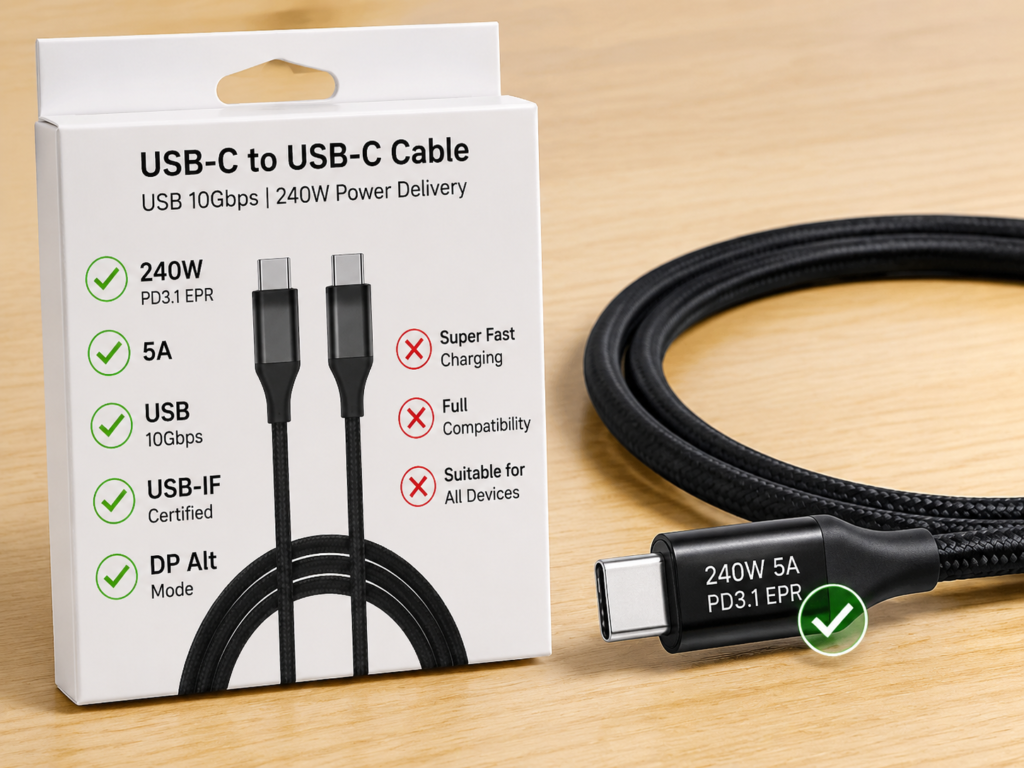
How to Read Specification Markings: Distinguish Valid Parameters from Marketing Terms
First, you need to learn to distinguish which are useful parameters and which are useless marketing terms.
- Valid power markings: 60W, 100W, 240W, 3A, 5A, PD, PD3.1, EPR – these are solid parameters;
- Valid certification markings: USB-IF Certified (a compliance certification mark in the USB standard ecosystem, which can be used as a credibility reference). But having certification doesn’t mean it can meet all your needs; you still need to confirm specific power, data, and video parameters;
- Valid data markings: USB 2.0, USB 5Gbps, USB 10Gbps, USB 20Gbps, USB 40Gbps – these are data rates;
- Valid video/expansion markings: DP Alt Mode, USB4, Thunderbolt 3/4/5 – these are video and expansion capabilities.
And terms like “super fast charging”, “extreme flash charging”, “full compatibility”, “suitable for all devices”, “full-speed fast charging” are basically marketing terms, with no actual reference value, don’t take them seriously.
When verifying parameters, don’t just look at the product title – many titles are randomly marked, adding any terms for traffic. The correct order is: first look at the specification table on the product detail page, then check the printed markings on the packaging or cable body, and finally check for certification and third-party measured data. This way you won’t be easily fooled.
Correct Conditions for Verifying Cable Power
Many people buy a 240W cable and want to verify if it’s real, but use the wrong method. To verify whether a cable really supports 240W, three conditions must be met at the same time: a charger that supports EPR high power, a device that supports over 100W PD input, and the cable to be tested. All three are indispensable. If you use a 100W charger or a 100W device, you can’t test whether the cable is really 240W at all.
When observing power, choose a state where the device’s battery is relatively low (e.g., 20%-50%), temperature is normal, and load is relatively stable – this makes it easier to reach high power. If it’s a multi-port charger, try to plug in only one device during testing to avoid power shunting affecting judgment.
Clarification of Common Misconceptions
We’ve compiled 7 of the most common misconceptions, to clarify them all at once:
- Misconception: 240W cables will damage low-power devices. Truth: Compliant USB PD negotiates power between three parties, and the device will only use the level it supports. It will not be force-fed power, so there’s nothing to worry about.
- Misconception: 100W cables can’t be used for 240W devices. Truth: They can be used, but the power will be limited to within 100W. It’s fine for light-load use, but under high load, charging may be slow or the battery may drain.
- Misconception: 240W cables have faster data transfer. Truth: Power and data are independent specifications. Many 240W cables are only for charging, and their data capability may only be USB 2.0, not suitable for high-speed hard drives, monitors, or docking stations. Whether it can transfer data at high speed or output video depends on separate markings like USB 5/10/20/40Gbps, USB4, Thunderbolt, DP Alt Mode, etc.
- Misconception: All USB-C cables support 100W. Truth: Ordinary USB-C cables without a correct E-Marker usually max out at 3A/60W, and cannot reach 100W.
- Misconception: A charger marked 240W can output 240W to a single device. Truth: It depends on the single-port output power, whether there are EPR levels, and whether the device and cable support it. Total power does not represent single-port power.
- Misconception: The thicker the cable, the higher the power. Truth: Thickness can only be a very rough reference. The key is the inner conductor specification, E-Marker, certification, and workmanship. Thick cables can also have falsely marked specs.
- Misconception: A 100W cable is a Thunderbolt cable. Truth: 100W is only power delivery capability, it does not mean it supports 40Gbps data or video output. Thunderbolt cables require separate markings.
Safety Reminders for High-Power Use
Finally, here are safety precautions for high-power use. Although the probability is low, you should still pay attention:
- If the cable has a damaged outer sheath, discolored connector, loose plug, frequent charging interruptions, or abnormal overheating, stop using it immediately;
- In high-power scenarios, try not to use falsely marked cables, unbranded cables, aged cables, and don’t use poor-quality adapters or magnetic adapters;
- In 240W high-power scenarios, it is not recommended to add extension cables, adapters of unknown specifications, or multi-layer adapters, which add unnecessary risks;
- During daily use, avoid long-term crushing or bending of the plug root, desk edge bends, or areas crushed by chair wheels, to extend cable life;
- Slight warmth of the cable and connector during charging is normal, but if it’s hot to the touch, has an odor, is deformed, or charging is repeatedly interrupted, that’s a danger signal – unplug the power immediately.
Buying Checklist: Verify Parameters by Need
For your convenience when checking during purchase, we’ve compiled a buying checklist for 4 of the most common needs, you can directly check against it.
Only Charging Phones/Tablets/Small Devices
- Power: 60W or 100W is sufficient, no need for higher;
- Data: If it’s only for charging, USB 2.0 is fine, no need to pursue high-speed data;
- Length: 1 meter or 1.5 meters is most convenient, choose according to your usage habits;
- Key points: Just choose a reliable brand, durable connectors, and reasonable price.
Charging Thin and Light Laptops/Office Laptops
- Power: First confirm the device’s USB-C input power, common values are 45W, 65W, 100W;
- Cable: If the device input is 45W/65W, both 60W and 100W cables can meet the need; if you need to cover 100W office laptops or want one cable compatible with more laptops, choose a compliant 100W 5A C-C cable;
- Charger: Confirm that the single-port output can reach the power required by the device, don’t mistake multi-port total power for single-port power;
- Pitfall avoidance: Don’t buy unbranded cables whose titles say 100W but the detail page doesn’t mention 5A or E-Marker.
Charging High-Performance Laptops/Workstations
- Power: First check clearly whether the device’s USB-C PD input exceeds 100W, and which EPR levels it supports;
- Cable: If the device supports 140W and above PD EPR, choose a 240W PD3.1 EPR cable;
- Charger: Choose one that supports PD3.1 EPR and has corresponding voltage levels (28V/36V/48V), with sufficient single-port output;
- Boundary: Note that some high-performance laptops must use the original round-port power supply for full performance operation; USB-C PD can only meet daily light-load use.
Connecting Monitors/Docking Stations/High-Speed Hard Drives
- Power: Choose 100W or 240W according to the device’s power supply needs. For example, if the docking station needs to supply 100W to the laptop, choose a cable of at least 100W;
- Data: Choose a rate of 10Gbps, 20Gbps, or 40Gbps according to your needs. For example, for connecting a high-speed SSD, choose 10Gbps or higher;
- Video: Confirm that the cable supports DP Alt Mode, USB4, or Thunderbolt before connecting to a monitor;
- Recommended search terms: USB4 240W cable, Thunderbolt 4 100W cable, 40Gbps 240W full-featured cable – the more specific, the less likely you are to buy the wrong one.
FAQ and Final Summary
Common Long-Tail Questions and Answers
What is the essential difference between 100W and 240W USB-C cables?
The core difference is the maximum carrying power and whether they support PD3.1 EPR high-voltage levels: 100W cables support a maximum of 20V×5A=100W (SPR standard power range), while 240W cables support a maximum of 48V×5A=240W (EPR extended power range). Data capability, durability, etc. have no direct relationship with power level, and depend on specific product specifications.
Is it necessary to buy a PD3.1 EPR cable?
It is only necessary if you have a device that supports >100W PD EPR and a corresponding charger; if all devices have a maximum power ≤100W, a 100W cable is more cost-effective, with no difference in use.
Will charging a phone with a 240W cable damage the battery?
No. Compliant USB PD devices will negotiate to the power level supported by the phone, which will not exceed the device’s tolerance range, and the user experience is no different from ordinary charging cables.
Do 240W cables have faster data transfer?
Not necessarily. Charging power and data rate are independent specifications, and you need to check the data rate marking separately; many 240W cables only support USB 2.0, while some 100W cables instead support USB4/Thunderbolt high-speed transmission.
Are 100W cables and 5A cables the same thing?
Most compliant 100W C-C cables support 5A (100W is 20V×5A), but they cannot be directly equated. You still need to confirm whether the product has formal parameter markings and a correct E-Marker.
Can a 240W cable replace a Thunderbolt cable?
It cannot directly replace one, unless the cable is also marked with USB4/Thunderbolt and corresponding rate and video output capability. Otherwise, it can only charge, and cannot support high-speed data or video output.
How to tell if a USB-C cable can run 240W?
First check the markings: whether there are parameters like 240W, PD3.1, EPR, 5A; prioritize reputable brands, preferably with USB-IF certification; verification requires pairing with an EPR-supporting high-power charger and a >100W PD device, it cannot be tested with only low-power devices.
What to pay attention to when buying a 2-meter 240W cable?
Prioritize products from reputable brands, with clear certification and clearly marked parameters. Pay attention to inner conductor specifications, temperature rise performance, and connector workmanship. Don’t buy cheap unbranded long cables just for the low price.
Final Summary: 3-Step Judgment Logic
Finally, we use a 3-step judgment logic to help you tie together today’s content. When buying cables in the future, just go through these steps and you won’t choose wrong.
Step 1: First check your device’s USB-C input power limit, confirm whether it really exceeds 100W. If it doesn’t, a 100W cable is sufficient, no need to spend extra money.
Step 2: Then check your charger’s maximum single-port output and whether it supports PD3.1 EPR, confirm whether it can provide the high-power level you need.
Step 3: Finally, choose the cable specification according to your additional needs – for charging only, just look at power; for connecting high-speed hard drives, look at data rate; for connecting monitors or docking stations, look at video and USB4/Thunderbolt capability.
One final reminder: the main differences between 100W and 240W USB-C cables are the power limit and whether they support PD3.1 EPR high-voltage levels. It’s not that 240W cables are smarter, more durable, or faster in data. Don’t waste extra money on high power you won’t use, and don’t use low-spec cables that limit the charging capability of high-power devices. Choosing according to your needs is the most cost-effective.