
Have you ever had this experience: when packing for a business trip, the chargers for your phone, tablet, and laptop take up half a storage pocket in your bag; or there are three or four chargers on your desk, with cables tangled like a mess, and you have to search for ages when you want to charge a device. At times like this, you might wonder: should I buy a multi-port wall charger that plugs directly into the wall, or a desktop charging station that sits on the desk? Many people think the only difference between the two is where they are placed, but in fact, they differ greatly in power distribution, usage scenarios, and buying logic. Below, we will clarify the differences between the two, from entry-level buying tips to parameter verification.
First, Understand: What Exactly Is the Difference Between the Two?
What Is a Wall Charger
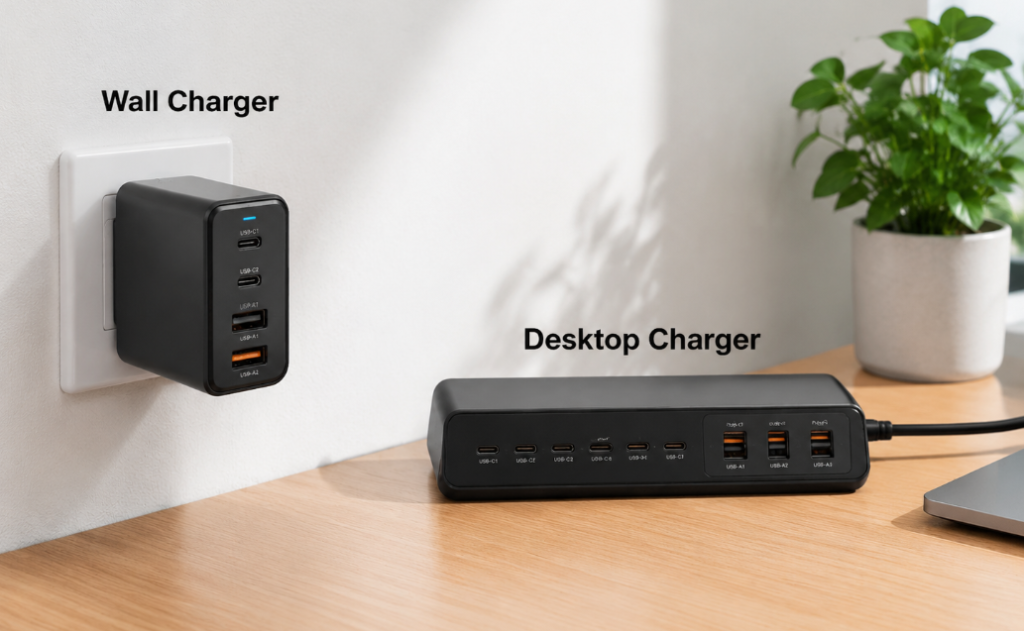
The original charger that comes with your phone, where the plug and the charger body are integrated and can be used directly by plugging into a wall socket or power strip, is a wall charger. It comes in many forms: the most common is the single-port small square, there are also travel models with foldable prongs, and multi-port GaN (gallium nitride, a material technology that allows high-power chargers to be made smaller) models. The prongs can be fixed or foldable.
The core positioning of this type of charger is for mobile scenarios and temporary top-up charging, mainly for charging 1-2 devices. Common power ratings range from 20W, 30W, 45W, 65W to 100W, 140W. There are also higher-power consumer-grade models, but their size and price will increase significantly. Typical examples include original phone chargers, 65W three-port GaN wall chargers, and 140W laptop USB-C chargers.
What Is a Desktop Charger
Desktop chargers do not have prongs to plug directly into the wall; they require a separate power cord to connect to the socket, and the body is usually placed on a desk, nightstand, or workbench. Most are long strip-shaped multi-port charging stations, but there are also square high-power models, and some come with displays, independent switches, or status indicators.
Its core positioning is centralized charging of multiple devices in fixed scenarios, helping you reduce the hassle of multiple chargers taking up sockets. Common power ratings range from 65W, 100W, 150W, 200W to over 300W. High-power models are mainly for laptops, multi-device users, or studio scenarios. Typical examples include 4-port USB-C charging stations and 200W six-port GaN desktop chargers.
How to Quickly Distinguish Between the Two
The core criterion for judgment is very simple: check whether the charger can be plugged directly into a wall socket. If the plug and body are integrated and can be plugged directly into a wall or power strip, it is a wall charger; if the body cannot be plugged directly into the wall, must be connected to an additional power cord, and is usually placed on the desk when in use, it is a desktop charger.
Of course, there are some ambiguous products, such as small travel chargers with a short extension cord. In this case, you don’t have to get hung up on the category, just judge based on your main usage: if you mainly carry it with you for temporary use when going out, choose according to the logic of wall chargers; if it is fixed on the desk for centralized charging of multiple devices, choose according to the logic of desktop chargers.
These Products Are Not Included in Today’s Comparison
There are several types of related products that are easily confused with these two, and they will not be included in today’s comparison to avoid confusion:
- Wireless charging bases: charge via electromagnetic induction, with different charging methods and efficiency, so they are a separate category;
- Car chargers: input is 12V/24V from the car cigarette lighter, with completely different usage scenarios;
- Power strips/desktop sockets with USB ports: they are essentially power strips with AC outlets, and their safety requirements are different from pure USB chargers;
- Power banks: have built-in batteries, belong to energy storage devices, and are not chargers powered directly by sockets;
- Docking stations/monitor power supplies: although they may have USB-C power delivery, their core function is data transmission or display, not just charging.
A Few Must-Know Basic Terms, Don’t Mix Them Up (Refer Back If Needed)
Several terms will be used in the comparison later. Let’s explain them clearly in plain language first. You don’t need to memorize them, just refer back if you don’t understand:
- Total power: the overall upper limit when all ports output at the same time. For example, 100W total power means the whole device can output a maximum of about 100W;
- Single-port maximum power: the highest output of a single port when used alone. For example, the C1 port has a maximum of 100W when used alone;
- Multi-port power distribution: how much power each port actually gets when multiple devices are charging at the same time;
- Fast charging protocol: the rules for the charger and device to “negotiate” voltage, current, and charging speed. Both sides must support the same rule to enable fast charging;
- USB PD: the most mainstream universal fast charging protocol for USB-C devices currently, supported by almost all phones, tablets, and laptops;
- PPS: an adjustable voltage capability of USB PD, often required for high-power fast charging on devices such as Samsung;
- PD 3.1 EPR: a USB-C power delivery specification that supports higher voltage and power, commonly used in high-power scenarios such as 140W, 180W, and 240W;
- GaN: gallium nitride material technology, whose main function is to increase power density, making it easier to make high-power chargers smaller and lighter.
Before Comparison: How to Compare Fairly
Many people just grab two chargers and compare them, only to find the conclusion is wrong, because the premises of the comparison are different. For example, a 20W small wall charger and a 200W desktop charger have a tenfold power difference, so comparing speed is definitely unfair; for another example, a 9-yuan unbranded product and a tens-of-yuan branded compliant product are not on the same level in terms of safety and stability, so they cannot be compared either. Even if both are labeled 65W, the actual experience of a single-port 65W charger and a multi-port shared 65W charger is completely different.
To make the comparison referenceable, the main comparison benchmarks of this article are:
- Main comparison power levels: the two most mainstream tiers, 65W and 100W;
- Main usage scenarios: daily consumer electronic devices such as phones, tablets, thin and light laptops, earphones, and watches;
- Main price range: mid-range products from mainstream or compliant brands, not using extremely low-priced or luxury high-end models to represent the whole category;
- Compliance standards: for the US, prioritize UL/ETL safety certification and FCC electromagnetic compatibility; for the EU, check CE and related EN standards; for the UK, check UKCA; for other regions, confirm according to local regulations.
Of course, the conclusion is not fixed. When encountering the following situations, the selection preference will change:
- Large power difference: for example, a 65W wall charger may have a faster single-port charging speed than a low-power desktop charger;
- Change in number of devices: when switching from charging only one phone to charging a laptop + phone + tablet at the same time, the advantages of desktop chargers will be significantly amplified;
- Change in usage scenarios: wall chargers are more suitable for frequent business trips, while desktop chargers are more suitable for long-term fixed workstations;
- Mismatched protocol or cable: even if the charger is rated for high power, if the protocol or cable does not support it, it may only charge slowly;
- Different socket environments: large-sized wall chargers may block adjacent sockets, while desktop chargers take up desk space.
Core Dimension-by-Dimension Comparison, See the Difference After Reading
We compare from 7 dimensions that everyone cares about most. For each dimension, we first give the conclusion, then explain the reason, so that you can directly find the one that suits you.
Size and Portability: Choose Wall Charger for Frequent Travel, Desktop Charger for Fixed Use
The biggest advantage of wall chargers is their small size and no need for an extra power cord. The small 20W model is about the size of a sugar cube, takes up no space when stuffed in a bag or pocket, and is convenient for business trips, commuting, and travel. However, high-power multi-port wall chargers will be thicker and heavier. For example, a multi-port GaN wall charger of 100W or more, when plugged into a loose wall socket or power strip, may fall down due to being too heavy, resulting in unstable contact.
The body of a desktop charger is originally designed to be placed on a desk, with concentrated ports, which is convenient for long-term use. However, it is large in size and requires a power cord, so it is less convenient than a wall charger when stuffed in a bag during travel, and is more suitable for use in a fixed location.
Ports and Plugging Experience: 1-2 Devices Are Enough, 3+ Devices Are More Worry-Free with Desktop Charger
Limited by size, wall chargers usually have 1-3 ports, and high-end models have at most about 4 ports. Moreover, the ports are relatively close together. If you plug in a thicker charging cable head or use an adapter, they may squeeze each other, making the adjacent ports unusable.
Desktop chargers have many more ports, with 4-8 ports being the mainstream, which is basically enough for a family or multi-device users. Moreover, the port spacing is usually wider, and it is easier to apply force with your hand when plugging and unplugging on the desk, without having to reach down to the wall to fumble, so the experience is much better.
Charging Speed and Power Distribution: Similar for Single Device, More Stable for Multiple Devices with Desktop Charger
Many people think desktop chargers are definitely faster than wall chargers, but that’s not the case. Under the same power, protocol, and cable conditions, the single-device charging speed is basically the same — after all, when using a single port, the charger has the ability to provide that maximum power, which has little to do with the product form. There is a premise for this “basically the same”: the device itself can request the corresponding power; if your phone only supports 25W, even if connected to a 100W single-port charger, it will not charge at 100W speed.
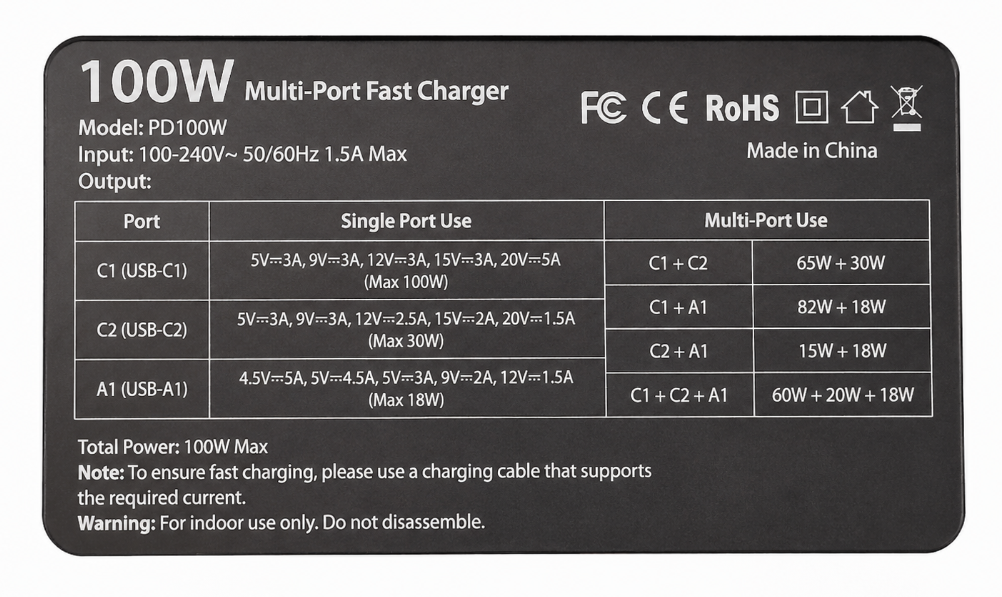
But if multiple devices are plugged in at the same time, the difference becomes apparent: most wall chargers share total power. For example, a 65W dual-port wall charger delivers 65W to the first device, and after plugging in the second, the first may drop to 30W and the second to 20W, with the total power not exceeding 65W. Mid-to-high-end desktop chargers have higher total power and clearer power distribution schemes. For example, a 100W desktop charger may have C1 alone at 100W, C1+C2 at 65W+30W, and C1+C2+A port at 60W+20W+18W, which is clearly stated. When multiple devices are charging together, the core device can still maintain fast charging.
Here’s a key point: when buying a multi-port charger, don’t just look at the labeled maximum wattage. Be sure to check “how many watts each port has when all are plugged in at the same time” — that’s what you actually use.
Heat Dissipation and Long-Term Stability: Desktop Charger Has Advantage for Long-Term Full-Load Use
Wall chargers are small in size with limited internal heat dissipation space. If running at full power, such as charging a laptop at 65W or outputting from multiple ports at the same time, the shell temperature will rise significantly, which is normal. However, under long-term high load, their stability is not as good as desktop chargers.
Desktop chargers are large in size with more abundant internal layout and heat dissipation space. For long-term multi-port output, temperature control is generally better, and they are more stable for long-term use.
By the way, let’s clarify the real function of GaN: many people think GaN equals low temperature, but that’s actually wrong. GaN only allows chargers to be made smaller and slightly more efficient, but if the heat dissipation design is cut corners, it will still get hot. Normal high-power fast charging generates heat, especially when charging laptops or outputting from multiple ports at the same time. But if you smell a burning odor, the shell is deformed, the prongs are loose, charging is frequently interrupted, or there is abnormal noise, be sure to stop using it immediately.
Socket and Space Occupation: Choose Wall Charger If Socket Is Near, Choose Desktop Charger If Sockets Are Few
The advantage of wall chargers is that they don’t take up desk space. If the socket is right by the bed, sofa, or table, you can just plug it in directly, which is very convenient. But the problem is that larger wall chargers, such as multi-port GaN models, are relatively wide. When plugged into a wall socket, they will block the adjacent sockets, and when plugged into a power strip, they will take up several positions, wasting socket slots.
As for desktop chargers, they only need to occupy one wall socket to expand into several USB ports, which is especially suitable for environments with few sockets but many devices, such as a rental apartment with only one wall socket. But the disadvantage is that they take up space on the desk or nightstand, and you also need to organize the power cord and several charging cables. If the desk is very small, it may feel messy.
Safety and Usage Risks: Both Types Should Choose Regular Brands, Each Has Points to Note
Whether it’s a wall charger or a desktop charger, the most basic requirement is to choose a regular brand with clear parameter labeling and overcurrent/overvoltage/short circuit/overtemperature protection — this is the bottom line.
An additional note for wall chargers: do not hang large and heavy high-power models on loose sockets for a long time, otherwise the prongs will be unevenly stressed, which may cause poor contact, or even overheating and safety hazards.
An additional note for desktop chargers: the power cord specifications must match, do not use replacement cords of unknown origin; do not cover the heat dissipation holes, or use them under bedding or pillows, as heat can easily accumulate.
Here’s a reminder for overseas users: FCC is an electromagnetic compatibility certification, not a safety certification; CE is a declaration of conformity in the EU, and is not equivalent to third-party safety certification. When buying, you must distinguish clearly, don’t think it’s absolutely safe just because you see a certification mark. You need to judge based on the sales region and product category.
Price and Overall Cost: Wall Charger Is Cheaper for Single Device, Desktop Charger Is More Cost-Effective for Multiple Devices
If you only charge 1-2 devices, wall chargers are definitely cheaper. The prices of mainstream 20W to 65W wall chargers are not high.
The unit price of desktop chargers seems higher. For example, a 100W desktop charger may be much more expensive than a 65W wall charger, but it can replace several chargers, so you don’t need to buy one for each phone, tablet, and laptop, nor take up multiple sockets. For families or workstations with multiple devices, the total cost is actually lower when calculated.
Also pay attention to hidden costs: for example, high-power USB-C cables, cables with E-marker chips, conversion plugs, cable management accessories, and replacement power cords — these may all cost extra. Price differences mainly come from factors such as brand, certification, power, number of ports, whether it uses GaN, and whether it supports PD 3.1/PPS.
For your quick review, here is a core comparison table:
| Comparison Dimension | Wall Charger | Desktop Charger | More Suitable Scenario |
|---|---|---|---|
| Portability | Small size, no extra power cord needed | Large size, requires matching power cord | Choose wall charger for frequent movement, desktop charger for fixed use |
| Number of ports | Mainly 1-4 ports | Mainly 4-8 ports | Choose wall charger for 1-2 devices, desktop charger for 3+ devices |
| Multi-device fast charging | Total power shared, multi-port easily slows down | Higher total power, clearer distribution | Little difference for single device, choose desktop charger for multiple devices |
| Space occupation | Does not take up desk space, may block adjacent sockets | Takes up desk space, only occupies 1 wall socket | Choose wall charger if socket is near, desktop charger if sockets are tight |
| Long-term stability | Small size, limited heat dissipation space | Abundant heat dissipation, more stable for long-term output | Choose wall charger for temporary top-up, desktop charger for long-term full load |
Want to Choose More Clearly? Learn to Read Parameters and Avoid Marketing Hype
If you don’t want to choose just by feeling, want to understand the logic behind the parameters, and avoid marketing gimmicks, you must read this part.
How to Read Power Parameters Correctly
Don’t just stare at the marketing words “maximum XXW” at first. It’s reliable to look in this order:
First, look at total power, that is, the maximum wattage the whole device can output — this is the foundation;
Second, look at single-port maximum power — whether your main device (such as a laptop) can run at full speed alone depends entirely on this;
Third, look at the multi-port distribution table, that is, how many watts each port has when 2, 3, or 4 devices are plugged in at the same time — this directly determines the multi-device usage experience;
Fourth, look at sustained output capability — whether high power can be output stably for a long time, instead of only a few seconds of peak value.
Here’s a common pitfall: don’t add up the maximum power of all single ports to calculate the total power. The vast majority of multi-port chargers share total power, and the sum of the numbers is meaningless. For reliable products, the product page will clearly state the output under different combinations, such as “C1 alone 100W, C1+C2=65W+30W” — the more detailed it is, the more credible it is.
Reference for Power Requirements of Common Devices
Many people don’t know how many watts their devices need. Here is a rough reference, but the specific details shall be subject to the official input power and supported protocols of the device:
- Bluetooth earphones, watches, small accessories: 5W-15W is sufficient;
- Phones: common range is 20W-45W, the maximum speed is determined by the phone itself, not that the bigger the charger, the faster it is;
- Tablets: common range is 20W-45W, some large-screen tablets may be higher;
- Handheld game consoles/light office devices: common range is 30W-65W;
- Thin and light laptops: common range is 45W-100W;
- High-performance laptops: may require more than 100W. Some models cannot fully replace the original adapter even with USB-C, and cannot achieve full performance.
Remember a principle: the upper limit of charging speed is determined by the device itself, and the specific details shall be subject to the official input power and supported protocols of the device. If you only charge a single fixed device, exceeding the device’s upper limit usually won’t make it faster; but if you often charge multiple devices at the same time, or plan to upgrade to higher-power devices in the future, it still makes sense to buy a higher power tier appropriately.
How to Match Fast Charging Protocols to Avoid Wasting Money
You don’t need to memorize a bunch of protocol names, just follow this priority:
First, look at USB PD — this is the most versatile fast charging protocol now. Most mainstream USB-C phones, tablets, and laptops support USB PD or are compatible with part of PD’s capabilities. However, for old devices, low-end devices, and some models with proprietary fast charging, you still need to check the official parameters. Prioritizing PD support is always right.
If you use Android devices that require high-power fast charging, such as Samsung, you need to check whether the charger supports PPS and the corresponding voltage and current range. Otherwise, it may only run normal fast charging and cannot reach the maximum speed.
QC protocol is common in some old Android devices. Now, if there is PD, it is basically compatible, so you don’t need to pursue it specifically.
Apple’s iPhone, iPad, and MacBook mainly support USB PD, not some Apple proprietary protocol. You don’t need to buy “Apple-specific” ones; any compliant PD-supported charger will work.
For high-power scenarios above 140W, you need to check PD 3.1 EPR, and all three — device, charger, and cable — must support it. If any one is missing, it won’t run at full power.
There are also ultra-high-power proprietary fast charging for some brand phones, such as those above 100W, which may require the original charger and cable. Third-party wall or desktop chargers may only run normal PD and cannot reach the maximum speed. Confirm clearly before buying.
Don’t Ignore the Hidden Limitations of Cables and Ports
Many people buy high-power chargers but find they don’t charge fast — the problem may be with the cable.
In terms of ports, USB-C is the mainstream now, commonly used in high-power and new devices, so prioritize it; USB-A is suitable for old devices, small accessories, watches, and earphones, and its general high-power capability is usually not as good as USB-C; the specific wattage depends on QC, proprietary protocols, and device support.
As for cables, ordinary compliant USB-C cables within 60W can basically meet the requirements, but it’s better to check the label on the cable; 100W requires a USB-C cable that supports 5A, usually with an E-marker chip; 140W or 240W must use cables that support PD 3.1 EPR, otherwise they can’t run at full high power.
Also, for the power cord of desktop chargers, pay attention to the plug specification, wire diameter, rated current, and local standards. Don’t just use a low-specification cord, as it is prone to problems.
Is GaN Worth Paying Extra For?
Don’t be dazzled by the marketing of “GaN black technology”. GaN is just a material technology, not a safety certification, nor does it mean better quality.
For wall chargers, the value of GaN is smaller size at the same power, better portability; for desktop chargers, it is higher power and more ports at the same size.
How to judge when buying? If it’s the same brand, same certification, same power and number of ports, then the GaN model is better, prioritize it; but if it’s a no-name GaN, it’s not as reliable as a regular brand’s ordinary solution. Don’t waste extra money just for the three letters “GaN”.
Notes for Overseas and Cross-Border Use
If you often travel across borders or live overseas, you must pay attention to these points:
First, look at input voltage — it must be labeled 100-240V, 50/60Hz to be used across borders with peace of mind, otherwise plugging in the wrong voltage will burn it out.
The prongs of wall chargers are fixed. For example, US-standard prongs cannot be used in Europe, so you need to bring a conversion plug; while desktop chargers with a replaceable power cord design are much more convenient — you just need to replace it with a local standard power cord, which is more stable than a conversion plug.
Also note: ordinary conversion plugs only change the shape of the prongs, do not change the voltage, nor increase the power carrying capacity. Don’t think you can plug in anything just because you use a conversion plug.
Sales compliance requirements vary from country to country. When buying cross-border, confirm whether the certification and plug standards meet the requirements of your region.
Choose According to Scenarios, No Need to Worry
Actually, you don’t have to worry about which is better. The key is to look at your usage scenario and find the one that suits you.
Scenarios Where Wall Chargers Are Preferred
- Frequent business trips, commuting, travel, want to carry less stuff;
- Mainly charge 1-2 devices, such as phone + earphones, phone + tablet;
- The socket is right at hand, such as by the bed, desk, or sofa, no need to run the cable to the desk;
- Limited budget, only need a reliable fast charger;
- Not strict about desk tidiness, or don’t want to put an extra device on the desk.
Scenarios Where Desktop Chargers Are Preferred
- Long-term fixed use on desk, bedside, living room, workbench;
- Charge 3+ devices at the same time, such as phone, tablet, laptop, watch, earphones all need charging;
- The socket is under the desk or in the corner, out of reach, need to extend the charging port to hand;
- Shared by multiple people in the family, don’t want the power strip to be full of various chargers;
- Scenarios of centralized charging for multiple devices such as studios, live streaming stations, and photography equipment.
Using Both Types Together Gives the Best Cost Performance
Actually, many people don’t have to choose one or the other. Using them together is more cost-effective:
Put a 100W-200W desktop charger at your fixed workstation to handle daily charging of laptops, phones, tablets, and small accessories; when going out, carry a 30W-65W foldable-prong GaN wall charger, which is light and takes up no space.
For the bedroom, if you only charge your phone and watch, one wall charger is enough; if there are many devices by the bed, a desktop charger will be tidier.
For family sharing, put a desktop charger in the living room or entryway for convenient temporary charging for guests or family members, and everyone keeps a small wall charger in their bag for going out.
How to Choose for Travel and Cross-Border Scenarios
- Short solo trip: prioritize foldable-prong wall charger, 30W-65W is usually sufficient;
- Travel with a thin and light laptop: prioritize 65W-100W wall charger, confirm single-port power and PD protocol;
- Group travel: choose high-power multi-port wall charger to reduce the number of chargers carried;
- Long-term stay overseas: if the desktop charger has a replaceable power cord, it is more convenient to adapt to local sockets; for wall chargers, it is recommended to buy the local prong version directly, so you don’t have to carry a conversion plug every day.
Common Misconceptions and Pitfall Avoidance Tips
6 Most Common Misconceptions
- Desktop chargers are definitely faster than wall chargers: Wrong. Under the same power, protocol, and cable, the single-device charging speed is basically the same. The advantage of desktop chargers is that they can maintain fast charging when multiple devices are charged at the same time.
- Wall chargers can only charge phones: Wrong. Wall chargers above 65W, as long as they support USB PD, can charge many thin and light laptops, no problem at all.
- The more ports, the more worth buying: Wrong. If the total power is very low, no matter how many ports there are, they will all charge slowly when full. It’s better to have fewer ports but higher total power.
- The higher the wattage, the faster: Wrong. The device’s own input upper limit determines the maximum speed. If your phone only supports 25W, buying a 100W charger will still charge at 25W speed. High wattage is only useful for laptops and multiple devices.
- GaN is definitely safer and cooler: Wrong. GaN is just a technical route. Safety depends on design, certification, materials, and protection mechanisms. No-name GaN can still get hot and be unsafe.
- Having CE/FCC means it’s definitely safe: Wrong. FCC is mainly an electromagnetic compatibility certification, not a safety certification; CE is a self-declaration, and you also need to see what specific standards it meets. Don’t believe it just because you see the mark.
These Situations Will Reverse the Conclusion
Sometimes you have already made a choice, but you may need to switch when encountering these situations:
- From charging only a phone to charging a phone + laptop + tablet: desktop charger is more suitable;
- From fixed office work to frequent business trips: wall charger is more practical;
- From sufficient sockets to tight sockets: the value of desktop chargers turning one socket into multiple ports is higher;
- Using high-power fast charging devices like Samsung but the charger doesn’t support PPS: actual speed will decrease;
- Need power above 140W but the cable doesn’t support PD 3.1 EPR: cannot run at full high power;
- Loose socket with a heavy wall charger hanging on it: both safety and stability will deteriorate, better to use a desktop charger.
Universal Pitfall Avoidance Checklist for Both Types of Products
Whether buying a wall charger or a desktop charger, pay attention to these points:
- Do not buy low-priced products with no brand, no clear parameters, and no compliance information — safety is not guaranteed;
- Do not buy multi-port chargers that only label “maximum power” but do not have a multi-port distribution table — most likely they will slow down when fully plugged;
- Do not buy “multi-port slow chargers” with many ports but very low total power — they look cost-effective but are actually very slow to use;
- Chargers with damaged shells, loose prongs, peculiar smell, abnormal noise, or abnormal overheating: stop using immediately;
- Do not use low-specification cables to force high power — not only will it not charge fast, but it may also have safety hazards;
- Do not use high-power chargers covered by quilts, clothes, or paper — heat can easily accumulate and cause danger.
4 Steps to Quickly Choose the One That Suits You
If you don’t want to read the whole article, follow these 4 steps and you basically won’t choose wrong.
Step 1: Count How Many Devices You Need to Charge
- Only charge 1 phone: 20W-30W wall charger is sufficient;
- Phone + earphones/watch: about 30W wall charger is enough;
- Phone + tablet: 45W-65W wall charger is more reliable;
- Phone + thin and light laptop: 65W-100W, either wall charger or desktop charger is fine;
- 3+ devices charging simultaneously for a long time: prioritize desktop charger above 100W;
- Multiple laptops or high-power devices: prioritize 150W-300W desktop charger, be sure to carefully check the single-port and multi-port power distribution.
Step 2: Confirm How Many Watts Your Highest-Power Device Needs
- Phone users: don’t blindly pursue above 100W, first check how many watts your phone supports;
- Tablet users: recommend at least 30W-45W, heavy use can choose 65W;
- Thin and light laptop users: at least 45W-65W per single port, some models need 100W;
- High-performance laptop users: first confirm your computer’s USB-C power delivery upper limit. Some models, even if they can charge via USB-C, cannot achieve full performance and still need to use the original adapter.
Step 3: Judge Where You Mainly Use It
- Often take it out: prioritize wall charger;
- Fixed use on desk: prioritize desktop charger;
- Socket is far from the desk: prioritize desktop charger;
- Desk space is very small: prioritize wall charger;
- Shared by multiple people in family: prioritize desktop charger.
Step 4: Check Protocol, Cable, and Certification
- First check if there is USB PD — this is the most important for versatility;
- For devices that require PPS, such as Samsung, focus on confirming whether there is PPS;
- For high-power scenarios above 140W, focus on checking whether there is PD 3.1 EPR;
- Confirm whether your existing cables can support the target power — 100W, 140W, and 240W have different cable requirements;
- Confirm the specific meaning of certifications such as UL/ETL, CE, UKCA, FCC according to your region, don’t just look at the mark;
- Be sure to look at the multi-port distribution table to confirm that your core device can still get enough power when used simultaneously.
Finally, here’s a 5-minute checklist. When you’re not sure, ask yourself these questions, and after answering, you’ll know what to choose:
- How many watts does the highest-power device need?
- How many devices can be charged at the same time at most?
- Do you need to take it out often?
- Is the socket far from where you use it?
- Will the existing socket be blocked by a large wall charger?
- Do you need PPS or PD 3.1 EPR?
- Does your existing USB-C cable support the target power?
- Does the product have clear certification and multi-port power distribution table?
Final Summary: How to Choose with the Least Chance of Mistake
Actually, choosing between a wall charger and a desktop charger boils down to three sentences:
- Few devices, frequent movement, limited budget: choose wall charger;
- Many devices, fixed use, want centralized cable management: choose desktop charger;
- Need both fixed high power and portability for going out: use the combination of desktop charger + small wall charger, which is the most reliable.
Finally, here’s a power tier reference, so you don’t have to worry about what size to choose:
- 20W-30W: suitable for phones, small accessories;
- 45W-65W: suitable for phone + tablet, or entry-level use for thin and light laptops;
- 65W-100W: suitable for thin and light laptop + phone, commonly used for mobile office;
- 100W-150W: suitable for fixed workstations with multiple devices;
- 150W-300W: suitable for multiple laptops, photography equipment, studios, multi-user sharing.
One last reminder: when choosing a charger, don’t just look at the form. You need to make a comprehensive judgment based on power, protocol, cable, number of ports, usage scenario, and certification. Prioritizing the parameter table and multi-port distribution table is much more reliable than marketing gimmicks.