
If you’ve ever been on a long business trip, you’ve probably had this experience: your bag is stuffed with chargers for your phone, earbuds, watch, tablet, and laptop. Not only do they take up space, but when you get to the hotel, you find there aren’t enough outlets—plug one in, and you can’t plug in another. At times like this, you might wonder: is it better to buy a single-port charger, or get a multi-port one once and for all?
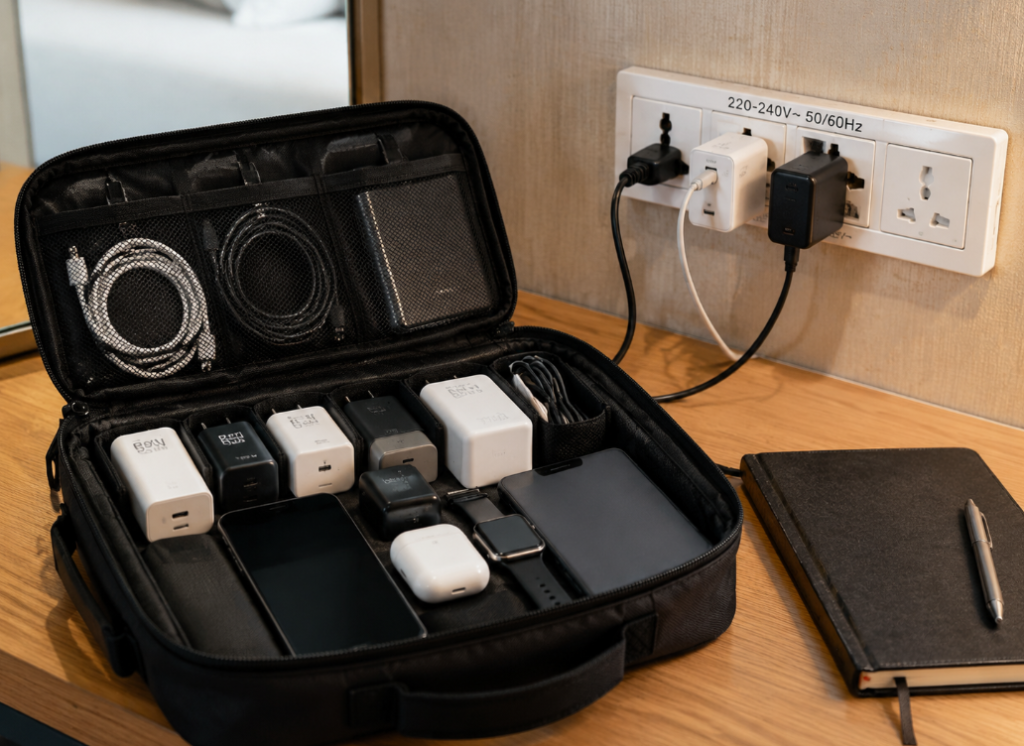
Many people think the only difference between the two is the number of ports, and even assume that a multi-port charger is just “several single-port chargers put together”, with each port able to deliver the full advertised total power—this is actually the biggest misconception. The power distribution logic, user experience, and suitable scenarios behind the two are very different. This article starts with the most basic concepts, then covers how to read specifications, avoid pitfalls, and choose according to your own needs. Even if you know nothing about fast charging, you’ll be able to pick the right one after reading it.
First, Understand the Basics: Single-Port, Multi-Port, and Several Key Terms
Let’s start with the most basics. A single-port charger is easy to understand: it has only 1 output port, and mainly powers 1 device at a time. The common ports now are USB-C and USB-A. Newly released phones, tablets, and laptops basically use USB-C, while older devices or small accessories may still use USB-A.
Its power range covers a wide spectrum: 5W to 12W models are generally used to charge small accessories like old phones, Bluetooth earbuds, and smartwatches; 20W to 30W is the most mainstream fast charging range for phones now, which is sufficient if you only bring your phone when going out; 45W to 65W can power tablets, handheld game consoles, and thin and light laptops; single-port chargers above 100W are suitable for high-performance laptops, but you must first confirm that your computer supports high-power USB-C input.
The typical scenarios for single-port chargers are also clear: for example, fixed charging for your phone at the bedside, powering only one laptop in the office, or as a portable backup charger. Because of their simple structure, they are usually cheaper, easier to make compact, more stable when powering a single device, and free from all kinds of interference.
A multi-port charger is a model with 2 or more output ports, which can power multiple devices at the same time. There are several common port combinations: dual USB-C (2C) is suitable for the combination of a phone plus a tablet, or a phone plus a thin and light laptop; C+A models can balance new devices and old USB-A accessories; 2C1A and 3C1A are the most common models for desktop, business travel, and family shared use, which can both power high-power devices and charge small accessories; models with 4 or more C ports are more like desktop charging stations, suitable for users with a particularly large number of devices.
The total power of multi-port chargers ranges from 35W to over 200W, depending on the product specifications. Its biggest advantage is that one charger serves multiple purposes, saving outlets and luggage space. When charging multiple devices together, you don’t have to swap chargers back and forth, which is much more efficient.
Several Basic Concepts You Must Understand
Before the formal comparison, there are a few terms you must understand, otherwise you can easily be misled by promotional pages.
- Total power: You can think of it as the “total budget” of the charger, which is the maximum power limit that the entire charger can output at the same time. The total power consumption of all devices combined cannot exceed this number.
- Maximum single-port power: The maximum power that a port can output when only one port is connected, equivalent to the “budget limit” of a single port.
- Multi-port simultaneous output power table: This is the most critical parameter for choosing a multi-port charger, equivalent to a detailed list of “how much power each device can get when multiple devices are charging at the same time”. For products that do not clearly mark this table, don’t trust them no matter how high the advertised total power is.
- Fast charging protocol: The “communication rules” between the charger, device, and cable. Only when all three support the same rule can fast charging be triggered.
- Cable specification: A cable is like a water pipe for electricity. If the pipe is too thin, no matter how powerful the charger is, it can’t deliver the power. High-power charging requires cables of corresponding specifications.
Our Comparison Premise
For the sake of fairness, all comparisons in this article are for formal, compliant products of the same power level, same price range, and same quality grade. Special categories such as car chargers, wireless chargers, power banks, and desktop charging stations with power strips are not included in the comparison.
Also, there is a major premise you must remember: only when the device itself, the charger, and the cable all support the corresponding power and protocol can you achieve the expected fast charging speed—none of the three can be missing.
The Real Core Difference: Completely Different Power Distribution Logic
Many people think that single-port and multi-port chargers only differ by a few ports, but in fact, the core difference that really affects the experience is that their power distribution logic is completely different.
Let’s first talk about the output logic of single-port chargers: since there is only one output target, the charger does not need to distribute power among multiple ports. It only needs to negotiate the protocol, voltage, and current with that device, so the negotiation chain is very simple. Therefore, single-port chargers have better stability, and will not cause the device being charged to suddenly slow down or stop charging because you plug in another device. Of course, this does not mean that single-port chargers have no loss at all—any charger will have a little loss and heat when converting alternating current from the wall into direct current for devices, but single-port chargers do not have the problems of power drop and re-negotiation caused by multi-port distribution.
Multi-port chargers need to distribute total power among multiple ports, and there are four common distribution logics:
- Fixed distribution: The power combination of each port is fixed in advance, for example, C1 is fixed at 45W and C2 at 20W. The rules are clear but not flexible enough, and unused power from a device will not be distributed to other ports.
- Smart distribution: Power is dynamically adjusted according to the device demand of each port, with the total output not exceeding the rated limit. The experience is more flexible, but plugging in or unplugging new devices may trigger power re-negotiation, causing existing devices to briefly stop charging.
- Main port priority: Usually the C1 port is the main port, which prioritizes meeting the needs of high-power devices such as laptops, and the remaining power is distributed to secondary ports. This is suitable for users who often charge laptops.
- Average distribution: Some dual-C port products will distribute power nearly equally when charging two devices at the same time, such as 30W+30W or 45W+45W, which is suitable for two devices with similar power (such as two phones, or a phone plus a tablet).
A special reminder here: total power does not mean that each port can deliver the full total power. Take the most common example: a 65W dual-C charger may deliver 65W when only one port is connected, but when both ports are used together, it may be 45W+20W, 30W+30W, or 45W+18W, depending entirely on the product design. Another example: a 100W three-port charger can reach 100W on a single port, but when all three ports are charging at the same time, it may be 65W+20W+15W, or 45W+30W+20W—the difference is huge.
So when looking at specifications, don’t just look at the big “65W” or “100W” on the promotional page. Remember three principles: for single-device charging, look at “single-port output”; for multi-device simultaneous charging, look at the “dual-port/three-port/four-port output table”; when charging high-power devices like laptops, first figure out which port is the main port that supports the highest power.
Speaking of this, we have to mention the “charging interruption when plugging/unplugging” problem that many people have encountered: for example, you are charging your laptop, then plug in a phone, and the laptop suddenly prompts that the power is disconnected and reconnected, or the phone’s fast charging icon flashes. This is actually normal, because when a new device is connected, the charger has to re-negotiate the protocol and re-distribute power, which will cause a brief flash interruption.
This kind of flash interruption has different effects on different devices: devices like phones, earbuds, and watches are basically unaffected—you can’t even feel an interruption of a few tenths of a second; laptops may briefly switch to battery power, which you might notice if you are playing games or running large software; but for devices that are very sensitive to power continuity, such as external hard drives, capture cards, and some docking stations, it is not recommended to power them with ordinary multi-port chargers, as frequent re-negotiation may cause device disconnection and data loss. Of course, some high-end multi-port chargers use independent power management solutions, so the flash interruption will be very slight or even unnoticeable, but this depends on the actual test and instructions of the specific product, and you can’t take it for granted.
Core Dimension Comparison: Which One is More Suitable for You
Now that we understand the underlying logic of power distribution, let’s compare the performance of single-port and multi-port chargers from several dimensions that everyone cares about most. To make it easy for you to understand quickly, I have compiled a simple comparison table:
| Comparison Dimension | Single-Port Charger | Multi-Port Charger |
|---|---|---|
| Single-device charging speed | Can reach full speed when power and protocol match | When used with a single port and matched, the speed is basically the same as a single-port charger |
| Multi-device simultaneous charging efficiency | Can only charge one device, needs charger swapping | Can charge multiple devices at the same time, but the power of each device may decrease |
| Portability | Small size, light weight, fewer cables to carry | Usually larger and heavier, but GaN models can reduce size; need to carry multiple cables |
| Outlet occupancy | One charger takes one socket, multiple single-port chargers take multiple sockets | One charger takes one socket, but large size may block adjacent sockets |
| Compatibility | Depends on the protocol and port type of the single port | More diverse ports, but protocol coverage is determined by product positioning, unrelated to the number of ports |
| Heat control | Generates heat under single-device high load, simple path | Total heat is greater under multi-device high load, easy to trigger temperature control power reduction |
| Cost-effectiveness | More cost-effective for single-device users | More economical than buying multiple single-port chargers when there are 2 or more devices |
Next, we will explain each one clearly.
Charging Speed: Speed Has Nothing to Do with the Number of Ports
Many people think single-port chargers are definitely faster than multi-port ones, but that’s not necessarily the case. When charging only one device, as long as the maximum single-port power, protocol, and cable of the multi-port charger match the device, the speed is basically the same as that of a single-port charger. Only when multiple devices are charging at the same time will the power allocated to each device decrease, and the speed may slow down.
There are four common reasons for slow charging: the main port power drops when multiple ports are used at the same time (for example, from 65W to 45W), the secondary port itself has a low power limit (such as only 18W/20W), the cable specification is insufficient (for example, only supports 60W and cannot run 100W), and the port does not support the fast charging protocol required by the device. To put it bluntly, speed has no direct relationship with the number of ports. The key is whether the device’s demand is less than the actual output power of the port under the current combination.
Portability and Outlet Occupancy: Each Has Its Advantages
The advantages of single-port chargers are obvious: small size and light weight. If you only bring one device when going out, you only need to bring one cable, which is very portable. The advantage of multi-port chargers is that one replaces several, so you don’t have to carry a bunch of chargers, which is suitable for business travel and desktop organization.
However, there is an exception: multi-port chargers using the new gallium nitride (GaN) semiconductor material have more compact internal circuits and can be made very small—some 65W dual-C GaN chargers are even smaller than old 65W single-port chargers made of silicon material, and have better portability instead.
In terms of outlet occupancy, although a multi-port charger only takes one socket hole, if it is too large, it may block the adjacent jack, making it impossible to plug in the adjacent plug; although multiple single-port chargers take multiple holes, they are more flexible to place and will not block each other. In addition, although multi-port chargers save on chargers, you still have to carry multiple different cables, such as C-C cables, A-C cables, watch charging cables, etc. This part of the carrying cost should also be taken into account.
Compatibility: Unrelated to the Number of Ports, Depends on Product Positioning
Many people think multi-port chargers have better compatibility, but that’s not necessarily the case—compatibility mainly depends on port type, protocol support, and cables, and has no direct relationship with the number of ports.
- Port compatibility: USB-C is currently the mainstream port for new phones, tablets, and laptops, while USB-A is suitable for old devices, small accessories, and old cables. If you choose a multi-port charger with all C ports, it may not be able to directly power old devices that only have USB-A charging cables, and an extra adapter cable is needed.
- Protocol compatibility: Fast charging protocols are the “communication” rules between devices and chargers. Only when both support the same protocol can fast charging of the corresponding power be triggered. Currently common protocols are:
- USB PD: The most versatile universal protocol, supported by iPhone, iPad, most Android phones, and thin and light laptops;
- PPS: An advanced version of the PD protocol, which is a necessary condition for medium and high-power fast charging on Android phones from brands such as Samsung and Google;
- QC: Qualcomm’s old fast charging protocol, still used by some old Android devices and accessories;
- Brand proprietary protocols: High-power fast charging of some brands (such as Samsung 45W super fast charging, Xiaomi 120W fast charging, etc.) requires original or authorized chargers to reach full speed.
For laptops, focus on the USB PD power levels, common ones are 45W, 65W, 100W, 140W, etc. Only when the level matches can normal fast charging be achieved. - Cable compatibility: Cables are like water pipes for electricity. If the specification is insufficient, no matter how high the power is, it can’t be transmitted:
- Below 60W: Ordinary compliant USB-C cables can basically meet the demand;
- 60W-100W: Cables that support 5A current and have an E-Marker smart chip are required;
- Above 100W: Cables that support the PD 3.1 standard and corresponding rated power (such as 140W, 240W) are required.
In short, protocol coverage and compatibility are determined by the product’s chip, positioning, port configuration, and cost, and have no direct relationship with whether it is single-port or multi-port.
Safety and Heat: Qualification is the Premise
Whether it’s single-port or multi-port, first of all, you should choose products from legitimate brands and legitimate channels, with clearly marked parameters and protection functions such as overvoltage, overcurrent, overtemperature, and short circuit. This is the most basic premise.
The heat characteristic of single-port chargers is that they also generate heat during single-device high-power output, but because the load path is simple, the heat is relatively controllable. When multiple devices are under high load at the same time, multi-port chargers have higher total output and greater internal thermal pressure, making it easier to trigger temperature control power reduction. Therefore, heat will be more obvious in summer or when placed in a small space.
How to distinguish between normal heat and abnormal heat? Under normal circumstances, the charger will be warm during fast charging, the casing will be a little hot but there is no peculiar smell, and it can work stably; if it is too hot to hold, has peculiar smell, abnormal noise, deformed casing, frequent charging interruptions, or loose prongs, that is abnormal, and you should stop using it immediately.
If you use it in different countries/regions, you should also pay attention to three points when purchasing: First, choose products that support 100-240V wide input voltage, which can adapt to the mains power of most countries in the world; second, confirm that the prong specification matches the local socket. For example, the prong shapes of US standard, European standard, British standard, and Australian standard are different, and if you buy the wrong one, you can’t use it directly; third, prioritize legitimate products with local safety certifications, such as UL or ETL certification for the US/Canada, CE mark for the European Union, UKCA mark for the United Kingdom, and purchase through legitimate channels for better safety assurance.
Cost-Effectiveness: Calculate Based on Real Needs, More Ports Don’t Mean Better Value
Cost-effectiveness cannot be calculated by the number of ports, but by real needs:
- Single-device users: Single-port chargers are cheaper, more portable, and more cost-effective;
- Users with 2 or more devices: One multi-port charger is usually cheaper than buying multiple single-port chargers, and also saves outlet space;
- For full-speed charging of only one high-power laptop: A high-spec single-port charger may be more cost-effective than a multi-port charger of the same power;
- Users with proprietary high-power fast charging needs: Universal multi-port chargers may not reach full speed, and original or authorized chargers have higher actual cost-effectiveness;
- Shared by multiple people at home/workstation: Multi-port chargers of 100W and above have higher comprehensive value, but it is recommended to leave a 10%-20% power margin to avoid accelerated heat and aging caused by long-term full load.
Calculate First: How Many Watts Your Devices Need
Many people don’t know what power to buy when choosing a charger. In fact, you just need to first figure out how many watts your devices need. I have compiled the power requirements of several common types of devices, and you can calculate accordingly.
Small Devices
For example, Bluetooth earbuds, smartwatches, and fitness bands generally only need about 5W. Fast charging is of little significance to them, after all, their batteries are very small. There are also electric toothbrushes, e-readers, small speakers, etc., which are all low-power devices. A USB-A port or a low-power USB-C port is sufficient. There is no need to buy a high-power charger separately for them, and the secondary port of a multi-port charger can meet the demand.
Phones
For ordinary fast charging, choosing 20W-30W can meet most daily needs: 20W-30W PD chargers are very suitable for iPhone and most iPad; for Android phones from brands such as Samsung and Google, if you want to trigger medium and high-power fast charging, the charger needs to support the PPS protocol; for some brands’ proprietary high-power fast charging (such as 67W, 120W, etc.), corresponding authorized chargers are required to reach full speed.
Tablets, Handheld Game Consoles, Thin and Light Laptops
The common power of tablets is 20W to 45W, and some models are higher; handheld game consoles such as Switch are generally between 30W and 65W, and you can check the power of the official adapter for details; for thin and light laptops, the common power is 45W to 65W, which is sufficient for daily office work, but in heavy load scenarios such as running large software or playing games, the battery may still drain.
High-Performance Laptops and Professional Devices
For example, gaming laptops and creator laptops may have power requirements of 100W, 140W, 180W or even higher. Special attention should be paid here: not all high-performance laptops can run at full speed through the USB-C port. Some can only charge slowly, or maintain power supply under light load, and will still use the battery under heavy load. Therefore, for scenarios that require full performance use, it is better to use the original power supply first. USB-C chargers are suitable as a portable charging solution. Before buying, be sure to check the official instructions to see if your computer supports high-power USB-C input.
Choose by Scenario: No Need to Hesitate, Find Your Match
Once you understand the power requirements and combine them with your own usage scenarios, choosing is very simple.
Situations Where Single-Port Chargers are Preferred
If you only charge one fixed device, such as your phone at the bedside or your laptop in the office, a single-port charger is enough; if you only bring your phone when going out and pursue portability and low cost, single-port is also the first choice; if you have a limited budget and only need reliable basic fast charging, choosing a single-port charger is more cost-effective; if your high-power device has very high requirements for power supply stability and does not want re-negotiation caused by plugging in other devices, then single-port is more stable; also, if you have enough outlets at home and don’t need one charger for multiple purposes, there’s no need to buy a multi-port one.
Situations Where Multi-Port Chargers are Preferred
If you often charge more than two devices at the same time, a multi-port charger is definitely more convenient; if you want to make your desktop, bedside, and living room tidier and reduce cable clutter and outlet occupancy, multi-port is a good choice; if you bring a bunch of devices like a phone, earbuds, watch, tablet, and laptop on a long business trip, one multi-port charger can save a lot of luggage space; for shared use by multiple people in a family, a high-power multi-port charger can basically cover the charging needs of most devices; also, if you have many low-power small devices and want to charge them all on one charger, multi-port is also more suitable.
Common Combination Recommendations
I have compiled several of the most common device combinations, and you can directly find your match:
- Only a phone: A 20W-30W single-port charger is enough. If you want to accommodate future devices, you can also choose a 35W small dual-port charger, the price difference is not much.
- Phone plus earbuds/watch: A 30W-45W dual-port charger is sufficient. It doesn’t matter if the secondary port has a little lower power, after all, small devices don’t need high power.
- Phone plus tablet: Choose a 45W-65W multi-port charger. Make sure that when both ports are charging at the same time, the port for the tablet has at least 20W-30W, otherwise charging will be very slow.
- Phone plus thin and light laptop: Choose a 65W-100W multi-port charger. Be sure to confirm that when both ports are charging at the same time, the main port for the laptop has at least 45W-65W, otherwise the laptop may only charge slowly.
- Phone plus high-performance laptop: Choose a multi-port charger above 100W or a high-power single-port charger, but if you pursue full performance operation of the laptop, it is better to use the original adapter first.
- Multiple devices at home/workstation: Choose a 100W-200W multi-port charger. It is best to leave a 10%-20% margin more than your usual total demand to avoid long-term full load.
Advanced: Understand the Product Specification Page, Don’t Be Fooled by Promotions
If you want to choose more accurately and not be fooled by the big words on the promotional page, you need to learn to read the product specification page. The following five parameters are must-sees, sorted by importance:
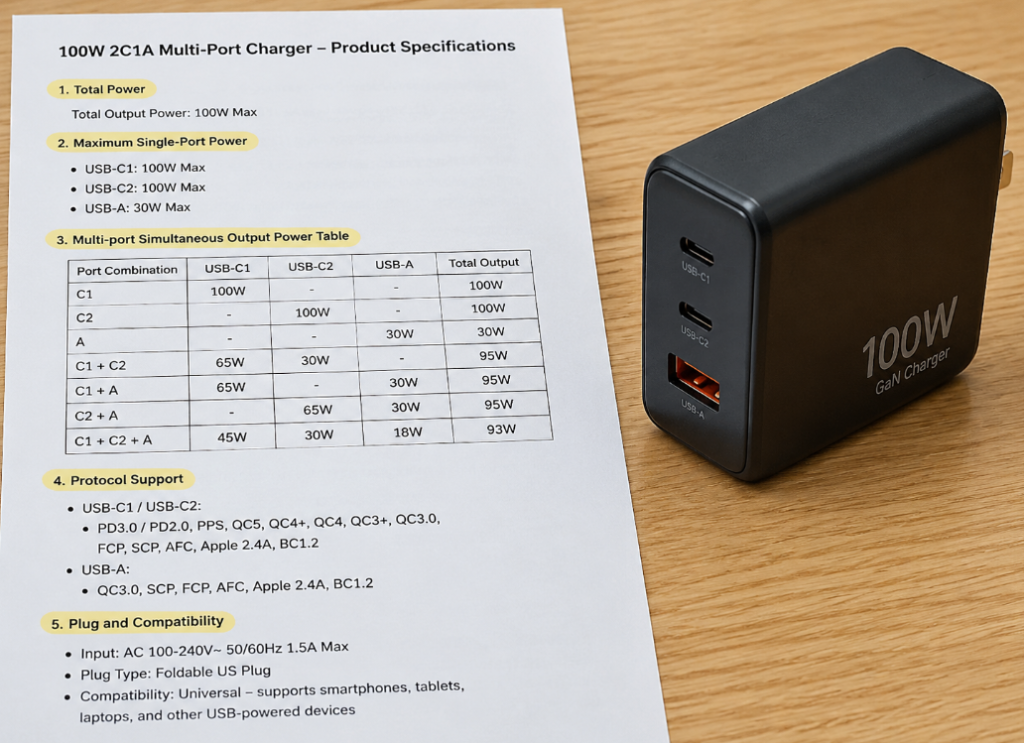
- Total power: Determines the total capacity of multi-device simultaneous charging. The judgment method is very simple: add up the power of the devices you usually charge at the same time, then leave a 10%-20% margin. For example, if you often charge a 65W laptop and a 20W phone at the same time, the total demand is 85W. If you leave a 20% margin, it is more appropriate to choose a product of around 100W. Note that higher total power is not always better—the higher the power, the higher the volume, price, and heat will rise accordingly. It’s good enough to meet your needs.
- Maximum single-port power: Determines whether the highest-power device can run at full speed. Focus on the main C port marked C1. High-power devices such as laptops, tablets, and handheld game consoles should all be plugged into the main port. Note: Most multi-port chargers only have C1 supporting the highest power, and other secondary ports may have much lower power. Don’t buy it, plug it into the wrong port, and then blame the charger for being slow.
- Multi-port simultaneous output power table: This is the core parameter of a multi-port charger, which directly determines the real simultaneous charging experience. Be sure to check the output power of the combinations you use most often, such as C1+C2, C1+A, C1+C2+A, and all ports charging together. If there is no clear multi-port output table in the specification page, this product is not suitable as the main charger for high-power multiple devices, and there is a high probability of false labeling or chaotic distribution logic.
- Protocol support: Don’t just look at “supports fast charging” on the promotional page. Compare the protocol list of each port with the officially supported protocols of your devices one by one. For example, for iPhone, confirm that there is USB PD; for Samsung Android high-power fast charging, confirm that there is PPS; for proprietary fast charging, confirm that there is a corresponding authorized protocol.
- Plug and compatibility: If used in different countries/regions, confirm that the input voltage supports 100-240V wide range, the prong specification matches the local socket, and there is a safety certification for the corresponding region. In terms of cables, confirm in advance whether your existing cables can carry the corresponding power. If not, replace them together.
Common Misconceptions and Pitfall Avoidance
Finally, let’s talk about a few pitfalls that people are most likely to fall into, as well as some common cognitive misconceptions, which can help you avoid wasting money.
6 Most Frequent Cognitive Misconceptions
- Each port of a multi-port charger can deliver the full rated total power: Wrong. Total power is the upper limit of the entire charger. The actual power when multiple ports are charging at the same time depends on the distribution table. It is impossible for each port to reach the total power.
- Multi-port chargers are definitely slower than single-port ones: Wrong. When used with a single device, as long as the power, protocol, and cable all match, the speed is basically the same as a single-port charger.
- The more ports, the better the value: Wrong. Unused ports will only increase volume, cost, and heat pressure, which is not cost-effective instead.
- USB-C ports definitely support fast charging: Wrong. USB-C is just the port shape. Fast charging also depends on the protocol, power, and cable. The USB-C port of some old devices may only have 5W slow charging.
- Charging multiple devices at the same time with a multi-port charger will damage the battery: Wrong. Legitimate chargers and devices will negotiate a safe power and will not damage the battery; what really damages the battery is inferior chargers, high temperatures, and long-term abnormal heat.
- The higher the wattage, the better: Wrong. Devices only draw power according to their own needs. Charging a 20W phone with a 100W charger will only run at 20W, which is just a waste of money and heavier.
Key Points for Avoiding Pitfalls with Multi-Port Chargers
Don’t buy low-priced models with no brand, no specification table, and no compliance mark—there is a high probability of false labeling or unsafety; don’t just look at the total power, you must look at the multi-port simultaneous output combination; don’t assume that all USB-C ports have the same capabilities, the main port and secondary ports may be very different; don’t use it at full load for a long time, especially in summer, when placed in a small space, or when desktop cables are piled together—poor heat dissipation will accelerate aging; if you have a demand for Android high-power fast charging, be sure to confirm that the charger supports the corresponding PPS or proprietary protocol; if you want to charge a laptop, be sure to confirm that when both ports are charging at the same time, the power of the main port can still meet the laptop’s needs.
Key Points for Avoiding Pitfalls with Single-Port Chargers
Don’t buy models with power significantly lower than the device’s demand, otherwise not only will charging be slow, but it may also generate heat under long-term high load, affecting its lifespan; don’t use old chargers with loose prongs, damaged casings, peculiar smell, abnormal noise, or abnormal heat—they have safety hazards; don’t use mismatched cables to charge high-power devices, not only will they not reach full speed, but they may also be dangerous; don’t buy uncertified, unbranded products with vague parameters just for low prices.
These “Faults” Are Actually Normal
Don’t panic when you encounter these situations: after plugging in a new device, the device that was already charging briefly stops charging—this is a normal phenomenon of power redistribution and protocol re-negotiation; charging speed slows down after changing a port—you may have plugged into a secondary port with lower power and fewer protocols; the charger is warm during fast charging—this is normal, as long as it’s not too hot to hold, has no peculiar smell, or frequent charging interruptions, there’s no problem; if the laptop shows “slow charging”, it may be that the charger power is insufficient, or the cable does not support high power, or you may have plugged into the wrong secondary port.
60-Second Quick Decision Method
You may still find it a bit complicated after reading this. Don’t worry, I have compiled a 60-second quick decision framework, just follow it to choose.
Quick Judgment for Beginner Users
If you just want to quickly choose the right one, just answer a few questions:
- Usually only charge 1 device? Choose single-port.
- Often charge 2 or more devices at the same time? Choose multi-port.
- Only bring your phone when going out? Choose a 20W-30W small single-port charger.
- Have a phone and a tablet? Choose a 45W-65W dual-port or three-port charger.
- Have a phone and a thin and light laptop? Choose a 65W-100W multi-port charger, remember to check the dual-port simultaneous charging distribution.
- Have a high-performance laptop? First check the official power requirements, then decide whether to buy a high-power single-port, multi-port, or continue using the original adapter.
Checklist for Semi-Proficient Users
If you want to be more precise, you can check against this list:
- List all your commonly charged devices, such as phone, earbuds, watch, tablet, laptop, handheld game console.
- Mark the maximum charging power and protocol requirements of each device.
- Find your most common simultaneous charging combination, such as charging phone, earbuds, and watch at the same time at night, or charging phone and laptop at the same time on a business trip.
- Calculate the total power of this combination, then leave a 10%-20% margin—that’s the total power you need.
- Confirm which port the highest-power device should be plugged into (usually the main C port).
- Check the multi-port simultaneous output table to see if the power of each port under this combination can meet the device’s needs. Don’t just look at the total power.
- Confirm whether your existing cables can support the corresponding power. If not, replace them together.
- Confirm that the plug, voltage, and certification meet the region you use it in.
Key Conditions That Will Reverse the Conclusion
If your situation has these changes, you need to reconsider your choice:
- From charging only 1 device to often charging 2 or more: The advantages of multi-port will increase significantly.
- The highest-power device is close to the total power of the charger: Then buying a single-port charger, or a higher-power multi-port charger, will be more stable.
- From carrying for business travel to being permanently placed on the desktop: The value of multi-port chargers in saving outlets and being tidier will increase.
- From an ordinary phone to an Android phone with proprietary high-power fast charging: Protocol matching is more important than the number of ports.
- From a thin and light laptop to a high-performance laptop: Don’t just look at the USB-C port, first confirm whether the device supports PD high-power input.
- Cables are not up to standard: Whether it’s single-port or multi-port, fast charging cannot be achieved. Replace the cables first.
Summary
Overall, single-port chargers excel in simplicity, stability, low cost, and portability, while multi-port chargers excel in being able to charge multiple devices at the same time, saving outlets, and saving space. What really determines which one you should choose is never the number of ports, but the number of devices you charge at the same time, the demand of your highest-power device, and the power distribution table of the multi-port charger.
After reading this article, you should already be able to distinguish the difference between total power, maximum single-port power, and multi-port simultaneous output power, be able to judge the approximate power requirements of phones, tablets, and laptops, be able to understand the distribution table of multi-port chargers, be able to identify slow charging caused by protocol mismatch, cable mismatch, or wrong port insertion, and also be able to independently choose a suitable charger according to your own usage scenarios.
When it comes to charging, there is no absolute good or bad. The one that suits your own needs is the best.