
When buying a USB-C charger, you have most likely seen dizzying labels like 100W, 240W, PD 3.1, and EPR. The price difference is more than double, yet no one clearly explains what the actual gap is: Will 240W charge a phone twice as fast? Will it damage an old tablet? Why is charging a laptop still slow after buying a 240W charger?
This article will thoroughly break down the difference between PD 100W and 240W, from the most basic principles to actual purchasing and pitfall avoidance. Even if you know nothing about fast charging parameters, you will be able to make a choice that suits you directly after reading it.
First, the Conclusion: Judge Whether You Need 240W in 30 Seconds
If you are in a hurry, just look at these 4 core conclusions:
- For charging only phones, tablets, earbuds, handheld consoles, and thin-and-light laptops with 100W or lower input: 100W is usually sufficient, with a more balanced size, price, and compatibility.
- Prioritize 140W/180W/240W chargers only if your device explicitly supports PD 3.1 EPR or has a PD input exceeding 100W.
- For multi-device simultaneous charging, do not just look at the total power; be sure to check the single-port peak power and the multi-port power distribution table.
- If you want a set of accessories for long-term universal use: you can prioritize buying a 240W EPR cable, and choose a 100W or 240W charger based on your current device needs.
Default Comparison Conditions of This Article
To avoid misinterpretation of the conclusions, let’s first clarify the comparison scope of this article:
We only discuss compliant USB PD chargers, compliant USB-C to USB-C cables, and genuine devices that support USB-C PD power receiving; we do not cover falsely labeled products, full-speed private fast charging, non-standard adapters, magnetic connectors, damaged cables, or low-quality chargers. The default test scenario is a room temperature of around 25°C, single-port output, use of compliant cables, and the device’s battery level and temperature are within the range acceptable for high-power input.
First, Understand USB PD, SPR, and EPR
Before the formal comparison, take 1 minute to understand a few basic concepts, so you will not get confused when looking at parameters later:
USB PD, short for USB Power Delivery, is the USB-C port power negotiation rule formulated by the USB-IF organization. A charger does not forcefully output the maximum power as soon as it is plugged in; instead, it first negotiates the voltage and current supported by both parties with the device, then supplies power according to the device’s actual request. Compliant devices will only draw power within their own tolerable range.
The calculation formula for charging power is very simple: Power (W) = Voltage (V) × Current (A); the higher the voltage or current, the greater the total power.
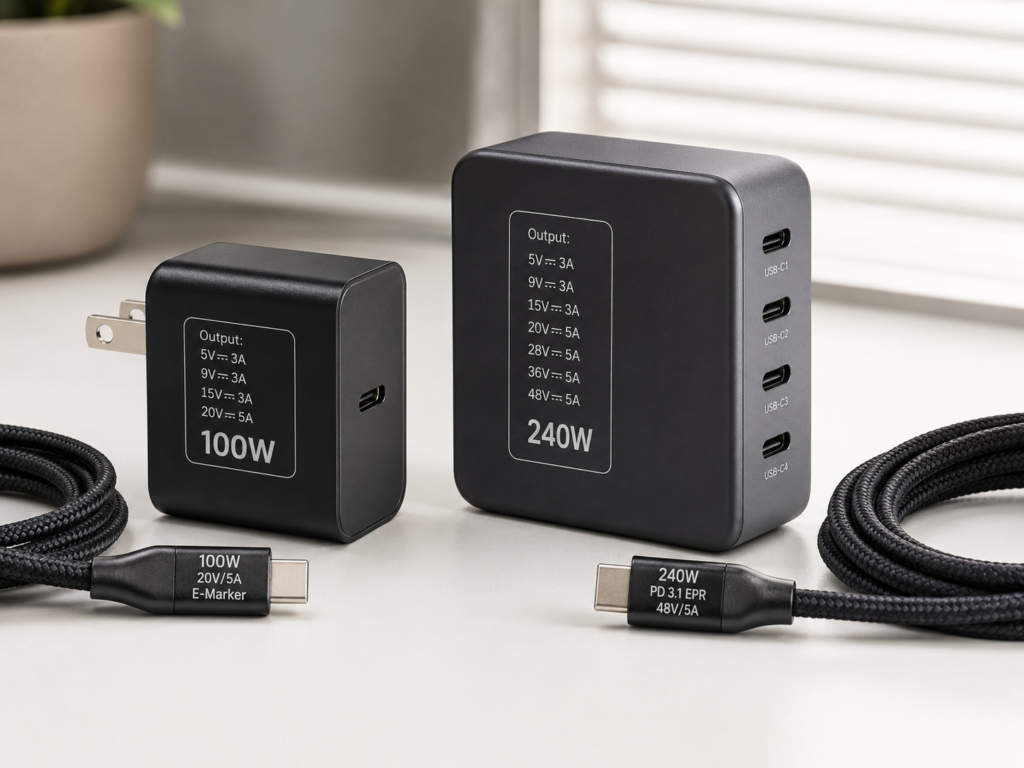
The PD 100W we often talk about is the mainstream upper limit of the Standard Power Range (SPR for short), with a typical specification of 20V×5A=100W; while PD 240W is the highest grade of the Extended Power Range (EPR for short) under the PD 3.1 protocol, with a typical specification of 48V×5A=240W.
Special attention should be paid here: PD 3.1 does not mean it necessarily supports 240W — some products are labeled PD 3.1, but only cover power within the SPR range, and do not have EPR high-voltage gears. Finally, two commonly seen terms: PPS (Programmable Power Supply) is a dynamic voltage regulation fast charging function commonly found in phones and tablets, and does not mean the power is necessarily high; AVS is the adjustable voltage capability within the EPR range, ordinary users do not need to delve into it, just focus on whether the product is labeled EPR and its specific output gears.
Three Indispensable Conditions for Full 100W or 240W Output
Charging power is like a relay race: the charger, cable, and device — all three legs must meet the standard, none is dispensable. Among them, the cable is the most easily overlooked.
First Leg: Requirements for the Charger
To achieve the corresponding power, the charger must support the corresponding voltage and current gears; it is not necessarily compliant just because it is labeled with a power rating:
- Full 100W: The charger must support USB PD SPR and have an output gear of 20V×5A=100W;
- Full 140W: Must support PD 3.1 EPR and have a 28V×5A gear;
- Full 180W: Must support PD 3.1 EPR and have a 36V×5A gear;
- Full 240W: Must support PD 3.1 EPR and have a 48V×5A gear.
If it is a multi-port charger, be sure to check the “maximum single-port output power”, not just the total power on the casing. For example, a four-port charger labeled 240W may only reach 140W when the first C port is used alone, while other ports have a maximum of only 65W, and the power will be further split when two devices are plugged in.
Genuine chargers will clearly mark the voltage and current of each gear on the packaging, body nameplate, or official website specification page, such as “5V⎓3A、9V⎓3A、15V⎓3A、20V⎓5A、28V⎓5A、48V⎓5A”. Be cautious when buying products without clearly marked gears.
Second Leg: Requirements for the Cable (The Most Common Bottleneck)
Many people cannot charge fast, and the problem lies with the cable. USB-C is just the interface shape; different internal materials and chips of the cable lead to very different power carrying capacities:
- Around 60W: Ordinary 3A USB-C to USB-C cables generally can only carry a maximum of 20V×3A, which is 60W;
- 100W: Requires a 5A C-to-C cable with an E-Marker electronic marking chip; the packaging or cable body is usually labeled “100W”, “20V/5A”, or “5A PD”;
- 240W: Requires a 5A C-to-C cable that supports EPR; the labels are generally “240W”, “PD 3.1”, “EPR”, or “48V/5A”.
Note: Ordinary 100W 5A cables cannot be used as 240W EPR cables; compliant chargers, cables, and devices usually will not negotiate to the 48V high-voltage gear with non-EPR cables, but falsely labeled cables, non-standard adapters, and damaged cables may cause identification errors or safety risks.
If the cable has no markings and you do not know its power level, use it conservatively as a low-power cable, and do not use it to charge high-power devices. In addition, magnetic connectors, cheap adapters, and USB-A to USB-C cables are not recommended for carrying high-power PD, as they can easily become bottlenecks or even cause problems.
Third Leg: Requirements for the Device
The final charging speed is still determined by the device itself. The device must support USB PD input of the corresponding power, otherwise it will automatically reduce to the maximum acceptable power.
For example, if a phone only supports a maximum of 30W PD, using a 240W charger will only charge at 30W, no faster. If a thin-and-light laptop supports a maximum of 65W or 100W, the charging speed is basically the same when using a 100W or 240W charger alone.
If it is a gaming laptop or high-performance notebook, be sure to confirm which specific USB-C port supports PD input, what the maximum supported wattage is, and whether it has EPR. The USB-C ports on many gaming laptops can only transfer data and connect to monitors, cannot charge, or only support a maximum of 100W PD, so even a 240W charger is useless.
How to check: Look at the device’s official website specification page, user manual, or the parameters of the original power adapter. Do not just look at the big text on promotional pages — many promotional pages only say “supports USB-C” and do not state how many watts it supports. Especially for gaming laptops, the 230W or 280W marked on the original adapter is the maximum total power consumption of the whole machine or the private power supply power, which does not mean the USB-C port can achieve the same PD input power. The upper limit of USB-C PD input shall be subject to the clear marking on the official website interface specifications or user manual.
What Happens When the Three Are Not Matched?
You can compare with your own situation to see if you have fallen into these pitfalls:
- 240W charger + ordinary 3A cable + high-power device: The cable’s carrying capacity is insufficient, with a maximum of only around 60W;
- 240W cable + 100W charger + high-power device: The charger’s upper limit is insufficient, with a maximum still at 100W;
- 240W charger + low-power phone: The phone only draws the power it needs, it will not be damaged by overcharging, nor will it charge faster;
- 100W charger + 240W-supported gaming laptop: It can charge at low load, but when playing games or rendering at full load, it may charge very slowly, or even lose power while charging;
- Multiple devices plugged in at the same time: The charger will redistribute power, some devices may switch from fast charging to slow charging, and some chargers will even briefly stop charging when plugging or unplugging new devices to renegotiate power.
Actual Perceived Differences in Daily Scenarios
After talking about so many parameters, you may still have no idea. In actual use, how big is the difference between 100W and 240W? Let’s talk about it in several of the most common scenarios.
Phone, Tablet, Earbuds, Handheld Console Scenarios
The PD input power of most phones, tablets, true wireless earbuds, and handheld consoles is lower than 100W: phones generally have 18W-65W, tablets 30W-65W, and earbuds only a few watts.
In this case, the experience difference between 100W and 240W chargers is almost zero, the charging speed is the same, and there are no safety issues.
Although a few phones advertise fast charging above 100W, most use the manufacturer’s private protocol, not standard PD, so even a 240W PD charger cannot reach full speed and can only charge at PD power. The PD power of handheld consoles also varies by device: for example, the original Nintendo Switch adapter is rated at about 39W, and the actual power draw varies with the console model, whether it is in docked mode, and protocol negotiation; the PD input power of other handheld consoles like Steam Deck and ROG Ally also varies, so you need to check the official specifications for details.
For these users, when choosing a charger, they should pay more attention to size, number of ports, brand, safety certification, and whether it supports the phone’s private fast charging protocol; there is no need to chase 240W.
Thin-and-Light Office Laptop Scenario
Currently, most 14-inch and smaller thin-and-light laptops have a maximum PD input power of 65W or 100W. When charging the computer alone, a 100W charger is completely sufficient, and there is no difference in speed from a 240W charger.
The value of 240W is mainly reflected in simultaneous charging of multiple devices: for example, when traveling, plugging a laptop, phone, tablet, and earbuds into one charger, a 100W multi-port charger may split the power, so the laptop only gets 45W and charges slowly; 240W can provide 65W to the laptop, 30W to the phone, and 30W to the tablet, maintaining a good speed even when charging together.
When buying a multi-port charger, be sure to check the power distribution strategy. For example, some chargers can reach 100W on the C1 port alone, but when C1 and C2 are used together, it becomes 65W + 45W, not both ports at full speed.
In addition, if the thin-and-light laptop manufacturer requires a specific power to run at full performance, for example, some thin-and-light laptops need 90W or 100W to run the processor at full performance, you should choose according to the official power supply specifications.
Gaming Laptop and High-Performance Notebook Scenario
- Using a 100W charger: Suitable for charging when off, charging on standby, and low-load office work (such as writing documents, browsing the web), and can basically maintain charging or not lose power. But when playing games at full load, rendering videos, or compiling code, 100W is definitely not enough; it may charge very slowly, even lose power while charging, and the computer may also throttle its performance.
- Using a 240W charger: It only makes sense if the gaming laptop explicitly supports USB PD 3.1 EPR input, so as to approach the experience of the original adapter. If the gaming laptop does not support EPR, a 240W charger will output a maximum of 100W, no different from a 100W charger.
Be sure to note: Not all USB-C ports on gaming laptops support high-power PD input. The C ports on many gaming laptops can only transfer data and connect to monitors; charging must use the original round DC power supply. Even some gaming laptops that support PD charging have a maximum of only 100W, so be sure to check the official website clearly before buying.
In addition, using 100W to power a high-power laptop is generally not dangerous; at most, it charges slowly, loses power, or throttles performance. There is no need to worry about burning out the computer.
Docking Station, Desktop Workstation, and Multi-Device Scenarios
If using a high-power docking station to power a laptop, connect a monitor, keyboard and mouse, external hard drive, and even charge a phone at the same time, 100W may have insufficient margin: the docking station itself consumes power, and also needs to allocate power to the laptop and peripherals. When the power margin is insufficient or the peripheral power distribution is unreasonable, peripheral instability may occur.
However, monitor flickering or hard drive disconnection may also be related to cable bandwidth, data protocol, drivers, and the docking station’s own design, which requires comprehensive troubleshooting combined with the device instructions.
A 240W charger is more suitable for this desktop single-cable connection scenario: one cable connects to the laptop, which can supply power, transfer data, connect to a monitor, and at the same time charge other USB-C devices such as phones and tablets.
For scenarios like external GPU docks or professional monitor power supply, be sure to first read the device manual to confirm whether it explicitly supports USB PD input, do not just look at the power requirement — some devices can only use a dedicated power supply.
Fixed Desktop vs Business Trip Portability
For fixed desktop use, the size disadvantage of 240W chargers is not obvious. If you have a high-power laptop, high-power docking station, or often fast charge multiple devices at the same time, it can replace multiple chargers and reduce socket occupancy.
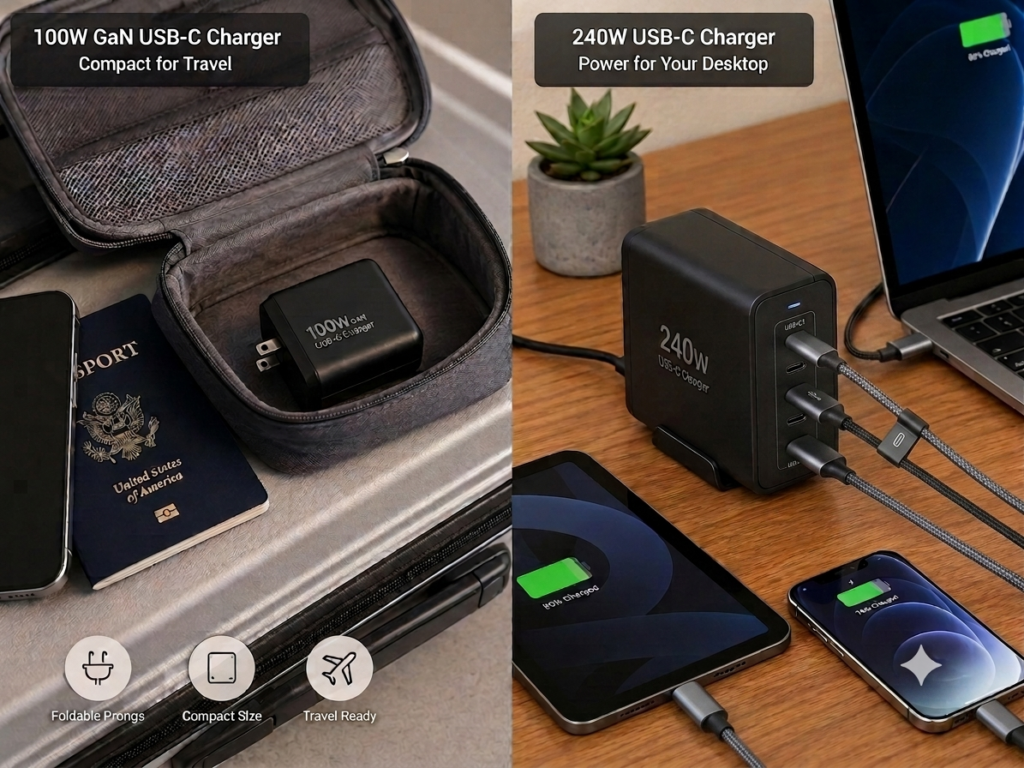
If you often travel for business or commute with it, prioritize a 100W GaN charger, which is small in size and light in weight, more convenient to carry, and can also cover the vast majority of mobile office needs.
The most practical hybrid solution is: Always keep a 240W EPR cable, put a 240W charger at home/office, and bring a small 100W charger when traveling — both sides can use it, and you do not have to switch cables back and forth. If you need to bring multiple devices such as a laptop, tablet, phone, camera, and handheld console on a business trip, a high-power multi-port 240W charger may save more space than bringing several small chargers.
Purchasing Decision Steps and Checklist
After understanding all this, finally let’s talk about how to choose. We will give you a clear decision-making process and checklist, just follow it, no need to hesitate.
Four Steps to Choose the Right Charger for You
Step 1: First Confirm the Maximum PD Power of All Commonly Used Devices
List the devices you often charge: phones, tablets, laptops, handheld consoles, docking stations, etc., then find the highest USB PD input power among them — note that it is USB PD input power, not the total power consumption of the device, nor the original adapter power. Some original adapters use private protocols, so the PD input may be lower.
- If the maximum power ≤ 100W: A 100W charger is usually sufficient, no need to spend extra money on 240W;
- If any device explicitly supports PD 3.1 EPR, or has a PD input exceeding 100W: then consider 140W, 180W, or 240W chargers.
Step 2: Determine Whether You Need Simultaneous Fast Charging for Multiple Devices
- If you only charge one device at a time: just match the maximum input power of that device;
- If you often charge multiple devices at the same time: estimate the total power of commonly used combinations. For example, laptop 65W + tablet 30W + phone 20W totals 115W, then a 100W multi-port charger will split power and slow down, and the 240W experience will be much better.
The key points to check are: what the single-port peak power is, how the power is distributed when two/three ports are used together, whether charging stops when plugging or unplugging new devices, and which port is the highest power port.
Step 3: Combine with Usage Scenarios and Portability Needs
- Frequent commuting, business trips, carrying around: Prioritize 100W GaN chargers, those with small size, light weight, and foldable prongs are more convenient;
- Fixed use at home, dormitory, office: You can choose 100W or 240W multi-port models according to device power requirements;
- For mixed use, the most cost-effective solution is: carry a small 100W charger with you, keep a 240W charger fixed on the desktop, and pair it with a 240W EPR cable for universal use on both sides.
Step 4: Combine with Budget and Future Plans
- Limited budget: Prioritize buying a compliant 100W charger and reliable cable, which is enough to meet the vast majority of daily needs;
- Sufficient budget, and already have high-power devices that support EPR: directly choose a 240W charger that supports PD 3.1 EPR;
- Plan to replace with a high-performance laptop in the next 1-2 years: You can buy a 240W EPR cable first, and upgrade the charger after replacing the device. This way it can be used now, and you will not have to replace the cable later;
- It is not recommended to blindly buy 240W just for “seeming faster”, because if the device does not support EPR, it will not be faster after buying, it is a pure waste of money.
Practical Combination Recommendations for Different User Groups
You can directly find the one that fits you:
- Users who mainly use phones/tablets: 65W or 100W multi-port charger + compliant 100W C-to-C cable, completely sufficient;
- Thin-and-light laptop users: 100W GaN charger + 100W or 240W cable, sufficient for daily use. Buying a 240W cable can be used when you replace devices later;
- High-performance laptop users: After confirming the device supports PD 3.1 EPR, buy a 240W PD 3.1 EPR charger + 240W EPR cable;
- Multi-device desktop users: 240W multi-port charger + at least one 240W EPR cable (for laptop use) + several 100W cables (for other devices);
- Conservative long-term universal solution: 100W charger + 240W EPR cable, sufficient for now, and the cable will not hold you back when you upgrade the charger later.
Pre-Purchase Checklist (Check According to This, You Won’t Fall Into Pitfalls)
Charger Check
- Whether it supports USB PD, what the maximum single-port output power is;
- Whether it supports PD 3.1 EPR, whether it has 28V/36V/48V output gears;
- What the power distribution rule is when multiple ports are used at the same time;
- Whether it supports 100-240V wide voltage (adaptable to power grids of different countries, overseas users should pay special attention);
- Whether it has the safety certification of the region (such as UL, CE, UKCA, etc.);
- Whether the plug specification matches the socket of the region of use (such as US standard, EU standard, UK standard).
Cable Check
- Whether it is a USB-C to USB-C cable (USB-A to USB-C cables cannot handle high power);
- Whether it is clearly marked with power level (100W or 240W);
- Whether the 100W cable has an E-Marker chip;
- Whether the 240W cable is clearly marked with EPR, PD 3.1, or 48V/5A;
- Whether the length is suitable for the usage scenario;
- Whether the brand and parameters are clear, avoid buying unbranded, uncertified products;
- Try not to use with unknown adapters or magnetic connectors.
Device Check
- Whether the device supports USB PD input;
- What the maximum input power is;
- Which USB-C port supports charging, whether it supports EPR;
- Whether there is a battery protection mode that limits charging power;
- Whether the original power supply is required to achieve full performance.
Usage Environment Check
- Whether it is used in a high-temperature environment for a long time;
- Whether the socket is crowded, whether the charger size will block adjacent sockets;
- Whether desktop cable management is needed;
- Whether it is often taken on planes or used for business trips (ordinary wall chargers usually do not contain lithium batteries, and carry restrictions are generally fewer than power banks; but you still need to confirm the destination plug specification, input voltage, as well as the security check requirements of airlines and airports. Power banks or portable power stations with batteries shall be judged according to relevant rules separately).
Final Summary: After Reading This Article, You Should Be Able to Judge These 4 Things
- Whether you need 240W yourself: If the maximum PD input of your devices ≤ 100W, 100W is sufficient; if you have high-power devices that support EPR, or the total demand for simultaneous multi-device charging is very high, 240W is valuable.
- Whether the cable you have can support high power: Do not assume unmarked cables support 100W or 240W; those marked 100W/20V 5A are only suitable for 100W SPR, not for 240W EPR; those marked 240W/PD 3.1/EPR/48V 5A are real 240W high-power cables.
- Which link is causing slow charging: Troubleshoot in the order of “device → charger → cable → multi-port power split → temperature/battery level/load”. The actual power is the result of negotiation among the three, it is not necessarily faster just because the charger has a higher upper limit.
- How to choose in the end: If you mainly use phones and tablets, no need to chase 240W; if you mainly use thin-and-light laptops, prioritize 100W, and can pair with a 240W cable for long-term universal use; if you mainly use high-performance laptops or high-power docking stations, confirm EPR support first before buying 240W; for desktop multi-device use, choose 240W multi-port, for carrying around, choose 100W for more portability.