
If you frequently travel for business or commute, you’ve most likely had this frustration: your bag is stuffed with three chargers for your phone, tablet, and laptop — heavy and space-consuming, and the wall outlets in hotels are so cramped you can’t plug them all in. In recent years, you’ve probably heard the term “gallium nitride (GaN) charger” often. Marketing claims they’re smaller, faster, and safer, but others say it’s an overpriced gimmick, feels hotter to the touch, and is expensive.
What exactly is gallium nitride? How is it different from ordinary chargers? Are its advantages real, or just marketing hype? What limitations are rarely talked about? In this article, we’ll break everything down from basic concepts to buying tips and pitfalls to avoid, in plain language anyone can understand, to help you decide if it’s worth buying for you.
1. First Things First: What Is a GaN Charger?
People who are new to this type of product often confuse materials, ports, and protocols. Let’s first clarify the most basic concepts.
Plain-Language Definition
Gallium nitride’s English abbreviation is GaN, and its full name is Gallium Nitride. It is a semiconductor material — it is not a brand name, nor is it a fast charging protocol.
A GaN charger is a charger whose key internal power switching devices use GaN material. Its core function is exactly the same as that of ordinary chargers: it converts alternating current (AC) from wall outlets into direct current (DC) that can be used by phones, tablets, and computers.
There is no difference in function between it and traditional silicon-based chargers. The differences mainly lie in the internal power conversion components, switching frequency, power density, and heat dissipation design. A special reminder here: USB-C ports, USB-A ports, and fast charging protocols like PD/PPS are not the same as GaN. Many non-GaN ordinary chargers also support fast charging. Do not confuse ports, protocols, and materials.
Common Product Form Factors
GaN chargers vary widely in appearance and positioning. There are several common types to help you first establish a general classification concept:
- Single-port USB-C fast charger: Common power ratings are 30W, 45W, and 65W. Suitable for charging single devices like phones, tablets, and thin-and-light laptops, with the best portability.
- Multi-port wall-plug charger: Common configurations are 2C1A, 3C1A, and 4C. Plugged into the wall, it can charge multiple devices at the same time, and is currently the most mainstream model for home/business travel use.
- Desktop charger: Common power ratings are 100W, 140W, or even 200W and above. They are relatively larger in size, but have more ports and a more stable center of gravity, suitable for use on a fixed desk.
- Laptop replacement adapter: Common power ratings are 65W, 100W, and 140W. Their main selling point is replacing bulky original laptop chargers. When buying, focus on the maximum single-port power and protocol compatibility.
Core Terms Beginners Must Know
Understand these basic terms before looking at specifications, and you won’t be confused by the content later:
- Power (W): Refers to the maximum energy output capacity of the charger. Remember this especially: devices only draw power according to their own supported power level, they won’t charge infinitely faster just because the charger has a higher wattage.
- Voltage (V) / Current (A): The calculation of power is very simple: “Power = Voltage × Current”. For example, 20V × 5A = 100W, which is a common 100W PD charging level.
- Conversion Efficiency: Refers to the ratio of AC from the outlet converted to usable DC for the device. The lower the loss, the less electricity is wasted, and usually the less heat is generated.
- Power Density: Refers to how much power can be output per unit volume, commonly expressed in W/cm³. The higher the value, usually the smaller the volume at the same power, but it must also be considered together with temperature rise and reliability; you cannot pursue density alone.
- USB PD: The most common universal fast charging protocol on USB-C ports. iPhones, iPads, MacBooks, most Android phones and tablets support PD charging to varying degrees.
- PPS: A programmable power supply capability within the USB PD protocol. Android phones from brands like Samsung and Google often rely on PPS for better fast charging performance.
- E-Marker Cable: A USB-C cable with a built-in electronic marker chip that can inform the charger and device of its own supported power capacity. This is especially important for high-power charging of 100W and above.
When we talk about specifications and purchasing later, we will further elaborate on the practical use of these concepts.
Easily Confused Basic Concepts
People who are just starting to learn about GaN often have several preconceived misconceptions. Let’s clarify them in advance to avoid going astray when reading the content later:
First, GaN is not equivalent to fast charging. Traditional silicon-based chargers can also support fast charging. Charging speed is jointly determined by the device, protocol, cable, temperature, and battery level stage, and has no direct relationship with whether GaN material is used.
Second, not all GaN chargers are the same. Chip solutions, controllers, transformers, capacitors, heat dissipation design, and electromagnetic compatibility design all affect the final user experience. Expensive and cheap GaN chargers can be very different.
Third, smaller is not always better. If you compress heat dissipation space to pursue extreme compactness, problems like hotter casing, cramped ports, unstable wall plug fit, and automatic power reduction under long-term full load may occur. Volume must be considered together with stability and heat dissipation.
Fourth, third-party GaN chargers are not necessarily better than original ones. For phones with proprietary fast charging protocols and some laptops with special requirements, only original or officially authorized chargers may be able to reach full speed, and third-party GaN chargers may not achieve the best charging effect.
2. Plain-Language Principle: Why GaN Chargers Can Be Made Smaller
Many people only know that GaN chargers are smaller, but don’t know why they can be made smaller — in fact, the core logic is not complicated, and you don’t need to understand circuits to get it.
A Charger Is Essentially a “High-Speed Power Converter”
The wall outlets we use daily supply alternating current (AC), while devices like phones, tablets, and laptops use direct current (DC). The job of a charger is to convert AC into DC that the device can use.
This conversion process relies on the high-frequency “on/off” action of internal power switching devices to adjust the voltage to an appropriate value. The higher the switching frequency, the smaller the volume of components used for voltage transformation and energy storage, such as transformers, inductors, and capacitors — just like transferring water: high-frequency switching is equivalent to pouring quickly back and forth with a small cup, while low-frequency switching requires pouring slowly with a large cup, and the volume of the cups is very different.
At the same time, if the loss during the conversion process is lower, less heat is generated, and the space originally used for heat dissipation can also be compressed. Combined, these two factors allow chargers to be made smaller and lighter at the same power, which is what we often call “higher power density”.
GaN’s Material Advantages Over Silicon Are Not “Magic”
The core reason why gallium nitride can achieve higher power density is that as a semiconductor material, it has several natural characteristics compared to traditional silicon-based power devices:
First, it can support higher switching frequencies, leaving room for shrinking magnetic components and energy storage components;
Second, it has lower switching losses, meaning less electrical energy is wasted during each “on/off” process, and this advantage is especially obvious under high-frequency operation;
Third, with a reasonable design, its conduction loss can also be reduced, further cutting down heat generation.
But it must be specially noted: these advantages are not automatically obtained just by pasting a “GaN” label. Whether high efficiency and small size can ultimately be achieved depends on the supporting controller, drive circuit, PCB layout, magnetic component selection, synchronous rectification design, and heat dissipation design — this is also why, even though they are all called GaN chargers, different brands can have very different volumes, heat generation, and stability. The higher price is not just for the material itself, but for the overall design capability.
High Frequencies Also Bring New Design Challenges
Higher switching frequency is not all benefits; it also raises the design threshold:
The higher the frequency, the harder it is to control electromagnetic interference (EMI). Better filter circuits, shielding design, more reasonable PCB layout, and passing stricter certification tests are all required, all of which increase costs.
If the design is inadequate, various problems may occur: for example, high-pitched whine or current noise caused by vibration of transformers and inductors, excessive temperature triggering power reduction at full load, or even unstable fast charging protocol compatibility and frequent charging interruptions.
In other words, a high-quality GaN charger should be the comprehensive result of “small size, high efficiency, low temperature rise, low noise, and stable protocol”, not just a matter of making the volume small.
Which Power Ranges Best Show GaN’s Value
The advantages of GaN are not equally obvious across all power ranges, and the cost-effectiveness varies greatly between different power ranges:
- Below 20W: Traditional silicon-based chargers can already be made very small and very cheap. GaN’s size advantage is almost unnoticeable, and cost-effectiveness is usually low.
- 30W-45W: GaN’s portability advantage begins to show. Suitable for charging light-load devices like phones, tablets, and Switch. It saves more space to carry around than ordinary silicon-based chargers.
- 65W-100W: This is the range where ordinary users can most easily perceive the difference. It can power thin-and-light laptops and also support multi-port designs, with the most obvious value of replacing several original chargers.
- 140W and above: You can’t just look at the “GaN” label. You also need to check whether it supports the PD 3.1 EPR standard, whether it has corresponding 28V/36V/48V voltage levels, whether the cable is compatible, and whether heat dissipation and multi-port power distribution are reasonable. These factors have a greater impact on experience than the material itself.
3. Core Advantages: What Ordinary Users Can Directly Feel
Having talked about so many principles, returning to the real experience of ordinary users, the advantages of GaN chargers are real. But note: all comparisons are based on the premise of same power, same number of ports, same brand tier, and formal compliant products. Comparing low-quality silicon-based chargers with high-quality GaN chargers, or comparing single-port with multi-port chargers, is meaningless.
Smaller and Lighter at the Same Power
The first most intuitive advantage is smaller volume and lighter weight under the same conditions.
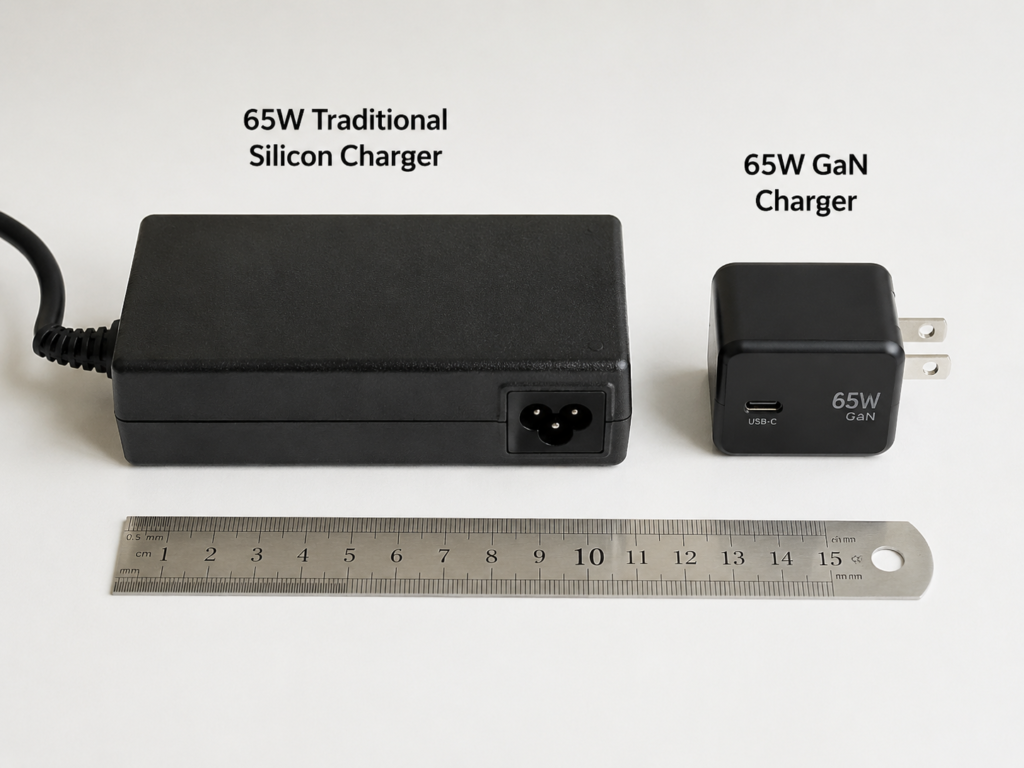
This advantage is most obvious in the 65W-100W range: previously you might have to carry three chargers for your phone, tablet, and laptop, but now a single 65W or 100W multi-port GaN charger can handle it all, taking up almost no space in your commuter bag or suitcase. For example, some 65W dual-port GaN chargers are significantly smaller and lighter than old-fashioned 65W laptop adapters, with some models nearly halved in volume or weight; but the specific difference depends on the brand, number of ports, plug structure, whether it comes with a cable, and heat dissipation redundancy. Based on the premise of same brand tier, formal products, and non-extreme component design, the actual measured size and weight shall prevail. Carrying it for daily commuting is much easier.
Of course there are exceptions: if it is a multi-port design, desktop model, metal casing, or a GaN charger with particularly generous components (for example, using large capacitors to improve stability), the volume may not be small. You can’t judge size just by whether it’s GaN.
Easier to Achieve High Power Density
The core value of GaN is actually not simply making power higher, but achieving relatively high power output in a relatively small volume, which is what we mentioned earlier as “high power density”.
For ordinary users, the benefits of high power density are very tangible: it takes up less space on a power strip, won’t block adjacent outlets; it’s lighter to carry out; it can also fit into the cramped small outlets found in hotels and airports.
When judging, don’t just look at the “GaN” wording on the packaging. Look at the actual size, weight, number of ports, and maximum single-port power. Calculating it yourself or looking at third-party tested power density is more reliable than looking at marketing claims.
More Likely to Reduce Heat and Power Reduction Risk Under High Load
The third advantage is that during continuous high-load output, GaN chargers are more likely to reduce the risk of heat generation and power reduction.
Because GaN devices have lower losses, less heat is generated internally. This advantage is especially obvious in scenarios where a laptop is charged continuously at 65W or above.
But there is a point that is easily misunderstood: the casing may not feel cooler to the touch. Because GaN chargers are small in size, their heat dissipation area is also small, and heat is more concentrated. So they may feel hotter than larger silicon-based chargers, which is normal and does not mean they are bad.
So how do you judge if heat generation is normal? Don’t just rely on feel. Check if there is any strange odor, any deformation, whether it frequently interrupts charging, or whether it significantly reduces power. It is normal for the casing of a formal product to heat up at full load. As long as there are no these abnormal situations, there is no need to worry too much.
If you want a more advanced judgment, more important than the casing temperature is its continuous output capability, temperature control strategy, and whether it frequently slows down due to high temperature.
More Suitable for Multi-Port High-Power Integration
The fourth advantage is that it is easier to implement multi-port high-power integrated design.
Because GaN devices save internal space, manufacturers have room to include more ports. That’s why most current multi-port high-power chargers use GaN solutions. With common configurations like 2C1A, 3C1A, or even 4C, one charger can charge a phone, tablet, laptop, and earbuds at the same time. You don’t need to carry a bunch of chargers when going out, which saves a lot of trouble.
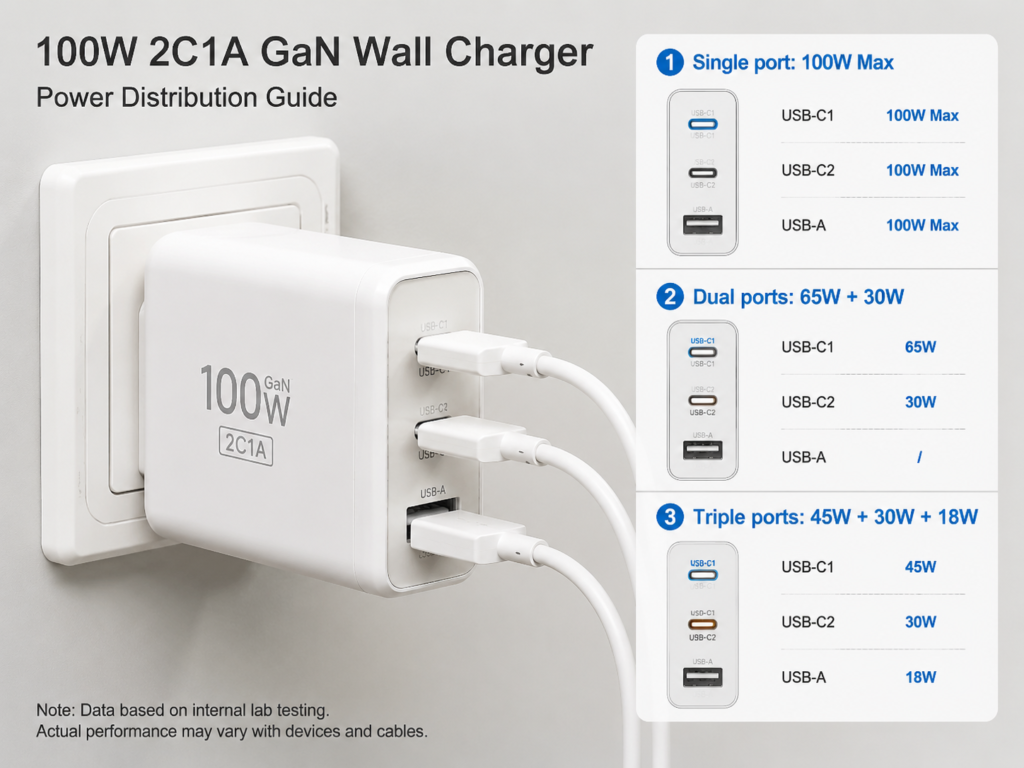
A common sense must be clarified here in advance: when a multi-port charger is used simultaneously, the total power is shared by all ports, and the maximum power of a single port will decrease. This is a normal design, not a quality problem. For example, a multi-port charger rated at 100W may output 100W when using a single port; when using two ports simultaneously, it may be 65W + 30W; when using three ports simultaneously, it may be 45W + 30W + 18W. The specific details depend on the product’s power distribution table, so be sure to check carefully before buying.
More Suitable for Travel and Mobile Office
The fifth advantage is that it is more suitable for travel and mobile office.
Most portable GaN chargers now support a wide voltage range of 100-240V, suitable for international travel, no need to buy a separate transformer — but note that wide voltage is not unique to GaN; many ordinary silicon-based chargers also support it. The specific input range depends on the product nameplate.
In addition, foldable prongs, compact shape, and lighter weight are all very travel-friendly. But it should also be reminded: if it is a high-power wall-plug GaN charger, when plugged into loose foreign outlets with an adapter plug, it may easily sag or even fall off due to its heavy center of gravity. Pay attention to the weight and plug stability when buying.
4. Objective Limitations: The Costs Marketing Often Ignores
Having talked about so many real advantages, it does not mean that GaN chargers are perfect. Many marketing campaigns only amplify the benefits, do not proactively mention their limitations, and even cover up the costs in design and cost. We have sorted out the objective limitations that ordinary users can perceive, to help you make a more rational judgment and avoid disappointment after buying.
4.1 Usually Higher Price for the Same Specifications
Under the premise of the same power, same number of ports, same brand tier, and same certification level, GaN chargers are usually more expensive than traditional silicon-based chargers. The reason behind this is very realistic: the cost of GaN power devices themselves is higher than that of silicon-based devices. Supporting control chips, high-frequency circuit design, heat dissipation solutions under compact layout, as well as more demanding EMI filtering and certification tests, all drive up the overall cost.
However, the GaN industry chain has matured rapidly in recent years, and prices have dropped a lot. Especially in the medium and high power range above 65W, the price difference with silicon-based products is narrowing, and cost-effectiveness is getting higher and higher.
It should also be reminded here: if your budget is limited and you can only buy unbranded, uncertified no-name GaN chargers at the same price, it is safer to choose a formal brand silicon-based charger — at least safety and quality control are guaranteed, and you won’t sacrifice reliability just for a GaN label.
4.2 Low Cost-Effectiveness in Low Power Ranges
The size and efficiency advantages of GaN only become obvious at a certain power range. For phone chargers below 20W, traditional silicon-based ones can already be made very small and very cheap. The size difference of GaN is almost imperceptible, but the price is much higher, so cost-effectiveness is very low.
If you only charge your phone at around 20W fast or slow charge in a fixed place like the bedside or office, there is no need to spend extra money for the GaN label. Generally speaking, the portability and multi-port value of GaN will truly be reflected in power ranges above 30W, especially above 65W.
4.3 Small Size May Make It Feel Hotter to the Touch
GaN devices have lower losses, and the total internal heat generation is usually less than that of silicon-based chargers of the same power. But because their volume is smaller, the heat dissipation area is also reduced, and heat is more concentrated. So the casing may feel hotter than that of a larger silicon-based charger — this is a normal physical phenomenon and does not mean poor quality.
It is common for formal products to have a warm or even hot casing when operating at high power full load. But you should be alert if the following situations occur: burning smell, casing deformation, obviously too hot to touch, frequent charging interruptions, abnormal power reduction, or abnormal heating of the outlet or cable. In these cases, stop using it immediately and replace or return it in time.
If you need to supply full-load power to a laptop for a long time (for example, 8 hours of plugged-in office work every day), don’t blindly pursue extreme small size. Prioritize models with good heat dissipation reputation and stable continuous output, which are more reassuring to use.
4.4 May Have Slight Whine or Current Noise
Some GaN chargers may produce slight current noise or whine when working. This mainly comes from the vibration of transformers, inductors, or capacitors during high-frequency switching operation. It is not a problem unique to GaN — traditional silicon-based chargers may also have whine, but GaN’s high-frequency compact design makes this sound more noticeable to users.
How to judge if it’s acceptable? If the slight sound can only be heard when close to the charger in a quiet environment, and charging is stable, no strange odor, no abnormal heat generation, it usually does not affect normal use and can be used with confidence. But if the sound is clearly audible from more than half a meter away, affects sleep when placed by the bedside at night, or is accompanied by charging interruptions and abnormal heat generation, it is an abnormal situation, and return or exchange is recommended.
4.5 Multi-Port Use Involves Renegotiation and Brief Charging Interruptions
When a new device is plugged in or unplugged from a multi-port GaN charger, it will redistribute power to each port. Already connected devices may experience a brief pause in charging before resuming — this is the normal working logic of most multi-port PD chargers, not a quality problem.
But this brief charging interruption may have an impact on some devices that require continuous and stable power supply: for example, external hard drives that are reading and writing data, running handheld game consoles, capture devices for live streaming, mini PCs, etc. Frequent charging interruptions may lead to data loss or game interruption. If you often need to power such devices, it is recommended to choose models with stable power distribution logic, minimal impact from plugging/unplugging, and clear reputation or measured performance. Also, try to avoid frequently plugging and unplugging devices from other ports while important devices are working.
4.6 Compatibility Is Limited by Protocols
GaN is just a material, it does not mean it is compatible with all fast charging protocols. Charging compatibility still depends on the protocols and power levels supported by the product.
For example, for iPhones, iPads, and MacBooks, it mainly depends on the USB PD protocol; for Android phones from brands like Samsung and Google, it also depends on whether there is a corresponding PPS level to achieve full fast charging; for some domestic Android phones with high-power proprietary fast charging like 120W and 150W, only original or officially authorized chargers can reach full speed, and ordinary PD GaN chargers may only run at a basic power of 18W-30W.
Some laptops also have specific voltage level requirements, such as 20V/3.25A, 20V/5A, or the 28V PD 3.1 EPR level. Be sure to check carefully whether the charger’s output levels match your device before buying, otherwise no matter how high the power is, it won’t be usable.
4.7 Wide Variation in Safety and Quality
Many marketing campaigns say “GaN is safer”, but in fact, safety has no direct relationship with the material. What really determines safety is isolation design, protection circuits, component materials, heat dissipation design, flame-retardant casing, and production quality control.
The quality of GaN chargers on the market varies greatly. Common cost-cutting points in some low-cost no-name brands include: using inferior capacitors, omitting surge protection circuits, rough temperature control strategies, falsely labeled power, failing EMI electromagnetic compatibility tests, and substandard flame-retardant casings. All of these directly affect usage safety and lifespan. There are even some low-cost products that only print GaN on the packaging, with no GaN power devices used inside at all — pure false advertising.
In addition, in pursuit of small size, GaN chargers have very high internal integration and a compact structure. Ordinary users cannot repair them by themselves at all. Once damaged, water-damaged, cracked from dropping, or abnormally hot, they usually can only be replaced directly. Do not attempt to disassemble and repair them yourself to avoid danger.
4.8 Environmental Limits Cannot Be Ignored
Whether it’s a GaN or silicon-based charger, its working performance is affected by the environment: low temperature, high temperature, humidity, and high altitude will all change the charging efficiency, heat generation performance, and lifespan of the charger, cable, and device battery. Don’t take “whether it can be used in extremely cold environments” as the core difference between GaN and silicon-based.
If you need to use it for a long time outdoors, in garages, construction sites, humid areas, or high-altitude areas, don’t just look at whether it’s GaN. First check the operating temperature and humidity ranges marked on the product nameplate or manual, as well as the corresponding protection and certification information. Prioritize formal products with clear environmental parameter descriptions and a reputation for real testing. Most consumer-grade chargers are designed for indoor daily use, and for extreme environments, you should choose products with corresponding positioning.
5. Common Cognitive Misconceptions: Don’t Be Misled by Marketing Talk
Having finished talking about advantages and limitations, let’s sort out a few of the most common cognitive misconceptions, many of which are deliberately guided by marketing talk. Don’t be misled.
Misconception 1: GaN Always Charges Faster
The truth is: charging speed is mainly determined by the device’s maximum input power, supported protocols, cable, battery temperature, and current battery level stage, and has no direct relationship with whether GaN is used.
For example: charging an iPhone with a 20W GaN charger is almost the same speed as charging with a 20W formal silicon-based PD charger; it won’t be faster just because it’s GaN.
So to judge charging speed, look at the output levels, PD/PPS protocols, and the power supported by the device, not just whether there is a GaN logo.
Misconception 2: GaN Doesn’t Generate Heat At All
The truth is: all chargers generate heat when working. GaN just has a better chance of improving efficiency and reducing heat generation due to lower losses, but it is not completely heat-free.
Especially small-sized GaN chargers, because heat is concentrated, the casing may feel hotter instead, which is normal.
To judge if there is a problem with heat generation, don’t just rely on feel. Check if there is burning smell, deformation, frequent charging interruptions, or abnormal power reduction. These indicators are more valuable than “feels hot”.
Misconception 3: GaN Is Safer and Doesn’t Damage Batteries
The truth is: the safety of a charger depends on certification, protection design, and workmanship; battery health is mainly determined by the device’s battery management system (BMS), battery temperature, and charging strategy.
As long as it is a compliant third-party charger, whether it’s GaN or silicon-based, it will not cause additional damage to the battery. What really damages batteries a lot is using the device while charging in a high-temperature environment, because high temperature accelerates battery aging, which has nothing to do with the material of the charger.
Misconception 4: Total Multi-Port Power Means Every Port Can Run at Full Speed
The truth is: total power is the combined output upper limit of all ports. When multiple ports are used simultaneously, power is distributed according to preset rules, and it is impossible for every port to reach maximum power.
For example, a 2C1A charger rated at 100W may reach 100W when using a single port; when using two ports simultaneously, it’s 65W + 30W; when using three ports simultaneously, it’s 45W + 30W + 18W. This is normal.
So when buying a multi-port charger, be sure to look at the detailed power distribution table, not just the maximum wattage on the packaging. Otherwise, you’ll find that charging speed is very slow when charging multiple devices at the same time after you buy it.
Misconception 5: Higher Wattage Means Better Value for Money
The truth is: devices only draw power according to their own supported power level. If you use a 140W charger to charge a phone that only supports 27W, it will only run at 27W, not faster, and you’ll just waste extra money.
A reasonable power choice should match your device: around 30W is enough for phones, 30W-45W for tablets, 65W for thin-and-light laptops, 100W-140W for high-performance laptops, and users with multiple devices can consider 100W and above.
When budget is limited, buying a formal product that matches your needs is far more important than blindly chasing high wattage.
Misconception 6: All Products Labeled GaN Are Real GaN
The truth is: there are indeed some low-cost no-name brands on the market that falsely label GaN. Ordinary users can’t take them apart to check, so they are easily deceived.
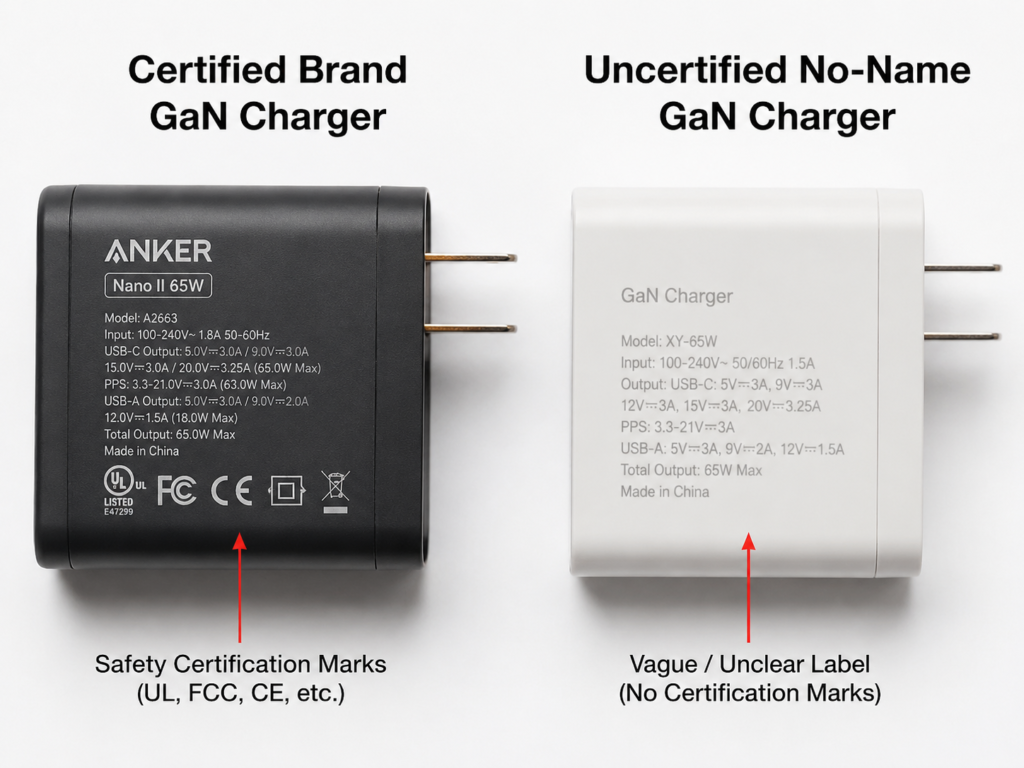
A simple judgment method: if the price is abnormally low, there is no safety certification, no brand official website, the parameter table is vaguely written, and the volume is no different from traditional silicon-based chargers, then be cautious — it is most likely fake.
Also, there’s no need to obsess over “pure GaN”. For consumer-grade chargers, as long as the key power switching devices use GaN, it can be called a GaN charger. There’s no need to pursue all components being GaN, which is neither realistic nor useful.
Misconception 7: Third-Party GaN Is Always Better Than Original
The truth is: some phones, gaming laptops, and older laptops have their own proprietary fast charging protocols or special voltage requirements. Third-party PD GaN chargers may not be able to reach full speed.
For example, some phones with 120W proprietary fast charging may only charge at around 18W-30W with a regular 65W PD GaN charger, much slower than the original.
So before buying, first find out whether your device supports PD, PPS, or proprietary fast charging, then choose the corresponding charger. Don’t blindly think that third-party GaN is necessarily better.
6. Intermediate Level-Up: How to Fairly Compare GaN and Silicon-Based Chargers
If you want to be a bit more professional and judge the quality of two chargers yourself, you need to learn to compare fairly, otherwise it’s easy to draw wrong conclusions. Below are a few correct standards for comparison, which are sufficient for daily purchasing.
Compare Size/Weight: Must Be Same Power and Same Number of Ports
When comparing size and weight, it only makes sense for products with the same power, same number of ports, same plug structure, same brand tier, and same certification level.
For example, comparing a 65W single-port GaN charger with a 65W three-port silicon-based charger and then saying GaN is smaller is completely unfair, because the number of ports is different, and the internal components required are also different.
If you want a more precise comparison, you can look at power density (W/cm³). The higher the value, the higher the power per unit volume, and the better the portability. But you also need to look at temperature rise, whether it reduces power, and how stable it is; you can’t just look at density.
Compare Charging Speed: Look at Device and Protocol
When comparing charging speed, you need to control variables: same device, same cable, same battery level range, same ambient temperature, same protocol. Only then will the comparison result be accurate.
For example, if you use a 100W GaN charger to charge a phone that only supports 20W, and then compare the speed with a 20W silicon-based charger, the result will definitely be the same. You can’t say GaN is useless because of that.
Another common phenomenon: when the battery level reaches around 80%, the charging speed will drop significantly. This is the device’s battery protection strategy, not that the charger is getting worse. This happens with both GaN and silicon-based chargers.
Compare Heat Generation: Unified Environment and Load
When comparing heat generation, you also need to unify the environment and load: same room temperature, same ventilation conditions, same output power, same test duration. Only then is the comparison fair.
For example, comparing the temperature of a fully loaded GaN charger in summer with a lightly loaded silicon-based charger in winter, the GaN will definitely be hotter. This has no reference value at all.
When comparing heat generation, don’t just look at the casing temperature. Also check if it drops power, if it interrupts charging, if there is any strange odor or abnormal sound. These are more important than just the temperature value.
Compare Efficiency: Can’t Just Look at Material
When comparing conversion efficiency, you can’t just look at whether it’s GaN material.
GaN is indeed beneficial for improving efficiency, but the final efficiency is jointly determined by many factors such as circuit topology, controller, synchronous rectification, magnetic components, load conditions, and so on. For example, some GaN chargers have high full-load efficiency, but their light-load efficiency is not as good as good silicon-based ones; standby power consumption is also not determined by GaN alone.
If there is energy efficiency certification, or third-party measured efficiency data, it will be more reliable than just “GaN” marketing claims.
Compare Safety: Look at Certification and Product Consistency
When comparing safety, look at certification and product consistency, not just the material.
Safety certifications vary by region: in North America, focus on safety certifications like UL and ETL; FCC is an electromagnetic compatibility certification, not a safety certification; CE in the EU is a compliance mark for entering the EU market, which in many cases takes the form of a manufacturer’s declaration of conformity, and should not be simply equated with third-party safety certification. When purchasing, you should also judge based on brand information, test reports, nameplate information, local regulations of the sales region, and after-sales channels; the UK uses UKCA, Japan uses PSE, Australia uses RCM — each region has different requirements.
Consumer electronics power supplies usually comply with safety standards like IEC/UL 62368-1, depending on local regulatory requirements. In addition, the information on the product nameplate, official website, packaging, and in the certification database should be as consistent as possible. If they don’t match, be careful.
Compare Cost-Effectiveness: Combine with Scenarios, Not Just Calculate Price Per Watt
When comparing cost-effectiveness, you need to combine with usage scenarios, not just calculate how much per watt.
For example, if you only charge your phone at a fixed bedside location, a silicon-based charger may be more cost-effective, because it’s cheap, and you don’t need to take it out, so a larger size doesn’t matter;
If you commute or travel for business frequently, then size and weight have practical value, and even if GaN is a bit more expensive, it’s more worth it;
If you have many devices to charge at the same time, the number of ports, power distribution, and maximum single-port power are much more important than the price per watt;
If it’s for long-term high-load use, such as using a laptop plugged in for 8 hours a day, then brand, heat dissipation, and stability are far more important than extreme small size.
7. Must-Read Before Buying: Quickly Understand GaN Charger Specifications
Many people get a headache when they see a bunch of numbers on the specification sheet. In fact, ordinary users don’t need to understand all specifications. They only need to prioritize checking six things: maximum single-port power, total power, PD/PPS/EPR protocol support, power distribution table, cable compatibility, and local safety certification. Below we explain the practical meaning of each specification one by one.
Total Power and Maximum Single-Port Power
Total power is the maximum power that all ports can output combined, which determines whether you can charge multiple devices at the same time.
Maximum single-port power is the maximum power that a single port can output, which determines whether it can supply full-speed power to your laptop. For example, if your thin-and-light laptop needs 65W, then at least one USB-C port must have a maximum single-port power of 65W; if it’s a 100W laptop, then not only must the single port support 100W (that is, 20V/5A), but you also need to pair it with an E-Marker cable that supports 5A.
Output Levels and PDO/PPS
Common PD fixed levels are 5V, 9V, 12V, 15V, and 20V. These fixed levels are called PDO (Power Delivery Object) in the PD protocol. You can think of PDO as a list that the charger sends to the device in the PD protocol saying “which fixed voltage/current combinations I can provide”. The device will negotiate a suitable output from the levels supported by both sides. General PD devices can use these fixed levels.
PPS levels are adjustable, common ones are 3.3V-11V, 3.3V-21V. Android phones from Samsung, Google, and other brands need PPS levels to get better fast charging performance.
When buying, don’t just look at the maximum power. Check whether the charger has the voltage and current levels your device needs. Otherwise, even if the power is sufficient, it may not reach full speed.
PD 3.1 EPR High-Power Standard
100W and below are usually still within the SPR power range of USB PD, and common products may be implemented according to PD 3.0 or PD 3.1 SPR levels; below 60W, most are 20V/3A or lower, and formal 3A USB-C cables are usually sufficient; from above 60W to 100W, a USB-C cable that supports 5A/100W and has an E-Marker is usually required. Higher powers like 140W, 180W, 240W usually require PD 3.1 EPR and involve higher voltage levels such as 28V, 36V, and 48V.
For charging at 140W and above, not only must the charger support PD 3.1 EPR, but your device and cable must also support it, otherwise it won’t reach full power.
Port Types and Power Distribution Table
Port types are simple: USB-C is suitable for new devices like new phones, tablets, and laptops; USB-A is suitable for old devices, earbuds, watches, and small accessories.
The key is the power distribution table, which is the output power under different port combinations. Be sure to check whether your commonly used combination can be satisfied. For example, if you often charge a 65W laptop and a 25W phone at the same time, then you need to check whether the dual-port simultaneous output can reach 65W + 25W, otherwise one device will charge very slowly.
In addition, when plugging or unplugging devices from a multi-port charger, there will be a brief power renegotiation and charging interruption. This is a normal phenomenon, don’t think it’s a quality problem.
Cable Compatibility
Many people buy high-power chargers but use old cables, and as a result, they can’t reach full speed, thinking it’s a problem with the charger, but actually the cable is wrong.
Simple compatibility rules:
- Below 60W: Most formal USB-C to USB-C cables can be used, but it’s best to check the labeling on the cable to avoid buying inferior cables.
- 100W: Requires an E-Marker cable that supports 5A or 100W, otherwise it can only run at a maximum of 60W.
- 140W and above: Requires cables that support PD 3.1 EPR. 240W cables are usually backward compatible with lower powers.
Cables that have no markings, are of unknown origin, or heat up significantly during charging must never be used to charge high-power laptops, as they can easily cause danger.
Safety and Certification Check
When buying, be sure to check whether the product has the certifications required by your region, such as UL/ETL and FCC in North America, CE in the EU, UKCA in the UK, PSE in Japan, RCM in Australia, and so on.
Two common misconceptions to note here: FCC is an electromagnetic compatibility certification, not a safety certification; CE is a compliance mark for entering the EU market, which in many cases takes the form of a manufacturer’s declaration of conformity, and should not be simply equated with proof of third-party safety testing. When purchasing, you should make a comprehensive judgment based on brand information, test reports, nameplate information, and local regulations. Don’t be fooled by a bunch of certification marks on the packaging.
In addition, the nameplate of a formal product will definitely be marked with input voltage range, output levels, manufacturer, model, and certification marks. If this information is incomplete, or does not match the official website and packaging, don’t buy it.
Try to choose products with a brand official website, verifiable specifications, and clear after-sales service. Even if they are a bit more expensive, they are reassuring to use.
Workmanship and Usage Experience Details
Although these details do not affect power, they affect the happiness of daily use:
- Plug Prongs: Chargers with foldable prongs are more portable, suitable for taking out; fixed prongs are more stable and less likely to fall off. For high-power chargers, prioritize fixed-prong or desktop models.
- Casing: Must use flame-retardant material, with even gaps, and the port fits firmly without wobbling. These are far more important than flashy appearances.
- Port Spacing: For multi-port chargers, pay attention to the distance between ports. If the spacing is too small, plugging in a thick cable head may block the adjacent port, which is very troublesome to use.
- Desktop or Wall-Plug: Desktop models are more stable, have more ports, and are suitable for use in a fixed place; wall-plug models are more portable, suitable for taking out. Choose according to your own needs.
8. Scenario-Based Decision Making: When to Choose GaN, When to Choose Silicon-Based
Having talked so much, you may still be a bit confused: should you choose GaN or ordinary silicon-based? We’ll divide it directly by scenario, you can just check against your own situation.
Scenarios Where GaN Is Prioritized
If you meet the following situations, prioritize choosing a GaN charger, and the experience improvement will be obvious:
- Frequent business trips, commuting, or travel, requiring you to often take a charger out. The advantages of small size and light weight are very obvious, saving a lot of space in your bag and reducing the burden.
- Have multiple devices that need to be charged at the same time. One multi-port GaN charger can replace several charging heads, no need to carry a bunch of cables and heads, saving a lot of trouble.
- Need to charge a thin-and-light laptop at 65W or above. GaN’s advantages in portability and power density are obvious, much more convenient than the bulky original charger.
- Too many cables on the desk, want to simplify outlets. A multi-port desktop GaN charger of 100W or above can handle all devices with one unit, making the desk much tidier.
- Frequent international travel. Choose a GaN charger with 100-240V wide voltage support marked on the nameplate, paired with a compliant adapter plug, and it can be used in most countries.
Scenarios Where GaN Is Not Necessarily the Best Choice
If you are in the following situations, you don’t necessarily have to choose GaN, ordinary silicon-based may be more suitable:
- Only charge your phone at around 20W, and use it in a fixed place like the bedside or office, no need to take it out. Silicon-based ones are already small and cheap enough, no need to spend extra money.
- Very limited budget, and at the same price you can only buy unbranded no-name GaN chargers. Then it’s better to buy a formal brand silicon-based charger, at least safety and quality are guaranteed.
- Your device relies on proprietary super fast charging, and third-party PD GaN can’t reach full speed. If you pursue the fastest charging speed, it’s more appropriate to buy an original or officially authorized charger.
- Particularly sensitive to nighttime whine, and can’t confirm the noise performance of the product in advance. Then you can prioritize choosing a well-reputed silicon-based charger, or choose a GaN product that supports no-reason return, try it out and return it if it’s not good.
Recommended Power Selection Table
For your quick reference, I have compiled a simple power selection table that you can refer to:
| Usage Scenario | Recommended Power Range | Prioritize GaN? | Key Focus Points |
|---|---|---|---|
| Single phone charging | 20W-30W | No | USB PD protocol, formal safety certification |
| Phone + tablet | 30W-45W | Optional | Dual-port power distribution, portability |
| Thin-and-light laptop + phone | 65W-100W | Yes | Single port 65W+, multi-port power distribution |
| 100W-class high-performance laptop | Around 100W | Yes | 20V/5A output, 5A E-Marker cable compatibility |
| 140W and above high-performance laptop | 140W-240W | Yes | PD 3.1 EPR, EPR cable, device support |
| Multi-device desktop use | 100W-200W | Yes | Number of ports, desktop stability, power distribution |
This table is for reference only, and specific adjustments should be made based on your own devices and usage habits.
Three-Step Purchasing Method
Finally, I’ll teach you a simple three-step purchasing method. Follow this, and you basically won’t buy the wrong one:
Step 1: First list the maximum charging power and supported protocols of all your commonly used devices. For example, some iPhone models can reach a peak charging power of over 20W with a matching PD charger and cable, and the specific value depends on the device model, system version, and ambient temperature; the common charging demand of MacBook Air of different sizes and generations is in the 30W-70W range, and whether 65W or above is needed depends on the official specifications of the specific model; for some Samsung flagship models to reach their rated fast charging power, they need to match the corresponding PPS level and cable, and the supported power varies by model.
Step 2: Determine your most commonly used simultaneous charging combination, for example: thin-and-light laptop 65W + phone 27W + earbuds 5W. Having a total power close to at least 100W is only the first step. You also need to check the power distribution rules for three-port simultaneous output — for example, some 100W three-port chargers have a distribution of 45W + 30W + 18W, then the thin-and-light laptop can’t run at full 65W speed; only when the distribution rule can cover a combination of around 65W + 25W + 5W is it suitable for your needs. Don’t buy just because the total wattage is close.
Step 3: According to your usage scenario, choose a formal brand product with matching single-port power, total power, power distribution, cable, and certification. Don’t just look at the GaN logo and maximum wattage.
9. Real Examples: Judge Whether It’s Worth Buying by Scenario
To give you a better idea, let’s take several common user groups as examples to see how they should choose.
iPhone Users
If you only charge an iPhone, a 20W-30W formal PD charger is enough. GaN is not a necessity, silicon-based ones are fully usable and cheaper.
If you have an iPhone, iPad, and MacBook Air at the same time, a 65W or 100W multi-port GaN charger will be very practical. One can replace three original chargers, just take one when going out.
When purchasing, focus on: whether it supports USB PD protocol, whether the number of ports is sufficient, whether the size meets your needs, and whether it has formal certification.
Samsung/Google Android Users
To get a good fast charging experience, the key is to check whether the charger has a matching PPS level, not just whether it’s GaN. Don’t place an order just because the product page says “supports PPS”. Check whether the PPS voltage range and maximum current cover the levels your phone needs; the peak power of different Samsung and Google Pixel models is different, and the specific details shall be subject to the official device specifications, the charger’s PDO/PPS parameter table, and the cable’s carrying capacity. For example, many Samsung models require a specific PPS current level to reach the rated fast charging speed. If there is only the PPS label but insufficient current, even if it’s GaN, it can only run at regular PD speed.
When purchasing, focus on: PPS voltage and current range, maximum single-port power, and whether the cable supports the corresponding power.
Proprietary Fast Charging Android Users
If you use an Android phone with proprietary fast charging like 120W, 150W, or 200W:
Ordinary PD GaN chargers most likely can’t reach the original fast charging speed, and may only run at a basic PD power of around 18W-30W.
If you pursue the fastest charging speed, prioritize original or officially authorized chargers; if you value versatility and portability more, for example, you don’t want to carry too many chargers when on a business trip, then third-party GaN is still suitable as a backup, just the speed will be slower.
Laptop Users
If it’s a thin-and-light laptop, like MacBook Air, Dell XPS, etc., a 65W GaN charger is generally sufficient. It’s much smaller than the original one and very convenient to take out.
If it’s a medium to high-performance laptop, like a 16-inch MacBook Pro, or a Windows performance laptop, it may require 100W, 140W, or even higher power, and your laptop must support USB-C PD input, otherwise it can’t be used.
If it’s a gaming laptop, most still require the original high-power adapter. USB-C GaN may only be used for light-load office work, or for supplementary charging, and can’t supply full-load power.
10. Final Summary
At this point, I believe you have a relatively comprehensive understanding of GaN chargers. Finally, let’s quickly summarize a few core conclusions to help you deepen your impression:
- The core advantage of GaN chargers is high power density, so they are easier to make small, light, with multiple ports and high power, suitable for users who often take them out or have multiple devices.
- GaN is not equivalent to fast charging. Charging speed is jointly determined by the device, protocol, cable, temperature, and battery strategy. Don’t think that buying GaN will definitely be faster.
- GaN is not completely heat-free. Small-sized products may even feel hotter to the touch due to concentrated heat. As long as there is no strange odor, deformation, charging interruption, or power reduction, there is no need to worry too much.
- Safety depends on certification, protection design, workmanship, and quality control, not determined by GaN material alone. Don’t think that GaN is necessarily safer.
- There’s no need to insist on GaN for low power below 20W, as cost-effectiveness is very low; 65W-100W is the range where ordinary users can most easily feel the value.
- Before buying, focus on total power, maximum single-port power, PD/PPS/PD 3.1 protocols, power distribution table, cable compatibility, and safety certification. Don’t just look at the GaN logo and maximum wattage.
- The safest purchasing logic is to choose formal brand products according to your device needs and usage scenarios, rather than blindly following the trend to buy GaN or the highest wattage.
Choosing based on device needs, protocol matching, cable compatibility, and safety certification is more reliable than just looking at the GaN label.