
Have you ever had the experience of your phone running low on battery during a layover at the airport, grabbing a public charging cable in the waiting area and plugging it in without a second thought? Or being swamped with work in the office, grabbing a data cable handed to you by a colleague to charge for 10 minutes first? For most people, charging cables are such ordinary daily necessities that no one is on guard against a mere cable. But it is precisely this “taking for granted” that gives a special type of USB risk an opportunity to exploit — the O.MG malicious cable we are going to talk about today.
When many people hear this name for the first time, they think it is some kind of virus that can spread through the air, or a “magic device” that steals all your passwords as soon as you plug it in. In fact, it is neither that mysterious nor completely harmless. Today we will start with the most basic concepts to help you understand what it is, where the risks lie, how to identify it, and how ordinary people can protect themselves. After reading this, you will have a clear judgment of this type of USB risk — neither panicking excessively nor taking it lightly.
1. Basic Knowledge: What Exactly Is an O.MG Malicious Cable? (Must-Know for Beginners)
1.1 Plain-Language Definition: Programmable Hardware That Looks Like a Regular USB Cable
Simply put, an O.MG Cable is a special cable that looks almost identical to daily-use charging and data cables, but has a tiny microcontroller chip hidden inside the connector or the cable body. After being plugged into devices such as computers or mobile phones, it can disguise itself as input devices you use every day, like a keyboard or mouse, and automatically execute pre-configured operations.
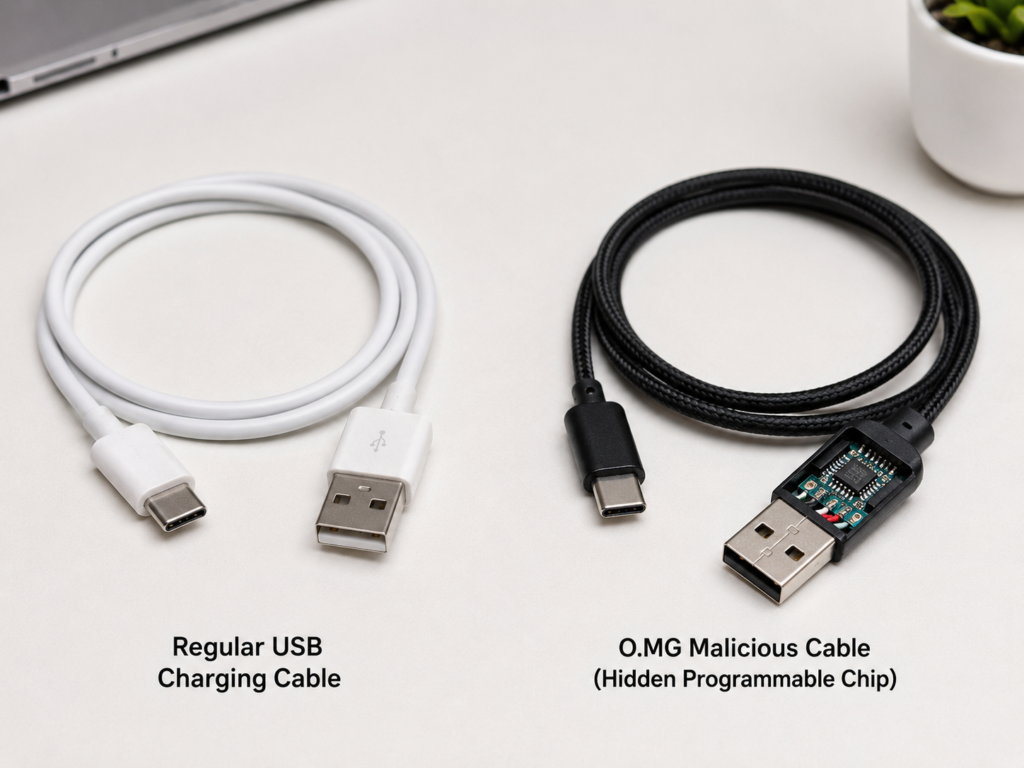
An important premise to clarify first: it is essentially a testing tool for security practitioners, and only when used without the authorization of the device owner does it constitute a “malicious cable” attack. It belongs to physical access USB risks, not a remote virus that can spread through the air. Usually, it must be physically plugged into the target device’s port to have any potential impact.
1.2 Origin of the Name and Category Classification
O.MG Cable itself is the product name of a well-known programmable security testing cable. Because its form and function are so representative, it has since been commonly used in security popular science to refer to all “programmable attack devices disguised as ordinary cables”.
In terms of technical classification, it belongs to hardware disguise devices under the attack concept of BadUSB. What is BadUSB? Simply put, it uses the universal characteristics of USB devices to disguise itself as peripherals that the system trusts by default, such as keyboards, network cards, serial ports, and storage devices, thereby causing the system to perform operations that it should not.
Compared with BadUSB tools in the form of USB flash drives and testing devices in the form of development boards, the biggest feature of O.MG is its “cable form” — charging cables are daily necessities used by everyone and seen everywhere, and almost no one is wary of a charging cable. This is also where its strongest concealment lies.
1.3 Core Differences Between It and Regular USB Cables
Many people ask: today’s fast charging cables and long cables also have chips inside, how to distinguish whether they are malicious? Let’s first clarify the core differences between the two:
- Regular USB cables: whether they are charging cables or data cables, they only have two core functions — transmitting power and transmitting data. They do not actively send operation commands to the device, let alone execute any programs on their own.
- O.MG-class programmable cables: they have an additional programmable control module inside, which can actively send input commands to the connected device, and even establish a hidden control channel. It is equivalent to hiding “a tiny computer that can automatically type on a keyboard” inside the cable.
We also need to clarify a common misunderstanding here: the E-marker chip in ordinary USB-C fast charging cables, the light control chip in cables with LED indicators, and the signal enhancement chip in long-distance transmission cables are not inherently equivalent to malicious control modules. The main function of E-marker is to negotiate the power and transmission capabilities of the cable, making fast charging and high-speed data transmission more stable; the LED chip only controls the on and off of the indicator light; the signal enhancement chip is to make long-distance transmission more stable. Of course, we cannot反过来 think that “having an E-marker means it is absolutely safe” — it cannot be ruled out that someone will additionally implant a malicious module in a normal cable. Therefore, to judge whether a cable is safe, we must comprehensively consider the source, behavior after connection, and actual test results, not just whether there is a chip.
1.4 Scope of Discussion and Learning Boundaries of This Article
As a security popular science article for ordinary users, let’s first clarify the content boundaries to avoid misunderstanding:
- Content covered in this article: what O.MG-class cables are, what the risk logic is, how they work, which scenarios have high risks, how to initially identify them, and what protection measures ordinary people can take.
- Content not provided in this article: specific attack scripts, payload writing methods, device configuration tutorials, or operation steps to bypass security restrictions.
- Our learning goal: to enable you to quickly judge whether a cable is trustworthy, understand the basic logic of USB physical security, and take simple and executable protection measures to protect your device and data security.
2. Why Should We Take the Risk of Such Cables Seriously?
Many people may think, it’s just a cable, how much harm can it do? In fact, the core of its risk precisely hits a “default rule” of operating systems — systems inherently trust input devices such as keyboards and mice.
Think about it, the first step when we use computers and mobile phones is to operate them with keyboards and mice. We can’t possibly have to enter a password to verify every time we plug in a keyboard, right? Therefore, operating systems default to directly allowing devices called HID (Human Interface Device, simply put, peripherals used to operate devices, such as keyboards, mice, and trackpads). Of course, this default trust mainly occurs when the device is unlocked, the system does not enable USB restrictions, or the enterprise whitelist policy does not intercept; different system versions handle new peripheral prompts and lock screen access not exactly the same. If a cable disguises itself as a keyboard, the system will treat all commands it sends as if you typed them yourself.
For example: ordinary viruses or phishing attacks trick you into opening bad files and entering passwords yourself; while this type of cable attack directly “impersonates your hand”, typing on the keyboard and clicking the mouse for you, without requiring you to do anything at all. That is its most dangerous part.
Compared with the “malicious USB flash drive” we are familiar with, its concealment is much higher. After all, most people have the awareness that “you can’t plug in a strange USB flash drive randomly”, but charging cables are daily necessities. Borrowing cables from each other in airports, hotels, offices, and dormitories is so common that almost no one is on guard. Moreover, its appearance can be made very close to original or branded cables, and it is almost impossible to distinguish with the naked eye alone.
So what specific harm might it cause? We will only explain it at the conceptual level, without involving any operational details: for example, it may automatically open a command line window or browser and enter preset commands; if the system allows it, the network is available, and security software does not block it, it may download and run malicious programs; it may also modify system settings, such as adding startup items, adjusting security policies, and opening remote access portals; it may also induce you to jump to phishing pages, or cooperate with subsequent scripts to steal session information. If sufficient permissions have been obtained, it may also try to copy files, take screenshots, or exfiltrate information.
But we want to give you a reassurance here: It is absolutely not a given that you will be compromised just by plugging it in. Whether it can take effect is limited by many conditions:
- First, whether the device is unlocked: in the locked screen state, the vast majority of automatic inputs cannot cause direct impact;
- Second, whether the system restricts unknown USB devices: for example, enterprise management policies and the system’s built-in USB restriction mode will greatly reduce the success rate;
- Third, whether you accidentally click authorization: for example, pop-ups like iPhone’s “Trust This Computer” and Android’s “Allow USB debugging” or “Allow file transfer” — if you don’t click agree, it won’t get more permissions;
- In addition, the preset commands must match the system: the operation logic and permission models of Windows, macOS, Linux, iOS, and Android are all different, and commands for Windows are useless at all when plugged into an Apple phone;
- Finally, many subsequent harmful behaviors require internet access, sufficient execution permissions, or bypassing system security prompts to be realized.
Of course, several groups of people should pay special attention to this type of risk: for example, people who travel frequently and use public charging facilities in airports, hotels, and conference centers frequently; professionals who often handle sensitive information such as journalists, lawyers, finance staff, corporate executives, government or scientific research personnel; users who live in open office areas, shared laboratories, campus dormitories, where cables are easily mixed up or swapped; people who often buy electronic accessories on eBay, Facebook Marketplace, Craigslist, or second-hand groups; and people who hold crypto wallets, work VPNs, corporate email accounts, or code repository access permissions — once these groups are compromised, the loss will be much greater than that of ordinary people.
3. Plain-Language Working Logic: Understand How It Works Without Technical Knowledge
Many people think this type of attack is very complicated, but it is easy to understand if you break it down into three steps. Even if you don’t understand technology at all, you can understand its operating logic.
3.1 Step 1: Disguise as a Trusted USB Device After Plugging In
When you plug an O.MG-class cable into a device, the first thing it does is “introduce itself” to the system — not saying “I am a charging cable”, but saying “I am a keyboard”, “I am a mouse”, “I am a network card”, or even saying it is a combination of multiple devices at the same time.
The “keyboards and mice” here all belong to the HID human interface devices we mentioned earlier, which are trusted by the system by default. Therefore, in most cases, the system will directly accept it without strict verification. For the user, they may not feel any abnormality at all, at most just a pop-up prompt saying “new device connected”, or even no prompt at all.
3.2 Step 2: Automatically Execute Preconfigured Operations
After the disguise is successful, the chip in the cable will start executing the pre-written command sequence — just like someone typing on the keyboard and clicking the mouse one by one according to a pre-written script.
For the system, these inputs are no different from those typed by a real person, so traditional antivirus software that works by scanning for malicious files is often difficult to detect problems at this stage — because no malicious file is running at all, just normal keyboard input.
These preset commands (also known as payloads in the security circle) are not necessarily executed as soon as they are plugged in. They can have many trigger methods: some execute immediately when powered on, some delay for minutes or even hours before running, some wait until specific conditions are met (such as the user opening a browser or connecting to a specific network) before triggering, and some keep waiting until the attacker gives an instruction to start acting. That’s why sometimes “no reaction after plugging in” does not mean the cable is safe — it may just be waiting for the right time.
3.3 Step 3: Possible Wireless Control or Subsequent Payload Execution
Some versions of O.MG cables also have built-in WiFi or other wireless modules. Attackers can wirelessly connect to the cable’s control interface nearby to modify commands, trigger operations, or control in real time.
It should be specially noted here: wireless control is not equal to “global remote control”. The effective range depends on the specific version, antenna design, wall/metal obstruction, electromagnetic environment, and device placement, and cannot be judged by a fixed number of meters; in real scenarios, attackers are usually still required to be at a relatively close distance, or establish a subsequent network channel separately. If no subsequent network control channel is deployed in the device in advance, the attacker cannot control your device thousands of miles away relying solely on the wireless module of the cable itself.
3.4 Why Regular Antivirus Software Is Hard to Fully Defend Against It
Many people ask: I have antivirus software installed, should I still be afraid of this? The answer is: regular antivirus software can block part of it, but it is difficult to fully prevent it. The core reason is that the “working levels” of the two are different:
- The detection focus of regular antivirus software is files, processes, network connections, and known malicious behaviors. It mainly looks for “bad files” and “bad programs”.
- HID injection occurs at the hardware input layer. In the early stage, it is just normal keyboard and mouse input, and there are no malicious files to scan at all, so it is naturally difficult for antivirus software to detect it immediately.
Of course, antivirus software may block subsequently downloaded malicious programs, abnormal command execution, or suspicious network connections, but it may not be able to block the initial “automatic input” step. Relatively speaking, enterprise-level endpoint security software (EDR), USB device whitelist management, and behavior detection policies have much better protection effects against this type of attack.
3.5 Key Prerequisites for a Successful Attack (Must-Know for Intermediate Learners)
If you want to have a deeper understanding of the boundaries of this type of risk, just remember: its effectiveness is never “unconditional”, and it must meet several key prerequisites:
- The device is in an unlocked state, or allows access to USB accessories in the locked screen state;
- The user does not restrict the access permission of unknown USB devices;
- The system allows this type of input device to work, and there is no enterprise whitelist or management policy blocking it;
- If it is a mobile phone, it usually requires enabling OTG, USB debugging, or the user clicking authorization such as “Trust This Computer” or “File Transfer”;
- Subsequent harmful behaviors also require a matching system environment, network connection, and sufficient permissions to be realized.
Simply put, locking the screen, refusing unfamiliar authorization, turning off USB debugging, and enabling USB restrictions can all significantly reduce risks, but they cannot replace the management of cable sources — after all, the core of physical access risks is always “who can touch your ports”.
4. Common Types and Easily Confused Objects: Avoid Misjudgment and Missed Judgment
This type of programmable cable does not have only one form. We can briefly understand it from the two dimensions of interface and function, and at the same time help you distinguish which ordinary cables are easily misjudged, and the differences between it and other USB threats.
4.1 Mainstream Interface Formats
Corresponding programmable cables or disguise devices may appear for USB-A, USB-C, Lightning, and Micro-USB. Many people think USB-C is safer, but in fact, the interface is just a physical form and does not affect its ability to disguise as an HID device — different interfaces only affect compatibility, power supply capacity, data protocols, and pop-up prompts, but the core idea of “disguising as a trusted device” is exactly the same.
4.2 Common Versions Classified by Function
In terms of functions, common versions are of the following categories:
- Input injection type: the most typical type, whose main function is to simulate keyboard and mouse input, and is also the easiest to understand;
- Wireless control type: with a wireless module, attackers can manage, trigger, or modify preset commands nearby, with higher flexibility;
- Composite device type: can simulate multiple USB devices at the same time, such as being both a keyboard and a serial port, and a network card, which can realize more complex attacks;
- Data exfiltration auxiliary type: note that it is not inherently capable of reading all files, but will help transmit data through the network or other methods only after the device is unlocked and authorized, or after the script is successfully executed to obtain permissions.
4.3 Regular Cables Easily Mistaken for Malicious Cables
There are many ordinary cables in life that are often mistaken for malicious cables because they have chips in the connectors or have a special appearance. Let’s clarify here:
- Active long-distance transmission cables: because they need to enhance signals and reduce attenuation, there will be signal processing chips in the connectors, so the connectors are usually larger than ordinary cables, which is normal;
- USB-C fast charging cables: the E-marker chip inside is mainly used to negotiate the power and transmission capacity of the cable, and is not inherently equivalent to a malicious control module. You cannot conclude that the cable is problematic just because it has an E-marker;
- Cables with LED indicators: the lamp beads are only used to display the charging status, and the corresponding control chip only controls the on and off of the light, and has no ability to control the device;
- Security cables with physical data switches: this type of cable is used to switch the “charge only / data transfer enabled” mode, and instead belongs to protection tools.
In a word: abnormal appearance can only be used as a clue for suspicion, and cannot be used alone to determine whether a cable is malicious. It must be judged in combination with the source and actual behavior.
4.4 Core Differences from Other USB Threats
Many people also confuse it with other USB threats. Let’s make a brief distinction to help you clarify the concepts:
- Relationship with BadUSB: BadUSB is a general term for a type of attack idea, and O.MG Cable is a specific product under the BadUSB idea, and is the representative of the cable form;
- Difference from malicious USB flash drives: most malicious USB flash drives attack by inducing users to open files, exploiting auto-run vulnerabilities, or the trust of storage media, while O.MG is more inclined to input simulation and hardware disguise;
- Difference from Rubber Ducky: Rubber Ducky is a HID injection tool in the form of a USB flash drive, while O.MG is in the form of a cable, with stronger concealment;
- Difference from Juice Jacking: the risk of Juice Jacking comes from the tampering of public charging ports or charging facilities themselves, while the risk of O.MG comes from the cable itself;
- Difference from ordinary phishing attacks: phishing mainly tricks users into clicking and entering information by themselves, while O.MG can directly automatically input for users through physical access.
5. High-Risk and Low-Risk Scenarios: What to Watch Out For
After understanding its principles and types, let’s talk about which scenarios have high risks and which are relatively safe in daily life, to help you avoid most threats from the source.
5.1 Shared/Free Cables in Public Places (High Risk)
This is the most common high-risk scenario: public spare charging cables in airports, shopping malls, cafes, and conference centers, unbranded cables provided in hotel rooms, front desks, and shared office areas, as well as damaged, unmarked, or unconfirmed source cables attached to shared charging devices, all belong to the high-risk category. These cables are circulated by many people, and no one knows whether they have been tampered with before, so try not to use them directly.
5.2 Second-Hand and Informal Purchase Channels (High Risk)
Low-priced unbranded cables on eBay, Facebook Marketplace, Craigslist, and second-hand trading groups, miscellaneous accessory cables included with second-hand mobile phones, computers, and power banks, as well as third-party low-priced accessories without official websites, after-sales service, or certification descriptions, should be chosen carefully. The source chain of cables in such channels is unclear, and it is easy to mix in modified devices.
5.3 Unsolicited Deliveries or Free Gifts (High Risk)
Free charging cables, data cables, and adapters sent in strange express deliveries, unbranded cables distributed at exhibitions, street promotions, and lottery activities, as well as strangers “kindly lending cables” or swapping your cables while you are not paying attention, all require high vigilance. Attackers often take advantage of people’s psychology of “being greedy for small bargains” or “being embarrassed to refuse” to deliver malicious cables to users.
5.4 Risk of Swapping in Offices, Campuses, and Shared Spaces (High Risk)
In open office areas, classrooms, shared laboratories, and campus dormitories, if you leave the charging cable on the desk when you leave your workstation or seat, and continue to use it when you come back, you may face the risk of being swapped. There are also public cables placed for a long time in meeting rooms, libraries, printing areas, and front desks, as well as cables that are frequently mixed between colleagues and classmates with untraceable source chains, all of which are high-risk scenarios.
5.5 Low-Risk Scenarios Where Good Habits Should Still Be Maintained
Of course, not all scenarios require panic. The following scenarios have very low risks, but it is still recommended to maintain good habits:
- Cables you purchased from official channels or trusted merchants, and have always kept with you and never left your sight;
- The device is in a locked screen state, and the system has enabled USB accessory restrictions in the locked state;
- Use your own wall charger and your own cables, and do not connect to strange computers or public data ports;
- Only use wireless charging or trusted charging bases, and do not connect to unknown USB data links.
6. How to Identify O.MG Malicious Cables: Troubleshooting Ideas from Beginner to Intermediate Level
After talking about the scenarios, let’s talk about how to specifically troubleshoot whether a cable has problems. Note that no method can 100% accurately identify it. What we can do is to troubleshoot step by step from easy to difficult, and minimize the risk.
6.1 Beginner Level: Quick Visual Inspection (For Preliminary Screening Only)
The most basic method is to take a quick look with the naked eye, but it can only be used for preliminary screening and cannot be used as the final conclusion. You can focus on these parts:
- Check the connector: if it is obviously thicker and longer than regular cables of the same specification, with rough seams or abnormal workmanship, you should be more vigilant;
- Check the markings: if the engravings of brand, model, certification, and parameters are blurred, wrong, missing, or inconsistent with the information on the packaging, you should also be vigilant;
- Check the cable body: if the hardness, weight, and bending feel of the cable body are significantly different from genuine products of the same model, it can also be used as a clue.
But the most important thing is the source — if it is picked up, given by others, second-hand, or placed in public places, even if it looks like a genuine product, it should be treated as a suspicious cable. After all, current high-imitation technology can make it almost identical to the genuine product, and it is impossible to distinguish with the naked eye alone.
6.2 Intermediate Level: Observe System Prompts and Abnormal Behavior
If the source of the cable is unknown, in principle, do not plug it into your main device; only when you really need to troubleshoot and can use a test device or isolated environment, observe the system prompts and abnormal behavior, which is a more reliable clue than visual inspection:
- If you just want to charge, but the computer prompts that a new keyboard, mouse, serial port, network card, or other device is found, you should be highly vigilant. You can check with the system’s built-in tools: Windows Device Manager, macOS System Information, Linux lsusb command or system logs can all show the currently connected USB devices. If there is an extra unknown HID device, it is an important clue;
- If it is an iPhone or iPad, never click “Trust” when the “Trust This Computer” prompt pops up in a strange cable or strange computer environment;
- If it is an Android device, do not authorize randomly when requests such as USB debugging, file transfer, MIDI, or network tethering pop up;
- If after plugging in, there are abnormal situations such as windows opening automatically, cursor jumping randomly, command line flashing, or browser automatically redirecting, don’t think about anything, just pull the cable out immediately.
6.3 Intermediate-Advanced Level: Verification with Low-Cost Tools and Methods
If you want to verify more deeply, you can use some low-cost tools, which belong to intermediate-level methods:
- Use a data blocker adapter: its function is to only retain the power supply pins and cut off the data transmission channel. Under normal circumstances, after using a data blocker adapter, the device should not recognize any data devices, such as keyboards, storage, or network cards. If after using the blocker, the device can still recognize data devices, either the blocker itself is unqualified, or the connection method is wrong, or the cable does have problems. Although it cannot directly prove that it is a malicious cable, it is definitely worth being vigilant about;
- Use USB device viewer tools: compare the device list before and after plugging in. If there are extra HID, serial port, network card, or composite devices, and your cable is only used for charging, it is very suspicious;
- Use a USB current tester: if the standby power consumption of the cable is abnormally high, it can be used as an auxiliary clue, but note that E-marker chips, LED lights, and active signal chips all consume power, and a fixed value cannot be used for qualitative judgment.
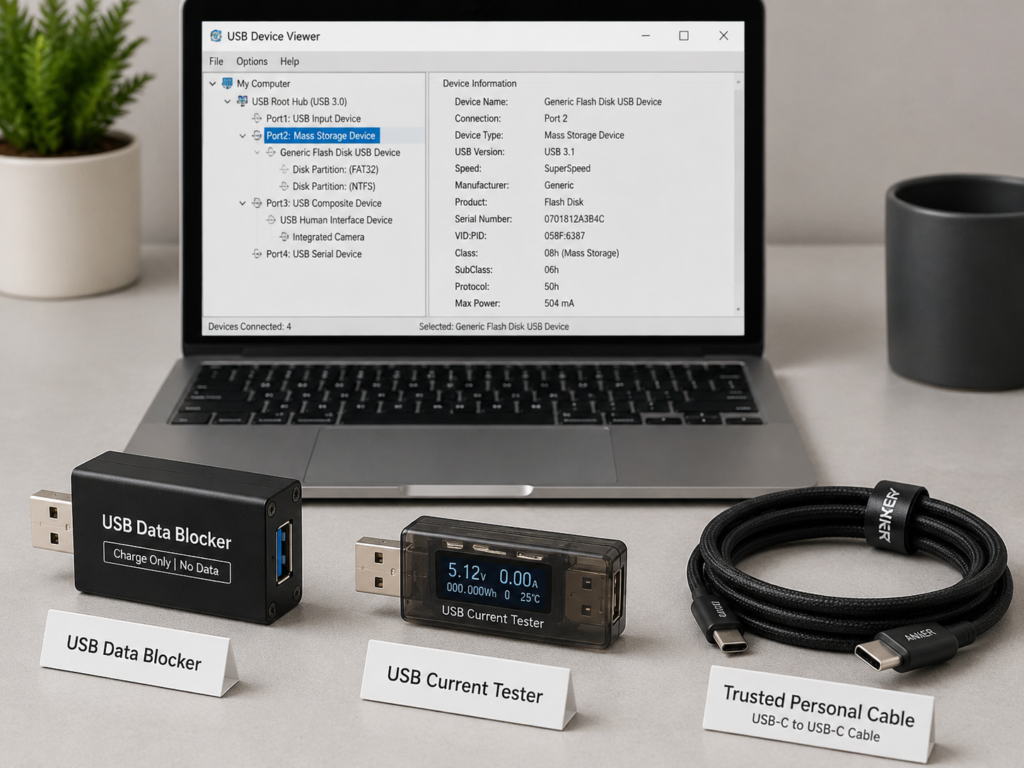
If it is an enterprise environment, checking USB management logs, EDR alerts, and device whitelist records will be much more reliable than personal visual judgment.
6.4 The Most Reliable Judgment Principle: Trusted Source Is Far More Important Than Normal Appearance
After talking about so many methods, in fact, there is only one most reliable judgment principle: A trusted source is ten thousand times more important than a normal appearance.
Trusted sources include official channels, regular retailers, unified enterprise procurement, and cables that you have kept by yourself and never left your sight after purchase; while suspicious sources are those in public areas, given by strangers, included with second-hand goods, exhibition gifts, and cables that have left your sight and may have been swapped. As long as the source is unknown, even if it looks like a genuine product, it should be treated as a suspicious cable.
6.5 Misidentification Methods That Cannot Be Relied On
There are several common misidentification methods that you must not believe:
- “Branded cables are absolutely safe”: brand logos can be printed, and cables can also be swapped. The source chain is far more reliable than the logo;
- “USB-C is safer”: the interface is just a physical form, which does not mean it can prevent HID disguise;
- “Mobile phones won’t be compromised”: mobile phones do have more permission restrictions, but there are still risks under conditions such as authorization, debugging, and OTG;
- “Antivirus software will automatically block it”: antivirus software may not be able to detect behaviors at the hardware input layer;
- “No reaction after plugging in means it’s safe”: preset commands may be delayed, wait for conditions to trigger, or wait for wireless control, and may not react as soon as they are plugged in.
6.6 Handling Process After Discovering a Suspected Malicious Cable
What if you really encounter a suspected malicious cable? Remember these steps:
First, physically pull out the cable immediately. Don’t be curious and continue to test “what else can happen” to avoid more losses;
Second, record relevant information, such as the time of insertion, what device was used, what prompts popped up, what abnormal phenomena occurred, and where the cable came from. If it is an enterprise environment, report to the IT or security team in time;
Third, check the device to see if there are any unfamiliar applications, abnormal startup items, unknown login records, strange browser extensions, and whether the remote access settings have been changed;
Fourth, protect your accounts. Prioritize changing the passwords of email, online banking, work accounts, cloud storage, code repositories, and crypto wallets, and enable multi-factor authentication;
Fifth, handle the cable: individual users can stop using it, and discard it after physically destroying the connector to avoid being picked up and misused by others; in an enterprise environment, it should be handed over to security personnel for evidence retention and analysis.
We also want to specially remind you: pulling out the cable can only stop the cable from continuing to input commands, it does not mean that the malicious operations that have been executed will automatically disappear. You still need to check carefully what should be checked.
7. Scenario-Based Protection Measures: Security Solutions Ordinary People Can Use Directly
After understanding how to identify, the more important thing is how to protect yourself. In fact, you don’t need complex technology, as long as you develop a few simple habits, you can avoid most of these risks.
7.1 Essential for Beginners: Daily Basic Protection Habits
The most basic thing is to develop these daily habits first:
- Do not use USB cables of unknown origin. Prioritize buying cables from正规 brands and channels, and don’t be greedy for cheap unbranded low-priced products;
- Make unique marks on your cables, such as using heat shrink tubing, number stickers, or obvious color markers, so that even if they are placed in public areas, you can recognize your own cables at a glance, reducing the risk of being swapped;
- Bring your own cables and charger when going out, keep the cables with you, and do not leave them in public workstations or meeting rooms for a long time;
- Do not easily borrow cables from strangers, and do not leave your sight after giving your own cables to strangers;
- For devices that handle sensitive information, such as work computers and mobile phones that store crypto wallets, establish the rule of “special cable for special use”, only use your own dedicated cable, and do not plug in other cables randomly.
7.2 Protection for Public Charging Scenarios
Public charging is one of the highest-risk scenarios, you can protect yourself according to these steps:
- Prioritize using your own charging head plugged into a wall power socket, instead of strange computers, public USB ports, or public cables;
- If you only need to charge and do not need to transfer data, you can use a data blocker adapter or a charge-only cable to physically cut off the data transmission channel;
- Lock the device screen before plugging in a strange cable to avoid being affected by HID input in the unlocked state;
- When you see prompts such as “Trust This Computer” or “Allow USB debugging”, refuse all of them, unless you are completely sure that the source of the device and cable is trusted;
- If you are a high-risk person who often handles sensitive information, prioritize using a power bank or wireless charging, and try not to use public charging facilities.
7.3 Key Protection Points for Different Devices
Devices with different systems have different protection focuses. Let’s talk about them separately:
Windows PCs
- Pay attention to unknown device prompts such as “Setting up a new device” and “HID Keyboard Device”, and troubleshoot in time when you see unfamiliar input device prompts;
- Develop the habit of locking the screen when leaving your seat to reduce the window period for automatic input in the unlocked state;
- Enterprise devices can restrict the access of unknown USB devices through Group Policy, Microsoft Defender for Endpoint, and device control policies; ordinary personal devices (especially Home edition systems) usually do not have convenient enterprise-level USB whitelist functions, so the focus is on daily protection: do not randomly confirm unfamiliar operations in UAC/administrator permission pop-ups, and troubleshoot in time when unknown HID device prompts are found;
- Try not to use an account with administrator privileges for daily use. Even if commands are automatically input, it can limit permissions and reduce harm.
Macs
- Pay attention to system prompts such as external accessories, input devices, accessibility, and terminal permissions, and do not randomly approve permission requests from unfamiliar devices;
- On supported macOS versions and hardware, enable USB/external accessory restrictions in the locked state, so that unfamiliar USB devices cannot work when the screen is locked;
- Do not enter the system password or approve permission pop-ups in an environment with strange cables or strange devices;
- In public scenarios, prioritize using your own power adapter and cables, and try not to use publicly provided cables.
iPhone/iPad
- Do not click “Trust This Computer” in a strange connection environment, even if you just want to charge;
- Keep the system updated, and use the USB restrictions and sandbox mechanism of iOS/iPadOS to reduce risks;
- Prioritize using accessories from trusted brands, MFi-certified, or official channels, and do not use uncertified miscellaneous cables;
- When you only need to charge, try to use your own charger, data blocker, or wireless charging.
Android Devices
- Set the default USB configuration to “Charge only”, and do not randomly switch to modes such as file transfer, MIDI, or USB network tethering;
- Do not enable or keep USB debugging on for a long time; if you must use it, turn it off in time after use, and revoke previous debugging authorizations;
- Do not authorize ADB debugging requests from unknown computers;
- Different brands have different setting entry points. You can search for “USB preferences”, “Default USB configuration”, or “USB debugging” in the settings to find the corresponding options for setting.
7.4 Protection for Offices, Homes, and Highly Sensitive Assets
In addition to personal habits, there are also some points to note in office and home scenarios:
- Do not mix private cables and public cables in the office. Cables in meeting rooms should be purchased uniformly, and their source and status should be checked regularly;
- For personnel in key positions, such as employees handling finance, customer data, or core code, it is recommended to use numbered dedicated cables, and store them in time when leaving the workstation to avoid being replaced;
- Family members should not use cables that are picked up, given by strangers, or included with second-hand goods. Especially if there are elderly people and children at home, remind them not to use strange charging cables randomly;
- For highly sensitive devices that store crypto wallets, enterprise keys, source code, and customer data, only use trusted dedicated cables, and do not plug in other cables randomly;
- Enterprises should establish USB device whitelists, physical security inspections, and employee security awareness training to reduce risks from the system and process level.
7.5 Quick Decision-Making Checklist Before Plugging In a Cable (For Intermediate Learners)
If you want to make a judgment faster, you can quickly ask yourself these questions before plugging in the cable. As long as one answer is uncertain, do not plug it in directly:
- Is the source of this cable completely under my control?
- Has this cable left my sight, with the possibility of being swapped?
- Is the current device in an unlocked state?
- Is the current device logged into sensitive accounts such as online banking, work email, VPN, cloud storage, or crypto wallet?
- Is my need just charging, or do I really need to transfer data?
- If it’s just charging, can I use a data blocker, charge-only cable, power bank, or wireless charging instead?
8. Cognitive Misconceptions, Capability Boundaries, and USB Security Positioning (Must-Know for Intermediate Learners)
Finally, let’s sort out several common cognitive misconceptions to help you view this type of risk more objectively, neither underestimating nor panicking.
8.1 Correction of Common Cognitive Misconceptions
We have sorted out the most common wrong ideas and corrected them all at once:
- Misconception 1: You won’t be attacked if you don’t click on strange files. Correction: HID injection does not require you to open any files. It directly simulates keyboard operations. Even if you do nothing, as long as the device is unlocked, you may be affected.
- Misconception 2: Plugging in an O.MG cable will definitely result in full control. Correction: Whether the attack can succeed depends on many conditions, such as whether the device is unlocked, whether you have accidentally authorized it, whether the system has restrictions, and whether the preset commands match the system. It is not a given that you will be compromised just by plugging it in.
- Misconception 3: Mobile phones are absolutely safe. Correction: Mobile phones do have more permission restrictions than computers, but if you enable OTG, USB debugging, or click trust authorization or file transfer, there is still a possibility of being attacked.
- Misconception 4: Antivirus software and firewalls can fully defend against it. Correction: They may block subsequently downloaded malicious files or abnormal networking behaviors, but they may not be able to block input operations at the hardware level.
- Misconception 5: As long as it is a USB-C or fast charging cable, it is safe. Correction: Interface form and fast charging protocol are not equal to security certification, and can still be used for BadUSB attacks.
- Misconception 6: Normal appearance means no problem. Correction: High-imitation programmable cables can be made almost identical to genuine products. A trusted source is far more important than a normal appearance.
8.2 Real Capability Boundaries: There Is No “Universal Attack Cable”
We must also objectively understand its capability boundaries. There is no such thing as a “universal attack cable” at all:
- O.MG-class cable risks usually rely on physical access to the target device; if the device is not plugged in, and no other control channels are deployed in advance, the cable alone cannot affect distant devices through the air;
- The control distance of the wireless version is limited, and it is very affected by the environment. If there are walls or metal obstructions, the distance will be greatly shortened, and it is impossible to achieve global remote control;
- Locking the screen, no authorization, turning off USB debugging, and enabling USB restrictions will all significantly reduce risks;
- It cannot directly crack strong passwords, and more often uses already unlocked sessions, user misauthorization, or the system’s default trust mechanism;
- Data theft is not its natural ability. It usually requires successful script execution, file access permissions, network channels, or user authorization cooperation to be realized.
8.3 Legal Use Scenarios: Not All O.MG Cables Are “Hacker Criminal Tools”
Many people equate O.MG with “hacker tools” or “criminal tools” as soon as they hear it, but in fact, it is essentially a testing hardware for security practitioners, and has many legal use scenarios:
- Enterprise red team testing: the security team will deliberately place such cables in the office area to test whether employees will use unknown cables randomly, and at the same time verify whether the endpoint protection and USB management policies are effective;
- Security awareness training: using controllable demonstrations to let employees intuitively understand the risks of BadUSB and physical access, which has a much better effect than pure text training;
- Device protection verification: individuals or enterprises can use it to test whether their protection measures such as lock screen policies, USB whitelists, and EDR behavior detection are really effective, and find vulnerabilities in time.
But all these legal uses must have clear written authorization, limit the scope, time, and objects of the test, and cannot randomly test with other people’s devices, nor can they be deliberately placed in public places to induce strangers to use them.
8.4 Legal and Ethical Boundaries
It must be clarified here: inserting such cables into other people’s devices without consent, placing them in public places to induce use, or using them to steal data or damage systems may constitute illegal crimes, and may violate laws and regulations related to computer security and privacy protection. Even if no actual losses are caused, they may bear corresponding legal responsibilities.
All content in this article is only used for security awareness popularization and protection guidance, and does not provide any attack-related operation methods, script writing, or bypassing skills. We hope everyone can use the knowledge they have learned to protect the device security of themselves and those around them.
8.5 Position of O.MG in the USB Data Security System
Finally, let’s put this type of risk into the entire USB data security system: it belongs to hardware disguise and input injection attacks among physical access risks. Risks of the same category include malicious USB flash drives, malicious docking stations, BadUSB development boards, etc. Adjacent risks include Juice Jacking of public charging ports, supply chain risks of counterfeit accessories, abuse of USB debugging, malicious peripheral hijacking, etc.
The core logic of protecting against such risks is actually two checkpoints:
The first is the access control gate: control which devices can access your USB port. The core is to manage the sources of cables and peripherals well, and only use devices with trusted sources;
The second is the permission control gate: control what the connected devices can do. The core is to make good use of the system’s permission restrictions, lock screen policies, USB management, whitelists and other functions.
Let’s emphasize the most critical principle again: charging and data should be considered separately. Don’t think that “I’m just charging” means there is no data risk. As long as the data pins of the cable are connected, there may be a risk of input simulation.
9. Judgment Abilities You Will Master After Learning (Summary)
At this point, all the content about O.MG malicious cables and USB physical security has been finished. You don’t need to memorize all the technical details by rote. As long as you establish these core judgment abilities, it will be enough to deal with most related risks in daily life.
The first is the ability to judge the nature of risks: you can explain in plain language that O.MG is a special cable with a built-in programmable chip that can disguise as a trusted USB peripheral, belongs to the cable-form implementation of BadUSB attacks, can distinguish the differences between it and ordinary cables, malicious USB flash drives, and public charging port risks, and will not be misled by exaggerated rumors, neither underestimating risks nor panicking excessively.
The second is the ability to judge scenario risks: you can quickly identify high-risk scenarios such as public cables, second-hand accessories, free gifts, and office swapping, and also accurately judge low-risk scenarios such as self-purchased and self-used, lock screen restrictions, and using your own charger plugged into the wall, and firmly remember the core logic that “a trusted source is more important than appearance”.
The third is the ability to troubleshoot suspicious cables: you have mastered the layered troubleshooting ideas from visual preliminary screening to system prompt observation and tool verification, will not take appearance differences as qualitative basis, can avoid common misconceptions such as “branded cables are absolutely safe” and “USB-C is safer”, and also know the correct handling process for suspected malicious cables.
The fourth is targeted protection ability: you can choose appropriate protection solutions according to the devices and scenarios you use, start with daily habits to plug most of the loopholes, and obtain sufficient security guarantees without complex technical configuration.
The fifth is on-site quick decision-making ability: you have formed a quick decision-making framework before plugging in the cable. As long as one of the cable source, device status, and usage needs is uncertain, you will choose a more stable solution, and never take a chance with the mentality of “it should be fine”.
In the final analysis, USB physical security has never been a profound technical problem, but a problem of awareness and habits. You don’t need to master programming knowledge, nor do you need to buy expensive protection equipment. As long as you turn the two principles of “verify the source first, then consider access” and “consider charging and data separately” into daily habits, you can keep most related risks out of your devices.