
Have you ever had this experience: whether it’s cheap cables bought as add-ons on e-commerce platforms, or original cables included with devices, you can always accumulate seven or eight at home — the packaging is printed with a bunch of numbers like 3A, 5A, 100W, 240W. When picking one, you always think “the bigger the number, the safer”, so you simply buy the most expensive 5A cable. But when charging small devices like AirPods or smart watches, the cable is as stiff as wire, and it doesn’t charge any faster; or you use a cheaply bought 5A cable to power a thin and light laptop like a MacBook Air, and within half an hour the connector is too hot to hold, and you can smell a little plastic when you get close, making you panic, afraid it will burn the device or even catch fire.
Actually, the difference between 3A and 5A is far more than just “a difference of 2 in the number” — it is related to both charging speed and directly linked to safety margin, but only if you buy and use it correctly. Today we will expand from basic concepts, risk logic, scenario selection and daily inspection, to clarify the safety differences, applicable scenarios, purchase pitfalls to avoid and daily maintenance of the two. Whether you are a complete beginner who doesn’t understand anything, or a user who wants to understand the underlying logic, you can find useful information.
Conclusion First: How Ordinary People Can Quickly Judge
If you are in a hurry and don’t want to read the principles and detailed comparison later, just remember these core conclusions and cable selection references.
One-Sentence Conclusion
Formal and qualified 5A cables have a higher safety margin in high-power charging scenarios, but this does not mean that all 5A cables are safer than 3A cables. For low-power devices, using a formal 3A cable is completely sufficient, and there is no need to worry that charging small devices with a 5A cable will burn them out — the actual current is determined by negotiation between the device and the charger, and the cable will not actively output excess current; only high-power laptops, PD fast charging around 100W, and some high-current private fast charging devices require the selection of formal 5A cables or officially certified cables.
If we rank safety, it is usually: formal certified cables that match device needs > cables with higher specifications but reliable sources > formal cables with sufficient specifications but no certification > falsely labeled no-brand cables.
Quick Cable Selection Reference
We have sorted out the most common daily device scenarios into a table, and you will basically not make a mistake by choosing according to it:
| Device Type | Recommended Cable | Notes |
|---|---|---|
| AirPods, Apple Watch, night lights and other low-power small devices | Formal 3A cable is sufficient | No need to blindly buy 5A, which may be thicker and stiffer, inconvenient to carry |
| iPhone (USB-C/Lightning), iPad, power banks within 60W | Formal 3A cable (USB-C PD scenario) | PD devices exceeding 60W need to upgrade to 5A cable; Lightning cables should preferably be MFi certified |
| 65W-100W laptops (such as MacBook Air, 13-inch MacBook Pro), high-power power banks | Formal USB-C 5A cable (with E-Marker, supports 100W) | Private fast charging of brands such as Samsung and Google requires confirmation of official compatibility requirements |
| Devices above 100W up to 240W PD 3.1 (such as 16-inch MacBook Pro, gaming laptops) | Cables clearly marked with 140W/180W/240W or EPR capability | Cannot only look at the 5A mark, need to confirm that the voltage level matches |
| Brand private fast charging devices (such as Samsung Super Fast Charge) | Official or certified compatible cables | Ordinary 5A cables may not trigger full-power fast charging |
First Understand the Basics: What 3A/5A Are, What We Are Comparing
Before the formal comparison, we must first clarify several basic concepts, otherwise it is easy to get more confused as you read.
The True Meaning of 3A/5A Markings
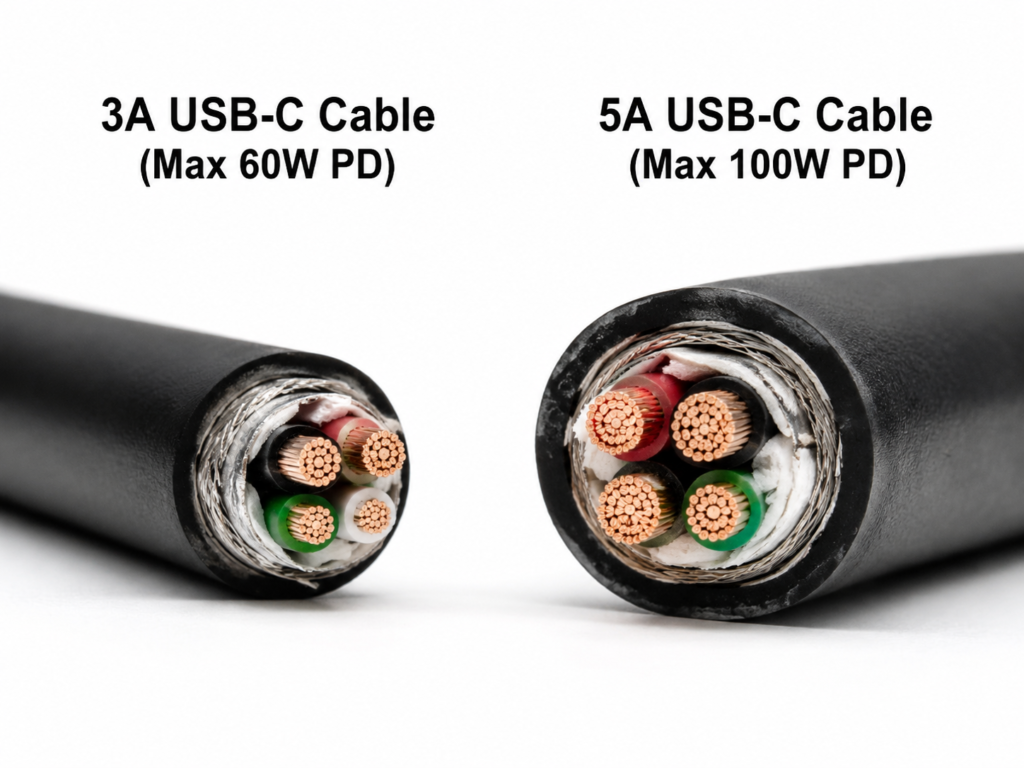
Many people think that 3A and 5A are “charging speed”, but they are not. The A here is ampere, a unit for measuring the magnitude of current — you can imagine the wire as a water pipe, current is the water flow in the pipe, and 3A and 5A are the maximum water flow value that this “electric water pipe” can stably carry under design and test conditions.
Regarding this marking, there are several common misunderstandings that need to be clarified first:
First, it is the “maximum capability”, not the “current that will definitely be used in practice”. Just like a water pipe can pass a maximum of 5 liters per minute of water, but if you connect a small coffee cup, it will only output the flow you need, and will not force water into the cup. This is why charging AirPods with a 5A cable will not burn the device — the device only draws the current it needs, and the extra capability will not be forced in.
Second, it is not a “guarantee of charging speed”. Charging speed is determined by the “shortest board” among the device, charger, charging protocol, and cable. Just because a cable is marked 5A does not mean it will charge faster. For example, if your phone only supports a maximum of 20W fast charging, even with a 240W 5A cable, the speed will not improve at all.
Let’s mention USB PD here, which we will often refer to later. You can understand it as the most universal “common language” for fast charging currently. Whether it’s a phone, tablet or laptop, as long as it supports USB PD, it can negotiate charging power using the same set of rules, without having to use an original cable. The PD we talk about later refers to this universal fast charging standard.
Third, the rated current is not an unconditional safety promise. It is usually the maximum carrying capacity declared under corresponding standards, design and test conditions, and does not mean that it can be used safely no matter how high the temperature is, how many times it is bent, or how many years it has been used. Actual safety is also affected by factors such as the length of the cable, conductor material, whether the connector contact is good, whether the insulating material is heat-resistant, and the heat dissipation environment.
Fourth, even for 5A cables, the capabilities can vary greatly. For example, a common 100W USB-C cable runs 5A at 20V voltage, while a 240W PD 3.1 Extended Power Range (abbreviated as EPR, which you can understand as the “enhanced version” of PD fast charging, supporting higher voltage and power) cable runs 5A at 48V voltage. The insulation requirements and chip markings of the two are different, and they cannot be lumped together.
You can find these markings on the cable body printing, connector laser engraving, product packaging parameter page or product detail page. It is also very simple to convert to power: in common USB PD standard power scenarios, 20V×3A≈60W, 20V×5A≈100W; if it is a PD 3.1 extended power scenario, the maximum can reach 48V×5A≈240W.
Scope of Application of This Comparison
What we are talking about today are daily consumer charging/data cables, including USB-C, USB-A, Lightning and various brands’ private fast charging cables, mainly used on low-voltage DC devices such as mobile phones, tablets, laptops, power banks, and docking stations. Among them, USB-C PD cables are the focus of our discussion — because the rules for current negotiation and capability identification of 3A/5A are the most standardized and common in the USB-C system.
It should be noted in advance that AC wires at home, power strip power cords, industrial cables, automotive power wiring harnesses, etc., are not within the scope of today’s discussion. Their safety standards are completely different from consumer-grade charging cables.
In addition, all subsequent comparisons are defaulted to be carried out under the premise of formal and qualified products, same length, same interface type, same use environment, same actual load — if you compare the heat generation of a 1-meter pure copper 3A cable with a 3-meter copper-clad aluminum (copper plated on the outside, cheaper aluminum on the inside, with much higher resistance than pure copper) 5A cable, the conclusion will definitely be inaccurate and completely meaningless for reference.
Different Interfaces Have Different Judgment Logics
Many people apply the 3A/5A rules of USB-C to all interfaces, which is a common mistake — the current identification logic of different interfaces is very different, and cannot be generalized.
Let’s start with the USB-C interface, which has the clearest rules. In the standard USB-C PD fast charging system, ordinary C-to-C cables support a maximum of 3A current by default, and no additional chip is required; if you want to support 5A capability exceeding 3A and up to 100W, a small chip called E-Marker is usually required. You can think of this chip as the “capability business card” of the cable, which stores information such as the current and power that the cable can withstand. After the charger is plugged into the cable, it will first “read” this business card, and then decide how much power to output — just like when you go to the gym, the coach first looks at your fitness test form, then arranges the training intensity for you, and will not force you to lift too heavy a barbell. If there is no valid E-Marker, compliant PD chargers generally limit the current to within 3A to avoid overload. Of course, some brands’ private fast charging USB-C cables may have their own identification methods, which do not rely on the general E-Marker, such as some of Samsung’s super fast charging cables. In this case, the official description of the brand shall prevail.
Next, let’s talk about USB-A port private fast charging cables. Many old fast charging or brand private protocols use USB-A ports. The high current of such cables may be achieved through special contacts, thickened wire cores or brand-specific identification chips. You can’t just look at the 3A/5A numbers printed on the packaging, you have to see if it is a certified cable of the corresponding brand, otherwise it may not trigger full power.
There are also Apple’s Lightning interface cables. For such cables, more attention should be paid to MFi certification (that is, Apple’s official accessory certification. Cables that have passed certification are more stable when used on Apple devices, and there will be no “this accessory is not supported” prompt), connector chips and compatibility, and the E-Marker judgment logic of USB-C cannot be directly applied.
Finally, it should be reminded that many cables support charging, data transmission, and video output at the same time, but these capabilities are independent of each other — a 5A cable may only support low-speed data of USB 2.0, and may not be able to transfer high-speed files or output 4K video. Be sure to check the parameters clearly when buying, don’t just stare at the 5A mark.
Why Pay Attention to the Safety Difference of Current Levels
Some people may ask: It’s just charging, is it necessary to be so particular? In fact, the current level is directly related to the safety margin of the cable. Once used incorrectly, the risk escalates step by step.
The initial manifestation is overheating due to overload, the cable body or connector becomes very hot; over time, the outer insulating layer will soften, become sticky or even crack; further down, there may be poor contact, short circuit, leakage current. In mild cases, the device cannot be charged and the interface is burned out; in severe cases, with the addition of inferior chargers and combustible coverings (such as bedding, carpets), there is a risk of smoking or even fire.
There are also secondary risks, such as the charger repeatedly triggering protection and disconnecting, the device interface turning black and deforming, and the charging power fluctuating high and low. These are all related to the mismatch of cable specifications. The most common wrong usage is to use a no-brand 3A cable to power a MacBook that requires 5A for a long time, or buy a falsely labeled 5A cable that actually cannot withstand 5A current at all, and is in an overloaded state for a long time.
So, 5A only represents a higher current carrying capacity, and does not mean it is safer in any scenario — the core of safety depends on whether the specifications match, whether the cable is really qualified, and whether the use environment is correct.
Beginner Principle: Why Current Affects Cable Safety
Many people know that high-current cables generate heat, but they don’t know why, nor do they know how big the risk of heating is. Let’s explain it in as plain a language as possible.
Where Cable Heat Comes From
When current passes through a wire, it generates heat due to the “resistance” of the wire — just like water flowing through a water pipe, the rougher the pipe wall and the thinner the pipe, the greater the resistance of the water flow, and the more heat generated by friction. This “resistance” of the wire is called resistance. The thinner the wire core, the worse the material (for example, copper-clad aluminum has much higher resistance than pure copper), the longer the wire, and the looser the connector contact, the greater the resistance, and the more obvious the heat generation under the same current.
There is a very intuitive rule: when the current increases, the heat does not rise linearly, but rises much faster. For example, for the same cable, if the current increases from 3A to 5A, the theoretical heat generation will become 25/9 of the original, that is, about 2.8 times — equivalent to you turning the faucet twice as wide, the friction heat of the water pipe is not doubled, but several times more. This law is called Joule’s Law in physics. Simply put, the heat generation is proportional to the square of the current and the resistance. You don’t need to remember the name, just know that “a little increase in current leads to a lot of increase in heat”. This is why the safety margin of cables is particularly important in high-current scenarios — a little exceeding the rated current will cause a large increase in heat generation, which is very prone to problems.
Why Connectors Are Often Hotter Than the Cable Body
Many people should have this experience: when charging, the cable body is warm, but the connectors at both ends are very hot. This is because there are solder joints, terminals, shrapnel and contact surfaces inside the connector, and the structure is much more complex than the cable body — as long as there is a little looseness, oxidation, dust, it will increase the “resistance” of current passing, that is, contact resistance, forming a local “hot spot”. Even if the cable body is fine, the connector may be hot to the touch.
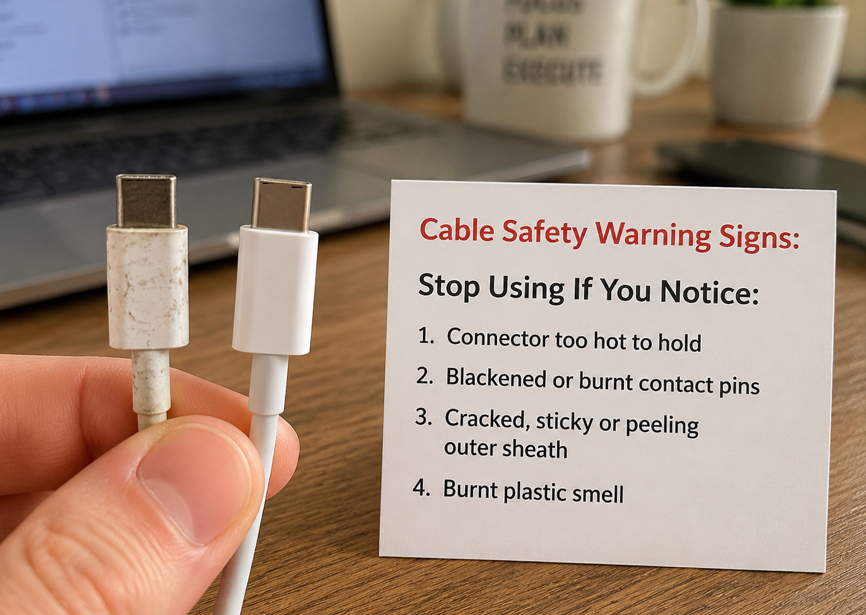
If you plug and unplug roughly on weekdays, the interface is often dusty and damp, the plating quality is poor, or the interface has been deformed, the problem of connector heating will be more serious. Here is a simple judgment standard for everyone: a slightly warm connector is normal; if it is so hot that you can’t keep touching it with your hand, turns black, or has a smell of burnt plastic, you must stop using it immediately, don’t force it.
Development Chain of Safety Risks
Cable safety accidents rarely happen suddenly, and basically deteriorate step by step:
At the beginning, it is long-term overload or poor contact, and the cable body or connector is continuously in a high temperature state; over time, the temperature exceeds the tolerance value of the insulating sheath, and the sheath begins to soften, become sticky, deform or even crack; after the insulating layer is damaged, the internal wire cores may be exposed, touch each other and short circuit, or there may be leakage current and abnormal disconnection; if it is matched with an inferior charger (poor protection mechanism), there are combustibles such as bedding and paper around, or in a closed high-temperature environment, the risk may escalate to smoking or even fire.
So as long as you pay attention to observation on weekdays and deal with it in time when heating and softening of the sheath just appear, there will basically be no serious safety problems. The probability of fire for formal and qualified cables under normal use is very low, and the vast majority of accidents are related to false labeling, misuse, and matching with inferior chargers.
Safety Is a Matter of the Entire System
It should also be particularly emphasized: the actual charging current is determined by the joint negotiation of the charger, device and cable, and the cable itself will not actively “pour” 5A current into the device. For example, if you use a 5A cable to charge an Apple Watch, the watch will only draw the few hundred milliamps of current it needs, and will not be burned out just because the cable can withstand 5A.
Formal chargers have overcurrent, overvoltage, overtemperature, and short circuit protection, which can greatly reduce the risk of accidents, but protection is not omnipotent — for example, the local high temperature caused by poor connector contact may have burned the interface before the charger’s overcurrent protection is triggered. In addition, aging of the device interface, poor charger quality, high ambient temperature, cables covered by bedding, and long-term bending will reduce the overall safety margin.
Prerequisite for Fair Comparison: First Set the Comparison Caliber
Many people argue about whether 3A or 5A is safer, but in fact, it is because the premises of comparison are different, so the conclusions drawn are naturally meaningless. To compare fairly, several variables must be fixed first.
First, the length must be the same. A short 1-meter cable and a long cable of more than 2 meters have very different resistance, voltage drop (that is, voltage loss, current flowing through the cable will lose a little voltage, just like the water pressure will decrease when water flows through a long water pipe), and heat generation, so they cannot be directly compared at all. Second, the interface type must be the same. The structures of USB-C, USB-A, Lightning, magnetic cables, and three-in-one cables are completely different and not comparable. Third, the real material must be the same. The resistance and reliability of pure copper, tinned copper, and copper-clad aluminum are very different. A copper-clad aluminum 5A cable may not be as durable as a pure copper 3A cable.
In addition, the contact quality must also be at the same level. If one interface is wiped clean and plugged tightly, and the other is full of dust and loose, then the heat difference is most likely caused by contact problems, not related to the cable itself. The actual load must also be unified, either both running 3A current, or both running a load close to 5A. You can’t have one no-load and one full-load, so the comparison result will naturally be inaccurate. Finally, the environment must be the same. Comparing in a normal temperature, ventilated environment without coverings can truly reflect the safety performance of the cable itself.
The next item-by-item comparison will focus on several safety dimensions that everyone is most concerned about: including the risk of overload and heating, the risk of charging stability and voltage loss, the risk of short circuit and fire, the risk of equipment damage, the risk of long-term aging, the tolerance to extreme environments, the probability of falsely labeled inferior products, and the risk of standard identification and compatibility, trying to cover all situations that everyone will encounter in daily life.
Of course, 5A cables are not more advantageous in all cases. In the following situations, the conclusion may be reversed:
The first is that the 5A cable is a falsely labeled no-brand product, while the 3A cable is a formal certified product, then the safety of the no-brand 5A cable is definitely not as good as that of the formal 3A cable. The second is that the 5A cable is cut corners, with thin wire cores, poor connectors, and fake E-Marker, while the 3A cable is made of solid materials. In this case, the 5A cable is more dangerous. The third is that the actual use is for low-power devices, such as AirPods and smart watches, where the current is far lower than 3A. At this time, the advantages of 5A cables cannot be exerted at all, and buying them is a waste. The fourth is that the 5A cable is very long and does not have a thickened wire core, while the 3A cable is short and has good contact. At this time, the heat generation of the long 5A cable may be more serious than that of the short 3A cable. The fifth is that environmental factors dominate the risk, such as the cable being covered by bedding, long-term bending, or the interface being corroded by moisture. At this time, whether it is 3A or 5A, the risk is very high, and solving the environmental problem first is the key.
3A vs 5A Safety Item-by-Item Comparison
The following comparisons are all carried out under the premise of “same length, same interface, same material, same qualification standard, same environment, same load”. If there are special circumstances, they will be explained separately.
Overload and Heating Risk Comparison
This is the point that everyone is most concerned about. Let’s give the conclusion first: Formal 5A cables are safer in high-current scenarios, and formal 3A cables are sufficient in low-current scenarios.
Specifically, if both are used within their respective rated ranges — that is, the 3A cable runs no more than 3A current, and the 5A cable runs no more than 5A current, qualified products should meet the standard temperature rise requirements and will not have overheating problems.
If both run 3A current, a qualified 5A cable will have slightly lower heat generation than a 3A cable because of its thicker wire core and lower resistance, but the difference is usually not particularly obvious, and you may not be able to feel it in daily use. There is no need to specifically change to a 5A cable for this difference.
If both run 5A current, the 3A cable is used beyond the rated value, and the risks of heating, voltage drop, and insulation aging will increase significantly. At this time, the 5A cable is the reasonable choice.
Of course, there is also the possibility of reversal: if it is a falsely labeled 5A cable, the wire core is actually as thin as or even thinner than the 3A cable, then its heating risk may be higher than that of a formal 3A cable.
Charging Stability and Voltage Drop Risk Comparison
When charging, current flows from the charger to the device, and there will be a certain voltage loss through the cable, that is, “voltage drop” — if the voltage drop is too large, the device may charge at reduced power, or even repeatedly negotiate power and disconnect, and it will also increase the heating of the interface.
The conclusion is: There is little difference between the two under low load, and 5A cables are more stable under high load and long cable scenarios.
When the load is low (for example, charging AirPods, the current is only about 1A), the voltage drop of both is very small, and the charging stability is basically the same; when the load is high (for example, running full 3A or 5A), 3A cables or thin cables are more prone to excessive voltage drop problems, resulting in reduced power of the device, repeated disconnection, and more serious interface heating; especially for long cables of more than 2 meters, the voltage drop will be more obvious when charging with high current. At this time, you must choose a cable with a thicker wire core and clearly marked 5A and corresponding power.
There are also reversal situations: a long, cut-corner 5A cable may not be as stable as a short and solid 3A cable.
Short Circuit, Smoking, Fire Risk Comparison
This is the most misunderstood point — many people think that 5A cables have higher current and higher fire risk, but that’s not the case. The risk of short circuit and fire cannot simply be said that 3A or 5A is inherently higher. Formal power supply protection, insulating flame-retardant materials and connector quality are the key.
Let’s talk about it by situation: under normal matching use, qualified 3A cables and 5A cables should not have short circuit and fire problems; if matched with a formal charger with perfect protection mechanism, the risk will be significantly reduced, but it cannot be said that there will never be a fire — for example, the local high temperature formed by poor connector contact may ignite surrounding combustibles before the charger’s overcurrent protection is triggered; if an inferior charger is used with poor protection mechanism, the risk mainly depends on the output capacity of the power supply, the resistance of the fault point, the time of protection action, and the flame-retardant grade of the cable and whether there are combustibles around, and has little to do with 3A/5A.
Because 5A cables have thicker wire cores and lower resistance, the temperature rise of the cable body is lower during normal use, but if a short circuit fault occurs, the low resistance may allow a larger fault current to pass, so it still depends on the protection of the charger and the flame-retardant material of the cable itself. This is not to say that 5A cables are inherently more dangerous, but that any cable cannot be judged for safety independently of charger protection, flame-retardant materials and use environment under faults such as short circuit, water ingress, foreign objects or poor contact.
Simply put, don’t dare to use 5A cables because you are afraid of fire, and don’t think that 3A cables must be safer. The key is to buy formal products, use formal chargers, and do not overload them.
Equipment Damage Risk Comparison
Many people worry that using the wrong cable will burn the device. Let’s go straight to the conclusion: The risk of equipment damage mainly comes from specification mismatch, poor contact and inferior cables, not the number 5A itself.
Specifically: as long as it is used in a matching way (3A cable with ≤3A devices, 5A cable with ≤5A devices), it generally does not increase the risk of equipment damage; charging low-power devices with 5A cables, there is no need to worry about burning out at all — the device only draws the current it needs, no matter how high the rated current of the cable is, it is useless; if you use a 3A cable to power a high-power device that requires 5A (such as a 16-inch MacBook Pro), it may increase the probability of damage to the device interface due to overload heating, excessive voltage drop, and repeated disconnection, and will also make the charger frequently trigger protection.
Of course, 5A cables are not completely risk-free: if the connector is poorly connected, the soldering is bad, the E-Marker chip is abnormal, or the private fast charging identification is wrong, it may lead to unstable power, inability to fast charge, and in extreme cases, it may damage the device, but this is a problem of inferior cables or compatibility, not a problem of 5A itself.
Long-Term Aging Risk Comparison
Cables will age after long use, the insulating layer will become brittle and crack, and the wire core may also break strands. Long-term safety depends not only on rated current, but also on temperature rise margin, flexibility and stress design of connectors.
The aging speed is different in different scenarios: if it is a low-power scenario of ≤2A, and the cable is not frequently bent, damp, exposed to the sun or the sheath is damaged, the difference in cable aging speed between 3A and 5A is usually not obvious, and the specific life still depends on materials, workmanship and usage habits. If used under the same actual current, 5A cables may age slower because of higher safety margin and lower long-term temperature rise; but if the 5A cable has been running at full load of 5A, with poor heat dissipation (for example, covered by a quilt), and uses ordinary insulating materials, the aging speed will also accelerate.
There is also a point that is easy to ignore: many 5A cables are stiffer because of the thick wire core, and they are more likely to break the core after repeated bending — after the core is broken, the local resistance will increase, and the heat generation will be more serious, which is more dangerous. On the contrary, those cables with multiple strands of thin copper wire, tensile fiber, flexible outer sheath, and reinforced connector tail may have a longer life even if they are 3A.
Extreme Environment Tolerance Comparison
If used in extreme environments such as high temperature, humidity, and low temperature, the impact of current level is not that great. In extreme environments, priority is given to temperature resistance, flame retardancy, moisture resistance and mechanical strength, then current level.
Let’s talk about it by environment: in high-temperature environments, such as inside a car in summer, places exposed to direct sunlight, and closed backpacks, the heat dissipation conditions are poor, and the safety margin of the cable will decrease. If the actual current is the same, formal 5A cables have more margin because of lower resistance and less heat generation; but if the 5A cable is running at full load, covered, and the outer sheath material has poor temperature resistance, there may also be high temperature risks.
The main risks in humid environments are interface corrosion, foreign object conduction, and short circuit. At this time, the difference between 3A and 5A is not big. The focus is on whether the interface has water ingress, whether there is damage, and how the moisture resistance of the cable is.
In low-temperature environments, such as outdoors in winter, the outer sheath of the cable will harden and easily crack when bent. At this time, the flexibility of the material is much more important than the current level — even a soft silicone cable with 3A is more durable than a stiff PVC 5A cable.
Falsely Labeled Inferior Product Risk Comparison
3A cables also have false labeling, but because the cost of reaching 3A is relatively low, the motivation for false labeling is not that great. However, because 5A cables are more expensive, many no-brand manufacturers will falsely label parameters. Common tricks include: thin wire cores, using copper-clad aluminum to pretend to be pure copper, serious connector heating, marking 5A without E-Marker, using fake E-Marker chips, and only writing “100W fast charging” on the packaging without any standard information.
The biggest danger of falsely labeled 5A cables is: users think it can really run 5A, and use it to charge laptops or high-power power banks for a long time. In fact, the cable is always in an overloaded state, with serious heat generation, fast aging, and may even have safety accidents.
So when buying high-power cables, you must look at the brand, certification, and clear parameters. Don’t be greedy for cheap to buy those low-priced “100W 5A cables” — if the price is obviously lower than similar products of regular third-party brands such as Anker and Belkin, there is a high probability that there is a problem.
Standard Identification and Compatibility Risk Comparison
In addition to the risks mentioned above such as heating, aging, and false labeling, the standard identification and compatibility issues of cables will also indirectly affect safety and user experience, which is easily overlooked.
USB-C PD fast charging is a negotiation mechanism: the charger, device, and cable must identify each other’s capabilities to output the corresponding power. If the E-Marker chip of the 5A cable is abnormal or the information is not standardized, the charger may not be able to identify the 5A capability, and can only operate at the upper limit of 3A, resulting in failure of fast charging; in severe cases, there may be repeated power negotiation and frequent disconnection, which increases the risk of interface heating.
If it is a brand private fast charging cable, such as Samsung’s Super Fast Charge cable, even if the cable body is marked 5A, if it lacks the brand’s exclusive identification contacts, certification chip or special pinout, it may not be able to trigger full-power fast charging, and can only run in ordinary low-power mode, which means spending 5A money but only using 3A capability.
There are also multifunctional scenarios such as docking stations and external monitors, which require special attention: the charging capability, data transmission capability, and video output capability of the cable are independent of each other. 5A only represents current carrying capacity, does not mean it supports high-speed data transmission, nor does it mean it can output 4K/8K video, let alone support Thunderbolt/USB4. If you buy only by looking at the 5A mark, it is likely that it will not meet the data or video usage needs.
Safety Selection Logic for Different Daily Scenarios
After finishing the comparison, let’s combine the devices everyone uses daily to talk about how to choose specifically.
Low-power devices: earphones, watches, slow-charging phones, small appliances
The charging current of such devices is usually within 2A, and the power is about 10W, such as AirPods, Apple Watch, night lights, old slow-charging phones.
In this scenario, formal 3A cables are completely sufficient, and there is no need to spend more money on 5A cables — 5A cables will not make small devices charge faster, but may be stiffer due to thicker wire cores, which is inconvenient to carry and use.
It should be noted that even for low-power devices, do not use no-brand multi-in-one cables with damaged sheaths or loose connectors. Low power does not mean no risk.
Medium-power devices: ordinary fast-charging phones, tablets, power banks
This is the most common scenario, such as iPhones, iPads, Pixels, and ordinary power banks that support 20W-60W fast charging.
If it is a USB-C PD protocol device, the common combination within 60W is 20V×3A, and a formal 3A USB-C cable can fully meet the demand; if the device’s PD power exceeds 60W and is within 100W, then a 5A USB-C cable is required, and it is best to have an E-Marker chip.
If it is a brand private fast charging device, such as some Samsung phones that use low-voltage high-current solutions, you may have to use original or officially certified cables to trigger full power. Ordinary 5A USB-C cables may only run ordinary fast charging. At this time, don’t just look at the 3A/5A numbers, but look at the compatibility requirements in the device manual.
Also a reminder: don’t treat “supports fast charging” as “supports all fast charging”. Only when the device, charger, cable, and protocol all match can full-power fast charging be triggered, and it is also the safest.
High-power devices: laptops, high-power power banks, docking stations
The power of such devices is usually above 65W, such as MacBook Air, MacBook Pro, power banks above 100W, and powered docking stations.
For devices of 65W-100W, priority is given to formal 5A USB-C cables, confirm that the cable body is marked with 100W or 20V/5A, and it is best to have an E-Marker chip; for devices above 100W, such as 16-inch MacBook Pro and gaming laptops that support 140W, 180W, 240W PD 3.1 EPR, you can’t just look at the 5A mark, you also need to confirm that the cable clearly marks the corresponding power or PD 3.1 EPR capability, because high voltage has higher requirements for insulation; if it is used for docking stations, you also need to check the data rate and video output capability of the cable — many 5A cables only support low-speed data of USB 2.0, which is not enough for transferring files or connecting monitors. When buying, you need to see clearly whether it supports USB 3.x, Thunderbolt or video output.
For long-term power supply scenarios, such as using a laptop plugged in all day, try to choose certified cables, short cables or thickened cables. Do not charge at high power in bedding, carpets, or closed bags. Poor heat dissipation will accelerate aging.
Long-term energization, vehicle-mounted, bending, long cable scenarios
There are also some special scenarios where the logic of selecting cables is different:
For long-term energization scenarios, such as long-term power supply for routers, smart speakers, and surveillance cameras, it is recommended to choose a formal cable with a grade higher than the actual current, leaving enough temperature rise margin for more assured use; in vehicle-mounted high-temperature scenarios, the temperature inside the car is very high in summer, priority is given to cables with high-temperature resistant and flame-retardant outer sheaths. Do not use high-power charging immediately after the vehicle is exposed to the sun, wait for the temperature to drop before use; for scenarios with frequent bending, such as cables carried with you, often folded in a bag, priority is given to soft, bending-resistant cables. The reinforcement design of the connector tail is more important than simply thick cable; for long cables of more than 2 meters, if you need to use long cables for high-current charging, you must choose products clearly marked with 5A/100W/240W and with thickened wire cores. Under the same specifications, use short cables as much as possible, which is more stable and safer.
Brand private fast charging protocol scenarios
Many electronic brands have their own private fast charging protocols, many of which are high-current solutions. At this time, ordinary USB-C 5A cables may not be able to trigger full-power fast charging, and may even have compatibility problems.
When choosing such cables, the safest way is to look at the device manual, the markings on the charger, and the official compatible cable list, and give priority to official original cables or officially certified compatible cables. If you use a third-party cable of unknown origin, even if it can trigger fast charging, you should observe the temperature of the cable body and connector, and whether there is frequent disconnection during the first use, and then use it for a long time if there is no problem.
Common Safety Misconceptions
Many people’s misunderstandings about 3A and 5A cables are because they only look at the numbers and not the essence. These seven common misconceptions are almost encountered by every beginner.
Misconception 1: 5A cables must be safer than 3A cables
This is the most common mistake. 5A only means that the rated current of the cable is higher, and does not mean it must be safer — if it is a falsely labeled no-brand 5A cable with thin wire cores and poor connectors, it may not be as safe as a formal 3A cable. Only in scenarios where it is formal and qualified and requires 5A current, the safety margin of 5A cables is higher.
Misconception 2: Charging low-power devices with 5A cables will burn the devices
Don’t worry at all. The actual charging current is determined by negotiation between the device and the charger. The device draws as much as it needs. The cable only provides the capability of “can withstand at most this much”, and will not actively pour current into the device. Just like you use a thick water pipe to fill a small coffee cup, it won’t break the cup just because the pipe is thick — using a 5A cable for AirPods, it will only draw the few hundred milliamps of current it needs, and will not burn out at all.
Misconception 3: The thicker the cable, the faster it will charge if marked 5A
Charging speed is determined by the “short board”: the maximum power supported by the device, the maximum output of the charger, whether the protocol matches, and whether the cable can withstand it. The weakest of these four determines the final charging speed. If your iPhone only supports a maximum of 27W fast charging, even if you use a 240W 5A cable, the charging speed will not increase.
Misconception 4: Marked 5A means it can pass 5A
False labeling of cables is very common now, especially low-priced 5A cables, many of which just print a number, and actually cannot withstand 5A current at all. When buying, you can’t just look at the words on the packaging. You also need to see if there is an E-Marker (standard USB-C PD cable), if there is formal certification, and if the brand is reliable. It is best to touch the temperature when using it for the first time. If it is very hot, there must be a problem.
Misconception 5: Being able to charge means it’s safe
Many people think “if it can charge, there’s no problem”, but that’s not the case. Being able to charge at low power does not mean it is safe at high power; not being hot after short-term use does not mean it will not age under long-term full load. Many safety hazards accumulate slowly. By the time it becomes hot and turns black, there is already a risk.
Misconception 6: All USB-C cables are the same
USB-C is just the shape of the interface, and does not mean the same capability. Different USB-C cables can have very different current capabilities, power, data rates, video output, Thunderbolt/USB4 support — some can only charge 3A/60W, some can charge 240W, some can transmit 8K video, some can only transmit USB 2.0 data. Don’t think that “all USB-C ports can be used universally”.
Misconception 7: The more shielding layers, the heavier the cable, the safer it is
The shielding layer is mainly used to reduce interference during data transmission, and has nothing to do with current carrying capacity; the heavy cable may also be just because of the thick outer sheath and many braided layers, which does not necessarily mean that the copper core inside is thick. To judge the current capability, you still need to look at the rated current, wire gauge, certification and actual temperature rise. Don’t be fooled by propaganda such as “multi-layer shielding” and “thickened cable body”.
Operable Safety Judgment and Maintenance Methods for Ordinary People
After talking so much, some people may ask: I’m not a professional, how do I judge if a cable is reliable? In fact, it’s very simple. You don’t need professional equipment. You can排查 most hidden dangers by looking, touching, and smelling.
Pre-purchase judgment: quickly screen reliable cables
When buying a cable, pay attention to these points, and you can basically avoid most pitfalls.
First, look at clear parameters. Formal cables will definitely mark specific parameters such as rated current, maximum power, interface type, and data rate. If the packaging only has vague propaganda such as “super fast charging” and “extreme fast charging”, and there are no specific parameters, it is best not to buy, and there is a high probability of false labeling.
Second, look at the relevant markings of USB-C 5A. A 100W standard USB-C PD cable is usually marked with 20V/5A and has an E-Marker chip; a 240W cable will clearly mark PD 3.1 EPR or 240W capability, and will not just generally write “5A cable”.
Third, look at certification, but don’t blindly believe in certification. Different certifications have different focuses: USB-IF is the certification of the USB official organization, which focuses on the compatibility of USB specifications. Cables that pass it basically meet the general PD standard; MFi certification is the official certification made by Apple for Lightning and some USB-C accessories, which is more stable when used on Apple devices; UL/ETL are common third-party safety test certifications in North America, which mainly test material flame retardancy, electrical safety, etc.; CE/UKCA are compliance marks for entering the EU and UK markets, which are more of a declaration of compliance with local regulations, and cannot alone prove that the cable truly supports 5A, 100W or 240W. To judge high-power capability, it is still necessary to combine applicable certification, E-Marker, clear parameters, brand reputation and actual temperature rise performance.
Fourth, you can refer to the wire gauge. Sometimes a string of numbers with AWG is printed on the cable body, which is a commonly used wire diameter specification internationally. Simply remember: the smaller the AWG value, the thicker the copper conductor inside, and the stronger the current carrying capacity. For example, a 24AWG cable is thicker than 28AWG and can withstand more current. However, it should be noted that a cable has power cores and data cores, and some cables have thick power cores and thin data cores, so the wire gauge can only be used as an auxiliary reference and cannot replace certification and actual testing.
Fifth, look at the workmanship. The connector is regular without burrs, the tail has a reinforcement design, the cable body printing is clear, and it is not loose when plugged in and out. These are basic quality requirements. If even the workmanship is rough, the internal materials will definitely not be good.
Sixth, look at the price. If a so-called 100W 5A cable is priced at less than half of similar products of regular third-party brands such as Anker and Belkin, then there is a high probability of false labeling. Don’t be greedy for cheap. After all, the cost is there, and low prices often mean cutting corners in places you can’t see.
If it is a USB-A private fast charging cable, don’t judge only by the 3A/5A words on the packaging. Check the brand’s official compatibility list to confirm whether special contacts, thickened power cores or official certified cables are needed, to avoid failure to trigger full power or compatibility problems. If it is a Lightning interface cable, priority is given to MFi certification, connector chip compatibility and connector workmanship. The 3A/5A and E-Marker judgment logic of USB-C cables cannot be directly applied.
In-use judgment: check hidden dangers in 10-20 minutes
When using a new cable for the first time, or when using an old cable to charge a high-power device, you can spend 10-20 minutes doing a simple check.
Test the new cable with a low-power device first, and then use it to charge a high-power device if there is no problem; after 15-20 minutes of charging, lightly touch the cable body and the connectors at both ends with the back of your hand — slightly warm is normal, if it is so hot that it is difficult to keep touching, stop using it immediately; observe whether there is frequent disconnection, power fluctuation, the device prompting “accessory not supported”, and whether the interface is black or deformed; smell if there is a burnt smell or the smell of melted plastic, if there is an odor, cut off the power immediately.
If conditions permit, you can also use a USB power meter or a charger with power display to assist in observing the current, power and power drop, but this can only be used as a reference and cannot replace temperature rise and workmanship judgment.
Daily maintenance
Good daily maintenance can greatly extend the life of the cable and reduce safety risks.
When unplugging the cable, hold the plug to pull, do not pull the cable body, otherwise it is easy to break the wire core at the connector; do not press the cable under heavy objects for a long time, and do not bend it into an acute angle, which will damage the insulating layer and the wire core; when charging at high power, do not cover the cable under bedding, pillows, or carpets, poor heat dissipation will lead to excessive temperature; before use in a humid environment, dry the interface first to avoid water corrosion or short circuit; cables that are not used for a long time should be stored in a dry place to avoid dust and oxidation of the interface.
Signals that must be replaced
If the cable has the following situations, don’t hesitate, replace it immediately:
The outer sheath is damaged, bulging, cracked, or even the inner wire core can be seen; the connector is loose, wobbly when plugged in and out, poor contact, and can only be charged when placed at a specific angle; it is obviously hot to the touch when charging at high power, or has a burnt smell or the smell of melted plastic; under the same device and charger, frequent disconnection and unstable power, after excluding the problems of the device and charger, it is most likely that the cable is broken; the metal sheet of the interface is discolored, blackened, or has burn marks.
Easily Overlooked Safety Influencing Factors
In addition to the 3A/5A current level, there are several factors that have a great impact on safety but are often overlooked.
The impact of cable length
Many people only look at the current when choosing a cable, not the length. In fact, the longer the cable, the greater the resistance and voltage drop, and the more obvious the problems of heating and power drop under high current. For example, for the same 5A cable, the actual performance of 1 meter and 3 meters may be very different.
So for long cables of more than 2 meters, if they are to be used for high-current charging, you must choose products clearly marked with 5A/100W/240W and with thickened wire cores. Under the same specifications, short cables are usually more stable and safer than long cables, so use short cables as much as possible.
The role of USB-C E-Marker
We mentioned E-Marker earlier, let’s expand on it here, because many people have misunderstandings about it. E-Marker is a small chip in USB-C high-capability cables, equivalent to the “capability business card” of the cable, which stores information such as the current, voltage, and data rate supported by the cable. The charger will read this information and then decide how much power to output.
According to the standard USB-C PD specification, C-to-C cables that support more than 3A current usually need a built-in E-Marker to declare capability; if a merchant claims to be a standard USB-C PD 5A/100W cable but has no E-Marker and cannot provide corresponding certification information, it should be highly suspected of false labeling. Compliant PD chargers generally only give it a maximum of 3A current. Of course, some brands’ private fast charging USB-C cables may use their own identification solutions, which do not rely on the general E-Marker. In such cases, the official description of the brand shall prevail.
Of course, having an E-Marker does not mean that the quality of the cable is necessarily good. It only means that the cable meets the basic specification requirements. The specific workmanship, material, and durability depend on the brand and other parameters. In addition, 240W EPR cables not only need to support 5A current, but also support higher voltage levels, so the information in the E-Marker will also be different, and cannot be confused with ordinary 100W 5A cables.
The impact of charger and device status
The cable is only part of the charging system, and the status of the charger and device also affects safety:
Formal chargers have overcurrent, overvoltage, overtemperature, and short circuit protection, which can greatly reduce the risk of accidents, but cannot replace qualified cables; inferior chargers have poor current limiting and temperature control, even if the cable is qualified, it may amplify the risk due to unstable output; if the device interface is loose, oxidized, or dusty, it will increase contact resistance, leading to local heating. Even if the cable is good, the connector may be hot; the performance of the same cable on different devices is different, which may be a protocol compatibility problem, or the state of the device interface is different, so it cannot be generalized.
Materials and flame retardant grade
The outer sheath material and flame retardant grade of the cable are also closely related to safety. Common outer sheath materials include PVC, TPE, silicone, braided sheath, etc., each with advantages and disadvantages: PVC is cheaper but stiffer, and easy to become brittle at low temperatures; TPE is soft and elastic, which is a relatively common material; silicone is softer and has a wide temperature resistance range, but is easy to get dusty; braided sheath is more wear-resistant, but not necessarily more high-temperature resistant.
Flame-retardant materials can reduce the speed of flame spread in the event of a fire and reduce risks, but it does not mean that they can be used under overload — even flame-retardant materials will age and fail after long-term overload heating. So don’t think that “braided cables” and “silicone cables” must be safer. The core still depends on the cross-sectional area of the conductor, connector quality, insulation temperature resistance grade and flame retardant ability. The outer sheath material is only part of it.
Final Judgment Framework: From Beginner to Semi-Proficient
At this point, you may have a little mixed up. We have sorted out a simple judgment framework, whether you are a beginner or a user who wants to understand in depth, you can follow it.
How to judge whether a cable is suitable for your device
Just four steps:
First step, check the device parameters. First find out the maximum charging power supported by your device, and what charging protocol it uses (such as USB PD, Samsung’s Super Fast Charge). This information can be found in the manual, official website or system settings of the device.
Second step, calculate the required current. If it is a USB PD device, 3A cables are generally sufficient for within 60W, 5A cables are needed for around 100W, and for above 100W, you can’t just look at 5A, you need to see if there is a corresponding EPR power mark (140W, 180W, 240W); if it is a private protocol device, look at the cable specifications required by the official.
Third step, check the cable parameters. Check whether the rated current, power, interface type, certification, and length of the cable match the needs of the device; if it is a USB-A or Lightning interface, you also need to check the brand compatibility requirements or MFi certification accordingly.
Fourth step, first use inspection. When using this cable to charge the device at high power for the first time, observe for 15-20 minutes to see if the temperature is normal, if there is disconnection, if there is any odor, if the interface is abnormal, and only proceed to regular long-term use once you confirm no abnormalities appear.
Final Recommendations for Choosing Between 3A and 5A Cables
To wrap up the selection logic with clear, actionable guidance aligned with USB-IF and IEC 62368-1 safety standards:
- For low-power accessories and standard fast-charging smartphones (60W and below), a formal, qualified 3A cable is fully sufficient and offers the best cost-performance ratio. There is no practical safety or speed benefit to upgrading to 5A in this use case.
- If you want a single cable to cover smartphones, tablets, and 65W–100W laptops, a reputable 5A USB-C cable with a genuine E-Marker chip is the more reliable, future-proof choice with broader compatibility. Note that under current USB-IF certification rules, new official high-power certified cables fall under the 240W EPR category, which is fully backward compatible with 100W SPR devices.
- For devices supporting 140W, 180W, or 240W PD 3.1 EPR charging (such as 16-inch high-performance laptops and gaming notebooks), you must select a cable explicitly marked for EPR and the corresponding wattage. A standard 100W 5A cable is not rated for the higher 28V–48V EPR voltage levels and cannot deliver full power safely.
- For devices using brand-proprietary fast charging protocols, prioritize official original cables or officially certified compatible cables to ensure proper power negotiation, full charging speed, and consistent safety.
Regardless of whether you choose 3A or 5A, the hierarchy of safety priorities never changes: genuine compliant product > specification match > appropriate cable length > ventilated use environment > regular inspection.
Conclusion
By the end of this guide, you should be able to make three key judgments independently:
First, 3A and 5A are not guarantees of charging speed, but current-carrying ratings that define a cable’s safety margin. A higher number does not automatically mean a better or safer cable. Proper matching between the cable’s rated capacity and your device’s actual power demand is what matters most. You also do not need to worry that using a 5A cable with low-power devices will cause damage — the device only draws the current it needs, and the cable never forces extra power into the device.
Second, you can select the right cable for your setup based on your device’s power rating and charging protocol, combined with the cable’s markings, certifications, length, and build quality. You no longer need to waste money on unnecessarily high-spec cables that offer no real benefit for your daily devices.
Third, you can recognize common safety hazards — including excessive heating, frequent disconnection, unusual odors, physical sheath damage, and false specification labeling — and know when to stop using a cable and when it is time for a replacement.
Charging cables may seem like small, trivial accessories, but electrical safety is never a minor concern. With the right product, correct usage, and routine checks, you can eliminate the vast majority of charging cable safety risks and enjoy reliable, worry-free charging for all your devices.