
Introduction: Why Your USB-C Cable Never Lives Up to Its Packaging
Have you ever bought a USB-C cable that promised 240W blazing-fast charging, only to watch your laptop charge at half speed? Or picked up a “USB4 40Gbps” cable that transfers a 10GB movie slower than your old phone charger cord? You are far from alone.
The USB-C market is full of marketing hype. Two cables can look identical on the outside, but one might cost $3 and the other $30 — with massive gaps in real performance, safety, and lifespan. Claims like “10,000 bends” or “works with every device” are often just words on a box, with no real testing to back them up.
A reliable USB-C cable is not defined by the numbers printed on its packaging. It is defined by measurable, repeatable, standardized lab testing.
This guide breaks down exactly how professional reviewers test USB-C cables, what each test means for you, and how to use this knowledge to pick a cable that actually does what it says.
What a Complete Cable Review Should Cover
| Test Category | What It Checks | Why It Matters For You |
|---|---|---|
| Build & Structure | Material quality, internal design | Determines feel and long-term durability |
| Electrical & Charging | Power delivery, efficiency, heat | Decides how fast your device charges and how hot the cable gets |
| Data & Video | Transfer speed, signal stability | Affects file transfers, monitor connections, and docking |
| Mechanical Reliability | Lifespan under daily use | Tells you how many months/years the cable will actually last |
| Safety & Compatibility | Risk of damage, device support | Protects your devices from harm and avoids “works but not really” surprises |
Testing Foundations: Standards, Samples & Lab Environment
Before any test starts, reliable reviews follow strict ground rules to make sure results are fair and trustworthy.
Official Standards We Follow
All tests are aligned with globally recognized industry standards, so results match what official certification labs use:
- USB-IF Specifications: The official rules for USB Type-C ports, USB Power Delivery (PD), and USB4/Thunderbolt performance
- IEC 62680: International standard for USB data and power transmission electrical requirements
- IEC 62368: Global safety standard for information technology and audio/video equipment
- UL 94 & UL 20276: Safety standards for cable flame resistance and wire construction
- IEC 60068: Standardized environmental aging and reliability testing methods
Sample & Fairness Rules
- Anonymous retail purchase: Cables are bought from regular stores, not sent by manufacturers. This avoids biased “golden samples.”
- Full product documentation: Every detail from the packaging is recorded — claimed wattage, speed, certifications, length, and model number.
- Pre-test conditioning: Samples rest in standard lab conditions for at least 4 hours to eliminate temperature or humidity effects from shipping.
Standard Lab Environment
Tests run in a controlled room to make sure results from different cables can be fairly compared:
- Temperature: 25°C ± 2°C (77°F ± 3.6°F)
- Relative humidity: 45%–75%
- Clean, stable power supply with low electrical noise
- All key electrical measurements are repeated at least 3 times, with the average value recorded
Test Equipment Tier
| Tier | Tools | Used For |
|---|---|---|
| Basic | USB power meter, multimeter, electronic load, PD protocol analyzer | Everyday consumer-level testing |
| Professional Lab | Oscilloscope, thermal imaging camera, plug cycle tester, bend test machine, temperature/humidity chamber | Full deep-dive reliability and signal testing |
How USB-C Cable Design Determines Performance
Before diving into test methods, it helps to understand what’s inside a cable and why each part matters. A cable’s real-world performance is shaped by four core internal components:
- Power Conductors Thicker, purer copper wires (measured in AWG, or American Wire Gauge) carry more current with less loss. A smaller AWG number means a thicker wire — and usually better high-power performance. Cheaper cables often use thinner copper or even copper-clad aluminum (CCA), which runs hotter and delivers less power to your device.
- High-Speed Data Pairs For USB 3.2, USB4, and video output, cables include shielded twisted wire pairs. Precise impedance control and full shielding keep signals clean over distance. Skip these internal pairs, and you get a “charging-only” cable that looks identical but can’t transfer files at high speed.
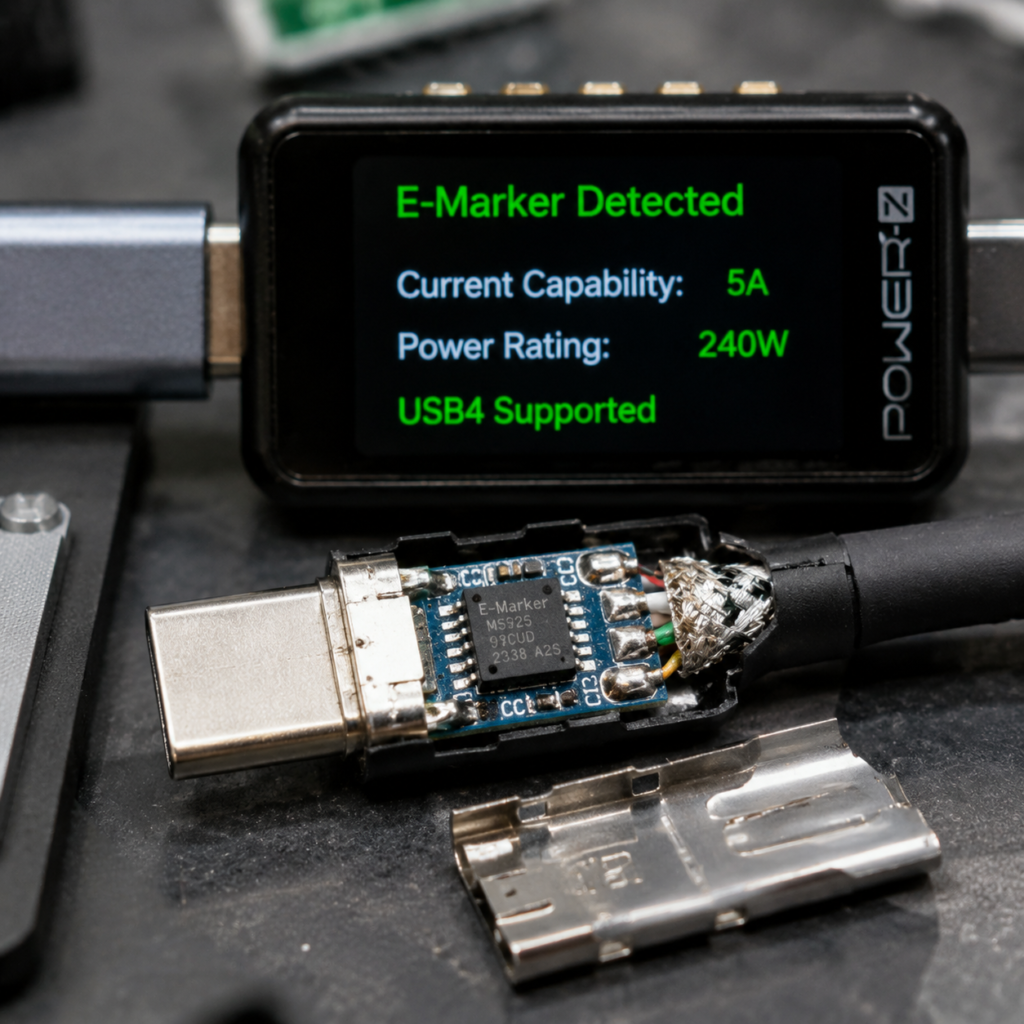
- E-Marker Chip This tiny built-in chip tells chargers and devices what the cable can handle. Per USB-IF rules, any cable rated above 3A / 60W requires one to unlock higher current levels. A missing or fake E-Marker is the top reason “100W cables” only charge at 60W.
- Connector PCB & Assembly The small circuit board inside each plug, solder joints, and contact plating all affect reliability. Poor soldering or thin gold plating leads to early wear, higher resistance, and intermittent connections.
Core Test Categories: What We Measure & Why
1. Physical Build & Internal Structure: What’s Hiding Under the Plastic
A cable’s outward appearance tells only part of the story. The real quality lives inside.
1.1 Exterior Build Inspection
We start with what you can see and feel:
- Connector housing: Metal shell finish, port fit precision, plating quality, and how smoothly it plugs in
- Cable jacket: Outer material (PVC, TPE, nylon braided, silicone), thickness consistency, and flexibility
- Strain relief: The reinforced section where the cable meets the plug. This is one of the most common failure points in everyday cable use. Longer, flexible strain relief dramatically extends a cable’s usable life.
Why it matters: Build quality is the first predictor of lifespan. Flimsy strain relief and cheap plastic almost always mean early breakage.
1.2 Internal Teardown Analysis (Destructive Test)
We open up the cable to verify claims:
- Conductor material & gauge: Real copper vs. copper-clad aluminum (CCA), and actual AWG wire thickness. Thicker wire = less power loss.
- Shielding structure: Aluminum foil + braided shield layers prevent signal interference and improve data stability.
- Internal components: Confirmation that an E-Marker chip actually exists, and inspection of solder joint quality.
Why it matters: This is how we catch the most common false advertising — charging-only cables sold as “full-featured high-speed” cables.
2. Electrical & Charging Performance: Does It Charge Fast and Stay Cool?
This is the most important set of tests for most people.
2.1 Continuity & Pinout Check
First, we confirm every pin works correctly on both plug orientations:
- Full pin connectivity test for VBUS (power), GND (ground), CC (configuration channel), data pins, and SBU pins
- Checks for short circuits, open circuits, and crossed wires
- Verifies reversible plug works identically in both directions
Why it matters: Basic manufacturing defects are surprisingly common in no-name cables. A single broken pin can mean no data, no video, or unreliable charging.
2.2 DC Resistance & Voltage Drop Test
Think of electrical resistance like friction in a water pipe: higher resistance = more power lost as heat = less power reaches your device.
- We use a 4-wire (Kelvin) measurement method for maximum accuracy, testing both the power and ground wires
- We then measure voltage drop at real-world loads — 3A, 5A, and up to the cable’s claimed maximum
As a rule of thumb, a good 1-meter 5A cable usually has a total VBUS+GND resistance below 100mΩ. Higher values mean noticeable heat and slower charging.
Why it matters: This is the single best test of how efficiently a cable delivers power. Two “100W” cables can have very different real-world charging speeds.
2.3 Real-World Power Capacity Test
We load the cable at its full claimed power for 30+ minutes:
- Standard voltage steps: 5V, 9V, 15V, 20V, 28V, 36V, 48V
- Checks for power droop, unexpected disconnections, or thermal runaway
- Peak overload test at 110% of claimed power to verify safety margins
Why it matters: Some cables handle peak power for 10 seconds but overheat and drop power after a few minutes — exactly when you need it most for laptop charging.
2.4 E-Marker Chip Verification
The E-Marker is a tiny chip inside the cable that tells your charger what the cable can handle.
- Per USB-IF rules:
- 3A / 60W cables: No E-Marker required
- 5A / 100W (PD SPR) cables: E-Marker required
- 240W (PD 3.1 EPR) cables: E-Marker required
- We read the chip’s data — current rating, USB version, vendor info — and compare it to the packaging claims
- A missing or fake E-Marker is the #1 cause of “why doesn’t my 100W cable charge fast?” If no chip is detected, chargers cap output at 60W by default
Why it matters: You can’t see the chip, but it controls how much power your charger will deliver. Fake E-Markers are rampant in budget cables.
2.5 Fast Charging Protocol Compatibility
We test real protocol handshake:
- Standard protocols: USB PD 2.0, PD 3.0, PD 3.1 EPR (up to 240W), and PPS (Programmable Power Supply)
- EPR cables support extended voltages up to 48V for 140W–240W laptops and gaming devices
- Common proprietary fast-charge standards used by major phone brands
Why it matters: A cable can deliver 100W but still fail to trigger fast charging on your phone if it doesn’t support the right protocol.
3. Data & Video Performance: Is “High Speed” Actually Fast?
Many “charging cables” look just like data cables — but can’t move files at all.
3.1 Transfer Speed Verification
We test at each official USB speed tier:
- USB 2.0 (480Mbps) — basic charging-only cables
- USB 3.2 Gen 1 (5Gbps) / Gen 2 (10Gbps) / Gen 2×2 (20Gbps)
- USB4 Gen 2 (20Gbps) / Gen 3 (40Gbps)
- USB4 Version 2.0: up to 80Gbps symmetric, up to 120Gbps asymmetric mode
We calculate real-world efficiency — how much of the theoretical speed you actually get — and watch for sudden speed drops.
Why it matters: Speed ratings are the second most commonly faked spec after wattage.
3.2 Real-World File Transfer Stability
We transfer large 10GB+ files (videos, RAW photos, game data) continuously:
- Records average speed, peak speed, and any dropouts
- Monitors cable temperature during long transfers
- Catches “fast for 10 seconds, then slows to a crawl” issues
Why it matters: Benchmark speeds don’t always match real-world file transfers. Thermal throttling is a common hidden problem.
3.3 Video Output Capability
- Tests DisplayPort Alt Mode support at 4K@60Hz and 8K@60Hz where claimed
- Checks for screen flickering, blackouts, and audio sync issues
- Verifies Thunderbolt 3/4 compatibility for docks and eGPUs where applicable
Why it matters: A cable can have fast data speeds but still fail at video output if it lacks the right alternate mode support.
3.4 High-Speed Signal Integrity (Advanced Lab Test)
For USB4 and Thunderbolt cables, we dig deeper into why a cable might be unstable:
- TDR testing: Checks for impedance mismatches that cause signal reflections. Why it matters: A poorly made USB4 cable may work fine for charging and low-speed data, but drop connections or fail entirely when used with a 40Gbps SSD or high-resolution monitor.
- Insertion & return loss: Measures how much signal strength is lost through the cable. Why it matters: Longer cables lose more signal. A cable that works at 0.5m may fail completely at 2m.
- Eye diagram analysis: Visualizes signal quality, jitter, and noise margin at high speeds. Why it matters: Two cables can both claim “40Gbps,” but one may have unstable signals that cause random file corruption or dropped video — issues you’d never spot with a simple speed test.
4. Mechanical Reliability: How Long Will It Actually Last?
A cable that works great out of the box is useless if it breaks in 3 months.
4.1 Plug Cycle Lifespan Test
- Repeated plug-in and pull-out cycles, aligned with USB Type-C mechanical durability requirements (USB-IF specifies a minimum of 10,000 mating cycles for the connector)
- We re-measure contact resistance every 1,000 cycles to watch for wear
- Checks for loose metal contacts, plating wear, and plastic housing damage
Why it matters: Thin gold plating wears out fast. A cable that feels tight on day one can develop loose connections after a few hundred uses.
4.2 Bend & Flex Fatigue Test
This simulates daily use — tossing the cable in a bag, bending it near the plug, wrapping it up:
- Repeated bending right at the strain relief area
- Standard test runs 5,000–10,000+ bend cycles
- Acceptance criteria vary by test standard and product grade. Typical evaluation metrics include resistance change, continuity failures, and visible damage to the jacket or internal structure.
- Records when outer jacket cracks, internal wires break, or the cable stops working
Why it matters: This is the test that predicts real-world lifespan. Most cables fail from repeated bending, not pulling.
4.3 Tensile Strength Test
- Pulls the cable and connector with controlled force
- Tests both straight pull and side-loading force (simulating yanking the cable off a desk)
- Checks if the connector pulls apart, solder joints break, or wires snap inside
Why it matters: Accidentally stepping on or yanking a cable is a common failure scenario. Weak internal strain relief means the wires rip right out of the plug.
5. Environmental & Safety Testing: Can It Handle Real Life?
5.1 Full-Load Temperature Rise Test
- Runs the cable at maximum rated power for 30–60 minutes
- Uses a thermal imaging camera to map hotspots on the connectors and cable body
- A surface temperature rise of ≤30°C above room temperature is generally considered safe. Hot spots can indicate undersized wire or bad connections.
Why it matters: Excess heat wastes power, speeds up aging, and creates safety risks. The hottest part of the cable is almost always inside the connector.
5.2 Environmental Aging Test
- Temperature cycling: Alternates between cold (-20°C / -4°F) and hot (60°C / 140°F) to simulate seasonal changes
- Humidity aging: 85°C / 85% RH damp heat test to accelerate insulation degradation. This is primarily used for industrial-grade qualification, not standard consumer cable testing.
- After aging, all electrical tests are repeated to measure performance decay
Why it matters: Some materials degrade quickly in heat or humidity. Aging tests catch cables that work fine new but fail after a few months in a hot car or humid room.
5.3 Electrical Safety Protection
- Insulation withstand test: Applies 500V DC for 60 seconds to verify insulation integrity
- Short-circuit & overcurrent test: Simulates fault conditions to confirm the cable doesn’t fail dangerously
- Verifies protection systems on the charger/device side activate correctly
Why it matters: Safety is non-negotiable. A cable with poor insulation can damage devices or create fire risk under fault conditions.
6. Real-World Compatibility Testing
Lab numbers mean nothing if the cable doesn’t work with your actual devices.
6.1 Cross-Device Charging Compatibility
We test with a matrix of real products:
- Smartphones, tablets, laptops, and handheld gaming consoles
- Multiple charger brands to rule out one-off compatibility
- Low-power devices like earbuds and smartwatches
Why it matters: Some cables work perfectly with one brand but refuse to fast-charge another.
6.2 Peripheral & Expansion Compatibility
- External SSDs, USB hubs, and card readers
- Monitors, USB-C audio adapters, and car connectivity systems (CarPlay / Android Auto)
Why it matters: Compatibility issues often only show up with specific peripherals, not in basic electrical tests.
How to Read Review Results: Scoring System Explained
Not all tests matter equally for everyday use. Our weighted scoring system reflects real-world impact:
| Category | Weight | What It Includes |
|---|---|---|
| Electrical & Charging Performance | 30% | Resistance, voltage drop, power delivery, heat |
| Build & Mechanical Reliability | 25% | Materials, plug life, bend life, tensile strength |
| Data & Multi-Function Performance | 15% | Speed accuracy, stability, video support |
| Safety & Compatibility | 20% | Safety tests, device support, protocol compatibility |
| Value & Build Quality | 10% | Price vs. actual performance |
Final Rating Tiers
- Highly Recommended (90–100): Meets or exceeds all claims. No significant weaknesses. Safe, reliable, and worth the price.
- Good Buy (75–89): Core performance is solid. Minor cosmetic or secondary-feature flaws. Fine for daily use.
- Consider Carefully (60–74): Works for basic use, but falls short of claims in some areas. May not be ideal for high-power or high-speed needs.
- Not Recommended (Below 60): Serious false advertising, safety risks, or core function failures. Avoid.
Example Review Result
To show how this framework works in practice, here is a sample summary for a mid-tier 240W USB4 cable:
| Test Item | Claimed Spec | Measured Result | Verdict |
|---|---|---|---|
| Max Power | 240W PD 3.1 EPR | 240W sustained, no droop | Pass |
| USB Speed | USB4 40Gbps | ~38Gbps sustained | Pass |
| DC Resistance (1m) | Not specified | 82mΩ total (VBUS+GND) | Good |
| Bend Life | 10,000 cycles | Passed 10,000 cycles, no continuity failure | Pass |
| E-Marker | Present | Verified, correct 5A EPR rating | Pass |
What to Look For In Any Review
- Claimed vs. Measured comparison table: The single fastest way to spot false advertising
- Defect & risk summary: What could go wrong with this cable
- Clear use-case recommendation: Who this cable is actually best for
Practical Buying Guide: Pick the Right Cable Without Lab Equipment
You don’t need a thermal camera to buy well. Use these simple rules.
Choose Based On Your Actual Use Case
More watts and faster speed are not always better. Buy what you need:
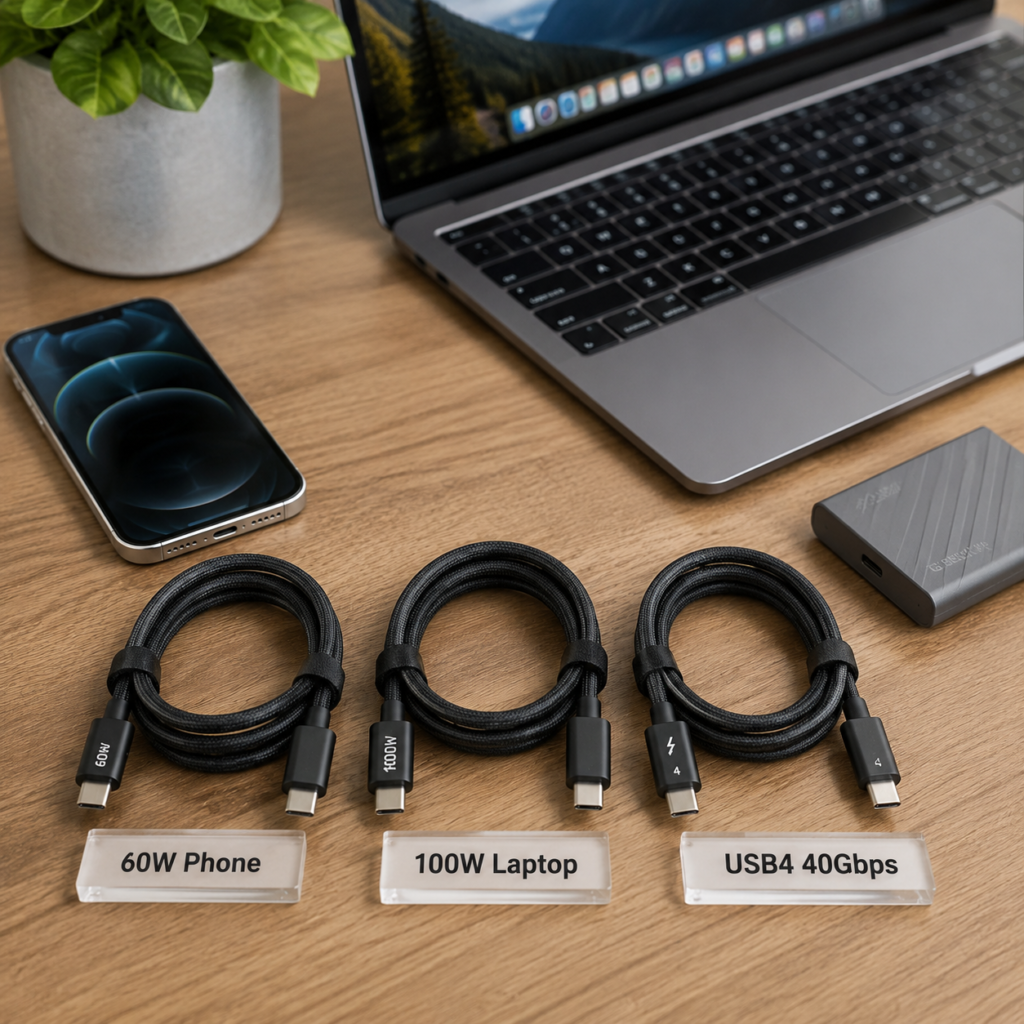
- Phone fast charging: Look for 60W PD + PPS support, flexible jacket, good strain relief
- Laptop charging: Must be 100W+, have an E-Marker chip, and support 5A current
- Gaming laptops / high-power devices: Look for USB PD 3.1 EPR rating matching your laptop’s wattage (140W, 240W)
- High-speed data / video: Confirm the USB version and DisplayPort Alt Mode support. Full-featured cables with proper shielding are worth paying for.
3 Common Fake Specs to Spot Instantly
- Fake high wattage: If a cable claims 100W/240W but is extremely cheap, it almost certainly lacks a real E-Marker chip and will cap at 60W.
- Fake high speed: A $5 cable labeled “USB4 40Gbps” is almost always a USB 2.0 charging-only cable.
- Fake certifications: Printed logos are easy to fake. Real USB-IF certified cables have a TID number you can look up on the official USB-IF website.
Quick Self-Tests Anyone Can Do
- Use a basic USB power meter: Affordable $10–$30 meters can read E-Marker info and show real charging power.
- Feel for heat: If the cable gets uncomfortably warm during normal fast charging, the wire inside is probably too thin.
- Test a large file transfer: Copy a big file to an external SSD. If it’s very slow, you likely have a USB 2.0 cable.
Tips to Make Your Cables Last Longer
- Don’t yank cables out by the wire — pull from the connector body
- Avoid tight bends right at the plug
- Keep cables away from extreme heat and direct sunlight
- Loosely coil cables when storing; don’t wrap them tightly around objects
Frequently Asked Questions (FAQ)
Q1: Does a longer USB-C cable always charge slower?
Not automatically. For the same wire thickness (AWG), longer cables do have higher resistance and more power loss. However, a well-made long cable with thicker internal wires can have lower loss than a cheap thin short cable. Wire gauge matters more than just length.
Q2: Why do two 100W USB-C cables have such different prices?
Price differences come from real internal differences: pure copper vs. copper-clad aluminum wire, thicker vs. thinner conductors, genuine E-Marker chip quality, full shielding layers, certification fees, and better build quality at the stress points.
Q3: Can a bad USB-C cable damage my devices?
Yes, it can. Excessively high resistance causes dangerous overheating, faulty insulation can cause short circuits, and incorrect resistor/chip design can trick devices into drawing more power than the cable can safely handle. There are well-documented cases of cheap non-compliant cables damaging laptops and chargers.
Q4: Are Thunderbolt cables and regular USB-C cables interchangeable?
Thunderbolt cables work as regular USB-C cables — they are backwards compatible. But a regular USB-C cable may not support Thunderbolt speeds or features. You can’t tell just by looking; you have to check the rating.
Q5: How can I quickly tell if a cable has an E-Marker chip?
The easiest way is with a USB PD power meter that can read cable info. As a rule of thumb, any cable rated for 5A / 100W or higher is required by USB-IF standards to have one. If it claims 100W but costs almost nothing, assume the chip is missing or fake.
Q6: Will a 240W cable make my phone charge faster?
No. Charging speed is limited by the slowest link in the chain: your phone, your charger, and your cable. If your phone only accepts 25W charging, a 240W cable won’t speed it up at all. It will work perfectly fine — it just won’t charge any faster.
Q7: Why does my USB-C cable charge fast but transfer files very slowly?
Because USB-C is just the shape of the plug — it does not guarantee high-speed data. Many cables are built only for charging, with no internal high-speed data pairs. They will charge your phone or laptop perfectly well, but top out at USB 2.0 speeds (480Mbps) for file transfers. You cannot tell the difference by looks alone.
Q8: Are more expensive USB-C cables always better?
Not automatically, but price usually correlates with internal build quality. A high price tag can be wasted on premium branding, but extremely cheap cables almost always cut corners on wire gauge, copper purity, shielding, and E-Marker authenticity. For critical use cases like laptop charging and high-speed data, verified performance and certifications matter more than either price or brand name.
Final Thoughts
The biggest problem with the USB-C market is information asymmetry. Manufacturers print big numbers on packaging, but most buyers have no way to verify them. Standardized lab testing strips away the marketing and shows you what a cable can actually do.
You don’t need to buy the most expensive cable on the shelf. You just need one that honestly matches what your devices require — and that has the build quality to last. A good USB-C cable balances three things: efficient power delivery, long mechanical life, and safe, reliable operation.
Next time you shop for a cable, skip the hype. Look for reviews that show measured data, not just unboxing photos and subjective opinions. The numbers never lie.