
We all have that junk drawer stuffed full of charging accessories — cables and bricks for phones, tablets, laptops, wireless earbuds, electric toothbrushes, even portable fans. Most of us live by the unspoken rule: if it still charges, it doesn’t need replacing. We wrap frayed cables in clear Scotch tape, wait an extra hour for slow charges, and only panic when a charger gets so hot we can barely hold it, or even starts wisping smoke.
The truth is, charging accessory hazards almost never come out of nowhere. They start with small, easy-to-ignore red flags: extra heat during use, loose connections, worn outer casing, or fast charging that suddenly stops working. Multiple consumer electronics fire incidents have been linked to low-quality, damaged, overheated, or misused charging gear.
Of course, whether to replace an accessory depends on its product manual, certification marks, actual condition, and local safety standards — but the core rule is simple: if you see exposed wires, a burnt electrical smell, smoke, tripped breakers, water damage, unusual extreme heat, or charred ports, stop using it immediately and unplug it. Don’t keep plugging it in over and over to “test” if it still works.
In this guide, we’ll walk through immediate danger signs, aging warning signals, use-case-specific checklists, shopping tips to avoid low-quality gear, daily care habits, common charging myths, and emergency response steps. By the end, you’ll be able to tell exactly which of those old accessories in your drawer are safe to keep — and which need to go.
Aging Warning Signs: Still Works, But Time to Plan a Replacement
Now for the cases where there’s no immediate danger, but your gear is showing its age. These aren’t emergency-level risks, but you should plan to replace them soon, or do a cross-test (swap outlet first, then cable, then charger, then check your device’s port/OS/battery) to confirm where the issue is coming from.
Charger Aging Signs
Start with appearance: if the charger casing is yellowed, feels slightly sticky to the touch, the prongs have light oxidation, and the markings are a little worn but still fully readable — it’s been around a while and is starting to degrade.
Next, test performance: if you’ve ruled out issues with the outlet, cable, and device, and charging is still noticeably slower, fast charging won’t kick in, or it cuts out when charging multiple different devices — it’s almost certainly internal component wear.
If you have a reliable power meter, you can check the output power — if it’s way off the listed rating, it’s time to replace it. But never take a charger apart yourself; there are high-voltage components inside that can cause serious injury.
Note: chargers don’t have a fixed “expiration date,” but if you use it every day, keep it in a hot space, or run it at full power for high-wattage devices constantly, it will wear out faster, so check it more often.
Charging Cable Aging Signs
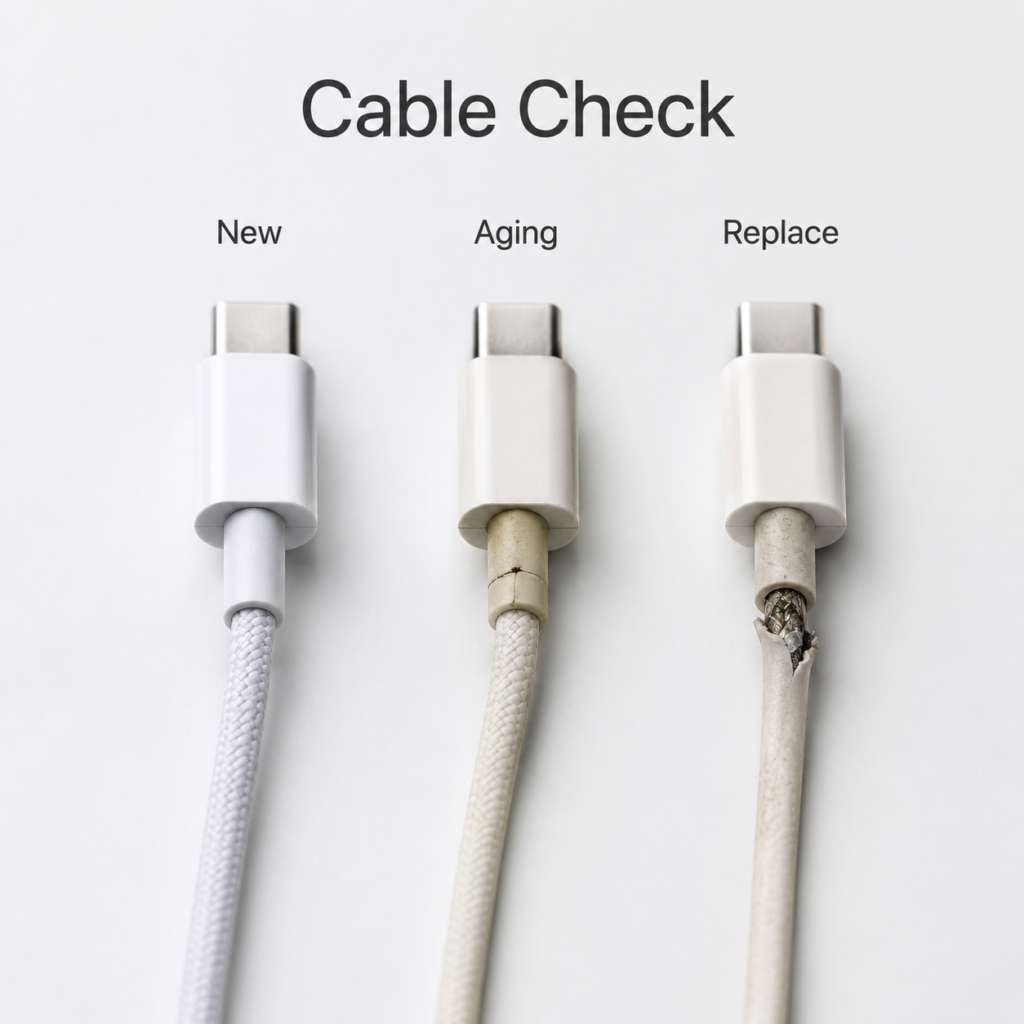
Cable aging is much easier to spot: the cable gets stiff, brittle, feels like a hard plastic stick in cold weather, is heavily yellowed, has tiny cracks at the connector root (but no exposed insulation yet), or a braided outer layer is super frizzy but hasn’t worn through to the inside — those are all clear aging signs.
In use: if wiggling the cable a little makes the charge cut out, you have to hold it at a specific angle to charge, or data transfer drops out constantly — the inner wires are probably partially broken, or the connection is failing.
Also watch for power drop-off: if this cable used to trigger fast charging reliably, but now it won’t, or it keeps dropping back to slow charging, and you’ve confirmed the charger and device are fine — it’s the cable.
What to Check for Different Cable Types
Different port types have different common failure points and requirements:
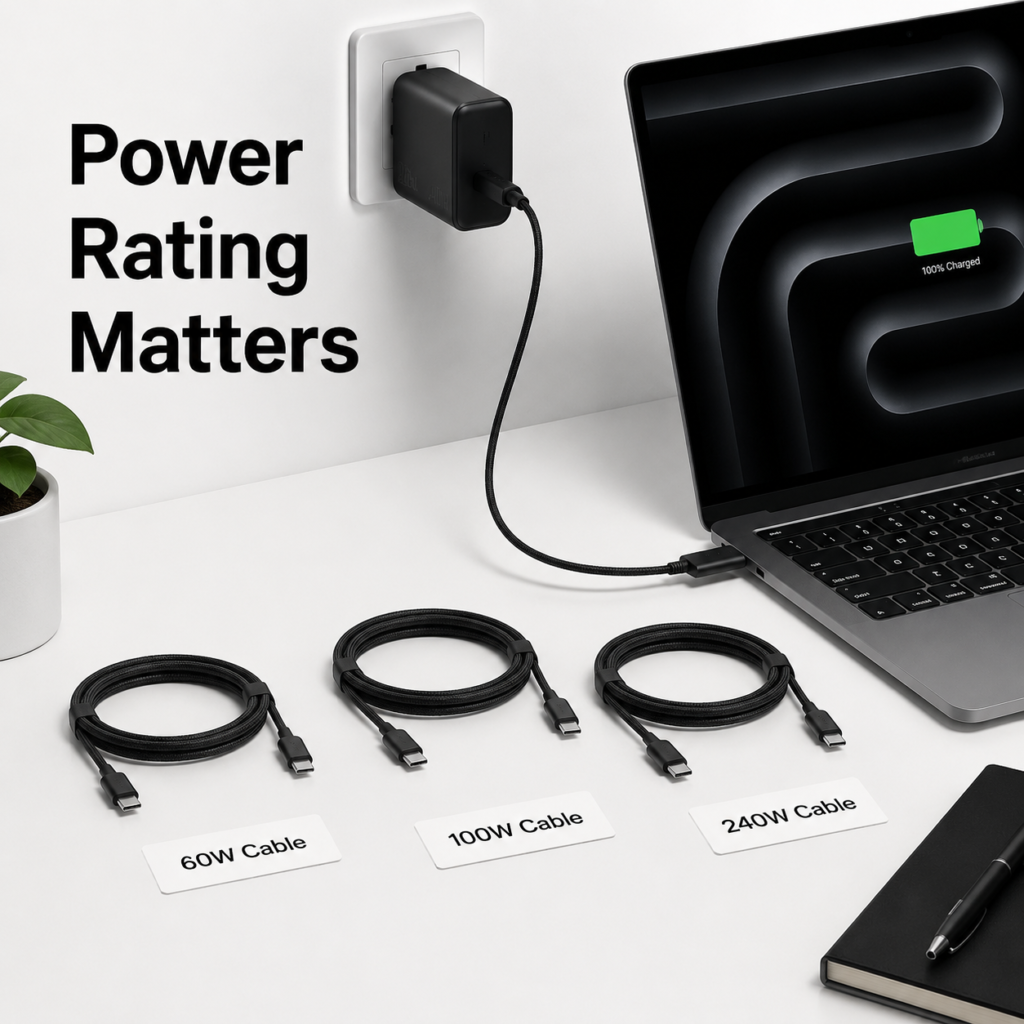
- USB-C cables: For phones, tablets, and other 60W-or-lower devices, a 3A cable is usually sufficient. But for 100W, 240W, or other high-wattage laptop fast charging, you need a cable explicitly rated for that power level, with a 5A current rating and an E-Marker chip. Otherwise, you won’t get full charging speed, and the cable could overheat from being overloaded.
- Lightning cables: If you keep getting “this accessory is not supported” alerts, even after cleaning the port and updating your device’s OS, replace it with an MFi-certified cable to avoid sudden failures or potential device damage.
- Micro-USB cables: This port type is already prone to loose fits and bad connections. If it’s already cutting out regularly, don’t put up with it long-term — just replace it.
- High-power cables: No matter the port type, if the connector gets noticeably hot, the plug changes color, or the power output is unstable, stop using it immediately.
Use Cases Where You Should Check More Often
The same charging gear will wear out faster in some environments than others, so adjust your check frequency accordingly.
Hot, Humid, or Dusty Environments
If your charger or cable lives in the kitchen, bathroom, a workshop, or gets left outside in direct sun, heat, humidity, and dust will speed up casing wear and metal oxidation. In these cases, check the outer casing, prongs, connector temperature, and charging stability once a month.
Car Charging Setups
Charging gear in cars wears out way faster. In summer, the inside of a car can hit 120–140°F (50–60°C) in direct sun, and cables get tugged, bent, and twisted constantly. A lot of people leave a cable plugged in their 12V (cigarette lighter) outlet for a year or two without ever glancing at it. If your car charger wiggles loosely in the outlet, gets unusually hot while charging, the 12V port is blackened, or the cable is stiff and cracked — replace it right away.
Checklists by Device Type
What to focus on depends on what you’re charging:
- Phones/tablets: Check for cable fraying, loose connectors, and whether fast charging works reliably.
- Laptops/high-power devices: Check charger temperature, cable power rating, E-Marker chip presence, and if the port gets hot or discolored.
- Low-power devices (earbuds, smartwatches): Check for corrosion on magnetic contact points, frequent disconnections, and if the charging base gets hot.
- E-bikes, electric vehicle chargers: If the cable casing is cracked, the port is charred, or the plug is warped, stop using it immediately. Contact the brand’s support or a certified technician — don’t try to fix it yourself.
International or Cross-Region Use
If you travel between countries often, or bought a charger from a different region, first check if it has a “100-240V~” wide-voltage input mark. If it doesn’t, don’t plug it into an outlet with a different voltage — you’ll burn it out instantly.
If you’re living somewhere long-term or buying local accessories, pick products that meet local regulations and certification requirements: UL/ETL for the US, CE marking for the EU, UKCA for the UK, PSE for Japan, RCM for Australia, and so on.
Important note: Marks like CE, FCC, or RoHS don’t automatically equal full electrical safety certification, especially for high-power chargers and cables. Stick to reputable brands with verifiable certification info and clear warranty policies — don’t trust a product just because its box is covered in logos.
Also, plug adapters are only for short travel use. For long-term high-power use, get a compliant charger with the correct local plug shape to avoid loose connections or overload risks from adapters.
How to Pick Safe Replacement Chargers and Cables (Avoid the Junk)
When it’s time to replace something, how do you pick gear that’s safe and works well? Stick to these rules to skip most of the bad products out there.
Charger Shopping Tips
For use in any region, first look for the correct local mandatory safety certification — CCC for mainland China, UL/ETL for the United States, CE for the European Union, UKCA for the UK, and so on — and buy from reputable brands and authorized retailers.
Don’t chase the highest wattage just for fun. Pick a charger that meets your device’s maximum charging speed with a little headroom. For example, if your phone maxes out at 27W, a 30W charger is perfect — there’s no need to buy a 100W model, it’s just more expensive and unnecessary.
For USB-C chargers, pick one that supports universal fast charging protocols like USB PD — it will work with far more devices.
Never buy no-name, unlabeled, uncertified chargers that are suspiciously cheap. Don’t trust flashy packaging that screams “65W fast charge” or “supports all protocols” — look for products where you can verify the certification on the brand’s website, and that have a clear return and warranty policy.
Charging Cable Shopping Tips
First, make sure the port matches: USB-C, Lightning, or Micro-USB — don’t buy the wrong one by accident.
Then, match the power rating: for 65W, 100W, 240W, or other high-power use, check the cable’s listed wattage and current rating, and confirm it has an E-Marker chip if required. Never use a low-power cable for a high-power device.
For certifications: look for USB-IF certification for USB-C cables, and MFi certification for Apple Lightning cables — both offer far better compatibility and safety.
Don’t fixate on “braided” cables as automatically better. If you carry it around a lot and bend it often, pick a flexible, bend-resistant cable with reinforced connectors — some braided cables look tough but have cheap, thin inner wires that break easily.
First Use Check for New Gear
When you get a new charger or cable, don’t plug it in and leave it charging overnight right away. Test it for 10–15 minutes first, then feel the charger and connector temperature to make sure it’s not getting too hot, there’s no weird smell, and it doesn’t cut in and out.
Also test that fast charging kicks in properly, data transfer is stable, and the plug fits snugly in the port. For high-power devices, if you have a power meter, test that it hits the expected power level consistently for extra peace of mind.
Disposing of Old Accessories
Damaged or worn-out accessories should be disposed of per your local e-waste recycling rules. Don’t give them away just because “they sort of work” — if they fail and cause a problem, it’s not worth the risk.
If you have accessories that look fine but have been sitting unused for a long time, check them thoroughly before using again: make sure the markings are still clear, the prongs and connectors are undamaged, and they don’t get hot during a short test charge.
Care and Self-Checks: Slow Down Wear and Fix Loose Connections
A few small daily habits can drastically slow down wear and reduce connection issues.
Use It the Right Way
When unplugging a charger or cable, grip the plug or connector itself — don’t yank on the cable body, that will break the connector root over time.
Don’t bend the cable at a sharp angle right at the connector; repeated bending will snap the inner wires.
When charging, keep the gear in a well-ventilated spot — don’t tuck it under blankets, pillows, or clothes. Poor ventilation speeds up wear and can cause dangerous overheating.
Don’t leave high-power chargers plugged into cheap power strips, loose outlets, or daisy-chained multiple power strips long-term — loose connections cause extra heat and raise fire risk.
Storage and Organization
When storing cables, use soft cable ties or Velcro wraps to keep them neat. Don’t use tight metal zip ties — they can cut through the outer casing.
Keep cables away from damp, hot, sunlit spots, and don’t store them with sharp things like keys or pocket knives that can scratch through the casing.
For car cables, tuck them in the armrest or a cool spot when not in use — don’t leave them sitting on the dashboard baking in the sun all day.
Regular Checks and Cleaning
Do a 10-second quick check once a month: look for casing damage, loose connectors, oxidized prongs, overheating during use, intermittent charging, and readable markings.
Always unplug everything before cleaning ports. Use a dry soft brush or compressed air to blow out dust — never spray liquid cleaner directly into ports, it can cause short circuits. If contact points are heavily oxidized or loose, just replace the accessory — don’t pick at them or try to sand them down.
Common Charging Myths, Debunked
There are a lot of widely believed myths about charging accessories that are totally wrong. Let’s clear them up once and for all.
- “If I wrap a frayed cable in electrical tape, it’s fine to use long-term.”
No. Electrical tape only blocks dust and provides a basic temporary barrier — it can’t restore the original insulation or structural strength. Especially on parts that get bent a lot, taped cables still break easily, and they carry shock and short-circuit risks. It’s fine for a temporary emergency fix, but replace it as soon as you can. - “If it still charges, I don’t need to replace it.”
Wrong. A lot of hazards don’t stop the charge at first — partially broken inner wires, worn insulation, loose connections all still work early on, but the risk is already higher. By the time it starts smoking or catches fire, it’s too late. - “Third-party chargers always damage your device.”
Not necessarily. As long as it’s a compliant third-party product with matching specs and proper certification, it’s perfectly safe to use. The products that damage devices are cheap, uncertified, no-name ones with fake or overstated specs. - “All USB-C cables are the same.”
Nope. USB-C is just the shape of the connector — what’s inside varies a lot. Some only carry 2A of current, others carry 5A. Some only do USB 2.0 data speeds, others do Thunderbolt 4. Some have an E-Marker chip, some don’t. The price and use case are totally different, so don’t grab a random USB-C cable to charge a high-power device. - “Higher-wattage chargers are more dangerous.”
Not really. A well-made charger negotiates voltage and current with your device, and only delivers what the device asks for — it doesn’t force extra power into it. As long as the charger is compliant, the cable is rated for the power, and it has good ventilation, a higher-wattage charger isn’t more dangerous — if anything, the extra headroom makes it more reliable. - “Original brand accessories never break.”
Of course that’s not true. Original accessories are usually higher quality, but they still wear out from bending, water damage, heat, tugging, and regular use over time. If they’re old and showing signs of wear, replace them.
What to Do If a Charger Smokes, Catches Fire, or Causes Shock
If you ever deal with a smoking or burning charger, stay calm and follow these steps:
- Cut power immediately. First, turn off the outlet switch, circuit breaker, or main power breaker. Don’t touch the smoking, hot, or damaged accessory with your bare hands. Stand on a dry, non-conductive surface like a wooden stool if possible.
- Prioritize your safety first. If there’s a lot of acrid smoke, the fire is growing, or you’re not sure the power is off, get out to a well-ventilated safe area first, then call your local fire or emergency services. Don’t risk your safety for a charger.
- Put out small fires carefully. If the fire is very small, you can use a dry chemical fire extinguisher, CO₂ extinguisher, or fire blanket. Never use water if the power is still on — you could get a severe electric shock.
- Get medical help if needed. If you get shocked, or feel sick from inhaling smoke, don’t brush it off — call emergency services or go to a doctor right away.
- Follow up afterward. Don’t plug the faulty accessory back in to “test” it. Take photos of it and keep your receipt, then contact the brand’s support or the seller to resolve the issue.
- Watch for recall notices. Check brand websites and local consumer protection agency announcements regularly — if your accessory is part of a recall, return or exchange it promptly.
10-Second Quick Check Chart
| Condition | Risk Level | Recommended Action |
|---|---|---|
| Exposed cable wires, cracked/bulging charger casing, burn marks, smoke, visible sparks, trips breaker when plugged in | Critical | Stop using immediately and replace |
| Unusually hot to touch, burnt smell, frequent charge drops, water damage, crushed, deformed port | High | Stop use, diagnose the issue, then replace |
| Stiff/brittle cable, fast charging fails, loose connector, heavily worn markings | Medium | Replace soon, or do a cross-test to confirm the source of the issue |
| Undamaged, normal temperature, stable charging, clear specs and certification marks | Low | Keep using, perform a monthly self-check |
Final Thoughts
At the end of the day, figuring out when to replace your charger or cable boils down to three simple rules: replace immediately if there’s physical damage, don’t push it if it’s getting unusually hot, and diagnose first before replacing if fast charging slows down.
When shopping, prioritize proper certification, matching power ratings, compatible protocols, and reputable sellers. A 10-second monthly check is all it takes to drastically lower the risk of electric shock, overheating, fire, or device damage — and give you peace of mind.