
Quick Summary
- USB-C cable voltage drop directly determines real charging speed, heat generation, and long-term reliability — advertised wattage alone is never a reliable performance indicator.
- Per the official IEC 62680-1-3:2024 (USB Type-C) specification, a compliant cable must have ≤500mV drop on the VBUS power path and ≤250mV on the ground return path at its maximum rated current.
- Thicker pure copper conductors (lower AWG number), shorter length, and high-quality gold-plated connectors are the three biggest drivers of low voltage drop.
- This guide ranks mainstream brand cables by theoretical voltage drop across 60W, 100W, 240W EPR, and full-featured tiers, built entirely from official specifications and certification data.
- For most users, a 20AWG 100W USB-IF certified 1m cable offers the best balance of performance, versatility, and value for daily laptop and phone use.
Have you ever bought a 100W USB-C fast charging cable for your thin-and-light laptop, only to find it charges barely faster than your old 60W cable — and warms up noticeably in your hand after 20 minutes? Most people first blame an overrated charger or a worn-out battery. But more often than not, slow fast charging, excessive heat, and underdelivered power trace back to one overlooked factor: the cable’s voltage drop.
A cable’s advertised wattage is just the maximum power it claims to support on paper. Real-world charging efficiency, operating temperature, and long-term durability all depend on how much voltage is lost as electricity travels from your charger to your device. A high-drop cable doesn’t just slow down charging — it wastes power as heat, accelerates wear on connectors, and can even prevent your laptop from reaching its full charging speed.
In this guide, we break down the core principles of USB-C cable voltage drop in plain language, then share ranked reference lists for every common power tier and length. All rankings are built from official brand specifications, USB-IF standard requirements, and certification data, so you can quickly narrow down your options before buying. Whether you charge a phone, a work laptop, or a high-power gaming notebook, you’ll find clear, actionable advice here.
Important Disclaimer: These rankings are theoretical reference lists based on public official specifications, not independent lab test results. Real-world voltage drop and temperature performance vary with manufacturing quality, contact wear, ambient temperature, and paired devices. Always reference authoritative third-party testing or your own hands-on experience for final purchase decisions.
1. Ranking Methodology & How to Use This List
To keep these rankings consistent and useful, all sorting follows public industry standards and transparent rules, with clear limitations noted upfront.
1.1 Reference Standards
All rankings are anchored to official industry publications and widely recognized compliance frameworks. The core technical baseline comes from the USB Type-C Cable and Connector Specification (IEC 62680-1-3:2024) and the USB Power Delivery Specification Revision 3.1 v1.0, both published by USB-IF. We also reference USB4 and Thunderbolt 4 certification requirements for full-featured cables, plus UL 758 and CE electrical safety standards for build quality and material safety context.
Each certification serves a different purpose, so you can prioritize based on your needs:
- USB-IF certification: Verifies basic protocol compatibility, power rating compliance, and adherence to core electrical standards (including maximum voltage drop limits). It is the most reliable baseline for interoperability.
- USB4/Thunderbolt certification: Validates high-speed data transfer and video output capabilities for full-featured cables, with strict signal integrity requirements.
- UL/CE safety certifications: Confirm compliance with regional electrical safety, flame resistance, and material standards, reducing risk of insulation failure or overheating hazards.
Note that cables for Apple devices follow the exact same universal standards — any properly certified cable with matching specs will work normally with iPhones, iPads, and MacBooks. Official Apple cables do not use proprietary power standards beyond standard USB PD.
1.2 Ranking Rules
All products on this list are legitimate brand models sold through official retail channels, with parameters pulled directly from public product specifications. Sorting follows these fixed rules:
- Grouped comparison: Cables are only ranked against others in the same power tier, same length, and same function type (charge-only vs. full-featured). No cross-group overall rankings are provided, as comparing a 0.5m 60W cable to a 2m 240W cable would be meaningless.
- Sorting priority: Within the same group, cables are first sorted by power conductor AWG (thicker conductors = lower AWG number = lower theoretical resistance and voltage drop). For identical AWG, they are sorted by number of reputable third-party certifications. For similar certification levels, they are sorted by brand market presence and long-term user reputation.
- Eligibility filter: Products with opaque specs, no clear brand identity, no legitimate sales channels, or obviously mismatched power ratings and conductor specs are excluded. Any cable advertising 100W+ without explicit E-Marker support is automatically disqualified.
1.3 Table Field Definitions
- Rank: Sort order within the group, based on theoretical voltage drop from public specs only. This is not a real-world performance score.
- Brand & Model: Exact product name for easy searching.
- Rated Power: Maximum charging power advertised by the brand.
- Cable Length: Brand-listed conductor length (excluding connector housings).
- Rated Conductor AWG: Gauge of the power conductors, per official specs. Lower numbers mean thicker copper and lower theoretical voltage drop.
- E-Marker/EPR Support: Advertised protocol chip support. E-Marker is required for 5A/100W+ operation; EPR is required for 240W PD 3.1 operation.
- Listed Certifications: Certifications the brand explicitly claims for the product.
- Recommended Use Case: Guidance for ideal scenarios based on specs.
2. USB-C Cable Voltage Drop Reference Rankings
Below are grouped rankings for the four most common cable categories. All tables are sorted by theoretical voltage drop performance from best to worst.
2.1 60W USB-C Fast Charging Cables (3A, for Phones/Tablets/Power Banks)
This tier is designed for everyday charging for smartphones, tablets, and standard power banks. Most models support USB 2.0 data transfer, and 3A current is sufficient for nearly all mobile devices.
0.5m Group
| Rank | Brand & Model | Rated Power | Cable Length | Rated Conductor AWG | E-Marker Support | Listed Certifications | Recommended Use Case |
|---|---|---|---|---|---|---|---|
| 1 | Anker PowerLine III USB-C to USB-C 3A | 60W | 0.5m | 22AWG | None | USB-IF | Portable backup, short-distance desk charging |
| 2 | Belkin BoostCharge USB-C to USB-C 3A | 60W | 0.5m | 22AWG | None | USB-IF, UL | Multi-device general use, stability-focused |
| 3 | Ugreen Braided USB-C to USB-C 3A Cable | 60W | 0.5m | 22AWG | None | UL | Preference for braided durability, everyday use |
| 4 | Baseus USB-C to USB-C 3A Cable | 60W | 0.5m | 24AWG | None | CE | Budget backup option |
| 5 | Amazon Basics USB-C to USB-C 3A Cable | 60W | 0.5m | 24AWG | None | UL | Bulk purchases, everyday backup |
| 6 | Cable Matters USB-C to USB-C 3A Cable | 60W | 0.5m | 24AWG | None | USB-IF | Office use, certification-focused |
| 7 | Plugable USB-C to USB-C 3A Cable | 60W | 0.5m | 24AWG | None | UL | Office backup |
| 8 | Pisen USB-C to USB-C 3A Cable | 60W | 0.5m | 24AWG | None | CCC | Entry-level brand option, everyday backup |
1m Group
| Rank | Brand & Model | Rated Power | Cable Length | Rated Conductor AWG | E-Marker Support | Listed Certifications | Recommended Use Case |
|---|---|---|---|---|---|---|---|
| 1 | Anker PowerLine III USB-C to USB-C 3A | 60W | 1.0m | 22AWG | None | USB-IF | Daily main cable, universal for phones/tablets |
| 2 | Belkin BoostCharge USB-C to USB-C 3A | 60W | 1.0m | 22AWG | None | USB-IF, UL | Stability-focused, Apple device compatible |
| 3 | Ugreen Braided USB-C to USB-C 3A Cable | 60W | 1.0m | 22AWG | None | UL | Durable braided build, everyday use |
| 4 | Baseus Crystal Shine USB-C 3A Cable | 60W | 1.0m | 24AWG | None | CE | Aesthetic preference, everyday backup |
| 5 | Amazon Basics USB-C to USB-C 3A Cable | 60W | 1.0m | 24AWG | None | UL | High value, home backup |
| 6 | Cable Matters USB-C to USB-C 3A Cable | 60W | 1.0m | 24AWG | None | USB-IF | Office use, full certifications |
| 7 | Plugable USB-C to USB-C 3A Cable | 60W | 1.0m | 24AWG | None | UL | Budget-friendly, reliable use |
| 8 | Anker PowerLine II USB-C 3A Cable | 60W | 1.0m | 24AWG | None | USB-IF | Durable older model, value pick |
| 9 | Apple USB-C to USB-C Charge Cable | 60W | 1.0m | 24AWG | None | USB-IF | Preference for official accessories, Apple device compatible |
| 10 | Baseus Basic USB-C 3A Cable | 60W | 1.0m | 26AWG | None | CE | Temporary backup, ultra-low budget |
2m Group
| Rank | Brand & Model | Rated Power | Cable Length | Rated Conductor AWG | E-Marker Support | Listed Certifications | Recommended Use Case |
|---|---|---|---|---|---|---|---|
| 1 | Anker PowerLine III USB-C to USB-C 3A | 60W | 2.0m | 22AWG | None | USB-IF | Bedside/couch charging, long cable needs |
| 2 | Belkin BoostCharge USB-C to USB-C 3A | 60W | 2.0m | 22AWG | None | USB-IF, UL | Stable and durable, Apple device compatible |
| 3 | Ugreen Braided USB-C to USB-C 3A Cable | 60W | 2.0m | 22AWG | None | UL | Durable braided build, home long cable |
| 4 | Baseus USB-C to USB-C 3A Cable | 60W | 2.0m | 24AWG | None | CE | Home long cable, backup option |
| 5 | Amazon Basics USB-C to USB-C 3A Cable | 60W | 2.0m | 24AWG | None | UL | High value, backup long cable |
| 6 | Cable Matters USB-C to USB-C 3A Cable | 60W | 2.0m | 24AWG | None | USB-IF | Office long cable, full certifications |
| 7 | Plugable USB-C to USB-C 3A Cable | 60W | 2.0m | 24AWG | None | UL | Budget-friendly, temporary use |
| 8 | SmartDevil Braided USB-C to USB-C 3A Cable | 60W | 2.0m | 24AWG | None | CCC | Home backup, preference for braided feel |
3m+ Group
| Rank | Brand & Model | Rated Power | Cable Length | Rated Conductor AWG | E-Marker Support | Listed Certifications | Recommended Use Case |
|---|---|---|---|---|---|---|---|
| 1 | Anker PowerLine III USB-C to USB-C 3A | 60W | 3.0m | 22AWG | None | USB-IF | Extra-long distance charging, stability needs |
| 2 | Belkin BoostCharge USB-C to USB-C 3A | 60W | 3.0m | 22AWG | None | USB-IF, UL | Durable and stable, Apple device compatible |
| 3 | Ugreen Braided USB-C to USB-C 3A Cable | 60W | 3.0m | 22AWG | None | UL | Durable braided build, home extra-long cable |
| 4 | Amazon Basics USB-C to USB-C 3A Cable | 60W | 3.0m | 24AWG | None | UL | High value, occasional use |
| 5 | Cable Matters USB-C to USB-C 3A Cable | 60W | 3.0m | 24AWG | None | USB-IF | Office extra-long distance, certification-focused |
2.2 100W USB-C Fast Charging Cables (5A, for Thin-and-Light Laptops/Pro Tablets)
Cables in this tier include a built-in 5A E-Marker chip, which is required for devices to negotiate 20V/5A (100W) power. They are ideal for thin-and-light laptops, high-power pro tablets, and large-capacity power banks. Without an E-Marker, even a physically thick cable will be capped at 3A/60W by the PD negotiation system.
0.5m Group
| Rank | Brand & Model | Rated Power | Cable Length | Rated Conductor AWG | E-Marker Support | Listed Certifications | Recommended Use Case |
|---|---|---|---|---|---|---|---|
| 1 | Anker PowerLine III 100W USB-C Cable | 100W | 0.5m | 20AWG | 5A | USB-IF | Short-distance desk fast charging, thin-and-light laptops |
| 2 | Belkin BoostCharge 100W USB-C Cable | 100W | 0.5m | 20AWG | 5A | USB-IF, UL | Stable and reliable, Apple device compatible |
| 3 | Ugreen 100W Braided USB-C Cable | 100W | 0.5m | 20AWG | 5A | UL | Durable braided build, everyday fast charging |
| 4 | Baseus Crystal Shine 100W USB-C Cable | 100W | 0.5m | 22AWG | 5A | CE | Aesthetic preference, temporary fast charging |
| 5 | Amazon Basics 100W USB-C Cable | 100W | 0.5m | 22AWG | 5A | UL | Budget-friendly, backup option |
1m Group
| Rank | Brand & Model | Rated Power | Cable Length | Rated Conductor AWG | E-Marker Support | Listed Certifications | Recommended Use Case |
|---|---|---|---|---|---|---|---|
| 1 | Anker PowerLine III 100W USB-C Cable | 100W | 1.0m | 20AWG | 5A | USB-IF | Main cable for thin-and-light laptops, Pro tablet fast charging |
| 2 | Belkin BoostCharge 100W USB-C Cable | 100W | 1.0m | 20AWG | 5A | USB-IF, UL | Stable and durable, MacBook compatible |
| 3 | Ugreen 100W Braided USB-C Cable | 100W | 1.0m | 20AWG | 5A | UL | Wear-resistant braided build, everyday use |
| 4 | Cable Matters 100W USB-C Cable | 100W | 1.0m | 20AWG | 5A | USB-IF | Full certifications, office use |
| 5 | Plugable 100W USB-C Cable | 100W | 1.0m | 20AWG | 5A | UL | Office backup, stable and reliable |
| 6 | Baseus Crystal Shine 100W USB-C Cable | 100W | 1.0m | 22AWG | 5A | CE | Aesthetic preference, everyday fast charging |
| 7 | Amazon Basics 100W USB-C Cable | 100W | 1.0m | 22AWG | 5A | UL | Budget-friendly, backup option |
| 8 | Anker PowerLine II 100W USB-C Cable | 100W | 1.0m | 22AWG | 5A | USB-IF | Durable older model, value pick |
| 9 | SmartDevil 100W USB-C Cable | 100W | 1.0m | 22AWG | 5A | CCC | Entry-level high-power, everyday backup |
| 10 | Pisen 100W USB-C Fast Charging Cable | 100W | 1.0m | 22AWG | 5A | CCC | Entry-level brand, backup fast charging |
2m Group
| Rank | Brand & Model | Rated Power | Cable Length | Rated Conductor AWG | E-Marker Support | Listed Certifications | Recommended Use Case |
|---|---|---|---|---|---|---|---|
| 1 | Anker PowerLine III 100W USB-C Cable | 100W | 2.0m | 20AWG | 5A | USB-IF | Long cable for thin-and-light laptops, bedside/office dual use |
| 2 | Belkin BoostCharge 100W USB-C Cable | 100W | 2.0m | 20AWG | 5A | USB-IF, UL | Stable and durable, MacBook long cable |
| 3 | Ugreen 100W Braided USB-C Cable | 100W | 2.0m | 20AWG | 5A | UL | Wear-resistant braided build, home long cable |
| 4 | Cable Matters 100W USB-C Cable | 100W | 2.0m | 20AWG | 5A | USB-IF | Full certifications, office long cable |
| 5 | Baseus Crystal Shine 100W USB-C Cable | 100W | 2.0m | 22AWG | 5A | CE | Aesthetic preference, occasional high-power use |
| 6 | Amazon Basics 100W USB-C Cable | 100W | 2.0m | 22AWG | 5A | UL | Budget-friendly, backup long cable |
| 7 | Plugable 100W USB-C Cable | 100W | 2.0m | 22AWG | 5A | UL | Office backup, stable use |
| 8 | SmartDevil 100W Braided USB-C Cable | 100W | 2.0m | 22AWG | 5A | CCC | Home backup, preference for braided feel |
3m Group
| Rank | Brand & Model | Rated Power | Cable Length | Rated Conductor AWG | E-Marker Support | Listed Certifications | Recommended Use Case |
|---|---|---|---|---|---|---|---|
| 1 | Anker PowerLine III 100W USB-C Cable | 100W | 3.0m | 20AWG | 5A | USB-IF | Extra-long distance high-power, stability needs |
| 2 | Belkin BoostCharge 100W USB-C Cable | 100W | 3.0m | 20AWG | 5A | USB-IF, UL | Durable and reliable, Apple device long cable |
| 3 | Ugreen 100W Braided USB-C Cable | 100W | 3.0m | 20AWG | 5A | UL | Wear-resistant braided build, home extra-long distance |
2.3 140W/240W USB PD 3.1 EPR Cables (for Gaming Laptops/Workstations)
This tier supports USB PD 3.1 Extended Power Range (EPR), which pushes the USB-C voltage ceiling from 20V to 48V for up to 240W of power delivery. EPR cables require upgraded insulation rated for 50V and updated E-Marker firmware to handle higher voltages safely — standard 100W cables will not negotiate EPR power levels, even if they carry a 5A rating. For full 240W operation, your charger, cable, and device must all support PD 3.1 EPR.
1m Group
| Rank | Brand & Model | Rated Power | Cable Length | Rated Conductor AWG | EPR Support | Listed Certifications | Recommended Use Case |
|---|---|---|---|---|---|---|---|
| 1 | Anker 240W USB-C Fast Charging Cable | 240W | 1.0m | 20AWG | Yes | USB-IF PD 3.1 EPR | Main cable for gaming laptops and workstations |
| 2 | Belkin BoostCharge Pro 240W USB-C Cable | 240W | 1.0m | 20AWG | Yes | USB-IF PD 3.1 EPR, UL | Stable and durable, high-power devices |
| 3 | Cable Matters 240W USB PD 3.1 EPR Cable | 240W | 1.0m | 20AWG | Yes | USB-IF PD 3.1 EPR | Full certifications, office high-power use |
| 4 | Ugreen 240W Braided USB-C Cable | 240W | 1.0m | 20AWG | Yes | UL | Wear-resistant braided build, everyday high-power use |
| 5 | Plugable 240W USB PD 3.1 Cable | 240W | 1.0m | 20AWG | Yes | UL | Budget-friendly, stable use |
| 6 | Baseus Crystal Shine 240W USB-C Cable | 240W | 1.0m | 22AWG | Yes | CE | Aesthetic preference, future upgrade backup |
| 7 | SmartDevil 240W USB-C Cable | 240W | 1.0m | 22AWG | Yes | CCC | Entry-level high-power, backup option |
| 8 | Pisen 240W USB-C Fast Charging Cable | 240W | 1.0m | 22AWG | Yes | CCC | Entry-level brand, high-power backup |
2m Group
| Rank | Brand & Model | Rated Power | Cable Length | Rated Conductor AWG | EPR Support | Listed Certifications | Recommended Use Case |
|---|---|---|---|---|---|---|---|
| 1 | Anker 240W USB-C Fast Charging Cable | 240W | 2.0m | 20AWG | Yes | USB-IF PD 3.1 EPR | Long cable for gaming laptops, desktop high-power use |
| 2 | Belkin BoostCharge Pro 240W USB-C Cable | 240W | 2.0m | 20AWG | Yes | USB-IF PD 3.1 EPR, UL | Stable and durable, long cable for high-power devices |
| 3 | Cable Matters 240W USB PD 3.1 EPR Cable | 240W | 2.0m | 20AWG | Yes | USB-IF PD 3.1 EPR | Full certifications, office long high-power cable |
| 4 | Ugreen 240W Braided USB-C Cable | 240W | 2.0m | 20AWG | Yes | UL | Wear-resistant braided build, home long high-power cable |
| 5 | Apple 240W USB-C Charge Cable | 240W | 2.0m | 22AWG | Yes | USB-IF PD 3.1 EPR | Preference for official accessories, MacBook Pro compatible |
2.4 Full-Featured USB-C Cables (USB 3.x/USB4/Thunderbolt, Charging + Data + Video)
These cables combine charging, high-speed data transfer, and video output in one, making them ideal for docking stations, external SSDs, and monitor connections. Because internal conductor space is shared between power and data lines, full-featured cables often have slightly higher voltage drop than charge-only cables of the same wattage. These rankings balance charging performance, data speed, and certification status.
0.5m–1m Group
| Rank | Brand & Model | Rated Charging Power | Cable Length | Rated Data Speed | Rated Video Capability | E-Marker Support | Listed Certifications | Recommended Use Case |
|---|---|---|---|---|---|---|---|---|
| 1 | CalDigit Thunderbolt 4 Cable | 100W | 1.0m | 40Gbps | 8K60Hz | 5A | Thunderbolt 4, USB-IF | Thunderbolt docks, professional high-speed data needs |
| 2 | Anker USB4 Thunderbolt 4 Data Cable | 100W | 1.0m | 40Gbps | 8K30Hz | 5A | Thunderbolt 4, USB-IF | All-in-one high-speed data and video output |
| 3 | Belkin Thunderbolt 4 Cable | 100W | 1.0m | 40Gbps | 8K60Hz | 5A | Thunderbolt 4, USB-IF | Apple device compatible, Thunderbolt peripherals |
| 4 | Ugreen USB 3.2 Gen 2 Full-Featured Cable | 100W | 1.0m | 10Gbps | 4K60Hz | 5A | UL | Everyday high-speed data and video output |
| 5 | Cable Matters USB4 Cable | 100W | 1.0m | 40Gbps | 8K30Hz | 5A | USB-IF | Full certifications, high-speed data needs |
| 6 | Baseus USB 3.2 Gen 2 Full-Featured Cable | 100W | 1.0m | 10Gbps | 4K60Hz | 5A | CE | Aesthetic preference, everyday full-featured use |
| 7 | Plugable Thunderbolt 4 Cable | 100W | 1.0m | 40Gbps | 8K60Hz | 5A | Thunderbolt 4, UL | Office Thunderbolt devices, stable use |
| 8 | SmartDevil USB 3.2 Gen 2 Full-Featured Cable | 100W | 1.0m | 10Gbps | 4K60Hz | 5A | CCC | Entry-level full-featured, everyday backup |
2m Group
| Rank | Brand & Model | Rated Charging Power | Cable Length | Rated Data Speed | Rated Video Capability | E-Marker Support | Listed Certifications | Recommended Use Case |
|---|---|---|---|---|---|---|---|---|
| 1 | CalDigit Thunderbolt 4 Active Cable | 100W | 2.0m | 40Gbps | 8K60Hz | 5A | Thunderbolt 4, USB-IF | Long-distance Thunderbolt expansion, professional use |
| 2 | Belkin Thunderbolt 4 Active Cable | 100W | 2.0m | 40Gbps | 8K60Hz | 5A | Thunderbolt 4, USB-IF | Apple device compatible, long-distance Thunderbolt peripherals |
| 3 | Anker USB4 Active Data Cable | 100W | 2.0m | 40Gbps | 8K30Hz | 5A | Thunderbolt 4, USB-IF | Long-distance high-speed data and video output |
| 4 | Ugreen USB 3.2 Gen 2 Braided Full-Featured Cable | 100W | 2.0m | 10Gbps | 4K60Hz | 5A | UL | Home long-distance full-featured use |
| 5 | Cable Matters USB 3.2 Gen 2 Full-Featured Cable | 100W | 2.0m | 10Gbps | 4K60Hz | 5A | USB-IF | Office long-distance full-featured needs |
2.5 Quick Pick Recommendations by Use Case
- Everyday phone/tablet charging: A 1m 22AWG 60W USB-IF certified cable from a reputable brand offers the best balance of performance and value for mobile devices.
- 100W laptop daily use: Prioritize a 1m 20AWG 100W cable with USB-IF certification. This combination delivers very low voltage drop for most thin-and-light laptops and works universally with phones and tablets.
- 240W high-power gaming/workstation: Always choose cables explicitly marked USB PD 3.1 EPR with USB-IF certification. Confirm your charger and device both support EPR — missing any link in the chain will cap power at 100W.
- Docking station / full-featured use: For 1m or shorter, a passive Thunderbolt 4 cable offers the best all-around performance. For 2m or longer, opt for an active cable to maintain full data speed.
- Long cable needs (2m+): Always step up to a thicker AWG when you need extra length. For high-power laptop use, avoid passive charge-only cables longer than 3m, as voltage drop will become noticeably impactful.
3. What Determines USB-C Cable Voltage Drop?
Voltage drop is a basic law of electrical physics: whenever current flows through a wire, some voltage is lost as heat due to the wire’s internal resistance. Think of it like water pressure dropping as it flows through a long, narrow pipe — the narrower and longer the pipe, the more pressure you lose along the way.
For USB-C cables, total voltage drop comes from two main sources: the resistance of the copper conductors themselves, and the contact resistance where plugs meet device ports.
Per official USB-IF specifications (IEC 62680-1-3:2024), a compliant USB-C cable must have no more than 500mV of drop on the VBUS (power) path and 250mV on the ground return path when running at its maximum rated current. A cable that exceeds these limits may fail protocol negotiation, run hot, or prevent your device from reaching full charging speed.
Let’s break down the four biggest factors that shape real-world voltage drop.
3.1 Conductor Material & AWG Gauge
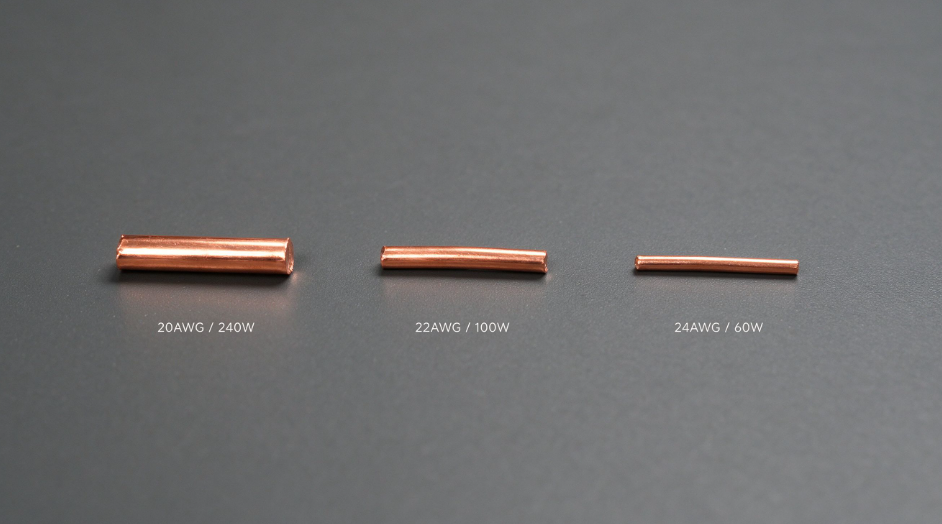
The single biggest factor in line resistance is the thickness and material of the power conductors.
All quality USB-C cables use pure oxygen-free copper for power conductors. Cheaper alternatives like copper-clad aluminum (CCA) or copper-clad steel have much higher resistance, leading to far more voltage drop and heat — we do not recommend CCA cables for any high-power charging use.
Conductor thickness is measured in American Wire Gauge (AWG). A lower AWG number means a thicker copper cross-section, lower resistance, and less voltage drop. For pure annealed copper at 20°C (68°F), the standard DC resistance values are:
- 20AWG pure copper: ~0.033 Ω per meter
- 22AWG pure copper: ~0.053 Ω per meter
- 24AWG pure copper: ~0.084 Ω per meter
To put this in perspective: at 5A (100W), a 1m 20AWG conductor loses about 165mV from line resistance alone, while a 24AWG conductor of the same length loses 420mV — 2.5x more drop just from the conductor itself. That difference is enough to turn a fast, cool-running cable into one that runs warm and delivers noticeably less power to your device.
3.2 Cable Length
Resistance scales linearly with length. A 2m cable has exactly twice the conductor resistance of a 1m cable with the same AWG, and therefore twice the conductor voltage drop.
This is why buying an unnecessarily long cable is counterproductive for fast charging. If you only need a cable for your desk, a 1m model will always run cooler and deliver more power than a 2m model with identical specs. For high-power 100W+ scenarios, length is just as important as AWG, and doubling the length has the same negative effect as dropping two AWG sizes.
3.3 Connectors, Terminals & Contact Resistance
Many people overlook contact resistance, but it can account for 30–50% of total voltage drop — especially on older or worn cables.
When you plug a USB-C cable in, electricity flows through the physical contact points between the plug terminals and the port pins. Per industry standards, a new mated USB-C power pin should have no more than 40mΩ of initial contact resistance, and no more than 50mΩ after environmental stress and normal wear. Over time, oxidation, dirt, and mechanical wear can push this even higher.
At 5A, just 100mΩ of total contact resistance adds 500mV of drop — the entire USB-IF VBUS limit. This is why a cable that worked great when new can start running slow and hot after a year of heavy use, even if the internal copper is still perfectly fine.
Terminal plating quality, crimp/solder workmanship, and plug durability all affect how well contact resistance stays low over the cable’s lifespan. Gold-plated terminals, for example, resist oxidation far better than tin-plated ones, preserving low contact resistance for years.
3.4 Common Myths Debunked
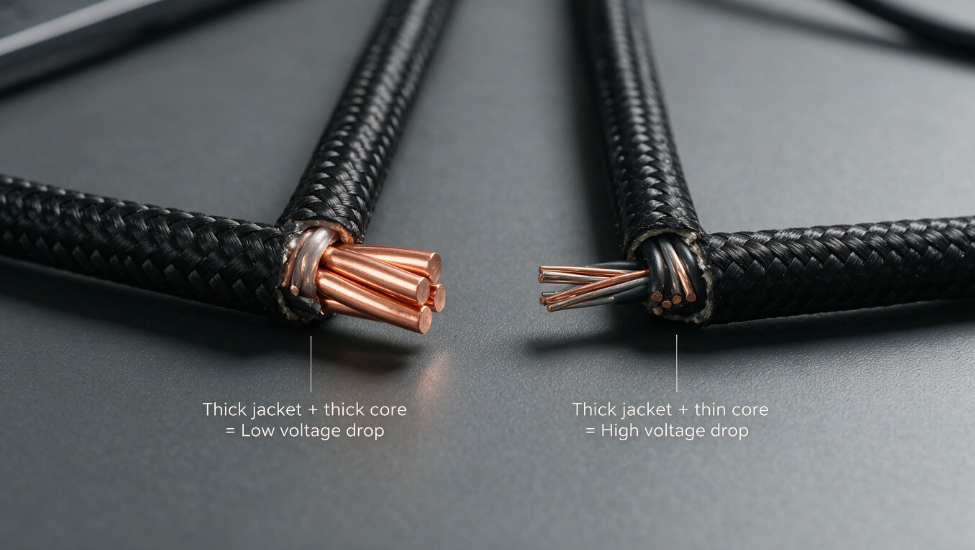
- Myth: A thick cable body means low voltage drop
A thick braided jacket or bulky cable body tells you nothing about the copper inside. Some budget brands use thick outer insulation to make a thin-conductor cable look premium. Always check for a listed AWG number — marketing words like “heavy-duty” mean nothing without hard specs. - Myth: E-Marker chips reduce voltage drop
An E-Marker chip is just an electronic name tag. It tells your charger and device what the cable is capable of, so they can negotiate the right power level. It does not change the cable’s resistance or reduce drop in any way. A poorly built 100W cable with an E-Marker will still have high voltage drop. - Myth: Higher wattage rating = lower drop
Rated wattage only tells you the maximum protocol the cable supports. A cheap 240W cable with 22AWG conductors will have higher voltage drop than a well-built 100W cable with 20AWG conductors. Wattage is a ceiling, not a quality score.
4. How to Choose & Use Low-Voltage-Drop USB-C Cables
Picking a good cable doesn’t have to be complicated. Follow this simple framework to avoid common traps and get the best performance for your money.
4.1 Pre-Purchase Checklist
Before you start shopping, answer these four questions to narrow down your exact needs:
- What is my device’s maximum charging power? Do I need 3A (60W), 5A (100W), or EPR (140W–240W)?
- How long do I realistically need the cable to be? Short desk use, bedside reach, or extra-long room-spanning?
- Do I need high-speed data, video output, or docking support? Or do I only need charging?
- What is my budget, and how heavily will I use the cable on a daily basis?
4.2 3-Step Buying Method
- Lock in core requirements
First confirm the power tier, length, and function type you need. Make absolutely sure the cable supports the required current: any 100W laptop cable must have a 5A E-Marker, and any 240W setup must use PD 3.1 EPR certified components end to end. If any part of the chain is missing, your device will fall back to a lower power level. - Verify reputable certifications
Prioritize cables with USB-IF certification for power cables, or official Thunderbolt 4/USB4 certification for full-featured cables. UL or ETL safety certification is a strong bonus for build quality and material standards. Certified products may cost a little more, but they eliminate the risk of fake wattage ratings and unsafe construction. - Compare conductor specs
Within the same power tier and length, always pick the cable with the thickest (lowest number) power conductor AWG. If AWG is not listed in the product description, that is a red flag — reputable brands almost always publish this spec. Cross-reference with user reviews for reports of excessive heat or slow charging.
4.3 Common Pitfalls to Avoid
- Avoid falsely rated no-name cables: If a 100W 2m cable costs $3 and has no mention of E-Marker or certifications, it is almost certainly fake. It may negotiate at 3A/60W internally, or run dangerously hot at higher current.
- Don’t pay for features you won’t use: If you only charge your phone, a 240W Thunderbolt 4 cable is a waste of money. Buy the tier that matches your current devices, and upgrade only when your hardware changes.
- Don’t ignore length for high-power use: A 2m 22AWG 100W cable will have noticeably more drop and heat than a 1m version. For laptop charging, keep cables as short as practical, and step up to 20AWG for lengths over 1.5m.
- Don’t confuse charging speed with data speed: Fast charging and fast data use separate wires inside the cable. A great charging cable may only support USB 2.0 data, and a great data cable may have mediocre charging performance. Buy for your primary use case first.
4.4 Usage Tips for Long-Term Performance
A good quality cable can last for years if used properly. Follow these tips to keep voltage drop low and extend its lifespan:
- Avoid covering cables during high-power charging. Good ventilation keeps temperatures down and slows insulation aging. Never tuck a charging laptop cable under a blanket or pillow.
- Avoid long-term excessive bending, squeezing, or pulling of cables, especially near the connectors. Repeated sharp bends can cause internal conductor breakage or poor crimp connections, which raise resistance and voltage drop over time.
- If connectors get dirty, gently clean them with 90%+ isopropyl alcohol and lint-free swabs while the power is disconnected. Dirt and dust build-up increases contact resistance. Never use metal tools to scrape terminals, as this can scratch plating and permanently increase resistance.
- If you notice unusually hot connectors, intermittent charging disconnections, or damaged cable jackets, stop using the cable immediately. These are signs of excessive resistance or internal damage, and they can become safety hazards.
5. Frequently Asked Questions
1. What’s a normal voltage drop for a USB-C cable?
Standards vary by power level and cable length. Generally speaking, for 20V/3A (60W) use, a total drop under 500mV for a 1m cable is within USB-IF spec. For 20V/5A (100W) use, a total drop under 500mV for a 1m cable is excellent, and drop over 1000mV will likely reduce charging speed. Exact expectations depend on conductor AWG and length.
2. What is per-meter voltage drop?
Per-meter voltage drop is the voltage drop per meter of cable, used to compare build quality across cables of different lengths. For example, a 22AWG cable will have roughly the same per-meter drop whether it’s 1m or 2m long, and total drop equals per-meter drop multiplied by length. That said, total drop is what actually affects your device, so always choose based on the length you need.
3. Does voltage drop affect data transfer speed?
Normally, no. Charging and data transmission use separate sets of conductors inside the cable. Charging voltage drop is an issue with power conductors, while data transfer relies on dedicated data pairs — there’s no direct link between the two. Severe cable overheating could indirectly affect data stability, but this is rare in normal use.
4. Are official/first-party cables always lower drop than third-party cables?
Not necessarily. First-party cables usually excel at compatibility and stability, but some use minimum-spec AWG to control costs, and may have higher drop than third-party cables of the same rating with better build quality. For example, Apple’s official 240W cable uses 22AWG conductors, while many third-party 240W cables of the same length use 20AWG, giving them lower theoretical drop.
5. Do E-Marker or USB-IF certification guarantee low voltage drop?
No. E-Marker only identifies the cable’s capabilities, and has no direct relation to drop. USB-IF certification primarily tests protocol compatibility and compliance with maximum drop limits, not exceptional low-drop performance. That said, certified cables meet minimum spec requirements, so you won’t run into issues like false power ratings or dangerously high drop.
6. Will using a high-power cable damage my phone?
No. Charging power is negotiated between the device and charger; the cable is just a transmission path. As long as the cable is qualified, using a high-power cable with a low-power device will only deliver the power the device requests — it won’t output extra power on its own, and won’t damage your device.
7. Do regular users need a 240W cable?
If your device’s maximum supported power is 100W or lower, there’s no need to buy a 240W cable — it’s more expensive and won’t speed up charging. But if you have high-power gear, or plan to upgrade to high-power devices in the next 2–3 years, a 240W EPR cable is a versatile future-proof investment.
8. Does voltage drop increase as a cable ages?
Yes. After long-term use, terminals oxidize and wear, and internal conductors may develop micro-fractures from repeated bending. All of these increase contact resistance and line resistance, raising voltage drop. If you notice a cable that used to deliver full power now charges slower or runs hotter, it’s likely aged and due for replacement.
9. How can I test voltage drop at home with a USB power meter?
If you have a USB PD power meter, use the same charger and device to measure voltage at the charger end and the device end — the difference is the cable’s voltage drop. Be sure to test at the same power level (e.g. both at 20V/5A) for results to be comparable. Note that cheap power meters have measurement error of 20–50mV, so small differences may not be meaningful.
6. Final Thoughts & Disclaimers
USB-C cables are easy to overlook, but they are the critical link between your charger and your devices. A cheap, high-drop cable can turn an expensive fast charger into a mediocre performer, while a well-built low-drop cable will deliver full power, run cool, and last for years.
This list is updated regularly to add new legitimate brand compliant models, and rankings are adjusted based on user feedback and public test data to maintain usefulness.
- Regular updates: New popular models are added and specs are updated on a quarterly basis.
- Adjustments: If a model is found to have batch inconsistencies, false ratings, or quality issues, it will be adjusted or removed from the list promptly.
- Disclaimer: All parameters on this list are sourced from official public brand information, for initial purchasing screening only, and do not constitute purchase advice. Real cable performance is affected by production batches, use environment, paired devices, and other factors — please refer to your own real-world experience for final decisions.
When shopping for USB-C cables, don’t just look at rated power and price. Pay attention to the factors that directly impact voltage drop — conductor gauge, certifications, and build quality — to pick a product that’s both reliable and safe. With the right cable, you’ll get the full fast charging speed you paid for, with less heat and more years of reliable use.