
Ever bought a charger that promised 65W fast charging but barely hit 30W in real use? Or one that claimed “full protocol support” only to deliver slow 5V charging when you plugged in your phone? Maybe you’ve had a multi-port charger that cut power in half the second you added a second device, or got so hot during use you could barely hold it. Whether you’re a casual shopper hunting for a reliable daily charger, a tech creator doing side-by-side reviews, or a quality control or cross-border sourcing professional vetting products, you need a clear, actionable testing framework to spot false claims and avoid safety risks.
This template covers every charger category – wired, wireless, and car chargers – with tests ranging from no-tool at-home checks to lab-grade standardized assessments. Skip to the section that fits your needs:
- Casual shoppers: Head to the at-home self-check, scenario buying guide, and scoring sections to quickly judge if a charger is worth buying.
- Tech enthusiasts and content creators: Focus on the advanced testing section, perfect for deep dives into PD, GaN, and fast-charge protocol reviews.
- QC and cross-border sourcing teams: Use the lab-standardized testing and reference standard sections for safety testing and market access assessments.
Entry-Level: 10-Minute At-Home Self-Check
You don’t need to tear apart a charger or mess with high voltage to spot most red flags. With common household items (or even just your eyes and hands), you can rule out most duds in 10 minutes. This section is for every casual shopper.
Step 1: Check the Label – Skip Any Product That Crosses These Red Lines
First, pick up the charger itself and check the engraved or sticker label. These details must be clear and complete: input voltage range, output voltage/current profiles, per-port power ratings, total power output, brand/manufacturer name, model number, and safety certification marks.
If you can, verify certification authenticity: Official certifications like CCC and UL can be looked up on their respective websites using the product model or certificate number. For CE marks (which use a self-declaration system), double-check that the manufacturer’s Declaration of Conformity (DoC), test reports, and technical documentation all match – fake CE marks and certificate reuse are extremely common.
Hard pass on any charger with these red flags:
- Only lists total power, not per-port output (odds are power will drop sharply when using multiple ports)
- Missing mandatory market access certifications for your region (no safety guarantee)
- Certification information doesn’t match the product model (likely counterfeit or using a stolen certificate)
Step 2: Feel and Shake It – Spot Build Quality Issues Instantly
Next, check the exterior and build quality:
- Run your fingers along the casing: Seams should be even, with no sharp burrs, loose parts, or cracks. Wiggle the wall prongs – they should feel solid, not wobbly. Plug in a USB cable: the port should fit snugly, not so loose it falls out or so tight it’s hard to remove.
- Plug it into a wall outlet: Check if it blocks adjacent outlets, or if it’s so heavy it sags or falls out easily.
- Bonus points for folding prongs and a well-spaced port layout that doesn’t block adjacent cables – these make travel much easier. If you want to get specific, weigh the charger and measure its dimensions to calculate power density (higher = smaller and more portable for the same wattage).
Step 3: Simple Performance Tests – Catch False Claims and Overheating
You’ll need a few basic tools for this: a budget USB power meter, a low-battery test device, a compliant charging cable, and an infrared thermometer (you can also just use your hand for a rough estimate).
- Test for false power claims: Grab a device with a low battery (around 10% charge, like a phone or tablet), plug it in with a certified cable, and check the stable power output once fast charging triggers. A deviation of ±5% from the rated per-port power is considered good. Note: If your device only supports 20W charging, a 65W charger won’t hit its full rated output – that’s not a false claim, that’s your device limiting the power.
- Check protocol matching: Use the power meter to confirm the actual triggered fast-charge protocol matches the product’s advertising. Pay special attention to common protocols like PD, PPS, QC, SCP, FCP, and Apple 2.4A.
- Test low-current compatibility: Charge a low-power device like TWS earbuds or a smartwatch for a few minutes. If the charger keeps cutting out or reconnecting, its low-current mode is poorly designed.
- Check heat levels: Let the charger run at full load for 10 minutes at room temperature. Measure the hottest point on the casing:
- ≤50°C (122°F): Feels warm to the touch – excellent performance
- ≤60°C (140°F): Feels hot but still holdable – generally acceptable
- >60°C (140°F): Too hot to hold comfortably – use caution
- For multi-port chargers: Test multi-port power allocation by plugging in two or more devices at once. Check if the total power and per-port power are close to the rated values, and if adding a second device causes the first one to stop charging.
Advanced Level: Deep Performance Testing for Tech Enthusiasts
If you want to do detailed side-by-side reviews or share test data with your audience, these advanced tests deliver reproducible, data-driven results that are actually useful for comparison.
Prep Work: Get Accurate, Repeatable Results
Accurate tests start with controlled conditions:
- Environment: Test in a room with a stable 20–25°C (68–77°F) temperature, no direct sunlight, strong wind, or heavy electromagnetic interference. Let the test sample sit in this environment for 24 hours to acclimate to the temperature.
- Input voltage: Set to your target market’s standard (e.g., 230V 50Hz for the EU and China, 120V 60Hz for the US and Canada). If testing wide-voltage adaptability, cover all common input voltages.
- Equipment: You’ll need a USB protocol tester, electronic load, power meter/power analyzer, IR thermometer or thermal camera, digital calipers, and a digital scale.
- Cables: Don’t let a bad cable ruin your results. Record the cable’s gauge, length, internal resistance, E-Marker chip status, and maximum current rating before testing.
- Calibration: Zero your electronic load before testing, verify your power meter with a known-accurate reference device, and calibrate temperature measurement tools to ensure accurate readings.
Input Characteristics: Wide-Voltage Adaptability and Standby Power
These tests tell you if a charger works worldwide and how much power it wastes when not in use:
- Wide-voltage adaptability: Test output performance at 100V, 120V, and 230V input. A power deviation of ≤±5% across all voltages is ideal, meaning it’s safe for international travel.
- Standby power: This is the power the charger draws when plugged in but not connected to a device. Lower is always better. To check compliance with DOE or EU ErP efficiency rules, use the official calculation formulas from those standards, not just a single raw reading.
Output Performance: The Core of a Good Charger
Output performance is what determines how stable and fast a charger actually is. Test these key metrics:
- Single-port stability: Run a single port at full load for 1 hour, logging voltage, current, and power curves the entire time. Voltage deviation should stay within ±5%, with no unexpected cutouts or voltage drops.
- Multi-port power allocation: Test both static allocation (all ports loaded, steady-state power per port) and dynamic plug/unplug behavior. For example: if you’re charging a laptop at full load on the C1 port, plug a phone into C2 and time how long it takes for power to reallocate. A switch time of ≤1 second with no charging dropouts counts as excellent.
- Dynamic load response: Use an electronic load to jump from 0% to 100% load instantly, then back down. Measure voltage overshoot, undershoot, and recovery time. A result of ≤±10% overshoot/undershoot and ≤100ms recovery time is considered solid.
- Ripple and noise: This is the small AC fluctuation superimposed on the DC output – like ripples on a calm lake. Too much ripple can cause device instability. Measure with an oscilloscope using standard test methods, and record mVpp values for each PDO voltage level. Lower is better; exact limits depend on product specs and applicable standards.
Fast-Charge Protocol and Compatibility: Do Advertised Protocols Actually Work?
Fast charging is only useful if the charger actually supports the protocols your devices use:
- Protocol detection: Use a protocol tester to read the charger’s PDO (fixed voltage profiles) and APDO (adjustable PPS voltage profiles). Confirm supported protocols match advertising, including common ones like PD 2.0/3.0/3.1, PPS, EPR, QC, AFC, FCP/SCP, VOOC, and Apple 2.4A.
- Real-device compatibility: Test with popular phones, tablets, laptops, handheld consoles, and wearables. A stable fast-charge handshake within 10 seconds of plugging in counts as a pass. A 90%+ pass rate across devices is excellent.
- Charging curves: For phones, measure 0–50% and 0–100% charging time. For laptops, check if it hits rated peak power at low battery, and if it stays stable while the laptop is in use (no battery drain while charging).
Conversion Efficiency and Energy Rating
Conversion efficiency is the percentage of input AC power that gets turned into usable output power. Higher efficiency means less wasted electricity and usually less heat:
- Measure input and output power at 25%, 50%, 75%, and 100% load points to calculate efficiency.
- Average efficiency, low-load efficiency, and standby power must be evaluated using the official formulas from standards like DOE and EU ErP to judge compliance. For reference, high-power GaN chargers with an average efficiency of ≥92% are considered very good.
Thermal Performance: How Hot Does It Get Under Full Load?
Heat affects both user experience and long-term safety and lifespan:
- Run the charger at full load for 1 hour in a 25°C (77°F) room. Record the maximum temperature of the casing, ports, and prongs at the 15-minute, 30-minute, and 60-minute marks.
- Don’t just look at the number – check hot spot distribution too: If hot spots are only near the prongs or ports and the rest of the casing stays cool, that’s normal. If the entire casing is hot, or hot spots are on thin/weak parts of the casing, that’s a concern.
- Use the same temperature thresholds as the entry-level test: ≤50°C = excellent, ≤60°C = generally acceptable, >60°C = use caution.
Professional Level: Lab-Standardized Testing Framework
This level of testing is for quality control, pre-certification assessments, and cross-border sourcing. It involves high-voltage, high-temperature, and abnormal-condition tests that carry significant safety risks. These tests must only be performed by qualified personnel in a compliant, certified lab. Never attempt these tests at home.
Test Design: Ensure Credible, Traceable Results
Professional test results need to be reproducible and trustworthy, so design your tests carefully:
- Sample size: Use at least 3 test units, and do batch sampling when necessary to avoid skewed results from a single defective unit.
- Repeatability: Run key tests at least 3 times. If you get an abnormal result, retest and record the cause of the anomaly – never discard data arbitrarily.
- Data records: Save all test details: environment conditions, instrument models and calibration certificates, cable specifications, raw data curves, photos, and judgment criteria. This ensures full traceability for future comparison.
Lab Environment and Equipment
Professional testing requires strict environmental controls and specialized gear:
- Environment: Maintain a temperature of 25°C ±1°C (77°F ±1.8°F), relative humidity of 45–75% RH, altitude ≤2000m (6562ft), and natural convection cooling (no direct fans, which would skew temperature test results).
- Equipment: You’ll need a programmable AC power supply, high-precision power analyzer, oscilloscope, protocol analyzer, multi-channel electronic load, withstand voltage tester, thermal camera, temperature/humidity test chamber, and EMC test system.
- Calibration: All test instruments must be within their calibration validity period. Prefer calibration certificates from IEC 17025-accredited bodies to ensure data traceability.
Advanced Input Characteristics
Beyond basic wide-voltage and standby tests, professional testing covers more complex input conditions:
- Inrush current: Test peak current during cold startup to check if protection circuits trip falsely, and if fuses and rectifiers have enough safety margin to avoid damage when plugged in.
- Power factor and harmonics: Test per IEC 61000-3-2 and target market requirements (e.g., the EU has mandatory harmonic limits for CE certification).
- Input anomalies: Simulate overvoltage, undervoltage, and frequency deviation to test the charger’s startup ability and protection strategies. It should not be damaged or pose a safety risk under abnormal input conditions.
Advanced Output Performance
Professional output testing covers edge cases and granular performance metrics:
- Line and load regulation: Record output voltage deviation when input voltage varies from 100–240V and load varies from 0–100%. Better regulation means more stable output.
- Ripple and noise: Use a 20MHz bandwidth limit and short ground spring or coaxial test leads to avoid external interference. Record mVpp values for each voltage level for accurate, reliable results.
- Start and shutdown timing: Measure output voltage rise time, fall time, startup overshoot, and hold-up time. These metrics are critical for the safety of sensitive electronics.
- Multi-port dynamic scheduling: Test power reallocation logic across different plug/unplug combinations and load mixes (e.g., a high-power laptop paired with a low-power smartwatch). Check for underpowered ports or frequent, unnecessary power switching.
Advanced Protocol Analysis
Professional protocol testing doesn’t just list supported protocols – it checks if they’re implemented correctly:
- PDO/APDO packet analysis: Beyond just listing voltage profiles, check if PPS step size meets specifications, voltage/current boundaries are accurate, EPR profiles actually work, and the charger properly downgrades power when connected to a cable that can’t handle the full rating.
- Handshake stability: Repeatedly plug and unplug the charger to test handshake success rate, reconnection behavior after failed handshakes, and proper power downgrade with non-compliant cables (e.g., no E-Marker cable for EPR power levels – the charger should not damage the device).
- Compatibility: Test with cables of different gauges and E-Marker capabilities, plus devices from different brands, to confirm broad real-world compatibility.
Extreme Environment Testing
Chargers are used in all kinds of conditions, so they need to perform well outside room temperature:
- High-temperature test: Run at full load for 1 hour in a 40°C (104°F) environment. Check for power derating, over-temperature protection trigger points, and whether the charger automatically recovers once the fault is cleared (and at what temperature).
- Low-temperature test: Let the charger sit in a -10°C (14°F) environment for 2 hours, then test if it starts normally and runs stably at full load.
- Long-term aging test: Run continuously at full load for 72 hours (or per the manufacturer’s enterprise standard). Log performance degradation, temperature changes, and any abnormal events to assess long-term reliability.
Safety and Reliability: Non-Negotiable Baseline
Safety is the most important part of charger testing, and it’s taken extremely seriously in professional assessments:
- Protection functions: Test over-voltage protection (OVP), over-current protection (OCP), short-circuit protection (SCP), over-temperature protection (OTP), and over-load protection (OLP) one by one. All protections should trigger promptly, and the charger should recover normally after the fault is cleared (no permanent lockup or damage).
- Safety compliance items: Withstand voltage, leakage current, insulation resistance, creepage distance, electrical clearance, casing flame retardancy, and glow wire tests must all be judged per applicable safety standards. Any single failure means the product is not safe for sale.
- Mechanical reliability: USB-C ports have a reference lifespan of 10,000 insertion/removal cycles; USB-A ports follow their relevant connector specifications. Also test drop resistance, vibration resistance, and port retention force to judge daily durability.
- Abnormal operating conditions: Simulate repeated protection triggers, output short circuits, and input anomalies. The charger must not smoke, catch fire, or explode – it should either recover function or fail safely.
EMC Electromagnetic Compatibility
EMC testing has two parts: emissions (whether the charger interferes with other devices) and immunity (whether it resists interference from other devices):
- Conducted and radiated emissions are tested per standards like FCC Part 15, CE EMC, and CISPR to ensure the charger doesn’t interfere with other electronics via power lines or wireless signals.
- After immunity tests for electrostatic discharge (ESD), surge, and electrical fast transient (EFT) bursts, the charger should either work normally or recover to normal function per the standard’s allowed limits. It should not be permanently damaged.
Scenario-Specific Testing: What to Prioritize for Your Use Case
You don’t need a charger that scores perfectly on every test. The best charger for you depends on how you use it. Here’s what to prioritize for common use cases, plus the most common pitfalls to avoid.
Frequent International Travel: Small, Versatile, and Travel-Ready
Key metrics: 100–240V wide voltage support, plug compatibility with local outlets, folding/interchangeable prongs, high power density, and reliable multi-port charging.
Common pitfalls: Plugs that don’t fit local outlets, sharp multi-port power drops, bulky/heavy designs that take up too much bag space, and chargers that block adjacent wall outlets.
Office and Student Use: Reliable Multi-Device Charging
Offices and dorm rooms usually need to charge a laptop, phone, earbuds, and more at the same time.
Key metrics: Stable laptop charging even while in use (no battery drain), consistent multi-port power allocation, low heat at full load, no coil whine, and a small desktop footprint.
Common pitfalls: Laptop charging speed drops sharply when you plug in a phone, battery drains while using the laptop and charging, and frequent charging dropouts during power reallocation.
Car Chargers: Stable, Durable, and Road-Ready
Car chargers operate in a unique, bumpy environment.
Key metrics: Secure fit in the cigarette lighter port, ability to survive car startup surges without dropping charge, no loosening on bumpy roads, solid multi-port allocation, and no concentrated hot spots.
Common pitfalls: Charging cuts out when the car starts (requires re-plugging), falls out on rough roads, concentrated heat that poses a risk, and overly bright indicator lights that distract the driver at night.
Wireless and MagSafe-Compatible Chargers: Magnet Strength and Temperature Control Matter Most
Wireless chargers are convenient, but bad ones are more trouble than they’re worth.
Key metrics: Qi/Qi2 certification, strong magnetic hold (for MagSafe models), accurate alignment, reliable FOD (foreign object detection), good charging efficiency even with cases, and low temperature rise.
Common pitfalls: Weak magnets that let the phone fall off with a light bump, no charging with thick cases, failed FOD that heats up keys or coins left on the pad, and high long-term charging temperatures that damage your battery.
Universal Experience Details That Make a Big Difference
No matter what type of charger you’re testing, these small details have a huge impact on daily use:
- Noise: No audible coil whine from 1 meter (3 feet) away at idle or full load = pass. If you can hear a high-pitched buzzing even up close, that’s a bad user experience.
- Indicator light: Not so bright that it disturbs sleep if used in a bedroom.
- Anti-slip and stability: Desktop chargers shouldn’t slide around on desks; wall chargers shouldn’t sag or fall out of outlets.
Quantitative Scoring: How to Rate Chargers Objectively
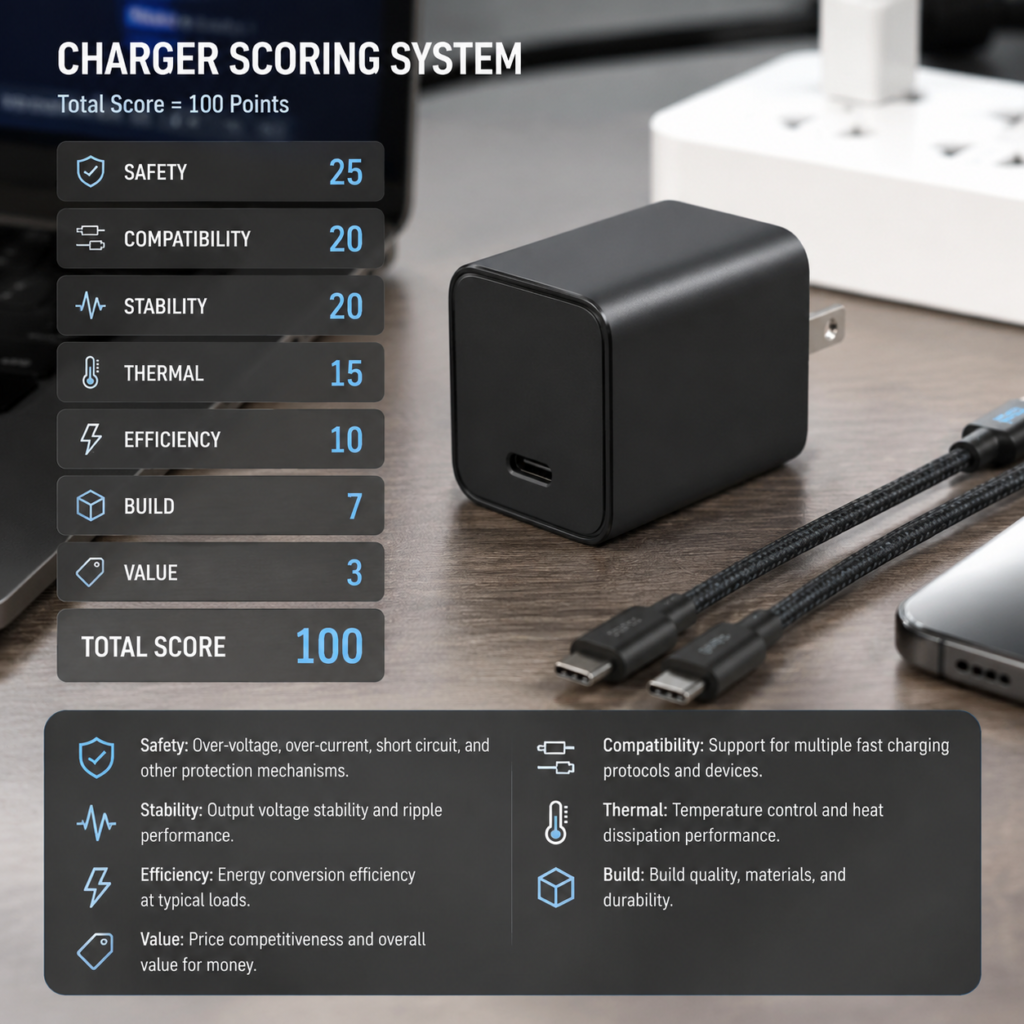
For easy side-by-side comparison, use this 100-point weighted scoring system to rate chargers across key dimensions, then assign a final grade.
100-Point Scoring Rubric
| Scoring Dimension | Weight | What It Covers |
|---|---|---|
| Safety and Reliability | 25 pts | Completeness of safety documentation, protection function quality, durability, and abnormal-condition performance. This is the most important dimension. |
| Fast-Charge Compatibility | 20 pts | Protocol coverage, accuracy of PDO/APDO claims, real-device compatibility rate, and low-current charging support. |
| Output Performance Stability | 20 pts | Single-port output stability, multi-port power allocation, dynamic load response, and ripple/noise levels. |
| Thermal Performance | 15 pts | Room-temperature full-load temperature rise, hot spot distribution, and high-temperature derating behavior. |
| Conversion Efficiency and Standby Power | 10 pts | Average conversion efficiency, low-load efficiency, and no-load standby power. |
| Build and Portability | 7 pts | Build quality, power density, port layout, and prong design. |
| Value for Money | 3 pts | Side-by-side comparison with other chargers in the same power and price tier. |
Rating Tiers: Which Grade Is Worth Buying?
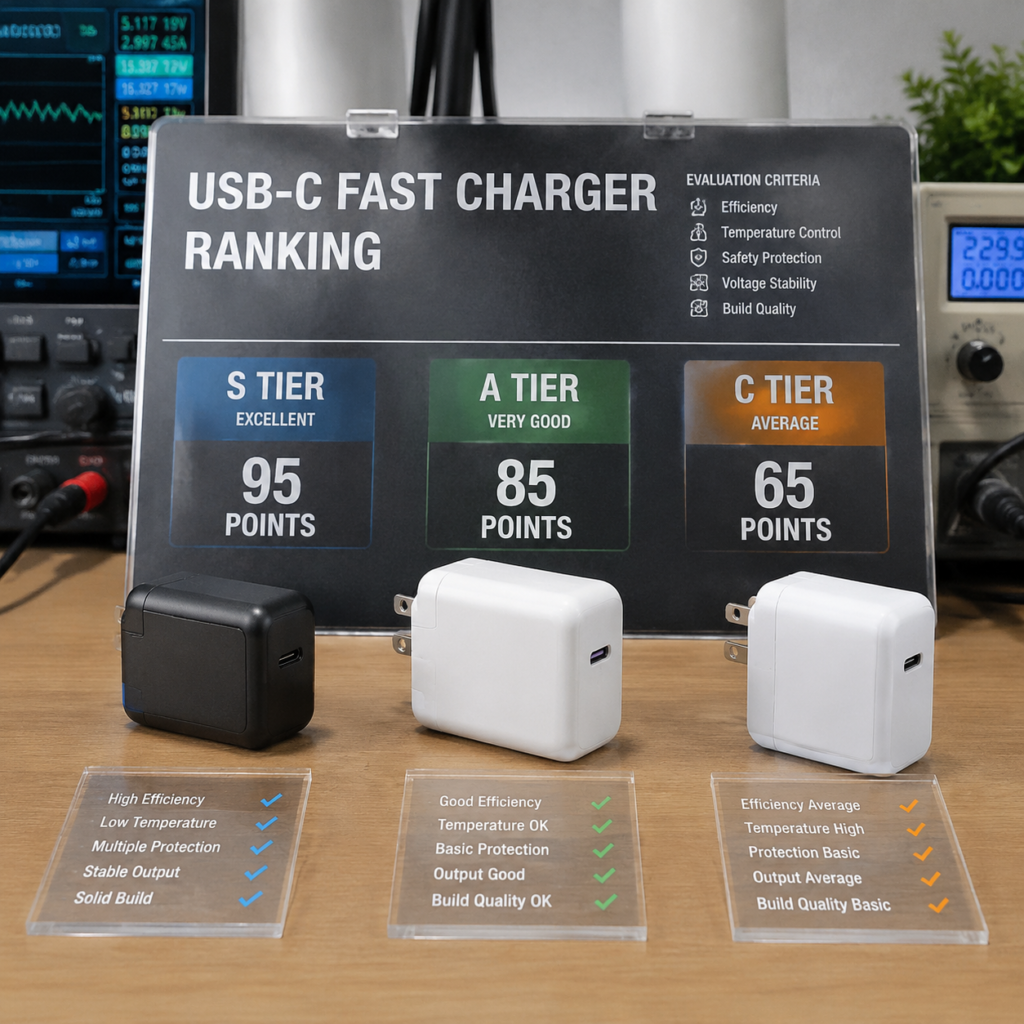
Use these tiers to judge overall value:
- S Tier (≥90 pts): Excellent performance, safety, and compatibility with no noticeable flaws. Top pick.
- A Tier (80–89 pts): Great overall performance with only minor, non-impactful flaws. Highly recommended.
- B Tier (70–79 pts): Meets basic use needs. Good for budget shoppers or those with specific use cases.
- C Tier (60–69 pts): Noticeable flaws (e.g., high heat or poor compatibility). Choose with caution.
- D Tier (<60 pts): Clear performance or safety risks. Not recommended at all.
How to Compare Chargers Fairly
Don’t compare a 20W charger to a 100W charger – group like products together for fair comparisons:
- By power tier: 20W, 30W, 45W, 65W, 100W, 140W+. Only compare chargers in the same power range.
- By type: GaN, silicon, desktop, wireless, car charger. Different types have different design goals, so don’t mix them.
- By price point: Compare safety, protocol support, heat levels, and warranty across chargers in the same price range – don’t just pick the cheapest option.
FAQ and Common Terms Explained
Frequently Asked Questions
Q: What is a normal temperature for a charger?
A: At room temperature under full load, a casing temperature of ≤50°C (122°F) is excellent (feels warm to the touch). ≤60°C (140°F) is generally acceptable (hot but holdable). Anything over 60°C deserves extra attention, especially if hot spots are concentrated near ports or prongs – use caution.
Q: Is a higher-wattage charger always better?
A: No. You need to match the charger to your device’s maximum input power, the number of ports you need, and your cable’s capability. For example, if your phone only supports 20W fast charging, a 100W charger won’t charge it any faster, and it’ll be bigger, heavier, and more expensive. That said, high-watt multi-port chargers are great if you have multiple devices to charge at once.
Q: How do I check if a certification is real?
A: For official mandatory or third-party certifications like CCC and UL, look up the product model or certificate number on the certifying body’s official website. CE marks use a self-declaration system, so verify that the manufacturer’s Declaration of Conformity (DoC), test reports, and technical documentation all match to avoid fake or reused certificates.
Q: Are GaN chargers always better than silicon ones?
A: Not necessarily. Gallium Nitride (GaN) material makes it easier to build small, high-power-density chargers, but real-world heat, efficiency, and reliability depend entirely on the manufacturer’s design, component quality, and cooling system. Some cheap GaN chargers run even hotter than same-watt silicon chargers.
Q: Do wireless chargers damage your battery?
A: Compliant Qi/Qi2 wireless chargers won’t cause abnormal battery damage under normal use. However, high heat does accelerate battery aging, so prioritize wireless chargers with good temperature control and avoid models that run very hot during long charging sessions.
Common Terms, Explained Simply
- Fast Charge Protocol: A set of rules that chargers, cables, and devices use to negotiate charging voltage and current. All three must support the same protocol to trigger fast charging.
- PDO/APDO: In the USB PD protocol, chargers send a list of their supported fixed voltage profiles (PDO, or Power Delivery Object) and adjustable PPS voltage profiles (APDO, or Adjustable Power Delivery Object) to the device, which then picks the best match for its needs.
- E-Marker Chip: A small chip inside USB-C cables that tells devices the cable’s current capacity, data transfer speed, and high-power EPR support. Without this chip, high-watt fast charging may not trigger.
- Conversion Efficiency: The percentage of input AC power that gets converted to usable DC output power. Higher efficiency means less wasted electricity and usually less heat generation.
- Power Density: The amount of output power per unit of volume. Higher power density means a smaller, more portable charger for the same wattage.
- Ripple and Noise: Small AC fluctuations superimposed on the DC output voltage, like tiny ripples on still water. Excessively high ripple can cause device instability.
Appendices
Appendix 1: Reference Standards List
- Safety: IEC 62368-1, UL 62368-1, EN 62368-1, GB 4943.1
- Energy Efficiency: DOE Level VI, EU ErP 2019/1782, CEC
- Protocol: USB Type-C Specification, USB PD 3.1, PPS, EPR, QC 5, Qi 1.3/Qi2
- Market Access: CCC, FCC, CE, UKCA, RCM, KC, PSE
Appendix 2: Test Equipment by Skill Level
- Entry-Level: USB power meter, infrared thermometer, digital scale, digital calipers
- Advanced: Electronic load, protocol tester, thermal camera, programmable AC power supply
- Professional: Power analyzer, oscilloscope, withstand voltage tester, temperature/humidity chamber, EMC test system
Appendix 3: Disclaimer
All test results apply only to the tested samples and specific test conditions, and do not represent the quality of entire production batches. Tests involving high voltage, withstand voltage, glow wire, EMC, and abnormal operating conditions carry significant safety risks and must only be performed by qualified personnel in compliant, certified labs. Do not attempt these tests on your own. Final purchasing decisions should be made based on a combination of product price, warranty, after-sales support, target device compatibility, and local regulations.
Chargers are small, easy-to-overlook accessories, but they’re used every single day and play a critical role in your device’s safety and lifespan. Whether you’re a casual shopper just looking for a reliable charger, a tech hobbyist who loves testing gear, or a professional responsible for product quality, this end-to-end testing framework – from quick at-home checks to lab-grade assessments – will help you avoid false claims and safety risks, and find the perfect charger for your needs.