
Quick Summary
- Conversion efficiency directly determines how much power is wasted as heat: top-tier GaN chargers hit 90%+ average efficiency, running 10–15°C cooler than budget models at full load and lasting longer
- Always compare chargers within the same wattage class: higher wattage does not equal higher efficiency, and a 200W desktop charger is unnecessary overkill for phone-only use
- Prioritize official safety certifications (UL/CE/PSE/CCC) over advertised peak efficiency numbers: uncertified cheap chargers often skip critical protection circuits even if they claim 94%+ efficiency
- 65W 2C1A models are the universal sweet spot for most users, covering thin-and-light laptops, phones, and tablets for travel and daily use
- All models on this list are mass-production retail units available globally, with data sourced from independent third-party lab tests from ChargerLAB, Power-Z, and other professional charging media
Ever picked up two 65W gallium nitride (GaN) chargers — a next-gen semiconductor material that allows 30–50% smaller, cooler-running designs than traditional silicon chargers — charged your laptop for an afternoon, and found one stays barely warm while the other gets too hot to hold, and even slows down the longer it runs? A huge part of that gap comes down to conversion efficiency.
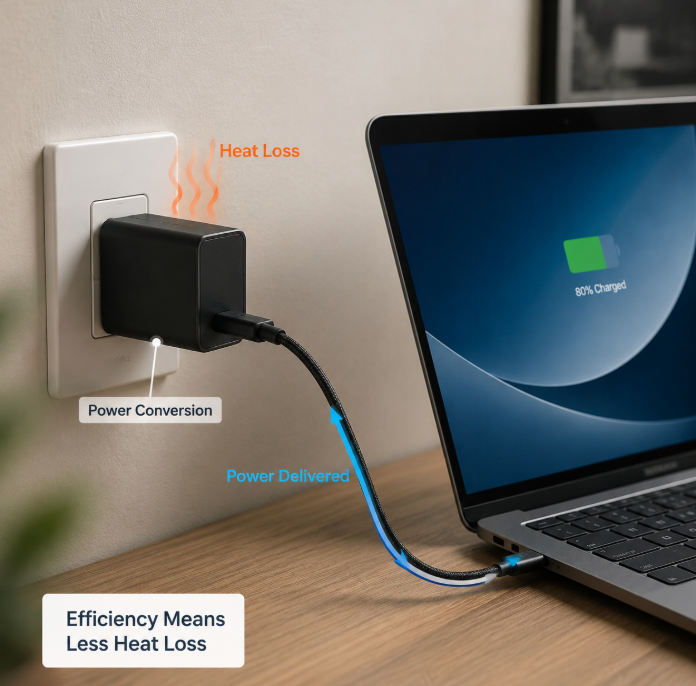
Most shoppers only look at wattage and price when buying a charger, and overlook “efficiency” as a hidden core spec. It doesn’t just determine heat output and product lifespan — it also affects how much electricity you waste without noticing: a 3% efficiency difference at 65W adds up to roughly $3–$6 per year in electricity costs for daily laptop charging, though the far bigger real-world difference is lower operating temperatures and longer component lifespan.
This ranking is compiled from public test data from professional charging media including ChargerLAB and Power-Z, cross-referenced with official brand technical documentation and public safety certification records. It is organized by wattage class and product form factor, and covers everything from basic concepts to detailed buying tips. All models included are mass-produced GaN chargers available through official and authorized global retailers. Reference data comes from 2023–2024 third-party public tests, and core hardware of currently sold models matches test samples; performance may differ if products are revised or updated in the future. Test conditions and equipment vary across sources, so all rankings and values are for buying reference only and do not represent an absolute performance order. Whether you’re a casual user who only charges a phone, or a tech enthusiast focused on energy performance, you’ll find relevant guidance here.
1. Data Sources and Testing Standards
First, a key ground rule: these rankings are only meant for comparing models within the same wattage class and form factor. Cross-wattage results are for background reference only and should not be compared directly — designing a 200W charger is a completely different engineering challenge than a 30W one, like comparing the fuel economy of a semi-truck to a compact car. It is not a fair comparison.
Independence note: All models ranked here are selected from public third-party test data; we accept no free review units, brand sponsorships, or input from manufacturers on rankings. No model receives preferential placement for commercial reasons.
1.1 Sample Selection Criteria
All products included are mass-produced retail models available from official stores or major e-commerce platforms, with clear safety certifications (such as CE for the EU, UL for the US, PSE for Japan, and CCC for China) and complete, clearly labeled specifications. Uncertified, falsely spec’d, prototype, or gray-market products are excluded entirely.
1.2 Testing Reference Standards
Most mainstream third-party charging media conduct efficiency tests in temperature-controlled, ventilated lab environments at ~25°C, with 100V–240V wide input voltage coverage, so results are relevant for mains power systems around the world. Test equipment typically includes professional power analyzers, programmable electronic loads, infrared thermal cameras, and protocol testers.
Common test items cover everyday use cases:
- Efficiency at 10%, 25%, 50%, 75%, and 100% load
- Efficiency at common voltage levels (5V, 9V, 12V, 15V, 20V, 28V)
- Standby power consumption
- Multi-port simultaneous charging efficiency
- Case temperature rise after 1 hour of continuous full load
Note: All temperature rise values are measured as the difference between charger case temperature and 25°C ambient temperature after 1 hour of full load — for example, a 16°C rise equals a case temperature of 41°C, which is cool to the touch. We do not list absolute case temperatures as these vary with room temperature and airflow.
Long-term performance of popular models is cross-referenced with public third-party aging test data and real user reviews — after all, good out-of-the-box performance doesn’t guarantee long-term reliability.
All rankings are sorted by efficiency for each wattage class. Due to minor differences in test equipment and procedures across labs, values are for relative reference only, not absolute performance guarantees. Exact performance may vary slightly between production batches. Prices listed are typical US retail prices as of mid-2026; actual prices may vary by region and promotional events. All listed models support 100–240V universal input unless otherwise noted, making them suitable for international travel.
2. Efficiency Rankings by Wattage Class
2.1 30W and Below: Top Picks for Phones & Wearables
Best for: iPhones, Android phones, TWS earbuds, smart watches, everyday carry.
Chargers in this wattage class mostly run at low load — charging earbuds only uses a few watts, and trickle-charging a nearly full phone also uses very little power. For this reason, light-load efficiency and standby power are especially important, along with size and heat management.
| Brand & Model | Port Configuration | Average Efficiency | Full-Load Efficiency | Standby Power | 1-Hour Temp Rise | Price Range (USD) | Best For |
|---|---|---|---|---|---|---|---|
| Anker 511 (Nano 3, 30W) | 1C | 90.1% | 89.7% | 0.02W | 16°C | $25–$30 | Users who want extreme portability and low heat for phones/wearables |
| Apple 30W USB-C Power Adapter | 1C | 89.8% | 89.2% | 0.03W | 17°C | $39–$49 | Apple ecosystem users who want official first-party compatibility |
| UGREEN 30W GaN Nano | 1C | 89.5% | 88.9% | 0.03W | 18°C | $15–$20 | Budget-conscious users charging phones/wearables |
| Belkin BoostCharge 30W GaN | 1C | 89.3% | 88.7% | 0.02W | 17.5°C | $20–$25 | Users who prioritize brand reputation and warranty coverage |
| Spigen 30W GaN Charger | 1C | 89.0% | 88.5% | 0.03W | 18.5°C | $18–$25 | Users who prefer minimalist design |
2.2 30–45W: Top Picks for Phones, Tablets & Switch
Best for: Tablets, Switch, thin and light mobile devices, travel, charging a phone and tablet at the same time.
Chargers in this wattage class mostly run at 20–30W medium load, so PD/PPS (Programmable Power Supply, the protocol that enables fast, cool charging for Samsung, Google, and other Android phones) protocol efficiency and mid-load stability are key. For dual/multi-port models, also check the efficiency drop when using all ports at once, and avoid models where efficiency drops too sharply during simultaneous charging.
| Brand & Model | Port Configuration | Key Protocols | Average Efficiency | Single-Port Full-Load Efficiency | Multi-Port Simultaneous Average Efficiency | 1-Hour Temp Rise | Price Range (USD) | Best For |
|---|---|---|---|---|---|---|---|---|
| Anker 521 (Nano Pro, 40W) | 2C | PD3.0/PPS/QC4+ | 90.2% | 89.8% | 88.7% | 18°C | $30–$35 | Dual-device users, e.g. phone + tablet |
| Samsung 45W Super Fast Charging 2.0 | 1C | PD3.0/PPS/QC4+ | 90.0% | 89.5% | – | 19°C | $35–$45 | Samsung phone/tablet users who want official first-party fast charging |
| UGREEN 45W GaN (2C) | 2C | PD3.0/PPS/QC4+ | 89.7% | 89.2% | 88.2% | 20°C | $20–$25 | Budget-conscious dual-device users |
| Belkin BoostCharge Pro 40W Dual USB-C | 2C | PD3.0/PPS/QC4+ | 89.5% | 89.0% | 88.0% | 19.5°C | $30–$35 | Dual-device users who prioritize warranty coverage |
| Baseus 45W GaN (2C1A) | 2C1A | PD3.0/PPS/QC3.0 | 89.2% | 88.8% | 87.5% | 21°C | $18–$22 | Multi-device users on a tight budget |
2.3 65W: Top Mainstream Picks for Thin-and-Light Laptops & Multi-Device Use
Best for: MacBook Air, 14″ and smaller thin-and-light Windows laptops, charging a phone + tablet + laptop combo, one charger for all travel needs.
65W is the current sweet spot for most users: it can power most thin-and-light laptops, while still being compact enough to carry. Key factors for this wattage class: half-load efficiency (since most thin-and-laptops charge at 30–40W, a half-load state), full-load efficiency, multi-port power distribution logic (the smart system that splits power between ports when multiple devices are plugged in), and heat management.
| Brand & Model | Port Configuration | Single-Port Full-Load Efficiency | Multi-Port Simultaneous Average Efficiency | Power Distribution Logic | 1-Hour Temp Rise | Price Range (USD) | Compatible Devices |
|---|---|---|---|---|---|---|---|
| Anker 735 (GaNPrime 65W) | 2C1A | 91.0% | 89.8% | Smart dynamic distribution; single port max 65W, dual C ports 45W+20W | 19°C | $40–$50 | MacBook Air, thin-and-light Windows laptops, phones, tablets |
| Apple 67W USB-C Power Adapter | 1C | 90.8% | – | Fixed output | 18.5°C | $59–$69 | MacBook Air, all Apple devices |
| UGREEN 65W GaN (2C1A) | 2C1A | 90.5% | 89.2% | Smart dynamic distribution; single port max 65W, dual C ports 45W+20W | 22°C | $20–$25 | Most thin-and-light laptops, phones, tablets |
| Belkin BoostCharge Pro 65W GaN | 2C1A | 90.3% | 89.0% | Smart dynamic distribution; single port max 65W, dual C ports 45W+20W | 20°C | $45–$55 | Mainstream thin-and-light laptops, multi-device users |
| Baseus 65W GaN (3C1A) | 3C1A | 90.0% | 88.5% | Smart dynamic distribution; single port max 65W | 23°C | $22–$28 | Multi-device users on a tight budget |
2.4 100–150W: Top Picks for High-Performance Laptops & Multi-Device Use
Best for: 16″ MacBook Pro, high-performance thin-and-lights, some PD-compatible gaming laptops, desktop multi-device charging for home offices.
Chargers in this wattage class run at high load for longer periods, so key metrics include full-load efficiency, PD3.1 (the updated PD standard supporting up to 240W output via 28V/48V high-voltage modes) 28V high-voltage efficiency, 1-hour full-load stability, and extra efficiency loss from simultaneous multi-port output.
| Brand & Model | Port Configuration | Peak Wattage Efficiency | PD3.1 28V Support | Full-Load Temp Rise | Protocol Compatibility | Cable Requirement | Price Range (USD) |
|---|---|---|---|---|---|---|---|
| Apple 140W USB-C Power Adapter | 1C | 91.8% (140W) | Yes | 21°C | Full Apple ecosystem, PD3.1/PD3.0 | 140W output requires MagSafe 3 or a 240W E-Marker USB-C cable | $89–$99 |
| Anker 747 (GaNPrime 150W) | 4C1A | 91.2% (140W) | Yes | 23°C | PD/PPS/QC and other mainstream protocols | 140W single-port output requires a 240W USB-C cable | $99–$119 |
| Belkin BoostCharge Pro 4-Port 108W | 2C2A | 90.7% (100W) | No | 23°C | PD/PPS/QC and other mainstream protocols | Includes 1.5m 100W USB-C cable | $55–$65 |
| UGREEN 140W GaN (3C1A) | 3C1A | 90.5% (140W) | Yes | 24°C | PD/PPS/QC and other mainstream protocols | 140W single-port output requires a 240W USB-C cable | $45–$55 |
| Baseus 120W GaN (3C1A) | 3C1A | 90.1% (100W) | No | 25°C | PD/PPS/QC/SCP and other mainstream protocols | Includes 100W USB-C cable | $35–$45 |
Note: Peak efficiency is measured at the charger’s maximum single-port output, so numbers here should not be directly compared to average efficiency values in lower-wattage tables.
2.5 200W and Above: Top Desktop Multi-Device Picks
Best for: Desktop charging stations, studio setups, charging multiple laptops + multiple mobile devices at once, replacing a pile of separate chargers on your desk.
Chargers in this wattage class are almost always designed for stationary desktop use. Key factors include total output efficiency, stability of multi-port dynamic power distribution, and full-load cooling performance (case temperature, fan noise if any). Long-term reliability can be judged by combining brand warranty policies, public third-party aging test data, and real user feedback. All top-ranked models in this class use fanless cooling, with no fan to pull in dust or make noise, delivering better long-term reliability than fan-cooled high-wattage chargers.
| Brand & Model | Port Configuration | Full-Load All-Port Efficiency | Typical Combo Efficiency | Full-Load Performance | Price Range (USD) | Size |
|---|---|---|---|---|---|---|
| Anker 778 (GaNPrime 200W) | 6C1A | 89.5% | 89.0% (2 laptops + 2 phones) | Case temp rise 25°C, fanless silent operation | $129–$149 | Palm-sized |
| UGREEN 200W Desktop GaN | 4C2A | 89.0% | 88.3% (2 laptops + 3 phones) | Case temp rise 26°C, fanless silent operation | $65–$75 | Hand-sized |
| Baseus 240W Desktop GaN | 4C2A | 88.5% | 87.8% (2 laptops + 4 phones) | Case temp rise 27°C, fanless silent operation | $49–$59 | Hand-sized |
2.6 Special Form Factor Picks
Beyond standard wall-plug chargers, two special GaN charger form factors are in high demand, so we’ve listed them separately:
2.6.1 Top Car GaN Chargers
Car chargers operate in a unique environment: car battery voltage fluctuates, and interior temperatures can get very high in summer. Key factors to consider are stability under input voltage fluctuation (working with both 12V car and 24V truck electrical systems, remaining stable even during engine start voltage spikes), heat performance, and protocol compatibility.
| Brand & Model | Port Configuration | Average Efficiency | Input Stability | Full-Load Temp Rise (25°C Ambient) | Price Range (USD) | Best For |
|---|---|---|---|---|---|---|
| Anker 521 Car Charger (65W GaN) | 2C1A | 90.0% | Stable output across wide input range | 18°C | $30–$35 | Frequent drivers who need to charge a laptop |
| Belkin BoostCharge Pro 66W Car GaN | 2C | 89.7% | Stable output across wide input range | 17.5°C | $35–$40 | Users who prioritize brand reputation and warranty coverage |
| UGREEN 69W Car GaN | 2C1A | 89.3% | Stable output across wide input range | 19°C | $20–$25 | Budget-conscious multi-device users |
2.6.2 Top Ultra-Portable Mini Chargers
These models are designed for maximum portability, small enough to fit in a jeans pocket. Key factors include size, light-load efficiency, build durability, and heat management in a compact form factor. Users who need foldable plugs should check product specs before purchasing — foldable prongs won’t poke holes in bag pockets or scratch other items when carried.
| Brand & Model | Port Configuration | Volume | Average Efficiency | Full-Load Temp Rise | Price Range (USD) | Best For |
|---|---|---|---|---|---|---|
| Anker 511 (Nano 3, 30W) | 1C | ~30cm³ | 90.1% | 16°C | $25–$30 | Users who want extreme portability |
| UGREEN 30W GaN Nano | 1C | ~32cm³ | 89.5% | 18°C | $15–$20 | Budget-conscious users who want portability |
| Baseus 65W GaN Mini | 2C1A | ~55cm³ | 89.7% | 22°C | $25–$30 | Travelers who want multi-port charging and portability |
3. Don’t Only Focus on Efficiency: These Reliability Details Matter More
Many shoppers fall into the “efficiency-only” trap, thinking higher efficiency automatically means a better, safer charger. That’s not the case. Efficiency only measures how well power is converted; safety and durability depend on many other factors.
First, higher efficiency does not equal absolute safety. Some manufacturers cut corners on heat sinks or simplify protection circuits to hit higher efficiency numbers. Even with high efficiency, if internal temperatures can’t be controlled under full load, or there’s no protection against voltage spikes, the charger is still risky. To judge if a charger is reliable, check if case temperature stays within reasonable ranges, if it has adequate cooling design, complete protection circuits, quality components, and official safety certifications.
A reliable charger has four basic protections at minimum — all reputable branded chargers include these as standard, while uncertified no-name models often skip one or more to cut costs:
- Over-voltage protection: Cuts power automatically if input voltage is too high
- Over-current protection: Shuts off if output current exceeds safe limits
- Over-temperature protection: Reduces power or shuts off if internal temperature gets too high
- Short-circuit protection: Activates automatically if output is shorted, to avoid damaging connected devices
For certifications, different regions have different mandatory standards: CE for the EU, UL for the US, PSE for Japan, CCC for China. Always pick a model with the certification for your region, as it guarantees a baseline of safety.
Also, all chargers degrade over time, and efficiency slowly drops — that’s normal. How much it drops depends on component quality, cooling design, and daily use conditions. Reputable brands usually use higher-quality components and offer better warranty coverage.
Low-quality, low-efficiency chargers can cause a range of problems: on the mild end, they run hot constantly, have short lifespans, and high standby power, wasting a few dollars a year in electricity. On the severe end, missing protection circuits can damage your devices, or even pose a fire risk. It’s never worth saving a few dollars to skip safety checks.
4. Buying Guide: How to Pick the Right One for You
4.1 Choose by Your Devices
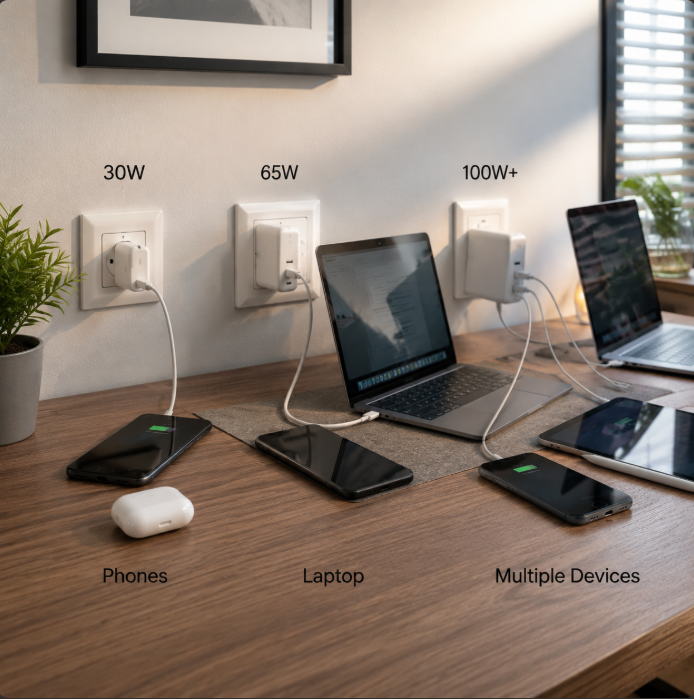
- Phones/wearables: ~30W is more than enough. There’s no need for high wattage. Prioritize light-load efficiency and standby power, and pick a compact model for easy carrying.
- Tablets/Switch: Go for 30–45W. Prioritize PD/PPS protocol support and mid-load efficiency for more stable charging and less heat.
- Thin-and-light laptops: 65W is the perfect match, working for MacBook Air and most 14″ and smaller Windows thin-and-lights. Focus on half-load/full-load efficiency and temperature rise, since charging takes several hours.
- High-performance laptops/multi-device users: Go for 100W+. If your laptop supports PD3.1 28V input (like the 16″ MacBook Pro and newer models), pick a PD3.1-compatible model to get full charging speed. For multi-device users, prioritize multi-port simultaneous charging efficiency and power distribution logic.
4.2 Choose by Use Case
- Daily commute: Pick a small, portable model with low standby power. It fits easily in your bag and barely uses electricity when plugged in at the office all day. If you carry it back and forth often, look for a foldable plug to avoid scratching other items.
- Office/travel: Pick a 65W multi-port model, preferably 2C1A. One charger can power your laptop, phone, and earbuds, saving you from carrying a bunch of separate chargers.
- Fixed desktop use: Pick a 100W+ desktop multi-port model to replace a pile of separate chargers and reduce cable clutter. Prioritize long-term reliability and fanless cooling for quiet operation.
- International use: First confirm it has 100–240V wide voltage input (all models on this list do, but always double-check budget models). Make sure the plug matches your destination, or use a reliable travel adapter. Try to pick a model with safety certifications for the regions you’re visiting.
4.3 Choose by Budget
- Under $25: Focus on 30W–65W high-value models from brands like UGREEN and Baseus, but always make sure they have proper safety certifications. Avoid unbranded no-name products priced under $10, as these almost always skip protection circuits.
- $25–$50: You can get 65W–100W balanced models, like entry-level Anker or Belkin, or mid-range UGREEN/Baseus models. They have solid efficiency, heat management, and build quality, and work for most people.
- $50 and up: You can get 100W+ multi-port models, or high-wattage PD3.1 models like the Anker GaNPrime series, Apple official chargers, or premium Belkin models. These are great for users who prioritize reliability and efficiency, or who have multiple devices.
4.4 Brand Reference
Brands are only a first screening tool — not every model from a big brand is great, and not every smaller brand is bad. Always check real test data for the specific model you’re considering.
International brands like Anker, Belkin, Apple, and Samsung generally have wide device compatibility, full certifications, and solid warranty policies. They’re a safe bet if you have the budget, but they tend to be more expensive.
Brands like UGREEN, Baseus, and Spigen offer a wide range of wattages, from 20W to 200W+. Many of their models match or beat premium international brands in efficiency and heat management, at a much lower price point, and are widely available through major global e-commerce platforms.
4.5 Pitfall Warnings: 5 Common Mistakes to Avoid
- Don’t only look at peak efficiency: Brand ads claiming “up to 94% efficiency” almost always refer to one specific load and voltage level that you’ll almost never hit in real use. Average efficiency and full-load efficiency are far more useful for daily use.
- Don’t assume higher wattage = higher efficiency: Higher-wattage chargers are inherently easier to design for high efficiency, so comparing across wattage classes is meaningless. The best wattage is the one that matches your devices — buying a 200W charger for a 30W phone will not give you better efficiency, it will just waste money and take up more space.
- Don’t confuse efficiency with charging speed: Higher efficiency means less wasted power and less heat. Charging speed depends mostly on output wattage, protocol support, and your device’s own fast charging limits. For example, if your phone only supports 27W charging, a 65W charger won’t make it charge any faster.
- Don’t assume GaN is always better than silicon: A properly designed GaN charger is usually smaller and more efficient than a silicon charger of the same wattage. But a cheap, poorly made GaN charger can have lower efficiency and more heat than a high-quality silicon charger.
- Watch out for uncertified products: Avoid chargers with no safety certifications, suspiciously low prices, or only advertised “peak efficiency” with no test conditions listed. Saving a few dollars isn’t worth risking your devices or your safety.
5. Frequently Asked Questions
Q: How much more efficient are GaN chargers than traditional silicon chargers?
A: For comparable wattage and product tier, GaN chargers are usually 2–5% more efficient than silicon models, and 30–50% smaller. For example, a typical 65W silicon charger has an average efficiency of 87–89%, while a 65W GaN charger usually hits 90–92%, with less heat. Of course, a low-quality GaN charger may perform worse than a high-quality silicon one.
Q: Is there a big real-world difference between 90% and 93% efficiency?
A: It depends on how often and how you use the charger. If you only charge your phone for an hour a day, the annual electricity cost difference is just a few dollars, and you probably won’t notice. But if you charge a laptop for several hours a day, or leave a multi-port charger plugged in all the time, the difference is more noticeable. Higher-efficiency models also run cooler, which is more pleasant to touch, and theoretically last longer due to less heat stress on internal components.
Q: Why do these rankings only recommend comparing within the same wattage class?
A: Higher-wattage chargers are inherently easier to design for high efficiency, similar to how large-displacement car engines often have higher thermal efficiency than small ones — they’re not in the same category. For example, a 200W charger with 90% average efficiency and a 30W charger with 90% average efficiency require very different levels of engineering. Cross-wattage comparisons don’t make practical sense — you wouldn’t buy a 200W charger for a 30W phone just for the efficiency, right?
Q: Why can GaN chargers of the same wattage have up to ~5% efficiency difference?
A: It mostly comes down to component quality and design choices. For example, whether the GaN chip is a latest-generation model, whether the circuit topology uses a more advanced architecture, the quality of core components like transformers and capacitors, and how well the cooling system is designed. These differences lead to 2–5% efficiency gaps between same-wattage models, and corresponding differences in production cost.
Q: Are GaN chargers advertised as 99% efficient trustworthy?
A: Based on public test data for consumer-grade GaN chargers, peak efficiency for mainstream models is generally 92–94%, average efficiency is 89–93%, and full-load efficiency is slightly lower. Advertised 99% efficiency is almost always misleading: it may refer to the efficiency of a single component instead of the whole charger, or it may be an outright false claim. Always check for independent test data when shopping.
Q: Do GaN chargers lose efficiency over time with long-term use?
A: Yes. All electronics degrade as they age, and components like capacitors and transformers in chargers will slowly wear out, causing efficiency to drop gradually. Under normal use conditions, well-built chargers from reputable brands degrade very slowly, and maintain stable output for years. Low-quality models may show noticeable efficiency drops and increased heat after a short period of use.
Q: Is it normal for my GaN charger to get warm during charging?
A: Yes, it is completely normal. No charger is 100% efficient, so some waste heat is expected. A good rule of thumb: if the charger is warm enough to hold comfortably in your hand, it is operating normally. If it is too hot to hold for more than a few seconds, or smells like burning plastic, unplug it immediately — it may be faulty or counterfeit.
Q: Will a higher-wattage GaN charger damage my phone or laptop?
A: No. USB PD charging is a negotiated process: your device will only request the amount of power it is designed to handle, regardless of the charger’s maximum wattage. A 140W charger will charge a 27W phone exactly the same as a 30W charger, as long as both support standard PD protocols. Damage only occurs with faulty, uncertified chargers that output incorrect voltage.
Efficiency is an important factor to consider when buying a GaN charger, but it’s not the only one. We recommend matching your device needs, use case, and budget, and prioritizing products sold through official channels with complete safety certifications.