
Introduction
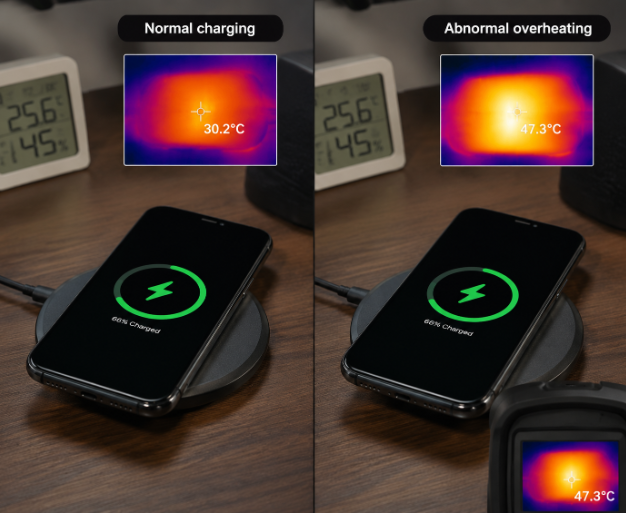
If you’ve ever picked up your phone mid-wireless charge and thought, “Is this supposed to be this hot?” you’re not alone. Many people worry that a warm charger means a defective product, or fixate on the oft-quoted 55°C “safety limit” they see online. The truth is, temperature safety depends on testing standards, real-world use cases, and product design—you can’t judge quality by touch alone, but you also shouldn’t ignore unusual overheating risks.
1. First Things First: Temperature Rise, Surface Temperature, and Heat — What’s the Difference?
When people say “my wireless charger gets hot,” they’re describing a subjective feeling: one person might find 40°C uncomfortably warm, while another can handle 50°C without issue. Formal testing uses precise, defined metrics to measure heat performance, so let’s start with key terms.
1.1 What Is Temperature Rise?
You’ll often see temperature rise written as ΔT (delta T), which is the difference between a product’s surface temperature at a test point and a set baseline ambient temperature. Put simply, it’s how much extra heat the device itself generates, separate from the temperature of the room around it.
Temperature rise is sometimes measured in Kelvin (K), but since it refers to a temperature difference, the numerical value is identical to a Celsius difference. For example, if your room is 25°C and the wireless charger surface hits 45°C, the temperature rise is 20K — equal to a 20°C difference.
Why not just use surface temperature? Surface temp directly affects how hot something feels to the touch, but temperature rise is the standard metric for comparing heat performance across products. After all, a charger hitting 45°C in a 30°C summer room has the same 15K rise as one hitting 25°C in a 10°C winter room. That doesn’t mean the two chargers have identical heat performance, though — real-world results also depend on cooling design, power management, and thermal equilibrium. The difference in how hot they feel comes down to the surrounding air temperature, not just the charger itself.
2. Why Do Wireless Chargers Get Hot?
Wireless charging works by transferring energy between a transmitter coil (in the charger) and a receiver coil (in your phone) via electromagnetic induction. No energy transfer is 100% efficient, and almost all lost energy turns into heat. This heat comes from two main places:
- The transmitter (charger) itself: Power components on the circuit board, the charging coil, and magnetic materials all lose energy as heat when current runs through them.
- The receiver (your phone/device): The phone’s receiving coil, rectifier circuit, charging management chip, and battery all generate heat during operation.
Plenty of common scenarios can make this heat worse:
- Misaligned coils reduce coupling efficiency, increase energy waste, and can raise temperatures on both the charger and phone.
- Thick phone cases widen the gap between coils, and metal components in cases can create eddy currents that generate extra heat. The exact impact depends on case material, design, alignment, and charging power.
- Metal foreign objects like coins or keys trapped between the charger and phone will induce electric current and heat up.
- Unstable input voltage or poor airflow traps heat instead of letting it dissipate.
- If you’re gaming, recording 4K video, or running other high-load apps while charging, your phone’s processor and screen already generate massive amounts of heat, which mixes with the charger’s heat — making it hard to tell which device is causing the warmth.
2.1 Typical Heat Scenarios for Different Charger Types
Different types of wireless chargers tend to overheat in different common scenarios:
- Desktop wireless chargers: The most frequent causes of excess heat are misaligned phones, thick protective cases, or long continuous fast-charging sessions.
- Car wireless chargers: Heat is usually more noticeable than desktop models, thanks to summer cabin temperatures, direct sunlight, and vibration that shifts the phone out of alignment while driving.
- Magnetic wireless chargers: Magnet alignment prevents misalignment, but heat levels still depend on coil design, power output, and cooling structure — they’re not automatically cooler than non-magnetic models.
- Low-power wireless chargers (for earbuds, smartwatches, etc.): Even though they use less power, their small size and limited internal cooling space can still make them feel noticeably warm to the touch.
3. Standards and Safety: Why You Can’t Just Rely on the 55°C “Safety Limit”
You’ve probably seen people claim “any wireless charger over 55°C is defective” — but that’s an oversimplification. Temperature limits aren’t a one-size-fits-all number, and depend on multiple factors. Let’s break down the most common industry and safety standards.
3.1 Common Regulations and Compliance Frameworks
Regulatory and industry standards vary by region, and they’re not interchangeable:
- WPC Qi Specifications: Developed by the Wireless Power Consortium, these are the most widely adopted industry standards for wireless charging. They cover compatibility, power management, foreign object detection (FOD), and thermal management requirements.
- IEC 62368-1: An international safety standard from the International Electrotechnical Commission for audio/video, information technology, and communications equipment. Many countries adopt or adapt this standard for local regulations.
Regional requirements have distinct focuses:
- For products sold in China, compliance depends on product form, power supply type, sales scope, and current regulatory catalogs. Note that GB/T 35590 applies primarily to power banks, and cannot be used as a direct universal standard for all wireless chargers.
- The EU’s CE mark is a multi-faceted compliance badge covering safety, electromagnetic compatibility (EMC), and more — it is not a standalone temperature rise certification.
- The US FCC focuses on EMC and radio frequency regulation, and does not evaluate temperature rise or overall product safety performance.
- Japan’s PSE certification eligibility depends on product power supply type and category, with different testing requirements for different product classes.
No single certification equals a “temperature rise pass” — eligibility always depends on product type, sales region, and current local regulations.
3.2 How to Interpret Temperature Limits
Many people want a single fixed “safe temperature” number, but the allowable temperature for touchable surfaces depends on casing material, how and how long you touch it, contact area, product type, and test conditions.
For example, metal conducts heat far better than plastic, so a 45°C metal surface feels much hotter than a 45°C plastic surface. Standard limits for accessible surfaces also differ between parts you only touch briefly and parts you hold for long periods.
Battery temperature limits are even more complex, and depend on battery chemistry, device design, manufacturer specifications, and charging management strategies — different phone brands often have different internal temperature thresholds.
That means numbers like 55°C or 60°C you see online are only rough reference points for consumer risk awareness, not official pass/fail criteria. A formal compliance determination always requires reference to applicable standards, official certification reports, product specifications, and full test condition documentation.
3.3 Safety Requirements for Abnormal Operating Conditions
Beyond normal use, safety standards and Qi specifications require testing under certain abnormal conditions, and most manufacturers add even more test scenarios based on their product’s intended use. These include trapped metal foreign objects, severe phone misalignment, overvoltage input, overload, and blocked cooling vents.
These tests verify that temperatures stay within safe ranges, protection features activate on time, and the device returns to normal operation after the fault is resolved.
The absolute minimum safety baseline, under all standard normal and abnormal test conditions, is no fire, explosion, sustained uncontrolled temperature rise, casing melting, or other hazardous failures.
Keep in mind: even a Qi-certified or safety-certified charger isn’t guaranteed to never overheat in every possible scenario. Certifications are tested under specific, standardized conditions, and can’t cover every extreme real-world use case.
4. How Labs Test Wireless Charger Temperature Rise
If you’ve ever tested a charger at home and got a very different result than a lab report, it’s because formal lab testing follows extremely strict, controlled conditions for every step, from sample prep to data logging.
4.1 Test Conditions and Sample Preparation
Before any test starts, every variable that could affect results is fixed and documented in the test plan: ambient temperature, humidity, air flow speed, input voltage, output power, exact receiver device model (e.g., a specific phone model), and the receiver’s starting battery level.
Test samples must be mass-produced units from a defined production batch — not custom-built “engineering samples.” Sample size, pre-test conditioning time (to let the sample acclimate to room temperature), and number of repeat tests are all set by applicable standards or manufacturer specifications.
Test point placement is also critical: points must cover all accessible surfaces, the area directly above the charging coil, near the charging port, and a dedicated ambient temperature reference point to ensure complete data collection.
4.2 Measurement Equipment and Data Quality
Labs use two primary temperature measurement tools, each with pros and cons:
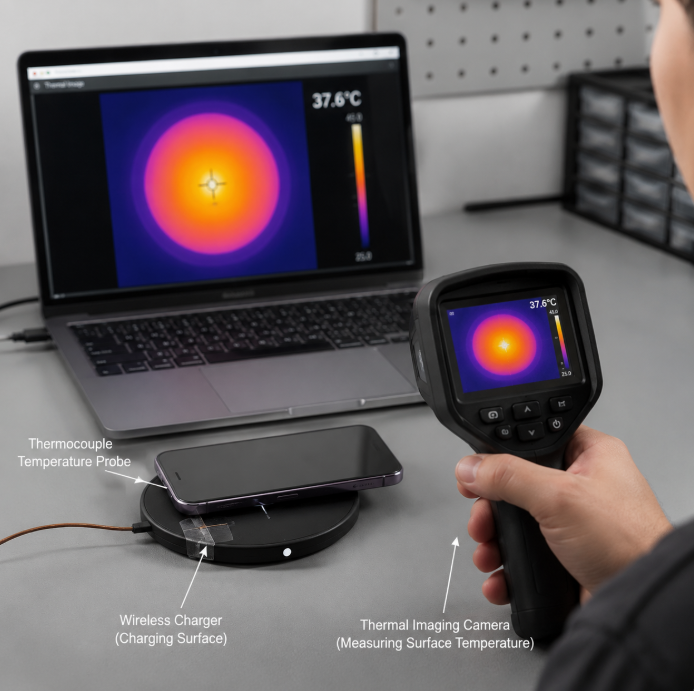
- Thermocouples: The most common tool for fixed-point testing. These ultra-thin temperature probes are taped directly to test points to record continuous temperature changes. Their accuracy depends on the probe’s precision grade, how they’re attached (e.g., type of tape, how securely they’re bonded), and the calibration status of the data collection system.
- Thermal imagers: These capture full surface temperature distribution and hotspot locations across the entire field of view, no need to place individual probes. However, they require correct emissivity settings for the material being tested, and can be skewed by heat reflection from nearby objects, focal distance, and shooting angle. They also cannot measure temperatures of hidden areas or internal hotspots directly.
Labs also use power meters to log input and output power in real time, thermohygrometers to monitor ambient conditions, and alignment jigs to ensure the receiver is placed in exactly the same position every test. All equipment must be within its valid calibration period, and test reports must note measurement uncertainty or key error sources for data to be considered reliable.
4.3 Normal Operating Conditions
Normal condition tests simulate real-world everyday use, and include:
- Idle standby: The charger is plugged in with no receiver placed on it, to test standby temperature.
- Rated power charging: A full charge cycle at rated power with perfect coil alignment, with temperature changes logged throughout (test duration depends on receiver battery capacity and power management strategy, per applicable standards or test plans).
- Multiple power levels: Testing across all supported power tiers, e.g., 5W, 10W, 15W.
- Different placement scenarios: Perfect alignment, horizontal placement, vertical placement, use with a standard-thickness case, and various degrees of coil offset (exact parameters set by the test plan). For multi-device chargers, tests also run with all devices charging simultaneously.
During testing, technicians log input power, output power, accessible surface temperatures, ambient temperature, and any protection feature activations. If the test plan includes internal temperature monitoring, internal hotspot temperatures are also recorded.
There’s no universal rule for when temperature is “stable” (e.g., “10 minutes of no change” or “test for exactly 2 hours”) — steady state is defined by the specific standard or test plan being used.
4.4 Abnormal and Extreme Conditions
Labs also run abnormal and extreme condition tests per applicable standards, certification requirements, or manufacturer test plans to verify safety:
- Foreign object detection (FOD) testing: Labs use standard metal foreign object samples defined by the applicable standard or test plan, placed between the transmitter and receiver, to verify that FOD triggers promptly and temperatures stay within controllable limits. Home users should never intentionally place metal objects on their charger to test this.
- Misalignment testing: The receiver is intentionally offset by a large distance to check for overheating and protection activation.
- Blocked cooling testing: The charger is covered with cloth, for example, to simulate poor ventilation scenarios.
- Extreme ambient temperature testing: Tests run in environmental chambers at high or low temperatures to evaluate performance in extreme conditions.
- Fault testing: Overvoltage, overload, and short circuit scenarios to verify protection features work correctly.
These tests record the temperature when protection activates, activation time, output status, auto-recovery conditions, and whether the device enters a repeated on/off cycle.
4.5 Reliability and Aging Verification
Temperature rise testing doesn’t only evaluate brand-new products. Reliability and aging verification tests check how performance changes over long-term use, with test plans tailored to product specifications, certification requirements, or manufacturer standards.
For example, products may go through charge-discharge cycles, continuous operation tests, or temperature-humidity cycling aging, then be re-tested for temperature rise and compared to their initial new-unit performance. Technicians look for significant increases in temperature rise, power output degradation, failed protection features, increased operating noise, or physical casing deformation.
5. At-Home Checks: How to Spot Abnormal Wireless Charger Heat
You don’t need lab equipment to do basic at-home checks for abnormal heat, but it’s important to understand the limits of DIY testing first.
5.1 Tools and Limitations
If you have a calibrated contact temperature probe or a high-quality consumer thermal imager, your results will be fairly reliable for personal reference.
Standard consumer infrared (IR) thermometers have significant limitations: readings are heavily affected by surface emissivity, reflectivity, distance-to-spot ratio, and measurement angle. For example, shiny plastic or metal surfaces will often give lower-than-actual readings. Never treat IR thermometer results as equivalent to lab test data, and never use them to claim a product passes or fails a certification standard.
Touch testing is only useful for spotting obvious anomalies — for example, if the charger keeps getting hotter and hotter, or feels way warmer than it usually does in the same scenario. You can’t judge exact temperature by feel, and touch testing can never replace formal certification testing.
5.2 Recommended Test Steps
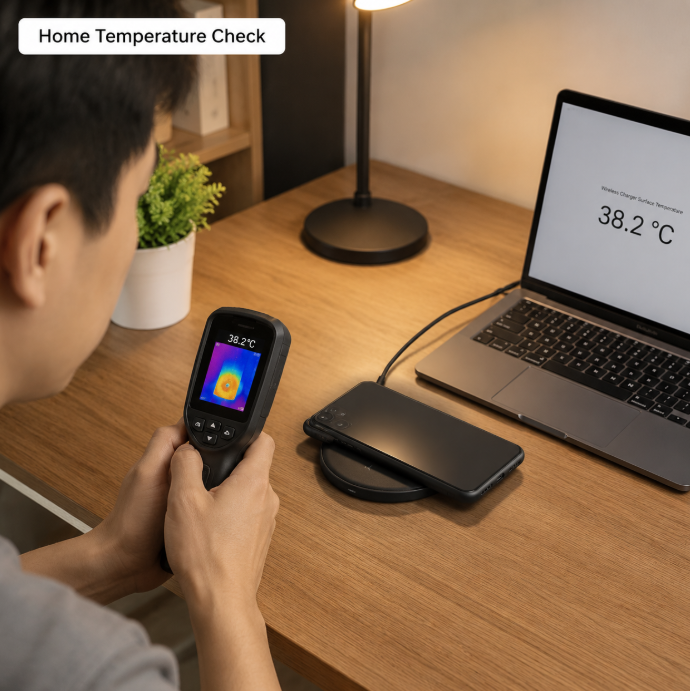
For the most reliable at-home results, keep as many variables consistent as possible:
- Test in a room with stable room temperature, no direct sunlight, and no direct airflow from fans or AC vents. Write down the current ambient temperature first.
- Keep all test conditions identical: use the same wall charger to power the wireless charger, the same phone, the same phone case, the same power level, and place the phone in the exact same spot every time.
- Test scenarios that match your real daily use — for example, normal coil alignment with your everyday case. There’s no need to test extreme misalignment that you’d never encounter in regular use.
- Monitor temperature trends during charging. You can note temperatures of the charger surface, phone back, and ambient air at typical charge time checkpoints (e.g., 15 minutes, 30 minutes, 1 hour). If you have time, keep monitoring until the temperature stabilizes.
- Repeat the test 1-2 times for consistency. Write down all details: temperature readings, power level, charge time, and any anomalies like dropped charging or disconnections. You can also take photos for future reference.
5.3 How to Interpret Results
At-home test results can only help you spot abnormal temperature trends — they can’t be used to prove a product passes or fails any certification, since home conditions are nowhere near as controlled as a lab.
Always compare results under identical conditions (same room, phone, wall charger, case, and placement). If the temperature keeps climbing steadily, feels significantly hotter than it normally does in the same scenario, or is accompanied by a burning smell, unusual noise, casing deformation, frequent charging drops, or glitchy protection features, stop using the charger immediately and unplug it.
If you see smoke, melted plastic, bulging components, or other dangerous signs, do not touch the device with your bare hands. Cut power immediately if it is safe to do so, move the device away from flammable materials, and follow local fire safety and e-waste disposal rules. Never plug the charger back in to “test” it further.
6. Common Myths and Facts About Wireless Charger Heat
There are a lot of persistent myths about wireless charger heat. Let’s clear them up one by one:
- Myth: A warm charger is always defective.
Fact: Some warmth is normal, since wireless charging always involves energy loss. Exact temperature depends on power level, efficiency, cooling design, and ambient temperature. Abnormal signs include temperatures that keep rising indefinitely, or surfaces too hot to hold for more than a few seconds — these require immediate investigation. - Myth: Higher power = hotter charger.
Fact: A high-power charger with excellent efficiency and cooling design, used with perfect alignment, can run cooler than a low-power no-name charger with poor efficiency. Heat level depends on efficiency, alignment, cooling, and ambient temperature — not just power output. - Myth: If it doesn’t feel hot in winter, its temperature rise is fine.
Fact: Lower winter ambient temperatures make even the same temperature rise feel cooler. Judging a product’s inherent heat performance requires looking at temperature rise, not just absolute surface temperature or how it feels. - Myth: FOD will detect every metal object.
Fact: Foreign object detection works by measuring power loss. Very small or very thin metal objects may not cause enough power loss to hit the detection threshold, so protection won’t trigger. Never intentionally place metal items on your charger to test this. - Myth: If the surface feels cool, there’s no internal overheating.
Fact: Internal power components can be much hotter than the outer casing. Internal hotspots can only be confirmed with proper probe placement or internal thermal testing — you can’t assume a cool exterior means no internal risk. - Myth: Magnetic wireless chargers are always cooler.
Fact: Magnetic alignment only solves the misalignment problem. If a magnetic charger has very high power and poor cooling design, it will still run hot. - Myth: If my phone gets hot while charging wirelessly, it’s all the charger’s fault.
Fact: When you use your phone heavily while charging (gaming, recording 4K video, etc.), the phone’s processor and screen generate large amounts of heat that mix with the charger’s heat. You can’t blame all heat on the wireless charger in these scenarios.
7. Buying and Usage Tips to Reduce Overheating Risk
You can reduce overheating headaches by choosing the right charger and using it correctly.
7.1 What to Look for When Buying
- Verify certifications first: Prioritize products with official WPC Qi certification, and confirm they meet all safety and compliance requirements for your region. All certification credentials should be verifiable via official channels — don’t take marketing copy at face value.
- Check key features and specs: Look for listed input power requirements, rated output power, over-temperature protection, foreign object detection, and cooling design details (e.g., heat sinks, thermal pads, or active cooling fans).
- Match power to your device: Don’t pay extra for high-power chargers if your phone only supports lower wireless charging speeds. For example, if your phone maxes out at 10W wireless charging, a 25W model won’t charge it any faster, and will just add unnecessary cost.
- Read real user reviews: Focus on reviews that mention heat levels, charging drops, alignment issues, and long-term reliability — don’t just look at star ratings and promotional photos.
7.2 How to Reduce Heat During Use
- Align coils properly: Try to center your phone on the charging coil. If you’re not sure where your phone’s coil is, check the product manual, or slowly move the phone around until you find the position where charging is fastest and most stable.
- Use a compatible case: Avoid extra-thick phone cases, especially ones with metal ring holders, metal kickstands, or magnetic attachment plates. If your case has metal components, remove it while charging for best results.
- Clear the charging area: Before charging, remove any coins, keys, metal cards, paper clips, or other metal items from the charging surface so they don’t get trapped between the charger and phone.
- Keep cooling unobstructed: Don’t place the charger in a sun-heated car, next to a heater, or in a closed drawer. Don’t cover it with cloth, paper, or pillows while charging, as this blocks heat dissipation.
- Use wired charging for high-load phone use: If you’re gaming, recording 4K video, using navigation, or running other high-load apps, use a wired charger instead. This avoids stacking phone and charger heat, and helps slow battery degradation.
7.3 What to Do If You Suspect Abnormal Heat
If you notice any of the following, stop using the charger immediately and unplug it: burning smell, unusual noise, cracked or deformed casing, abnormal heat after water damage or a drop, steadily rising temperature that never stabilizes, or frequent unexplained protection triggers.
If you see smoke, melted plastic, bulging components, or other hazardous signs, do not touch the device with bare hands. Cut power only if it is safe to do so, move the device away from flammable items, and follow local fire safety and e-waste disposal guidelines.
Never try to disassemble or repair the charger yourself, and never intentionally test it with metal foreign objects or short circuits — this can cause serious safety hazards.
When disposing of old wireless chargers (especially models with built-in batteries), do not throw them in regular trash. Follow your local electronic waste recycling regulations for proper disposal.
8. Frequently Asked Questions
8.1
Q: What temperature rise counts as abnormal for a wireless charger?
There is no universal fixed number — requirements vary by product, use case, and applicable standard. At-home temperature checks can only spot trends, like steady rising heat or temperatures much higher than your usual baseline for the same scenario. You cannot use a single temperature reading to judge if a product is compliant. If the charger keeps getting hotter, or has a burning smell, unusual noise, or frequent charging drops, stop using it immediately. Official compliance determinations must come from applicable standards and certified lab test reports.
8.2
Q: Why do wireless chargers usually feel hotter than wired chargers?
Wireless charging has more energy conversion steps, so many products have higher energy loss and more noticeable heat — but that doesn’t mean every wireless charger is hotter than every wired charger. Wired charging transfers power directly through a cable, so overall loss is more controlled, with heat concentrated in the wall charger and phone internals. Wireless charging relies on magnetic field coupling between two coils, so both the transmitter and receiver generate heat. Thick cases widen the coil gap, and metal components can add extra heat loss. At the same power level and similar cooling conditions, many wireless chargers will feel warmer to the touch, but exact performance always depends on product efficiency, cooling design, and use case.
8.3
Q: Does Qi certification guarantee no overheating in any scenario?
No. Qi certification is tested under specific, standardized conditions, and cannot cover every extreme real-world scenario. You may still experience overheating if you use an incompatible device, a thick case with metal parts, trap a metal foreign object, or use the charger in direct high-temperature sunlight.
8.4
Q: Why does my IR thermometer reading not match how hot the charger feels?
There are two main reasons: First, IR thermometers measure surface radiation temperature, so shiny plastic or metal reflective surfaces will give inaccurate readings. Second, human perception of heat depends on many factors, like your hand’s own temperature, contact time, and the material’s thermal conductivity. A 45°C metal surface feels much hotter than 45°C plastic because metal conducts heat faster into your skin. That’s why the thermometer number may not line up with how hot it feels to you.
8.5
Q: How can I reduce overheating risk with my car wireless charger in summer?
When parked, leave your car in the shade if possible, or take your phone with you instead of leaving it on the charger on the dashboard in direct sun. While driving, if you have AC, point a vent toward the dashboard to help cool the charger and phone. Adjust your phone to align properly with the coil to avoid vibration-caused misalignment. If your phone is already very hot, let it cool down for a few minutes before charging — don’t fast charge while running navigation in high heat.
8.6
Q: Can I charge with a metal ring holder or bank card in my phone case?
We don’t recommend leaving metal ring holders on, or keeping bank cards between your phone and charger, while charging. Metal accessories or cards with metal components in the magnetic charging field can cause extra energy loss, with effects varying by accessory/card design and placement. For safety, remove metal accessories like ring holders before charging, and take any cards out of your phone case.
8.7
Q: If both my phone and wireless charger get hot, how do I tell which one is the source?
You can do a basic static test for a rough idea, but results are only for reference and can’t confirm a specific fault source: Take the phone off the charger, set both in a well-ventilated area for a few minutes, and watch how their temperatures change. Since heat transfers between the two when they’re in contact, and different products have different thermal mass and cooling rates, how fast they cool down doesn’t directly tell you which one is faulty. If either device keeps getting abnormally hot, or has other unusual symptoms, stop using it and contact the brand’s customer support or a professional testing service.
8.8
Q: Does frequent charging disconnection always mean overheating?
Not necessarily. Frequent disconnections can have many causes: misaligned coils, a too-thick phone case, an underpowered wall charger, or accidental FOD triggering — though over-temperature protection can also be the cause. First check your placement, case, and wall charger to make sure they meet requirements. If everything checks out and you still get frequent drops, check the temperature to see if overheating is the culprit.
8.9
Q: How does long-term high heat affect phone batteries and wireless charger lifespan?
Long-term high-temperature charging accelerates lithium-ion battery aging and capacity loss, and increases safety risk. Issues like bulging also depend on cell quality, overcharging, and physical damage. For the wireless charger itself, long-term high heat accelerates aging of electronic components like capacitors and chips, which can lead to lower power output, failed protection features, and shorter overall lifespan. That’s why it’s best to avoid using wireless charging in high-temperature environments long-term.
8.10
Q: When should I stop using my charger and contact support or a testing service?
Stop using the charger immediately and contact the brand’s customer support if you notice any of these: deformed, cracked, or melted casing; burning smell, smoke, or unusual noise; abnormal heat after a drop or water exposure; steadily rising temperature that never stabilizes; or frequent unexplained protection triggers. If you suspect a product quality issue, contact a qualified third-party testing lab to run tests per applicable standards.
9. Final Takeaways
Some warmth during wireless charging is a normal side effect of energy conversion. The key markers of a safe charger are stable operating temperatures, working safety protection features, and compliance with applicable safety standards.
At-home temperature checks are only useful for spotting abnormal trends — they cannot replace formal lab testing for compliance determinations. To reduce overheating risk and extend the life of your charger and phone, choose certified compliant products, align coils properly during use, keep cooling paths clear, and avoid trapping metal foreign objects between the charger and device.