
Ever bought a 65W GaN charger advertised as ultra-fast, only to have it cut out repeatedly when charging your laptop, or charge way slower than the listed speed? Most people first blame incompatible cables or picky devices, but overlook one critical factor: charger voltage accuracy.
Voltage accuracy is closely tied to charging stability, protocol reliability, and even long-term device safety, making fast-charging voltage deviation one of the core metrics for judging charger quality. Yet many people either reduce it to “how accurate the displayed number is” or mix it up with ripple, line loss, and other unrelated metrics.
This guide breaks down everything you need to know about charger voltage accuracy, from basic definitions to user-friendly test methods and professional standardized workflows. Whether you’re checking a charger you already own or avoiding duds when shopping, you’ll find practical, actionable reference here.
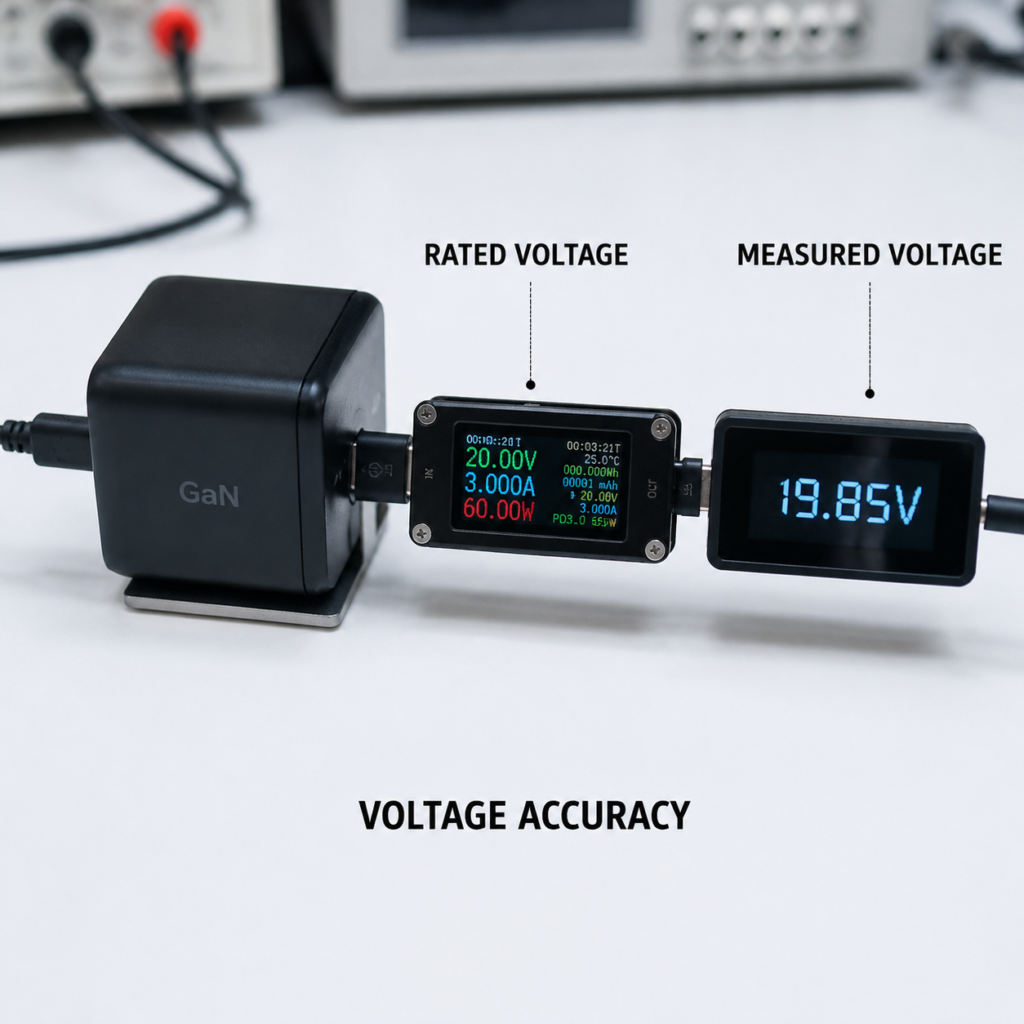
How to Judge “Good” Accuracy: Standards, Specs & Rating Tiers
Once you understand what voltage accuracy is, you’re probably wondering: how much deviation is acceptable? Do certified products always have good accuracy? The answer depends on a hierarchy of judgment criteria — you can’t just apply a random standard.
Priority of Judgment Criteria
- Highest priority: The product’s own nameplate and manufacturer-published output specs. If a charger lists 5V±5%, any result within that range meets the manufacturer’s pass standard.
- Corresponding fast charging protocol version and certification requirements. For example, USB PD fixed PDOs (Power Delivery Objects), PPS programmable voltage, and EPR extended power all have version-specific accuracy requirements under defined test conditions. Products with corresponding protocol certification must meet those requirements for relevant scenarios.
- Applicable product safety, EMC, and energy efficiency regulations. These are the baseline requirements for products to be sold legally.
- The comparative rating tier in this guide. This is only for side-by-side comparison of products under identical test conditions, not a mandatory standard, and cannot replace regulatory or certification conclusions.
What Certifications Actually Cover
Many people assume that chargers with safety certifications (like China’s 3C, EU CE, or US UL) automatically have excellent voltage accuracy — this is a major myth.
- Standards like IEC 62368-1, GB 4943.1, and UL 62368-1 are safety standards for audio/video and IT equipment, focused on preventing electric shock, fire, and overheating under normal use and single-fault conditions. Output voltage only needs to stay within safety limits, which is a completely separate metric from voltage accuracy. You cannot infer accuracy from a safety certification.
- Protocol certifications like USB-IF, Qualcomm QC, and UFCS (Universal Fast Charging Specification) do set requirements for output voltage characteristics of specific versions and tiers, but only under strictly defined test conditions. Don’t assume a certified product has high accuracy across all voltage tiers.
- Energy efficiency certifications like DOE Level VI and EU CoC measure energy efficiency and standby power, which have no direct link to output voltage accuracy.
Suggested Comparative Rating Tiers
To make side-by-side comparison of charger voltage accuracy easier, we’ve created a reference rating system. This system is only for comparing products under identical test conditions, and is not a mandatory pass/fail line or regulatory standard:
| Rating | Relative Deviation Range | Notes |
|---|---|---|
| Excellent | Within ±1% | Voltage deviation has negligible impact on charging experience in normal use |
| Good | Within ±3% | Maintains stable protocol connection and power output for daily use, no noticeable power loss |
| Basic Usable | Within ±5% | Normally triggers charging protocols reliably in typical use, no immediate safety risk |
| Outside Recommended Range | Over ±5% | First verify test conditions, instrument accuracy, and product specs; if deviation is confirmed, use with caution |
DIY Testing for Regular Users: Safe, Simple, Repeatable
If you want to test the accuracy of a charger you own, you don’t need expensive professional gear. You can run basic tests with common, reputable tools, and the process is relatively safe.
Tool Selection
First, you’ll need a USB tester or protocol trigger, the most widely used tool for this job. Don’t just look at display digits — focus on these key specs:
- Measurement accuracy (look for ratings like ±0.5% + 2 digits — this is the real accuracy spec)
- Resolution
- Measurement range (does it cover the voltage/current you want to test?)
- Load capacity (if it has a built-in load, can it handle the charger’s full rated current?)
- Calibration information
Never mistake “displays to 0.01V” for “accurate to 0.01V” — many cheap meters show two decimal places but have large actual errors.
If possible, pair your USB tester with a calibrated digital multimeter of higher accuracy to cross-check key voltage readings. To confirm a tool’s real accuracy, use a traceable standard voltage source or calibration device — matching readings between two meters does not prove accuracy.
Prioritize reputable, adjustable electronic loads for consistent, repeatable test conditions. If you don’t have a dedicated electronic load, you can only do trend observation using a fixed device’s specific charging phase — those results are not suitable for direct accuracy judgment.
You’ll also need low-resistance, reputable fast charging cables and reliable adapters. Avoid no-name accessories with no listed specs, as line loss and contact resistance will heavily skew results.
3-Step Testing Method
For regular users, follow these three steps for safe, easy testing:
No-Load Test
Plug the charger into AC mains, connect the USB tester to the output port with no load attached, and record the default 5V output (or the product’s specified no-load output voltage).
Note: No-load testing is only for initial screening. If no-load deviation is already large, loaded performance will likely be poor too — but normal no-load voltage does not guarantee good loaded accuracy. Many chargers have slightly higher no-load voltage that drops under load, so never judge solely on no-load results.
Loaded Test
Pick several load points within the charger’s rated range. For example, for a 5V 2A charger, use 0.5A, 1A, and 2A. For each test point, wait until the output voltage stabilizes, then record voltage, current, and power.
To measure the charger’s own output accuracy, plug the tester directly into the charger’s output port with no extra cables. If you want to measure line loss, move the tester to the device end of the cable — the difference between the two readings is the cable voltage drop.
Never test beyond the product’s rated power range; voltage drop under overload is normal and cannot be used to judge accuracy.
Fast Charging Tier Test
Before testing high-voltage fast charging tiers, you must successfully negotiate the corresponding protocol first, otherwise you’ll only get the default 5V output. Use a USB tester with protocol trigger function, or a device that supports the target protocol to trigger it.
For USB PD testing, make sure your test equipment supports the matching PD version to avoid negotiation failures that skew results.
Test only the voltage tiers the product actually lists — don’t assume every charger has 5V/9V/12V/15V/20V. Many low-power models only have 5V and 9V, so not triggering unlisted tiers is normal.
For PPS (Programmable Power Supply) supported products, PPS voltage accuracy directly affects power regulation stability during charging. Test three key dimensions:
- The protocol’s minimum request step (e.g., 20mV step for USB PD PPS standard)
- The charger’s actual responsive voltage adjustment step
- The request point interval you use for testing
Test points should cover the lowest output voltage, highest output voltage, typical working voltage, and several intermediate points across the rated range. For example, for a 3.3V-11V PPS tier, test 3.3V, 5V, 9V, 11V, and other evenly spaced points. Record the deviation between requested voltage and actual output, single-step adjustment response time, and fluctuation after stabilization.
Recording Results
Always record full test conditions, otherwise results have very little reference value. Be sure to note:
- Charger model, firmware/protocol version (if applicable)
- Input voltage (e.g., 120V or 240V mains)
- Ambient temperature
- Load level
- Cable model used
- Instrument model
- Time of reading
Repeat each test condition at least 3 times, and record the average value, maximum deviation, and reading consistency to reduce random error. For key results, note the instrument’s accuracy rating and combined measurement uncertainty (e.g., “The instrument used in this test has an accuracy of ±0.3%, so results have a corresponding level of uncertainty”) to make results more objective.
Professional Testing: Building a Repeatable Test Workflow
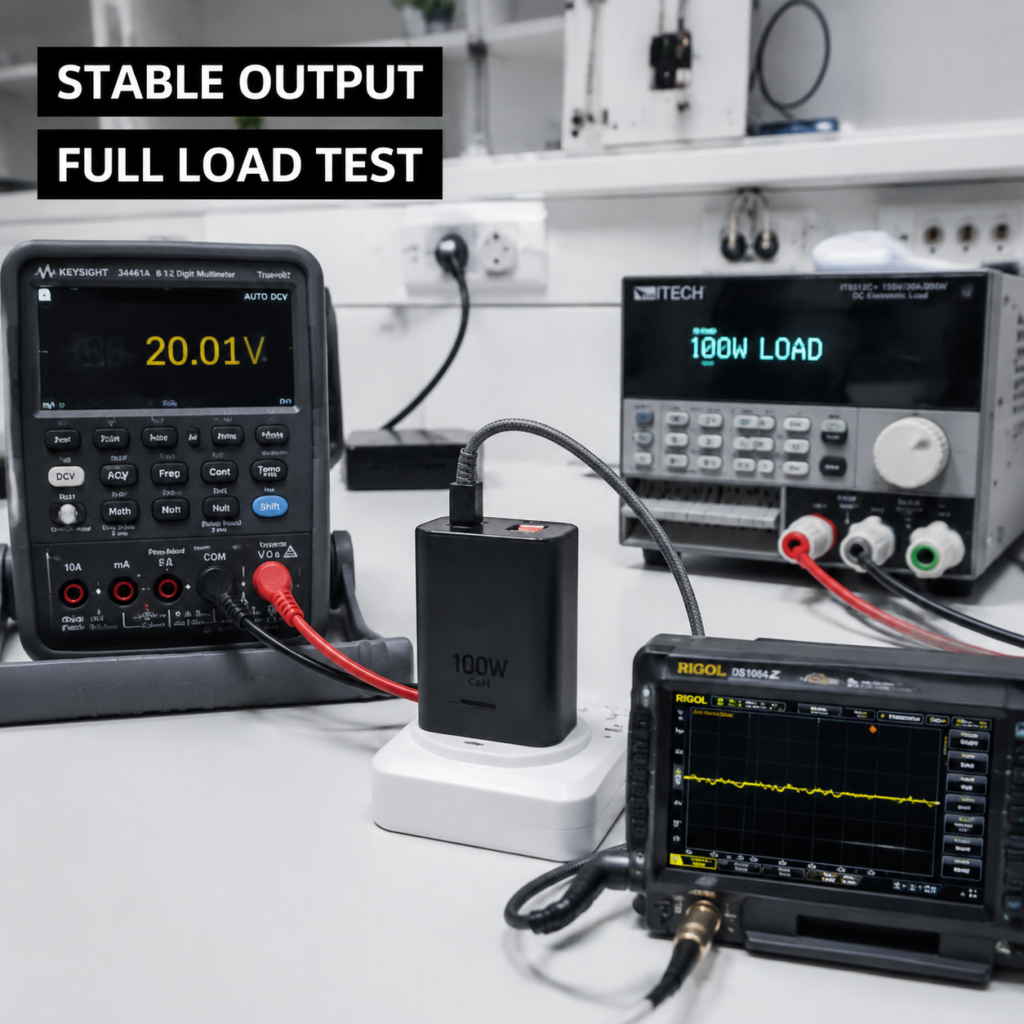
If you do product reviews or want to dive deeper into charger voltage accuracy, you’ll need a more standardized test workflow to ensure results are repeatable and comparable.
Equipment & Setup
Professional testing requires a full suite of gear:
- Programmable AC power supply (to precisely adjust input voltage and frequency)
- Programmable electronic load (to precisely control load level and change patterns)
- High-precision digital multimeter (for accurate voltage/current measurements)
- Power analyzer (for power and efficiency testing)
- Protocol analyzer (to capture the full protocol negotiation process)
- Oscilloscope (for dynamic response and ripple testing)
Clearly label the measurement point: charger output port, end of the cable, or device side. Never mix results from different positions, as they will not be comparable. Include instrument range, sample rate, bandwidth limits, and calibration status in the test report so other people can replicate the results.
Input & Load Conditions
Input voltage should cover the full rated range listed on the product nameplate. For example, if a product is rated 100-240V, test key points like 100V, 120V, 220V, and 240V. Do not test outside the rated input range unless you are doing dedicated extreme input testing, which requires strict adherence to product specs and safety protocols.
Load points should include no-load, low load, medium load, and full load within the rated range, covering common user scenarios. Overload and protection testing should be a separate section, strictly following product specs, lab safety rules, and risk control procedures to avoid damaging samples or causing safety hazards.
Static & Dynamic Testing
- Static testing: Cover all nominal voltage tiers, and test voltage deviation at different load points, load regulation, and voltage drift after temperature stabilization — that is, the change in output voltage after the charger runs at rated conditions until the case temperature stabilizes. This metric reflects long-term accuracy stability.
- Dynamic testing: Cover load step scenarios (e.g., switch from 10% rated load to 90% rated load, then back) to measure voltage overshoot, undershoot amplitude, and recovery time. Also test voltage fluctuation during plug/unplug and protocol switching, to check if protection circuits trigger falsely.
- Long-term stability testing: Run for several hours or more under rated conditions, continuously record output voltage, power, and case temperature trends, to evaluate long-term accuracy retention and overheat power reduction strategies.
Testing for Multi-Port & Specialized Chargers
Different charger types have different test focuses:
- Multi-port chargers: First test single-port output accuracy as a baseline, then test common multi-port combinations (e.g., dual-port simultaneous output, triple-port simultaneous output) to check each port’s voltage performance. Also observe voltage fluctuation and tier switching during power reallocation.
- Car chargers: Focus on output stability under varying input voltage. Input voltage should cover the rated range (e.g., 9V-16V for 12V vehicle systems, 18V-32V for 24V systems). You can also add typical automotive electrical tests like startup voltage dip and load transients, recording output voltage fluctuation and recovery.
- GaN chargers: Pay close attention to voltage drift under high temperature, full load, and dynamic load. Don’t assume GaN architecture means better accuracy — some budget GaN chargers may have worse high-temperature full-load drift than similarly priced silicon-based chargers, so rely on actual test data.
- Wireless charging products: Clarify which part you’re testing. The DC output accuracy of the power adapter can be tested by wired charger rules. The transmitter’s input voltage and coil operating voltage are internal system parameters, so label the test position separately. Receiver output voltage and power are affected by coil coupling efficiency, distance, foreign objects, etc., so they cannot be directly compared to wired charger output accuracy.
Key Testing Points for Different Fast Charging Protocols
Different fast charging protocols have different voltage accuracy requirements, so testing focuses vary:
- USB PD: Test fixed voltage tiers according to the product’s declared PDOs, and note the PD version (PD 2.0, PD 3.0, PD 3.1) and corresponding power level, as test requirements vary by version.
- PPS: Focus on deviation between requested voltage and actual output, actual adjustable voltage range, single-step adjustment response speed and stability, and long-term negotiation reliability, to avoid issues like tier dropping or negotiation interruption.
- QC, UFCS, AFC, and other protocols: First confirm the trigger conditions and port requirements for the specific version (e.g., some QC protocols rely on D+D- pin signal communication). Only test available voltage tiers after confirming successful protocol triggering — default output when the protocol isn’t triggered cannot be used to claim a tier is missing.
- High-power PD and EPR (Extended Power Range) products (100W and above): Simultaneously record the cable’s rated power level (e.g., 5A EPR cable), connector contact condition, test ambient temperature, and product protection trigger status. At high power levels, cable and connector voltage drop and contact resistance have a much larger impact on test results.
Interpreting Data & Troubleshooting Anomalies
Once you have test data, how do you interpret it? How do you troubleshoot odd results? Here are the key points.
Core Formulas
The most commonly used metric is relative voltage deviation: (Measured Value - Nominal Value) ÷ Nominal Value × 100%. For example, a 20V nominal charger that measures 19.6V has a -2% relative deviation.
Load regulation and linear regulation have varying definitions across different sources — sign, denominator, and test range can all differ. When reading other people’s test reports, always confirm the calculation rules first, don’t just compare percentage numbers.
Complete test results should include the value, test conditions, and combined measurement uncertainty. A single deviation number without context has no comparative or judgment value — for example, “5V deviation +2%” tells you nothing if you don’t know if it’s no-load or full-load, 110V or 220V input.
Common Anomalies
When you see unexpected results, don’t immediately blame the charger — check these common causes first:
- No-load voltage high but drops to normal range under load: For example, a 5V tier measures 5.3V no-load, but returns to within the manufacturer’s rated deviation under full load. This is common in chargers with no-load voltage boost or line loss compensation strategies. If it matches the manufacturer’s published specs, it’s a normal design choice, not an accuracy issue.
- Significant voltage drop under load: E.g., drops to 4.5V at 2A load. First check if the cable’s rated current is too low, if the port is oxidized or dirty causing poor contact, if the load exceeds the product’s rated power, or if the charger has overheated and triggered over-temperature power reduction.
- Frequent tier switching: E.g., jumping between 9V and 5V. First check if protocol negotiation is working normally, if the test trigger or USB meter has compatibility issues, if the cable’s rated current meets requirements, or if the device’s charging logic is adjusting dynamically (e.g., a phone lowering power when nearly full).
- High-temperature voltage drift: Output voltage changes noticeably after the charger runs and heats up. This can be caused by component temperature drift, feedback network design, insufficient heat dissipation, or triggered protection strategies.
- Output changes when using multiple ports: E.g., single port outputs 20V, but drops to 15V when two ports are used. This is usually caused by total power limits and power allocation strategies, not a fault. Check the product’s power allocation table — if total power can’t support full power on all ports, reducing voltage or current on some ports is normal design.
Buying & Usage Tips
Now that you understand voltage accuracy, here’s how to apply that knowledge when shopping for and using chargers.
Buying Principles
- First, check the full output specs, protocol version, rated input range, and third-party test data — don’t just look at advertised peak power or buzzwords like GaN.
- USB-IF certification is a useful reference for PD products, but cannot replace specific voltage test results; certification doesn’t guarantee high accuracy across all tiers.
- Don’t infer voltage accuracy from GaN architecture, main controller brand, or peak power alone. Some budget GaN chargers, even with well-known main controllers, may have worse accuracy than similarly priced silicon chargers if the feedback circuit or heat dissipation is cut corners.
- Prioritize metrics that match your use case:
- For low-power devices like phones and tablets, focus on protocol compatibility and low/medium load stability.
- For high-power devices like laptops, focus on full-load stability and temperature rise performance.
- For multi-port chargers, focus on power allocation and voltage stability when multiple ports are in use, and always pair with cables that match the rated specs.
Usage & Troubleshooting
- For daily use, use reputable cables with matching rated current and power to reduce line loss. Avoid no-name cables with no clear rated specs for high-power charging — they not only increase line loss and reduce charging efficiency, but also pose overheating safety risks.
- If you experience slow charging, repeated disconnections, or abnormal heat, use the cross-replacement method to troubleshoot: swap the cable, charger, and device one by one to identify the problem source.
- If you notice sustained abnormal overvoltage, a burning smell, unusually hot case, or frequent protection triggers, stop using the charger immediately and contact the manufacturer’s support. Regular users should not attempt to disassemble or repair chargers themselves, as there is a risk of electric shock.
Test Report Template & FAQ
Use this template to record your own test results, or to judge how reliable a third-party test report is. We’ve also answered the most common questions we get about charger voltage accuracy.
Test Report Template
A reliable voltage accuracy test report should include at least the following:
- Sample basic info: model, serial number, firmware version, protocol version
- Test date, ambient temperature, humidity, and other environmental conditions
- Instrument models, calibration status, cable model used, connection method, and measurement position (charger port or device end)
- Voltage, current, power, temperature, and corresponding deviation for each voltage tier at each load point
- Judgment basis, combined measurement uncertainty, anomaly records, and applicable scenario recommendations
Frequently Asked Questions
Q: Is it normal for no-load voltage to be 0.2V high?
A: You can’t judge without knowing the voltage tier, rated specs, and loaded results. For a 5V tier, if no-load is 0.2V high but drops to within the manufacturer’s rated deviation under full load, this is usually normal design. If a high-voltage tier has no-load deviation far outside the manufacturer’s specs, or deviation remains large under load, further investigation is needed.
Q: If my USB meter displays to 0.01V, is it accurate to 0.01V?
A: Not necessarily. Display digits only show resolution; actual accuracy depends on the product’s rated accuracy spec. To confirm a meter’s real accuracy, calibrate it with a traceable standard source, or cross-check with a higher-accuracy calibrated instrument.
Q: Why do I only get 5V when the protocol doesn’t trigger?
A: Most fast charging protocols default to 5V output, and only switch to high voltage after the charger and device (or trigger) complete protocol negotiation. This is standard protocol design, not a charger fault.
Q: Does using multiple ports at the same time always cause voltage drops?
A: Not necessarily. If the charger’s total power is sufficient and its power allocation strategy supports full power on all ports simultaneously, voltage won’t drop. If total power can’t support full multi-port output, the charger will adjust voltage or current on some ports per its allocation strategy — this is normal power distribution design.
Q: Will poor voltage accuracy definitely damage my device?
A: Minor deviation usually won’t cause direct hardware damage; impacts are mostly limited to experience issues like charging power fluctuation or unstable protocol triggering. However, sustained severe abnormal overvoltage can trigger device protection or even damage internal components — stop using the charger immediately in that case.
Final Thoughts
Charger voltage accuracy is never a single isolated number. To get an accurate conclusion, you have to interpret it alongside fast charging protocol, load level, ambient temperature, cable voltage drop, and measurement uncertainty.
Regular users don’t need expensive professional equipment — simple loaded tests and protocol trigger tests are enough to do a basic check of your chargers and avoid clearly problematic products. For professional side-by-side comparisons or reviews, you need standardized instruments and complete test conditions to ensure results are repeatable and comparable.
Safety certifications, GaN architecture, and peak power can never replace actual testing of voltage accuracy, temperature rise, ripple, and compatibility. When buying a charger, checking third-party test data is far more useful than focusing on marketing buzzwords on the product page.