
Introduction
Every year, thousands of shoppers grab a USB-C portable SSD only to walk away disappointed. Their new drive fails to hit advertised speeds, slows to a crawl when copying large video files, or refuses to work across Windows, Mac, gaming consoles and smartphones. The confusion starts with one simple misunderstanding: USB-C is just a shape, not a guarantee of blistering speed.
This practical guide breaks down everything you need to know about portable solid-state drives (PSSDs). We cut through marketing hype, unpack critical hardware specifications, map optimized workflows for every user type, and walk you through troubleshooting common performance and compatibility headaches. Whether you edit 4K footage on location, travel between offices with project files, or expand storage for your gaming library, you will learn how to select, configure, and operate a PSSD matched perfectly to your daily workflow.
1. Fundamental Knowledge: How USB-C Portable SSDs Actually Work
1.1 Simple Definition of a PSSD
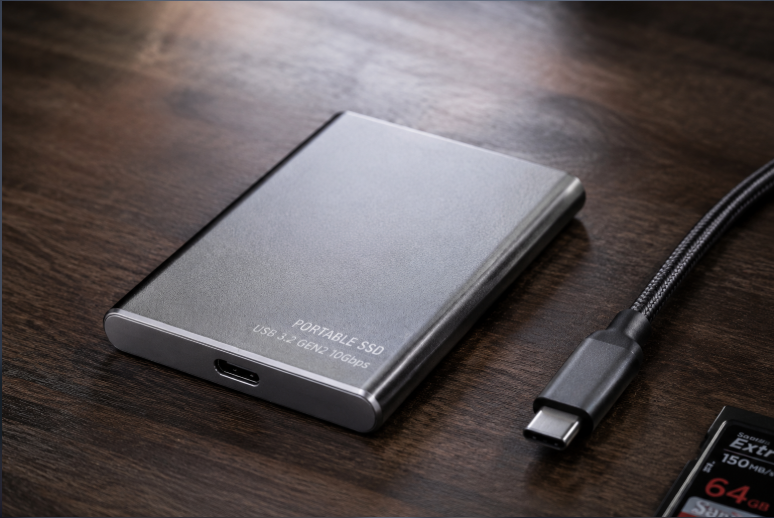
A USB-C Portable Solid State Drive (shortened to PSSD) is a flash-based external storage device without moving mechanical components. Equipped with a universal USB-C interface, it delivers compact sizing, shock resistance, and fast read and write speeds. It seamlessly transfers data across laptops, smartphones, game consoles, cameras and tablets, making it a core productivity tool for mobile office work, content creation and gaming storage expansion.
1.2 Side-by-Side Comparison: PSSD vs Other Common Storage
| Device Type | Core Advantages | Key Weaknesses | Ideal Use Cases | Typical Speed Range |
|---|---|---|---|---|
| Standard USB Flash Drive | Ultra-compact, low upfront cost | Basic controllers and low-grade flash; heavy speed drops, limited lifespan | Temporary small file transfers, quick document sharing | 30–200 MB/s |
| Portable Mechanical HDD | Huge available capacity, low cost per terabyte | Vulnerable to drops, slow transfer speeds, generates audible noise | Cold data archiving, long-term static backups | 80–150 MB/s |
| USB-C PSSD | Fast transfers, shock-resistant, silent, highly portable | Higher price per TB compared to mechanical hard drives | Office work, video editing, gaming libraries, field photography | 400–4000 MB/s |
| Internal NVMe SSD | Maximum achievable performance, no external transfer bottlenecks | Not removable; cannot share files across separate devices | Laptop/desktop system drives, local high-speed active storage | 3000–14000 MB/s |
| Thunderbolt Certified Portable SSD | Professional top-tier sustained speeds, excellent stability under heavy load | Premium pricing, limited compatibility with non-certified ports | 8K video editing, professional film production, studio workflows | 2800–6000 MB/s |
1.3 Who Should Invest in a PSSD?
- Content Creators: Photographers, short-form and feature video editors, streamers storing RAW media and 4K/8K footage for field backups and mobile editing.
- Mobile Professionals & Digital Nomads: Business staff, students shifting between multiple devices, synchronizing project files without slow cloud transfers.
- Gamers: PC, PlayStation 5 and handheld console users expanding local storage for AAA titles, enabling plug-and-play game libraries across devices.
- Field Crew: Drone operators and on-location photographers performing immediate in-field media backups; ruggedized models protect data in harsh outdoor environments.
- IT Technicians: Building multi-OS boot drives, system recovery media, mass data migration and equipment maintenance.
1.4 Internal Architecture & Data Transfer Workflow
Data flows through a clear pipeline: Smartphone / Laptop / Camera → USB-C port → USB bridge chip (protocol translation) → SSD controller → NAND flash storage.
Six essential internal components define drive quality:
- NAND Flash Memory: Stores all user data; determines capacity, endurance and baseline performance.
- SSD Controller: The “brain” of the drive, managing data scheduling, error correction, thermal regulation and wear leveling.
- USB Bridge Chip: Converts internal storage signals to standard USB communication for device recognition.
- Cache Memory: Boosts small-file read/write speeds; included on most high-end PSSD models.
- Power Management Unit: Stabilizes bus power delivery to prevent unexpected disconnects or drive drops.
- Thermal Structure: Metal casing or thermal padding prevents thermal throttling during sustained heavy writes.
1.5 USB Protocol Speed Reference Chart (Eliminate Spec Scams)
| Protocol Standard | Theoretical Bandwidth | Real-World Speed Range | Best Use Cases | Critical Notes |
|---|---|---|---|---|
| USB 2.0 | 480 Mbps | 20–45 MB/s | Occasional tiny document transfers | Obsolete for active work files; avoid for creative workflows |
| USB 3.2 Gen1 (5Gbps) | 5 Gbps | 400–550 MB/s | Light office document backups | Entry-level baseline, solid budget choice for casual users |
| USB 3.2 Gen2 (10Gbps) | 10 Gbps | 800–1050 MB/s | Everyday creative work, casual gaming libraries | The mainstream sweet spot for most consumers |
| USB 3.2 Gen2×2 (20Gbps) | 20 Gbps | 1700–2000 MB/s | Short-form video editing, heavy gaming storage | Requires host port support; automatically downgrades on older hardware |
| USB4 / Thunderbolt 3 / 4 (40Gbps) | 40 Gbps | 2800–3800 MB/s | 4K / 8K professional editing, film production | Requires certified ports AND certified cables on both ends |
| Thunderbolt 5 (80Gbps) | 80 Gbps | 5000–6000 MB/s | Top-tier film studios, professional production teams | New standard with limited mainstream hardware adoption |
2. Core Spec Deep Dive: Read Between Marketing Spec Sheets
2.1 Two Types of Speed Metrics Most Sellers Hide
- Sequential Read / Write: Performance for large continuous files such as video footage, game archives and compressed packages. This is the number brands prominently advertise and controls bulk copy and backup speeds.
- 4K Random Read / Write: Performance for fragmented small files including documents, application assets and media catalogs. This metric shapes daily responsiveness: app launch times, game load speeds and general system fluidity.
Peak vs Sustained Speed Trap: All PSSDs utilize an SLC cache. Drives hit maximum advertised speeds while data fits inside cache storage. Once the cache fills, performance drops to true sustained “out-of-cache” speeds. TLC drives maintain stable out-of-cache performance; QLC drives experience severe speed collapse under long writes. This gap separates premium and budget portable SSDs.
2.2 NAND Flash Type: The Foundation of Long-Term Stability
| Flash Type | Performance Profile | Endurance | Target Users | Purchasing Recommendation |
|---|---|---|---|---|
| TLC NAND | Balanced speed, consistent sustained writes | Good long-term durability | 90% of regular users, creators, gamers | Recommended default choice |
| QLC NAND | Sharp performance drop after cache exhaustion | Shorter usable lifespan | Light passive backup, cold archive storage | Avoid for heavy active creative workflows |
| SLC / MLC NAND | Near-zero speed degradation, maximum endurance | Enterprise-grade longevity | Business servers, high-load professional studios | Rarely available in consumer portable SSDs |
2.3 SSD Controllers: Setting the Minimum Performance Floor
Reliable mainstream controllers include Silicon Motion, Phison, InnoGrit, Samsung in-house controllers, and Marvell. Casual buyers do not need to memorize exact controller model numbers. Instead, prioritize established brand reliability, ongoing official firmware updates, and verified long-duration real-world testing.
A quality controller delivers precise thermal regulation, reduces speed throttling, maintains accurate error correction, and extends drive lifespan. Unbranded low-cost controllers frequently trigger stuttering, unexpected disconnects, and silent data corruption — the primary risk on no-name budget portable SSDs.
2.4 Capacity Sizing Guide: Avoid Overbuying or Running Out of Space
- 500GB: Only suitable for pure document backups; poor value, not recommended as primary active storage.
- 1TB (Entry-level sweet spot): Students, daily office tasks, photo libraries, casual gaming. Satisfies requirements for most everyday users.
- 2TB (Mainstream universal pick): Photographers, short-form video editors, dedicated gamers. Balances capacity and value; the most popular choice among active creators.
- 4TB: Professional video editors, users managing multiple concurrent projects and large media archives.
- 8TB+: Film production teams, enterprise-scale long-term data archiving and massive asset libraries.
2.5 Endurance (TBW) & Thermal Design: Hidden Critical Specs
TBW (Total Bytes Written): Represents the total volume of data you can safely write to the drive over its service life. A typical 1TB TLC consumer SSD offers roughly 300–600 TBW. Actual service life also depends on operating temperature and usage habits. For typical consumer workloads, these drives easily operate reliably for multiple years.
Thermal Design: Metal enclosures paired with thermal padding represent premium standard construction, dissipating heat and preventing thermal throttling during long transfers. All-plastic housings trap heat; extended copying or editing triggers performance drops and frequent drive drops, and should be avoided entirely. Portable SSDs commonly run between 40–70°C under heavy load; higher temperatures trigger built-in protection mechanisms that reduce speed to protect hardware.
2.6 File Systems: Critical for Cross-Device Compatibility
- exFAT (Recommended default): Works natively across Windows, macOS, game consoles and smartphones, with no 4GB single-file size limit. Best for users who switch between devices. Note: lacks journaling, so always safely eject before unplugging to avoid file corruption.
- NTFS: Native Windows format with stable read/write performance. macOS can only read NTFS drives natively, not write to them. Best for Windows-only office users.
- APFS: Native Apple ecosystem format optimized for macOS. Not recognized by Windows devices. Best for dedicated Mac-only workflows.
2.7 Useful Extra Features
High-value optional features include AES256 hardware encryption for private data protection, IP55/IP65 dust and water resistance for field use, and fingerprint unlock for business confidentiality. None of these add-on features impact base read/write performance.
3. Why Your PSSD Never Hits Advertised Speed: Bottlenecks Explained
3.1 The Bucket Effect: Speed Is Limited by the Weakest Link
The full transfer chain includes: NAND flash → SSD controller → USB cable → computer port → system drivers. Any single underperforming component caps overall speed, regardless of how fast the drive itself is rated.
3.2 6 Most Common Speed Killers (90% of Users Hit These)
- Using a charge-only cable: Basic USB-C charging cables lack high-speed data pins, locking transfer speeds below 40MB/s.
- Connecting through a USB hub/dock: Shared bandwidth across monitors, mice and card readers cuts transfer speeds in half or worse.
- Mismatched port protocol: A 20Gbps drive plugged into a 10Gbps port will automatically downgrade to the slower port speed, never reaching advertised performance.
- SLC cache exhaustion: Long continuous large-file writes fill the temporary high-speed cache, dropping performance to slower out-of-cache speeds.
- Thermal throttling: Plastic-enclosed drives heat up quickly under heavy load, triggering hardware protection that reduces clock speeds.
- Misconfigured system settings: Disabled Trim, active USB power saving mode, or disabled UASP protocol all reduce real-world performance.
3.3 Cable Buying Rules
Skip unmarked cheap cables, and prioritize the cable included with your drive.
High-speed transfers require E-Marker chip certified cables clearly rated for 10Gbps / 20Gbps / 40Gbps.
Keep cables 1 meter or shorter; longer cables cause signal degradation and reduced transfer speeds.
4. Optimized Workflows by Use Case
4.1 Content Creators (Photography / Video)
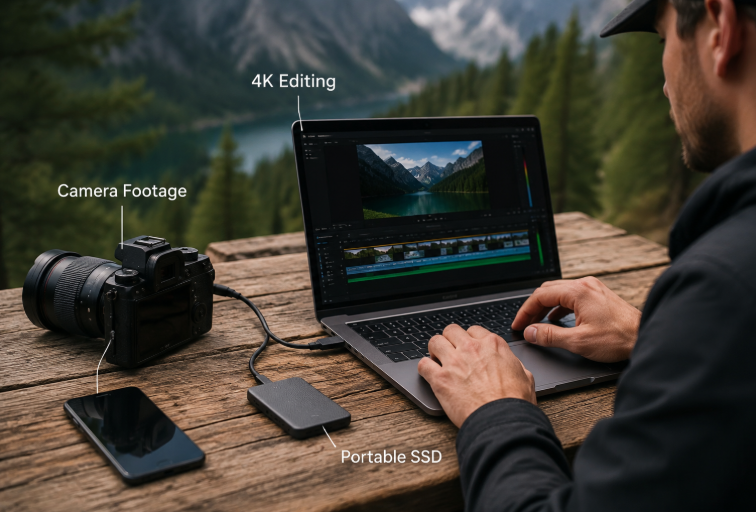
Standard workflow: Camera / drone memory card → dual PSSD backup → direct editing and color grading on the drive → project archiving.
Recommended specs: 2TB minimum, TLC NAND, 1000MB/s+ sustained write speed, metal thermal design, rugged build preferred. 4K editing requires 20Gbps protocol; 8K workflows need USB4 or Thunderbolt connectivity.
4.2 Mobile Office / Business Users
Standard workflow: Work files stored on PSSD → seamless switching across devices → hardware encryption for confidentiality → regular archive backups.
Recommended specs: 1TB capacity, USB 3.2 Gen2, exFAT format, hardware encryption, ultra-compact form factor.
4.3 Gamers
Standard workflow: AAA game library stored on PSSD → plug-and-play across multiple devices → gameplay recordings saved directly to the drive.
Recommended specs: 2TB+ capacity, strong 4K random read performance. Note: PlayStation 5 only supports running PS4 games from external storage; native PS5 titles require internal SSD installation.
4.4 Field / Outdoor Workers
Standard workflow: Real-time on-site media backup → rough edits on tablet/laptop → final file delivery.
Recommended specs: IP65 dust and water resistance, 2m+ drop rating, metal chassis, bus-powered with no external charger required.
4.5 IT / Technical Support Staff
Standard workflow: Multi-system boot drive creation → OS installation and recovery → mass data migration and backup.
Recommended specs: Broad device compatibility, consistent connection stability, balanced read and write performance.
4.6 Mobile Smartphone Creator Workflow
Modern flagship devices including iPhone 15/16 Pro and high-end Android phones support high-speed USB-C transfers and external ProRes recording, creating a fully mobile production pipeline.
Standard workflow: Phone connected directly to PSSD → ProRes video and high-res media recorded directly to external storage → large raw files transferred in real time → quick rough edits on mobile → final desktop editing and archiving later, with no intermediate storage step and no risk of filling internal phone storage.
Recommended specs: USB 3.2 Gen2 or faster protocol, 1TB/2TB mainstream capacity, short certified high-speed cable, compact size with good thermal performance, exFAT cross-device file system.
5. Budget-Focused Buying Guide
5.1 Entry Tier ($50–$100): Students / Light Office Use
Core specs: USB 3.2 Gen2 (10Gbps), 800–1050MB/s speeds, 500GB–1TB, TLC NAND, metal enclosure, dual cable included.
Common reliable brands: Samsung T7, SanDisk Extreme, Crucial X9 Pro.
What to avoid: No-name QLC drives, plastic housings, and sub-$50 drives advertising 2000MB/s speeds (always fake marketing).
5.2 Mainstream Tier ($100–$200): Creators / Gamers (Best Value)
Core specs: USB 3.2 Gen2×2 (20Gbps), 1700–2000MB/s speeds, 1–2TB, factory original TLC NAND, strong out-of-cache performance.
Common reliable brands: Samsung T9, SanDisk Extreme Pro E70, Crucial X10 Pro, Kingston XS2000.
What to avoid: Confirm your computer supports 20Gbps ports before buying; watch for models with severe out-of-cache speed drops.
5.3 Professional Tier ($200–$400): 4K / 8K Production Work
Core specs: USB4 / Thunderbolt 4, 2800–3800MB/s speeds, 2–4TB, high TBW endurance rating, professional thermal design.
Common reliable brands: SanDisk Extreme Pro E82 USB4, LaCie Rugged SSD 4, OWC Envoy Pro FX.
What to avoid: Must be paired with 40Gbps certified cables; standard USB ports cannot unlock full performance.
5.4 Flagship Tier ($400+): Studio / Enterprise Use
Core specs: Thunderbolt 5 / USB4 2.0, 4TB+ capacity, enterprise-grade NAND, military-grade ruggedization, ongoing firmware support.
Common reliable brands: LaCie flagship series, OWC high-end professional SSD lines.
What to avoid: No value for regular consumers; only justified for high-load professional production environments.
6. Setup, Optimization & Long-Term Care
6.1 First-Time Setup Steps
- Use the included original cable to connect directly to a native computer port, avoiding hubs and front-panel case ports.
- If unrecognized, open disk management to initialize the drive, selecting GPT partition style.
- Format to the file system matching your use case (exFAT for cross-device work).
- Run a speed test to verify performance, and enable hardware encryption if desired.
- Disable USB selective suspend in power settings to prevent random disconnects.
6.2 Long-Term Performance Optimization Tips
Leave 10–20% of drive space free to improve garbage collection efficiency, prevent speed drops and extend lifespan.
Confirm Trim command is enabled to maintain consistent long-term read/write performance.
Keep the drive ventilated during heavy use; avoid placing it near laptop exhaust vents or other heat sources.
Always use the safe eject function before unplugging to prevent file system corruption.
6.3 Data Security: Follow the 3-2-1 Backup Rule
Maintain 3 total copies of your data, across 2 different storage media types, with 1 copy stored off-site. This rule eliminates nearly all risk of permanent data loss for professional and creative work.
7. Common Myths & Misconceptions
- Myth: All USB-C ports are fast | Fact: The connector is universal; protocol defines speed. USB 2.0 Type-C ports remain extremely slow.
- Myth: Peak advertised speed = everyday speed | Fact: Sustained out-of-cache speed defines real experience; peak speeds only last for short bursts.
- Myth: Higher capacity is always better | Fact: Large QLC drives often perform far worse than smaller TLC models for active workloads.
- Myth: USB hubs work fine for high-speed transfers | Fact: For maximum speed, always connect directly to a native motherboard port.
- Myth: Software encryption is just as good as hardware encryption | Fact: Hardware encryption has zero performance impact and offers far stronger security than software-only solutions.
- Myth: Thunderbolt drives work on any USB-C port | Fact: Non-Thunderbolt ports either fail to recognize the drive or run at drastically reduced speeds.
- Myth: Leaving the drive plugged in damages it | Fact: Reading data does not wear out flash memory. High temperatures and sustained heavy writes are the main causes of aging.
8. FAQ & Troubleshooting
Connection & Recognition Issues
- Computer won’t detect the drive: Try the original high-speed cable, connect directly to a native port, and initialize/partition the drive in disk management.
- Frequent random disconnects: Disable USB power saving mode, check power delivery, and avoid low-quality USB hubs.
- Mac can’t write to NTFS drive: Reformat to exFAT, or install a third-party NTFS write driver for macOS.
Speed Performance Issues
- Speed far below advertised rating: Check your cable, port protocol, hub usage, and whether the drive’s SLC cache has been exhausted.
- Large file transfers slow down over time: Normal behavior when cache fills. If drops are extremely severe, the drive likely uses QLC NAND; consider upgrading to a TLC model for heavy workloads.
- Thermal throttling: Improve airflow around the drive, and prioritize metal-enclosed models for long transfers.
Data Safety Issues
- Corrupted files: Almost always caused by unplugging without safe eject. Build a habit of properly ejecting drives before removal.
- Locked encrypted drive: Forgotten encryption passwords cannot be recovered. Always store your recovery key in a separate secure location.
- Data loss after long storage: Power on the drive once every 6 months, and store it in a cool, dry environment.
9. Industry Trends
- Faster protocols: USB4 2.0 and Thunderbolt 5 will gradually reach mainstream adoption, pushing consumer PSSD speeds past 5000MB/s.
- Specialized NAND tiers: TLC will become the entry-level standard, while QLC will target high-capacity cold backup use cases.
- Smart features: AI-powered automatic backup, drive health alerts, and auto file organization will become more common.
- New form factors: Magnetic, modular and wireless portable SSDs will expand into smartphone, outdoor and automotive use cases.
Final Buying & Usage Principles
- Regular users: Prioritize stability, TLC NAND and value. 1TB + USB 3.2 Gen2 is more than enough for most needs.
- Creative users: Prioritize sustained speed, thermal performance and large capacity. Avoid low-performance QLC drives.
- Professional users: Prioritize protocol matching, endurance ratings and data security. Upgrade to USB4 / Thunderbolt only when your workflow requires it.
- Core rule: Never chase the most expensive specs. Choose the drive that fits your actual daily workflow.