
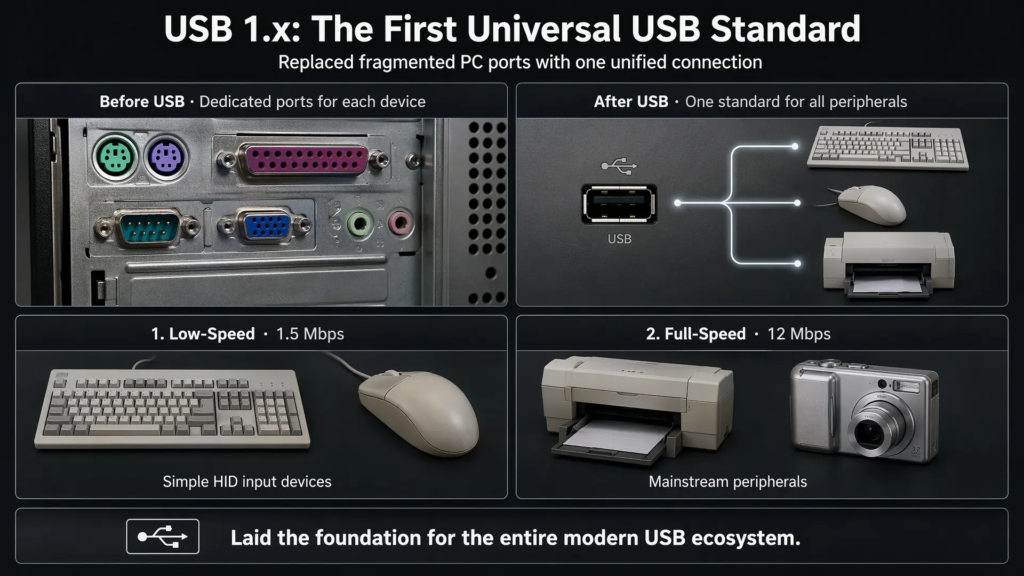
USB is now so common that it is easy to forget why it was created in the first place. Before USB became mainstream, personal computers relied on a mixture of serial ports, parallel ports, PS/2 connectors, game ports, and other dedicated interfaces. Each peripheral type often needed its own connector, driver model, and installation process.
USB 1.0 and USB 1.1 were designed to solve that problem. They introduced a unified peripheral bus, hot plugging, automatic device enumeration, standardized connectors, and a host-controlled communication model. Even though their bandwidth looks small by modern standards, these early USB versions established the foundation for the entire USB ecosystem.
This article explains the history, technical specifications, signaling model, protocol behavior, compatibility, and limitations of USB 1.0 and USB 1.1.
1. Historical Background
The original motivation behind USB was practical. PC peripheral connectivity in the early 1990s was fragmented, inconvenient, and difficult for ordinary users. A keyboard might use PS/2, a modem might use a serial port, a printer might use a parallel port, and each device often required manual configuration.
USB aimed to replace many of these older dedicated interfaces with a single standardized connection method. The goal was not only faster data transfer, but also easier installation, hot plugging, automatic configuration, and better support for multiple peripherals.
1.1 Why USB Was Created
USB was created to address several major problems:
- Too many incompatible PC peripheral ports
- Difficult manual configuration for non-technical users
- Limited support for hot plugging on older interfaces
- Poor scalability when connecting many peripherals
- The need for a unified interface for low-cost consumer devices
Instead of requiring users to understand IRQs, COM ports, parallel port modes, and device-specific connectors, USB introduced a simpler model: plug in the device, let the host detect it, enumerate it, load the proper driver, and start communication.
1.2 Version Evolution
| Version | Release Period | Main Characteristics |
|---|---|---|
| USB 1.0 | 1996 | First commercial USB specification; introduced Low-Speed and Full-Speed operation |
| USB 1.1 | 1998 | Improved reliability and compatibility; became the first widely adopted USB version |
USB 1.0 introduced the basic USB architecture, including host-controlled communication, device enumeration, hubs, standardized connectors, and two signaling rates: Low-Speed at 1.5 Mbps and Full-Speed at 12 Mbps.
USB 1.1 kept the same speed modes but improved the specification and corrected issues that affected timing, interoperability, and real-world compatibility. As a result, USB 1.1 became the first stable and widely deployed USB generation.
1.3 Founding Companies and USB-IF
The development of USB was started by a group of major technology companies, commonly documented as Compaq, DEC, IBM, Intel, Microsoft, NEC, and Nortel. The broader USB ecosystem is supported by the USB Implementers Forum, or USB-IF, which provides a forum for the advancement and adoption of USB technology.
USB-IF continues to support USB specifications, compliance programs, developer resources, and product certification for later USB generations.
2. Technical Specifications and Performance
USB 1.0 and USB 1.1 were not designed for high-bandwidth storage or video. Their main strength was convenience, standardization, and support for common peripherals such as keyboards, mice, printers, scanners, modems, and early digital devices.
2.1 Transfer Speeds
| Speed Mode | Data Rate | Typical Device Type |
|---|---|---|
| Low-Speed | 1.5 Mbps | Keyboard, mouse, game controller, simple HID device |
| Full-Speed | 12 Mbps | Printer, scanner, audio device, early flash drive, digital camera |
Low-Speed was intended for simple, low-cost human interface devices that only needed small amounts of data. Full-Speed provided enough bandwidth for many mainstream peripherals of the late 1990s, but it was still far too limited for large storage, high-resolution imaging, or modern video transfer.
2.2 Cable and Connector Design
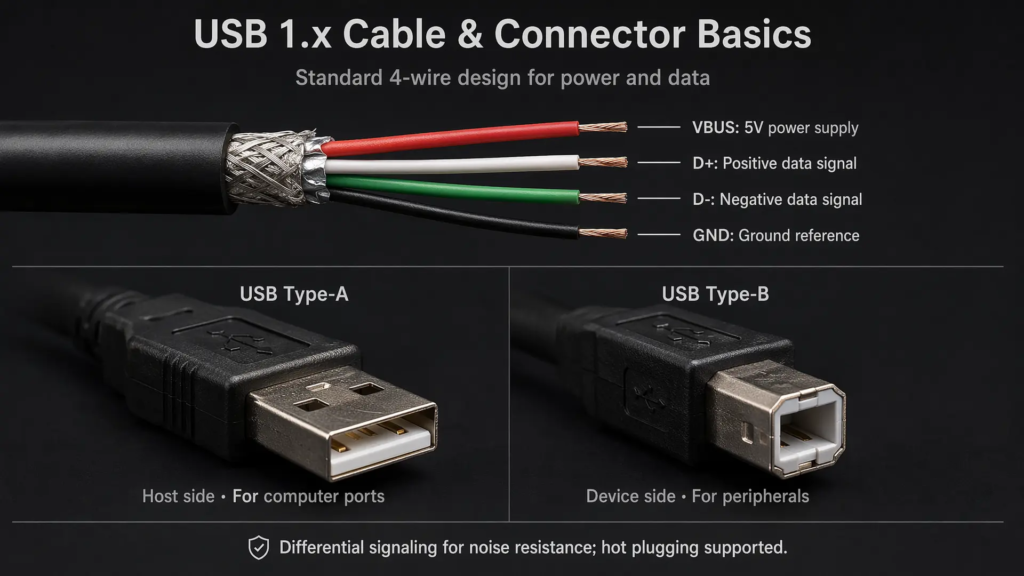
USB 1.x used a simple four-wire cable structure:
| Wire | Function |
|---|---|
| VBUS | 5V power supply |
| D+ | USB data signal |
| D- | USB data signal |
| GND | Ground reference |
USB also introduced standardized connector roles. The Type-A connector was typically used on the host side, while the Type-B connector was typically used on the device side. This helped prevent users from connecting devices incorrectly and reinforced the host-device architecture of USB.
USB 1.x also supported hot plugging, meaning devices could be connected or disconnected without shutting down the computer. This was a major usability improvement compared with many older PC interfaces.
2.3 Cable Length
| Device Speed | Typical Maximum Cable Length |
|---|---|
| Low-Speed | 3 meters |
| Full-Speed | 5 meters |
These limits exist because USB signaling depends on timing, electrical characteristics, and signal integrity. Longer cables can introduce attenuation, skew, and timing problems, especially as data rates increase.
2.4 Power Delivery
USB 1.x provided 5V power through the VBUS line. A USB device could draw a limited amount of current before configuration, and a configured device could request more current within the limits of the USB specification and host capability.
In traditional USB 1.x and USB 2.0 discussions, a standard downstream port is commonly associated with up to 500mA at 5V after proper configuration, giving a maximum power level of about 2.5W. This was enough for low-power peripherals such as keyboards, mice, simple adapters, and some small devices, but not enough for high-power external drives or modern fast-charging applications.
3. Signaling and Protocol Model
USB 1.x introduced many of the core concepts that still exist in later USB generations: differential signaling, host-controlled transactions, device enumeration, endpoints, hubs, and multiple transfer types.
3.1 Differential Signaling
USB 1.x uses the D+ and D- signal lines as a differential pair. Instead of relying on a single signal wire, USB compares the voltage relationship between D+ and D- to represent signaling states.
This improves noise resistance and helps maintain stable communication in real-world PC environments. USB 1.x communication is half-duplex, meaning data does not flow in both directions at the same time on the same pair of data lines.
3.2 Bus Topology and Hubs
USB uses a tiered star topology. The host sits at the root of the bus, and hubs expand connectivity to more downstream ports. A USB bus can support up to 127 device addresses, including hubs.
This hub-based architecture made USB much more scalable than older one-device-per-port interfaces. Users could connect multiple peripherals through hubs while the host maintained centralized control of the entire bus.
3.3 Enumeration
When a USB device is plugged in, the host does not immediately treat it as usable. It first performs enumeration.
During enumeration, the host detects the device, resets the port, reads device descriptors, assigns a unique address, loads or selects the appropriate driver, and configures communication endpoints. This process is what makes USB feel like plug-and-play from the user’s perspective.
4. USB 1.x Transfer Types
USB 1.x supports the same basic transfer model that later USB versions continue to use: control, interrupt, bulk, and isochronous transfers. However, not every speed mode supports every transfer type in the same way.
4.1 Control Transfer
Control transfer is required by every USB device. It is used for enumeration, configuration, descriptor access, and command-style communication between host and device.
Every USB device has endpoint 0, the default control endpoint. Without control transfer, the host would not be able to identify or configure the device.
4.2 Interrupt Transfer
Interrupt transfer is used for small, time-sensitive data. The name can be misleading because USB devices do not interrupt the host directly. Instead, the host polls the device at a defined interval.
This transfer type is ideal for keyboards, mice, game controllers, and other human interface devices. These devices do not need high bandwidth, but they do need predictable response time.
4.3 Bulk Transfer
Bulk transfer is used for reliable large data movement when timing is not critical. In USB 1.x, bulk transfer is mainly relevant to Full-Speed devices, not Low-Speed devices.
Typical examples include printers, scanners, and some early storage devices. Bulk transfer uses available bus bandwidth and includes error detection and retry behavior, making it suitable for data that must arrive correctly.
4.4 Isochronous Transfer
Isochronous transfer is designed for real-time data streams such as audio. It reserves bandwidth and prioritizes timing, but it does not use retransmission for corrupted data.
This trade-off makes sense for media streams. A late audio packet may be useless, so maintaining timing can be more important than retrying every error.
5. USB 1.1 Compared with Later USB Versions
USB 1.1 created the foundation, but later versions expanded speed, power, connector design, and protocol capability.
5.1 USB 1.1 vs USB 2.0
| Feature | USB 1.1 | USB 2.0 |
|---|---|---|
| Maximum speed | 12 Mbps Full-Speed | 480 Mbps High-Speed |
| Low-Speed support | Yes | Yes |
| Full-Speed support | Yes | Yes |
| High-Speed support | No | Yes |
| Backward compatibility | Earlier generation | Compatible with USB 1.x devices |
USB 2.0 added High-Speed operation at 480 Mbps while keeping compatibility with Low-Speed and Full-Speed devices. A USB 1.1 host cannot operate at 480 Mbps. Many USB 2.0 devices can fall back to Full-Speed when connected to an older host, but they will not achieve High-Speed performance.
5.2 USB 1.1 vs USB 3.x and USB4
USB 3.x introduced SuperSpeed signaling and a much more advanced physical architecture. USB 3.0 started at 5 Gbps, far beyond the 12 Mbps limit of USB 1.1.
USB4 moved the ecosystem even further by building on a Thunderbolt-based architecture, supporting high-bandwidth data and display protocol tunneling over USB Type-C. The original USB4 generation reached up to 40 Gbps, while newer USB4 specifications support even higher performance levels.
USB Type-C, introduced much later than USB 1.x, changed the connector experience by supporting reversible insertion, higher power capability, and multiple protocol use cases through the same connector form factor.
6. Typical Applications
USB 1.1 was most successful in devices that did not need high bandwidth. It was especially important for human interface devices and early mainstream peripherals.
6.1 Low-Speed Devices
- Keyboards
- Mice
- Game controllers
- Simple HID devices
- Buttons, knobs, and low-rate input devices
These devices only need small packets of data and predictable response time, making Low-Speed USB practical and cost-effective.
6.2 Full-Speed Devices
- Early USB flash drives
- Older digital cameras
- USB audio devices
- Printers
- Scanners
- Modems and adapters
Full-Speed USB was sufficient for many early peripherals, but its 12 Mbps limit quickly became a bottleneck as storage, imaging, and multimedia devices improved.
7. Limitations of USB 1.0 and USB 1.1
USB 1.x solved the usability problem, but it had clear technical limitations.
| Limitation | Impact |
|---|---|
| Maximum 12 Mbps speed | Too slow for large storage, high-resolution imaging, and video transfer |
| Half-duplex communication | Limits practical throughput compared with later architectures |
| Limited power delivery | Not suitable for high-power devices without external power |
| Cable length limits | Not suitable for long-distance communication without hubs or repeaters |
| Early compatibility issues | USB 1.0 was less widely adopted than USB 1.1 |
These limitations explain why USB 2.0 became so important. It preserved the USB device model while increasing the maximum speed from 12 Mbps to 480 Mbps.
8. Backward Compatibility
One reason USB has lasted so long is backward compatibility. Modern USB host controllers and operating systems generally continue to support Low-Speed and Full-Speed devices.
Legacy USB 1.x devices such as keyboards, mice, and simple adapters can often still work on modern computers through compatibility support in USB host controllers, hubs, and operating system driver stacks.
Historically, USB 1.x host controller standards included OHCI and UHCI. Later systems moved to EHCI for USB 2.0 High-Speed and xHCI for modern USB generations, but support for older Low-Speed and Full-Speed devices remains an important part of the USB ecosystem.
Summary
USB 1.0 and USB 1.1 were not impressive because of raw speed. Their real breakthrough was usability. They replaced fragmented PC peripheral interfaces with a unified, hot-pluggable, host-controlled, automatically configured bus.
USB 1.0 introduced the basic architecture, while USB 1.1 refined it into a stable and widely adopted standard. With Low-Speed at 1.5 Mbps and Full-Speed at 12 Mbps, USB 1.1 became the foundation for keyboards, mice, printers, scanners, early cameras, audio devices, and many other peripherals.
Later versions such as USB 2.0, USB 3.x, and USB4 greatly increased performance, power capability, and protocol complexity. But the core ideas introduced by USB 1.x, including enumeration, endpoints, hubs, transfer types, and plug-and-play behavior, still shape how USB works today.