
Meta Description: Why does my charger make noise? Learn why USB-C chargers buzz, coil whine happens, what sounds are dangerous, and how to fix charger noise safely.
Have you ever leaned in close to your phone or laptop charger and heard a faint high-pitched whine, a low hum, or a subtle buzzing sound? For most people, this immediately sparks a question: Is this normal, or is my charger about to break?
The short answer: Most charger noise is harmless. It comes from basic physical effects inside the switching power supply, not from a defect. But some sounds do act as warning signs of potential safety risks.
In this guide, we break down exactly why chargers make noise, what each sound means, how to tell normal operation from a dangerous fault, and simple fixes you can try at home.
Quick Summary
- Core takeaway: Mild, steady buzzing or whining is almost always a normal physical effect of power conversion. Only stop using your charger if the noise is paired with overheating, burning smells, or crackling sparks.
- Three main causes of charger noise: Electromagnetic component vibration, mechanical resonance inside the case, and power control mode switching.
- Quick self-check: If the noise changes when you plug or unplug a device, or gets quieter under full load, it is almost certainly normal. If a sharp noise continues even when no device is charging, it deserves closer attention.
- Safety rule of thumb: Soft, intermittent noise without other warning signs is usually safe to use. Sharp, constant noise with a hot case or burning smell means you should unplug immediately and replace the unit.
1. How Chargers Work & Why They Can Make Sound
1.1 The Basics of Switch-Mode Power Conversion
Nearly every modern phone and laptop charger is a switch-mode power supply (SMPS). Inside its plastic case, it converts high-voltage AC from your wall outlet into low-voltage DC for your device through a repeating cycle:
- Wall AC flows in and gets rectified into raw high-voltage DC
- A switching transistor (usually a silicon MOSFET, or a GaN transistor in premium compact chargers) rapidly controls the energy flow, typically switching at tens to hundreds of kilohertz depending on the design
- A high-frequency transformer steps the voltage down and provides electrical isolation
- Output capacitors and inductors smooth the pulses into clean, steady DC for your device
This rapid switching is why today’s chargers are small, light, and efficient — but it is also why they can occasionally produce audible sound.
1.2 The Physics of Charger Noise
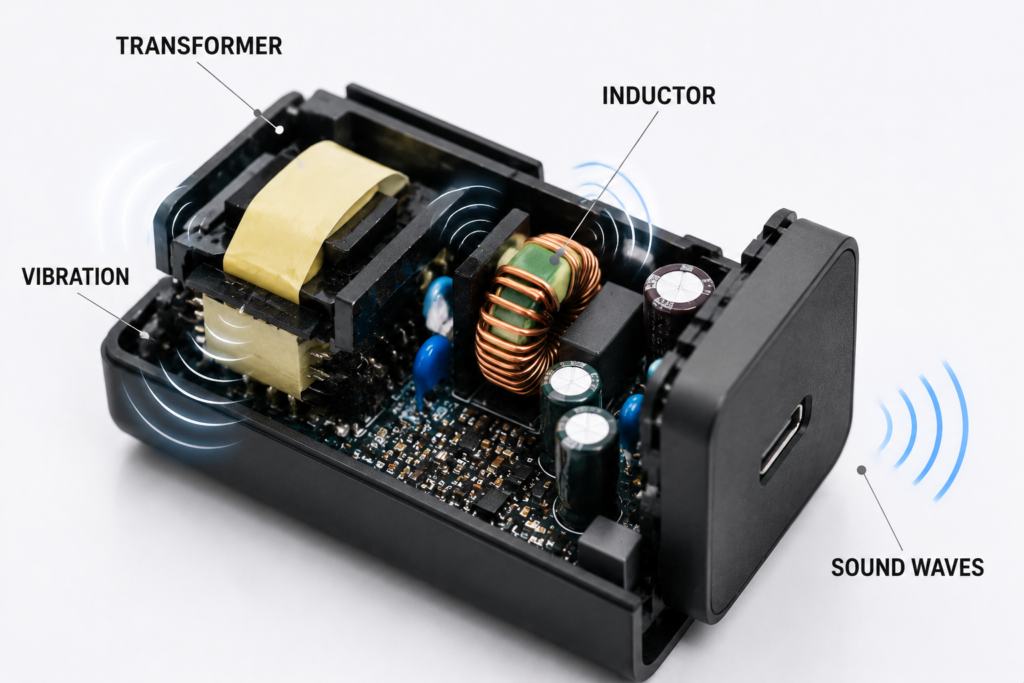
Charger noise is not “electricity sound” — it is mechanical vibration that travels through the air to your ear.
Inside the charger, changing magnetic fields and electric fields cause tiny physical deformations in components like transformers, inductors, and ceramic capacitors. These vibrations are usually microscopic, but under the right conditions they can generate audible harmonics, modulation frequencies, or mechanical resonances within the range humans can hear.
You might wonder: If chargers switch at 60 kHz or higher, why can we hear them?
The main switching frequency is indeed usually above the typical upper limit of adult human hearing. However, secondary effects can fall into the audible range and create the whine or buzz you hear.
Audible Noise Sources Inside Chargers
| Source | Audible Range |
|---|---|
| Primary switching frequency | Usually above human hearing range |
| Harmonics & subharmonics | May enter audible range under some conditions |
| Burst mode / PFM repetition frequency | Often falls in audible range |
| Mechanical resonance of parts | Amplifies existing vibration into noticeable sound |
| Spread-spectrum dithering sidebands | Can create faint audible tones |
2. Types of Charger Noise & What They Mean
Not all charger sounds are the same. Below is a quick reference to help you identify what you are hearing and how concerned you should be.
2.1 High-Pitched Squeal / Coil Whine
- What it sounds like: A thin, sharp, high-frequency “eeee” or “squeaky” noise
- When you hear it: Most noticeable at no load, light load, or when a battery is nearly full
- Usual cause: Inductor/transformer vibration or ceramic capacitor piezoelectric effect
- Risk level: Almost always harmless
2.2 Low-Frequency Hum / Buzz
- What it sounds like: A deep, steady, droning vibration, similar to the hum of older electrical equipment
- When you hear it: Most noticeable during full-power fast charging
- Usual cause: Magnetostriction in transformer cores, or line-frequency harmonics
- Risk level: Almost always harmless
2.3 Faint Buzzing / Fizzing Sound
- What it sounds like: Soft, irregular, grainy static-like noise
- When you hear it: Can appear at any load level
- Usual cause: Can be normal component vibration, or early signs of component aging
- Risk level: Usually safe; monitor for changes
2.4 Intermittent Clicking Sound
- What it sounds like: Soft, regular or random single “clicks” every few seconds
- When you hear it: When plugging in a device, during fast-charging handshakes, or when power levels shift
- Usual cause: Charging protocol negotiation, burst mode operation, or protection circuit activation
- Risk level: Almost always harmless
2.5 Crackling / Popping Sound
- What it sounds like: Sharp, random snaps and pops, like tiny sparks
- When you hear it: Can appear randomly, often gets worse over time
- Usual cause: Loose connections, bad solder joints, or arcing from worn insulation
- Risk level: Dangerous — stop using the charger immediately
2.6 Charger Noise Quick Reference Chart
| Sound Type | Most Likely Cause | Risk Level |
|---|---|---|
| High-pitched squeal | Inductor vibration / piezoelectric capacitors | Low — normal operation |
| Low steady hum | Transformer magnetostriction | Low — normal operation |
| Soft irregular buzzing | Component vibration or mild aging | Low — monitor for changes |
| Occasional clicking | Mode switching / protocol handshake | Low — normal operation |
| Crackling / popping | Arcing / bad electrical connections | High — replace immediately |
| Noise + burning smell + hot case | Internal component failure | High — unplug right away |
2.7 Charger Noise Diagnosis Table
| Symptom | Normal? | Recommended Action |
|---|---|---|
| Faint high-pitched whine only audible up close | Usually yes | Continue normal use |
| Buzz that changes when you plug/unplug a device | Usually yes | Monitor if it worsens |
| Soft clicking during charging or power changes | Usually yes | No action needed |
| Steady crackling or sparking sounds | No | Stop using immediately |
| Noise paired with burning or electrical smell | No | Unplug and replace |
| Noise paired with a very hot or deformed case | No | Unplug and replace |
3. What Actually Causes Charger Noise?
3.0 How Charger Noise Travels Through the Device
You cannot hear electricity itself. The sound you hear follows a clear physical path:
- High-speed electrical switching inside the circuit
- Changing magnetic and electric forces act on components
- Transformers, inductors, and capacitors vibrate microscopically
- Vibration transfers to the printed circuit board (PCB)
- The plastic enclosure resonates and amplifies the vibration
- Sound waves travel through the air to your ear
This is why even tiny internal movements can become noticeable noise — the charger’s case acts like a small speaker.
3.1 Electromagnetic Vibration: A Very Common Normal Cause
One of the most common sources of charger noise complaints is electromagnetic vibration. It is a fundamental physical effect, not a quality defect.
3.1.1 Transformer Magnetostriction
All magnetic materials change shape very slightly when placed in a magnetic field — this is called magnetostriction.
Simply put: magnetic materials slightly expand and contract when exposed to changing magnetic fields.
Inside a charger’s transformer, the ferrite core expands and contracts microscopically hundreds or thousands of times per second as the magnetic field reverses. Think of it like a tiny metal drumhead being tapped at high speed. The vibration is extremely small, but it can still produce audible sound, especially at lower harmonics. This effect can never be fully eliminated; it can only be reduced by material choice and manufacturing processes.
What does this mean for you? This is similar to the faint hum you may hear from older household electrical equipment. It is a built-in characteristic of power conversion, not a sign of failure.
3.1.2 Inductor Coil Vibration (Coil Whine)
When current flows through a coil of wire in a magnetic field, the windings experience a small mechanical force — the Lorentz force.
Simply put: the mechanical push or pull on a wire when electric current flows through it near a magnet.
If the wire is not tightly bonded, individual strands can tap against each other or against the core. Poor winding tension, inadequate varnish impregnation, or missing glue potting will make this effect much louder. This is the sound most people refer to as “coil whine.”
What does this mean for you? Tighter manufacturing and glue sealing reduce this noise, but even well-made coils can produce faint sound under specific load conditions.
3.1.3 Ceramic Capacitor Piezoelectric Effect
Multi-layer ceramic capacitors (MLCCs) are used in nearly all modern chargers to filter voltage ripple. Many high-capacitance MLCCs use materials that change shape when voltage is applied — the inverse piezoelectric effect.
As the voltage across the capacitor pulses, the capacitor flexes and vibrates the printed circuit board (PCB) like a tiny speaker cone. This is a well-documented effect from component manufacturers, and it is one of several possible causes of high-pitched noise in compact GaN chargers.
In normal operating conditions, MLCC acoustic vibration is generally not a reliability problem. However, excessive mechanical stress or PCB bending issues can still affect component lifespan in extreme cases.
In simple terms, some tiny capacitors can physically move like microscopic speakers when voltage changes across them.
What does this mean for you? A tiny high-pitched sound does not automatically mean the charger is failing or will break soon.
3.2 Mechanical Design & Assembly Factors
Even small differences in build quality can turn an inaudible vibration into a noticeable noise.
3.2.1 Inadequate Potting & Component Securing
High-quality chargers use epoxy potting or glue dots to lock transformers and inductors in place. Cheaper models skip these steps, leaving air gaps around components. These gaps act like echo chambers, amplifying vibration and carrying sound directly to the outer case.
3.2.2 Structural Resonance
Every plastic case and PCB has a natural resonant frequency. If the vibration frequency from a component happens to match this resonant frequency, the sound can suddenly become much louder — like pushing a swing at exactly the right rhythm. This is why a charger may be silent at 30W but noticeably noisy at 15W.
3.2.3 Cooling Fan Noise
Laptop adapters and high-power desktop chargers often include a cooling fan. Over time, dust buildup, bearing wear, or unbalanced fan blades can create rattling, whirring, or grinding sounds. This is purely mechanical and unrelated to electrical safety, but it does signal the charger is aging.
3.3 Power Control Strategy & Operating Modes
Many charger noises appear only under specific load conditions, because the charger’s control circuit changes how it switches.
3.3.1 Burst Mode at Light Load
To meet strict energy efficiency rules (like the EU’s Ecodesign or US DoE standards), chargers drastically reduce their switching frequency when nothing is plugged in or when charging a nearly-full battery. Instead of switching continuously, they send short bursts of power and then pause — this is called burst mode or pulse-frequency modulation (PFM).
The burst repetition frequency often falls directly into the audible 1–10 kHz range, creating a faint ticking or high-pitched whine. This is completely normal and intentional behavior.
3.3.2 Fast Charging Protocol Negotiation
When you first plug in a phone or laptop, the charger and device exchange data over USB PD or PPS to agree on voltage and current levels. During this handshake, the output jumps up and down rapidly. These quick power changes can cause brief audible noise that disappears once charging stabilizes.
3.3.3 Load Steps & Multi-Port Power Reallocation
On multi-port chargers, plugging or unplugging a second device forces the internal controller to redivide total power. This sudden load shift causes the control loop to readjust, and you may hear a brief change in the sound of the charger.
3.3.4 Noise Changes Through the Charge Cycle
You may have noticed your charger sounds different depending on battery level:
- 0–80% charge (fast charge): High power, often a low hum or nearly silent
- 80–100% charge (trickle charge): Lower current, charger enters lighter operating modes — whine often becomes more noticeable
- Full charge / no device: Standby or burst mode — noise may change again or fade out
3.4 Fault Conditions: When Noise Signals Danger
Some noises are not normal and indicate a failing charger.
3.4.1 Capacitor Degradation & Abnormal Operation
As electrolytic capacitors age, their internal electrolyte dries out, capacitance drops, and equivalent series resistance (ESR) rises.
Simply put: a measure of internal resistance in a capacitor that rises as the part ages.
This does not usually make a “boiling sound” by itself, but it causes increased voltage ripple and abnormal circuit behavior, which can amplify normal vibration noise into something much louder.
3.4.2 Loose Solder & Connection Arcing
Cracked solder joints, loose plug pins, or tarnished contacts can create tiny electrical arcs. Each arc makes a sharp crackling or popping sound. Arcing generates localized heat, can melt plastic, and is a fire risk — especially near flammable materials.
3.4.3 Insulation Breakdown & Partial Discharge
In very old or damaged chargers, insulation on high-voltage parts can degrade. Air in tiny gaps breaks down electrically, creating continuous micro-arcs known as partial discharge.
Simply put: tiny, repeated electrical sparks inside damaged insulation that do not yet cause a full short circuit.
This produces a steady hissing or fizzing sound and may be accompanied by a faint ozone smell. It is less common in low-voltage phone chargers, but it is a serious fault when it occurs.
3.4.4 Cycling Protection Circuits
If a charger has an internal short, overcurrent fault, or thermal problem, its protection system may repeatedly shut it off and restart it. This creates a rhythmic clicking sound paired with intermittent charging output. The case will usually also get unusually hot.
4. Noise Differences Between Charger Types
4.1 Traditional Silicon-Based Chargers
- Typical noise: Low-frequency hum, most noticeable at full load
- Why: Lower switching frequencies and larger transformers emphasize lower harmonics
4.2 GaN Fast Chargers
- Typical noise: High-pitched whine, most noticeable at light load or no load in some designs
- Why: GaN chargers are not inherently noisier than silicon designs. However, their compact size, higher power density, and aggressive miniaturization can make internal vibration easier to notice if acoustic damping and potting are not carefully engineered. Importantly, not all GaN chargers are noisy — well-designed models with thorough potting and optimized control firmware can be nearly silent.
4.3 Multi-Port Smart Chargers
- Typical noise: Brief clicks or pitch changes when devices are plugged or unplugged
- Why: Dynamic power reallocation causes sudden load steps and control loop adjustments
4.4 Wireless Chargers
- Typical noise: Soft, regular coil vibration, often more noticeable during foreign object detection
- Why: Most Qi wireless chargers operate around the 100–200 kHz range, although the exact frequency depends on the charging standard and operating mode. The larger transmitting coil can produce more noticeable mechanical vibration, especially during foreign object detection cycles.
4.5 Laptop Power Adapters
- Typical noise: Transformer hum plus fan whir at high power
- Why: Higher power levels mean larger magnetic components and active cooling fans
4.6 Old Linear Chargers
- Typical noise: Very faint 50/60 Hz hum, or almost silent
- Why: Transformer-based linear adapters may produce a low-frequency hum from mains-frequency magnetic vibration. These designs have few switching components, so they are often mechanically quieter than high-frequency switch-mode chargers, despite being much less energy efficient.
5. What Makes Charger Noise More Noticeable?
5.1 Design & Manufacturing Factors
- Magnetic core material quality and winding precision
- Whether components are vacuum-impregnated with varnish or potted with epoxy
- Capacitor selection (Class 2 dielectrics like X7R are more piezoelectric than Class 1 like C0G)
- PCB stiffness and case structural design
5.2 Usage & Environmental Factors
- Wall voltage fluctuations and dirty mains power can amplify vibration
- Poor-quality or worn wall outlets can add contact noise
- Ambient temperature changes component parameters and can shift resonance points
- How many devices are charging at once, and their charge state
5.3 Why Charger Noise Sounds Worse at Night
This is one of the most commonly asked questions, and there are three simple reasons:
- Background noise drops: In a quiet room, even very faint sounds become obvious.
- Human hearing sensitivity: Our ears are more perceptive to high frequencies in quiet environments.
- Charge state matches: Overnight charging usually ends with the battery full, putting the charger in light-load burst mode — exactly the condition where whine is most likely to be audible.
6. Is Your Charger Safe? Noise Risk Levels & Self-Check
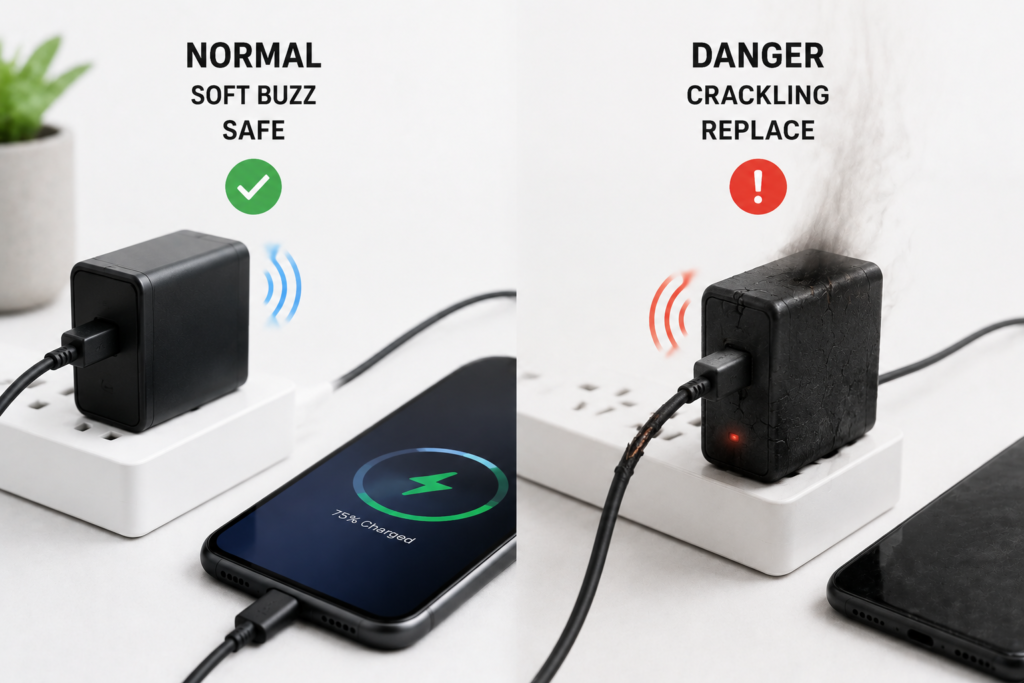
6.1 Level 1 — Normal & Harmless
- Signs: Sound is very faint; you must be within 30 cm (1 foot) to hear it. Sound changes or disappears when you change the load. The case stays only warm, not hot. No smell, no discoloration.
- Verdict: Normal physical behavior. Safe for continued use.
6.2 Level 2 — Monitor & Reduce Load
- Signs: Audible from up to 1 meter away, but volume stays steady over weeks or months. No unusual heat, no smell, no charging interruptions.
- Verdict: Likely still safe, but may indicate average build quality. Avoid running at maximum power for extended periods, and check periodically for worsening symptoms.
6.3 Level 3 — Dangerous — Replace Immediately
- Signs: Sharp, piercing noise audible from more than 1 meter away. Case gets uncomfortably hot to the touch. Burning plastic or chemical smell. Visible smoke, discoloration, or case deformation. Crackling or sparking sounds. Noise stays loud even with no device connected.
- Verdict: Internal fault present. Risk of overheating, short circuit, and fire. Unplug immediately and do not reuse. Do not continue testing it.
6.4 Three-Step User Self-Check
- Locate the source: Confirm the noise comes from the charger body, not the wall outlet, cable, or the device itself.
- Test with different loads: Plug in different devices or unplug entirely. If the noise changes predictably with load, it is almost certainly normal vibration.
- Check temperature and appearance: A warm case is normal. A case that burns your finger, shows melt marks, or smells burnt is not.
7. Charger Noise Decision Flow: A Step-by-Step Guide
Use this simple flow to quickly judge any charger noise:
- Do you hear noise from the charger?
- If no: No action needed
- If yes: Move to step 2
- Does charging work normally, with no interruptions?
- If no: Proceed to step 4
- If yes: Move to step 3
- Does the sound change when you add/remove a device or change the load?
- If yes: This is normal vibration behavior. No safety concern.
- If no: Move to step 4
- Do you also notice excessive heat, burning smell, discoloration, or crackling sounds?
- If no: Keep observing and avoid heavy continuous use
- If yes: Unplug immediately and replace the charger
8. Practical Ways to Reduce Charger Noise
8.1 Zero-Cost Adjustments
- Avoid leaving the charger plugged in indefinitely with no load
- Set the charger on a soft silicone pad or piece of foam to dampen vibration transfer to desks or shelves
- Try a different wall outlet to rule out loose contacts or mains-related noise
- Reposition the charger farther away from your bed or workspace — high-pitched noise drops off quickly with distance
8.2 Light Maintenance Fixes
- For fan-equipped chargers, carefully blow out dust from intake vents to reduce fan noise
- Replace worn or damaged charging cables, as bad connections can cause intermittent power and extra noise
8.3 Things You Should Never Do
- Do not open the charger case. High-voltage capacitors can hold a dangerous charge even when unplugged.
- Do not wrap the charger in tape or fabric. This traps heat and can cause overheating and fire.
- Do not add your own glue or potting compound. Poorly applied material can create short circuits or block heat dissipation.
8.4 When You Should Replace Your Charger
- It shows any Level 3 danger signs
- The noise gets steadily louder over time
- It has no reputable safety certifications
- The plastic case is cracked, deformed, or the plug pins are bent
9. How to Choose a Quiet, Reliable Charger
9.1 Check for Recognized Safety & Compliance Certifications
Always choose chargers tested to recognized standards:
- UL 62368-1 (North America, IT/AV equipment safety standard)
- CE / EN 62368-1 (European Union safety standard)
- FCC Part 15 (electromagnetic interference compliance, US)
- USB-IF certification for USB-PD chargers
Certification does not guarantee silence, but it ensures the charger meets minimum safety, insulation, and build quality requirements.
9.2 Look for Good Construction Details
- Full epoxy potting or at minimum glued and varnished magnetic components
- Low-noise MLCC selection and optimized PCB mounting
- Stiffer case design that avoids resonant frequencies
- For high-power models: temperature-controlled silent fans
9.3 Buying for Specific Scenarios
- Bedroom / nightstand use: Prioritize models with good user reviews mentioning “quiet” or “no coil whine.” Avoid ultra-miniature GaN models if you are very noise-sensitive.
- Desk / office use: A mid-size 65W GaN charger from a reputable brand will usually strike the best balance between size, speed, and noise.
9.4 Buying Pitfalls to Avoid
- Do not chase the absolute smallest size — extreme miniaturization often trades off thermal and noise performance
- Do not rely only on wattage and price; read user reviews that specifically mention noise
- Avoid no-name uncertified chargers from marketplaces — they skip potting, use cheap capacitors, and have much higher failure rates
10. Common Myths & Misconceptions
| Myth | Fact |
|---|---|
| “If it makes noise, it’s about to explode.” | The vast majority of charger noise is harmless vibration. Only noise paired with heat, smell, or sparking indicates danger. |
| “More expensive chargers are always quieter.” | Not necessarily. Premium compact GaN chargers can be noisier than larger, cheaper silicon models. Noise depends on engineering choices, not just price. |
| “Only cheap knockoff chargers make noise.” | False. Even name-brand chargers can produce audible coil whine under light load. It is a physics effect, not only a quality issue. |
| “The noise will damage my phone battery.” | The sound itself does nothing to your device. Only if the charger has an electrical fault and produces unstable output can it risk damage. |
| “Wrapping it in tape will make it quieter.” | This blocks airflow, traps heat, and creates a serious overheating risk. Never do this. |
11. Frequently Asked Questions
Q1: Is a buzzing charger normal?
Mild, steady buzzing that changes with load is extremely common and normal. Charger noise only becomes a concern if it is very loud, gets worse over time, or comes with overheating and strange smells.
Q2: Why is my charger making a high-pitched noise?
High-pitched squeal is almost always coil whine or ceramic capacitor piezoelectric vibration. It is most common at light load, when the charger enters burst mode and its operating frequency falls into the audible range.
Q3: Why does my USB-C charger squeal?
USB-C PD and PPS chargers frequently adjust voltage and current, especially during fast charge negotiation. These rapid power changes can trigger brief audible vibration from inductors and capacitors. It is usually not a defect.
Q4: Is coil whine on a GaN charger a defect?
Mild coil whine is considered a normal characteristic of high-density switching power supplies, not a manufacturing defect. If the whine is extremely loud, paired with overheating, or gets worse quickly, contact the seller for warranty evaluation.
Q5: Why does my charger make noise when nothing is plugged in?
Most modern chargers enter a low-power burst mode when idle to save energy. The burst frequency often falls in the audible range, creating a faint high-pitched whine or ticking. This is normal behavior.
Q6: Should I return a brand new charger that makes a little noise?
If it is very faint, operates cool, and charges normally, there is no safety reason to return it. If the noise bothers you personally, and the retailer has a return policy, you can try a different unit — individual units can vary slightly due to manufacturing tolerances.
Q7: Will the noise get worse as the charger ages?
A well-built charger should stay roughly the same for years. If you notice steadily increasing noise over months, it usually signals component aging or loosening inside, and replacement is a good idea.
Q8: Why does my charger only buzz when the room is quiet?
Two main reasons: First, faint sounds that are masked by everyday background noise become obvious in silence. Second, quiet rooms are usually bedrooms at night, when your phone is full and the charger runs in light-load mode — the condition where noise is most common.
Q9: Why does my charger stop making noise when I touch it?
Touching the charger changes its mechanical resonance and adds capacitive coupling from your body, which can shift the vibration frequency just enough to move it out of the most audible range. It does not mean the charger is broken or dangerous.
Q10: Can charger noise damage my phone or laptop?
Normal vibration-based noise has no effect on your device or its battery. Only if the charger has an internal electrical fault and delivers unstable or over-voltage output can it risk damage.
12. Final Takeaways
Charger noise is one of those topics where a little knowledge goes a long way. Once you understand that most sounds come from tiny mechanical vibrations inside inductors, transformers, and ceramic capacitors, you can stop worrying about every faint squeak.
The key rule is simple: Judge by more than just sound alone.
- Soft, changing, load-dependent noise = normal physics
- Loud, constant noise + heat + smell = fault and safety risk
For everyday use, stick to certified chargers from reputable brands, avoid leaving them under heavy load in enclosed spaces, and replace any unit that shows clear warning signs. If you are especially sensitive to high-pitched noise, read reviews specifically mentioning quiet operation before you buy — and consider a slightly larger, less aggressively miniaturized model for your nightstand.
If you found this guide helpful, share it with anyone who has ever asked, “Is my charger supposed to sound like that?”