
Quick Summary
- The core reason charging slows with multiple devices is that most consumer multi-port chargers share a fixed total power budget across all ports—not dedicated power for each outlet. Some premium charging stations use more independent power architectures.
- The wattage printed on the label is the maximum total output, not the per-port maximum. A 100W dual-port charger does not deliver 100W to each port simultaneously.
- Plugging in or removing a device triggers USB PD renegotiation on most chargers, which can cause brief power dips or momentary pauses.
- Real-world charging speed also depends on fast-charging protocol compatibility, each device’s charging stage, cable quality, and internal temperature protection.
- Choosing a charger with 30%+ extra power headroom, full USB PD support, and a smart power allocation strategy will drastically reduce slowdowns when charging multiple devices.
1. Introduction: Why Your Laptop Charges Slower The Moment You Plug In A Phone
1.1 The Frustrating Experience Almost Everyone Has Had
You plug your laptop into a 100W USB-C charger, and everything works perfectly—power flows fast, the battery climbs steadily. Then you plug in your phone, wireless earbuds, or tablet, and suddenly everything changes:
- Your laptop’s charging power drops noticeably
- Your phone never hits the advertised fast-charging speed
- The charging indicator on your screen flickers or dips for a few seconds
It feels like the charger is underperforming, or even broken. But most of the time, nothing is wrong—it’s just working exactly as designed.
1.2 Is Slow Multi-Device Charging a Sign of Poor Quality?
Almost always, no. This slowdown is not a defect—it’s a fundamental feature of how most multi-port chargers work.
Most consumer multi-port chargers have a limited total power budget, like a household water main. When multiple devices draw power at the same time, they all share from the same pool. When demand exceeds the total supply, every device gets a smaller slice. This behavior is commonly called power sharing or dynamic power allocation, and it is a normal design feature of most multi-port USB-C chargers.
1.3 What This Article Will Cover
By the end of this guide, you’ll understand:
- Why multi-port chargers slow down when you add more devices
- What “100W” and “140W” actually mean for real-world multi-device use
- How fixed and dynamic power allocation work, and which is better
- Why USB PD renegotiation happens and what it does
- How to choose and use a multi-port charger for the fastest possible multi-device experience
2. The Core Principle: Total Power Is a Shared Resource
2.1 What “Rated Power” Actually Means
The big wattage number printed on a charger—30W, 65W, 100W, 140W—is its maximum total output power. This is the absolute upper limit of energy it can safely and continuously deliver under standard conditions, set by its internal power components and cooling system.
It follows a simple, unbreakable formula:
Power (Watts) = Voltage (Volts) × Current (Amps)
This is not a marketing suggestion. It’s a hard physical limit. No software trick or brand name can make a charger output more than its rated total power.
2.2 Single-Port vs. Multi-Port Charging
Think of your charger like a water tank with a fixed capacity. Each USB port is a faucet connected to the same tank.
- Single device connected: The full water supply flows to one faucet. You get the full pressure and flow rate—this is when you see the advertised peak wattage.
- Multiple devices connected: The water has to split between multiple faucets. Each one gets less flow, so the charging speed drops for each device.
When the total power requested by all your devices stays under the charger’s total limit, everything can run at normal speed. When the total demand exceeds the limit, the charger has to cut power to some or all devices to stay within its safe operating range.
2.3 The #1 Misconception: “100W Dual Port = 100W Per Port”
This is the most common misunderstanding in the charger market.
❌ Wrong: A 100W dual USB-C charger delivers 100W to each port at the same time.
✅ Correct: Both ports share one 100W total power pool.
In real use, charging a 65W laptop and a 25W phone would use 90W total—well within the limit, so both charge at near-full speed. But if you plug in a 90W laptop and a 45W tablet, the 135W total demand exceeds the 100W cap, and both devices will charge slower than their maximum speed.
2.4 Example: How a 100W Dual-Port Charger Shares Power
| Usage Scenario | Port 1 Output | Port 2 Output | Total Output |
|---|---|---|---|
| Laptop only | 100W | 0W | 100W |
| Laptop + Phone | 65W | 25W | 90W |
| Laptop + Tablet | 65W | 35W | 100W |
| Two laptops | 65W | 35W | 100W |
Diagram suggestion: A visual “100W total power pool” graphic breaking down 65W for a laptop, 25W for a phone, 5W for earbuds, and 5W remaining reserve.

2.5 Why Can’t Every Port Deliver Full Power?
A common question is: if manufacturers can make one 100W port, why not just add a second one and give each port full speed?
There are real engineering and practical limits:
- Physical size: Full independent power for each port requires separate power conversion circuits, transformers, and heat management. A 2-port 100W independent charger would be roughly the size of two separate chargers glued together.
- Heat and cooling: More power circuits generate more heat, which requires more surface area to dissipate safely. Cramming full power for every port into a small travel-sized charger would cause overheating.
- Cost: Independent power architectures use more components, which drives up the final price significantly. Most consumers prefer a smaller, cheaper shared-power design for everyday use.
- AC input limits: Standard wall outlets have a maximum power capacity. While this rarely limits small consumer chargers, it becomes a hard constraint for very high-power multi-port stations.
For travel and everyday use, shared-power designs are a deliberate engineering tradeoff: they sacrifice full per-port speed for a smaller size, lower cost, and better portability.
2.6 The Simple Rule of Full-Speed Charging
There is a straightforward relationship between total power, port rating, and device demand:
- If available port power ≥ device maximum demand → full-speed charging
- If available port power < device maximum demand → reduced charging speed
This is the core logic behind every multi-port USB-C charger power distribution system.
3. How Multi-Port Chargers Distribute Power
Not all multi-port chargers split power the same way. There are two main allocation strategies, plus two different internal architectures that change how much devices interfere with each other.
3.1 Fixed Power Allocation
How it works: The manufacturer pre-programs fixed power limits for each port when multiple devices are connected. No matter what you plug in, the split stays the same.
For example, a 65W dual-port charger with fixed allocation might always split into 45W + 20W when both ports are in use.
Pros:
- Output is stable and predictable
- Simple, reliable design with lower cost
- Less frequent renegotiation
Cons:
- Low flexibility. If one device only needs 5W (like wireless earbuds), it still “reserves” its full 20W slot, wasting power that could go to your laptop.
3.2 Dynamic Power Allocation
How it works: A built-in power management controller detects each device’s real-time power needs and adjusts output on the fly. Power is assigned based on actual demand, not pre-set rules.
For example, with a 100W charger:
- A laptop needing 60W gets 60W
- A phone needing 20W gets 20W
- The remaining power may be available for redistribution depending on the charger’s controller design and firmware strategy.
Pros:
- Much higher power efficiency and utilization
- Adapts automatically to different device combinations
- The standard design for modern GaN and premium USB PD chargers
Note: When you plug in or unplug a device, the charger has to recalculate the budget and renegotiate power with connected devices. This causes the brief power dip or charging icon flicker you may notice—it’s not a glitch, it’s the system recalibrating.
3.3 Power Sharing vs. Independent Output Architecture
Beyond allocation strategy, the internal hardware design also matters. Below is a side-by-side comparison:
| Feature | Power Sharing Architecture | Independent Output Architecture |
|---|---|---|
| Cost | Lower | Higher |
| Physical size | Smaller | Larger |
| Laptop + phone performance | Good | Excellent |
| Multiple laptops performance | Limited | Better |
| Typical products | Compact wall chargers, most GaN models | Premium desktop charging stations |
Power Sharing Architecture
- All ports share one main power supply circuit and one total power pool
- Adding a device always affects the others
- Lower cost, smaller size, higher efficiency
- Used in the majority of consumer-grade wall chargers, especially compact GaN chargers.
Independent Output Architecture
- Each port has more independent power regulation, reducing the impact of one device on another. Note that input-side components like the front-end filter and power factor correction stage may still be shared across the whole charger.
- Some advanced multi-output designs can maintain higher power availability across multiple ports.
- Common in premium desktop charging stations
For everyday use with a laptop and a phone, a good power-sharing design works perfectly. Only users charging multiple high-wattage laptops at the same time will notice a real benefit from fully independent outputs.
3.4 How Charger Controllers Decide Which Device Gets Priority
A common question is: why does my laptop get 65W while my phone only gets 20W when both are plugged in? Charger firmware follows predefined priority rules to distribute wattage. Common priority logic includes:
- Primary port priority: The first USB-C port (usually labeled C1) is reserved for high-power devices like laptops, and gets first access to the power budget.
- High-power device priority: The controller detects which device requests more power and allocates accordingly.
- First-connected priority: Devices plugged in first keep their power allocation, and new devices take whatever is left over.
- Fixed allocation table: The manufacturer predefines exact power splits for every combination of ports.
This is why USB-C charger wattage allocation can feel inconsistent between brands—each manufacturer uses a slightly different priority strategy.
4. The Main Reasons Multi-Device Charging Feels Slow
Power splitting is the root cause, but several other factors stack on top of it to make the slowdown more noticeable.
4.1 Total Power Budget Limits
This is the biggest factor by far. When total device demand exceeds the charger’s maximum output, power has to be reduced across the board. High-power devices like laptops feel this the most, because they lose a larger absolute amount of wattage.
A 65W charger might work great for one laptop, but add a phone and the laptop drops to 45W—enough to still charge, but noticeably slower, especially if you’re using the laptop while charging.
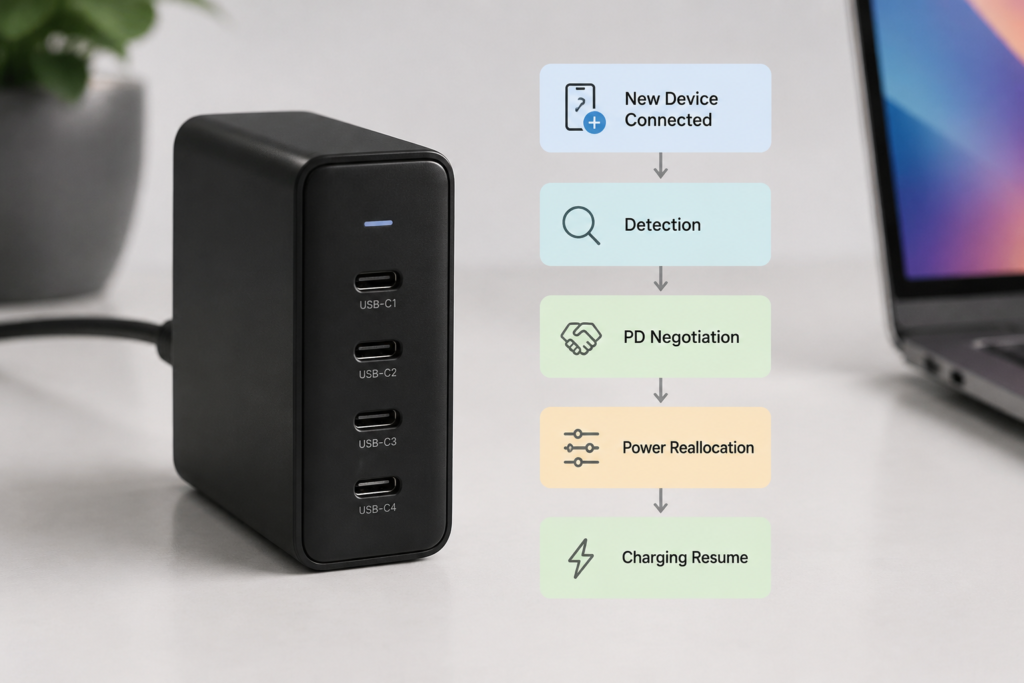
4.2 USB PD Renegotiation
USB Power Delivery (USB PD) is one of the most widely adopted USB-C fast charging standards. It is the universal “language” chargers and devices use to agree on voltage and current. They communicate over the CC (Configuration Channel) pin inside the USB-C cable, following a standard handshake process.
In simple terms, the charger tells the device “what power options are available,” and the device chooses the safest option it can accept. Technically, the charger advertises available power profiles called Power Data Objects (PDOs), and the device selects a suitable one by sending a Request Data Object (RDO) message. The full handshake also includes confirmation steps to ensure safety before power delivery begins.
When you add a second device, the charger may need to update the power allocation and renegotiate affected USB PD connections. It sends updated PDOs, relevant devices adjust their power draw, and power delivery resumes at the new levels.
This process usually takes less than a few seconds, depending on the charger design and device response time. During that time, you may see the charging icon disappear and reappear, or notice a brief drop to 5V baseline power. This is completely normal and built into the USB PD specification.
4.3 Fast-Charging Protocol Compatibility
Not all fast-charging standards speak the same language. USB PD is the most common universal standard, but many brands also use proprietary protocols for even faster speeds.
- When a charger and device share the same protocol, you get full-speed fast charging
- When they don’t match, the system falls back to a slower universal baseline—usually standard 5V charging or basic USB PD
There’s also a common hidden catch: many chargers disable proprietary fast-charging protocols when multiple ports are in use, falling back to standard USB PD only. This is why your phone might show “Super Fast Charge” with one port, but only regular charging when two devices are connected.
4.4 Device-Side Charging Limits
Your charger can’t force more power into a device than the device is willing to take.
For example:
- A phone that maxes out at 27W will only ever draw 27W, even from a 100W port.
- As a battery fills up, it naturally slows down. Lithium-ion batteries charge fastest when nearly empty (constant-current phase) and taper off as they approach 100% (constant-voltage phase).
This means slowdown isn’t always the charger’s fault. If one device is at 80% battery and trickle-charging, it’s not using its full allocated power. On dynamic chargers, that leftover power may be redistributed to other devices; on fixed-allocation chargers, it goes unused.
4.5 Thermal Protection and Cable Limits
Thermal Throttling
Charging generates heat, and running multiple ports at full load generates much more heat than single-port use. All chargers have temperature sensors and safety limits. If internal temperatures rise too high, the charger automatically reduces output power to cool down—this is called thermal throttling.
This is where GaN (gallium nitride) chargers have a real advantage. GaN allows chargers to switch more efficiently at higher frequencies, which reduces switching losses and enables smaller thermal designs.
Importantly, GaN does not automatically increase charging speed beyond the charger’s rated wattage. The total power rating and internal power design still determine maximum performance. GaN just makes it easier to pack high wattage into a small size and reduces heat-related slowdowns.
Cable Bottlenecks
Your USB-C cable is the pipe that carries power. A thin or low-quality pipe limits how much power can flow, no matter how strong the charger is.
- Standard 3A USB-C cables: Standard USB-C cables rated for 3A current support up to about 60W under USB PD (20V × 3A).
- 5A E-Marker cables: Standard 5A cables with an E-Marker chip support up to 100W at 20V. For USB PD 3.1 EPR charging above 100W, certified EPR-rated 5A cables with E-Marker chips are required, supporting up to 240W (48V × 5A).
If you use a basic 3A cable with a 100W laptop, you’ll cap out at ~60W even if the port could deliver more. Cheap, uncertified cables also have higher electrical resistance, which wastes power as heat and reduces what actually reaches your device.
4.6 Why Adding a Small Device Can Slow Down a Big Device
One of the most common user questions is: Why does plugging in a tiny pair of earbuds make my laptop charge so much slower?
It’s not because the earbuds use a lot of power. It’s because adding any second device triggers the charger to switch from “single-port mode” to “multi-port mode”—and the maximum power limit of the main port drops accordingly.
For example, on a 100W charger:
- Single-port mode: Main port can deliver up to 100W. Your laptop draws 90W without issue.
- Dual-port mode: The main port’s cap drops to 65W (per the charger’s preset rules). Even if your earbuds only use 5W, the laptop is locked to the 65W dual-port limit.
The missing 25W isn’t being used by the small device—it’s just locked off by the charger’s power allocation rules. This is why even a 5W accessory can cause a big drop in laptop charging speed on many budget and mid-range chargers.
5. Why Two 100W Chargers Can Perform Very Differently
Two chargers with the same wattage rating don’t always deliver the same real-world multi-device experience. Three factors make the difference:
- Power allocation strategy: One charger might split 100W into 65W+35W (prioritizing the main port), while another splits into 50W+50W (equal split). Which is better depends on your devices—if you charge a laptop and a phone, the 65W+35W split is usually faster in practice.
- Internal hardware quality: Better PD controllers, more advanced power topologies, and smarter thermal design mean smoother power delivery and less thermal throttling under sustained load.
- Firmware optimization: Premium chargers use smarter firmware that considers device type, battery level, and temperature when distributing power. Cheaper models use simple, rigid rules that waste power or cause unnecessary renegotiations.
6. Real-World Scenarios: What To Expect
Scenario 1: Laptop + Phone on a 100W Charger
- Devices: 65W laptop + 25W phone
- Total demand: ~90W
- Result: Both devices charge at near-full speed. The slowdown is barely noticeable, if at all. This is the sweet spot for a 100W charger.
Scenario 2: Two Laptops on a 140W Charger
- Devices: 90W laptop + 60W laptop
- Total demand: ~150W (exceeds 140W limit)
- Result: Both will charge slower than their maximum. Typical splits are 90W+50W or 80W+60W. The high-power laptop will feel the slowdown most clearly.
Scenario 3: Phone + Tablet + Earbuds on a 65W Charger
- Devices: 25W phone + 30W tablet + 5W earbuds
- Total demand: ~60W
- Result: All devices can charge within their supported limits with no obvious slowdown. Small, low-power devices put very little strain on a modern multi-port charger.
7. Common Myths Debunked
❌ Myth 1: “A 100W multi-port charger gives 100W to every port.”
Fact: The wattage rating is total output. Some advanced multi-output designs can maintain higher power availability across multiple ports, but these are much larger and more expensive than standard consumer models.
❌ Myth 2: “If charging slows down, the charger is broken.”
Fact: Power sharing and redistribution are normal design behavior. Only test for faults if charging is slow even with just one device connected.
❌ Myth 3: “GaN chargers never slow down with multiple devices.”
Fact: GaN improves efficiency and thermal performance, but it doesn’t bypass the laws of physics. A 100W GaN charger still has a 100W total limit. It just throttles less often from heat.
❌ Myth 4: “Small devices like earbuds don’t affect charging speed.”
Fact: Every device draws at least a little power from the total pool. More importantly, adding any second device can trigger a mode switch that lowers the main port’s maximum limit—even if the small device uses barely any power.
❌ Myth 5: “Multi-port chargers damage batteries.”
Fact: USB PD is a negotiated, safety-certified standard. Devices only accept power levels they’re designed for. Power sharing doesn’t harm batteries any more than using a single-port charger.
8. How to Reduce Slowdowns When Charging Multiple Devices
8.1 Buy a Charger With Enough Headroom
The single most effective fix: buy more wattage than you think you need.
Rule of thumb: Add up the peak power of all devices you’ll charge at the same time, then multiply by 1.3. That gives you a comfortable 30% power buffer.
Quick reference:
- Phone + earbuds: 30–45W total
- Phone + tablet: 65W total
- Phone + thin-and-light laptop: 100W total
- Multiple high-power laptops: 140W+ total
8.2 Always Check the Multi-Port Output Specs
Don’t stop at the big “100W MAX” number on the front of the box. Look for the fine-print output table that lists power for single-port, dual-port, and triple-port use. That number is your real-world performance.
8.3 Use the Right Cables
For any device drawing more than 60W, use a certified 5A USB-C cable with an E-Marker chip. This is mandatory for 100W+ charging. Cheap cables without the chip will silently cap your speed at ~60W, even with a top-tier charger. For 140W+ and PD 3.1 EPR devices, use a certified EPR cable to unlock full speed.
8.4 Optimize How You Use Your Charger
- Plug high-power devices (laptops) into the primary high-wattage port (usually labeled C1)
- Avoid running multiple high-power devices at full load at the same time when possible
- Leave space around the charger for airflow—don’t tuck it under a pillow, stack things on it, or leave it in direct sun
- Charge low-battery devices first, and let nearly-full devices trickle-charge on their own
8.5 Before You Buy: Quick Checklist
Use this simple checklist to evaluate any multi-port charger:
✅ Check total rated wattage
✅ Check the multi-port simultaneous output table
✅ Verify USB PD / PPS protocol support
✅ Confirm cable requirements (5A E-Marker or EPR)
✅ Review thermal design and user feedback on heat
9. Frequently Asked Questions
Q1: Will charging two phones at once cut the speed exactly in half?
Not necessarily. It depends on the charger’s allocation strategy and how much power each phone is actually drawing at the time. If both are nearly full and trickle-charging, you may not notice any slowdown at all.
Q2: Is it normal for charging to pause briefly when I plug in a second device?
Yes, on most chargers. This is USB PD renegotiation in action. Higher-end chargers with smarter firmware can minimize or nearly eliminate this gap.
Q3: Are GaN chargers better for multi-device charging?
Yes, but not because they break power limits. GaN’s higher efficiency means less heat and less thermal throttling, so they sustain full output longer under heavy multi-device load. They also pack higher wattage into smaller sizes, making it easier to carry a high-power multi-port charger.
Q4: Does using my device while charging make multi-device slowdown worse?
Yes. When you use a device while charging, some of the incoming power goes to running the screen and processor instead of filling the battery. The net charging speed drops, and the slowdown feels more noticeable.
Q5: How can I tell if a charger supports full-speed multi-device charging?
Check four things: total rated wattage, the multi-port output table in the spec sheet, which USB PD and PPS versions it supports, and whether it includes or requires 5A E-Marker cables.
Q6: Why does my 100W charger only output 65W when charging my laptop?
This almost always happens when a second device is plugged in, triggering the charger’s dual-port power limit. It can also happen if your cable is only rated for 3A (capping at ~60W), or if your laptop’s maximum charging speed is 65W by design.
Q7: Do all USB-C ports on a charger have the same power output?
Not always. On many multi-port chargers, the first USB-C port (primary port) supports the highest wattage, while secondary ports have lower maximum limits. Some premium chargers support blind-matched equal power across all ports, but this is less common.
Q8: Does using all ports at once damage the charger?
No. A properly designed, certified charger includes built-in safety features like over-current protection, over-temperature protection, and short-circuit protection. It is engineered to run at full rated load safely, and using all ports within its specifications will not damage it or shorten its lifespan.
Q9: Should I buy a 240W charger for multiple devices?
Not necessarily. A 240W charger is only worth the extra cost if you have high-power devices like gaming laptops, mobile workstations, or multiple 65W+ laptops that need to charge simultaneously. For phones, tablets, and standard thin-and-light laptops, a 100W–140W charger is usually more than enough and better value.
10. Final Takeaway
Multi-device charging slowdowns boil down to five core factors:
- A fixed total power budget that all devices share on most consumer chargers
- USB PD renegotiation when devices are added or removed
- Fast-charging protocol compatibility limits
- Each device’s own maximum charging speed and battery stage
- Thermal protection and cable quality bottlenecks
The good news is that this is mostly predictable and manageable. Pick a charger with enough total wattage for your setup, check the real multi-port output specs, use certified cables, and give the charger room to breathe—and you’ll get fast, reliable charging for all your devices without surprises.