
Introduction: Invisible Heat Shapes Your Device’s Performance and Lifespan
Every smartphone, laptop, and charger runs on tiny chips that generate heat as they work. As devices get smaller and more powerful, that heat becomes harder to escape — and left unmanaged, it causes thermal throttling, shorter battery life, faster component wear, and even safety risks.
If you’ve ever shopped for cooling parts, you’ve likely hit the same question: should you use a thermal pad, a metal heat sink, or both? Many people assume they are interchangeable, but they do completely different jobs inside a thermal system.
This guide breaks down everything in plain language: how each part works, what they’re good at, where they fall short, and how to build a reliable cooling setup for your project. We will also clarify how thermal interface materials (TIMs) like thermal pads fit into the bigger picture of heat management.
Core idea upfront: Thermal pads move heat across a gap. Metal heat sinks release heat into the air. They work best as a team, not competitors.
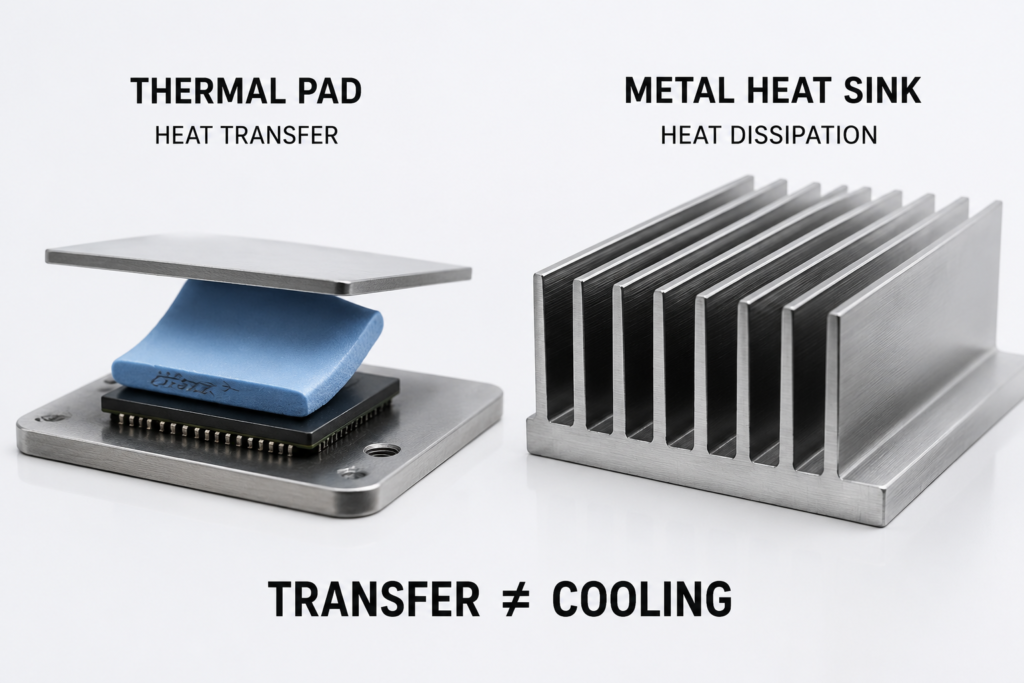
Quick Summary: Core Differences & Fast Decision Rules
Thermal Pad
- Role: Thermal Interface Material (TIM) / gap filler — a heat bridge
- What it does: Fills air gaps between parts, reduces contact resistance, adds insulation and vibration protection
- Pros: Flexible, works on uneven surfaces, easy to install, electrically insulating
- Cons: Cannot dissipate large amounts of heat on its own
Metal Heat Sink
- Role: Terminal cooling structure — a heat radiator
- What it does: Spreads heat across a large surface and releases it into the air
- Pros: Handles high power levels, very durable, scalable with fans
- Cons: Needs installation space, requires a good interface to work well
Quick Decision Guide
| Your Situation | Best Choice |
|---|---|
| Tight space, low power, need electrical safety | Thermal pad alone |
| CPU, GPU, or any high-power chip | Metal heat sink as main cooler |
| Most everyday electronics | Thermal pad + metal heat sink together |
1. What Is a Thermal Pad?
1.1 Definition and Basic Idea
A thermal pad (also called a thermal gap pad) is a soft, pre-formed solid sheet that sits between a hot component and a cooling surface. It squeezes into tiny gaps and pushes out trapped air, creating a smoother path for heat to travel through.
Its job is connecting and transferring heat, not getting rid of it into the air.
1.2 How It Works: Fixing the Air Gap Problem
To the naked eye, chips and heat sinks look perfectly flat. Under a microscope, both have tiny bumps and dips. When you press them together, air gets stuck in these gaps — and air is a very poor conductor of heat.
A thermal pad compresses into those gaps, replaces the air, and creates a continuous heat path from one side to the other.
1.3 Common Materials
Thermal pads have two main parts:
Base material
- Silicone: The most widely used; soft, durable, and heat-resistant
- Acrylic: Silicone-free, used where oil residue must be avoided
- Polyurethane: For special shock-absorbing designs
Heat-conducting fillers
- Aluminum oxide: Low cost, good electrical insulation
- Boron nitride: Higher performance, still fully insulating
- Aluminum nitride: Very high conductivity, used in industrial products
- Graphite: Excellent sideways heat spreading; note — most graphite pads conduct electricity
1.4 Main Types of Thermal Pads
- Silicone thermal pads: The standard choice for chargers, SSDs, and graphics card memory
- Graphite thermal pads: Ultra-thin, great for phones and slim devices
- Phase-change pads: Soften when warm to fill ultra-fine gaps; performance is close to thermal paste but easier to install
1.5 Key Specifications
All performance values below are tested under ASTM D5470, the widely accepted industry standard for thermal interface materials.
- Thermal conductivity
- Entry-level: 1–5 W/m·K
- Mid-range: 6–12 W/m·K
- High-end industrial: 12–20+ W/m·K
- Important note: Thermal conductivity numbers from different manufacturers are not always directly comparable. Real cooling performance depends heavily on thickness, mounting pressure, and overall thermal resistance.
- Thickness
- Common sizes: 0.3mm, 0.5mm, 1.0mm, 2.0mm, up to 5mm+
- Rule: Pick the thinnest pad that still fills your gap completely. Thicker pads slow down heat flow.
- Compression
- Best practice: 20–30% compression under mounting pressure
- Too little compression = air pockets remain
- Too much compression = can damage fragile chips
- Electrical insulation and flame safety
- Most ceramic-filled pads are electrically insulating. Many provide several kV/mm dielectric strength depending on thickness and formulation.
- Quality products carry UL 94 V-0 flame retardancy rating, a commonly used safety standard for electronic materials.
- Graphite and metal-filled pads are usually conductive — use carefully around live circuits.
- Temperature range
- Most consumer pads work reliably from roughly -40°C up to 200°C
2. What Is a Metal Heat Sink?
2.1 Definition and Basic Idea
A metal heat sink is a rigid metal structure — usually with fins — that absorbs heat from a chip, spreads it out over a large area, and releases it into the surrounding air.
It is the part that actually cools things down and serves as the core of most passive cooling designs.
2.2 How It Cools: Primary and Secondary Mechanisms
In practical electronics cooling, conduction and convection are the two dominant mechanisms. Radiation provides a smaller secondary contribution.
- Conduction: Heat travels through the metal from the base to the fins
- Convection: Heat moves from the fins into flowing air. This can be natural convection (passive cooling) or fan-driven forced convection, which drastically improves performance.
- Radiation: Hot surfaces give off infrared heat to cooler surroundings.
2.3 Common Materials
| Material | Thermal Conductivity | Weight | Cost | Best For |
|---|---|---|---|---|
| Aluminum | ~205 W/m·K | Light | Low | Most consumer electronics, general use |
| Copper | ~400 W/m·K | Heavy | High | High-heat spots, high-performance CPU/GPU bases |
| Copper-aluminum mix | Copper base + aluminum fins | Medium | Medium | Balanced performance |
A useful reality check: copper conducts heat faster, but in most air-cooled setups, the real limit is airflow over the fins, not the metal itself. A well-designed aluminum heat sink often beats a poorly designed copper one. Many high-performance air coolers use copper bases combined with aluminum fins because this balances heat transfer, weight, and cost.
2.4 Common Design Types
Most consumer heat sinks are one-piece extruded aluminum. Advanced industrial models use specialized fin designs for higher performance, but for everyday projects, the total surface area and airflow matter far more than the exact manufacturing method.
3. Thermal Conductivity vs Thermal Resistance: What Actually Matters?
Many people fixate on thermal conductivity, but it is only half the story.
Thermal Conductivity
This describes how well a material itself moves heat. Think of it like the speed limit on a road.
Thermal Resistance
This describes how hard it is for heat to pass through the entire interface — material, thickness, contact quality, and all. Think of it as total travel time.
Thermal resistance depends on:
- Material thermal conductivity
- Thickness of the pad or layer
- Contact pressure
- Surface smoothness
The simplified relationship is:
Thermal Resistance = Thickness / Thermal Conductivity
In plain English: a thinner pad with good contact will often outperform a thicker, higher-spec pad with poor contact. This is why blindly buying the highest conductivity number rarely gives the best real-world results.
4. Thermal Pad vs Heat Sink: Core Differences in Electronics Cooling
Quick Comparison Table
| Feature | Thermal Pad | Metal Heat Sink |
|---|---|---|
| Main job | Transfer heat across a gap | Remove heat into the air |
| Materials | Silicone, boron nitride, graphite | Aluminum, copper |
| Flexibility | Flexible | Rigid |
| Gap filling | Excellent | Poor |
| Heat spreading ability | Very limited | Excellent |
| Electrical insulation | Usually yes | No |
| Space needed | Very low | Higher (needs fin room) |
| Best for | SSDs, VRAM, chargers, gap filling | CPUs, GPUs, power modules |
The Biggest Difference: Transfer vs Release
A thermal pad and a heat sink solve different problems. One improves heat transfer; the other provides heat dissipation. You cannot substitute one for the other — they perform separate jobs in the same cooling system.
5. Can Thermal Pads Replace Heat Sinks?
Short Answer: Almost Never
For most real-world electronics, a thermal pad cannot replace a heat sink. It has no fins, almost no exposed surface area, and no way to move heat efficiently into the air.
A thermal pad sitting alone on a chip with nowhere for the heat to go will trap heat, not remove it.
When It Seems To Work (And Why It’s Not What You Think)
Under low-power conditions, a thermal pad can work as the only visible thermal component if it transfers heat into a large metal chassis or enclosure that acts as the actual heat sink. Common examples include:
- Single-board computer chip → thermal pad → metal case (the case is the heat sink)
- SSD controller → thermal pad → laptop bottom chassis (the chassis is the heat sink)
- LED strip → thermal pad → aluminum channel (the channel is the heat sink)
In every case, the pad is still just the bridge. The metal structure does the actual cooling work.
Why “Thicker Pad = Heat Sink” Is a Myth
Making a pad thicker adds a little more mass, but it does not create cooling surface area. Heat dissipation depends on surface exposed to air, not raw thickness.
6. Why Most Devices Use Thermal Pads + Heat Sinks Together
The Synergy Effect
Used together, each part fixes the other’s biggest weakness:
- The thermal pad eliminates the air gap that would cripple the heat sink’s performance
- The heat sink provides the large cooling surface the pad needs to dump heat
This is why nearly every well-designed electronic product uses both in combination.
The Complete Cooling Chain
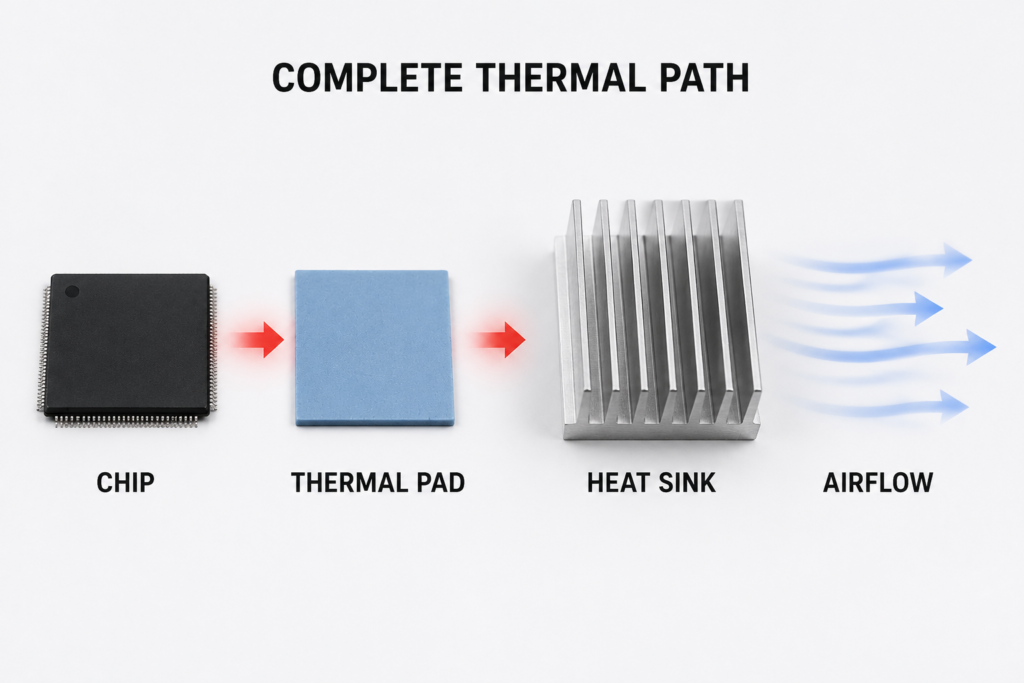
Heat source (chip)
        ↓
Thermal pad (removes air gap, smooths the heat path)
        ↓
Metal heat sink (spreads heat wide across fins)
        ↓
Airflow (natural or fan-driven, carries heat away)
Simple Matching Rules
- Pick a pad thickness that compresses 20–30% under mounting pressure
- Use a softer pad for light pressure, a firmer pad for heavy screw mounting
- Do not use a thicker pad than you need — every extra millimeter adds resistance
- For live circuits, use an electrically insulating pad under the heat sink
7. Real-World Applications
7.1 Smartphones and Slim Devices
Typical setup: Chip → thermal pad → graphite sheet → metal frame
There is no room for fins inside a phone. The entire metal body acts as the radiator, and the thermal pad makes sure heat moves efficiently from the chip to the frame.
7.2 Laptops and Desktop PCs
- CPU/GPU core: Thermal paste or thin pad + copper base + heat pipes + fin stack + fan
- VRAM, VRM and power parts: Thicker thermal pads bridge uneven-height chips to the main cooling assembly
Heat sinks handle the heavy cooling; pads handle the secondary chips with different heights.
7.3 M.2 SSDs
A thin thermal pad (often 0.5–1.0mm) sits between the SSD controller and a small metal heat spreader or heatsink. The pad fills the gap, and the metal plate spreads the heat.
7.4 GaN Fast Chargers
Typical thermal stack inside a 65W–120W GaN charger:
GaN transistor
        ↓
Electrical insulating thermal pad
        ↓
Metal heat spreader/shield
        ↓
Charger enclosure
        ↓
Ambient air
GaN chargers pack huge power into tiny cases, so heat density is very high. Thermal pads solve two problems at once: they move heat out to the metal shield, and they provide electrical isolation between high-voltage parts and grounded metal. Many designs also add graphite sheets to spread heat across the case more evenly.
7.5 Servers and AI Hardware
High-power server CPUs and AI accelerators use large, high-performance heat sinks with forced convection, paired with premium interface materials. Every degree of cooling directly translates to more sustained performance.
7.6 Electric Vehicles and Industrial Equipment
Battery packs and power modules use high-grade insulating thermal pads paired with aluminum cooling plates or liquid cooling systems. Long-term reliability and fire safety are the top priorities.
8. Thermal Pad vs Thermal Paste: How They Compare
This is one of the most common comparison questions for PC builders and hardware tinkerers.
| Thermal Pad | Thermal Paste | Metal Heat Sink | |
|---|---|---|---|
| Main function | Fills gaps of different heights | Creates ultra-thin contact between flat surfaces | Removes heat into the air |
| Best for | Uneven surfaces, VRAM, VRM, chargers | CPU/GPU with flat mounting surfaces | All high-power main cooling |
| Installation ease | Very easy | Moderate (can be messy) | More involved |
| Reusable | Mostly yes, for rework | No | Yes, almost indefinitely |
| Electrical insulation | Usually yes | Usually no | No |
Quick Takeaways
- Thermal paste gives the lowest possible thermal resistance between two perfectly flat, rigid surfaces — like a CPU and a cooler base.
- Thermal pads are better when surfaces are uneven, heights differ, you need insulation, or you want easier installation.
- Metal heat sinks are in a different category entirely — they are the cooler itself, not an interface material.
9. Buying Guide: How to Choose the Right Solution
Step 1: Estimate the power level
- Under low power, and the heat can flow into a metal case: a thermal pad may be enough as the interface component.
- Above 10W, or if the part is the main heat source: plan for a metal heat sink as the primary cooler.
Step 2: Measure the gap
- Measure the distance between the hot component and the cooling surface when assembled.
- Choose the thinnest thermal pad that still fills that gap with 20–30% compression.
Step 3: Check space and airflow
- If you have room for fins and air movement: thermal pad + heat sink is the default best choice.
- If space is extremely tight: use a thermal pad to route heat to the device’s metal chassis.
Step 4: Factor in safety and durability
- If the part is high-voltage or requires short protection: pick an electrically insulating thermal pad.
- For long-running industrial equipment: prioritize metal heat sinks for their very long service life.
10. Common Installation Mistakes to Avoid
Thermal Pad Mistakes
- Forgetting to peel both protective films — the single most common beginner error
- Stacking two pads on top of each other (the extra layer adds huge thermal resistance)
- Using a pad much thicker than the gap
- Not cleaning surfaces with isopropyl alcohol first
- Reusing old, hardened pads
Heat Sink Mistakes
- Mounting directly to the chip with no interface material at all
- Tightening screws unevenly, tilting the base and creating gaps
- Blocking intake or exhaust airflow
- Ignoring electrical clearance around live circuits
General Rule
If your new cooling part barely lowers temperatures, the first things to check are interface quality and airflow — not the size of the heat sink.
11. Popular Cooling Myths Debunked
Myth 1: Higher thermal conductivity always means better cooling
Reality. A thin, well-compressed 6 W/m·K pad often outperforms a thick, poorly fitted 12 W/m·K pad. The whole interface matters more than one number.
Myth 2: Thicker thermal pads work better
Reality. Thicker pads fill bigger gaps, but they also slow heat down more. The best pad is the thinnest one that still fills your gap properly.
Myth 3: A big heat sink always cools better
Reality. Volume alone does nothing. What counts is surface area exposed to moving air. A smaller, well-ventilated heat sink can beat a bulky one with blocked fins.
Myth 4: Copper heat sinks are always better than aluminum
Reality. Copper conducts heat faster, but in low-airflow setups the air itself is the bottleneck. For natural convection, aluminum often gives better value per dollar and per gram. Copper shows its biggest advantage under strong forced airflow.
Myth 5: Heat sinks can work fine without thermal pads or paste
Reality. Even mirror-smooth metal has microscopic gaps full of insulating air. Skipping the interface material can easily cut the heat sink’s effective performance in half.
12. Frequently Asked Questions (FAQ)
1. Can a thermal pad fully replace a metal heat sink?
Almost never. A thermal pad can only move heat — it cannot dissipate it into the air on its own. It only “replaces” a heat sink when it routes heat to a large metal case that acts as the real radiator.
2. Do I have to use a thermal pad with a heat sink? Can I use thermal paste instead?
You need some kind of thermal interface material — it does not have to be a pad. Thermal paste gives slightly lower resistance on perfectly flat surfaces. Pads are easier to install, better for uneven heights, and provide electrical insulation.
3. Can I use a thermal pad instead of thermal paste on a CPU?
Generally not recommended. CPU heat spreaders and cooler bases are very flat, and the goal is the thinnest possible interface. Thermal paste will give lower thermal resistance here. Thermal pads are better suited for memory chips, power circuits, and height-compensating roles.
4. For the same power: thick thermal pad or small metal heat sink?
Above low power levels, always choose a small heat sink + thin interface material. A thick pad alone has no convection ability and will run hotter.
5. Why does my temperature barely drop after installing a new heat sink?
The most common causes are missing or poorly applied interface material, uneven mounting pressure, blocked airflow, or a heat sink undersized for the power load.
6. How long do thermal pads last? When should I replace them?
Standard silicone pads last roughly 2–5 years under normal consumer conditions. High heat shortens their life. Replace them if they become brittle, crumbly, or heavily oily.
7. Are graphite thermal pads better than silicone pads?
It depends. Graphite pads are thinner and spread heat extremely well sideways, making them great for phones and slim devices. Silicone pads fill gaps better, are usually electrically insulating, and are more durable for general use.
8. Which is more cost-effective: aluminum or copper heat sinks?
For most consumer and light industrial use, aluminum is the better value. Copper is worth the extra cost and weight only when you have very high heat density and enough airflow to benefit.
9. Can I stack two thermal pads to fill a bigger gap?
Strongly not recommended. Each extra layer adds a new interface with high thermal resistance. Use one thicker pad rated for your gap instead.
10. Thermal pad vs thermal grease: which pairs better with heat sinks?
- For absolute best performance on flat, rigid surfaces: thermal grease
- For ease of installation, rework, height tolerance, and electrical insulation: thermal pad
13. Future Trends in Thermal Management
- Higher-performance materials: Boron nitride composites and graphene-enhanced pads are pushing conductivity higher while keeping insulation properties.
- Ultra-thin cooling: Phones, AR/VR, and AI edge devices are driving demand for sub-0.3mm pads integrated with vapor chambers and graphite sheets.
- High-power demand: AI servers, EV power electronics, and next-gen GaN chargers are pushing power densities up fast. This drives better heat sink designs and higher-quality TIMs used as complete systems.
Final Conclusion
Key Takeaways
- A thermal pad is a bridge. It solves the problem of getting heat across a gap.
- A metal heat sink is a radiator. It solves the problem of releasing heat into the air.
- They are teammates, not competitors. Most reliable cooling systems use both.
4-Step Selection Method
- Check power: Above ~10W? Plan for a metal heat sink as the main cooler.
- Measure the gap: Pick the thinnest pad that fills it properly.
- Check space and airflow: If you have room, pad + heat sink is the default best setup.
- Add safety and durability needs: Insulation, vibration, and expected service life help you pick the exact material.
Final Recommendation
For almost every project — from SSD coolers and charger builds to power supplies and small PCs — the optimal solution is a properly sized metal heat sink paired with a correctly chosen thermal pad. This combination gives the best balance of cooling performance, reliability, safety, and long-term value.