
Quick Summary
- That brief charging pause when you plug in a new device is almost always normal power reallocation and USB PD renegotiation — not a defect or broken charger.
- How noticeable the interruption is depends entirely on the charger’s internal architecture, power management logic, and firmware tuning.
- Chargers using a shared power allocation design are more likely to cause visible interruptions because multiple ports depend on the same power resources. Some models may briefly pause all outputs depending on their internal design.
- Standard smartphones, tablets and laptops will not suffer battery damage from these short, occasional interruptions.
- Devices that need constant, stable power (external drives, single-board computers, industrial gear) work best with independent-output chargers or fixed-power ports.
1. Why Does Charging Suddenly Stop When I Plug in a Second Device?
1.1 Three Everyday Scenes You’ve Probably Seen
If you own a multi-port USB-C charger, you have almost certainly run into this:
Scenario 1: Laptop charging drops when you add a phone
- Before: Your laptop pulls a full 65W from a single USB-C port.
- After you plug in your phone: The laptop pauses charging for 1–2 seconds, then resumes at a lower wattage (often 45W), while the phone takes roughly 20W.
- What you see: The charging icon disappears and reappears; the charger indicator light may flash once.
Scenario 2: Fast charging resets when you add a tablet
- Your phone shows a “Fast Charging” label and runs at full speed.
- You plug in a tablet or wireless charger, and the fast-charge badge vanishes for a moment. The charging animation replays as if you just plugged the cable in.
- This happens because the charger renegotiates power agreements for all active devices.
Scenario 3: All ports blink when you add a fourth device
- You already have a laptop, phone and earbuds running off a 4-port charger.
- You plug in a power bank, and every connected device briefly pauses charging at the same time.
- After a short pause, all devices come back online with their new share of the total power budget.
1.2 The Three Questions Everyone Asks
- Is my charger broken? — In most cases, this is normal, intended power management behavior.
- Will this hurt my battery? — No. A split-second power dip does not count as a full charge cycle.
- Why does my expensive GaN charger do this too? — Because GaN improves efficiency and size, not how power is split between ports. The internal power architecture is what matters.
Image placeholder: User scenario illustration showing a laptop + phone connected to a multi-port charger with a visible charging pause icon
2. Why Multi-Port Chargers Have to Reshape Power
2.1 The Core Idea: Total Power Budget
Here is the single most important fact about multi-port chargers:
A 100W charger does not give every port 100W. All ports share one total power limit.
Think of it like a pizza. If the whole pie is 100W, then Port 1 plus Port 2 plus Port 3 can never add up to more than 100W. When a new device sits down at the table, the charger has to cut the slices again.
Mathematically:
plaintext
Port 1 + Port 2 + Port 3 + ... ≤ Total Rated Power
2.2 Real Example: What Happens Inside a 100W Charger
When you add a second device, the charger recalculates the power split. Below is what typically happens with a 100W dual-port model:
| Device | Before adding phone | After adding phone |
|---|---|---|
| Laptop | 100W | 80W |
| Phone | — | 20W |
| Total | 100W | 100W |
- One device connected: A laptop pulls 20V × 5A = 100W. The whole power budget goes to one port.
- You add a phone that needs 20W: The total requested power would exceed the 100W limit if the laptop stayed at 100W.
- The charger recalculates: It drops the laptop to 80W and gives the phone 20W to stay within the total budget. Some chargers keep a small safety margin, so the actual combined output may be slightly lower than the theoretical maximum.
- The exact split depends on port priority rules, the firmware algorithm, and how the manufacturer tuned the product.
2.3 Three Common Power Distribution Designs
How much disruption you feel depends almost entirely on which design the charger uses:
| Architecture | How it works | Interruption level | Typical product tier |
|---|---|---|---|
| Shared Power Allocation | All ports share core power conversion resources; power is dynamically split | Higher — often affects multiple ports | Common consumer design |
| Fixed Port Allocation | Each port gets a pre-set maximum wattage that does not change | Low — no reallocation needed | Specialty / basic models |
| Independent Output Architecture | Every port has its own DC-DC converter and control path | Very low — mostly affects only the new port | Premium / high-end |
2.4 Port Priority Changes the Outcome
Not all ports are created equal. Many chargers assign higher priority to the first port (usually labeled C1).
For example:
- Port C1 (laptop) keeps 65W
- Port C2 (phone) gets whatever is left over
In that case, adding a phone will barely affect the laptop — it may not even trigger a noticeable pause. Cheaper models often split power evenly, which forces both sides to renegotiate.
2.5 Why Does a Tiny 5W Device Still Trigger an Interruption?
It is not about how much power the new device draws. It is about the connection event itself.
Plugging in even a pair of wireless earbuds changes the state of the USB-C CC (Configuration Channel) pins. The PD controller detects a new device on the bus and re-evaluates the system state.
Whether this causes a pause across all ports depends entirely on the charger’s firmware:
- Some chargers are smart enough to keep existing ports running while they negotiate with the new one.
- Simpler or more conservative designs pause everything at once to be safe.
This is why you may see your laptop flicker even when you plug in something as small as a smartwatch.
2.6 Power Sharing vs. Power Negotiation: Two Key Terms Explained
These two terms are often mixed up, but they describe separate parts of the charging process:
Power Sharing is about how the total power budget is divided between ports.
- Example: A 100W charger splits 80W to the laptop and 20W to the phone.
- It answers the question: How much power does each device get?
Power Negotiation is about how the charger and each device agree on voltage and current.
- Example: The laptop and charger settle on 20V × 4A = 80W.
- It answers the question: What voltage and current does this specific device use?
Both processes happen when you plug in a new device, and both can cause a brief charging pause.
3. What Actually Happens Inside the Charger When You Plug in a New Device?
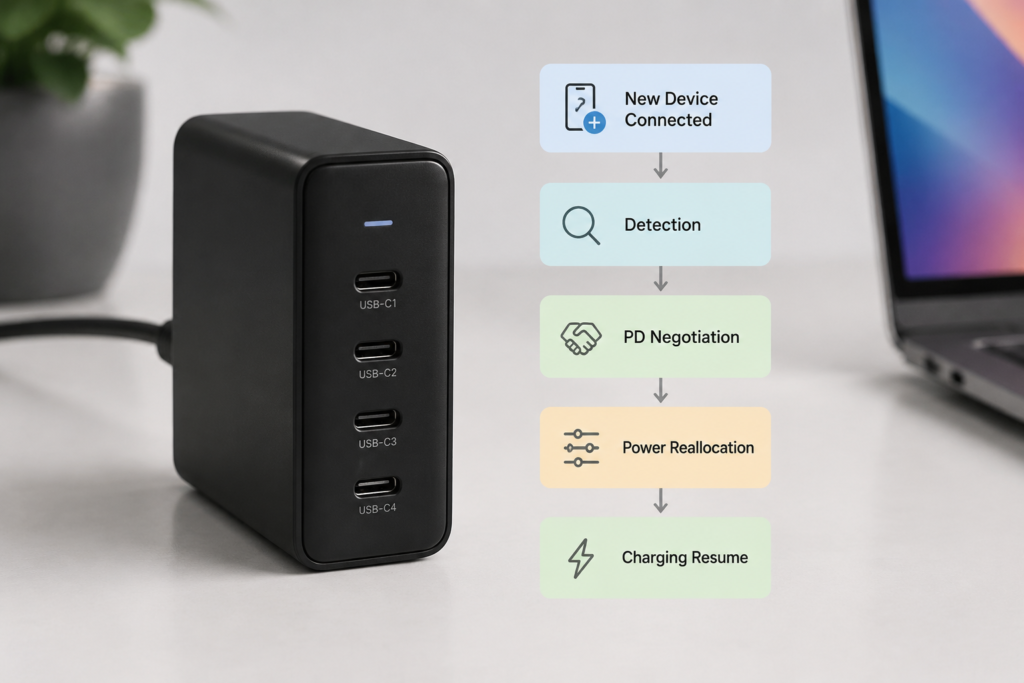
3.1 Step 1: The Charger Detects the New Device
As soon as you plug in a cable, the charger’s USB PD controller picks up the change on the CC pins of the USB-C connector.
It checks:
- Is there a valid device on the other end?
- What type of device is it?
- What charging protocols does it support?
At this stage, the charger normally supplies a safe 5V baseline before higher-voltage USB PD charging is enabled.
3.2 Step 2: USB PD Renegotiates the Power Contract
USB Power Delivery (USB PD) works like a business negotiation:
- The charger (source) broadcasts a list of available power profiles, called PDOs (Power Data Objects). PDOs describe the voltage and current combinations that the charger can provide.
- The device (sink) picks the voltage and current that best fit its needs.
- The charger accepts the request, and a new power contract is active.
When a new device joins, the charger may need to renegotiate existing power contracts because the available power budget has changed. Depending on the design, it may renegotiate only the affected port or update all active connections.
3.3 Step 3: Output Parameters Get Adjusted
Inside the charger, the internal DC-DC converter (the circuit that adjusts voltage and current) has to physically change its output:
- Voltage and current settings may change depending on the new power allocation strategy.
- Current limits get rewritten.
- Power split ratios are recalculated.
For a shared-design charger, you cannot tweak these settings while keeping power fully stable — the circuit needs a moment to reconfigure.
3.4 Why Some Chargers Fully Cut Power for a Moment
On basic shared power designs, all ports ride on the same power conversion path. To safely change voltage and current settings, the controller follows this sequence:
- Pause output
- Reset power allocation rules
- Reconfigure voltage and current limits
- Restart output and renegotiate USB PD
This full stop-and-restart behavior is a type of output reset or power re-initialization. Some manufacturers also describe this as power cycling. It is the most noticeable type of interruption, but not every shared-design charger works this way.
3.5 Why High-End Designs Feel Smoother
Some premium chargers use independent power channels or advanced power path designs, often with per-port DC-DC converters and faster control chips.
When you plug in a new device:
- Usually only the newly connected port needs to renegotiate, while other ports can often continue charging without interruption.
- You may not even notice anything happened on the other devices.
This seamless switching experience is sometimes marketed as no-interruption charging.
Image placeholder: USB PD renegotiation flow chart: New Device Connected → CC Detection → PD Negotiation → Power Reallocation → Resume Charging
4. Why Some Chargers Blatantly Disconnect and Others Barely Blink
4.1 Shared Power Allocation Design
This is the most common design in mainstream multi-port chargers.
Pros:
- Lower component cost
- Smaller overall size
Cons:
- Load changes often ripple through multiple ports
- Full re-initialization may be required on basic models
- Most noticeable interruption behavior
If your charger is marketed as “100W total output” with no mention of independent channels, it often indicates a shared power architecture, although internal designs vary by manufacturer.
4.2 Independent Output Architecture
Each port has its own dedicated step-down circuit and control logic.
Pros:
- Adding a new device barely disturbs existing ones
- More stable voltage per port
- Best user experience
Cons:
- More components, higher cost
- Slightly larger charger body
This is the architecture to look for if you want “plug and play” with near-zero interruption.
4.3 Fixed Port Allocation Design
Some chargers hard-wire each port’s maximum: for example, USB-C1 = 65W, USB-C2 = 30W.
Pros:
- Very stable; no renegotiation surprises
- Great for devices that need constant power
Cons:
- You can never use the full total wattage on a single port
- Less flexible for high-power single-device use
4.4 Why GaN Chargers Still Disconnect
Gallium Nitride (GaN) is a semiconductor material, not a power distribution technology.
What GaN actually does:
- Raises conversion efficiency
- Reduces heat
- Allows smaller charger bodies
What GaN does not do:
- Change whether ports share a power pool
- Eliminate USB PD renegotiation
- Automatically make disconnects vanish
A budget GaN charger with a shared power pool will still pause ports when you add a device. The charging experience depends more on the power architecture than the semiconductor material.
4.5 How to Identify a Truly Independent Charger
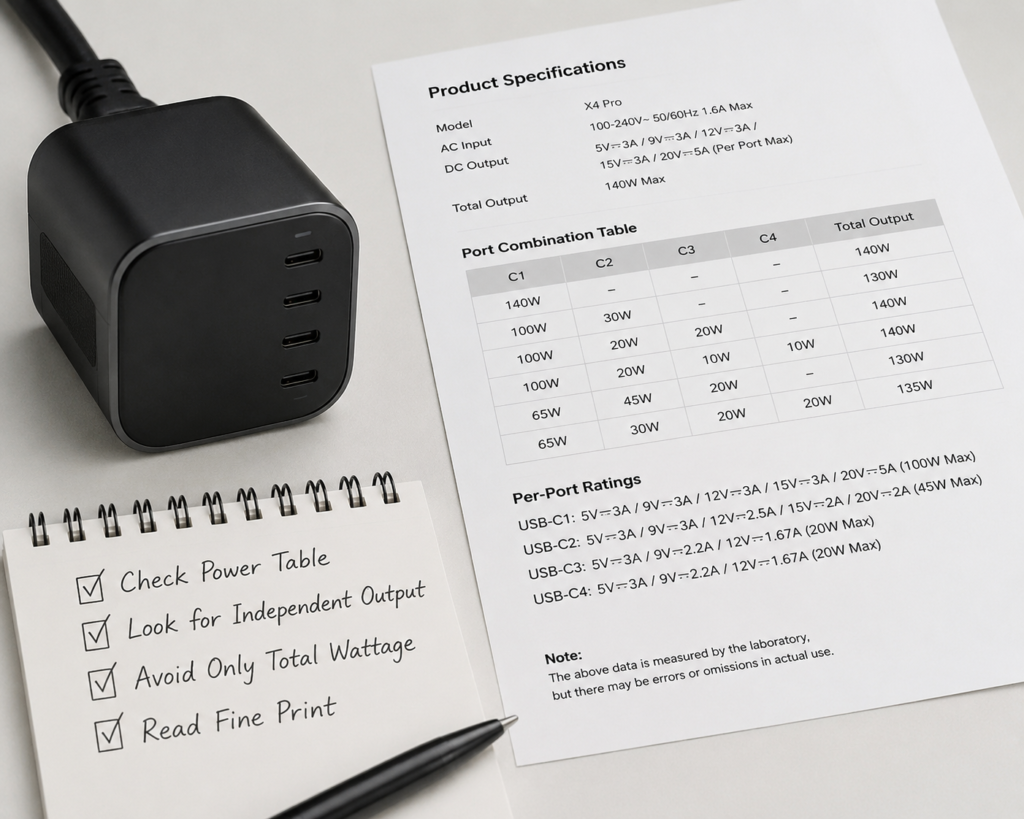
Do not rely on marketing buzzwords. Check the spec sheet for a port combination power table.
What a shared-architecture spec looks like:
plaintext
C1 alone: 100W
C2 alone: 100W
C1 + C2: 65W + 30W
This indicates a shared total power budget. Wattage drops when both ports are used.
What a fixed/independent power spec looks like:
plaintext
C1: 65W fixed
C2: 30W fixed
C3: 20W fixed
Each port keeps its maximum wattage no matter what is plugged into other ports.
Image placeholder: Side-by-side architecture diagram. Left: Shared Power Pool (AC Input → Power Converter → Shared Bus → C1/C2/C3). Right: Independent Output (AC Input → Power System → Separate DC-DC modules per port → C1/C2/C3).
5. Will This Disconnect Damage My Devices or Battery?
5.1 Smartphones and Tablets
For phones and tablets, you can relax.
Modern devices include a dedicated PMIC (Power Management Integrated Circuit) and battery protection system. They are designed to handle brief power glitches and negotiation pauses without any harm.
At worst, you will hear the charging chime again or see the screen light up. That is cosmetic, not damaging.
5.2 Laptops
Laptops will not shut down. Their internal battery instantly takes over for the millisecond or two that power drops out, then the charger picks back up.
For the user, the only sign may be a brief charging icon flicker. Work, downloads and video playback continue normally.
5.3 Devices That Actually Need Attention
Watch out for equipment that runs directly off USB power with little or no battery backup:
- External USB hard drives, especially during file transfers
- Single-board computers like Raspberry Pi
- Industrial control hardware
- Network cameras and low-power networking gear
Risks: A sudden power dip can interrupt a file write, corrupt data, or force a full system reboot. For these devices, use a fixed-power port or a dedicated single-port charger whenever possible.
5.4 What About Battery Health?
This is the most common worry — and the simplest to answer:
A short charging pause does not count as a full charge-discharge cycle.
Battery cycle life is measured by full capacity throughput: draining a battery from 100% to 0% and refilling it counts as one cycle. A tiny blip in charging current is irrelevant to wear and tear.
Normal, occasional renegotiation will not shorten battery lifespan in any measurable way.
6. How to Reduce or Avoid Charging Interruptions
6.1 What to Look for When Buying
Quick Buying Checklist
Look for these on the product page:
✓ Detailed multi-port power combination table
✓ Clear per-port wattage ratings
✓ “Independent output” or “seamless switching” descriptions
✓ Explanation of dynamic power allocation rules
Do not rely only on:
✗ “100W total output” as the only spec
✗ GaN branding alone
✗ Vague “smart power allocation” marketing phrases
6.2 The Best Order to Plug in Devices
You can minimize big resets by following this simple rule:
Plug in highest-power devices first, lowest-power devices last.
Recommended order:
- Laptop
- Tablet
- Smartphone
- Earbuds, watches, small accessories
Why? Adding a small 5W device to an already stable high-power setup is less likely to trigger a system-wide reallocation than pulling power away from a laptop to feed a new high-power device.
6.3 How to Protect Sensitive Devices
- Use a fixed-power dedicated port for external drives and single-board computers
- For mission-critical gear, use a separate single-port charger
- Avoid hot-plugging new devices while transferring data over USB
Image placeholder: Simple infographic showing how to choose a multi-port charger: check power table, prioritize independent output, match to your devices
7. Normal Renegotiation vs. a Faulty Charger
It is important to tell the difference between standard behavior and a broken unit.
| Normal power renegotiation | Possible hardware fault |
|---|---|
| Only happens when you plug in or remove a device | Happens on its own, with no changes to connected devices |
| Recovers fully in roughly hundreds of milliseconds to a few seconds | Stays off or loops interruptions repeatedly |
| Works perfectly with a single device | Disconnects even with one device connected |
| Charger runs at a normal temperature | Charger gets unusually hot, smells odd, or discolors |
If you see symptoms from the right column, stop using the charger and replace it.
8. Common Myths, Debunked
Myth 1: “If it disconnects, the charger is low quality.”
Fact: Most multi-port chargers — including well-known brands — use a shared power pool and will renegotiate when you add devices. This is a design tradeoff for size and cost, not a defect.
Myth 2: “GaN chargers never disconnect.”
Fact: GaN improves efficiency and thermal performance. Whether the charger pauses depends on its power architecture and control firmware, not the semiconductor material.
Myth 3: “Every disconnect damages the battery.”
Fact: Short negotiation pauses do not create full charge cycles and do not accelerate battery wear.
Myth 4: “100W means every port does 100W.”
Fact: 100W almost always describes the total combined output. Read the fine print for per-port and multi-port ratings.
9. FAQ
Q1: Why does my laptop stop charging when I plug in my phone?
A: Because the charger has a fixed total power limit. When you add the phone, it must recalculate and reallocate power across both devices, which triggers a USB PD renegotiation and a brief pause.
Q2: How long should a normal charger power reallocation last?
A: Typical consumer chargers may pause from hundreds of milliseconds to a few seconds, depending on design. If it regularly takes longer than 5 seconds, the charger may have poor firmware tuning or a hardware issue.
Q3: Will a better cable fix this problem?
A: No — not if the cause is normal power reallocation. A bad or non-compliant cable can cause extra handshaking failures and random disconnects, but it will not eliminate the standard renegotiation pause built into the charger’s design.
Q4: Why does my 100W charger become 65W + 20W when I use two ports?
A: Because 100W is the total power budget. When two devices charge at once, the charger splits that 100W between them. The exact split depends on the device requests and the charger’s allocation rules.
Q5: Does USB-C power sharing damage the battery?
A: No. Brief pauses during power renegotiation do not constitute full charge-discharge cycles and do not harm battery health.
Q6: Why does my USB-C charger keep disconnecting and reconnecting?
A: If it only happens when you add or remove devices, it is normal renegotiation. If it happens randomly with no changes, try a different cable first. If the issue continues, the charger may have a hardware fault.
10. What’s Next for Multi-Port Charging?
10.1 Smarter Digital Power Management
New generations of digital power controllers can calculate new power splits much faster, predict load changes, and smooth out transitions. The result is shorter, barely perceptible dips instead of full pauses.
10.2 Independent Output Architectures Going Mainstream
As component costs fall, independent per-port DC-DC designs are trickling down from premium chargers into mid-range products. Over time, seamless multi-device charging will stop being a luxury feature.
10.3 USB PD Keeps Evolving
Standards like USB PD 3.1 with EPR (Extended Power Range) push total power up to 240W and add finer-grained control options. Combined with PPS (Programmable Power Supply), future chargers will adjust power more smoothly — but for now, renegotiation pauses remain part of how the standard works.
11. Final Takeaway
The brief charging pause you see when plugging a new device into a multi-port charger is not a bug. It is the charger doing its job: recalculating the power budget, renegotiating USB PD contracts, and safely reconfiguring its output for every connected device.
What really separates a good experience from a frustrating one is not the wattage, the brand logo, or whether it uses GaN. It is the internal power architecture.
- Shared power allocation = low cost, compact, but often noticeable pauses
- Independent output = smoother, more stable, usually more expensive
For phones, tablets and laptops, the occasional renegotiation is harmless. For always-on, data-sensitive gear, spend a little extra for independent output or fixed-power ports.
At the end of the day, that tiny charging pause is just your charger fairly slicing up the power pie — safely, intelligently, and exactly as it was designed to do.