
Introduction: Why Multi-Port PD Chargers Are Taking Over
If you own a smartphone, laptop, wireless earbuds, and a smartwatch, you already know the struggle: a handful of chargers cluttering your desk, overcrowded power outlets, and a bag full of adapters every time you travel.
For years, we charged each device with its own dedicated brick. Today, thanks to the USB-C standard and gallium nitride (GaN) technology, a single multi-port PD charger can power almost all your daily gadgets reliably and efficiently. It’s not just about fewer cables—it’s about smarter, simpler charging for every part of your digital life.
1.1 The Pain Points of Traditional Charging
Most people carry 3–6 rechargeable devices today:
- Smartphone
- Tablet
- Laptop
- Smartwatch
- Wireless earbuds
- Portable power bank
Old-school charging setups come with obvious downsides:
- Multiple adapters take up every outlet on your power strip
- Tangled cables turn your desk into a mess
- Travel means packing 2–3 separate chargers just to cover your basics
- Every device has its own power needs, so one size never fits all
1.2 Core Advantages of Multi-Port PD Chargers
A multi-port USB PD charger fixes all of these problems with three key strengths:
- One charger for everything: Powers phones, tablets, laptops, and small accessories from a single plug
- Smart fast charging: Automatically negotiates power with each device and adjusts output on the fly
- Minimalist design: Works seamlessly at home, at the office, and on the road, and can replace multiple separate chargers for many users
1.3 Why They’ve Become So Popular
Two big shifts turned multi-port PD chargers from a niche gadget into a daily essential:
- The rise of the USB-C ecosystem USB-C has become the dominant connector across many phones, laptops, tablets, and accessories. With one connector shape and one shared charging standard, cross-brand compatibility is better than ever.
- Mature GaN (Gallium Nitride) technology GaN semiconductors deliver far higher power density than old silicon chips. That means 100W+ chargers can now fit in the palm of your hand, waste less energy, and generate less heat under similar power conditions when properly designed.
Chapter 1: Core Concepts – What Exactly Is a Multi-Port PD Charger?
Before we dive into how they work, let’s clear up the most common terms and misconceptions.
2.1 What Is USB Power Delivery (USB PD)?
USB Power Delivery (USB PD) is the official fast-charging standard created by the USB-IF. Think of it as a universal language that chargers and devices use to talk to each other.
Instead of forcing a fixed voltage like old 5V chargers, PD works like a restaurant menu:
- The charger lists all the power levels it can safely provide
- Your device picks the best option for its current battery level
- The charger delivers exactly what’s requested
The charger and device negotiate a suitable power level together, so the device only receives the power it is designed to handle. This is why higher-wattage chargers do not force excess power into smaller devices.
2.2 USB PD Versions and Power Specifications
The PD standard has evolved steadily over the years to support more powerful devices.
| PD Version | Release Year | Max Power | Key Features |
|---|---|---|---|
| USB PD 1.0 | 2012 | 100W | Established the basic USB high-power framework |
| USB PD 2.0 | 2014 | 100W | Fixed voltage levels; widely adopted today |
| USB PD 3.0 | 2015 | 100W | Improved communication features; PPS support was introduced in later PD 3.0 revisions |
| USB PD 3.1 | 2021 | 240W | Added EPR extended power range |
A Closer Look at PD 3.1 EPR
The 2021 PD 3.1 update introduced the Extended Power Range (EPR), which pushes the standard far beyond the old 100W limit:
- New voltage levels: 28V, 36V, and 48V
- Maximum output: 240W (48V × 5A)
- Requires three things to work: a PD 3.1 charger, an EPR-rated cable, and an EPR-compatible device
For most everyday users, 100W PD 3.0 is more than enough. You only need 240W EPR if you own a high-performance gaming laptop or workstation.
2.3 PPS Charging: Why It Matters for Android Phones
PPS (Programmable Power Supply) is an enhanced feature built into later revisions of PD 3.0 that makes charging even more efficient.
Instead of jumping between fixed voltage steps, PPS allows compatible chargers and devices to adjust voltage in small 20mV steps within supported ranges. This:
- Reduces energy waste from internal conversion
- Cuts down on heat during charging
- Unlocks the fastest charging speeds on supported hardware
Some Samsung Galaxy, Google Pixel, and other Android flagship models support PPS fast charging. Keep in mind: your actual top speed still depends on your phone model, charger support, and cable quality.
Other Common Compatible Protocols
Most multi-port PD chargers also support older or brand-specific standards for wider compatibility:
- Qualcomm Quick Charge (QC)
- Samsung AFC
- Huawei FCP/SCP
- Apple 2.4A charging
2.4 USB-C, PD Protocol, and Wattage: They’re Not the Same Thing
This is the single most common misunderstanding. Let’s break it down clearly:
- USB-C: The physical, reversible connector shape
- USB PD: The communication and power delivery protocol that runs over USB-C
- Watts (W): The actual maximum power a port can deliver
Important clarifications:
- USB-C ≠ USB PD. Not every USB-C port supports fast charging.
- USB-C ≠ high power. Some C ports only deliver 15W or less.
- Two identical-looking USB-C ports on the same charger may have different power capabilities.
2.5 Multi-Port PD Chargers vs. Regular Multi-Port Chargers
Not all multi-port chargers are created equal.
| Regular multi-port USB-A charger | Multi-port PD charger |
|---|---|
| Mostly 5V fixed low-power output | Multi-voltage dynamic output |
| No smart negotiation per device | Full PD handshaking and per-device control |
| For basic phones and accessories | Powers laptops, tablets, and phones at full speed |
| Limited future compatibility | Works with current and upcoming USB-C devices |
2.6 Multi-Port PD Charger vs. Single-Port PD Charger
Many shoppers wonder whether a single-port or multi-port charger is the better buy. The answer depends on how many devices you use regularly.
| Aspect | Single-Port PD Charger | Multi-Port PD Charger |
|---|---|---|
| Power output | Full dedicated wattage for one device at a time | Total wattage shared across all connected ports |
| Portability | Ultra-compact for single-device carry | Slightly larger, but replaces 2–3 separate adapters |
| Best use case | Ideal for users with one primary device | Best for multi-device users, offices, and travel |
| Value | Lower upfront cost | Higher upfront cost, but better long-term value |
If you only charge one device at a time, a single-port model works fine. For anyone juggling a phone, laptop, and accessories, a multi-port PD charger is almost always the more practical choice.
2.7 Common Port Configurations and Who They’re For
Charger port layouts are designed for different use cases. Pick the one that matches your device mix.
Dual USB-C
- Best for: Phones, tablets, and thin-and-light laptops
- Pros: Excellent PD compatibility, high power output per port, compact size
- Ideal user: Travelers who carry a laptop + phone
USB-C + USB-A
- Best for: Users with a mix of new and older devices
- Pros: Backward compatible with micro-USB accessories
- Cons: USB-A ports usually have lower power limits
- Ideal user: Anyone who still owns older gadgets
Multi USB-C Desktop Charger (3–6 ports)
- Best for: Families, shared workspaces, and power users with lots of devices
- Pros: One plug replaces an entire power strip of chargers
- Ideal user: Home office setups, households with multiple people
Chapter 2: How Multi-Port PD Chargers Actually Work
You don’t need an engineering degree, but understanding the basics will help you shop smarter and troubleshoot common issues.
3.1 What’s Inside a Multi-Port PD Charger?
Electricity flows through several stages from your wall socket to your phone. Here’s the simplified journey:
AC wall power → EMI filter → Rectifier → Power converter → PD controller → Multiple output ports
You can think of these stages as a three-step process: filtering incoming electricity, converting voltage to safe levels, and intelligently controlling output for each device.
Key internal modules:
- EMI Filter: Blocks electrical noise so the charger doesn’t interfere with other devices
- Rectifier Bridge: Turns alternating current (AC) from the wall into direct current (DC)
- PFC Circuit: Improves power efficiency and reduces waste
- Power Converter: Steps high voltage down to the levels your devices need
- USB PD Controller: The “brain” that talks to each device and manages power distribution
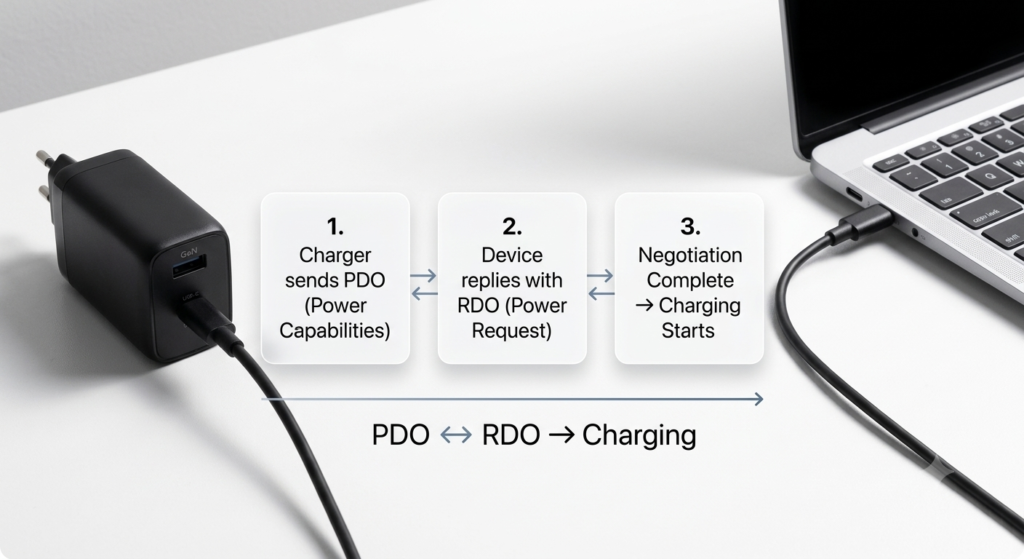
3.2 The PD Handshake: PDOs and RDOs
Every time you plug in a device, a quick conversation happens. It’s called the PD handshake.
- Source (the charger) sends out its Power Data Objects (PDOs)—a list of all voltage/current combinations it can provide.
- Sink (your device) replies with a Request Data Object (RDO)—its chosen power level.
- Both sides agree, and charging begins at exactly the right level.
This happens in a fraction of a second, and it’s why PD charging is both safe and efficient.
3.3 Power Sharing: The Heart of Multi-Port Charging
Power Sharing is what makes multi-port chargers smart. Every charger has a fixed total power limit, so it must split that power across all connected devices.
There are two main approaches to power distribution:
Fixed Power Allocation
Each port gets a pre-set maximum wattage that never changes, no matter what is plugged in.
- Example: 100W charger with C1 locked at 65W and C2 locked at 35W
- Pros: Simple, very stable performance
- Cons: Wastes potential. If you only plug a low-power device into the second port, it can never “borrow” extra wattage.
Dynamic Power Allocation
Dynamic Power Allocation reads each device’s needs in real time and adjusts output automatically.
- Factors in device power demand, internal temperature, and battery level
- Pros: Much higher power efficiency, better real-world charging speed
- Cons: Slightly more complex internal design
Many modern mid-range and premium multi-port chargers use dynamic power allocation to improve flexibility and overall efficiency.
3.4 Real-World Power Allocation Examples
Below are two common charger models to show how sharing works in practice.
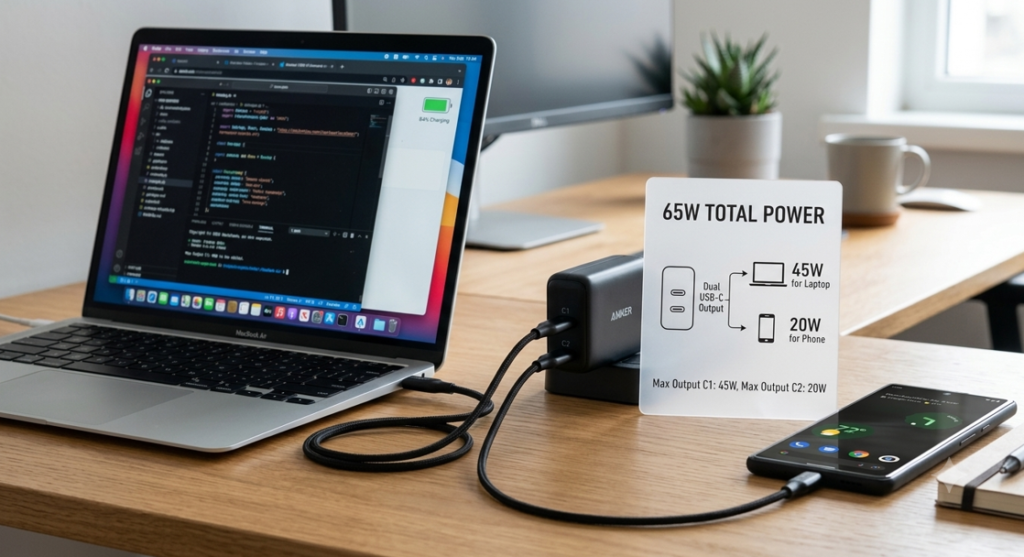
65W Dual-Port PD Charger
- Single device connected: Primary USB-C port delivers full 65W
- Two devices connected: ~45W for the laptop + ~20W for the phone
100W Triple-Port PD Charger
- 1 device: 100W on the primary C port
- 2 devices: 65W (laptop) + 35W (phone/tablet)
- 3 devices: ~45W + ~30W + ~20W distributed across ports
An important note: A charger’s maximum wattage is its top output capability, not the amount of power it always delivers. A 100W charger will not force 100W into a 20W phone—it only supplies the exact power the device requests. Similarly, a 65W laptop will only draw 65W even when plugged into a 100W port.
3.5 Power Priority: Who Gets the Juice First?
Many chargers reserve more power for high-power ports or devices, but the exact behavior depends on the charger’s firmware design. A common priority hierarchy seen in consumer models is:
- High-power devices like laptops
- Tablets and smartphones
- Earbuds, smartwatches, and low-power accessories
This ensures your most power-hungry devices still charge at usable speeds even when everything is plugged in.
3.6 Why Does Charging Pause When I Plug In a Second Device?
You may have noticed this: plug in a phone while your laptop is charging, and the laptop briefly stops charging then starts again.
This is completely normal. Here’s why:
- The new device triggers a fresh PD negotiation
- The charger recalculates the power budget for all ports
- Output levels are adjusted and charging resumes
The whole process usually takes less than a second. It’s not a bug—it’s the charger doing its job correctly.
3.7 What GaN Technology Actually Does (and Doesn’t Do)
Gallium Nitride (GaN) is the biggest leap in charger design in decades. Compared to traditional silicon MOSFETs:
- Much higher switching frequency
- Lower energy loss during conversion
- Smaller physical size for the same wattage
- Generates less heat under similar power conditions when properly designed
Compared to a normal silicon-based charger of the same wattage, a well-designed GaN charger delivers equal power in a much smaller form factor with lower wasted energy.
Important myth bust: GaN does not make your device charge faster by itself.
Charging speed still depends on:
- The PD protocol version
- The charger’s output power
- What your device actually supports
What GaN does give you is a smaller and potentially cooler, more efficient charger that’s much easier to carry around. For multi-port designs, this is a game-changer—without GaN, 100W multi-port chargers would be the size of old laptop bricks.
3.8 Safety Protection Systems
Quality multi-port PD chargers include layers of protection to keep you and your devices safe.
Hardware Protections
- OVP (Over-Voltage Protection): Prevents voltage spikes
- OCP (Over-Current Protection): Stops excessive current flow
- OTP (Over-Temperature Protection): Reduces power or shuts down if too hot
- SCP (Short-Circuit Protection): Instantly cuts power if pins touch
- OPP (Over-Power Protection): Caps total output at safe levels
Protocol-Level Protections
- Verified PD communication before power is applied
- Built-in power limits per device type
- Intelligent thermal throttling
Because multi-port chargers run more circuits and generate more heat, these protections are even more important than on single-port models.
Chapter 3: How to Read Charger Specs Like a Pro
Advertising can be misleading. Here’s how to look at the spec sheet and know what you’re really getting.
4.1 Total Power vs. Per-Port Power
This is the #1 shopping trap for new buyers.
- Total power: The maximum wattage the entire charger can output across all ports combined
- Per-port power: The maximum any single port can deliver when used alone
Example: A “100W 4-port charger” does not give you 100W on every port. It gives you 100W total, shared across all four ports.
Always check both numbers. Laptop users especially need to make sure at least one port has enough solo power for their machine.
4.2 How to Read an Output Profile Table
Every honest charger lists its output profiles. A typical USB-C PD profile looks like this:
- 5V/3A
- 9V/3A
- 15V/3A
- 20V/5A
For context: multiplying voltage by current gives wattage. The example above means the port can deliver up to 100W (20V × 5A) and supports all standard PD voltage levels for phones, tablets, and laptops.
How to judge it quickly:
- 20V support = can charge most laptops
- PPS entries = better fast charging for Android phones
- More voltage steps = smoother, more efficient charging
4.3 Which Power Tier Do You Need?
| Wattage Range | Best For |
|---|---|
| 30W–45W | Smartphones, tablets, earbuds, watches |
| 65W | Phones, tablets, and most ultrabooks |
| 100W–140W | High-performance laptops + multiple devices |
| 240W (PD 3.1 EPR) | Gaming laptops, workstations, specialized gear |
When choosing between a 65W vs 100W charger, consider your heaviest device: 65W covers most ultrabooks and phones for everyday use, while 100W handles higher-performance laptops and simultaneous multi-device charging more comfortably. For most people, a 65W GaN charger strikes the best balance of size, power, and price.
4.4 Cable Matching Rules (Don’t Skip This!)
Even the best charger won’t reach full speed with the wrong cable.
| Power Range | Cable Requirement |
|---|---|
| Up to 60W | Quality 3A USB-C cable |
| 65W–100W | 5A USB-C cable with E-Marker chip |
| Above 100W (PD 3.1 EPR) | EPR-rated cable required |
The E-Marker chip inside the cable tells the charger what the cable can safely handle. Skip it, and your 100W charger may only deliver 60W.
Chapter 4: Buying Guide – Pick the Right Charger for You
Armed with the basics, here’s a step-by-step system for choosing wisely. Finding the best USB-C charger for laptop and phone use comes down to matching your device lineup, not just chasing the biggest number of ports.
5.1 Step 1: Calculate How Much Power You Actually Need
Simple formula:
Add up the maximum charging wattage of all your devices, then add 20–30% headroom.
The extra headroom keeps the charger from running at 100% load all the time, which runs cooler and lasts longer.
For anyone shopping specifically for a laptop + phone setup, confirm the single-port max output meets or exceeds your laptop’s official charging wattage before buying.
5.2 Step 2: Check for Regional Safety Certifications
For users in North America and Europe, these are non-negotiable.
North America
- UL / ETL: Independent safety testing certifications widely recognized in North America, verifying compliance with electrical safety standards
- FCC: Mandatory electromagnetic compatibility standards
Europe
- CE: A European conformity marking indicating the product meets applicable EU regulatory requirements for safety, health, and environmental protection
- RoHS: Restrictions on hazardous materials in electronics
Energy Efficiency
- DOE Level VI: US energy efficiency standard for low standby power use
Unbranded cheap chargers often skip these certifications. The few dollars you save aren’t worth the fire risk.
5.3 Step 3: Your Buying Priority List
Rank features in this order for the smartest purchase:
- Total output power matches your needs
- Single-port max power works for your laptop
- USB PD and PPS support
- Valid safety certifications
- GaN construction (for size and heat)
- Reputable brand and real-world reviews
5.4 Step 4: Match It to Your Lifestyle
For travel
A compact travel USB-C charger with foldable prongs and 100–240V worldwide voltage support is ideal. Prioritize size and weight over maximum port count.
For your desk
More ports = fewer adapters. Higher total wattage handles full loads all day. Cable length and physical stability matter more than pocket-sized design.
For family/shared spaces
- 4+ ports handle multiple people at once
- Stable, consistent output is more important than maximum speed
- Strong safety protections are a must
Chapter 5: Pro Tips for Best Performance
Buying right is only half the story. Use these tips to get the most out of your charger.
6.1 How to Maximize Charging Speed
- Plug your highest-power device (usually your laptop) into the primary high-wattage port
- Pair high-power and low-power devices rather than two power-hungry ones
- Always use a cable rated for the full wattage of your charger
Does plugging order matter?
In most cases, plugging order has little effect on final charging speeds. For the most consistent high-power output for your laptop, connect it first and let it establish a PD handshake before plugging in smaller accessories. Adding a new device will always trigger a brief re-negotiation, but the final power distribution will be the same regardless of order on most modern chargers.
6.2 Safe Daily Use
- Normal: A warm-to-the-touch charger under load is expected
- Abnormal: If it’s too hot to hold, smells odd, or keeps cutting out, unplug it immediately and stop using it
- Good airflow around the charger helps it run cooler and last longer
Chapter 6: Frequently Asked Questions
Q: Does charging slow down when you use multiple ports at once?
A: It depends. If the total power needed by all devices is less than the charger’s total, no. If you exceed the total, yes—each device gets a proportional share. Good dynamic allocation keeps high-priority devices as fast as possible.
Q: Can a 100W charger charge a phone safely? Will higher wattage damage the battery?
A: Yes, it is completely safe. USB PD is a negotiated standard. Your phone only requests the power it can safely use. Think of it like a water faucet: having more pressure available doesn’t force more water into a small pipe. Higher-wattage chargers will not damage smaller devices.
Q: Can I charge non-PD devices with a PD charger?
A: In most cases, yes. The charger will fall back to basic 5V charging for devices that don’t support PD. You just won’t get fast charging speeds.
Q: Are GaN chargers worth the extra money?
A: For most people, yes. You get a noticeably smaller charger that runs cooler and wastes less electricity. For multi-port models especially, GaN is what makes high power in a small body possible.
Q: Why does my laptop pause charging when I plug in my phone?
A: This is the PD re-negotiation process we covered earlier. The charger is rebalancing power across all ports. It’s normal, safe, and usually lasts less than a second.
Q: Can I charge Apple and Android devices at the same time?
A: Absolutely. Each port negotiates independently. Apple and Android devices don’t interfere with each other at all.
Chapter 7: The Future of Multi-Port PD Charging
This technology is still evolving fast. Here’s what’s coming next:
- Wider PD 3.1 240W adoption: More gaming and workstation laptops will switch to USB-C power
- Next-gen GaN improvements: Even higher power density, smaller sizes, and cooler operation
- Smarter power algorithms: More seamless allocation, almost unnoticeable re-handshaking
- A more unified USB-C world: Fewer proprietary chargers, better cross-brand compatibility for everyone
Final Summary: Which Charger Should You Get?
Here’s your quick cheat sheet by user type:
- Light user (phone + earbuds): 30W–45W dual-port model
- Average user (phone + tablet): 65W dual or triple-port GaN charger
- Office user (laptop + phone + accessories): 100W+ triple-port model
- Power user (multiple devices / workstation): 140W+ multi-port desktop charger
At the end of the day, the real value of a multi-port PD charger isn’t how many ports it has—it’s how well it manages power. A great one uses USB PD intelligence, GaN efficiency, and smart power sharing to keep all your devices charged safely, quickly, and with a lot less clutter.
If you take one thing away from this guide: buy for total power management, not port count. Get that right, and one charger really can replace them all.