
If you’ve ever bought a cheap “100W fast charging” USB-C cable, only to get slower-than-advertised speeds and a warm cable during use, the problem is almost never the wattage printed on the package — it’s the thickness of the copper wires inside. Many budget cables use thick plastic jackets or braided exteriors to look sturdy, but the actual conductive copper cores are surprisingly thin. That’s where AWG comes in: it’s the universal standard for measuring real wire thickness.
The first thing almost everyone gets wrong: AWG numbers work backwards. A higher AWG number means a thinner wire, and a lower number means a thicker, higher-capacity wire. This guide breaks down everything you need to know about AWG in plain language, so you can stop judging cables by their outer appearance and pick ones that actually deliver on their advertised specs.
1. What Exactly Is AWG?
AWG stands for American Wire Gauge, sometimes also called Brown & Sharpe wire gauge. It originated as a North American standard for sizing solid round electrical conductors, and is now used globally in consumer electronics, cabling, and electrical work.
Key basics to remember
- AWG measures only the bare copper conductor itself. It does not include the plastic insulation, shielding, or outer jacket. A thick-looking cable can still have very thin copper inside.
- The numbering system comes from the wire-drawing manufacturing process. Each time a copper rod is pulled through a die, it gets thinner. More draws = thinner wire = higher AWG number.
- Core rule: Lower AWG number = thicker copper core = can safely carry more current = better for high-power fast charging.
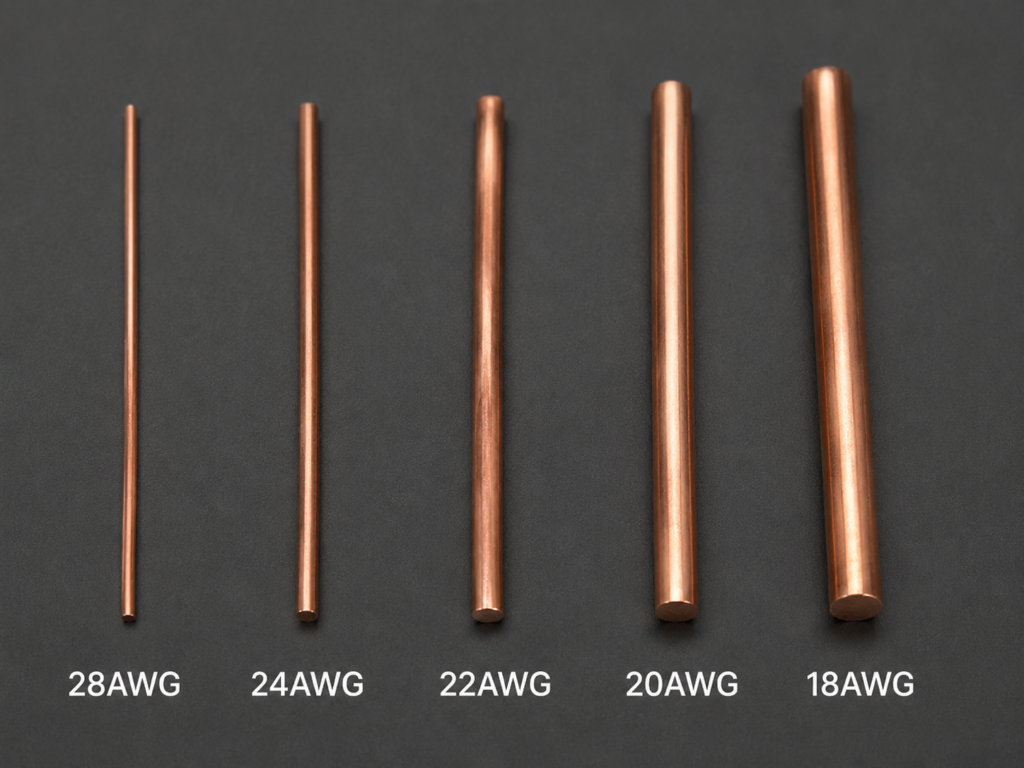
For example, a 20 AWG wire is significantly thicker and can handle far more power than a 28 AWG wire.
2. 3 Simple Rules to Remember
You don’t need to memorize formulas to use AWG. These three rules are enough for most everyday buying decisions:
- Every 3 AWG sizes down = double the cross-sectional area, half the resistance.
Going from 23 AWG to 20 AWG roughly doubles the copper area and cuts electrical resistance in half. - Every 6 AWG sizes down = double the conductor diameter.
Going from 24 AWG to 18 AWG approximately doubles the physical width of the copper wire. - Thicker copper = lower resistance = less heat and less voltage loss.
When current flows through a thinner wire, more energy is wasted as heat, and less power actually reaches your device.
3. How AWG Directly Affects Your Charging Speed
Think of electrical current like water flowing through a pipe. A narrow pipe restricts flow and creates more pressure loss. A thin wire restricts current and creates more voltage drop.
Why thin wires cause slow charging
When you run high current through a thin copper conductor:
- More power is lost as heat: Energy that should charge your battery instead warms up the cable.
- Voltage drops along the cable: The voltage arriving at your device is lower than the voltage leaving the charger.
- Your device slows down charging: Smart devices detect low voltage and reduce charging current to stay within safe limits. That’s why a cheap “100W” cable often charges no faster than a basic 60W one.
Typical AWG ratings for USB-C charging cables
USB cables use different gauges for power wires and signal wires. Charging performance depends on the power conductor AWG, not the signal wires.
| Cable type | Typical power wire AWG | Real-world use case |
|---|---|---|
| Basic budget charging cable | 24–28 AWG | Slow charging for phones, earbuds, and small accessories |
| 60W USB PD cable (3A) | ~22 AWG | Standard fast charging for phones, tablets, and ultraportable laptops |
| 100W USB PD cable (5A) | 20 AWG or thicker | Full-speed laptop charging, multi-device GaN chargers |
| 240W USB PD 3.1 EPR cable | Higher-gauge copper + E-Marker chip | High-performance laptops, workstations, and EPR-compatible devices |
A very common issue: off-brand cables advertised as “100W” may use only 24 AWG power wires. At 5A current, the voltage drop is so large that the device automatically lowers charging power, and you never actually get the advertised speed.
4. 4 Common AWG Myths Debunked
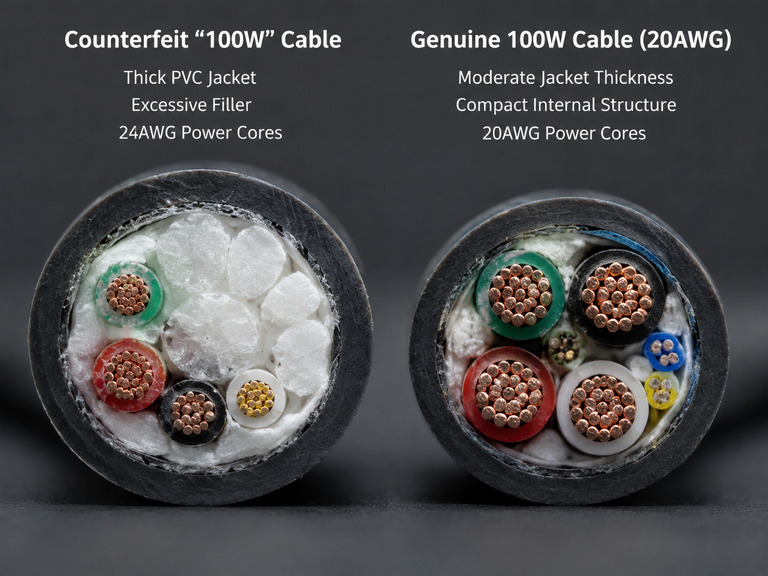
Myth 1: A thicker cable jacket means thicker copper (lower AWG)
False. Many cheap cables use extra plastic filler or thick insulation to make the cable feel sturdy, while the copper inside is still very thin. AWG only describes the bare metal core, not the jacket or braiding.
Myth 2: Braided cables have thicker copper cores
False. Braiding is just an outer jacket material. It improves durability and bend resistance, but it says nothing about the gauge of the copper wires inside. A braided cable can still be a basic 28 AWG charge-only wire.
Myth 3: One AWG rating applies to the whole cable
False. A single USB cable uses different gauges for different wires. You will often see ratings like “28AWG signal + 24AWG power” — this means the data wires are 28 AWG and the power wires are 24 AWG. Always check the power wire gauge for charging performance.
Myth 4: If the AWG is right, fast charging will always work
False. Wire gauge is just the physical foundation. You also need an E-Marker chip for 5A operation, support for the right charging protocol, and a compatible charger and device. A thick wire with no proper negotiation channel will still not trigger full fast charging speeds.
5. Practical Buying Tips
Where to find the AWG rating
Reputable brands list wire gauge in the product specifications, usually under “Conductor”, “Wire Gauge”, or “Cable Construction”. Always look for power wire gauge specifically, not just a single generic AWG number.
Pick the right gauge for your needs
- For spare phone charging, earbuds, and low-power accessories: 24 AWG power wires are more than enough.
- For 60W PD charging, tablets, and lightweight laptops: 22 AWG power wires offer the best balance of cost and performance.
- For 100W laptop charging, docks, and single-cable setups: 20 AWG or thicker power wires are recommended for lower heat and more stable performance.
- For 240W EPR devices: choose USB-IF certified cables with explicit EPR support to avoid fake specs.
Quick pitfalls to avoid
- Avoid any cable advertised as “thickened” or “heavy duty” with no actual AWG specification listed.
- If the price is drastically lower than name-brand equivalents of the same rating, the gauge is almost certainly mislabeled.
- Longer cables suffer more voltage drop. For cables 2 meters or longer, step up one AWG size for the same real-world performance.
6. Quick Reference: Common AWG Sizes for Consumer Electronics
You don’t need to memorize all sizes — these are the ones you’ll actually see on USB cables and accessories:
| AWG Size | Approx. Cross-Section | Common Use Case |
|---|---|---|
| 28 AWG | 0.08 mm² | Thin signal wires, internal headphone wiring |
| 24 AWG | 0.20 mm² | USB 2.0 data wires, basic low-power charging cables |
| 22 AWG | 0.33 mm² | Standard charging cables, 60W PD power conductors |
| 20 AWG | 0.52 mm² | 100W USB PD fast charging cables |
| 18 AWG | 0.82 mm² | High-current power cables, heavy-duty charging |
Final Summary
- AWG is the standard for measuring copper wire thickness. Lower number = thicker wire = higher current capacity — the numbering works backwards, which is the most common point of confusion.
- Fast charging performance depends on the gauge of the power conductors, not the thickness of the outer jacket or whether the cable is braided.
- When buying charging cables, don’t trust only the advertised wattage. Check the actual power wire AWG rating to avoid most fake-spec budget cables.
- Wire gauge is only the physical foundation. Combined with a proper E-Marker chip and full protocol support, you get reliable, full-speed fast charging.