
Intro
Your phone hits 8% GPS mid road trip. Your wireless earbuds die during a long commute. Your tablet runs flat while you work remotely away from wall outlets.
Almost everyone has faced that sinking feeling of a dead gadget with no power socket nearby. A reliable power bank turns panic into convenience, but shopping for one quickly becomes overwhelming.
Manufacturers flood product pages with confusing jargon: mAh, Wh, PD, PPS, Qi2, E-Marker cables and inflated capacity claims. Many shoppers waste money on units that charge slowly, fail to power laptops, or cannot be carried onto flights.
This complete guide cuts through marketing noise. We explain core terminology simply, walk you through matching a power bank to your devices, unpack hidden bottlenecks like charging cables, clarify international airline rules, share battery maintenance tricks, and debunk widespread false beliefs. Whether you are a daily commuter, frequent flyer, remote worker or outdoor enthusiast, you will learn exactly what to look for before buying.
Quick Key Takeaways (Save for later)
- Capacity is not everything. Match size and weight to your daily routine; 10,000 mAh works best for most everyday users.
- Fast charging relies on three factors: power bank, cable and your device. A high-watt power bank means nothing without matching accessories.
- Wh (watt-hour), not mAh, is the standard for comparing energy and airline travel limits.
- High-wattage power banks safely charge low-power gadgets. Your phone controls how much energy it draws.
- Heat, deep discharge and permanent full charge are the biggest causes of short battery life. Swollen or abnormally hot power banks must stop being used immediately.
1. What Is a Power Bank & How Portable Charging Works
A power bank (also known as a portable charger or external battery pack) is a sealed unit containing rechargeable lithium cells and smart control circuitry. It stores electrical energy so you can recharge electronics without fixed wall power.
How it operates
- You plug the power bank into a wall adapter to fill its internal battery cells.
- Internal circuits regulate voltage and current to avoid overcharging.
- When you connect your phone or tablet, circuitry converts stored battery voltage to match your device’s charging requirements.
Main types of power banks available today
- Wired standard power banks: Budget-friendly, wide capacity range, highest energy efficiency. Best value for daily use.
- Magnetic wireless power banks (Qi2 / MagSafe): Attach directly to compatible phones without cables. Convenient for iPhone and modern Android flagships.
- Built-in cable power banks: Eliminate carrying separate charging wires; great for people who constantly lose cables.
- Wall plug hybrid power banks: Foldable AC prongs built in. Ideal for frequent travelers packing light.
- Laptop-focused high-wattage power banks: 65W and above USB PD output to power lightweight notebooks.
- Outdoor rugged power banks: Water/dust resistance, LED flashlights and optional solar panels. Note: solar charging only works as emergency top-ups; solar conversion rates are low.
Power bank vs wall charger
A wall charger converts mains power to USB power but cannot store energy. A power bank stores energy, letting you charge devices anywhere outlets do not exist. Many travelers carry both.
2. Core Specs Explained: mAh, Wh, Rated Capacity & Charging Efficiency
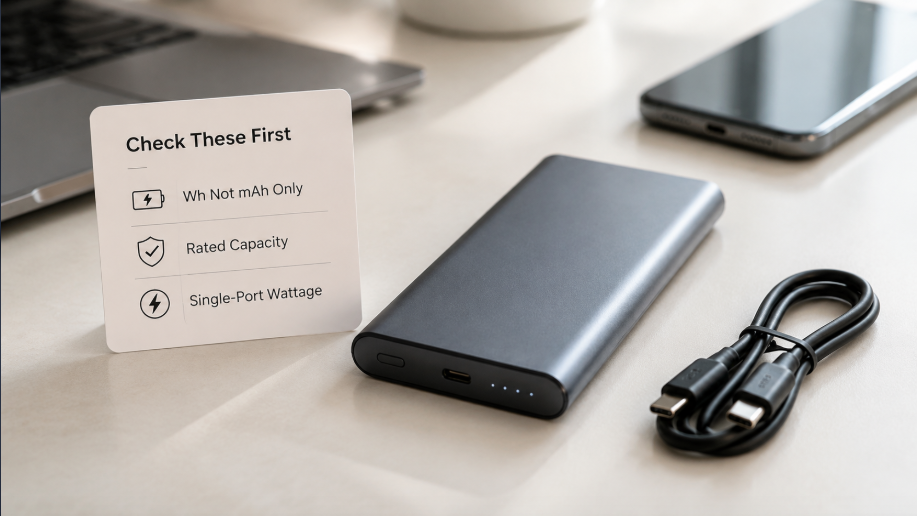
This section eliminates the most common shopping mistakes.
mAh (Milliampere-hour)
mAh describes charge quantity inside battery cells, measured at the cell’s native 3.7V voltage.
Critical warning: You cannot directly compare mAh between power banks and phone batteries, because they operate on different voltages. A 10,000 mAh power bank cannot fully recharge a 10,000 mAh phone battery.
Wh (Watt-hour)
Wh measures total usable energy. This is the universal unit for cross-product comparison and airline regulations.
Conversion formula:Wh = (mAh × 3.7) ÷ 1000
Examples:
- 10,000 mAh = ~37 Wh
- 20,000 mAh = ~74 Wh
Rated capacity vs advertised cell capacity
Manufacturers advertise cell capacity (raw mAh inside cells). The rated output capacity printed on the casing shows how much energy actually exits the ports after voltage conversion losses. Always check the rated figure.
Charging efficiency
Energy disappears during voltage conversion, cable transmission and heat.
Well-designed wired power banks deliver 70%–85% usable energy. Cheap budget models can drop below 65%.
Real-world example: A 10,000 mAh (37 Wh) power bank delivers roughly 25–32 Wh to your phone. For reference, this typically charges an iPhone 15 around 1.5–2 full cycles.
3. Power Output, Ports & Fast Charging Protocols (PD, PPS, QC)
Charging speed is not controlled by the power bank alone. Three pieces must align: power bank, cable and receiving device.
Common power tiers
- 5–12W: Slow charging for earbuds, smartwatches and low-power accessories
- 18–30W: Standard fast charging for most smartphones
- 45–65W: Powers tablets and lightweight laptops
- 100W+: For high-performance ultrabooks and portable gaming hardware
Important note: When multiple devices charge simultaneously, the total power splits between ports. A 65W power bank cannot deliver full 65W to two devices at once. Always verify single-port maximum output.
Main fast charging standards
- USB PD (Power Delivery): The global universal standard. Works with iPhones, Android phones, tablets and laptops. This should be your priority for multi-device setups.
- PPS (Programmable Power Supply): An enhanced extension of PD 3.0. Fine-tunes voltage to reduce heat during charging, favored by Samsung and many modern Android devices.
- QC (Quick Charge): Qualcomm’s older standard, seen on older Snapdragon Android phones. Most new hardware supports PD instead.
- Proprietary brand protocols: Some Android brands use private fast charging systems. While PD provides baseline fast charging, maximum speeds often require brand-certified accessories.
Port types
- USB-A: Older rectangular port, widely compatible but limited power ceiling.
- USB-C: Modern reversible port, supports bidirectional charging, high wattage PD and data transfer. Look for power banks with USB-C input + output.
- Micro-USB: Outdated charging input, rarely found on new 2025–2026 models.
4. How USB-C Cables Control Charging Speed (3A vs 5A E-Marker)
Many users buy high-wattage power banks yet charge slowly because they overlook cable limits.
USB-C cables look identical externally, but internal wiring varies drastically.
- 3A USB-C cable: Supports maximum 60W. Perfect for phones and small tablets under 30W.
- 5A USB-C cable with E-Marker chip: Required for power above 60W up to 100W+. The E-Marker chip acts as an electronic ID, telling chargers and devices the safe power limit for that wire.
Buyer rule: If you plan to charge a 65W+ laptop from your power bank, always use a certified 5A E-Marker USB-C cable. A regular 3A cable caps speeds at 60W, creating an invisible speed barrier.
5. Wireless Power Banks: Qi, Qi2 and MagSafe Pros & Cons
Wireless charging removes cables, but it carries trade-offs.
- Qi (original wireless standard): Requires precise manual alignment between phone and charger. Efficiency is lower than wired.
- Qi2 (2023+ global standard): Adds built-in magnets for automatic alignment. Certified hardware delivers up to 15W consistently. Works with both iPhone and Android without proprietary locks.
- MagSafe: Apple’s proprietary magnetic system, fully compatible with Qi2. Only works for iPhone 12 and newer unless you add a magnetic adapter ring.
Pros
- No tangled cables when on the move
- Simple to attach and detach
- Great for quick top-ups while navigating or streaming media
Cons
- Energy efficiency falls to roughly 60%–75%, wasting battery capacity as heat
- Thicker phone cases can block charging or reduce speed
- Premium magnetic models cost more than equivalent wired power banks
Recommendation: Use wireless for convenience; rely on wired charging when you need maximum speed or every watt of stored energy.
6. Device Compatibility: How to Charge Phones, Laptops, Earbuds & Consoles
Smartphones
- iPhone: Requires minimum 20W USB PD for full-speed fast charging
- Android flagship: Check if your model supports PD/PPS to unlock maximum speeds
- Capacity pick: 10,000 mAh for daily commuting; 20,000 mAh for multi-day trips
Tablets
- Minimum recommended power: 30W USB PD
- Choose 20,000 mAh or larger if you regularly charge your tablet away from power
Laptops
Two non-negotiable requirements:
- Output power ≥45W
- Supports 20V USB PD voltage profile
65W works for MacBook Air and most lightweight Windows laptops. Gaming ultrabooks often need 100W+.
Warning: A power bank labeled “65W total output” may only deliver 30W to single ports. Always verify single-port ratings before buying for laptops.
Earbuds & Smartwatches
These accessories draw tiny current. Some power banks automatically shut off because they detect near-zero load.
Search for power banks with trickle charge / low-current mode for wearables. A simple workaround: charge earbuds inside their charging case.
Handheld game consoles (Nintendo Switch, Steam Deck)
Switch works reliably with 30W+ PD power banks. Steam Deck benefits from 45W–65W models.
7. Power Bank Buying Guide: Pick Capacity Based On Your Scenario
| Capacity | Typical Weight | Best For | Airline Notes |
|---|---|---|---|
| 5,000 mAh | 100–150g | Pocket emergency top-ups, single phone charge | Fully compliant worldwide |
| 10,000 mAh | 200–250g | Daily commuters, most users’ ideal balance of size and capacity | Fully compliant worldwide |
| 20,000 mAh | 350–450g | Weekend travel, multiple devices, remote workers | ~74 Wh; allowed on nearly all commercial flights |
| 30,000 mAh + | 500g+ | Long outdoor expeditions; Check Wh rating carefully | Many units exceed 100 Wh and require airline pre-approval |
Key advice: Avoid chasing maximum capacity if you carry your power bank in a pocket or small crossbody bag. Extra capacity adds significant weight.
8. Safety Certifications & Red Flags When Shopping
Cheap uncertified power banks pose fire risks from poor circuit protection and low-grade battery cells.
Look for these marks on packaging or product pages:
- CE (European compliance)
- FCC (United States electromagnetic safety)
- UL safety certification
- UN38.3 (mandatory lithium battery transport certification)
Red flags to walk away from
- No printed Wh or rated capacity on the casing
- Unrealistic capacity at ultra-low prices (50,000 mAh for under $25)
- No listed safety certifications
- Vague descriptions such as “super fast charging” with no official protocol names (PD/PPS)
9. Best Practices to Extend Your Power Bank’s Lifespan
Lithium-ion cells degrade gradually over hundreds of charge cycles, but smart habits slow aging dramatically.
- Maintain partial charge for long storage: If you will not use it for weeks, charge to 50%–60%. Do not store fully empty or fully charged. Recharge to this level every three months.
- Avoid extreme temperatures: Never leave power banks inside parked cars under direct sunlight. Heat accelerates permanent battery degradation.
- Limit pass-through charging regularly: Charging the power bank while simultaneously powering your device creates extra heat. Use this feature sparingly.
- Use certified cables and adapters: Flimsy uncertified wiring creates heat and unstable power delivery.
- Recalibrate the battery gauge monthly: Fully discharge then fully charge once to fix inaccurate percentage readouts.
- Stop using immediately if the unit swells, emits odd smells, or becomes uncomfortably hot during normal use. Place it in a cool open space and recycle via official electronics waste programs.
10. Airline Carry-on Rules: IATA, FAA & EASA Official Standards
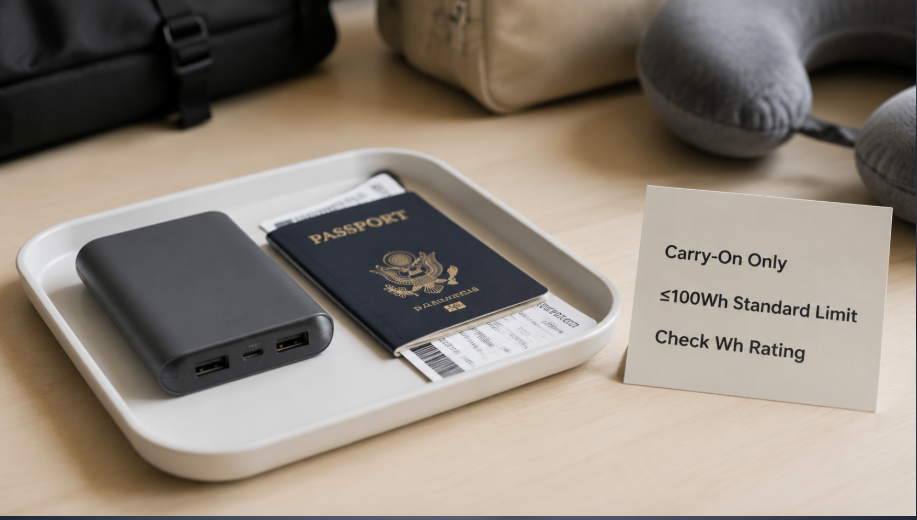
Global rules originate from IATA, enforced by FAA (USA), EASA (Europe) and local aviation authorities.
- ≤100 Wh: Permitted in carry-on luggage. Never place power banks into checked baggage. Quantity limits vary by airline; most carriers accept 2–3 personal units.
- 100 Wh – 160 Wh: Allowed only with advance airline written approval. Many low-cost airlines reject these entirely.
- >160 Wh: Banned on all commercial passenger flights.
Practical travel tips:
- Confirm the power bank has clearly printed Wh values. Security staff may reject units without visible markings.
- Protect ports to avoid accidental short circuits during screening.
- Always verify your airline’s latest policy before international travel, as individual carriers can impose stricter limits.
11. Common Myths Debunked
Myth 1: Larger capacity is always better
Fact: Extra capacity adds weight. Most everyday users gain no benefit carrying a bulky 30,000 mAh unit when a 10,000 mAh model covers daily needs.
Myth 2: High-wattage power banks damage phones
Fact: The receiving device controls how much power it draws. A 65W power bank safely charges a low-power smartwatch.
Myth 3: USB-C guarantees fast charging
Fact: USB-C is only a physical connector. Fast charging requires PD/PPS protocol support and matching cables.
Myth 4: Wireless charging is as efficient as wired
Fact: Wireless transfer always loses energy to heat. Expect shorter real-world run times compared to wired charging.
Myth 5: You must drain a power bank completely before recharging
Fact: Modern lithium-ion cells suffer more damage from deep full discharge. Top-up charging is healthier.
Myth 6: A swollen power bank can still be used safely
Fact: Swelling signals internal cell failure. Risk of thermal runaway. Discontinue use right away.
12. Troubleshooting Typical Power Bank Problems
Issue 1: Power bank stops charging earbuds / smartwatch
Solution: Activate low-current/trickle charge mode via short button presses. Alternatively charge earbuds inside their charging case.
Issue 2: Charging speed feels unexpectedly slow
Check three points:
- Confirm power bank single-port wattage
- Verify your cable (upgrade to 5A E-Marker for >60W loads)
- Check if multiple devices are drawing power at once
Issue 3: Power bank cannot charge your laptop
Solution: Confirm two criteria: ≥45W single-port output AND official support for 20V USB PD. Many budget power banks lack the 20V voltage profile required for notebooks.
Issue 4: Power bank fails to hold charge
Possible causes: Age-related cell degradation, consistent exposure to heat, or a defective unit. If capacity drops sharply within 1–2 years of light use, contact the retailer about warranty options.
13. Industry Trends: The Future of Portable Charging
- GaN power conversion modules: Smaller, cooler power circuitry will enable higher wattage power banks in thinner casings.
- Qi2 magnetic wireless ecosystem: Standardized magnetic alignment will reduce reliance on proprietary wireless hardware.
- Smarter built-in management: Advanced temperature monitoring and AI power allocation to extend cycle life.
- Modular, replaceable cell designs: Emerging designs will allow users to replace worn batteries instead of discarding the whole unit, cutting electronic waste.
- Improved low-light solar panels: Solar power banks will become viable for multi-day off-grid travel, though they will remain secondary emergency charging sources.
14. Frequently Asked Questions
Q: How many charges can I get from a 10,000 mAh power bank?
A: Roughly 1.5–2 full cycles for an iPhone 15, around 1–1.5 cycles for large-screen Android flagships. Results shift based on background app usage and temperature.
Q: Can I bring a power bank on international flights?
A: Yes, inside carry-on luggage, provided its Wh rating sits under 100 Wh. Always confirm printed labeling and airline restrictions before departure.
Q: Are expensive brand-name power banks worth the premium over budget alternatives?
A: Reputable brands implement stricter circuit protection, consistent rated capacity and certified cells. Budget unbranded units often overstate capacity and cut corners on safety hardware.
Q: Can I leave my power bank plugged in overnight long-term?
A: Modern units include overcharge protection, but continuous charging creates minor thermal stress. Unplug once fully charged for best longevity.
Q: Will a power bank work while charging itself (pass-through charging)?
A: Many models support this, but heat buildup accelerates aging. Reserve this feature for travel emergencies rather than daily routine.
15. Final Action Checklist Before Buying Your Next Power Bank
✅ Confirm the device list you need to charge (phone, laptop, wearables)
✅ Select capacity based on travel frequency and how much weight you can carry
✅ Check single-port maximum wattage and supported PD/PPS protocols
✅ Look for clearly printed Wh and rated output capacity on the casing
✅ Verify relevant safety certifications (UN38.3, CE, FCC, UL)
✅ Purchase matching certified USB-C cables: 5A E-Marker if charging laptops
✅ For air travel: Ensure total energy stays ≤100 Wh to avoid complicated airline approval
✅ Plan storage habits to avoid high temperatures and permanent full charge
Closing Words
A power bank is more than a simple gadget; it delivers freedom from hunting for power outlets during commutes, travel and outdoor adventures.
Once you move past confusing marketing buzzwords and focus on meaningful metrics — Wh, single-port wattage, PD compatibility, rated capacity and safety certification — choosing the right model becomes straightforward.
Match your power bank to your lifestyle, care for its battery cells, and you will enjoy reliable portable power for years.
If you found this guide helpful, share it with friends planning trips or shopping for their first portable charger. Subscribe to our newsletter for more unbiased tech buying guides.