
Many Nintendo Switch owners wonder: Can I charge my console with a phone charger? Will a high-wattage charger damage my device? Are third-party accessories safe? While the Switch uses a universal USB-C port, there are plenty of easy-to-miss details when it comes to charging. This guide breaks down everything you need to know in simple terms, so you can charge your Switch safely and efficiently, and pick the right accessories for your needs.
1. Basics: Charging Specs & USB-C Port Overview
1.1 Charging Specs for All Switch Models
There are four main Switch models, each with slightly different battery capacity and power needs. Here’s a quick comparison:
| Model | Battery Capacity | Typical Handheld Charging Power | TV Dock Support |
|---|---|---|---|
| Original Switch (2017) | 4310mAh | ~10–18W | Yes |
| Battery Life Enhanced Version | 4310mAh | ~10–18W | Yes |
| Nintendo Switch Lite | 3570mAh | ~10–15W | No |
| Nintendo Switch OLED Model | 4310mAh | ~10–18W | Yes |
1.2 Official Charger & Dock Power Specifications
The official Nintendo AC Adapter delivers 15V/2.6A (about 39W). It works both for direct handheld charging and for powering the TV dock. When the console is docked in TV mode, the system runs at higher performance and powers HDMI video output, which requires more power than handheld use.
1.3 What the USB-C Port Does
The USB-C port on the bottom of the Switch does more than just charge. It handles three key functions: power input for charging, data transfer for games and updates, and video output when connected to the dock. It also works either way you plug it in, making daily use more convenient.
2. How It Works: The Core Logic of Switch USB-C Charging
2.1 The Main Charging Protocol: USB Power Delivery
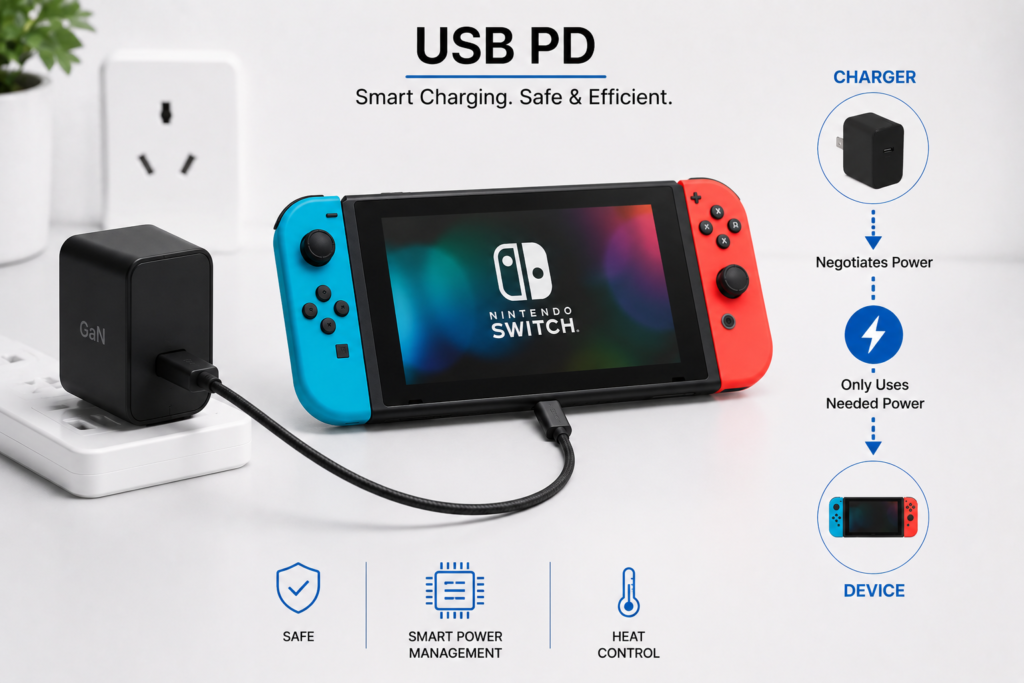
The Switch uses the universal USB Power Delivery (USB PD) fast charging standard. Think of it as a common language that chargers and devices use to communicate. Fast charging only works when both sides speak this language.
This is why many phone chargers charge the Switch slowly: they use proprietary fast charging tech that the Switch doesn’t recognize.
2.2 Handheld Mode vs. TV Dock Mode Power Difference
- Handheld mode: Only powers and charges the console itself, so it needs less power. An 18W PD charger is enough for basic charging.
- TV dock mode: The console runs at higher performance, drives HDMI video output, and powers the dock’s USB ports. Total power draw is much higher. A charger with too little power won’t activate TV mode properly, and may cause black screens or connection drops.
2.3 Power Negotiation: Higher-Wattage Chargers Won’t Damage Your Switch
A common worry is that a 65W or 100W charger will burn out the Switch. This is not true.
USB PD uses a standard negotiation process: when you plug in, the console tells the charger exactly how much voltage and current it needs, and the charger only delivers what’s requested. In short, the charger’s wattage is its maximum capacity — the Switch decides how much power to draw.
3. Accessory Buying Guide: Chargers, Cables & More
3.1 Charger Key Points & Wattage Recommendations
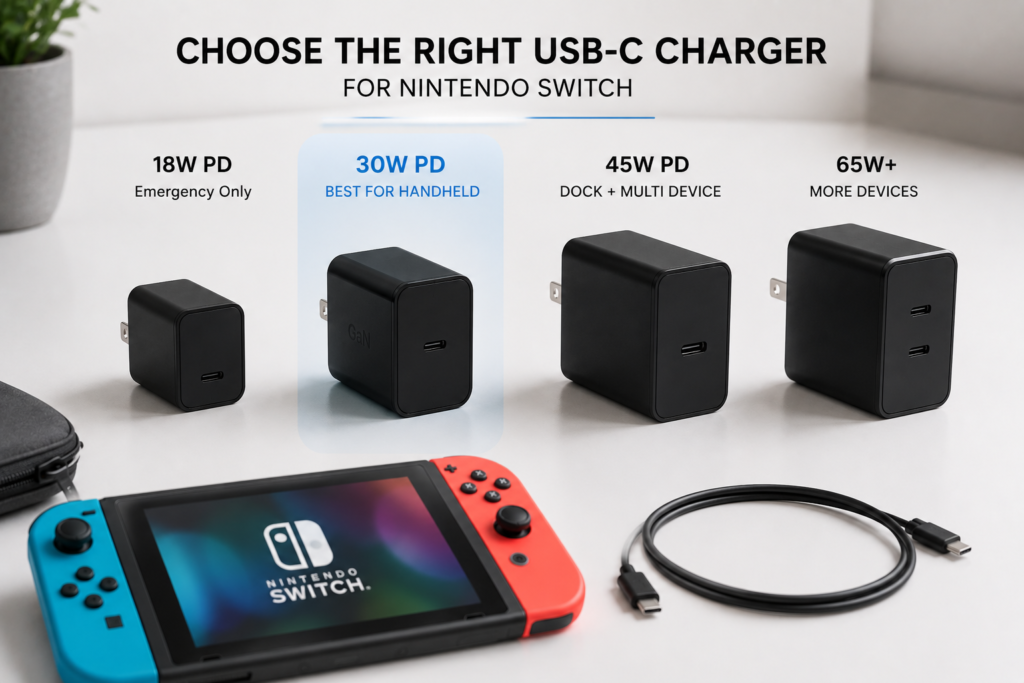
The number one rule for chargers: it must support USB PD, and ideally include a 15V output level. Here’s what different wattages are good for:
| Charger Wattage | Best For | Recommended For |
|---|---|---|
| 18W PD | Emergency charging, slow handheld top-ups | Backup only — not recommended as your main charger |
| 30W PD | Fast handheld charging, everyday portable use | Handheld-only players, Switch Lite owners |
| 45W PD | Near-official performance, works with the TV dock | Users with a TV dock, people who charge multiple devices |
| 65W+ PD | Charging multiple devices at once | Anyone with a phone, tablet, or laptop to charge alongside their Switch |
3.2 How to Pick the Right USB-C Cable
Many people focus only on the charger and overlook the cable. Remember two rules:
- Choose a USB-C to USB-C cable. USB-A to USB-C cables usually only support slow charging and won’t trigger fast charge.
- For high-power use (dock mode, 45W+ charging), pick a reputable cable with an E-Marker chip. It handles current more reliably and avoids dropouts or overheating.
3.3 Power Bank Compatibility & Buying Tips
For a power bank to work well with the Switch, it must support USB PD output and include a 15V output level. Standard 5V-only power banks charge very slowly, and may not even keep up with battery drain while you play.
A 20,000mAh PD power bank can fully charge a Switch about 1.5–2 times, which is enough for short trips.
3.4 Car Chargers & Third-Party Docks
- Car chargers: Pick one with USB PD support. Standard 5V car chargers charge extremely slowly and can’t keep up during gameplay.
- Third-party docks / hubs: Stick to well-known, reputable brands. Cheap, low-quality third-party docks may have unstable power or video issues, and could potentially damage the console’s port in extreme cases.
4. Usage Scenarios: Charging Solutions for Every Situation
4.1 At-Home Daily Charging
For home use, keep the official charger connected to your TV dock as your main charging station. If you need an extra charger for your bedroom or another room, a 45W GaN (gallium nitride) charger is a great pick — it’s compact, runs cool, and works with other devices too.
4.2 Portable On-the-Go Charging
For travel or day trips, we recommend a 30W GaN PD charger plus a 20,000mAh PD power bank. The charger is small enough to throw in a bag for hotel use, and the power bank gives you extra battery for long gaming sessions on the road.
4.3 How to Safely Charge While Playing
Charging while gaming is one of the most common ways people use their Switch. Follow these two tips:
- Use a 30W+ PD charger to make sure charging speed keeps up with battery drain during gameplay.
- Don’t block the air vents on the back of the console. Avoid long charging + gaming sessions in hot environments to reduce heat and battery wear.
4.4 Notes for TV Dock Mode Charging
TV dock mode needs stable, reliable power. For best results, use the official charger or a reputable 45W+ PD charger. If you can’t enter TV mode, or the screen goes black and flickers with a third-party charger, the issue is almost always insufficient wattage or incompatible charging protocol.
5. Common Myths & Risks to Avoid
5.1 Myth: More watts = faster charging
The Switch has a maximum charging speed limit. Going above that wattage won’t make it charge any faster. Charging with a 100W charger is essentially the same speed as a 45W charger. Higher wattage is useful for charging more devices, not for speeding up your Switch charge.
5.2 Myth: Any phone fast charger works
Only phone chargers that support USB PD will fast-charge a Switch (such as Apple’s chargers and some flagship Android chargers). Chargers that only use proprietary fast charging will usually charge at slow 5V speeds, or may not charge at all.
5.3 Myth: Third-party chargers will break your Switch
Reputable third-party PD chargers and cables that meet USB-IF standards are completely safe to use. The real risk comes from cheap, no-name accessories that skip safety circuits — these can overheat or short-circuit.
5.4 Myth: Any USB-C cable works with the dock
Dock mode carries both power and video signal. Poor-quality USB-C cables can’t handle high power and video data reliably, leading to TV mode failures, screen glitches, or dropouts. Not every cable that charges the console will work with the dock.
5.5 Real Risks of Cheap Accessories
Low-quality chargers and cables cause common problems like slow charging, frequent disconnections, and excess heat during use. Over time they can wear out your battery faster, and in the worst case damage your Switch’s USB-C port.
6. Troubleshooting & Battery Care
6.1 What to Do If Your Switch Won’t Charge or Charges Slowly
If you run into charging issues, try these steps in order:
- Try a different charger and cable to rule out broken accessories.
- Check the USB-C port on the bottom of the console and clean out any dust or debris.
- Hold down the power button to force-restart the console, which fixes temporary software glitches.
- If none of the above works, there may be a hardware issue with the battery or port. Contact Nintendo support for help.
6.2 Normal vs. Abnormal Charging Heat
Slight warmth during charging — especially while gaming — is normal. If the console gets too hot to hold comfortably, loses battery while plugged in, or shuts down on its own, that’s a sign of overheating. Stop charging and playing immediately, and let it cool down in a cool place before using it again.
6.3 Lithium-Ion Battery Care Tips
The Switch uses a lithium-ion battery. Follow these tips to extend its lifespan:
- You don’t have to charge it to 100% every time, and try not to let it die completely.
- Avoid charging and gaming in very hot environments. Keep the console ventilated in summer.
- If you won’t use it for a long time, store it at about 50% battery, and top it up every 1–2 months.
7. Final Recommendations: The Best Charging Setups
7.1 Great Value Charging Combos
- Handheld-only / Switch Lite users: A 30W PD GaN charger + a reliable USB-C to USB-C cable. Light, affordable, and more than enough for your needs.
- TV dock users: Keep your official charger dedicated to the dock. Add a 45W PD charger as a spare for handheld use.
- Multi-device users: A 65W multi-port GaN PD charger. One charger handles your Switch, phone, tablet, and more.
7.2 Key Takeaways
- The Switch uses the universal USB PD fast charging standard — always look for PD support when buying accessories.
- You don’t need the highest wattage. 30W is great for handheld, 45W works with the dock.
- Cables matter just as much as chargers. Avoid cheap, no-name cables.
- Reputable third-party PD accessories are safe and won’t damage your Switch.