
If you’ve ever been confused by two identical-looking USB-C ports that act completely different — one charges laptops and outputs 8K video, another only slowly charges your earbuds — this guide breaks down the root cause in plain language.
Core Key Idea
Every USB-C port shares the exact same oval reversible shape, but their supported features are never guaranteed to match.
USB Type-C only sets rules for the physical plug and socket shape. Everything else (charging speed, data speed, video output) depends on the device’s internal hardware, firmware, and software design.
Think of USB-C like a standard-sized pipe fitting used on every building. Every fitting looks identical from the outside — same oval shape, same 24 contact points, same reversible design — but one might be connected to a tiny residential water line, another to a high-pressure fire main, and another to a multi-lane data highway. The connector shape is universal; what flows through it, and how much, depends entirely on the hardware built behind it.
1. USB-C Only Defines Physical Hardware, Not Functionality
The USB Implementers Forum (USB-IF) created the USB-C standard with one primary goal: unify the physical connector.
Fixed universal physical rules every port must follow:
- Fully reversible 24-pin mirror contact layout
- Fixed 8.4mm × 2.6mm oval size
- Standard plug/unplug mechanical durability rules
Official USB-IF rule: The connector shape is just a physical connection medium. It does not set limits or minimum requirements for power, data, or video features.
The plastic/metal plug you see on the outside cannot control what signals run through the device’s internal circuits — just like a standard water faucet cannot control how much water pressure the pipes behind the wall can deliver.
2. All Advanced Capabilities Are Optional Add-Ons
The base USB-C physical spec only mandates basic 5V low-power power delivery. Every high-end feature is completely optional for manufacturers to implement:
- Data transfer tiers
From slow USB 2.0 (480Mbps) up to 20Gbps USB 3.2, or 40–80Gbps USB4. Brands pick one speed tier based on their product target. - USB PD Fast Charging
The high-wattage universal fast charging protocol is not required. Basic ports only carry default 5V low-speed charging. - DisplayPort Alt Mode (Video Output)
Lets the port stream video to monitors/TVs — completely omitted on most budget phones and cheap accessories. - Thunderbolt 3/4/5
A separate high-performance standard that reuses the USB-C plug shape. It requires dedicated expensive controller chips and is only built into premium laptops.
This works just like the upgrade packages for a new home. The basic unit always comes with standard electricity and running water, but fiber internet, cable TV and central air conditioning are all paid optional add-ons. USB-C follows the exact same logic: the base physical port only guarantees basic 5V power. Every premium feature is an optional upgrade for manufacturers to pick and choose.
3. Feature Configuration Depends On Product Positioning & Manufacturer Choices
Manufacturers customize USB-C functionality to match their product’s price bracket and intended use case, and this practice fully complies with USB-IF official standards.
- Entry-level budget gadgets: Only basic 5V charging + USB 2.0 slow data to cut production costs. Many cheap Bluetooth speaker chargers, budget smartwatches, and low-end phones fall into this category.
- Mid-range devices: Add USB PD fast charging and USB 3.2 medium-speed data, but skip video output to save costs. Most mid-tier Android phones use this configuration.
- Premium high-end devices: Full feature set — high-wattage PD, fast USB4 data, DP video output, and sometimes Thunderbolt. Flagship laptops and professional tablets use full-function USB-C.
Think of it like buying a car. An entry-level budget commuter car only covers basic transportation — it will not come with a race-grade engine, adaptive suspension or a rear-seat entertainment system. This is not cutting corners; it is how product tiers work. A $10 Bluetooth speaker has no reason to include a $20 Thunderbolt controller chip that no user will ever use.
Common beginner question: Why is my USB-C port only capable of charging?
Answer: The brand only soldered simple power supply circuits behind the port, and left out all controller chips required for data or video signals to save material costs. This is fully allowed under official USB-C rules.
4. Advanced Features Raise Hardware Costs Significantly
Every extra USB-C feature adds expensive internal components that increase the total production cost of a device:
- High-speed data (USB 3.2 / USB4): Needs dedicated high-speed signal controllers, specialized circuit board wiring, and EMI shielding to avoid signal loss.
- DisplayPort video output: Requires GPU signal multiplexer chips to reroute graphics data through the USB-C pins.
- Thunderbolt: Needs proprietary controller chips, extra signal amplifiers, and lengthy official certification testing fees.
Upgrading a basic USB-C port to full-featured spec is like upgrading a household garden hose to a commercial fire supply line. You need thicker, higher-grade copper wires, extra shielding layers to block signal interference, dedicated controller chips, and lengthy compliance testing — every single addition drives up the final bill of materials. For low-cost products, these extra costs would make the product uncompetitive in the market.
5. Your USB-C Cable Also Limits Full Functionality
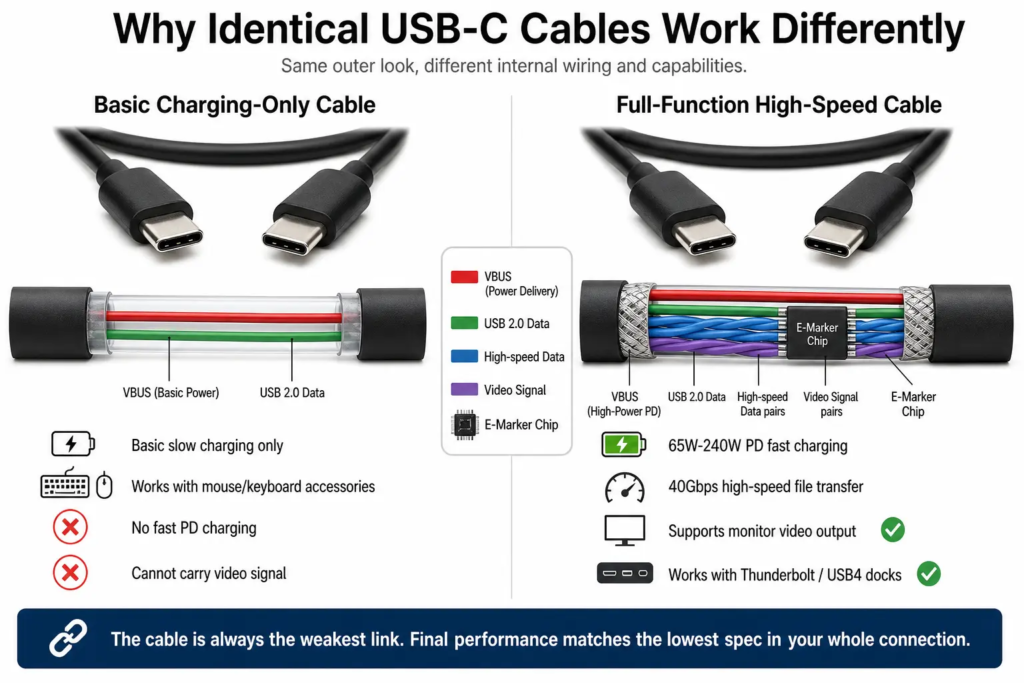
Even if your device’s USB-C port supports all high-end features, a low-quality cable will cap performance to its own limited specs. Visually all USB-C cables look identical, but their internal wiring varies wildly:
- Thin cheap wires cannot safely carry high wattage PD charging
- Lack of shielding ruins high-speed data and video signal stability
- Any cable rated above 3A maximum current must include an E-Marker ID chip that reports its power/speed limits to connected devices. Without this chip, the system automatically restricts power output to safe low levels.
Even if your home has a gigabit fiber internet plan, your speeds will be stuck at 100Mbps if you use an old low-grade Ethernet cable. The same rule applies to USB-C: the cable is the actual pipe / road between two devices. A thin, unshielded cable cannot safely carry high power or stable high-speed signals, no matter how capable the ports on both ends are.
The E-Marker chip built into high-power cables acts like an official pressure rating sticker printed on a water pipe. It tells the system exactly how much current the cable can safely handle, so the charger never pushes more power than the cable can take — preventing overheating or damage.
This creates the classic weak-link rule: your final performance will always match the lowest spec between your device port and your cable.
6. Why USB-IF Does Not Force Full-Featured USB-C On All Devices
Many users wonder why regulators don’t make every USB-C port support charging, fast data, and video. There are two core industry reasons:
- USB-C’s core design mission is connector unification, not universal identical functionality. The standard was built to fit every type of electronics from tiny earbud cases to gaming workstations.
- Mandating all advanced features on every USB-C product would drastically raise the cost of low-cost gadgets. Cheap wearable tech, disposable accessories, and basic power banks would become far more expensive, slowing global adoption of the unified USB-C connector.
Imagine if building codes required every single home, even tiny studio apartments, to install industrial fire water mains and gigabit fiber. Rent and housing prices would skyrocket, and many people could no longer afford basic housing. The optional feature system creates flexible design rules: premium gear gets full performance, while low-cost small gadgets retain affordable pricing without being forced to add unnecessary circuits they will never use.
7. Official USB-IF Certification Is Voluntary, Not Mandatory
USB-IF offers official product certification testing to verify compatibility and spec compliance, but brands are not legally required to apply for it:
- Certified products undergo standardized interoperability testing across chargers, cables, monitors, and peripherals. Their labeled speed/wattage ratings are reliable.
- Uncertified generic off-brand products are not guaranteed to follow standard rules, and often mislabel their supported features.
- Fully certified devices will print clear performance icons next to the port (lightning bolt for Thunderbolt, DP logo for video, power symbol for PD charging).
This is similar to safety certifications for home appliances. A certified product has been tested to meet official safety and performance standards, so you can trust its labeled specs. Uncertified generic products are not necessarily bad, but there is no third-party guarantee that they will perform as advertised, or work reliably across different devices.
8. How To Check What Your USB-C Port Supports
Never judge a port’s capability purely by its physical appearance — use these reliable methods ordered by accuracy:
- Official manufacturer product specs (most reliable source): Look up your laptop/phone’s spec sheet on the brand’s website for full USB-C feature breakdowns.
- Port printed icons: Lightning bolt = Thunderbolt; DP logo = video output; PD symbol = fast charging support. Note: Many modern slim phones remove printed port icons entirely.
- Real-world testing: Test different cables, monitors, and chargers to confirm if video output or high-wattage PD works on your device.
To put it simply: never judge a house’s plumbing by the look of its faucet. To know exactly what your USB-C port can do, always check the official spec sheet first — that is the equivalent of reading the building’s official utility blueprint.
9. Most Widespread User Misconceptions
❌ Myth 1: All USB-C ports support USB4 high speeds
Fact: USB4 is an optional premium protocol. Most budget USB-C ports only run slow USB 2.0.
❌ Myth 2: USB-C always means Thunderbolt
Fact: Thunderbolt uses the USB-C plug shape but requires separate proprietary hardware. Only premium laptops carry Thunderbolt ports.
Believing every USB-C supports Thunderbolt is like assuming every four-door car can drive Formula 1 races. They share the same basic shape and connector style, but the internal hardware is built for completely different purposes and price points.
❌ Myth 3: Every USB-C port can connect to monitors via HDMI adapters
Fact: Video output via DP Alt Mode is optional. Many phones and cheap tablets have no video circuitry at all.
❌ Myth 4: All USB-C ports support fast PD charging
Fact: Base USB-C only delivers basic 5V power. PD fast charging requires an extra dedicated power controller chip.
10. The Golden Rule For All USB-C Performance
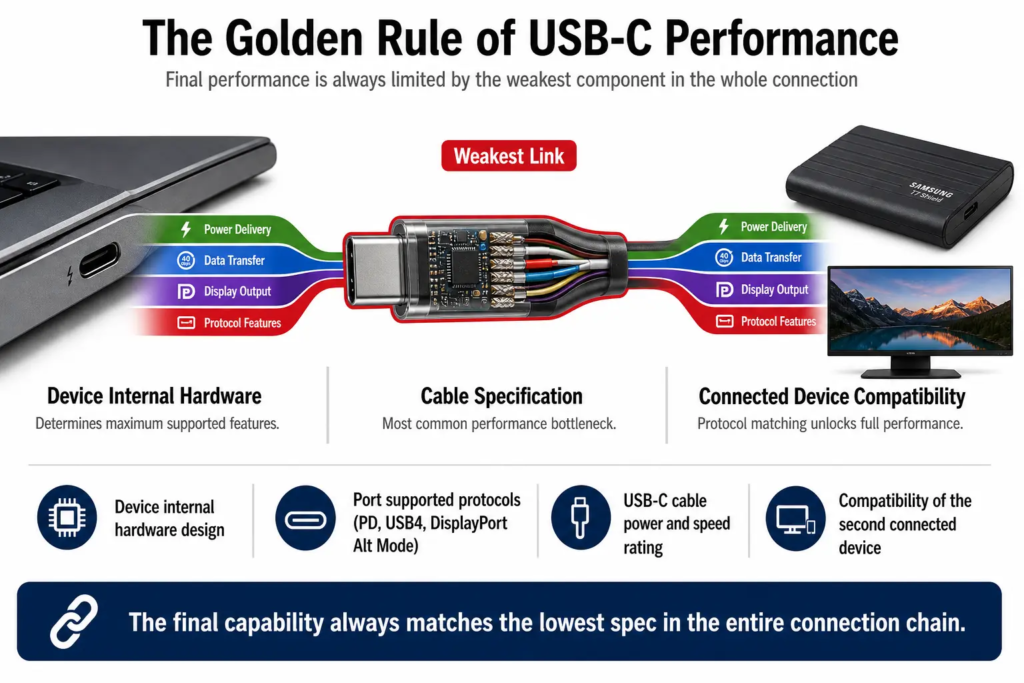
Final capability of your USB-C connection =
Device internal hardware design + Port supported protocols + USB-C cable specs + Compatibility of the second connected device
This is the classic “weakest link in the chain” rule, just like how a chain is only as strong as its thinnest link. A water supply system’s maximum flow rate is limited by the narrowest pipe in the line. For USB-C, the final speed, power and features will always drop to match the least capable component in the whole connection. All four factors must match high-end standards to unlock full fast charging, high-speed data, and video functionality. If any single component is low-spec, the entire connection downgrades to match its limits.