
If you’re shopping for a new USB-C charger, you’ll most likely be torn between the 65W and 100W tiers: Is 100W definitely twice as fast as 65W? Is the extra money worth it? Will it damage your phone?
In fact, the first misconception many people have about fast charging is “the higher the power, the faster the charging” — but the reality is far from that simple. Today we will thoroughly explain the differences, applicable scenarios, and key pitfalls to avoid between 65W and 100W chargers. Whether you only charge your phone, or travel for business with a laptop and multiple devices, you can directly find the right choice for you.
Conclusion First: What Exactly Is the Difference Between 65W and 100W?
Let’s put the core conclusion first; those who don’t want to read the long article can directly match their situation:
The core differences between 65W and 100W are maximum power supply limit and margin for simultaneous charging of multiple devices; it doesn’t charge significantly faster with any device plugged in. If your phone, tablet, and laptop only support up to 30W, 45W, or within 65W, a 100W charger usually won’t significantly improve the charging speed of a single device; the value of 100W only emerges when the device supports 65W-100W fast charging, or you often charge multiple devices at the same time.
Situations Where Choosing 65W Directly Is Suitable
- Mainly charge medium and low power devices such as phones, tablets, earphones, watches, and Switch
- The original adapter of your laptop is 30W, 45W, 61W, or 65W
- Hardly ever fast charge more than two devices at the same time
- Value portability, price, low heat generation, and small size more
Situations Where Choosing 100W Directly Is Suitable
- Have a high-performance thin and light laptop, creator laptop, gaming handheld, or Android phone that supports high-power fast charging
- Often charge laptop, phone, tablet, and earphones at the same time
- Want to use one multi-port charger to replace multiple original chargers, reducing cables on the desk or in luggage
- Mainly used fixedly on the desk, requiring a larger power margin
Quick Reference Table
For your direct reference, we have compiled the adaptation of the most common scenarios:
| Usage Scenario | Is 65W Sufficient? | Core Value of 100W |
|---|---|---|
| Only phone/earphones/watch | Completely sufficient | Mostly a waste of power |
| Phone + tablet | Sufficient for single-device fast charging | Can achieve simultaneous fast charging for two devices |
| MacBook Air/ordinary thin and light laptop | Usually sufficient | Improves the margin for simultaneous charging of multiple devices |
| 65W-100W high-performance thin and light laptop | Barely sufficient; may lose power when charging while using under high load | More stable charging, less likely to lose power when charging while using |
| Gaming laptop | Can only be used for emergency when shut down or under light load | Still for emergency use, cannot replace the original high-power adapter |
Prerequisites for Comparison: Clarify What We Compare and What We Don’t
Before formally starting, let’s clarify the basic rules and concepts first, otherwise it’s easy to randomly compare different types of products and draw wrong conclusions.
Plain Language Meaning of Power (W)
You can think of a charger as a faucet; W (watt) is the maximum water flow rate of this faucet — it represents the maximum power the charger can output, but the actual charging speed is not entirely determined by the charger.
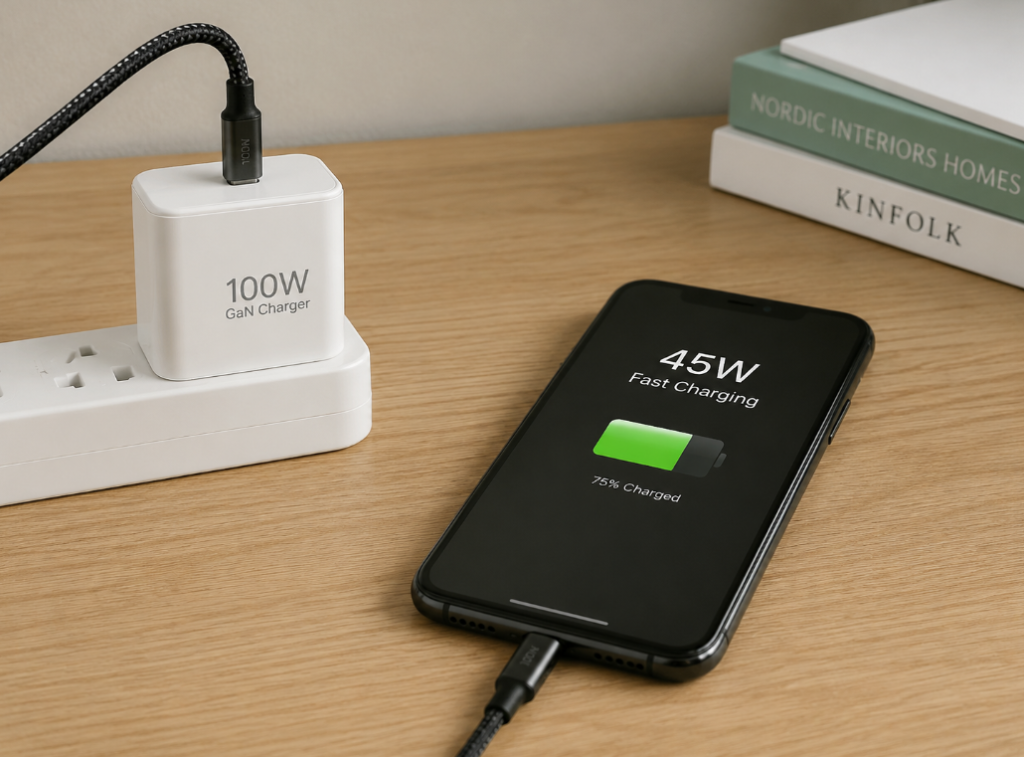
The actual charging power is jointly determined by the charger, device, cable, fast charging protocol, ambient temperature, and the current battery level of the device. The final speed depends on the weakest link: for example, if your phone only supports up to 45W fast charging, even if you plug in a 100W charger, it will only charge at 45W or lower, not faster.
Mainstream Positioning of 65W and 100W
Both are the most common power tiers in current USB-C PD fast charging; neither is more “premium” than the other, they just have different positioning:
- 65W is the main tier of universal fast charging, covering the vast majority of phones, tablets, handhelds, entry-level and ordinary thin and light laptops. It is an all-rounder option that “can charge everything, and most are fast enough”
- 100W is a high-power universal tier, more suitable for high-performance thin and light laptops, simultaneous multi-port fast charging, or scenarios where multiple devices are charged integrally on the desk
Unified Comparison Standard
All comparisons in this article default to USB-C chargers from reputable brands, with mainstream safety certifications, and using the same generation of gallium nitride (GaN) technology — the new type of charger commonly seen on the market now, with small size and low heat generation.
- For single-port models, mainly look at the maximum output power of a single port and the specific voltage/current tiers
- For multi-port models, look at total power, single-port peak power, and power distribution rules when using two/three ports simultaneously
We will not compare with unbranded falsely labeled products, uncertified products, old bulky silicon-based adapters, or exclusive chargers that only support a certain brand’s proprietary protocol; such products have no unified reference standard.
Core Premises That Will Change the Conclusion
The following factors will directly affect the charging experience, so there is no absolute “100W is definitely better than 65W”:
- The maximum input power of the device being charged itself
- Whether the device supports PD, PPS, or a brand’s proprietary fast charging protocol
- Current specification supported by the cable (3A or 5A)
- Whether multiple ports are used simultaneously
- Whether the device is in the low-battery fast charging phase or high-battery protection phase
- Ambient temperature, the device’s temperature control strategy, and whether charging while using
Content Not Included in This Comparison
- Specific brand rankings, after-sales experience, appearance aesthetics
- Wireless chargers, car chargers, power banks
- Recommendations for exclusive models targeting a single brand’s proprietary fast charging ecosystem
Must-Know for Beginners: Key Concepts Affecting Charging Experience
You don’t need to memorize terminology; understanding the following concepts will allow you to basically understand 90% of fast charging promotions and not be fooled by merchants.
Fast Charging Protocol: The Communication Language Between Charger and Device
You can think of the fast charging protocol as a “common language” between the charger and the device: after plugging in, the two will first negotiate what voltage and current to use for charging. Only after successful negotiation will fast charging be triggered; if negotiation fails, only the slowest normal charging can be used.
- The most universal protocol is USB PD, which is equivalent to Mandarin. It is supported by almost all phones, tablets, laptops, and handhelds, and is currently the most widely covered fast charging standard
- PPS is an enhanced function in the PD protocol that can adjust voltage more precisely. Efficient fast charging of some Android phones such as Samsung relies on this function
- There is also a category of brand proprietary protocols. For example, the 80W and 120W fast charging promoted by some phone manufacturers can only reach full speed with their own chargers and cables; a universal 100W PD charger may not trigger high power
If the protocols do not match, the most common result is falling back to 5V normal charging, or a lower PD tier. In a few cases, slow charging will be prompted, and very few old devices may not charge normally.
How to Read Voltage, Current, and Power Tiers
The formula for calculating power is very simple: W (power) = V (voltage) × A (current), just like water flow rate equals water pressure multiplied by pipe thickness. For example, 20V×5A=100W is the most common full power tier for 100W chargers.
Common PD tiers are 5V/3A, 9V/3A, 15V/3A, 20V/3A, 20V/5A:
- The common full power tier of 65W chargers is around 20V/3.25A; whether it can reach full speed depends on the device and cable
- The full power tier of 100W chargers is basically 20V/5A, which usually requires a dedicated cable that supports 5A
Here’s a pitfall to mention first: 100W written on the packaging doesn’t mean you can charge any device at 100W; it just means it can output up to that much.
Total Power, Single-Port Peak, Multi-Port Distribution
When buying a multi-port charger, don’t just look at the large total power number on the packaging; you must distinguish these three concepts clearly:
- Total power: the total upper limit of simultaneous output of the entire charger, which is the most prominent number on the packaging
- Single-port peak: the maximum power that a single port can output when using that port alone
- Multi-port distribution: when multiple devices are plugged in at the same time, the total power will be re-split. For example, a 100W dual-port charger may be split into 65W+30W, and a three-port one may be split into 45W+30W+20W
A very common phenomenon with multi-port chargers: when plugging or unplugging devices, charging will pause briefly or flicker. This is the charger redistributing power, which is normal and not a malfunction. When buying, be sure to check the power distribution table on the product detail page, don’t just look at slogans like “100W four-port fast charging”.
Cables: The Most Easily Overlooked Bottleneck
Many people spend a lot of money on a 100W charger, but end up using an ordinary cable that came with an old phone, and finally can only reach up to 60W, completely wasting the high power.
- Ordinary USB-C 3A cables generally only support up to about 60W, which is sufficient for most phones, tablets, and medium and low power devices
- 5A cables with E-Marker chip can support 100W or even higher 240W, which is the basic prerequisite for stable 100W output
- Even for 65W devices, some require 5A cables or manufacturer-certified cables to strictly reach full speed; not all 65W devices can reach full speed with ordinary 3A cables
Judging the cable specification is very simple: check if the packaging, cable body, or detail page has markings like 100W, 5A, E-Marker, 240W. Being able to plug in doesn’t mean fast charging; cheap short cables, randomly given cables, and old cables are likely to only support low power.
Why Charging Slows Down After 80%
This is a normal protection strategy for lithium batteries, not a broken charger. You can think of it as when the water is almost full, you turn down the faucet to prevent water from overflowing — when the battery is almost full, it will also gradually reduce the charging power to protect battery life.
Generally speaking, the 0%-50% or 20%-80% phase best reflects the difference in fast charging. In the 80%-100% phase, whether it’s 65W or 100W, the speed will slow down significantly, with very little difference. High temperature, charging while playing games, battery aging, and turning on power saving mode will all cause power to drop earlier.
Relationship Between PD 3.0, PD 3.1, and 100W
Many merchants use PD 3.1 as a selling point, but for 100W chargers, there’s actually no need to specifically pursue it:
- 100W basically falls within the traditional USB PD SPR range, which can be fully achieved with PD 3.0, commonly 20V/5A
- Higher powers like 140W, 180W, 240W require the PD 3.1 EPR standard, and all of the device, charger, and cable need to support it
If you don’t have a need to power devices above 140W in the future, you don’t need to specifically worry about whether it’s PD 3.1 when buying a 100W charger.
Item-by-Item Comparison of Core Dimensions: The Real Difference Between 65W vs 100W
Now that we understand the basic concepts, let’s see how big the real difference between the two is from several dimensions that everyone cares about most.
Charging Speed Comparison
Single-Device Charging
The speed difference depends entirely on the maximum supported power of the device itself:
- If the device’s maximum supported power ≤65W: the charging speeds of 65W and 100W are usually similar. Slight differences mainly come from protocol matching, temperature control, and cables, which ordinary people can barely perceive
- If the device’s maximum supported power is 65W-100W: 100W has a chance to be significantly faster, especially in the low-battery fast charging phase
- If the device’s maximum supported power >100W: 100W will be closer to the device’s needs than 65W, but still cannot replace the original high-power adapter
Special attention here: some phones advertise support for 100W fast charging, but use a brand’s proprietary protocol. Only original or compatible chargers and cables can reach full speed. A universal PD 100W charger may only reach a lower tier, even slower than a brand-exclusive 65W charger.
Charging While Using
The experience difference of charging while using is more obvious than charging in standby mode:
- For low-load use, such as office work, browsing the web, or video conferencing, 65W can usually meet the needs of most thin and light laptops, and can even slowly charge the battery
- For high-load use, such as video editing, code compilation, or gaming, 100W is less likely to have the situation of “showing charging, but the battery level drops instead”
- If the original adapter of your high-performance laptop has a power exceeding 100W, even with a 100W charger, it can mostly only maintain light to medium load use, with stronger emergency attributes
Simultaneous Charging of Multiple Devices
Simultaneous charging of multiple devices is the core advantage scenario of 100W:
- For 65W multi-port models, after plugging in two or three devices, the single-port power can easily drop to 30W, 20W or even lower, and the laptop may only charge slowly
- 100W multi-port models are easier to achieve combinations like “65W for laptop + 30W for phone”, or “45W for tablet + 30W for phone + low power for earphones”, both sides can maintain fast charging
The key here is not the total number of ports, but the actual power distribution rules. In addition, the laptop must be plugged into the highest power USB-C port first; many multi-port chargers only support full power on the first C port, and plugging into the wrong one will be much slower.
Situations Where Speed Difference Narrows
In the following situations, the speed gap between 65W and 100W will become very small, even no difference at all:
- The device itself does not support high-power fast charging
- The cable does not support 5A or has no E-Marker chip
- The battery level has reached the high-battery protection phase above 80%
- Ambient temperature is too high, device is severely overheated, charging while playing
- The fast charging protocols of the charger and device do not match
Size and Weight Comparison
Single-Port Models
Under the premise of the same brand and same generation of GaN technology, 100W single-port chargers are usually larger and heavier than 65W ones:
- The common weight of 65W single-port GaN chargers is about 80-120g
- The common weight of 100W single-port GaN chargers is about 100-180g
It seems like only a few tens of grams difference, but if you carry it in your pocket every day, the difference in size and weight will still affect the experience.
Multi-Port Models
The situation for multi-port models is just the opposite: a 100W multi-port charger may only be slightly larger than a 65W multi-port model, but can replace two or even three original chargers. For people who travel frequently for business, carrying one 100W multi-port charger is much lighter than carrying three original chargers for phone, tablet, and laptop, and the total luggage weight is actually more advantageous.
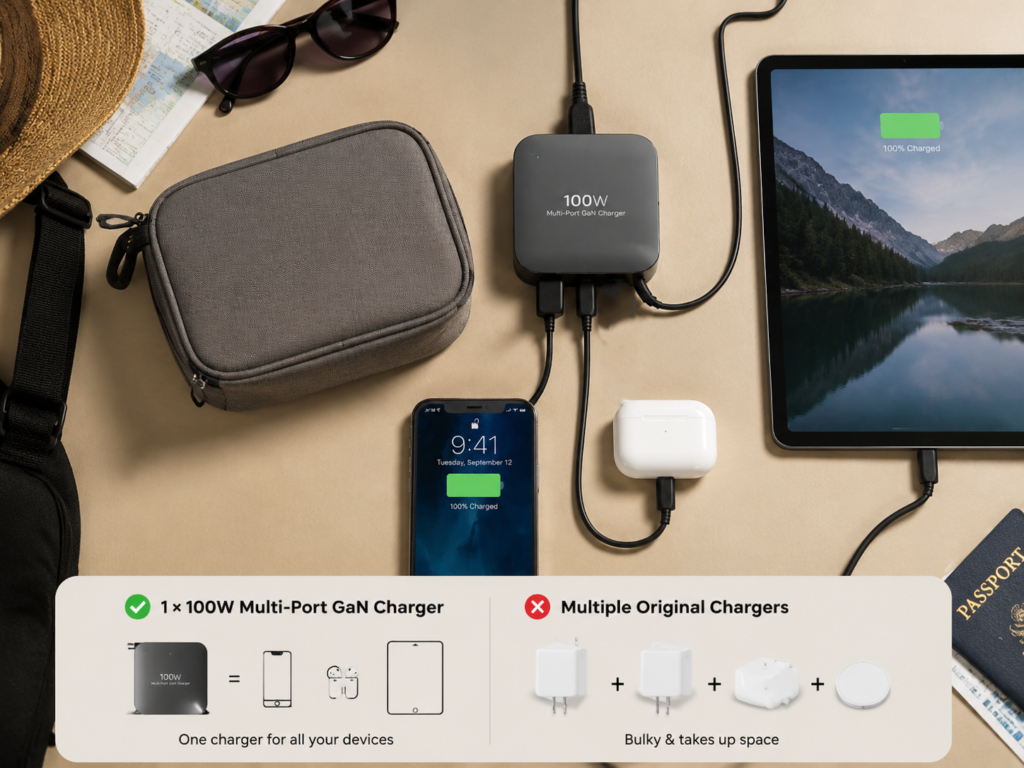
In scenarios where socket space is tight, also pay attention to the direction of the charger’s prongs. Some bulky chargers will block adjacent sockets; you can check physical references in user reviews before buying.
Conditions That Change the Conclusion
The above size and weight comparison is not absolute:
- High-end technology 100W GaN chargers may be similar in size to ordinary 65W ones
- Old silicon-based 100W chargers may be several times larger than GaN 65W ones
- Even for 100W, there will be obvious differences in size and weight between dual-port, three-port, and four-port models
Compatibility Comparison
General Device Compatibility
- Low-power devices (earphones, watches, Kindle, etc.): both can automatically adapt, and will not force high current just because the charger has high power, so there’s no need to worry at all
- Thin and light laptops of 65W and below: both can usually meet full speed or near full speed charging
- 65W-100W devices: 100W is easier to reach full speed, 65W may charge slowly, or lose power while using
- Gaming laptops/workstations above 100W: both can only be used for emergency, it is recommended to use the original adapter for heavy loads
Safety of Mixed Use
This is one of the most asked questions, let’s give the conclusion directly:
- Charging low-power devices with a 100W charger: legitimate products will output according to the device’s needs, will not damage the battery just because it’s rated 100W, you can use it with complete confidence
- Charging 100W devices with a 65W charger: usually will not damage the device, just insufficient power, may prompt slow charging, or lose power under high load
The real risks mainly come from inferior chargers, inferior cables, falsely labeled products, poor heat dissipation, and products without safety certifications, which have little to do with power itself.
Proprietary Protocol Exception
Let’s emphasize the issue of proprietary protocols again: the 80W, 100W, 120W fast charging of some phones relies on the brand’s own proprietary protocols, original cables, and original chargers. A universal PD 100W charger does not equal being able to trigger the 100W fast charging advertised by the phone — a brand-exclusive 65W charger charging its own phone may be faster than a universal 100W one.
If you use an Android phone that relies on PPS, such as Samsung, make sure the charger supports the PPS protocol when buying, otherwise the fast charging speed will be reduced.
Compatibility for Overseas Use
Legitimate USB-C chargers generally support 100-240V wide voltage, suitable for the power grids of most countries and regions in the world, no need to buy an additional transformer for cross-border use. But pay attention to two points:
- Confirm prong specifications: US, EU, UK, AU plugs have different shapes, either choose the version for the corresponding region, or prepare an adapter
- Pay attention to safety certifications: CE, FCC, UL/ETL are common in Europe and America, UKCA in the UK, PSE in Japan. Buying locally compliant products is more secure
Heat Generation, Stability, and Safety
Sources of Heat
It’s normal for chargers to generate heat, because there is loss during electrical energy conversion. The higher the efficiency, the less heat is generated at the same power. The conversion efficiency of legitimate GaN chargers is about 88%-94%, depending on the design and load conditions.
Simply put: the higher the power, the smaller the size, and the hotter the environment, the greater the heat dissipation pressure of the charger, and the hotter it feels to the touch.
Which Is Hotter: 65W or 100W?
There is no absolute answer to this, it depends on the usage scenario:
- When outputting the same 65W, the 100W charger may be more relaxed because of the lower load ratio, and the heat generation is not necessarily higher than 65W
- But if 100W is outputting near full load for a long time, the total heat generation is usually higher than 65W
- When multiple devices are at full load, 65W is more likely to hit the power limit and trigger power reduction protection; 100W has better stability because of the larger margin
What Heat Generation Is Normal
Many people feel unsafe when they touch a hot charger, but that’s not necessarily the case:
- Normal situation: the surface is warm or obviously hot, but there is no peculiar smell, no deformation, no frequent charging interruption. The temperature rise of legitimate products meets safety standards
- Abnormal situation: too hot to touch for a short time, peculiar smell, shell deformation, abnormally loose plug, frequent charging interruption. Stop using immediately in these cases
When using, try not to cover the charger, don’t place it on bedding, in a closed bag, or in a sun-exposed environment for high-load charging, as this will affect heat dissipation.
Safety Protection Configuration
Legitimate chargers generally have overvoltage, overcurrent, overtemperature, and short circuit protection. Safety is not determined solely by 65W or 100W, but jointly by design, materials, certification, and quality control — it’s better to choose a 65W from a reputable brand than to buy a cheap, falsely labeled 100W without certification.
Price and Long-Term Use Cost
Regular Price Difference
Under the premise of the same brand, same series, and same number of ports, 100W chargers are usually 20%-50% more expensive than 65W ones. Promotions, brand positioning, and number of ports will cause the price difference to fluctuate.
Where Does the Price Difference Come From
100W is more expensive mainly because of higher costs:
- Requires higher specification power devices, more complex heat dissipation design, larger transformers or capacitors
- Multi-port models require more ports and more complex power distribution chips
- Additional configurations such as higher specification safety certifications, foldable prongs, and included high-specification cables
Long-Term Cost
During daily standby, the power consumption of both is very low, the difference in electricity bills is almost negligible, and the difference is only a few yuan a year.
The real cost difference lies in the usage scenario: if 100W can replace several original chargers on your desk, whether it’s saving space or carrying fewer chargers on business trips, it’s more cost-effective in the long run; but if you don’t use high power for a long time, the extra money won’t have much return.
Scenario-Based Selection: How Different Users Should Choose
After talking about the parameter comparison, you may still be a bit confused. We will directly match your situation according to the most common usage scenarios.
Only Charge Phones, Tablets, and Small Devices
- Ordinary phones: most don’t need 100W. Focus on whether the phone supports PD, PPS, or a brand’s proprietary protocol. Matching the protocol is more important than just piling up power
- iPhone: usually don’t need 100W, 20W-35W can already meet the main fast charging needs. Choosing 65W can also cover tablet and occasional laptop charging
- iPad/Android tablets: 65W is usually sufficient. The value of 100W is mainly that it doesn’t slow down when charging other devices at the same time
- Low-power devices such as earphones, watches, and Kindle: there is basically no difference in charging speed between the two
Charging Laptops
- Thin and light laptops with original adapters of 30W/45W/61W/65W: 65W is usually sufficient
- Thin and light laptops or creator laptops with original adapters of 67W/90W/96W/100W: choosing 100W is more appropriate
- High-performance gaming laptops: first check if the laptop supports USB-C PD charging. Even if it does, 65W/100W can mostly only be used for emergency when shut down or under light load; use the original adapter for heavy loads
When judging, be sure to check the official adapter power and USB-C input power instructions of the laptop, don’t just look at the port shape — even if it’s a USB-C port, some can only transfer data and cannot charge.
Simultaneous Charging of Multiple Devices
- Occasionally only charge phone + earphones: 65W is enough
- Often charge laptop + phone at the same time: 100W is more stable. Prioritize checking if the dual-port simultaneous charging can achieve 65W+30W distribution
- Often charge laptop + tablet + phone at the same time: prioritize choosing 100W or higher power multi-port models
- Long-term fixed use on desk: multi-port 100W can reduce plugging and unplugging, but you have to accept the brief charging pause caused by power redistribution when plugging/unplugging devices
Business Trips and Travel
- Light travel for short trips, only bring phone and tablet: 65W is more portable
- Bring laptop, multiple devices, cross-border business trip: 100W multi-port model is more suitable, can replace several chargers, and carry fewer cables
- Cross-border use: confirm it’s 100-240V wide voltage, prepare the prong adapter for the corresponding region, prioritize choosing products with local safety certifications
- When there are few sockets in the hotel: the convenience of multi-port 100W is far greater than the mere speed improvement
Fixed Desk Use
- Single laptop for fixed office work: just choose 65W or 100W according to the laptop’s needs
- Multiple devices permanently on the desk: 100W multi-port model saves more sockets and makes the desk tidier
- High stability requirements: prioritize choosing models with clear power distribution rules, clear port markings, and stable reputation. Don’t greedily buy a bunch of unused ports
Advanced Pitfall Avoidance: Parameters You Must Check Before Buying
After determining the approximate power tier, there are several details you must check when buying, otherwise it’s easy to spend 100W money but only get 60W effect.
Check the Nameplate Output Tiers
Don’t just look at the large “65W” “100W” on the packaging. Be sure to check the small print output parameters on the packaging or the product itself, that is, the current corresponding to each voltage:
- For 100W chargers, you should generally see the 20V/5A tier
- For laptop use, confirm that there is a 20V voltage tier
- For use with Android phones that support PPS, such as Samsung, confirm support for PPS and the corresponding voltage and current range
Check Single-Port Maximum Power
Multi-port chargers are likely to only support full power on the first C port (usually marked C1 or PD1), and the power of other C ports or A ports will be much lower. If you plug into the wrong port, the laptop may only charge slowly. Prioritize choosing products with clear port markings and clear power distribution rules in the manual.
Check Multi-Port Distribution Table
Focus on whether the power distribution meets your actual usage habits when charging two or three ports simultaneously. For example, if you often charge a 65W laptop and a 30W phone at the same time, you need at least a reasonable distribution of nearly 95W, so 100W is appropriate; if a certain 100W three-port charger has 45W+30W+20W when charging three ports simultaneously, it’s still not enough for a 65W laptop, which means you bought 100W for nothing.
Check Cable Specification
It is recommended that 100W chargers must be paired with 5A E-Marker cables, otherwise it’s very likely they won’t reach full speed. Even for 65W laptops, it’s recommended to use cables clearly marked 100W/5A to reduce the probability of not reaching full speed due to cable bottlenecks. If you want to cover future devices above 140W, then consider 240W USB-C cables; ordinary users don’t need to buy them in advance.
Check Protocol Support
- Laptops: focus on whether they support USB PD
- Some Android phones such as Samsung: focus on whether they support PPS
- Domestic high-power phones: focus on whether they support the corresponding brand’s proprietary protocol
If you’re not sure, check the parameters on the device’s official website, don’t just look at the charger merchant’s promotion.
Check Certification and Workmanship
- Products sold legitimately in China should pay attention to 3C certification
- For overseas purchases, pay attention to local safety certifications and prong standards
- Avoid buying 100W products that are unbranded, uncertified, have vague parameters, and are abnormally low in price. Such products are most likely falsely labeled and have safety hazards
Common Misconceptions and Correct Understandings
Regarding fast charging, there are several widely circulated misconceptions, let’s correct them all at once.
Misconception: 100W Will Damage the Phone
Correct understanding: Legitimate chargers will not force output 100W; the phone will negotiate power with the charger according to its own needs, taking only what it needs, and will not be damaged. The main factors that really damage the battery are long-term high temperature, long-term storage at full charge, inferior chargers, and abnormal charging environments.
Misconception: Higher Power Means Faster Charging
Correct understanding: The device’s power limit, protocol matching, cable, temperature, and battery level phase will all limit charging speed. For phones that only support 30W, there is usually no significant difference in charging speed between 65W and 100W.
Misconception: Rated 100W Means 100W Per Port
Correct understanding: All ports of a multi-port charger share the total power. Usually, only when a single port is used exclusively can it reach 100W full speed; when multiple devices are used simultaneously, the power is split. Be sure to check the power distribution table before buying.
Misconception: Any USB-C Port Can Fast Charge
Correct understanding: USB-C is just the shape of the port, it does not equal supporting fast charging protocols and high power. Only when the cable, device, and charger all support the corresponding protocol and power can fast charging be triggered.
Misconception: 100W Is Definitely Safer or More Dangerous Than 65W
Correct understanding: Safety depends on the product’s design, materials, protection circuit, certification, and quality control, not solely determined by power level. A legitimate 100W can safely charge low-power devices, and an inferior 65W may also have safety risks.
Misconception: Buying 100W Will Definitely Be Future-Proof
Correct understanding: If you don’t have a need to buy a high-power laptop or multi-device fast charging in the next 1-2 years, 65W has higher cost-effectiveness. Only when you plan to upgrade to a high-performance thin and light laptop or build a multi-device desktop environment does 100W have forward-looking value.
Troubleshooting Methods for Slow Charging
If you already bought a charger and find that the charging speed is not as expected, you can troubleshoot it yourself by following these steps, and 90% of the problems can be found.
Step 1: Confirm How Much Power the Device Itself Supports
Check the parameters on the device’s official website, or look at the rated power of the original charger. Don’t use the word “fast charging” in promotions to replace specific values. The “100W fast charging” advertised by many phones is a proprietary protocol, and universal PD chargers can’t reach that speed by nature.
Step 2: Test with a Qualified Cable
First, try replacing it with a cable clearly marked 100W/5A E-Marker. If the speed becomes faster after changing the cable, then the original cable is the bottleneck. This is the most common problem, bar none.
Step 3: Plug in Only One Device, Use the Highest Power Port
Eliminate the influence of multi-port shunting, confirm that you are plugged into the USB-C port that supports the highest power. Many people plug into the wrong port and think the charger is broken.
Step 4: Check Temperature and Battery Level Phase
If the battery level has exceeded 80%, slowing down is a normal battery protection strategy. Severe device overheating, charging while playing, and too high ambient temperature will cause the device to actively reduce charging power, which is also normal.
Step 5: Verify Protocol Matching
For phones, check if PPS or proprietary protocol is needed to trigger high-power fast charging; for laptops, confirm if they support USB-C PD input. If only one device charges slowly, it’s most likely a problem with the device’s own charging strategy.
Step 6: Rule Out Charger Quality Issues
Observe if the charger has frequent charging interruptions, abnormal noise, peculiar smell, or abnormal heat generation. Check if the product has clear parameters and safety certifications. If possible, you can use a power tester to assist in judgment, but ordinary users don’t need to buy this specifically.
Purchase Decision Formula: 3 Steps to Choose the Right Power
If you’re still undecided, you can follow these 3 steps to calculate the most suitable power for you.
Step 1: List Your Devices
List all the devices you often charge, such as phone, tablet, laptop, earphones, watch, handheld, then mark the official maximum wired charging power of each device.
Step 2: Calculate Simultaneous Charging Needs
- If you basically charge single devices: just look at the device with the highest power, choose a tier close to what it supports
- If you often charge multiple devices at the same time: add up the power of the devices charged simultaneously to estimate. For example, 65W laptop + 25W phone + 10W earphones, total demand is about 100W, so choose 100W
- If you only occasionally charge multiple devices at the same time and can accept slower charging, you don’t need to buy strictly according to total demand; choosing a lower tier also works
Step 3: Match Protocols and Cables
- For laptops, prioritize choosing those that support USB PD
- For Android high-power phones, check if they support PPS or the corresponding brand’s proprietary protocol
- If you choose 100W, remember to pair it with a 5A E-Marker cable
Finally, adjust according to your budget and carrying method: if you carry it every day, prioritize choosing light weight, small size, and foldable prongs; for fixed desk use, prioritize looking at the number of ports and power distribution rules; if the budget is limited, a legitimate 65W from a reputable brand is always more worth buying than a low-priced falsely labeled 100W.
FAQ: Quick Answers to Frequently Asked Questions
Can a 100W Charger Be Used for 65W Devices?
Yes. Legitimate chargers will automatically negotiate output power with the device; the device will only take the power it needs, and will not be damaged.
Can a 65W Charger Be Used for 100W Laptops?
In most cases, it can be used for emergency, but may charge slowly, lose power while using, or the system will prompt a low-power adapter. Long-term use is not recommended for high-load scenarios.
Why Doesn’t a 100W Charger Charge My Phone Faster?
There are many possible reasons: the phone itself only supports lower PD power, requires PPS or proprietary protocol to trigger high power, the battery level has reached the high-battery protection phase, ambient temperature is too high, or the cable does not support 5A.
Do I Have to Buy a 100W Cable When Buying a 100W Charger?
It’s recommended to buy. 100W usually requires a 5A E-Marker cable to reach full speed; ordinary 3A cables generally only reach up to about 60W, which equals wasting the high power.
Which Is More Suitable for MacBook: 65W or 100W?
For MacBook Air and ordinary light use scenarios, 65W is usually sufficient; for higher-power MacBook Pro, or if you need to charge multiple devices at the same time, 100W is more suitable. The specific details are subject to Apple’s official adapter power and model support.
What Is the Relationship Between 100W and PD 3.1?
100W usually does not need to rely on PD 3.1; it can be achieved with PD 3.0. For higher powers above 140W, you need to pay attention to PD 3.1 EPR and 240W cables.
Final Summary: 1-Minute Selection
Finally, let’s sort it out for you in the most straightforward words, just choose according to this:
Situations Where 65W Is Sufficient
- All your devices have a maximum power not exceeding 65W
- Basically charge single devices, rarely charge multiple devices at the same time
- Mainly charge phones, tablets, and ordinary thin and light laptops
- Value portability, price, and low heat generation
Situations Where 100W Is More Worthwhile
- Have 65W-100W laptops, handhelds, or other high-power devices
- Often charge laptop + phone/tablet at the same time
- Want to use one charger to replace multiple original adapters, simplifying desk or luggage
- Fixed desk use, requiring a larger power margin
Most Important Purchase Reminder
Don’t just look at the large 65W or 100W rating on the packaging. Be sure to simultaneously check the device’s power limit, fast charging protocol, cable specification, single-port maximum power, and multi-port distribution rules. A 65W from a reputable brand is always more trustworthy than a cheap, falsely labeled, uncertified 100W.
For most ordinary users, 65W is completely sufficient; for users with laptop or multi-device charging needs, 100W is much more practical.