
When buying a USB-C charger, have you also stared at the wattage and hesitated: if I spend a little more for 140W, will it charge everything faster? After all, the number is 40% higher, which sounds like a noticeable improvement. But in actual use, many people who buy a 140W charger find that it makes almost no difference compared to their existing 100W charger when charging phones or thin-and-light laptops, while being heavier and more expensive.
Whether you want to know if 100W is enough, if 140W is worth buying, what PD3.1 is, how to use 140W charging for MacBook, or how to choose a fast charging cable, this article will explain it all. We’ll first give a quick conclusion for those in a hurry; if you want to understand the underlying principles and how to avoid pitfalls, read on for details.
First, the Conclusion: How to Choose Between 100W and 140W
Here’s the most straightforward judgment, no need to memorize complicated parameters:
- If you mainly use phones, tablets, handheld consoles, or thin-and-light laptops 14 inches and below: 100W is completely sufficient. 140W will not make these devices noticeably faster, because they cannot draw that much power on their own.
- If you use a high-performance laptop that supports 140W input: 140W is genuinely useful, especially for fast top-ups when the battery is low, or when charging while editing videos or running programs — the difference is clearly noticeable.
- If you travel frequently or need to charge multiple devices at once on your desk: the value of 140W is not just faster single-device charging, but also more power headroom when charging via multiple ports simultaneously, so the laptop won’t slow down charging as soon as you plug in a phone.
- If you use a gaming laptop or mobile workstation: both 100W and 140W are basically only for emergency use, and cannot replace the original 200W or 300W high-power adapters. Under high load, the battery will still drain.
For your quick reference, we have compiled a decision table:
| Better to Choose 100W | Better to Choose 140W | No Need to Upgrade to 140W At All |
|---|---|---|
| Main device’s maximum input power ≤100W | Main device explicitly supports PD3.1 140W | Device only supports up to 65W/100W |
| Mainly charge phones, tablets, thin-and-light laptops | Frequently charge laptop + phone/tablet at the same time | Your existing cables are not EPR high-power cables |
| Budget-sensitive, value portability | Want one charger to cover all devices | Mainly charge slowly at night, don’t care about speed |
| Phone fast charging relies on the manufacturer’s proprietary protocol |
Beginner Basics: First Clarify Comparison Boundaries and Core Concepts
Before the formal comparison, we need to clarify the premises of the comparison, otherwise it’s like talking past each other. Many people read reviews saying 140W is barely better than 100W, or that 140W chargers get very hot, often because the products being compared are not on the same baseline. The comparisons in this article are all based on several unified premises:
First, we only compare legitimate USB-C wired fast charging chargers. Wireless chargers, car chargers, and power banks are not included, as their power logic is different.
Second, we default to qualified gallium nitride (GaN) products of the same generation. We will not compare with old silicon-based bulky chargers, nor with cheap no-name products with falsely labeled wattage — those labeled 140W but only actually outputting 80W have no comparison value.
Third, the basic test conditions are around 25°C room temperature, single-port output, compliant cables, and the device in a low battery state (e.g., below 20%). For special cases such as multi-port simultaneous charging, high-temperature environments, or charging while using the device, we will explain separately.
Fourth, and most importantly: the charger’s power is an upper limit, not the actual output. What really determines how fast you charge is how much power the device itself can accept, not how much the charger is labeled to output.
Plain Language Explanation of Power Numbers
Many people’s understanding of “watt (W)” is “the bigger the number, the faster”, which is only half correct. Watt is the upper limit of power supply, just like the thickness of a water pipe: the thicker the pipe, the more water can flow through it at maximum, but if you only turn your faucet on a little, even the thickest pipe won’t make the water flow faster.
100W and 140W refer to the maximum output capability of the charger, not that this power is maintained throughout the entire charging process from 0% to 100%. During actual charging, the power is negotiated and determined by the device, remaining battery level, fast charging protocols supported by both sides, the cable, and temperature — the charger does not force power into the device. Qualified chargers and devices first perform a “handshake negotiation”: if the device says “I need a maximum of 100W”, the charger will output at most 100W, and will not force more just because it can output 140W. So there’s no need to worry that a high-power charger will burn out small devices.
PD, SPR, EPR Explained All at Once
When talking about fast charging negotiation, we have to mention several abbreviations often seen on spec sheets. You don’t need to memorize them by rote, just know their general meaning:
First is USB PD, the most universal fast charging protocol for USB-C ports. You can think of it as a universal set of “charging conversation rules”: both the charger and the device must follow these rules to agree on how much power to use for charging.
In earlier PD protocols, the maximum power basically topped out at 100W. This range is called SPR (Standard Power Range), which uses 20V voltage and a maximum 5A current. 20×5=100W — that’s where it comes from.
Later, the PD protocol was updated to version 3.1, adding higher voltage levels such as 28V, 36V, and even 48V, which can support higher power. This expanded range is called EPR (Extended Power Range). The 140W chargers we often talk about are basically implemented using the 28V/5A level: 28×5=140W.
So 140W is not simply increasing the current of 100W a little. It requires support from higher voltage, a new protocol, and matching cables — you can’t just buy any charger labeled 140W and expect it to work.
Key Term Supplements
There are a few other small terms you’ll often encounter; just know what they mean when you see them:
- E-marker chip: A small chip hidden inside a USB-C cable, equivalent to the cable’s “ID card”. It tells the charger and device “how much current/power I can handle”. Cables without this chip cannot reach full high power.
- PPS (Programmable Power Supply): A function in the PD protocol, more commonly used in Android flagship phones and tablets. It can adjust voltage more precisely, making charging faster and generating less heat. Not all high-power chargers support it, so Android users may want to pay extra attention.
- Multi-port power distribution: If a charger has multiple ports, when multiple devices are plugged in at the same time, the total power is divided into several parts, and the power of each port will be lower than when using a single port.
- Dynamic renegotiation: When you plug in a new device or unplug one, the charger has to recalculate how much power to allocate to each port. At this time, already connected devices may briefly stop charging, which is usually normal, but frequent disconnections indicate a problem.
Underlying Differences: Where 100W and 140W Really Differ
Now that we understand the basic concepts, let’s look at the essential differences between 100W and 140W.
Technical Basis of 100W Chargers
Current mainstream 100W chargers basically use the USB PD 3.0 or PD3.1 SPR standard, with the highest level being 20V/5A=100W. To reach full 100W, you need a 5A USB-C cable with an E-marker chip. Ordinary 3A cables can only reach a maximum of 60W, and will only charge slowly when plugged in.
The coverage of 100W is actually already very wide: phones, tablets, handheld consoles, thin-and-light laptops 14 inches and below, and most office laptops are basically covered, with even some headroom to spare.
Technical Basis of 140W Chargers
The core of a 140W charger is support for the EPR extended power range of USB PD3.1, with a typical maximum level of 28V/5A=140W. To actually reach 140W, three conditions must be met: the charger supports EPR, the cable supports EPR, and the device also supports EPR. None can be missing. If even one does not support it, the power will drop to the maximum level acceptable to both sides, such as 100W or even lower.
So 140W has higher requirements for cables. Generally, you need a USB-C cable rated at 240W or explicitly marked as supporting PD EPR. Your existing 100W cable, when plugged in, will still only run at a maximum of 100W, meaning you bought the 140W charger for nothing.
140W is more suitable for high-performance laptops that support 140W input, or scenarios where you often need to charge multiple devices at the same time — it’s equivalent to one charger replacing several.
Actual Changes Brought by Upgrading from 100W to 140W
When upgrading from 100W to 140W, the changes in actual experience are mainly in these aspects:
First, single-device charging speed: only if the device itself supports input above 100W will 140W bring a noticeable speed improvement; otherwise, there’s no difference from 100W.
Second, multi-device charging headroom: 140W has a higher total power. When charging a laptop, phone, and tablet at the same time, the laptop can still maintain a relatively high power, and won’t drop to 65W as soon as you plug in a phone.
Third, size, weight, and heat generation: with the same generation of technology and the same number of ports, 140W chargers are usually larger and heavier, and generate more noticeable heat at full load. After all, to output higher power, the requirements for heat dissipation are also higher.
Fourth, cost: whether it’s the 140W charger itself or the matching EPR cable, the price is higher than 100W ones, after all, the specifications are higher.
Fifth, compatibility: 140W chargers are backward compatible with all low-power USB-C devices, such as phones and earbuds, but they won’t make these devices charge faster — they just charge normally.
Common Labeling Traps
Here we want to specifically remind you of several common “word games” on spec sheets that can easily lead to wrong purchases:
First pitfall: labeled “140W”, but it’s actually the total power of multiple ports, and a single USB-C port can only reach a maximum of 100W or even lower. This type of charger is suitable for charging multiple devices at the same time, but if you want to charge a 140W-supported laptop at full speed via a single port, it won’t work.
Second pitfall: some laptops’ 140W fast charging requires a specific port or cable to trigger. For example, the 16-inch MacBook Pro can reach 140W with the MagSafe 3 magnetic port, but may only reach around 100W maximum with a regular USB-C port. It’s best to check the official instructions before buying.
Third pitfall: no-name high-wattage chargers look cheap, but in reality they may have incomplete protocols, poor temperature control, or even falsely labeled power. They advertise 140W but actually only run at 70-80W, and may even have safety hazards. Don’t go for this kind of cheap deal.
Item-by-Item Comparison of Core Dimensions
We compare the differences between the two in detail from several dimensions that everyone cares about most; you can focus on them according to your own needs.
Charging Speed: The Gap Depends on the Device’s Upper Limit
How big the speed gap between the two is depends entirely on how much power your device can draw.
If your device explicitly supports 140W input, the difference is noticeable: in the stage from low battery to 80%, which is the “golden period” of fast charging, 140W is usually 20% to 40% faster than 100W. How much faster exactly depends on the device’s battery capacity and temperature control strategy. But when the battery level reaches above 80%, to protect the battery, the device’s battery management system will actively reduce the charging power. At this point, the gap between 100W and 140W will quickly narrow. The final difference in full charging time may only be 10 to 30 minutes, not as big as in the low battery stage.
There’s another scenario where the gap is obvious: charging while using the device, especially under high load, such as editing 4K videos, running programs, or connecting an external display. At this time, the device itself consumes a lot of power. A 140W charger makes it easier for the battery level to rise, while a 100W charger may only maintain the battery level from dropping, or even let it drain slowly.
But if your device only supports up to 100W or lower, there’s basically no difference in speed between the two. For example, for phones, tablets, and 65W thin-and-light laptops, whether using a 100W or 140W charger, the actual charging power is the device’s upper limit. For a 65W laptop, whether plugged into 100W or 140W, it actually charges at around 65W and won’t get faster. Even for a 100W laptop, 140W won’t break through the device’s upper limit; at most, it leaves more headroom when charging via multiple ports.
If you mainly charge while sleeping at night, the speed advantage of 140W is even more meaningless. Anyway, it will be full after charging all night, and you won’t notice a few dozen minutes of difference at all.
Multi-port Simultaneous Charging: 140W Has a More Stable Advantage
Many people buy high-power chargers not for faster single-device charging, but to charge multiple devices at the same time. In this case, the advantage of 140W is more obvious than its single-device speed advantage.
For a typical 100W multi-port charger, if you plug in a laptop and a phone at the same time, the laptop’s power may drop from 100W to 65W or even lower, with the rest going to the phone. A 140W multi-port charger is more likely to achieve combinations like 100W for laptop + 20W/30W for phone, or 65W for laptop + 30W for tablet + 20W for phone, without sacrificing the laptop’s charging speed.
However, note that you shouldn’t only look at the total power. Be sure to check the “multi-port power distribution table” provided by the manufacturer, such as how much power C1+C2 has, or C+A has — different combinations have different distribution methods. Also, pay attention to the plug-and-unplug experience: some chargers briefly stop charging when a new device is plugged in, which is a normal phenomenon of power renegotiation. But if you often have external hard drives, handheld consoles, or meeting devices plugged in, frequent charging interruptions may affect use. You can check reviews from other users before buying.
Size and Weight: 140W Usually Sacrifices Portability
Portability is also an important factor in choosing a charger, after all, many people buy GaN chargers for their small size. With the same generation of technology and the same number of ports, 140W chargers are usually larger and heavier than 100W ones.
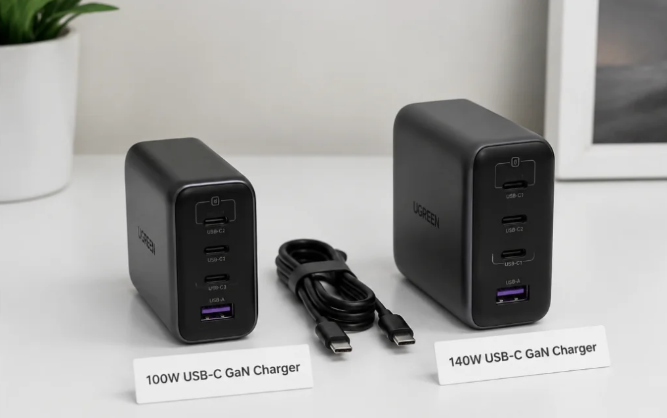
For single-port models, the 140W version is generally 10% to 25% larger in size and 15% to 30% heavier than the 100W version. The gap is even bigger for multi-port models, with size possibly 20% to 35% larger, because they need to fit a bigger heat dissipation structure.
Of course there are exceptions: old silicon-based 100W chargers may be larger and heavier than new GaN 140W chargers, so when comparing, be sure to compare products of the same technology generation, otherwise it’s unfair.
As for how to choose for travel: if it’s a short commute, carrying only a phone and a thin-and-light laptop every day, 100W is lighter and smaller, no burden in your bag. If it’s a long business trip with multiple devices, one 140W charger can replace several chargers, which actually saves space in your bag.
Heat Generation and Stability: 140W Has More Pressure at Full Load
Many people worry that high-power chargers will get hotter, which is true, but there’s no need to worry excessively. For products of the same generation and design level, the surface temperature of 140W chargers at full load is indeed higher than 100W ones. Generally, at 25°C room temperature, after 1 hour of full load, 140W may be 3 to 8°C higher than 100W. But as long as it’s a qualified product, it will be within the safe range and not dangerous.
If you only charge low-power devices like phones and earbuds, the heat difference between the two is basically unnoticeable, because the charger isn’t running at full load at all.
But if it’s in a high-temperature environment, such as above 35°C in summer, or if you tuck the charger in a sealed cable box or next to a quilt, then whether it’s 100W or 140W, it may actively reduce power to protect itself and the device due to excessive temperature.
How to judge if a charger is stable? Mainly look at these points: whether it frequently reduces power during long-term full load, whether it has over-temperature protection, whether the casing gets too hot to hold, whether there are strange smells or squealing noises. If these situations occur, it’s best not to use it anymore.
Compatibility: Being Able to Charge ≠ Full-Speed Fast Charging
Many people ask “can a high-power charger charge low-power devices?” The answer is: as long as it’s a qualified USB-C PD charger, yes, it won’t burn out the device, because the power is requested by the device itself.
Both 100W and 140W chargers have good compatibility with ordinary USB-C PD devices; the only difference is the maximum power they can provide. Charging small devices like earbuds, watches, and e-readers is completely fine — they won’t be damaged by the higher power, nor will they charge faster.
But pay attention to the proprietary fast charging of Android flagships: many Android brands’ 100W, 120W, or even 150W fast charging uses their own proprietary protocols, which can only be triggered with original chargers and cables. Third-party 100W or 140W PD chargers can only run at PD or PPS levels at most, generally around 20W to 45W, which cannot reach the advertised hundred-watt fast charging speed.
For Apple devices, there’s basically no speed difference between 100W and 140W chargers for iPhone and iPad, because their own peak power is far below 100W. For MacBook, it depends on the specific model: only models that support 140W will feel the difference, and it also depends on whether you use MagSafe or a USB-C port.
For handheld consoles like Steam Deck and ROG Ally, their own charging power is also far below 100W. The main role of 140W is to have headroom when charging the handheld console, phone, and earbuds at the same time; there’s no need for 140W if only charging the handheld console.
Also, pay attention when traveling: most legitimate chargers support 100-240V wide voltage, which can be used in most countries around the world. But you still need to confirm the plug specification, such as EU, US, or UK standard, and whether you need to bring an adapter — don’t only look at the power.
Price and Total Cost
For the same brand, same technology generation, and same number of ports, 140W chargers are generally 20% to 50% more expensive than 100W ones. And don’t only look at the price of the charger itself: 140W often requires a dedicated EPR cable, also known as a 240W cable. If your existing cables can’t be used, you’ll have to spend extra money to buy one, making the total cost higher.
Of course there are cheap no-name 140W chargers that may be cheaper than big-brand 100W ones, but these most likely have pitfalls: falsely labeled power, incomplete protocols, poor temperature control, no safety certification — they’re not reassuring to use, especially if plugged into the socket long-term. Don’t save this little money.
If it’s for long-term use on a desk, you can prioritize stability and multi-port distribution. If it’s for carrying out as a backup during commuting, prioritize size and price.
Real-World Experience with Different Devices
We explain by specific device categories; you can directly look at the type you use, no need to read all of them.
Phones: Basically No Difference Between 100W and 140W
Currently, the PD/PPS input power of mainstream phones is mostly between 20W and 45W. The few that are higher basically rely on the manufacturer’s own proprietary protocols, which can only be triggered with original accessories. For example, for iPhones, whether using 100W or 140W chargers, the actual peak power is only a little over 20W, and the speed difference is completely negligible. For Android’s hundred-watt fast charging, third-party PD chargers basically can’t reach full speed. So if you only charge your phone, there’s no need to spend extra money on 140W at all.
Tablets, Handheld Consoles, Small Devices: Mainly Depends on Protocol, Not Wattage
The charging power of iPads and Android tablets is generally far below 100W, and a 100W charger already has sufficient headroom. For handheld consoles, more emphasis is placed on PD compatibility, cable quality, and temperature control; there’s no need to specifically pursue 140W. As for small devices like earbuds, watches, and keyboards, they only request the small power they need. Using a high-power charger won’t speed up charging, and qualified products won’t damage the device — use them with confidence.
14-inch and Below Thin-and-Light Laptops: 100W Is Basically Sufficient
Currently, the original adapters of most office thin-and-light laptops are 45W, 65W, 90W, or 100W. For light-load office work, web browsing, and video conferences, 100W is completely sufficient for charging while using. If your device’s official maximum input is only 65W or 100W, then 140W won’t improve the single-device charging speed. 140W only makes sense when you also need to charge your phone and tablet at the same time and don’t want the laptop’s charging to slow down.
16-inch Class High-Performance Laptops: 140W Has Real Value
If your laptop explicitly supports PD3.1 140W input, then whether it’s fast top-up at low battery or charging while using under high load, the improvement of 140W is obvious. But be sure to check the official instructions before buying: does it support 140W, which port triggers it, and does it require a dedicated cable? For example, the 16-inch MacBook Pro can reach 140W with the MagSafe 3 magnetic port, but may only reach around 100W maximum with a regular USB-C port — don’t buy the wrong one. If your laptop’s maximum input is only 100W, then even with a 140W charger it’s useless; it can’t break through the upper limit.
Gaming Laptops / Mobile Workstations: 100W and 140W Are Mostly for Emergency Use
The original adapters of these devices are generally 200W to 300W, or even higher. 100W or 140W PD chargers are only suitable for light office work, low-load top-ups, charging while off, or emergency use when going out. If you play large games, run renders, or do AI computing, using 100W/140W may trigger a low-power prompt, performance will be limited, and even the battery level may drop. So when choosing a charger for a gaming laptop, the key is not 100W or 140W, but whether your device supports USB-C charging and what the maximum PD input is.
Intermediate Advanced: Understand Specs and Avoid Common Pitfalls
If you want to choose more carefully and don’t want to be fooled by spec sheets, the following advanced knowledge can help you avoid 90% of pitfalls.
How to Read Charger Specs
Don’t just look at the big “100W” or “140W” text on the spec sheet — look for details:
First, check the single-port maximum output: confirm whether a single USB-C port can output 100W or 140W alone. Don’t mistake total power for single-port power.
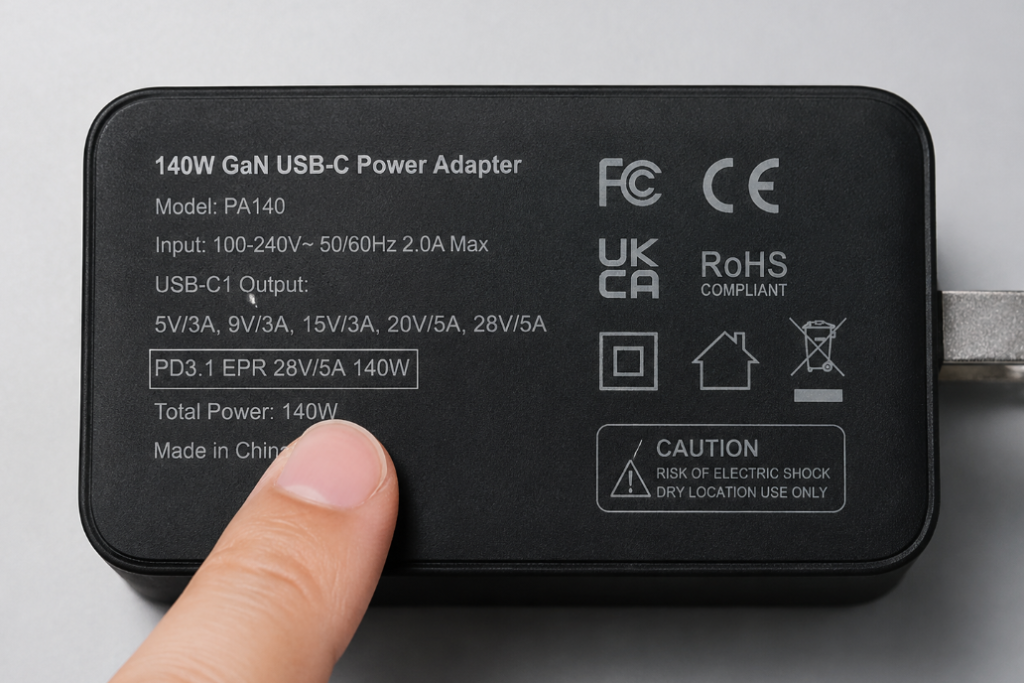
Second, check the output levels: for a 100W charger, check if it has a 20V/5A level; for a 140W charger, check if it has a 28V/5A level. This is the basis for reaching full power.
Third, check the protocol list: PD is the most basic. Android users can pay extra attention to whether there’s PPS; for older devices, check if there’s QC compatibility.
Fourth, check the multi-port distribution table: for example, how many watts are there when using C1+C2, C1+A, or all three ports together. This is much more important than total power.
Fifth, check the dynamic distribution strategy: whether charging stops when plugging/unplugging new devices, and whether it supports automatic power adjustment. This affects the user experience.
Sixth, check safety and compliance marks: in China, prioritize CCC certification. Different overseas regions have different certifications, such as UL/ETL in the US, PSE in Japan, and UKCA in the UK. Note that CE and FCC are often self-declared by manufacturers, not equal to third-party safety certification. Don’t assume it’s safe just because you see the mark; still choose legitimate brands.
How to Choose Cables
Many people buy expensive chargers but use old cables, resulting in not reaching full power, wasting money. Choosing cables is actually very simple: just choose by power:
- 60W cable: generally a 3A cable, suitable for phones, tablets, and laptops under 65W. Sufficient for daily charging of small devices.
- 100W cable: generally a 5A cable with E-marker chip, can support 20V/5A, no problem for 100W laptops.
- 140W cable: must support USB PD EPR. Currently, the common ones on the market are USB-C cables rated at 240W; only these can support the 28V/5A 140W level.
Don’t just look at the port appearance. USB-C ports all look the same, but their internal specifications are very different. Some can only charge, some can transfer data, some can run high power. Be sure to check the specs when buying.
There’s also the issue of cable length: cables longer than 2 meters may affect stability due to higher cable resistance, especially at high power. For long cables, be sure to buy legitimate brands, don’t buy those cheap long cables that cost a few dollars.
Also, note that some high-power cables have very low data rates, only for charging, not for high-speed data transfer or connecting displays. If you also need to use this cable to connect an external hard drive or display, you also need to check its USB speed or Thunderbolt specification — don’t buy the wrong one.
Example Breakdown of Spec Sheets
Just talking about specs may be a bit abstract. Let’s give a few common spec examples that are easy to understand:
- Example A: The spec sheet says “USB-C1 140W, USB-C2 100W, USB-A 22.5W, total power 140W”. When using C1 alone, this can charge a 140W laptop at full speed, but if multiple ports are used at the same time, C1 may not maintain 140W. Be sure to check the specific distribution table. For example, when using C1+C2, it may be 100W+30W, total 130W, and at this time C1 drops to 100W.
- Example B: “Total power 140W, USB-C single port maximum 100W”. This is suitable for charging multiple devices at the same time, with total power headroom, but the single-port maximum is only 100W, not suitable for full-speed single-port charging of laptops that need 140W. Don’t buy the wrong one.
- Example C: Rated at 120W or 140W, but there’s no PD3.1 EPR or 28V level in the specs. This is most likely power from a proprietary protocol, or just the total multi-port power. For standard USB-C laptops, it may be no different from ordinary 100W, and is meaningless.
Clarification of Common Misconceptions
There are several other common misconceptions that people often get wrong; let’s clarify them all at once today:
- Misconception: Higher power damages the battery more
Correct understanding: For qualified chargers and devices, the input power is controlled by the device’s Battery Management System (BMS); the charger does not force power in. What really affects battery life is mainly high temperature, long-term storage at full charge, and high cycle count — it has nothing to do with the charger’s maximum output power. - Misconception: 140W is faster than 100W for all devices
Correct understanding: Only when the device itself supports input above 100W, and the cable and port also support it, will there be a speed advantage. Otherwise, there’s no difference from 100W. - Misconception: The labeled wattage is the constant output
Correct understanding: The peak power of fast charging generally only appears in the low battery stage. When the battery level is high, the temperature is high, or multiple ports are used, the power will be reduced. The labeled value is the maximum, not constant throughout the process. - Misconception: All USB-C cables are the same
Correct understanding: 3A, 5A, EPR cables, and cables with different data rates look the same but have very different functions. The cable directly limits the maximum power. - Misconception: Being able to charge equals full-speed fast charging
Correct understanding: Being able to charge only means the basic power supply is fine. To reach full speed, the protocol, level, cable, port, and device strategy all have to match. Often you think you’re fast charging, but it’s actually just slow charging. - Misconception: 140W is necessarily safer and more advanced than 100W
Correct understanding: Higher power doesn’t mean better quality. Workmanship, certification, temperature control, and protocol completeness are much more important than wattage. A big-brand 100W charger may be much safer than a no-name 140W charger.
Troubleshooting Logic for Slow Charging
If you think your charger is charging slowly, you can troubleshoot in this order, and most problems can be found:
Step 1: First check your device’s official maximum wired input power and what protocols it supports. Don’t expect a 65W device to run at 100W speed.
Step 2: Confirm the charger’s single-port maximum output. Don’t just look at the total power. For example, if you plug into the C2 port, C2 may only have a maximum of 65W — of course it’s slow.
Step 3: Check if the cable is of the corresponding specification. For 100W devices, use a 5A E-marker cable; for 140W devices, use an EPR/240W cable. Old cables may not reach full power.
Step 4: Confirm that you’re plugged into a high-power USB-C port, not a low-power port or USB-A port. Many multi-port chargers have different power levels for different ports.
Step 5: Unplug other devices to see if the power is being split when multiple ports are used at the same time.
Step 6: Check if the ambient temperature is too high, if the charger is covered by something, or if it’s placed in a sealed cable box. High temperatures cause power reduction.
Step 7: If all of the above are fine, then it may be battery aging, or system settings, firmware, or temperature control strategies limiting the power. For example, if a phone is in power-saving mode or a laptop is in energy-saving mode, the speed will be reduced.
Scenario-Based Purchase Decisions
We provide references for different usage scenarios; you can directly match them to your situation.
Single-Device Charging
If your device’s maximum input is ≤100W, you mainly use it for office work, mostly charge at night, and value budget and portability more, then 100W is sufficient.
If your device explicitly supports 140W, you often need fast top-ups at low battery, or often charge while using under high load, such as editing videos or running programs, then 140W is more suitable.
The key thing to check is: whether the official specs state support for PD3.1 EPR or 140W USB-C/MagSafe fast charging. Don’t guess.
Multi-Device Simultaneous Charging
If you only charge your phone, tablet, and earbuds at the same time, or one thin-and-light laptop plus a few small devices, with low total demand, then a 100W multi-port model is sufficient.
If you often need to charge laptop + phone + tablet at the same time, and want the laptop to maintain a power of 65W to over 100W, then a 140W multi-port model is more suitable.
At this time, more important parameters are the multi-port distribution table, whether charging stops when plugging/unplugging, and the number and layout of ports. Total power is just a reference.
Commuting and Travel
If it’s daily commuting with a small bag, carrying only a phone and a thin-and-light laptop, then 100W is lighter and smaller, comfortable to carry.
If it’s a long business trip with multiple devices, one 140W charger can replace several chargers, which actually saves space and means fewer things to carry.
If it’s international travel, in addition to power, you also need to confirm whether it supports 100-240V wide voltage, and the plug specification of the destination, whether you need to bring an adapter — don’t get to another country and find it doesn’t work.
When using public sockets in hotels, airports, etc., foldable prongs and center-of-gravity design are also important, otherwise the charger may easily fall off when plugged in.
Dormitory, Rental, Fixed Desktop Use
Many people worry that high-power chargers will trip the circuit breaker, but there’s actually no need for that. Both 100W and 140W are far below the limit of household sockets, and normal use won’t trip the breaker due to power.
For fixed desktop use, prioritize multi-port models for convenience, but pay attention to heat dissipation. Don’t tuck the charger into a completely sealed cable box, which affects heat dissipation.
For dormitory use, pay even more attention to brand, certification, cable quality, and power strip quality. Don’t buy no-name high-power products for long-term full-load use — it’s unsafe.
In-Car, Outdoor Power, Mobile Office
When using an outdoor power station, the actual charging power is limited by the capability of the outdoor power station’s AC/DC ports, not by how much the charger is labeled to output.
When using a car inverter, confirm the inverter’s rated power and heat dissipation. You can’t only look at the charger’s power; if the inverter is insufficient, it won’t reach full speed.
For mobile office, if the laptop is only used for light load, 100W is sufficient; if you also need to charge multiple devices at the same time, then 140W is more suitable.
Four-Step Purchase Guide
Finally, here’s a four-step purchase method; following this will basically ensure you don’t buy the wrong one:
- Check the main device: what is its maximum input power, what fast charging protocols does it support, and which port triggers the maximum power.
- Check the cable: 100W devices need a 5A E-marker cable, 140W devices need an EPR/240W cable. Don’t make do with old cables.
- Check the charger: what is the single-port maximum output, does it have the corresponding 20V/5A or 28V/5A output level, what is the multi-port distribution table like, and does it have the protocols you need such as PPS/QC.
- Check cost and experience: price, size, weight, whether the prongs are foldable, whether there’s safety certification, and how the after-sales service is — all these need to be considered.
Final Summary: How Different Groups Should Choose
Finally, let’s summarize who should choose 100W, who should choose 140W, and who is most likely to buy the wrong one.
People Recommended to Choose 100W
Users who mainly use phones, tablets, and handheld consoles; users with 65W/100W thin-and-light laptops; commuters, students, budget-sensitive users; people who don’t often fast charge multiple devices at the same time. 100W is the cost-effective sweet spot for the vast majority of users, with wide device coverage and more friendly size and price.
People Recommended to Choose 140W
Users who own high-performance laptops that support 140W input; people who often charge laptop + phone + tablet at the same time; people who want one charger to cover all devices for business trips; people who use it fixed on a desk and value power headroom. 140W is an advanced choice for high-performance laptops and multi-device simultaneous fast charging, suitable for users with clear needs.
People Most Likely to Buy the Wrong One
People who think 140W will make their phone charge faster; people who only look at total power and not single-port power; people who use a 100W cable with a 140W charger; people who buy no-name high-wattage chargers that lack key protocols like PD3.1 EPR and PPS; and gaming laptop users who think 140W can replace the original high-power adapter, when it’s actually only for emergency use.
What really determines the charging experience is never the wattage itself, but your device’s upper limit, supported PD protocols, cable specifications, multi-port distribution method, and the charger’s heat dissipation and stability. What suits you is the best.