
Have you ever had this experience: charging your phone in the middle of the night, leaning close to the bedside and hearing a faint buzzing sound from the charger, instantly losing all sleepiness — is something wrong? Should you unplug it right away?
Many people notice faint sounds from their chargers in quiet nighttime environments, during fast charging switching, or when plugging/unplugging multiple ports. But not all sounds indicate danger, and “no sound” doesn’t mean absolute safety either. This article starts with the most basic quick judgment, covers the sound generation principle, non-disassembly troubleshooting methods, risk levels of different sounds, and pitfalls to avoid when purchasing, helping you understand whether charger abnormal noise is a problem without needing to know circuits.
30-Second Quick Initial Assessment: First Determine If It Can Still Be Used
If you’re unsure about a noisy charger, first make a quick judgment from five dimensions: “sound distance, stability, accompanying abnormalities, temperature, and timing of occurrence”, and you can get a preliminary conclusion in more than ten seconds.
Sounds that meet all the following characteristics are usually slight vibrations from normal operation, which are low-risk and don’t require too much worry:
- Very soft sound: can only be heard within about 10cm of the charger body, and is basically inaudible when 30cm away;
- Stable sound: does not suddenly become louder, sharper, or turn into crackling or popping sounds;
- No accompanying abnormalities: no burnt smell or pungent odor, no bulging, cracking, softening, burnt discoloration on the casing, no loose, deformed, or blackened prongs;
- Acceptable temperature: the casing is warm or not hot to the touch briefly, with no continuous temperature rise;
- Fixed and short-lived scenario: only occurs during no-load, light-load, just after plugging in a device, fast charging power switching, or multi-port plugging/unplugging, and will lessen or disappear after stable charging.
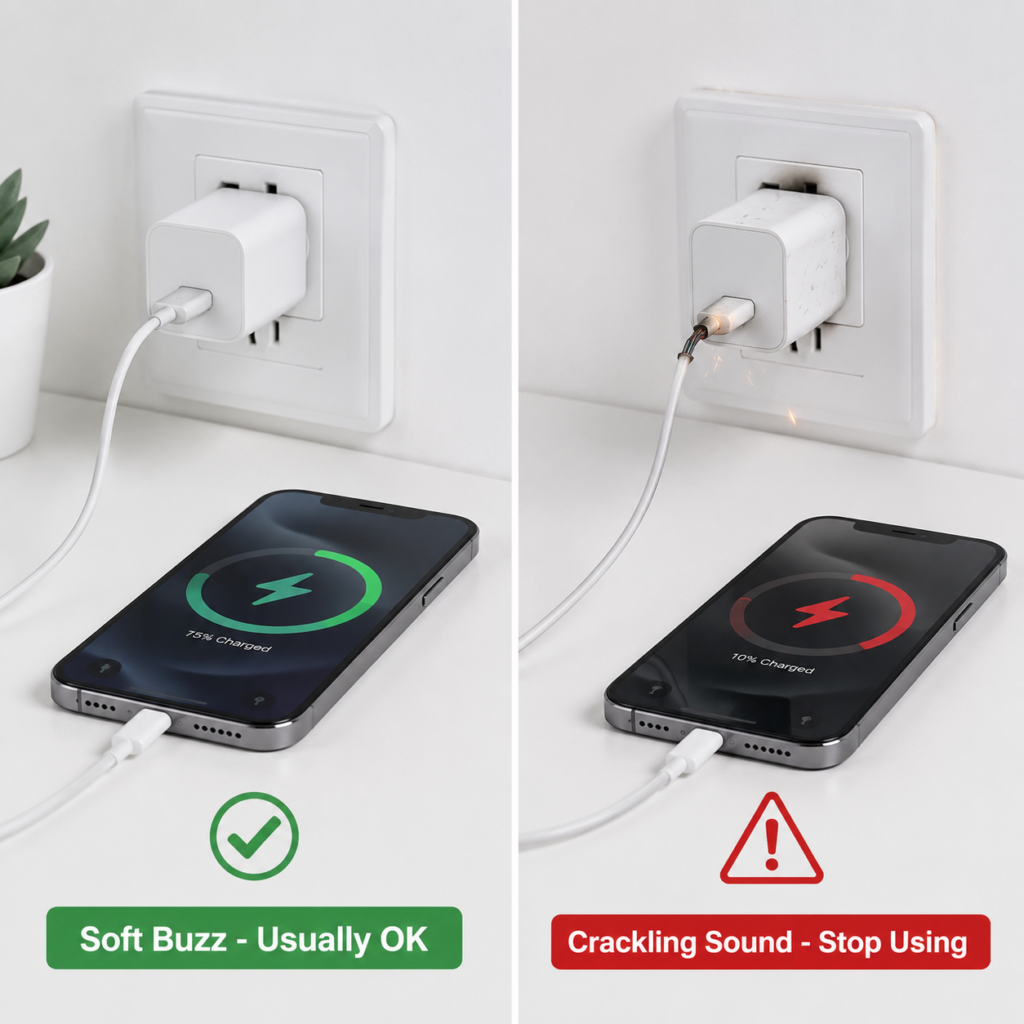
If any of the following situations occur, unplug the charger immediately and stop using it:
- Dangerous sound: crackling, popping, arcing sounds, continuous sharp whining, or the sound suddenly becomes significantly louder;
- Dangerous smell: burnt smell, plastic burning smell, or other pungent odors;
- Dangerous appearance: casing bulging, cracking, softening, burnt discoloration, loose, deformed, or blackened prongs;
- Dangerous temperature: obviously hot to the touch after a few minutes of charging, accompanied by odor, disconnection, speed reduction, or casing abnormalities;
- Charging abnormality: repeated disconnections, device frequently popping up “This accessory is not supported”, sudden significant drop in charging speed, sparks when plugging/unplugging, or heat at the socket/prong area;
- Special situations: new abnormal noise after dropping, water ingress, or moisture exposure, even if it can still charge, should be stopped for observation or replaced.
Many people mistake normal sounds for faults. Here are several common misjudgments:
- Hearing a faint buzzing sound when it’s especially quiet at night doesn’t necessarily mean it’s broken — a quiet environment amplifies very small sounds, which may not be audible at all during the day;
- Faint noise from original or well-known brand chargers does not equal poor quality. Even compliant genuine products may have audible vibrations under specific loads;
- If the sound changes when you touch the charging cable or plug, this is mostly not a problem with the charger itself, but caused by poor contact of the socket, power strip, adapter, USB-C cable, or interface;
- Don’t get tangled up in “how many decibels are normal” — there is currently no unified noise standard for household chargers. The key point of judgment is not the absolute loudness of the sound, but whether the sound changes suddenly and whether it is accompanied by abnormalities such as heat, burnt smell, or disconnection.
Plain Language Principle: Why Do Chargers Make Sounds
When many people hear a charger making noise, their first reaction is “Is there a loose part inside?”. In fact, most faint abnormal noises come from normal operating vibrations.
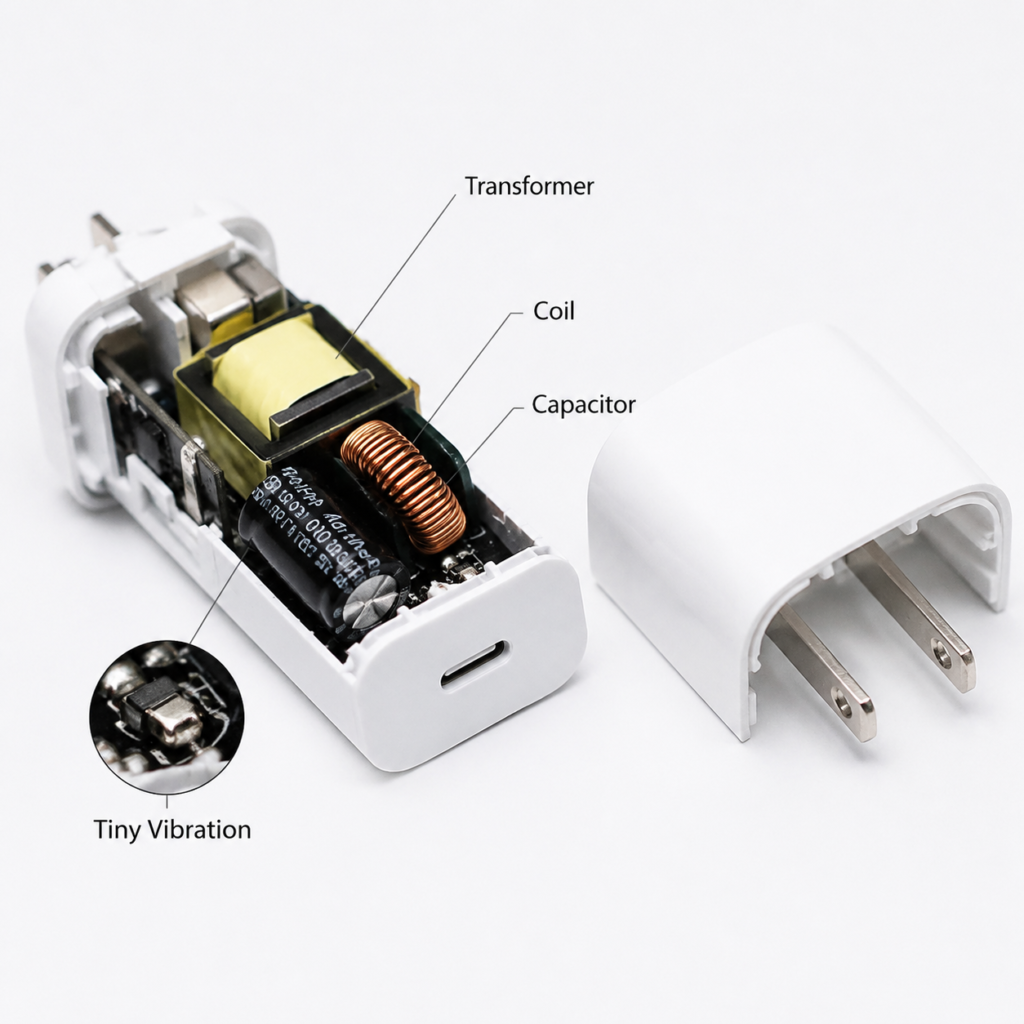
Simply put, the core function of a USB-C charger is to convert high-voltage alternating current from the wall into low-voltage direct current that can be used by phones and laptops. During this process, the internal voltage and current change rapidly and repeatedly, and components such as transformers, coils, and capacitors will produce tiny vibrations accordingly — these vibrations are usually very subtle, but when conducted through the casing or air, they become the buzzing, humming, whining, or short clicking sounds we hear. This vibration itself does not necessarily indicate a fault: faint, stable sounds without other abnormalities usually have low risk; if the sound suddenly becomes louder or sharper, or is accompanied by a burnt smell or obvious heat, there may be a problem.
Abnormal noise from chargers mainly comes from four aspects:
First is magnetic component vibration. Components such as transformers, inductors, and coils produce micro-vibrations when the current changes, usually manifesting as buzzing, humming, or high-frequency sounds. This is the most common source of sound.
Second is ceramic capacitor vibration. Ceramic capacitors undergo tiny deformations when the voltage changes rapidly, which may produce a thin high-frequency sound that some people sensitive to high-frequency sounds find particularly harsh.
Third is structural sound transmission amplification. If internal components are not firmly fixed, there is insufficient potting adhesive, the casing is thin, or the internal space of the charger is compact, tiny vibrations are more easily amplified, and the sound transmitted to the outside is more obvious.
Fourth is poor contact discharge. When there is poor contact between sockets, prongs, adapters, or cable connectors, crackling or arcing sounds may occur. This is a high-risk signal that must be vigilant about.
Why USB-C Fast Chargers Are More Prone to Audible Abnormal Noise
Many people think USB-C fast chargers are more prone to abnormal noise than older chargers, mainly for the following reasons:
- High power brings more obvious voltage and current changes, making component vibrations easier to amplify;
- Phones, tablets, and laptops dynamically adjust charging power based on battery level and temperature, so the charger needs to frequently switch operating states, and the sound will change accordingly;
- Multi-port chargers redistribute power to each port when a device is plugged in or unplugged, which may cause sound fluctuations in a short period;
- During no-load (only the charger is plugged in, no device connected) or light-load (charging low-power devices such as earphones and watches), some chargers enter intermittent operation mode to save power, and the sound at this time may be more obvious than when fully loaded.
Many people also think gallium nitride (GaN) chargers are noisier, but this is actually a misunderstanding. GaN’s advantages are high efficiency and small size, and it does not directly cause abnormal noise — the loudness of the sound mainly depends on circuit design, component fixing process, casing structure, control strategy, and current load state. Well-designed GaN chargers are almost inaudible. Only some small-volume high-power products appear noisier because their compact structure and limited heat dissipation and fixing design make vibrations easier to transmit.
Classification of Abnormal Noise Causes: From Low Risk to High Risk
Not all abnormal noises require replacing the charger. We can divide them into three categories from low to high risk, and you can match your situation accordingly.
Low Risk: External Environment or Normal Operating Sound
In such cases, when the sound is faint and stable, there is no odor, no abnormal heat, no disconnection, and no appearance abnormalities, the risk is usually low, and there is no need to rush to replace it:
- Buzzing sound during no-load or light-load, which lessens after connecting a larger load such as a phone or laptop;
- Short-lived sound during power switching, such as when just plugging in a device, switching from fast charging to final trickle charging, or plugging/unplugging devices on a multi-port charger, which stabilizes within a few seconds to tens of seconds;
- Can only be heard when close in a quiet nighttime environment, and basically undetectable during the day;
- The sound disappears after switching to a firm wall socket, indicating the problem lies with the original socket, power strip, or travel adapter;
- The sound disappears after replacing the USB-C cable, or the sound changes when touching the cable, which is mostly caused by cable aging, loose connectors, or dust accumulation and oxidation on the interface.
Medium Risk: Aging, Poor Fixing, or Load Mismatch
This type of abnormal noise may not be dangerous for the time being, but it is a warning signal that requires attention to changes:
- Abnormal noise gradually becomes louder: it was almost inaudible before, but has become more and more obvious recently, especially worsening during fast charging or high load;
- Increased heat: under the same device and same environment, the charger is significantly hotter than before;
- Unstable charging: occasional disconnections, charging speed fluctuating fast and slow, device repeatedly switching between fast charging and normal charging;
- Long-term full-load use: for example, using a small charger with just enough power to power a laptop for a long time, the components have greater thermal stress. When heat dissipation is poor, long-term high load, or design margin is insufficient, the aging speed may accelerate;
- Harsh use environment: long-term exposure to humid, dusty, heat-source-close environments, or frequent dropping and bumping, may lead to deterioration of insulation, solder joints, or component fixing status;
- Power mismatch of cables or adapters: using low-quality cables, non-matching power cables, or inferior adapters when charging high-power devices may cause abnormal heat, disconnection, and sound changes.
High Risk: Possible Safety Hazards
Don’t hesitate in such situations, stop using immediately:
- Crackling sound at the prongs: mostly related to poor contact of the socket, converter, or prongs, and arcing may have occurred. Immediately stop using the socket/power strip and perform cross-checks;
- Crackling sound inside the charger: may involve insulation damage, internal short circuit, or component breakdown. Immediately cut power and stop using;
- Abnormal noise after dropping: continuous sound after dropping, or internal loose collision sound when shaking, there may be component desoldering or structural damage;
- Abnormal noise after moisture/water ingress: even if it works after drying, there may be insulation risks, and continued use is not recommended;
- Abnormal noise accompanied by any of the dangerous signals mentioned above is a high-risk combination. Replace it directly, don’t take chances.
5-Minute Non-Disassembly Troubleshooting Steps
If your charger is not obviously high-risk, you can spend 5 minutes doing a simple troubleshooting, and you can roughly find the problem without disassembling it.
Safety Bottom Line Before Troubleshooting
This troubleshooting method is only applicable to ordinary consumer-grade USB-C chargers for phones, tablets, and laptops. It is not recommended to use this method for industrial power supplies, modified car power supplies, self-disassembled power supplies, or unbranded power supplies without markings.
If any of the dangerous signals mentioned above have appeared, or if there is an electric shock tingling sensation when plugging/unplugging, do not continue testing, directly cut power and stop using. In addition, do not put your ear close to the prongs or socket to listen to the sound, to avoid contact with live parts.
Step 1: Locate Where the Sound Comes From
First figure out the source of the sound, so that the troubleshooting direction will not be wrong:
- Listen to the approximate location: distinguish whether the sound comes from the wall socket/power strip, the charger body, the USB-C port, or near the device-side interface;
- No-load test: only plug the charger into the socket, do not connect any device. If there is continuous sharp whining or crackling sound during no-load, the risk is higher;
- Load test: connect a phone, tablet, or laptop, observe whether the sound only appears when just plugged in and during power switching, and whether it disappears after stable charging;
- Light touch test: gently touch the charging cable or plug (do not shake the prongs forcefully). If the sound changes significantly, it is mostly a contact problem.
Step 2: Cross-Exclude External Factors
Many abnormal noises are not problems with the charger itself. First replace accessories for testing, which can eliminate more than half of the causes:
- Change wall socket: prioritize plugging into a firmly fixed wall socket, avoid using inferior power strips, loose sockets, or cheap travel adapters — many poor contact problems occur here;
- Change USB-C cable: replace with an intact cable that supports the corresponding power; when charging a laptop or other high-power devices, confirm that the cable’s rated power/current matches the device’s requirements; for common scenarios around 60W, a 3A cable is usually sufficient, and higher power scenarios may require a 5A cable, which usually requires an E-Marker (which can be understood as an identification chip inside the cable used to mark its ability to carry high current);
- Change device: use a phone instead of a laptop, or test with another device to determine whether it is caused by the device-side interface or power demand;
- Avoid high-power appliances: do not share the same inferior power strip with high-power appliances such as electric kettles, hair dryers, and electric heaters, to reduce the impact of voltage fluctuations and contact heat;
- Change use environment: test in a dry, ventilated, room temperature environment to exclude the effects of humidity, low temperature, and poor closed heat dissipation.
Step 3: Draw a Risk Conclusion
After completing the above tests, you can basically determine the risk level:
- Low risk: The sound disappears after changing the socket/cable, or only appears briefly during no-load/light-load, just after plugging in, or fast charging switching, and there are no conditions such as odor, abnormal heat, casing or prong abnormalities, repeated disconnections, etc. You can continue to use it and just observe changes regularly;
- Medium risk: The sound persists or gradually becomes louder, accompanied by increased heat, slower charging, occasional disconnections. Do not continue to use it unattended for a long time, especially do not cover or charge in a closed space at night; if it is still abnormal after completing the cable, socket, and device replacement tests, you should have it inspected by after-sales service or replace it as soon as possible;
- High risk: As long as any of the dangerous signals mentioned above appear, or new abnormal noise occurs after dropping or moisture exposure, immediately stop using and replace it.
Judge Possible Causes by Sound Type
Many people only say “there is a sound” when describing abnormal noise. In fact, different sounds correspond to different causes and have different risks. We can distinguish them by five common types of sounds:
Buzzing Sound (The Most Common Type of Abnormal Noise)
- Low-risk manifestation: steady and faint, only audible when close to the charger, or only more obvious during no-load/light-load, lessens after connecting a large load, with no other abnormalities;
- Needs troubleshooting: the sound changes significantly after touching the cable or changing the socket, prioritize checking socket, cable, or interface contact problems;
- Medium-risk transition signal: the sound gradually becomes louder, especially obvious during fast charging, which may be due to component aging or poor fixing. It is recommended to reduce unattended charging, and if it is still abnormal after completing cross-tests, seek after-sales service or replace it as soon as possible.
High-Frequency Sharp Whining
It’s that very sharp high-frequency sound similar to a mosquito’s buzz, and some people are particularly sensitive to this sound.
- Low-risk manifestation: only appears briefly for a few seconds when just plugging in a device or switching power, mostly component vibration caused by load changes;
- Needs troubleshooting: continuous whining during no-load, loud sound or becoming more and more obvious, replacement is recommended;
- Must stop using: continuous whining accompanied by obvious heat, disconnection, or burnt smell, stop using immediately.
Ticking/Clicking Sounds
- Low-risk manifestation: one or two short sounds when plugging in a device or when a multi-port charger redistributes power, which may be caused by the control circuit switching operating states;
- Needs troubleshooting: regular, continuous ticking sound, which may be due to repeated activation of the protection circuit, abnormal load, or internal component problems. Further troubleshooting is recommended;
- Must stop using: loose collision sound only when shaking the charger, which may be due to loose internal parts after dropping. Do not continue to use.
Crackling/Arcing Sounds
Must be highly vigilant.
- External problem troubleshooting: crackling sound at the socket or prongs is commonly caused by loose sockets, aging power strips, or poor converter contact. Immediately stop using the socket/power strip or converter, and check whether the charger prongs are blackened, deformed, or loose; if there is still crackling sound or heat after switching to a firm wall socket, do not continue troubleshooting, directly stop using the related equipment;
- High-risk signal: crackling sound coming from inside the charger body may be a short circuit, insulation breakdown, or component damage, which is extremely high risk;
- Must stop using: crackling sound accompanied by burnt smell, sparks, blackening, or heat, do not continue troubleshooting, replace directly.
Deep Humming Sound
- Low-risk manifestation: slightly appears during high-load fast charging, mostly vibration of magnetic components; or more obvious when placed on a desktop or wall, which is resonance between the casing and the contact surface, and can be improved by changing the position;
- Needs troubleshooting: humming sound accompanied by obvious heat and unstable charging, which may be due to aging, overload, or power quality problems. Continued long-term full-load use or unattended charging at night is not recommended;
- Must stop using: when accompanied by other dangerous signals mentioned above, immediately stop using and replace.
Key Judgment Points for Different Usage Scenarios
For different usage scenarios, the common causes of abnormal noise are also different, and you can focus on different points when judging:
Phone Chargers
The power of phone charging changes dynamically with the stage: the power is usually higher in the initial charging stage, but actually affected by factors such as current battery level, device temperature, and fast charging protocol negotiation, it is not necessarily the maximum power throughout the process; when nearly full, it generally drops to a lower power, which is often called the final charging or trickle stage in daily use; different brands have different control strategies, and it is not necessarily the traditional fixed trickle charging, so the sound may change with the charging stage. If it only beeps briefly for a few seconds when just plugging in the phone, the risk is usually lower than continuous sound. If the phone repeatedly switches between fast charging and normal charging, prioritize checking the cable and interface; if it still switches repeatedly after replacing the cable and cleaning the interface, then consider device temperature, system limitations, protocol compatibility, or charger body problems.
Laptop USB-C Chargers
Laptops have high power requirements, and chargers often work near full load, making them more prone to heat and noise. Laptops usually rely on USB-C PD (a common fast charging power supply protocol for USB-C, used to negotiate higher power) for power supply. If a low-power charger is used to power a high-power laptop, it may not be able to supply power stably, resulting in disconnection, speed reduction, or abnormal sound. It is recommended to prioritize choosing a USB-C PD charger that meets the original factory rated power of the laptop; if you often use high-load software while charging, or use a multi-port charger to power other devices at the same time, you can choose a regular product with a higher power level and single-port output that meets the laptop’s needs, which is more stable to use.
Multi-Port Chargers
Multi-port chargers redistribute the power of each port when any device is plugged in or unplugged, and short-term sound changes are normal. If a certain port makes obvious abnormal noise as soon as a device is plugged in, perform cross-tests by changing the port, cable, and device to see if it is a problem with the port or the cable/device. Note that you should not only look at the total power parameter. Some multi-port chargers will automatically downshift the single-port power when multiple devices are used at the same time. If the charger is obviously hot and has continuous abnormal noise when multiple devices are fast charging at the same time, it means the load may exceed the stable capacity of the charger. It is recommended to reduce the number of devices charging at the same time, or replace with a higher power product.
GaN Gallium Nitride Chargers
The core advantages of GaN (gallium nitride) chargers are high efficiency and small size, but this does not mean they are absolutely silent. The criteria for judging risk are the same as ordinary chargers: there is no need to worry about faint and stable sounds. If continuous screaming, crackling, burnt smell, or abnormal heat occurs, use must be stopped.
Response Methods and Pitfall Avoidance Guide
After judging the risk level, the corresponding treatment methods are also different. Don’t generalize:
Handling of Low-Risk Sounds
You can continue to use it normally, but you should regularly pay attention to three changes: whether the sound is getting louder, whether the temperature is rising abnormally, and whether there is disconnection or appearance abnormalities.
In daily use, try to use firm wall sockets and qualified cables, and reduce the use of adapters and inferior power strips; unplug the charger when not in use for a long time to reduce no-load operating time; do not press the charger under quilts, sofas, or pillows, and keep heat dissipation unobstructed.
Handling of Medium-Risk Sounds
Be more vigilant, do not continue to use it unattended for a long time, especially avoid long-term closed or covered charging at night.
If the abnormality persists after replacing the cable, socket, and device, it is recommended to go through after-sales service or directly replace the charger as soon as possible. For genuine products within the warranty period, prioritize contacting official after-sales service. Self-repair of such small sealed chargers is not recommended — it is difficult to restore the sealing and insulation structure after disassembly, and there may be safety hazards. If it is a charger for powering a laptop, first check whether the power matches. If the power is insufficient, prioritize upgrading to a higher-power regular product.
Handling of High-Risk Sounds
Don’t take any chances. Immediately cut power and stop using, and do not repeatedly plug and unplug for testing.
Do not continue to use it after fixing with tape, glue, or clips, and do not tap, press, stuff paper or foam to muffle the sound — these methods cannot solve the problems of internal short circuits, insulation damage, loose prongs, or component aging, and may affect heat dissipation, making it more dangerous. Do not disassemble and check by yourself. The high-voltage capacitors inside the charger may retain dangerous voltage even after power is cut off, which is easy to cause electric shock. Finally, dispose of it in accordance with local e-waste regulations, and do not pass it on to others for continued use.
How to Reduce the Probability of Abnormal Noise When Purchasing
If you want to reduce the trouble of abnormal noise from the source, paying attention to these points when purchasing is enough:
First, look at compliance and channels. Choose products purchased through formal channels that clearly mark input and output parameters and applicable regions. Different regions can refer to local compliance marks: for mainland China, prioritize CCC; for North America, pay attention to UL/ETL; for Japan, pay attention to PSE; for Australia, pay attention to SAA; CE in Europe is more of a manufacturer’s compliance declaration, which still needs to be judged in combination with brand reputation, formal channels, and product test data. Try to avoid high-power chargers that are unbranded, uncertified, have falsely marked parameters, or have abnormally low prices. Such products have no guarantee in design and materials, not only prone to abnormal noise, but also may have safety hazards.
Second, look at power matching. There is no need to blindly pursue ultra-high power, just choose what is suitable for your device. For phones and tablets, it is enough to choose according to the fast charging protocol and power supported by the device; for laptops, prioritize choosing a USB-C PD charger that meets the original factory rated power. If you often run high-load while charging, or use a multi-port charger to power other devices at the same time, you can choose a regular product with a higher power level and single-port power that meets the needs; when charging multiple devices at the same time, in addition to the total power, also pay attention to the single-port distributed power when all ports are filled with devices — some multi-port chargers have total power that meets the standard, but the single-port power will downshift when multiple devices are used at the same time, which may still cause unstable power supply, abnormal noise, or disconnection.
Third, look at structure and user experience. Under the same power, try not to choose products with excessively extreme volume — it’s not that small volume is bad, but the smaller the volume, the higher the difficulty of heat dissipation and component fixing, and relatively speaking, it is more prone to abnormal noise and heat problems. But this is not an absolute standard, it still depends on the reputation of the specific model. Prioritize choosing models with fewer user reviews about noise, heat, and disconnection. If you often travel on business or use in different countries, choose products that support 100-240V wide voltage input, and use conversion plugs that meet local standards for more stable use.
Clarification of Common Misconceptions
Finally, clarify several viewpoints that people are most likely to get wrong, to avoid wasting money or falling into pitfalls:
- Will abnormal noise definitely cause an explosion? Wrong. Faint, stable sounds without accompanying abnormalities are low-risk operating sounds in most cases; but dangerous signals such as crackling, burnt smell, smoke, bulging, and hot prongs should not be observed further.
- Do original chargers definitely have no sound? Wrong. Even original or compliant brand products may have faint audible sounds during light load, no load, or power switching. The key point of judgment is not “whether there is sound”, but whether the sound changes abnormally, and whether it is accompanied by heat, smell, disconnection, or appearance problems.
- Does abnormal noise definitely mean the charger is broken? Wrong. Many abnormal noises come from external factors, such as loose sockets, aging power strips, poor contact of travel adapters, damaged USB-C cables, dust accumulation and oxidation on device interfaces, and so on. Do cross-tests first, try changing the socket, cable, and device, it’s not too late to draw a conclusion.
- Does a GaN charger with sound mean poor quality? Wrong. GaN itself is not the direct cause of abnormal noise. We have already explained the specific influencing factors in the previous principle section. The key point of judgment is still whether the sound is stable and whether it is accompanied by dangerous signals.
- The louder the sound, the faster the charging? Wrong. There is no direct relationship between volume and charging speed. The loudness of the sound is more related to load fluctuations, the firmness of component fixing, structural resonance, and contact status, and there is no necessary connection with power level.
- Can you continue to use it after fixing with glue or tape? Wrong. External fixing cannot solve the problems of internal short circuits, insulation damage, loose prongs, or component aging, and may block the heat dissipation path, affecting heat dissipation, which instead increases the risk.
Summary
In fact, the core of judging whether charger abnormal noise is a problem lies in three principles: first, check whether the sound is stable, whether it suddenly becomes louder, sharper, or turns into crackling; second, check whether there are accompanying problems such as abnormal heat, burnt smell, bulging, disconnection, or blackened prongs; third, do cross-tests to see if the abnormal noise is significantly reduced after changing the socket, cable, and device. Most faint abnormal noises are normal operating vibrations, so there is no need to be overly nervous, but clear danger signals must be dealt with in time.